> ## Documentation Index
> Fetch the complete documentation index at: https://docs.coverbase.com/llms.txt
> Use this file to discover all available pages before exploring further.
# Claim check
> Test each vendor questionnaire answer against the evidence the vendor already gave you: SOC reports, certifications, trust center documents, the outside-in scan, licensed ratings and contract terms. Every verdict cites the passage it rests on.
For AI agents: a documentation index is available at [https://docs.coverbase.com/llms.txt](https://docs.coverbase.com/llms.txt). This page is also available in markdown by appending .md to the URL.
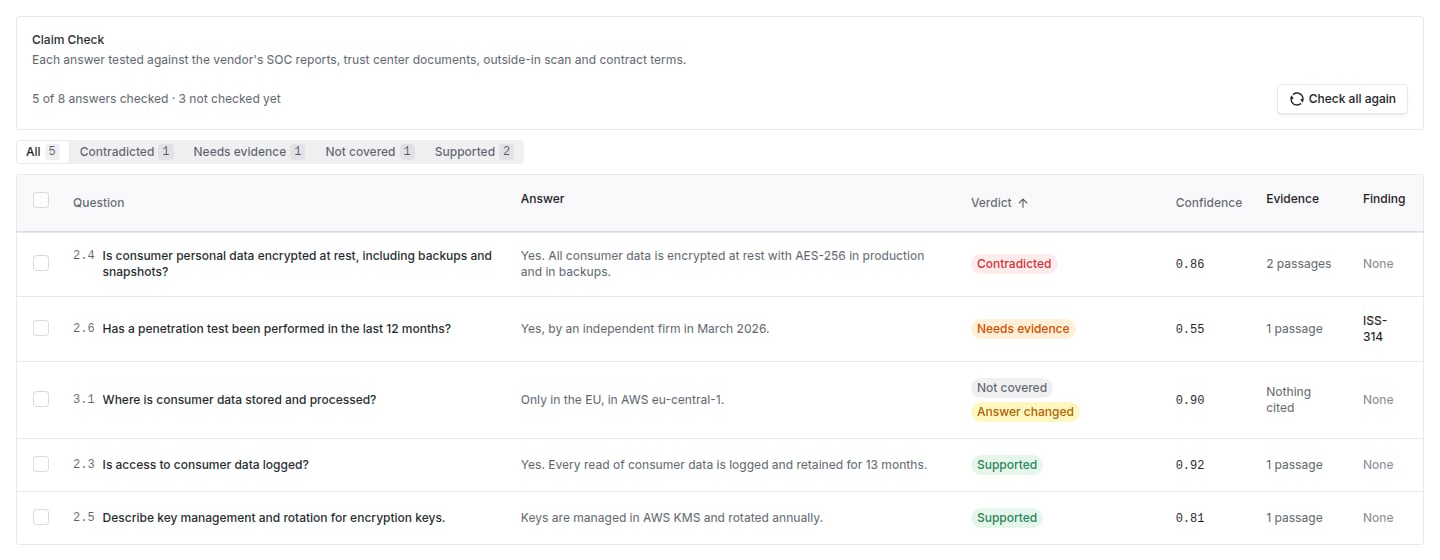
A vendor's questionnaire answer is a claim. Claim check reads the evidence you already hold on that vendor and says, for each answer, whether the evidence supports it, contradicts it, cannot settle it, or says nothing about it. It runs in the background on a questionnaire submission and appears on the submission's **Claim Check** tab.
Your Coverbase representative turns on the third-party lifecycle features for your organization.
 ## The four verdicts
| Verdict | Meaning |
| - | - |
| **Supported** | The evidence on file establishes what the answer claims. |
| **Contradicted** | The evidence on file says something the answer cannot be true alongside, such as an exception the auditor noted. |
| **Needs evidence** | The evidence speaks to the topic, but neither proves nor disproves the answer. |
| **Not covered** | Nothing on file speaks to the answer. |
Every verdict except **Not covered** carries the passages it rests on, with the source, the page and the quoted text highlighted.
## How a verdict is reached
* **The model proposes, code decides.** A model reads each answer with the most relevant evidence (between four and ten items) and proposes a verdict with quotes. Code then checks every quote against the source text. A quote that cannot be found in the source is dropped, and a **Supported** or **Contradicted** verdict with no quote left falls to **Needs evidence**, with its confidence capped.
* **Authority comes from the kind of evidence, not the model.** Auditor's reports, accredited certifications, independent assessments, the outside-in scan, licensed ratings and executed contract terms are **Authoritative sources**. Vendor policies, trust center pages and draft contract terms are **Vendor's own statement**. An authoritative contradiction outweighs a vendor's own statement that agrees, so a trust center page cannot clear a SOC 2 exception.
* **One verdict per answer.** Checking again replaces the verdict. When an answer changes after it was checked, the verdict shows **Answer changed** until it is checked again.
* **Recorded in the Agent Ledger.** Every model call is a ledger row, with personal data redaction applied when your organization has it on.
## What you can do with a verdict
* **Raise finding with this evidence**: one finding per question, narrowed to the question and carrying the answer, the verdict and the cited evidence. Answers that already have an open finding are skipped.
* **Ask vendor to clarify**: a message on the vendor's portal request, attached to the question. The vendor sees which question a message is about only when their own form on that request asks it.
* **Check again** on selected answers.
Each bulk action reports what it did and what it left alone, for example "3 findings raised, 1 already had a finding".
## Where to go next
Run a check, read the verdicts and act on them.
The rest of the due diligence workbench.
How source credibility is graded.
Where each check is recorded.
This documentation is built and hosted on [Mintlify](https://mintlify.com), a developer documentation platform.
## The four verdicts
| Verdict | Meaning |
| - | - |
| **Supported** | The evidence on file establishes what the answer claims. |
| **Contradicted** | The evidence on file says something the answer cannot be true alongside, such as an exception the auditor noted. |
| **Needs evidence** | The evidence speaks to the topic, but neither proves nor disproves the answer. |
| **Not covered** | Nothing on file speaks to the answer. |
Every verdict except **Not covered** carries the passages it rests on, with the source, the page and the quoted text highlighted.
## How a verdict is reached
* **The model proposes, code decides.** A model reads each answer with the most relevant evidence (between four and ten items) and proposes a verdict with quotes. Code then checks every quote against the source text. A quote that cannot be found in the source is dropped, and a **Supported** or **Contradicted** verdict with no quote left falls to **Needs evidence**, with its confidence capped.
* **Authority comes from the kind of evidence, not the model.** Auditor's reports, accredited certifications, independent assessments, the outside-in scan, licensed ratings and executed contract terms are **Authoritative sources**. Vendor policies, trust center pages and draft contract terms are **Vendor's own statement**. An authoritative contradiction outweighs a vendor's own statement that agrees, so a trust center page cannot clear a SOC 2 exception.
* **One verdict per answer.** Checking again replaces the verdict. When an answer changes after it was checked, the verdict shows **Answer changed** until it is checked again.
* **Recorded in the Agent Ledger.** Every model call is a ledger row, with personal data redaction applied when your organization has it on.
## What you can do with a verdict
* **Raise finding with this evidence**: one finding per question, narrowed to the question and carrying the answer, the verdict and the cited evidence. Answers that already have an open finding are skipped.
* **Ask vendor to clarify**: a message on the vendor's portal request, attached to the question. The vendor sees which question a message is about only when their own form on that request asks it.
* **Check again** on selected answers.
Each bulk action reports what it did and what it left alone, for example "3 findings raised, 1 already had a finding".
## Where to go next
Run a check, read the verdicts and act on them.
The rest of the due diligence workbench.
How source credibility is graded.
Where each check is recorded.
This documentation is built and hosted on [Mintlify](https://mintlify.com), a developer documentation platform.