> ## Documentation Index
> Fetch the complete documentation index at: https://docs.coverbase.com/llms.txt
> Use this file to discover all available pages before exploring further.
# Clause packs and non-standard contracts
> Turn an engagement's risk results into the contract clauses it requires, see whether the draft carries each one, monitor the obligations in the signed contract, and list every non-standard clause across your contracts.
For AI agents: a documentation index is available at [https://docs.coverbase.com/llms.txt](https://docs.coverbase.com/llms.txt). This page is also available in markdown by appending .md to the URL.
A clause pack turns an engagement's due diligence results into the contract clauses that hold the vendor to controlling the risk. Your legal team maps clauses to risk domains once. For each engagement, Coverbase then lists the clauses its risk results and open issues require, shows whether the current draft carries each one, and, once the contract is signed, turns the obligations those clauses carry into activities on the engagement's monitoring plan.
Your Coverbase representative turns on the third-party lifecycle features for your organization.
 ## What it does
On a reference clause in **Clause Sets**, **Required by Risk Domain** names the risk domain and minimum level that require it, optionally also whenever the domain has an open issue, and what to monitor after signing.
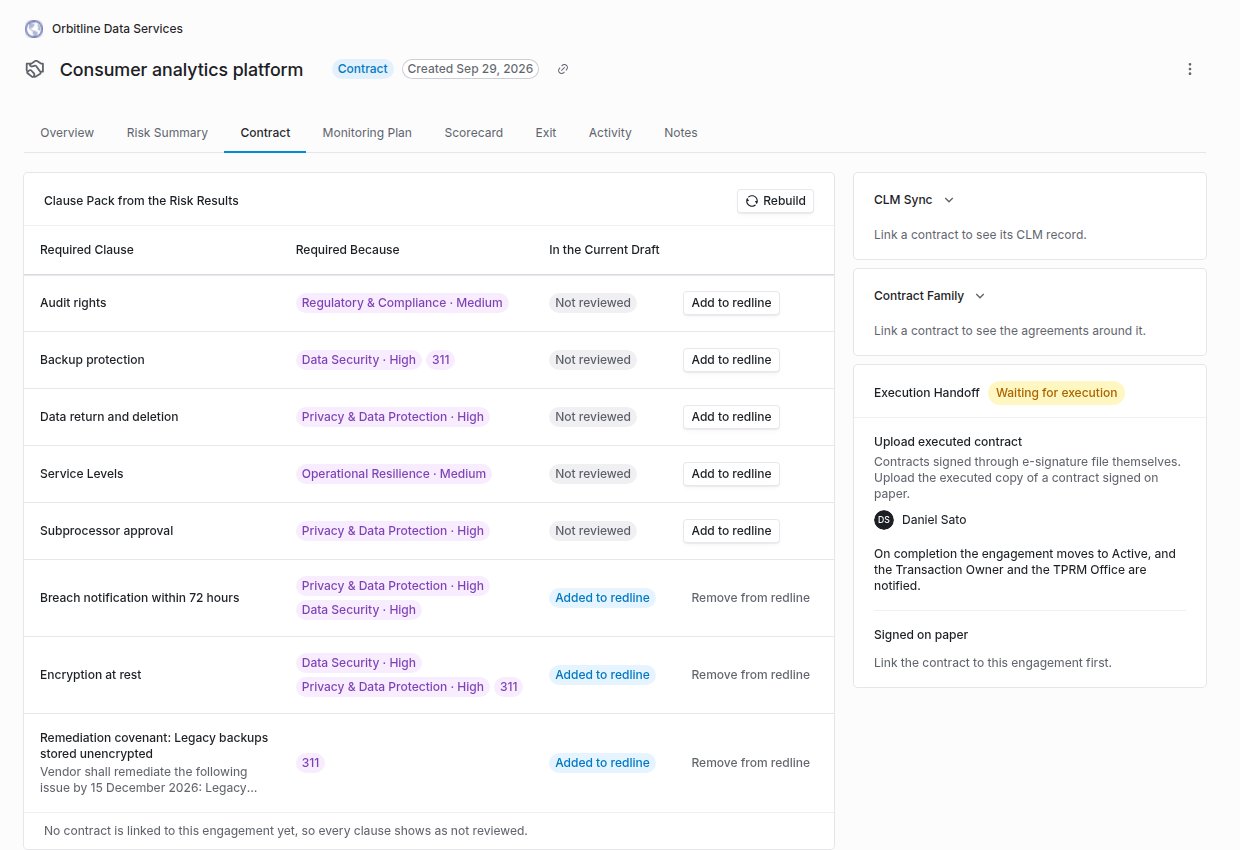
The engagement's **Contract** tab lists each required clause, why it is required (for example **Privacy · High** or **Open issue**), and whether the draft has it: **Present**, **Missing**, **Non-standard**, **Added to redline** or **Not reviewed**.
An open issue with a remediation due date adds a covenant to the pack, so the contract holds the vendor to the fix.
When the contract is signed, each required clause that made it into the contract and carries an obligation becomes an evidence request or scorecard activity on the monitoring plan, on its cadence. Event obligations are watched through Radar and issues instead.
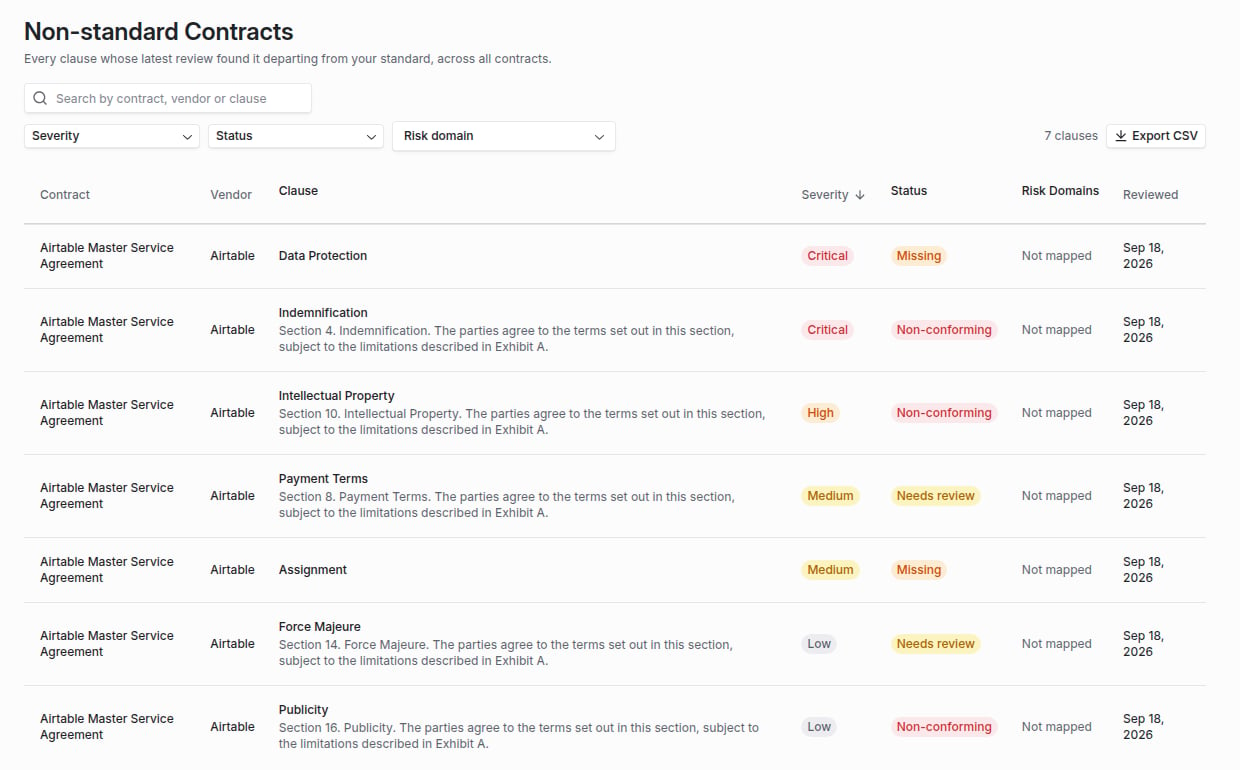
Every clause whose latest review found it non-conforming, missing or needing review, across all contracts, filterable by severity, status and risk domain, and exportable as CSV.
## What it does
On a reference clause in **Clause Sets**, **Required by Risk Domain** names the risk domain and minimum level that require it, optionally also whenever the domain has an open issue, and what to monitor after signing.
The engagement's **Contract** tab lists each required clause, why it is required (for example **Privacy · High** or **Open issue**), and whether the draft has it: **Present**, **Missing**, **Non-standard**, **Added to redline** or **Not reviewed**.
An open issue with a remediation due date adds a covenant to the pack, so the contract holds the vendor to the fix.
When the contract is signed, each required clause that made it into the contract and carries an obligation becomes an evidence request or scorecard activity on the monitoring plan, on its cadence. Event obligations are watched through Radar and issues instead.
Every clause whose latest review found it non-conforming, missing or needing review, across all contracts, filterable by severity, status and risk domain, and exportable as CSV.
 ## The rules it follows
* **The pack reads what the Risk Summary reads.** It uses the same domain results (residual where there is one) and the same open issues, so the pack cannot disagree with the decision it follows.
* **Clause review decides what the draft says.** The draft state comes from the latest complete [Contract Guardian](/products/contract-guardian) review of each contract linked to the engagement. The pack only marks a clause for the redline.
* **Rebuilding never drops a signed obligation.** A clause no longer required leaves the pack, unless it is already in the signed contract.
* **Only signed clauses are monitored.** At signature, a clause the draft held or that was added to the redline counts as signed. One still missing or non-standard does not, and its obligation is not monitored.
## Where to go next
Map clauses to risk domains, build a pack and read the report.
The clause review the draft state comes from.
Where signed obligations are monitored.
The Risk Summary the pack follows.
This documentation is built and hosted on [Mintlify](https://mintlify.com), a developer documentation platform.
## The rules it follows
* **The pack reads what the Risk Summary reads.** It uses the same domain results (residual where there is one) and the same open issues, so the pack cannot disagree with the decision it follows.
* **Clause review decides what the draft says.** The draft state comes from the latest complete [Contract Guardian](/products/contract-guardian) review of each contract linked to the engagement. The pack only marks a clause for the redline.
* **Rebuilding never drops a signed obligation.** A clause no longer required leaves the pack, unless it is already in the signed contract.
* **Only signed clauses are monitored.** At signature, a clause the draft held or that was added to the redline counts as signed. One still missing or non-standard does not, and its obligation is not monitored.
## Where to go next
Map clauses to risk domains, build a pack and read the report.
The clause review the draft state comes from.
Where signed obligations are monitored.
The Risk Summary the pack follows.
This documentation is built and hosted on [Mintlify](https://mintlify.com), a developer documentation platform.