> ## Documentation Index
> Fetch the complete documentation index at: https://docs.coverbase.com/llms.txt
> Use this file to discover all available pages before exploring further.
# Due diligence
> How each Risk Group gathers evidence and works with the vendor: assessment methods and review sessions, question delegation in the portal, answers carried forward from last time, reviewer edits the vendor approves, service-level questionnaires, findings raised on a question, and the acceptance chain for risk.
For AI agents: a documentation index is available at [https://docs.coverbase.com/llms.txt](https://docs.coverbase.com/llms.txt). This page is also available in markdown by appending .md to the URL.
Due diligence is the work your Risk Groups do on an assessment: collecting the vendor's answers and evidence, meeting the vendor where a questionnaire is not enough, and deciding what to do about each finding. These capabilities sit on top of [Assessment Copilot](/products/assessment-copilot) and the [supplier portal](/user-guides/centralized-supplier-portal). They change how evidence is gathered and who signs off on risk, not how controls are evaluated.
Your Coverbase representative turns on the third-party lifecycle features for your organization.
## What it does
Each assessment records how evidence is gathered: **Questionnaire**, **Remote review** or **Onsite**. Remote and onsite reviews schedule review sessions with a time, a place or link, internal participants and vendor attendees, who are notified when a session is scheduled, changed or cancelled.
A supplier can hand a section, or individual questions, to a colleague. A question assignment wins over its section's, which wins over the whole form's, and the portal shows who answered what.
When the same questionnaire goes to a vendor again, their previous answers are copied in. The vendor confirms each one or changes it, and cannot submit until every carried-forward answer is confirmed or updated. Reviewers see which answers changed.
When a reviewer edits a vendor's answer, the vendor sees the before and after in the portal and either approves the edit or suggests different wording.
Questions can be marked service-level. When a vendor's company-wide due diligence is current, a new service can be sent only those questions instead of the whole questionnaire.
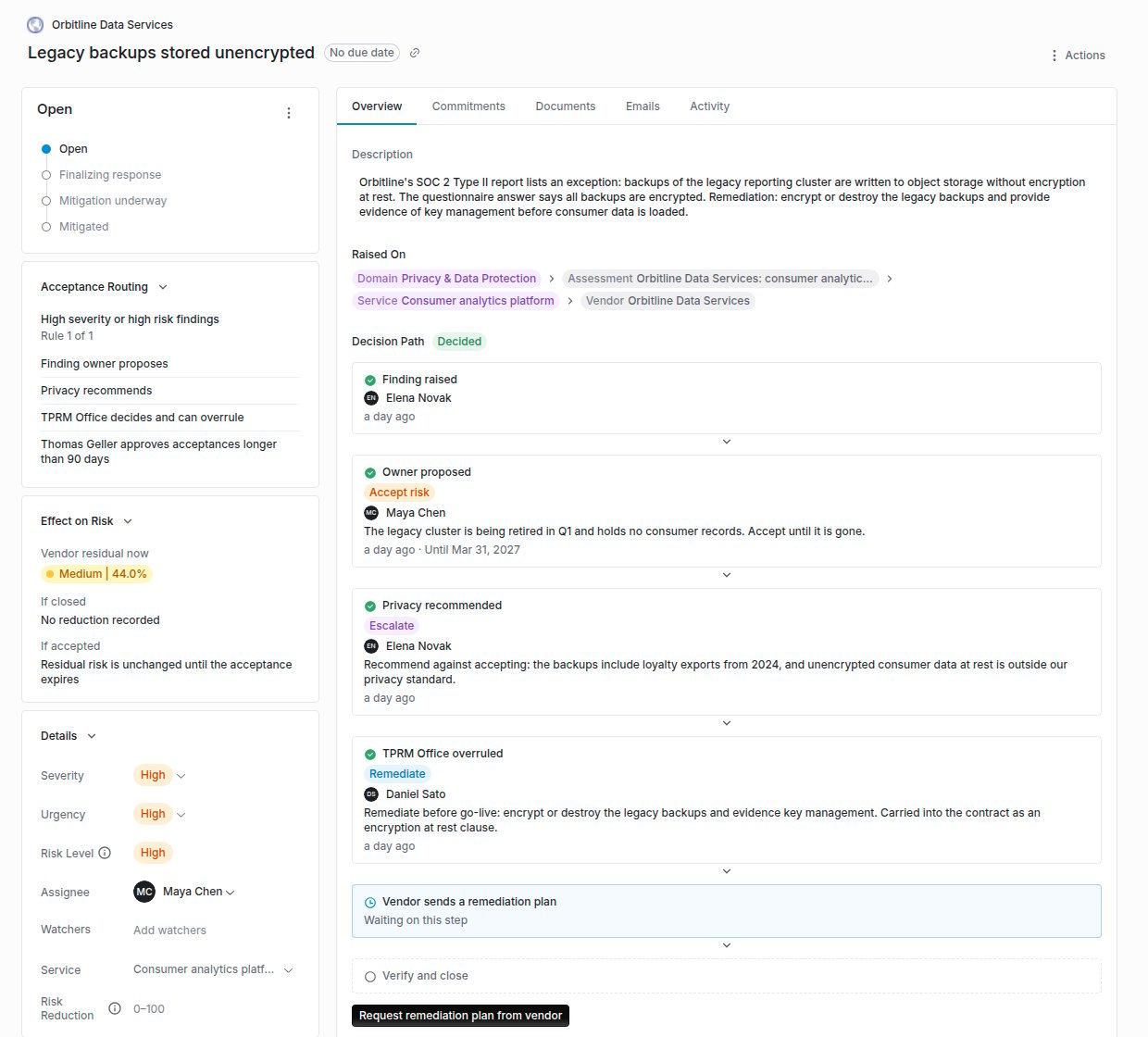
A finding records what it was raised on: a question, a risk domain, a questionnaire, an assessment, a service or the vendor. A reviewer can raise one directly on a question from the vendor's answer.
## The acceptance chain
Accepting a finding's risk can be routed through a chain of people instead of one approver. Rules under **Findings Settings** match a finding by its severity or risk level, first match wins, and name:
1. The **finding owner**, who proposes to accept the risk, have the vendor remediate, or escalate.
2. An optional **recommending group**, typically the Risk Group for the domain, which recommends.
3. A **deciding group**, typically the TPRM Office, which decides and may decide at any point, overruling what came before. The overrule is recorded as one.
4. An optional **extended approver**, who must also approve an acceptance that runs longer than the rule's number of days.
An acceptance always has an end date, at most 366 days out. Once a finding is routed, every way of moving it to risk accepted, from the finding page, a bulk action, an import, a workflow or the API, is refused until its chain has approved the acceptance, and the exception it creates cannot outlast the end date the chain approved. A finding that no rule matches follows the single-approver path. See [The issue acceptance chain](/user-guides/issue-acceptance-chain).
 ## When the vendor's due diligence is current
The abbreviated, service-level send is offered only when the vendor has a completed assessment and its next assessment date has not passed. Otherwise the option is disabled and explains why.
## What it does not do
* Carried-forward answers are matched by question across questionnaire versions. A question added since the last submission starts empty, and nothing the respondent has already answered on the new request is overwritten.
* An onsite review does not upload evidence for you. Reviewers upload what they collected and record control effectiveness by hand from the assessment.
* The acceptance chain does not change who may raise or close a finding. It governs accepting risk only.
## Checking answers against evidence
[Claim check](/products/claim-check) tests each answer on a submission against the vendor's SOC reports, certifications, trust center documents, outside-in scan, licensed ratings and contract terms, marks it **Supported**, **Contradicted**, **Needs evidence** or **Not covered** with the cited passages, and lets the reviewer raise a finding or ask the vendor to clarify from the result.
## Where to go next
Methods, sessions, delegation, carry-forward, edit approval and service-level sends, step by step.
Set up routing rules and record proposals, recommendations and decisions.
How completed domain reviews add up to a Risk Summary for the Transaction Owner.
Statuses, commitments and remediation once a finding exists.
This documentation is built and hosted on [Mintlify](https://mintlify.com), a developer documentation platform.
## When the vendor's due diligence is current
The abbreviated, service-level send is offered only when the vendor has a completed assessment and its next assessment date has not passed. Otherwise the option is disabled and explains why.
## What it does not do
* Carried-forward answers are matched by question across questionnaire versions. A question added since the last submission starts empty, and nothing the respondent has already answered on the new request is overwritten.
* An onsite review does not upload evidence for you. Reviewers upload what they collected and record control effectiveness by hand from the assessment.
* The acceptance chain does not change who may raise or close a finding. It governs accepting risk only.
## Checking answers against evidence
[Claim check](/products/claim-check) tests each answer on a submission against the vendor's SOC reports, certifications, trust center documents, outside-in scan, licensed ratings and contract terms, marks it **Supported**, **Contradicted**, **Needs evidence** or **Not covered** with the cited passages, and lets the reviewer raise a finding or ask the vendor to clarify from the result.
## Where to go next
Methods, sessions, delegation, carry-forward, edit approval and service-level sends, step by step.
Set up routing rules and record proposals, recommendations and decisions.
How completed domain reviews add up to a Risk Summary for the Transaction Owner.
Statuses, commitments and remediation once a finding exists.
This documentation is built and hosted on [Mintlify](https://mintlify.com), a developer documentation platform.