> ## Documentation Index
> Fetch the complete documentation index at: https://docs.coverbase.com/llms.txt
> Use this file to discover all available pages before exploring further.
# Intake Agent
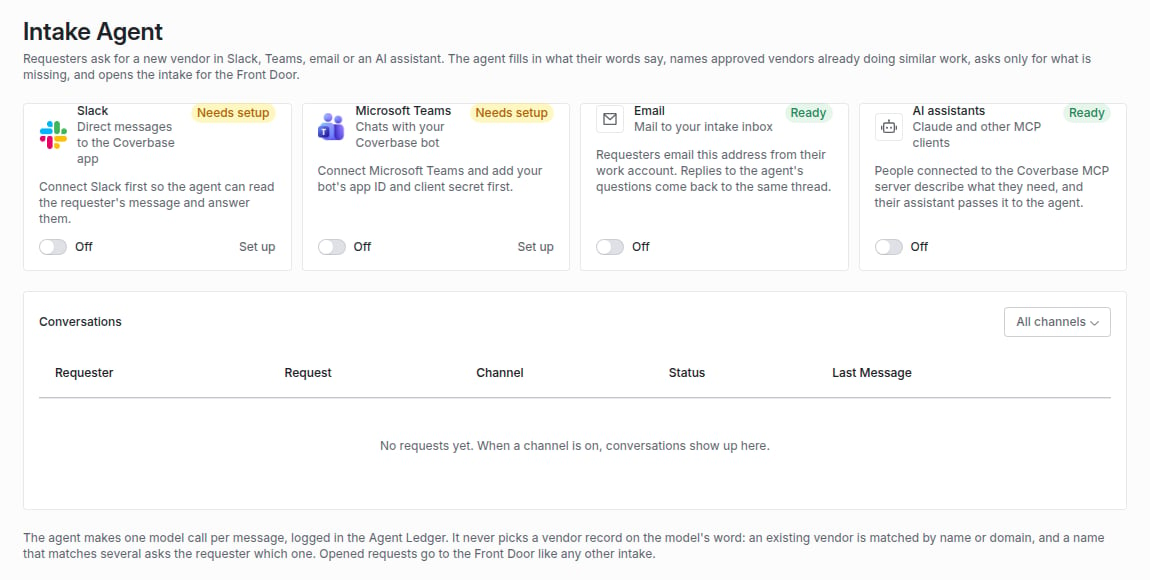
> Zero-form intake: requesters ask for a new vendor in Slack, Microsoft Teams, email or their AI assistant, and the Intake Agent fills in what their words say, names approved vendors already doing similar work, asks only for what is missing, and opens the intake for the Front Door.
For AI agents: a documentation index is available at [https://docs.coverbase.com/llms.txt](https://docs.coverbase.com/llms.txt). This page is also available in markdown by appending .md to the URL.
Your Coverbase representative turns on the third-party lifecycle features, including the Intake Agent, for your organization.
Most people who need a new tool will not fill in a form until they are made to. The Intake Agent meets them where they already ask: a direct message to the Coverbase app in Slack, a chat with your Coverbase bot in Teams, an email to your intake inbox, or their AI assistant through the [MCP server](/mcp/vendor-intake). It reads what they wrote, works out what it can, asks for the rest in the same thread, and opens an ordinary intake request that the [Front Door](/products/front-door) triages like any other.
 ## What it does
* **Reads the request.** One model call per message works out the vendor, what it is for, the kinds of data it touches (from a fixed list, including **No company data**) and short category terms. Each call is recorded in the [Agent Ledger](/products/agent-ledger).
* **Matches the vendor in code.** An exact name or domain match on one vendor is that vendor. A name matching several vendors is a question to the requester, listing them, and "new" is an answer. No match means a new vendor, created when the intake opens. The model never picks a vendor record.
* **Names similar approved vendors.** Vendors already approved whose use case shares the request's terms are listed in the reply, so the requester and the TPRM Office can reuse before buying. They never block the request.
* **Asks only for what is missing.** If the vendor, the purpose or the data is unclear, the agent replies with what it understood and a numbered question for each gap.
* **Opens the intake.** With everything known, it opens the intake on the same path as the Intake API, with the requester as the requester, your portal's questionnaires, and the conversation as context, starts drafting answers, and replies with the link.
## Who can use it
Only active members of your organization open intakes. Slack checks the member's confirmed address in your installed workspace, Teams the address Microsoft's roster returns for the sender, and email that the sender is a member and that the message passed SPF, because an inbox address is public. MCP uses the signed-in user, with the confirmation every MCP write needs.
## Guardrails
* A channel your organization left off takes nothing, and Slack and Teams requesters are told so.
* A message delivered twice is stored once.
* After five messages with something still missing, the agent stops and points the requester to the intake form.
* Once a conversation opens its intake, the next message in the same thread starts a new request.
## Where to go next
Turn on each channel and follow the conversations.
What happens to the intake next.
The portal and API ways in.
Registering the bot the Teams channel uses.
This documentation is built and hosted on [Mintlify](https://mintlify.com), a developer documentation platform.
## What it does
* **Reads the request.** One model call per message works out the vendor, what it is for, the kinds of data it touches (from a fixed list, including **No company data**) and short category terms. Each call is recorded in the [Agent Ledger](/products/agent-ledger).
* **Matches the vendor in code.** An exact name or domain match on one vendor is that vendor. A name matching several vendors is a question to the requester, listing them, and "new" is an answer. No match means a new vendor, created when the intake opens. The model never picks a vendor record.
* **Names similar approved vendors.** Vendors already approved whose use case shares the request's terms are listed in the reply, so the requester and the TPRM Office can reuse before buying. They never block the request.
* **Asks only for what is missing.** If the vendor, the purpose or the data is unclear, the agent replies with what it understood and a numbered question for each gap.
* **Opens the intake.** With everything known, it opens the intake on the same path as the Intake API, with the requester as the requester, your portal's questionnaires, and the conversation as context, starts drafting answers, and replies with the link.
## Who can use it
Only active members of your organization open intakes. Slack checks the member's confirmed address in your installed workspace, Teams the address Microsoft's roster returns for the sender, and email that the sender is a member and that the message passed SPF, because an inbox address is public. MCP uses the signed-in user, with the confirmation every MCP write needs.
## Guardrails
* A channel your organization left off takes nothing, and Slack and Teams requesters are told so.
* A message delivered twice is stored once.
* After five messages with something still missing, the agent stops and points the requester to the intake form.
* Once a conversation opens its intake, the next message in the same thread starts a new request.
## Where to go next
Turn on each channel and follow the conversations.
What happens to the intake next.
The portal and API ways in.
Registering the bot the Teams channel uses.
This documentation is built and hosted on [Mintlify](https://mintlify.com), a developer documentation platform.