> ## Documentation Index
> Fetch the complete documentation index at: https://docs.coverbase.com/llms.txt
> Use this file to discover all available pages before exploring further.
# Offboarding and continuity
> The end of an engagement, and the steps either side of the contract: the executed contract handoff, continuity plans for critical engagements, and offboarding with an exit plan that closes only on approved evidence.
For AI agents: a documentation index is available at [https://docs.coverbase.com/llms.txt](https://docs.coverbase.com/llms.txt). This page is also available in markdown by appending .md to the URL.
Ending a vendor relationship takes more than archiving a record. The data has to come back or be destroyed, access removed, integrations disconnected, and the contract terminated with the right notice. Coverbase builds that work from what the engagement had, assigns each step, and closes a step only when its evidence has been approved. The same module handles the steps around the contract: the handoff that files the executed agreement, and the continuity plan a critical engagement carries.
Your Coverbase representative turns on the third-party lifecycle features for your organization.
 ## What it does
A reason, a business justification and an optional requested date, approved by the TPRM Office and, once its group is named, Supply Chain. Marking an engagement not in use opens one automatically.
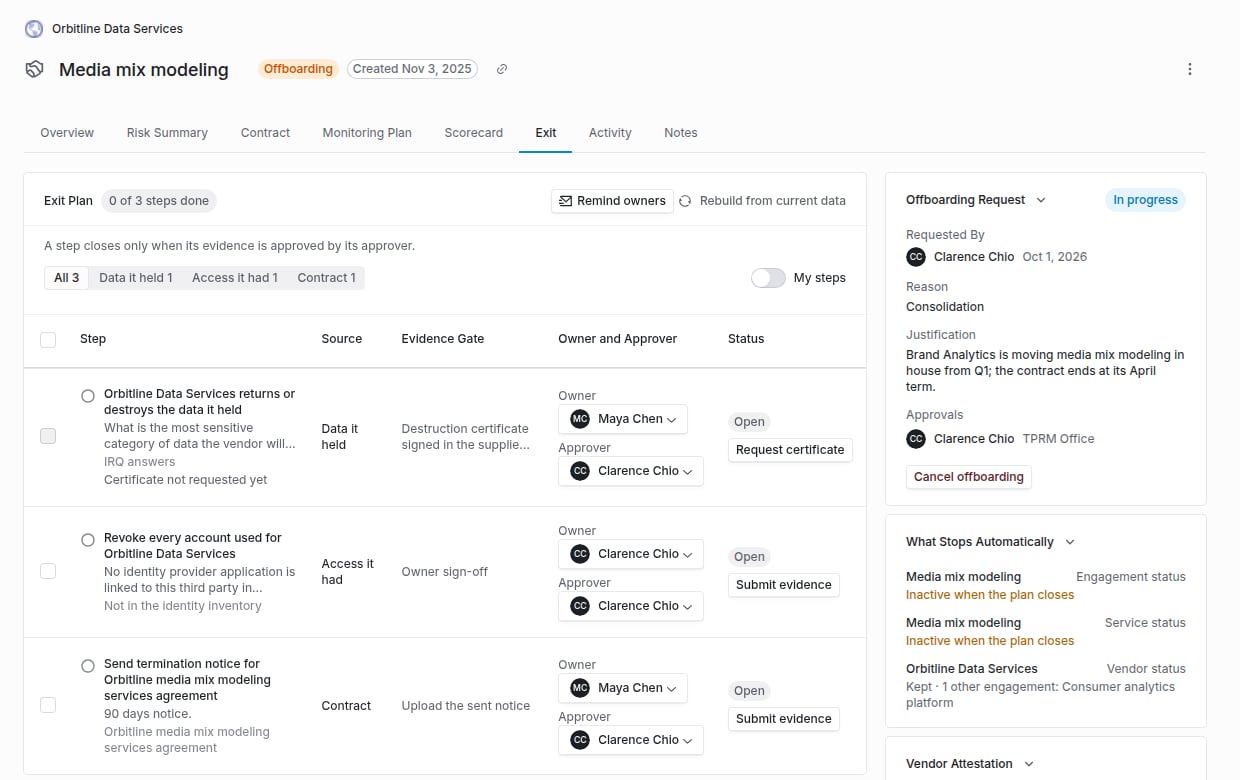
Steps for the data the vendor held, the access it had, its integrations, its contracts and the continuity plan, each with an owner and an approver. **Rebuild from current data** adds new steps without losing work already done. Evidence and approvals can be given for many steps at once, and **Remind owners** chases everyone a step waits on.
A step closes only when its evidence is submitted and its approver approves it. Document steps need a file, sign-off steps a note, and the data step the vendor's signed destruction certificate.
The vendor signs a data destruction certificate in the supplier portal. The signatory, title, time and a digest of the certificate are recorded, and approval is refused if the signed certificate has changed since it was submitted.
In-flight due diligence and a pending contract handoff stop when offboarding starts. When the plan closes, the engagement, its services, the vendor, Radar and the monitoring record are set inactive or closed, but only where no other live engagement still needs them.
An engagement at the top of its risk scale gets a draft continuity plan and a task for its Transaction Owner: backup suppliers, an exit strategy, a recovery time objective, resiliency notes and transition steps. Its transition steps become exit plan steps if the engagement is offboarded.
## The exit plan's sources
| Source | What Coverbase reads | The step |
| - | - | - |
| **Data it held** | IRQ answers about data, data processing, business associate and data sharing agreements, and the contract's data privacy terms | The vendor returns or destroys the data, evidenced by the destruction certificate. With nothing on record, an owner signs off that no data is held. |
| **Access it had** | The vendor's applications linked to an Okta or Entra application, with their assignment counts | Remove the single sign-on applications and assignments, evidenced by an export showing none remain. |
| **Integrations** | Applications with stored credentials, and API integration agreements | Disconnect each one. |
| **Contract** | Every linked contract that is not terminated | Send the termination notice within its notice period, or remove this engagement from a contract other engagements still use. |
| **Continuity** | The engagement's continuity plan | One step per transition step, plus confirming the backup suppliers can take over. |
## On the engagement tracker
An offboarding request moves the engagement's tracker to its **Exit** stage, which reads **Exit under way** until the plan closes and **Exited** with the date afterwards. See [Engagement record](/products/engagement-record#the-exit-stage).
## The contract handoff
When an assessment completes, a handoff opens on each engagement it was due diligence for that has not started yet, and Supply Chain (or the TPRM Office) gets a task to file the executed contract. Recording **Proceed to contracting** on a Risk Summary opens one too, and the TPRM Office can start one by hand. A contract signed through e-signature completes the handoff by itself. A contract signed on paper is completed by uploading the executed copy. Either way, the engagement moves to its active status and the Transaction Owner and the TPRM Office are notified.
## Routing
Offboarding approvals and the executed contract task go to two user groups set under **Configuration → Communications → Lifecycle Routing and Reminders**: the TPRM Office and Supply Chain. A task for a group follows the group's own assignment rule. With no TPRM Office group, offboarding approval falls back to the vendor's first risk analyst, then the requester. The approvals a request needs are fixed when it is filed, so changing the routing later cannot strand a request half approved.
## What it does not do
* Uploading a paper-signed copy does not mark the contract as executed in its signature workflow. Only the e-signature engines set that state. The handoff, the engagement status and the notices are the same either way.
* Canceling an offboarding does not undo what already stopped. A canceled assessment stays canceled.
## Where to go next
File a request, work the exit plan, write a continuity plan and complete a handoff.
Owner attestation, the most common way an offboarding starts.
How your own data comes back from Coverbase at the end of your contract.
Read engagements and their status from another system.
This documentation is built and hosted on [Mintlify](https://mintlify.com), a developer documentation platform.
## What it does
A reason, a business justification and an optional requested date, approved by the TPRM Office and, once its group is named, Supply Chain. Marking an engagement not in use opens one automatically.
Steps for the data the vendor held, the access it had, its integrations, its contracts and the continuity plan, each with an owner and an approver. **Rebuild from current data** adds new steps without losing work already done. Evidence and approvals can be given for many steps at once, and **Remind owners** chases everyone a step waits on.
A step closes only when its evidence is submitted and its approver approves it. Document steps need a file, sign-off steps a note, and the data step the vendor's signed destruction certificate.
The vendor signs a data destruction certificate in the supplier portal. The signatory, title, time and a digest of the certificate are recorded, and approval is refused if the signed certificate has changed since it was submitted.
In-flight due diligence and a pending contract handoff stop when offboarding starts. When the plan closes, the engagement, its services, the vendor, Radar and the monitoring record are set inactive or closed, but only where no other live engagement still needs them.
An engagement at the top of its risk scale gets a draft continuity plan and a task for its Transaction Owner: backup suppliers, an exit strategy, a recovery time objective, resiliency notes and transition steps. Its transition steps become exit plan steps if the engagement is offboarded.
## The exit plan's sources
| Source | What Coverbase reads | The step |
| - | - | - |
| **Data it held** | IRQ answers about data, data processing, business associate and data sharing agreements, and the contract's data privacy terms | The vendor returns or destroys the data, evidenced by the destruction certificate. With nothing on record, an owner signs off that no data is held. |
| **Access it had** | The vendor's applications linked to an Okta or Entra application, with their assignment counts | Remove the single sign-on applications and assignments, evidenced by an export showing none remain. |
| **Integrations** | Applications with stored credentials, and API integration agreements | Disconnect each one. |
| **Contract** | Every linked contract that is not terminated | Send the termination notice within its notice period, or remove this engagement from a contract other engagements still use. |
| **Continuity** | The engagement's continuity plan | One step per transition step, plus confirming the backup suppliers can take over. |
## On the engagement tracker
An offboarding request moves the engagement's tracker to its **Exit** stage, which reads **Exit under way** until the plan closes and **Exited** with the date afterwards. See [Engagement record](/products/engagement-record#the-exit-stage).
## The contract handoff
When an assessment completes, a handoff opens on each engagement it was due diligence for that has not started yet, and Supply Chain (or the TPRM Office) gets a task to file the executed contract. Recording **Proceed to contracting** on a Risk Summary opens one too, and the TPRM Office can start one by hand. A contract signed through e-signature completes the handoff by itself. A contract signed on paper is completed by uploading the executed copy. Either way, the engagement moves to its active status and the Transaction Owner and the TPRM Office are notified.
## Routing
Offboarding approvals and the executed contract task go to two user groups set under **Configuration → Communications → Lifecycle Routing and Reminders**: the TPRM Office and Supply Chain. A task for a group follows the group's own assignment rule. With no TPRM Office group, offboarding approval falls back to the vendor's first risk analyst, then the requester. The approvals a request needs are fixed when it is filed, so changing the routing later cannot strand a request half approved.
## What it does not do
* Uploading a paper-signed copy does not mark the contract as executed in its signature workflow. Only the e-signature engines set that state. The handoff, the engagement status and the notices are the same either way.
* Canceling an offboarding does not undo what already stopped. A canceled assessment stays canceled.
## Where to go next
File a request, work the exit plan, write a continuity plan and complete a handoff.
Owner attestation, the most common way an offboarding starts.
How your own data comes back from Coverbase at the end of your contract.
Read engagements and their status from another system.
This documentation is built and hosted on [Mintlify](https://mintlify.com), a developer documentation platform.