> ## Documentation Index
> Fetch the complete documentation index at: https://docs.coverbase.com/llms.txt
> Use this file to discover all available pages before exploring further.
# Agent Ledger
> Read the Agent Ledger, accept or reject an agent's action, choose what agents may do without a person, turn on personal data redaction before model calls, manage learning from your reviewers' corrections, and export the ledger for an audit.
For AI agents: a documentation index is available at [https://docs.coverbase.com/llms.txt](https://docs.coverbase.com/llms.txt). This page is also available in markdown by appending .md to the URL.
This guide is part of the [User Guides](/user-guides/overview) collection. It covers **Configuration → Agent Ledger**. It sits beside [Permissions and roles](/user-guides/permissions-and-roles) and the [AI governance](/security/ai-governance) security page. For what the module is, see [Agent Ledger and AI governance](/products/agent-ledger).
Your Coverbase representative turns on the third-party lifecycle features, including the Agent Ledger, for your organization.
The Agent Ledger records every action an AI agent takes on your organization's data, and holds the settings that decide what agents may do on their own.
The mistake people make most often is turning on learning before anyone has looked at the examples. Learning uses every enabled example. Read **Learned examples** first and switch off any correction you would not want repeated.
Open **Configuration** and choose **Agent Ledger**. Changing settings needs a role that can change organization settings.
## Step 1: Read the ledger
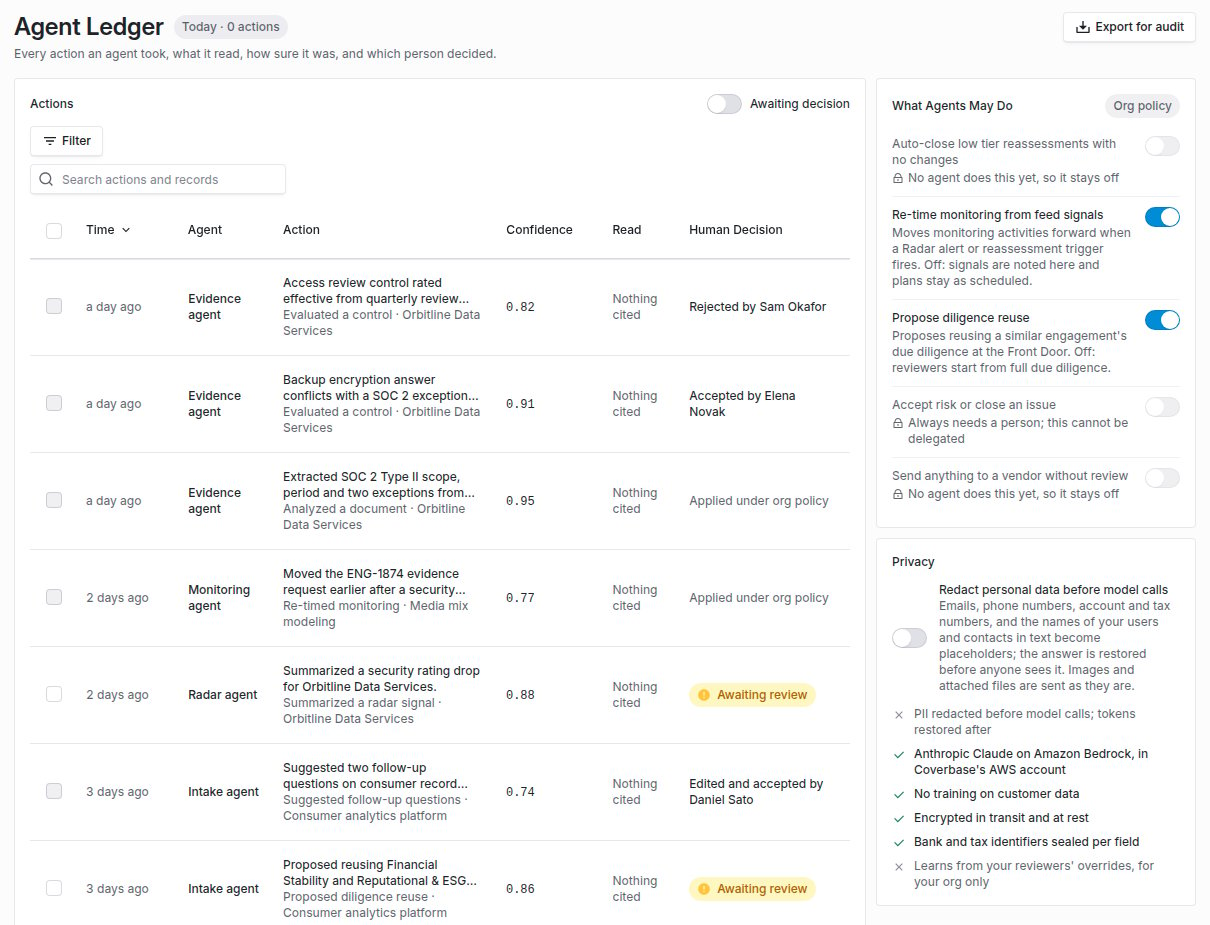
**Actions** lists what agents did, newest first, with **Time**, **Agent**, **Action**, **Confidence**, what it **Read**, and the **Human Decision**. Search, filter by agent, action, decision, outcome, record type, date or confidence, or show only actions **Awaiting decision**. The header counts today's actions.
 | Agent | Records |
| - | - |
| **Evidence agent** | Control evaluations, document analysis, the Zero Touch review and claim checks |
| **Intake agent** | Vendor matching, question planning and follow-up suggestions during intake, and the Intake Agent reading requests from messages |
| **Drafting agent** | Questionnaire answers drafted in the portal |
| **Contract agent** | Contract clause reviews |
| **Risk agent** | Risk report narratives |
| **Radar agent** | Radar signal summaries |
| **Monitoring agent** | Monitoring plans re-timed from signals under your policy, or held back by it |
Open a row to see the **Record** it acted on, what it **Read**, what it **Cited**, its **Confidence**, the **Models** it called and how many, and how many personal details were redacted.
## Step 2: Record a decision
On an action awaiting review, choose **Accept**, **Edited and accepted** or **Reject**, and confirm. A **Note** is saved with your decision in the ledger and its audit export. Rejecting needs one. The row then reads, for example, **Accepted by** and the person's name.
To decide several at once, select them and choose **Accept** or **Reject**. Only completed actions nobody has decided are changed. The result says how many were left as they were.
An action taken under one of your policies reads **Applied under org policy**, one a policy held back reads **Held back by org policy**, and a failed action reads **Failed**.
## Step 3: Choose what agents may do
Under **What Agents May Do**, switch on only the actions you are content for an agent to take without a person. Only admins can change them. Each switch is enforced where the agent acts:
| Policy | On | Off |
| - | - | - |
| **Re-time monitoring from feed signals** (off by default) | Moves monitoring activities forward when a Radar alert or reassessment trigger fires, under your [signal re-timing rule](/user-guides/monitoring-plans#step-4-keep-or-revert-a-signal-move). | Signals are noted in the ledger and plans stay as scheduled. |
| **Propose diligence reuse** (on by default) | Proposes reusing a similar engagement's due diligence at the Front Door. | Reviewers start from full due diligence. |
**Auto-close low tier reassessments with no changes** and **Send anything to a vendor without review** read **No agent does this yet, so it stays off**. **Accept risk or close an issue** reads **Always needs a person; this cannot be delegated**.
## Step 4: Decide on redaction
Under **Privacy**, **Redact personal data before model calls** is off by default. Turned on, email addresses, phone numbers, account and tax numbers (IBANs and US tax IDs), and the full names of your users and your vendors' contacts become placeholders before a request reaches the model, and the answer is restored before anyone sees it.
Keep in mind:
* Redaction does not reach inside images or attached documents, such as a PDF the model reads directly.
* If Coverbase cannot confirm the setting for your organization, the model call fails rather than going out unredacted.
The privacy panel also states where your models run, that customer data is not used for training, and that bank and tax identifiers are sealed per field.
## Step 5: Manage learning
When a reviewer overturns a control evaluation, clearing or flagging an issue, a daily job turns the correction into a learned example for that control. **Learned examples** lists each with the **Control**, the **Reviewer Decision** (**Cleared an issue** or **Flagged an issue**), the **Reviewer Note** and **Use**.
Switch off **Use this example** on any correction that should not be repeated. **Refresh from overrides** collects new corrections now instead of waiting a day.
Under **Evaluation Guidance**, describe how your organization reads its controls, for example which evidence you accept for a vendor's attestation. It applies to every control evaluation. A control's own guidance wins where the two differ. Click **Save guidance**.
Turn on **Use in evaluations**. From then on, a control's evaluation uses up to five of its enabled examples and your guidance. With it off, evaluations run unchanged.
## Step 6: Export for an audit
Filter the ledger to what the audit needs (agent, action, decision, outcome, record type, date or confidence), then click **Export filtered for audit** (**Export for audit** with no filter set). The CSV is prepared in the background, up to 50,000 actions, and downloads when it is ready. You are also notified. Each row carries the citations, models, redaction count and human decision. A value a spreadsheet would run as a formula is written as text.
## Troubleshooting
| What you see | Cause | Fix |
| - | - | - |
| No **Agent Ledger** under **Configuration** | The third-party lifecycle features are not on for your organization. | Ask your Coverbase representative. |
| **No agent actions match these filters** | The filters exclude everything. | Widen or clear the filters. |
| **Accept risk or close an issue** cannot be switched on | It always needs a person. | Expected. |
| An answer contains a placeholder such as `[[PERSON:...]]` | The model rewrote a placeholder so it could not be restored. | Run the action again. Report repeated cases to your Coverbase representative. |
| A model call failed after redaction was turned on | The call used a request type redaction does not cover, or the setting could not be read. | Report it to your Coverbase representative with the time and the action. |
| **No reviewer overrides yet.** | No reviewer has changed an evaluation's verdict in the last 180 days. | Expected. Examples appear as reviewers correct evaluations. |
| The export fails with a message to narrow it | More than 50,000 actions match. | Narrow the filters, for example to a shorter date range. |
| Signals did not move any monitoring plan | **Re-time monitoring from feed signals** is off. | Turn it on. The ledger shows what was held back. |
## Related
How models are selected, tested and constrained.
What the module does.
Correcting an evaluation, which feeds learning.
Signal re-timing, one of the agent policies.
This documentation is built and hosted on [Mintlify](https://mintlify.com), a developer documentation platform.
| Agent | Records |
| - | - |
| **Evidence agent** | Control evaluations, document analysis, the Zero Touch review and claim checks |
| **Intake agent** | Vendor matching, question planning and follow-up suggestions during intake, and the Intake Agent reading requests from messages |
| **Drafting agent** | Questionnaire answers drafted in the portal |
| **Contract agent** | Contract clause reviews |
| **Risk agent** | Risk report narratives |
| **Radar agent** | Radar signal summaries |
| **Monitoring agent** | Monitoring plans re-timed from signals under your policy, or held back by it |
Open a row to see the **Record** it acted on, what it **Read**, what it **Cited**, its **Confidence**, the **Models** it called and how many, and how many personal details were redacted.
## Step 2: Record a decision
On an action awaiting review, choose **Accept**, **Edited and accepted** or **Reject**, and confirm. A **Note** is saved with your decision in the ledger and its audit export. Rejecting needs one. The row then reads, for example, **Accepted by** and the person's name.
To decide several at once, select them and choose **Accept** or **Reject**. Only completed actions nobody has decided are changed. The result says how many were left as they were.
An action taken under one of your policies reads **Applied under org policy**, one a policy held back reads **Held back by org policy**, and a failed action reads **Failed**.
## Step 3: Choose what agents may do
Under **What Agents May Do**, switch on only the actions you are content for an agent to take without a person. Only admins can change them. Each switch is enforced where the agent acts:
| Policy | On | Off |
| - | - | - |
| **Re-time monitoring from feed signals** (off by default) | Moves monitoring activities forward when a Radar alert or reassessment trigger fires, under your [signal re-timing rule](/user-guides/monitoring-plans#step-4-keep-or-revert-a-signal-move). | Signals are noted in the ledger and plans stay as scheduled. |
| **Propose diligence reuse** (on by default) | Proposes reusing a similar engagement's due diligence at the Front Door. | Reviewers start from full due diligence. |
**Auto-close low tier reassessments with no changes** and **Send anything to a vendor without review** read **No agent does this yet, so it stays off**. **Accept risk or close an issue** reads **Always needs a person; this cannot be delegated**.
## Step 4: Decide on redaction
Under **Privacy**, **Redact personal data before model calls** is off by default. Turned on, email addresses, phone numbers, account and tax numbers (IBANs and US tax IDs), and the full names of your users and your vendors' contacts become placeholders before a request reaches the model, and the answer is restored before anyone sees it.
Keep in mind:
* Redaction does not reach inside images or attached documents, such as a PDF the model reads directly.
* If Coverbase cannot confirm the setting for your organization, the model call fails rather than going out unredacted.
The privacy panel also states where your models run, that customer data is not used for training, and that bank and tax identifiers are sealed per field.
## Step 5: Manage learning
When a reviewer overturns a control evaluation, clearing or flagging an issue, a daily job turns the correction into a learned example for that control. **Learned examples** lists each with the **Control**, the **Reviewer Decision** (**Cleared an issue** or **Flagged an issue**), the **Reviewer Note** and **Use**.
Switch off **Use this example** on any correction that should not be repeated. **Refresh from overrides** collects new corrections now instead of waiting a day.
Under **Evaluation Guidance**, describe how your organization reads its controls, for example which evidence you accept for a vendor's attestation. It applies to every control evaluation. A control's own guidance wins where the two differ. Click **Save guidance**.
Turn on **Use in evaluations**. From then on, a control's evaluation uses up to five of its enabled examples and your guidance. With it off, evaluations run unchanged.
## Step 6: Export for an audit
Filter the ledger to what the audit needs (agent, action, decision, outcome, record type, date or confidence), then click **Export filtered for audit** (**Export for audit** with no filter set). The CSV is prepared in the background, up to 50,000 actions, and downloads when it is ready. You are also notified. Each row carries the citations, models, redaction count and human decision. A value a spreadsheet would run as a formula is written as text.
## Troubleshooting
| What you see | Cause | Fix |
| - | - | - |
| No **Agent Ledger** under **Configuration** | The third-party lifecycle features are not on for your organization. | Ask your Coverbase representative. |
| **No agent actions match these filters** | The filters exclude everything. | Widen or clear the filters. |
| **Accept risk or close an issue** cannot be switched on | It always needs a person. | Expected. |
| An answer contains a placeholder such as `[[PERSON:...]]` | The model rewrote a placeholder so it could not be restored. | Run the action again. Report repeated cases to your Coverbase representative. |
| A model call failed after redaction was turned on | The call used a request type redaction does not cover, or the setting could not be read. | Report it to your Coverbase representative with the time and the action. |
| **No reviewer overrides yet.** | No reviewer has changed an evaluation's verdict in the last 180 days. | Expected. Examples appear as reviewers correct evaluations. |
| The export fails with a message to narrow it | More than 50,000 actions match. | Narrow the filters, for example to a shorter date range. |
| Signals did not move any monitoring plan | **Re-time monitoring from feed signals** is off. | Turn it on. The ledger shows what was held back. |
## Related
How models are selected, tested and constrained.
What the module does.
Correcting an evaluation, which feeds learning.
Signal re-timing, one of the agent policies.
This documentation is built and hosted on [Mintlify](https://mintlify.com), a developer documentation platform.