> ## Documentation Index
> Fetch the complete documentation index at: https://docs.coverbase.com/llms.txt
> Use this file to discover all available pages before exploring further.
# Claim check
> Check a vendor's questionnaire answers against the evidence on file, read each verdict and its cited passages, filter by verdict, raise findings, ask the vendor to clarify, and check answers again.
For AI agents: a documentation index is available at [https://docs.coverbase.com/llms.txt](https://docs.coverbase.com/llms.txt). This page is also available in markdown by appending .md to the URL.
This guide is part of the [User Guides](/user-guides/overview) collection. It covers the **Claim Check** tab on a questionnaire submission. It sits beside [Due diligence methods and the portal](/user-guides/due-diligence-methods-and-portal) and [The issue acceptance chain](/user-guides/issue-acceptance-chain). For what the feature is, see [Claim check](/products/claim-check).
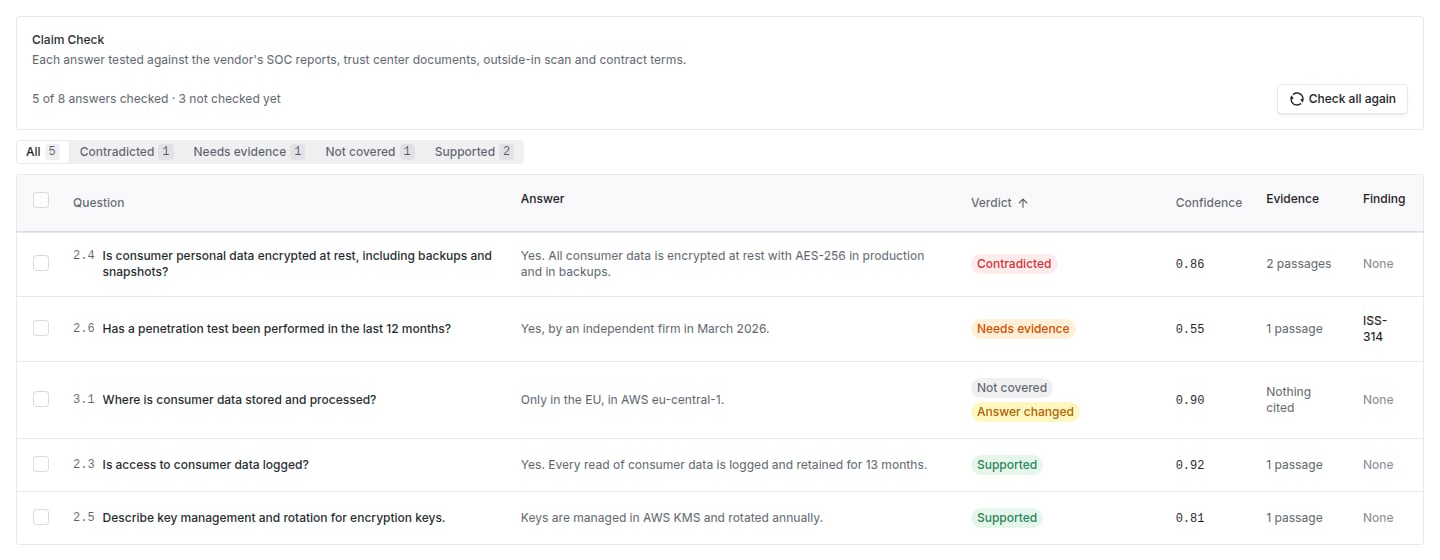
Claim check tests each answer on a submission against the vendor's SOC reports, certifications, trust center documents, outside-in scan, licensed ratings and contract terms, and cites the passages it relied on.
Your Coverbase representative turns on the third-party lifecycle features for your organization.
The mistake people make most often is reading **Not covered** as a failure. It means nothing on file speaks to the answer: request the evidence, rather than raising a finding against the vendor.
## Step 1: Run the check
Open the questionnaire submission and choose the **Claim Check** tab. Click **Check all answers**. The tab shows **Checking N of M answers** while it runs, and verdicts appear as each answer finishes. **Stop** ends the run; answers already checked keep their verdicts.
A submission has one check running at a time. Starting another while one runs shows the running one. Each run checks up to 400 answers.
## Step 2: Read the verdicts
The table lists each **Question**, the vendor's **Answer**, the **Verdict**, its **Confidence**, the **Evidence** cited and any **Finding** raised. The header counts contradicted answers, and you can filter the table by verdict.
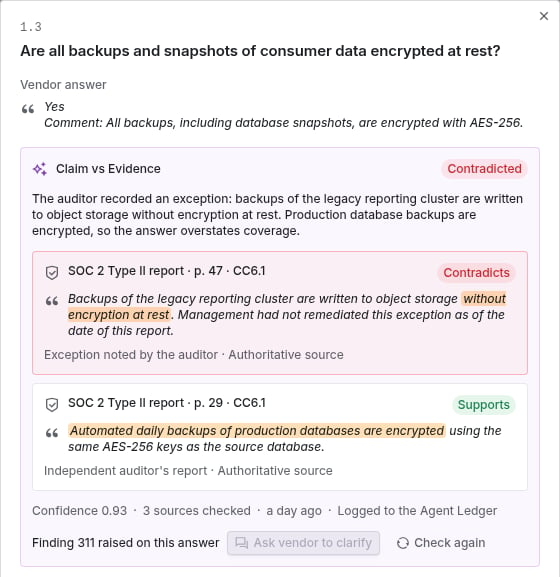
 Open a row to see the passages: each names its source (for example **Independent auditor's report** or **Published on the trust center**), whether it is an **Authoritative source** or the **Vendor's own statement**, whether it **Supports** or **Contradicts** the answer, the page, and the quoted text. **Open** the source to read it in place. The verdict also shows beside each question on the submission itself.
 A verdict marked **Answer changed** was made against earlier wording. Check it again.
## Step 3: Act on what you found
Select answers and choose:
* **Raise findings** (or **Raise finding with this evidence** on one answer). Each finding is narrowed to its question and carries the answer, the verdict and the cited evidence. Answers that already have a finding are skipped.
* **Ask vendor to clarify**. Edit the message (a default asks the vendor to clarify and share evidence) and send it. The vendor gets it on their portal request, attached to each question. The vendor sees which question a message is about only when their own form on that request asks it. A submission that did not come through the portal has no thread to ask on.
* **Check again**, for answers whose evidence or wording changed.
Each action reports what it did and what it skipped.
## Troubleshooting
| What you see | Cause | Fix |
| - | - | - |
| No **Claim Check** tab | The third-party lifecycle features are not turned on for your organization. | Ask your Coverbase representative. |
| **This submission has no written or selected answers to check.** | Every answer is empty. | Nothing to do. |
| Many answers are **Not covered** | Little evidence is on file for the vendor. | Request the SOC report or other documents, then check again. |
| **The last check did not finish** | The run failed. | Run it again. Answers already checked keep their verdicts. |
| **Ask vendor to clarify** is unavailable | The submission was not sent through the portal. | Contact the vendor directly. |
| A verdict seems wrong | The cited passages do not say what the verdict claims, or newer evidence is on file. | Read the cited passages, click **Check again**, and reject the action in the Agent Ledger with a note. |
## Related
Raising a finding on a question by hand.
Every check, and your decision on it.
How sources are graded.
What the feature does.
This documentation is built and hosted on [Mintlify](https://mintlify.com), a developer documentation platform.
A verdict marked **Answer changed** was made against earlier wording. Check it again.
## Step 3: Act on what you found
Select answers and choose:
* **Raise findings** (or **Raise finding with this evidence** on one answer). Each finding is narrowed to its question and carries the answer, the verdict and the cited evidence. Answers that already have a finding are skipped.
* **Ask vendor to clarify**. Edit the message (a default asks the vendor to clarify and share evidence) and send it. The vendor gets it on their portal request, attached to each question. The vendor sees which question a message is about only when their own form on that request asks it. A submission that did not come through the portal has no thread to ask on.
* **Check again**, for answers whose evidence or wording changed.
Each action reports what it did and what it skipped.
## Troubleshooting
| What you see | Cause | Fix |
| - | - | - |
| No **Claim Check** tab | The third-party lifecycle features are not turned on for your organization. | Ask your Coverbase representative. |
| **This submission has no written or selected answers to check.** | Every answer is empty. | Nothing to do. |
| Many answers are **Not covered** | Little evidence is on file for the vendor. | Request the SOC report or other documents, then check again. |
| **The last check did not finish** | The run failed. | Run it again. Answers already checked keep their verdicts. |
| **Ask vendor to clarify** is unavailable | The submission was not sent through the portal. | Contact the vendor directly. |
| A verdict seems wrong | The cited passages do not say what the verdict claims, or newer evidence is on file. | Read the cited passages, click **Check again**, and reject the action in the Agent Ledger with a note. |
## Related
Raising a finding on a question by hand.
Every check, and your decision on it.
How sources are graded.
What the feature does.
This documentation is built and hosted on [Mintlify](https://mintlify.com), a developer documentation platform.