> ## Documentation Index
> Fetch the complete documentation index at: https://docs.coverbase.com/llms.txt
> Use this file to discover all available pages before exploring further.
# Clause packs and non-standard contracts
> Map reference clauses to risk domains, build an engagement's clause pack, mark missing clauses for the redline, follow the obligations that will be monitored after signature, and use the Non-standard Contracts report.
For AI agents: a documentation index is available at [https://docs.coverbase.com/llms.txt](https://docs.coverbase.com/llms.txt). This page is also available in markdown by appending .md to the URL.
This guide is part of the [User Guides](/user-guides/overview) collection. It covers **Required by Risk Domain** on a reference clause in **Clause Sets**, the clause pack on an engagement's **Contract** tab, and the **Non-standard Contracts** report. It sits beside [Contract Guardian](/user-guides/contract-guardian) and [Monitoring plans](/user-guides/monitoring-plans). For what the feature is, see [Clause packs and non-standard contracts](/products/clause-pack).
The mistake people make most often is building a pack before any clause is mapped to a risk domain. With no mappings, the pack has nothing to require. Map your clauses first.
Your Coverbase representative turns on the third-party lifecycle features for your organization.
## Step 1: Map clauses to risk domains
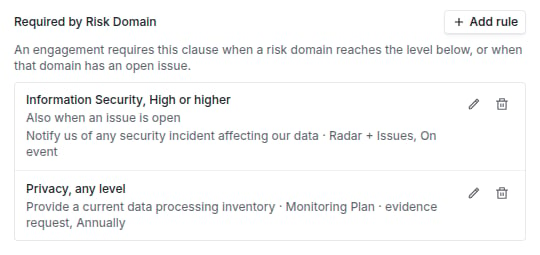
Open **Configuration → Clause Sets**, open a clause set, and open a reference clause. Under **Required by Risk Domain**, click **Add rule**:
1. Choose the **Risk Domain** and the **Minimum Level** (or **Any level**) at which an engagement requires the clause.
2. Turn on **Also require it when this domain has an open issue** if an open issue should require it too.
3. Under **Monitor After Signing**, choose what to monitor once the contract is signed: an evidence request, a scorecard, or watching for vendor notices through Radar and issues. Describe the **Obligation** (for example "provide an annual SOC 2 Type II report") and pick a **Cadence**. Choose **Nothing to monitor** if the clause carries no ongoing obligation.
4. Click **Save rule**.
A clause can have several rules. Rules follow the clause into its new versions.
 ## Step 2: Build an engagement's pack
Open the engagement and choose the **Contract** tab. Under **Clause Pack from the Risk Results**, click **Build clause pack**. The table lists each **Required Clause**, why it is **Required Because**, and whether it is **In the Current Draft**:
| State | Meaning |
| - | - |
| **Present** | The latest clause review found it in the draft, with the contract and page. |
| **Missing** | The review did not find it. |
| **Non-standard** | The draft has it, but departs from your standard wording. A callout routes it to Legal, with **Open clause review**. |
| **Added to redline** | Someone marked it to add to the redline. |
| **Not reviewed** | No linked contract has a complete clause review. |
## Step 2: Build an engagement's pack
Open the engagement and choose the **Contract** tab. Under **Clause Pack from the Risk Results**, click **Build clause pack**. The table lists each **Required Clause**, why it is **Required Because**, and whether it is **In the Current Draft**:
| State | Meaning |
| - | - |
| **Present** | The latest clause review found it in the draft, with the contract and page. |
| **Missing** | The review did not find it. |
| **Non-standard** | The draft has it, but departs from your standard wording. A callout routes it to Legal, with **Open clause review**. |
| **Added to redline** | Someone marked it to add to the redline. |
| **Not reviewed** | No linked contract has a complete clause review. |
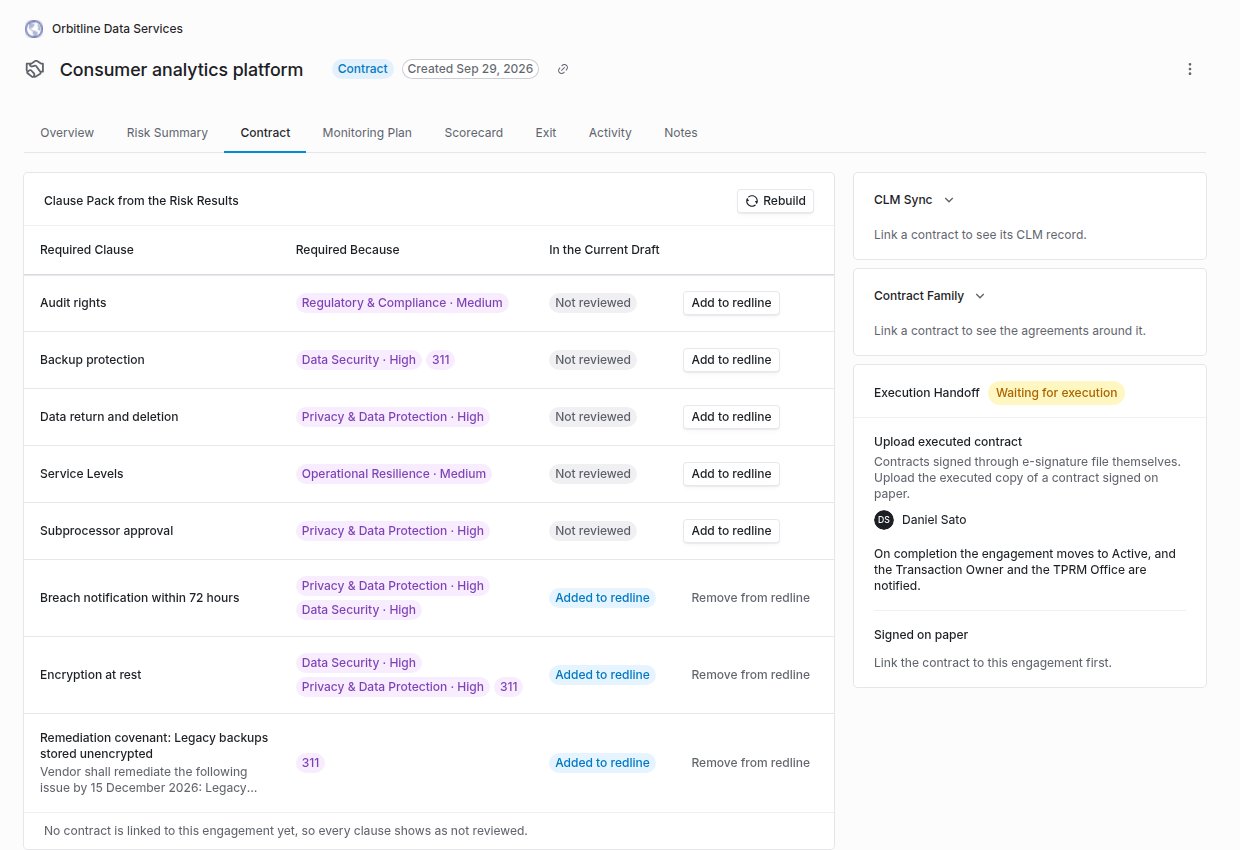 Click **Add to redline** on a missing clause to mark it, or **Remove from redline** to undo. Click **Rebuild** after the risk results, the open issues or the rules change.
## Step 3: Follow the obligations
**Obligations to Monitor After Signature** lists each obligation, where it **Goes To** (**Monitoring Plan · evidence request**, **Monitoring Plan · scorecard**, or **Radar + Issues**), its **Cadence** and its **Status**: **Starts when the contract is signed**, **Needs the clause in the signed contract**, **Monitored, next due** a date, or **Watched for vendor notices**.
Click **Add to redline** on a missing clause to mark it, or **Remove from redline** to undo. Click **Rebuild** after the risk results, the open issues or the rules change.
## Step 3: Follow the obligations
**Obligations to Monitor After Signature** lists each obligation, where it **Goes To** (**Monitoring Plan · evidence request**, **Monitoring Plan · scorecard**, or **Radar + Issues**), its **Cadence** and its **Status**: **Starts when the contract is signed**, **Needs the clause in the signed contract**, **Monitored, next due** a date, or **Watched for vendor notices**.
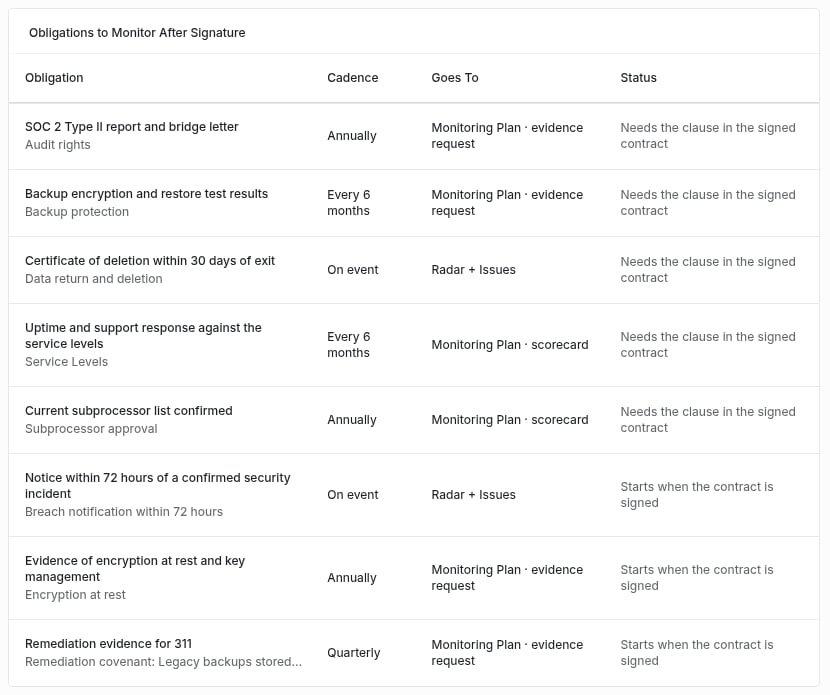 When the contract handoff completes, clauses that were present or added to the redline count as signed, and their obligations become activities on the engagement's monitoring plan. A clause still missing or non-standard at signature is not monitored.
## Step 4: Use the Non-standard Contracts report
From **Contracts**, open **Non-standard Contracts**, or click **See all non-standard contracts** on a pack. The report lists every clause whose latest review found it non-standard, with the **Contract**, **Vendor**, **Clause**, **Severity**, **Status** (**Non-conforming**, **Missing**, **Needs review**, or **Accepted risk** when you filter for it), the **Risk Domains** it is mapped to, and when it was **Reviewed**. Search, filter by severity, status and risk domain, sort, and **Export CSV**.
## Troubleshooting
| What you see | Cause | Fix |
| - | - | - |
| **No clause is mapped to a risk domain yet.** | No rules exist. | Add rules under **Required by Risk Domain** (step 1). |
| Every clause reads **Not reviewed** | No linked contract has a complete clause review. | Link the contract and run a clause review. |
| A clause you expected is not required | The domain's result is below the rule's minimum level, and it has no open issue. | Check the engagement's Risk Summary, or lower the rule's level. |
| An obligation reads **Needs the clause in the signed contract** | The clause was missing or non-standard when the contract was signed. | Amend the contract, or accept the gap. |
| The report is empty | No reviewed contract has a non-standard clause. | Expected. |
## Related
Clause sets and clause reviews.
Where obligations are monitored.
The contract handoff that executes the pack.
The Risk Summary the pack follows.
This documentation is built and hosted on [Mintlify](https://mintlify.com), a developer documentation platform.
When the contract handoff completes, clauses that were present or added to the redline count as signed, and their obligations become activities on the engagement's monitoring plan. A clause still missing or non-standard at signature is not monitored.
## Step 4: Use the Non-standard Contracts report
From **Contracts**, open **Non-standard Contracts**, or click **See all non-standard contracts** on a pack. The report lists every clause whose latest review found it non-standard, with the **Contract**, **Vendor**, **Clause**, **Severity**, **Status** (**Non-conforming**, **Missing**, **Needs review**, or **Accepted risk** when you filter for it), the **Risk Domains** it is mapped to, and when it was **Reviewed**. Search, filter by severity, status and risk domain, sort, and **Export CSV**.
## Troubleshooting
| What you see | Cause | Fix |
| - | - | - |
| **No clause is mapped to a risk domain yet.** | No rules exist. | Add rules under **Required by Risk Domain** (step 1). |
| Every clause reads **Not reviewed** | No linked contract has a complete clause review. | Link the contract and run a clause review. |
| A clause you expected is not required | The domain's result is below the rule's minimum level, and it has no open issue. | Check the engagement's Risk Summary, or lower the rule's level. |
| An obligation reads **Needs the clause in the signed contract** | The clause was missing or non-standard when the contract was signed. | Amend the contract, or accept the gap. |
| The report is empty | No reviewed contract has a non-standard clause. | Expected. |
## Related
Clause sets and clause reviews.
Where obligations are monitored.
The contract handoff that executes the pack.
The Risk Summary the pack follows.
This documentation is built and hosted on [Mintlify](https://mintlify.com), a developer documentation platform.