> ## Documentation Index
> Fetch the complete documentation index at: https://docs.coverbase.com/llms.txt
> Use this file to discover all available pages before exploring further.
# Negotiation rounds
> Upload the marked-up contract a vendor sends back, see what they changed, which of your asks they accepted, and what they edited without being asked, without starting the clause review over.
For AI agents: a documentation index is available at [https://docs.coverbase.com/llms.txt](https://docs.coverbase.com/llms.txt). This page is also available in markdown by appending .md to the URL.
This guide is part of the [User Guides](/user-guides/overview) collection. It picks up where the [Contract Guardian guide](/user-guides/contract-guardian) ends: you have run a clause review, decided the flagged clauses, and sent the vendor a redline. For how those asks are written and sent, read that guide first.
A contract review does not end when you send the redline. The vendor answers, usually weeks later, usually with a marked-up document, and you have three questions:
* **What did they change?**
* **Did they give me what I asked for?**
* **What is still open?**
A round answers all three against the review you already ran. You do not start a second review, and you do not lose the verdicts you recorded the first time.
## What a round is
One exchange: you send asks, the vendor returns a document, Coverbase reads it against what you asked for.
| | |
| ------------ | ------------------------------------------------------------------------------------------------------------- |
| **Round 1** | Your first clause review. You decide the flagged clauses and send a redline. |
| **Round 2** | You upload what the vendor sent back. Coverbase compares it to round 1 and tells you what moved. |
| **Round 3+** | The same again. Contracts that go three or four rounds are normal, and each one only asks about what changed. |
Your decisions carry. A clause whose language the vendor did not touch keeps the verdict you gave it, and the round says which round you gave it in. Anything the vendor edited comes back to you, whatever you decided last time, because a decision about the old language is not a decision about the new.
## Before you start
You need a clause review on this contract with at least one ask sent to the vendor. If nothing has been sent yet, there is nothing to compare against, so run the review first.
A PDF or Word file of the contract as the vendor returned it. Their cover email or response letter is useful too; you can upload both.
Starting a round needs the same contract-update permission as starting a review.
You do not have to finish reviewing round 1 before starting round 2. If the vendor comes back early, upload their document. Clauses you had not decided yet stay undecided and carry into the new round.
## Step 1: Upload what the vendor sent back
While a round is out with the vendor, the review page says so, and the upload sits on that same banner. **Upload vendor response** is also in the review page header, so you do not have to remember which screen you were on.
 Add the vendor's file on the contract's **Documents** tab, the same way you add any other contract document. There Coverbase asks one question: **is this a new version of a document already on the contract, or a new document alongside it?**
* **A new version** replaces the old one. The superseded text stops being reviewed.
* **A new document** sits alongside the others, such as a cover letter or a side agreement.
Getting that wrong costs you: a replacement recorded as an addition leaves both versions in scope, and the round then reports clauses from language nobody is bound by any more.
Then open **Upload vendor response** and confirm what this round reads. Everything on the contract is read unless you unpick it.
Add the vendor's file on the contract's **Documents** tab, the same way you add any other contract document. There Coverbase asks one question: **is this a new version of a document already on the contract, or a new document alongside it?**
* **A new version** replaces the old one. The superseded text stops being reviewed.
* **A new document** sits alongside the others, such as a cover letter or a side agreement.
Getting that wrong costs you: a replacement recorded as an addition leaves both versions in scope, and the round then reports clauses from language nobody is bound by any more.
Then open **Upload vendor response** and confirm what this round reads. Everything on the contract is read unless you unpick it.
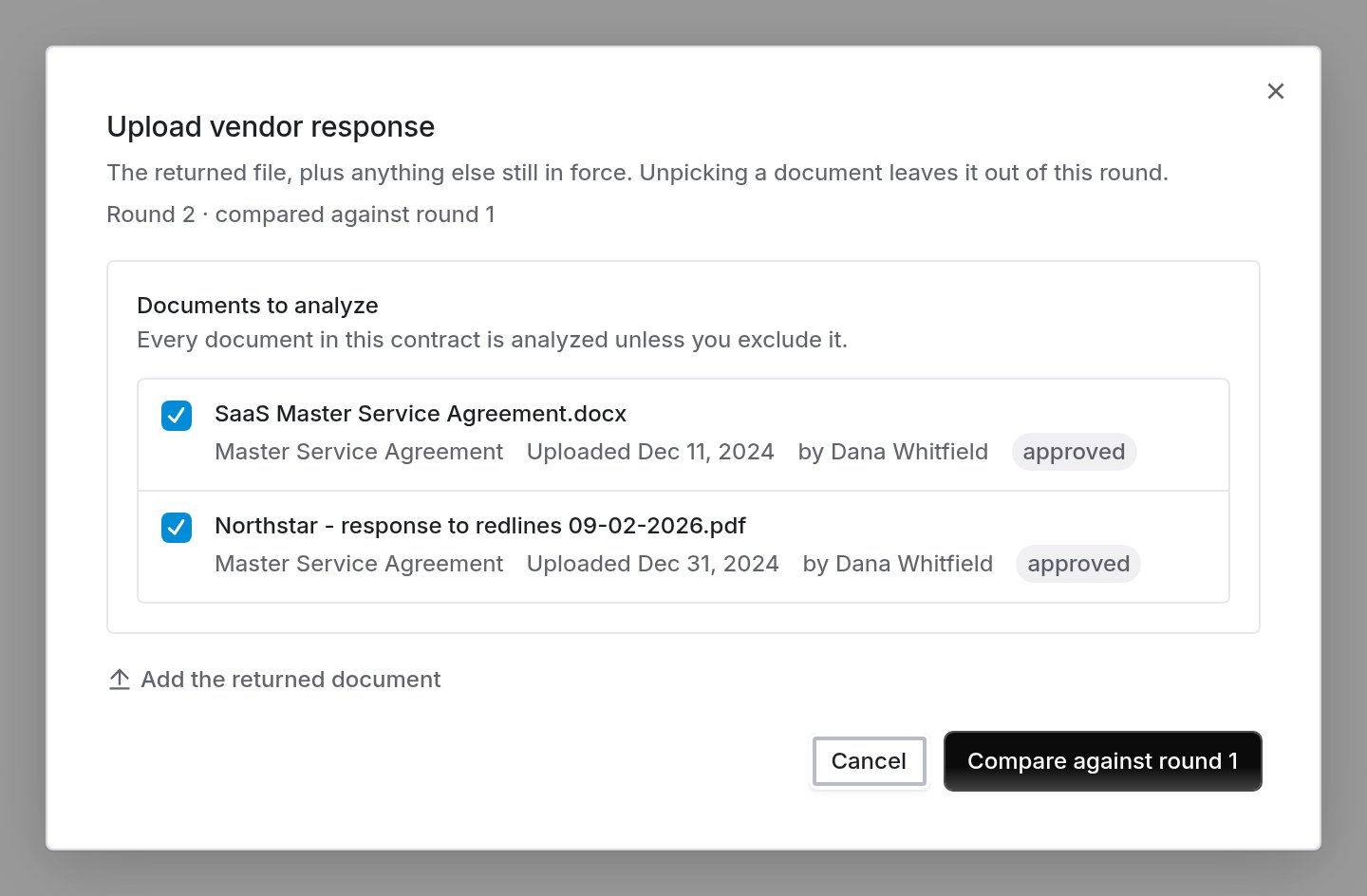 Press **Compare against round 1**.
The round inherits the clause sets and reviewer of the round it answers. The reply is measured against what the vendor was asked for; swapping the standard mid-way would grade them on something they never saw.
## Step 2: See what changed
The round opens on its answer, before you review a single clause.
Press **Compare against round 1**.
The round inherits the clause sets and reviewer of the round it answers. The reply is measured against what the vendor was asked for; swapping the standard mid-way would grade them on something they never saw.
## Step 2: See what changed
The round opens on its answer, before you review a single clause.
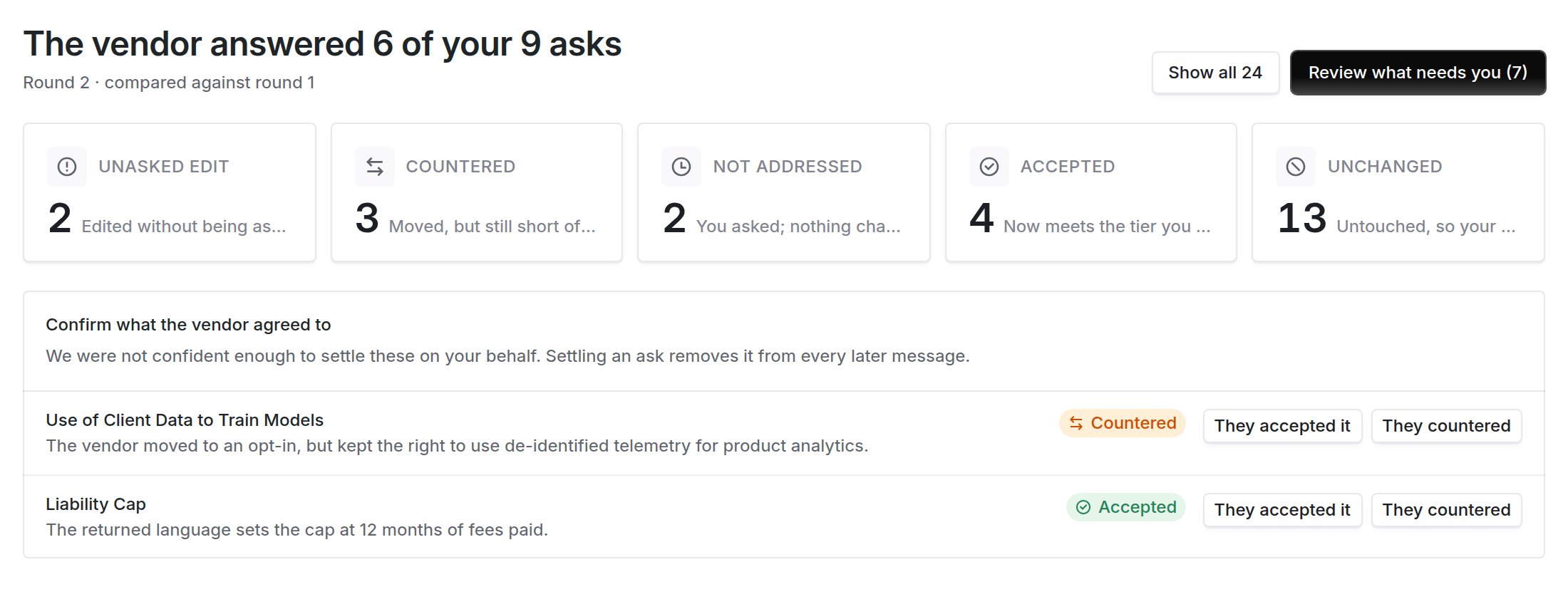
 | Bucket | What it means | What to do |
| --------------------- | --------------------------------------------------------------------------------------------- | ------------------------------------------------------------------------------ |
| **Unasked edit** | The vendor edited a clause you never raised, including ones you accepted in an earlier round. | Read every one. This is the bucket that catches quiet edits. |
| **Countered** | They moved, but the language still falls short of the tier you asked for. | Decide whether the counter is good enough. |
| **Not addressed** | You asked; nothing changed. | Decide whether to press again, accept the risk, or drop it. |
| **No longer present** | A clause the previous round read is not in the returned document. | Check whether it was removed deliberately. |
| **Newly present** | A clause you check for appears for the first time. | Read it; nothing about it was decided before. |
| **New standard** | You added this clause to your standard since the previous round. | Review it as you would in a first round. |
| **Accepted** | The language now meets the tier you asked for. | Nothing, unless you disagree with the read. |
| **Unchanged** | Untouched, so your earlier decision stands. | Nothing, unless no round ever decided it, in which case it stays in the queue. |
**Unasked edits are listed first.** An edit in a clause you already signed off is the change a returned document is most likely to hide.
**Review what needs you** opens the queue with the riskiest bucket first; **Show all** walks every clause the round read.
## Step 3: Review what needs you
The queue holds what this round needs a decision on: the clauses the vendor edited, the asks they left unanswered, and anything no round has decided yet. Every row says what happened to it.
| Bucket | What it means | What to do |
| --------------------- | --------------------------------------------------------------------------------------------- | ------------------------------------------------------------------------------ |
| **Unasked edit** | The vendor edited a clause you never raised, including ones you accepted in an earlier round. | Read every one. This is the bucket that catches quiet edits. |
| **Countered** | They moved, but the language still falls short of the tier you asked for. | Decide whether the counter is good enough. |
| **Not addressed** | You asked; nothing changed. | Decide whether to press again, accept the risk, or drop it. |
| **No longer present** | A clause the previous round read is not in the returned document. | Check whether it was removed deliberately. |
| **Newly present** | A clause you check for appears for the first time. | Read it; nothing about it was decided before. |
| **New standard** | You added this clause to your standard since the previous round. | Review it as you would in a first round. |
| **Accepted** | The language now meets the tier you asked for. | Nothing, unless you disagree with the read. |
| **Unchanged** | Untouched, so your earlier decision stands. | Nothing, unless no round ever decided it, in which case it stays in the queue. |
**Unasked edits are listed first.** An edit in a clause you already signed off is the change a returned document is most likely to hide.
**Review what needs you** opens the queue with the riskiest bucket first; **Show all** walks every clause the round read.
## Step 3: Review what needs you
The queue holds what this round needs a decision on: the clauses the vendor edited, the asks they left unanswered, and anything no round has decided yet. Every row says what happened to it.

 Use **Show all** if you would rather walk every clause, the same way you can in round 1.
## Step 4: Decide on a counter
When you open a clause the vendor countered, the middle pane compares **what you asked for** against **what came back**, rather than making you re-read the whole clause. The changed language is highlighted, and Coverbase says in one sentence why it counts the reply as a counter rather than an acceptance.
Use **Show all** if you would rather walk every clause, the same way you can in round 1.
## Step 4: Decide on a counter
When you open a clause the vendor countered, the middle pane compares **what you asked for** against **what came back**, rather than making you re-read the whole clause. The changed language is highlighted, and Coverbase says in one sentence why it counts the reply as a counter rather than an acceptance.
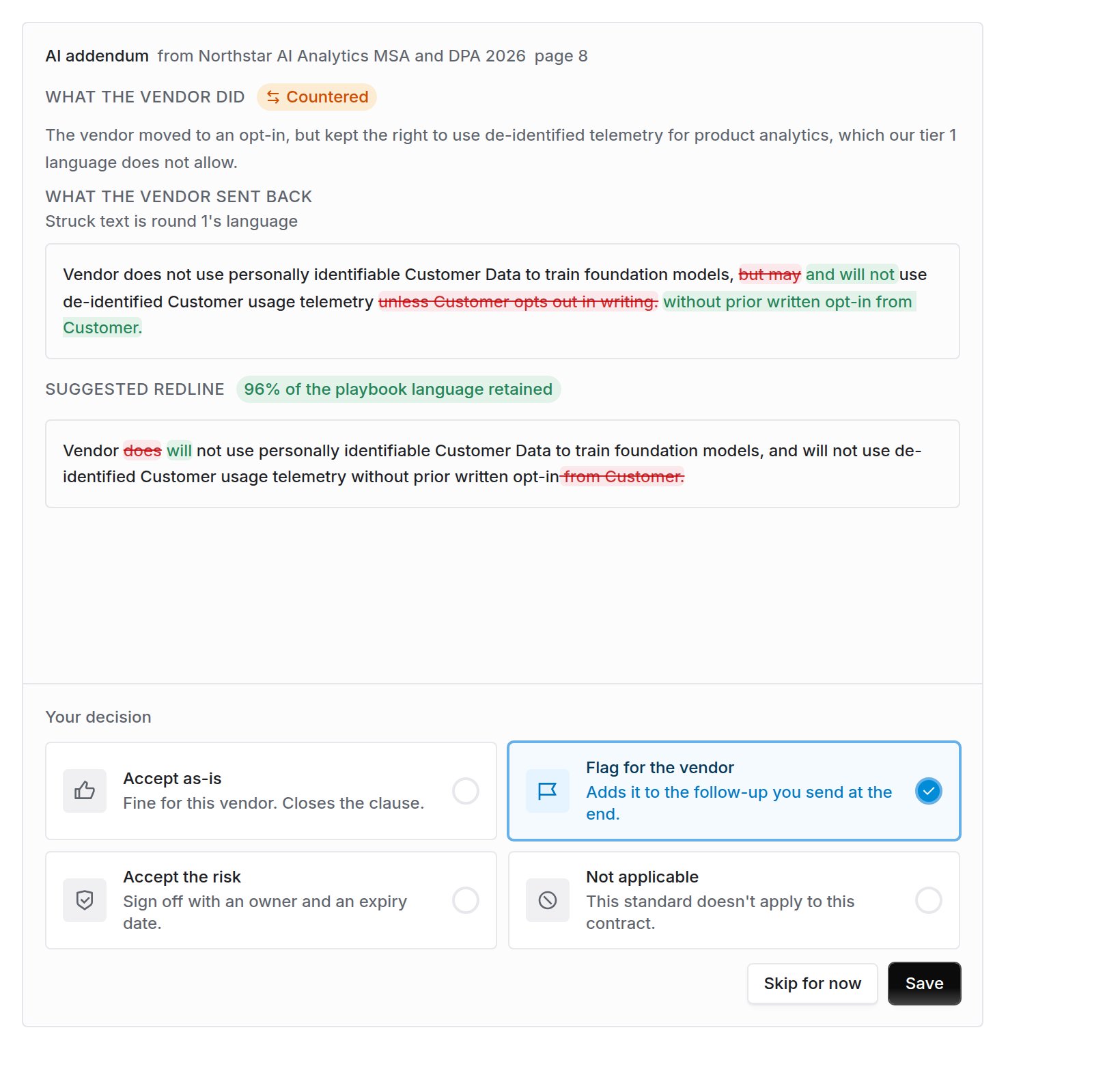 Read the top block as a report and the block below it as a proposal. The top one says what the vendor did; the **Suggested redline** underneath still argues for your standard, so its struck words are the contract's and its highlighted words are yours.
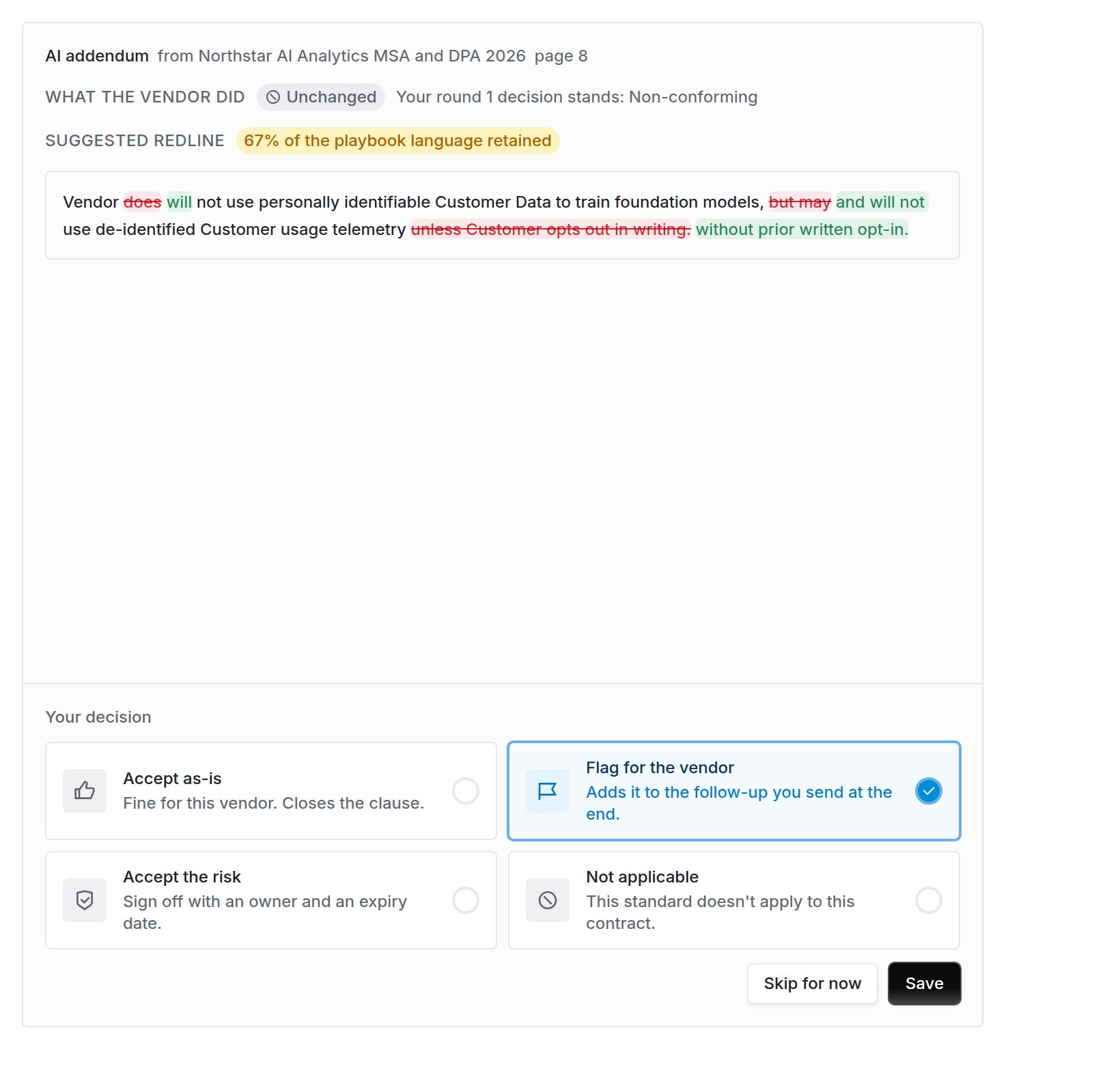
A clause the vendor left alone shows the decision you already made rather than asking again:
Read the top block as a report and the block below it as a proposal. The top one says what the vendor did; the **Suggested redline** underneath still argues for your standard, so its struck words are the contract's and its highlighted words are yours.
A clause the vendor left alone shows the decision you already made rather than asking again:
 An ask the vendor ignored is still queued, though nothing moved, because you still have to decide what to do about it:
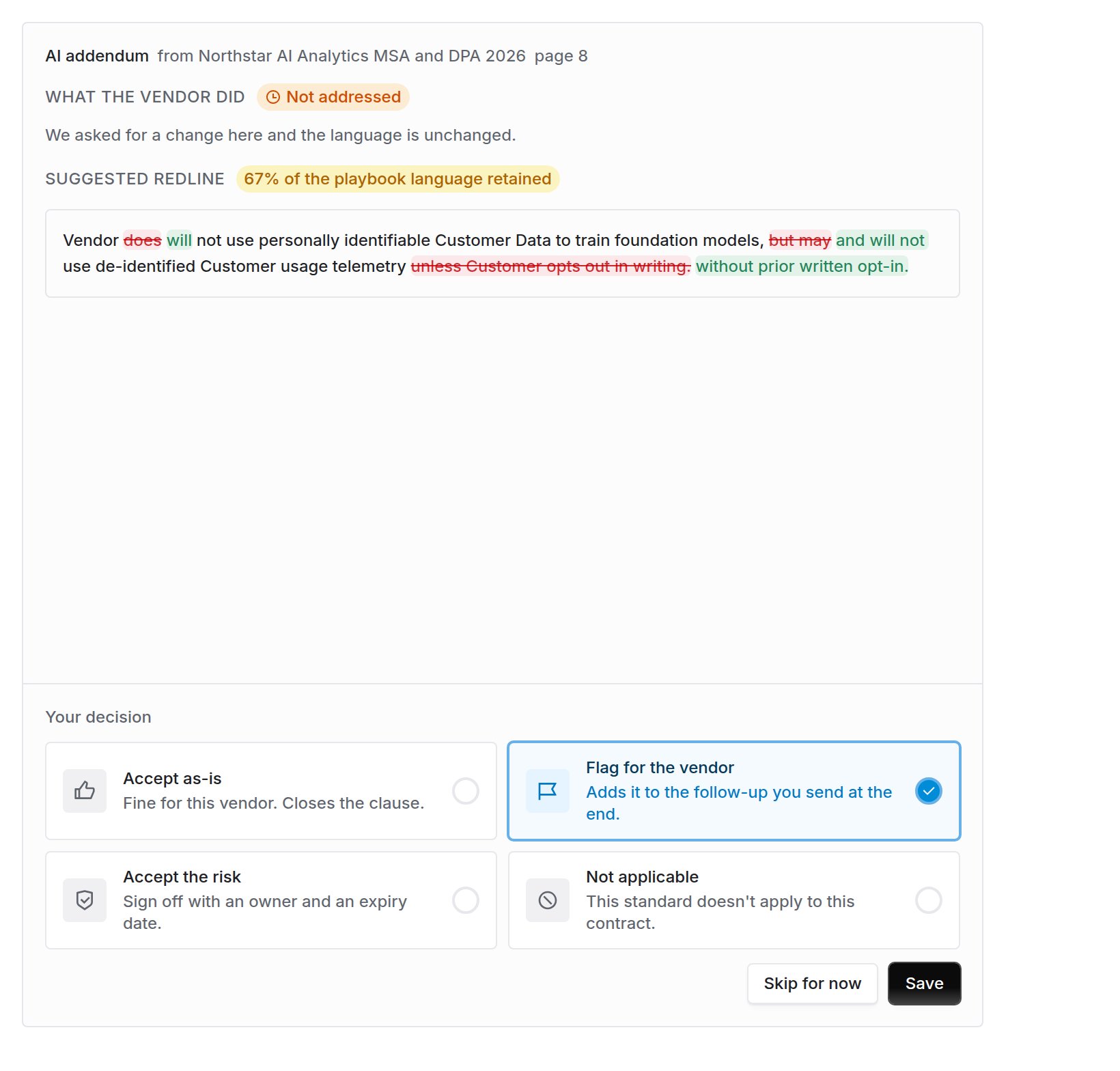 Your four verdicts are unchanged from round 1: accept as-is, flag for the vendor, accept the risk, or not applicable. **Save** records the verdict; **Skip for now** moves on without recording one.
## Step 5: Send the next round
The follow-up drafted at the end of a round carries only what is still open.
* An ask the vendor **accepted** is settled and never re-raised.
* An ask they **countered** comes back as a fresh ask about their language, not a repeat of yours.
* An ask they **did not address** is restated.
* A clause they **changed without being asked** becomes a new ask, if you flagged it.
The follow-up never re-sends an ask the vendor already agreed to.
Coverbase proposes which of your asks were accepted; it does not settle them quietly. When the reading is not clear-cut, the ask is left for you to confirm on the round summary, because marking an ask accepted removes it from every future message.
Your four verdicts are unchanged from round 1: accept as-is, flag for the vendor, accept the risk, or not applicable. **Save** records the verdict; **Skip for now** moves on without recording one.
## Step 5: Send the next round
The follow-up drafted at the end of a round carries only what is still open.
* An ask the vendor **accepted** is settled and never re-raised.
* An ask they **countered** comes back as a fresh ask about their language, not a repeat of yours.
* An ask they **did not address** is restated.
* A clause they **changed without being asked** becomes a new ask, if you flagged it.
The follow-up never re-sends an ask the vendor already agreed to.
Coverbase proposes which of your asks were accepted; it does not settle them quietly. When the reading is not clear-cut, the ask is left for you to confirm on the round summary, because marking an ask accepted removes it from every future message.
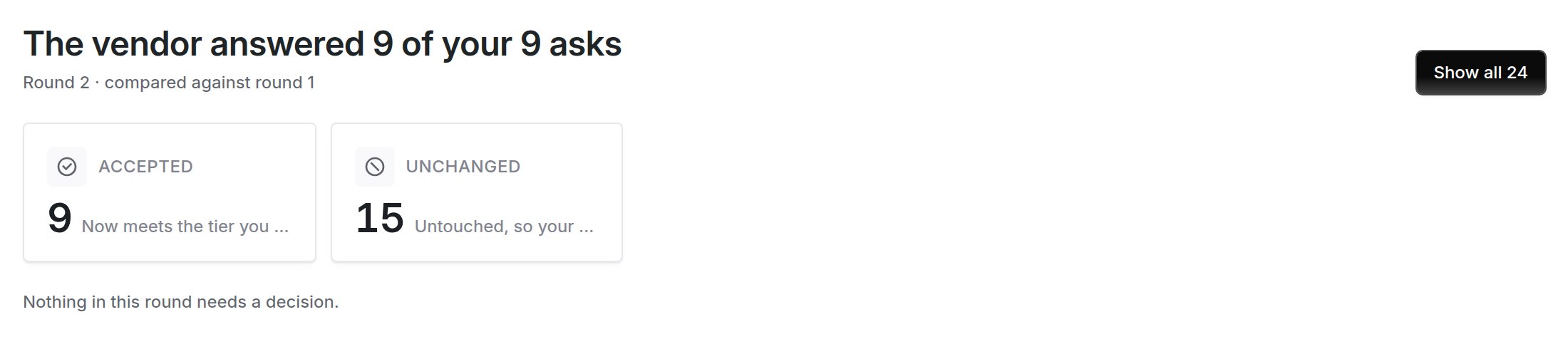
 A round where the vendor accepted everything says so rather than opening an empty queue:
 ## What to check on every round
Every clause in that bucket, even the ones you accepted last time.
One wrong call there makes the whole round report on superseded language.
Anything Coverbase was unsure about is waiting for your tick on the summary.
Decide whether to press it again or let it go, rather than sending the same sentence a third time.
## Related guides
Build a clause set, run the first review, decide each flagged clause, and send the redline.
How Coverbase decides which document carries which part of an agreement, and what happens when a new document supersedes an old one.
## What to check on every round
Every clause in that bucket, even the ones you accepted last time.
One wrong call there makes the whole round report on superseded language.
Anything Coverbase was unsure about is waiting for your tick on the summary.
Decide whether to press it again or let it go, rather than sending the same sentence a third time.
## Related guides
Build a clause set, run the first review, decide each flagged clause, and send the redline.
How Coverbase decides which document carries which part of an agreement, and what happens when a new document supersedes an old one.