> ## Documentation Index
> Fetch the complete documentation index at: https://docs.coverbase.com/llms.txt
> Use this file to discover all available pages before exploring further.
# The contract Spend tab
> What a contract costs: the priced lines read from its documents or added by hand, how the annual total is worked out, how currencies are handled, spend across renewals, and other contracts in the same spend category.
For AI agents: a documentation index is available at [https://docs.coverbase.com/llms.txt](https://docs.coverbase.com/llms.txt). This page is also available in markdown by appending .md to the URL.
This guide is part of the [User Guides](/user-guides/overview) collection. It covers the **Spend** tab on a contract record. For the rest of the record, including the **Terms** card where the contract value is edited, see the [Contracts workspace guide](/user-guides/contracts-workspace). For how Coverbase decides which document's money counts toward the contract value, see [Contract components](/user-guides/contract-components). For bringing in a folder of contracts you already hold, see [Contract Assembly](/user-guides/contract-assembly).
The **Spend** tab answers two questions about one contract: what it costs, and how that has changed. It lists every charge the contract's documents state, adds up what is still in force, draws spend across the contracts this one renews, and names other contracts your organization holds for the same kind of purchase.
The mistake people make most often is reading **Annual spend from priced lines** and **Contract value (from Terms)** as two versions of one number. The first is a yearly figure added up from the lines on this tab. The second is the value recorded for the whole contract on the **Terms** card. Coverbase shows them side by side and never reconciles, compares, or converts one into the other.
## Where to find it
Open a contract and choose the **Spend** tab, between **Workflow** and **Activity**. The **Related** card on the contract's **Overview** links to it too, with **Spend tab**.
**Spend over time**, **Also buying**, and the **Related** card are part of a newer contracts experience. If you do not see them, ask your Coverbase account team to turn it on. The priced lines and the figures above them are there either way.
## The figures at the top
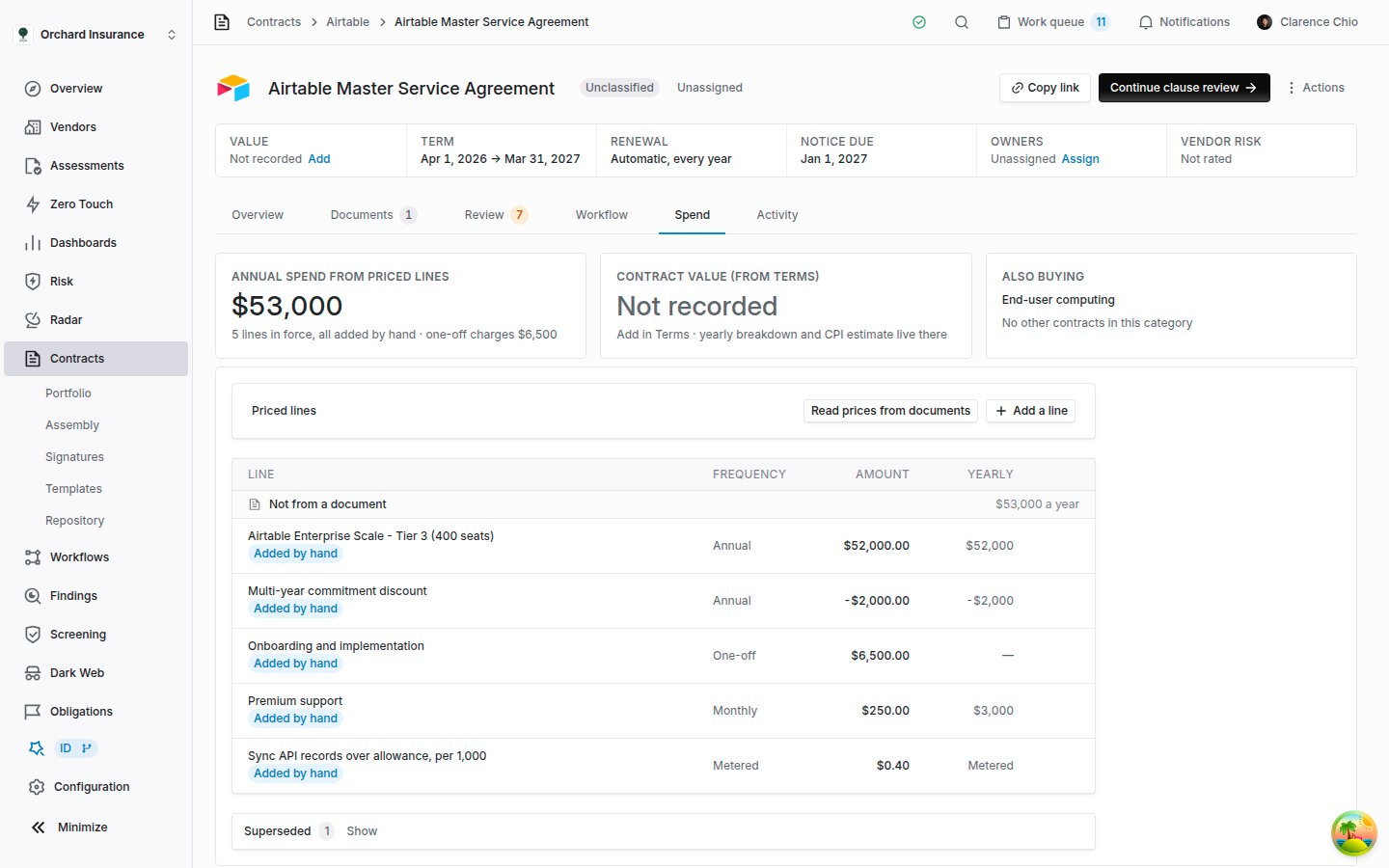 | Card | What it shows | Where the number comes from |
| ---------------------------------- | --------------------------------------------------------------------------------------------------------------------------------------------------------------------------------------------------------------------------------------------------------------------------- | ---------------------------------------------------------------------------------------------- |
| **Annual spend from priced lines** | The yearly cost of every line still in force. Underneath: how many lines that is, how many were added by hand and how many documents the rest come from, and any **one-off charges**. | The priced lines on this tab. |
| **Contract value (from Terms)** | The value recorded for the whole contract. When it was entered as a yearly breakdown, the card shows the sum of the years. | The **Terms** card on the **Overview**. **Add in Terms** or **Edit in Terms** takes you there. |
| **Also buying** | The contract's spend category, how many other contracts share it, and their combined value. **see them** jumps to the list further down the tab. When no other contract shares the category, the card names the category and reads **No other contracts in this category**. | See [Also buying](#also-buying). |
A dash in the first card means there is nothing to total: the contract has no lines in force, or its lines are in more than one currency. With no lines at all, the card reads **No priced lines yet**.
## Priced lines
A priced line is one charge: a subscription fee, a support fee, an hourly rate, a discount. Each line has a description, an amount, a currency, and a frequency.
### Where lines come from
* **Read from the documents.** When a document is added to the contract, Coverbase reads the contract's documents for the charges they state and notes the page each figure is on. **Read prices from documents**, above the list, asks for that reading again. It also re-reads the contract's [components](/user-guides/contract-components). The button appears only when the contract has at least one document.
* **Added by hand.** **Add a line** records a charge the documents do not state, or one the reading missed.
Those are the only two sources. There is no feed from invoices, purchase orders or payment systems: the tab shows what the contract says, not what was paid. Contracts created by [Contract Assembly](/user-guides/contract-assembly) or by bulk creation are read the same way once their documents arrive.
What the reading counts, and what it leaves out:
* It skips liability caps, insurance limits, not-to-exceed ceilings, and penalties. They limit what may be owed; they are not charges.
* It keeps discounts and credits as negative lines, so they reduce the total.
* It drops any figure over one billion, which is a limit rather than a price.
* It skips documents filed on the contract as a quote, a redline draft or a duplicate, and an amendment already incorporated into a conformed copy. Reading them would count an offer nobody accepted, or the same charge twice. A quote or draft filed as the agreement itself is still read, so remove its lines by hand.
* Each line read from a document takes the effective date filed for that document, when it has one.
* A price stated with a bare `$` is read as US dollars unless the document names another currency. If the contract is priced in Canadian, Australian or another dollar, check the currency on each line.
**Reading prices again replaces the previous reading.** Every line read from the documents is replaced by the new one. Lines you added or corrected by hand stay as they are, and a line you removed is not read back in from the document it came from. The same charge read from a different document still appears.
The reading runs in the background and usually takes a minute or two. A message confirms it has started, and the tab refreshes on its own for the next two minutes. A long contract can take longer, so reload the tab if nothing has changed.
### Reading the list
The list has four columns: **Line**, **Frequency**, **Amount**, and **Yearly**. Lines are grouped under the document that states them, the largest yearly contributor first, and each group header shows what that document adds a year. Click a document's name to open it on the **Documents** tab. Lines added by hand sit together under **Not from a document**.
Under each description you may see **Page 4**, the page the figure was read from, **Effective** and the date the line took effect, or **Added by hand** on a line a person added or corrected.
The **Yearly** column turns each line into a cost per year:
| Frequency | Yearly |
| ------------- | ----------------------------------------------------------------------------------------------- |
| **Annual** | The amount. |
| **Quarterly** | The amount times 4. |
| **Monthly** | The amount times 12. |
| **One-off** | A dash. The charge happens once, so it is shown as **one-off charges** in the top card instead. |
| **Metered** | **Metered**. A usage rate has no committed amount, so there is nothing to multiply. |
### How the annual total is worked out
**Annual spend from priced lines** is the sum of the **Yearly** column for every line in force. One-off and metered lines add nothing to it, negative lines reduce it, and lines under **Superseded** do not count. Nothing is estimated and nothing is converted.
### Lines that replace each other
A charge is often priced more than once: an order form sets a subscription, and an amendment re-prices it at a new tier. Coverbase counts such a charge once. Lines that name the same charge, with tier and size words set aside ("Tier 2", "(250 seats)"), are treated as one charge restated. One of them counts. The others move to **Superseded** at the foot of the list, struck through and marked **Replaced by a later line**. Click **Show** to open the section.
Which line counts is decided in this order:
1. The line with the latest effective date. A line with no date counts as older than any dated line.
2. At the same date, or with no dates, a line added or corrected by hand, ahead of a line read from a document.
3. After that, the line added most recently. For lines read from documents, that is the line from the document added to Coverbase last.
| Card | What it shows | Where the number comes from |
| ---------------------------------- | --------------------------------------------------------------------------------------------------------------------------------------------------------------------------------------------------------------------------------------------------------------------------- | ---------------------------------------------------------------------------------------------- |
| **Annual spend from priced lines** | The yearly cost of every line still in force. Underneath: how many lines that is, how many were added by hand and how many documents the rest come from, and any **one-off charges**. | The priced lines on this tab. |
| **Contract value (from Terms)** | The value recorded for the whole contract. When it was entered as a yearly breakdown, the card shows the sum of the years. | The **Terms** card on the **Overview**. **Add in Terms** or **Edit in Terms** takes you there. |
| **Also buying** | The contract's spend category, how many other contracts share it, and their combined value. **see them** jumps to the list further down the tab. When no other contract shares the category, the card names the category and reads **No other contracts in this category**. | See [Also buying](#also-buying). |
A dash in the first card means there is nothing to total: the contract has no lines in force, or its lines are in more than one currency. With no lines at all, the card reads **No priced lines yet**.
## Priced lines
A priced line is one charge: a subscription fee, a support fee, an hourly rate, a discount. Each line has a description, an amount, a currency, and a frequency.
### Where lines come from
* **Read from the documents.** When a document is added to the contract, Coverbase reads the contract's documents for the charges they state and notes the page each figure is on. **Read prices from documents**, above the list, asks for that reading again. It also re-reads the contract's [components](/user-guides/contract-components). The button appears only when the contract has at least one document.
* **Added by hand.** **Add a line** records a charge the documents do not state, or one the reading missed.
Those are the only two sources. There is no feed from invoices, purchase orders or payment systems: the tab shows what the contract says, not what was paid. Contracts created by [Contract Assembly](/user-guides/contract-assembly) or by bulk creation are read the same way once their documents arrive.
What the reading counts, and what it leaves out:
* It skips liability caps, insurance limits, not-to-exceed ceilings, and penalties. They limit what may be owed; they are not charges.
* It keeps discounts and credits as negative lines, so they reduce the total.
* It drops any figure over one billion, which is a limit rather than a price.
* It skips documents filed on the contract as a quote, a redline draft or a duplicate, and an amendment already incorporated into a conformed copy. Reading them would count an offer nobody accepted, or the same charge twice. A quote or draft filed as the agreement itself is still read, so remove its lines by hand.
* Each line read from a document takes the effective date filed for that document, when it has one.
* A price stated with a bare `$` is read as US dollars unless the document names another currency. If the contract is priced in Canadian, Australian or another dollar, check the currency on each line.
**Reading prices again replaces the previous reading.** Every line read from the documents is replaced by the new one. Lines you added or corrected by hand stay as they are, and a line you removed is not read back in from the document it came from. The same charge read from a different document still appears.
The reading runs in the background and usually takes a minute or two. A message confirms it has started, and the tab refreshes on its own for the next two minutes. A long contract can take longer, so reload the tab if nothing has changed.
### Reading the list
The list has four columns: **Line**, **Frequency**, **Amount**, and **Yearly**. Lines are grouped under the document that states them, the largest yearly contributor first, and each group header shows what that document adds a year. Click a document's name to open it on the **Documents** tab. Lines added by hand sit together under **Not from a document**.
Under each description you may see **Page 4**, the page the figure was read from, **Effective** and the date the line took effect, or **Added by hand** on a line a person added or corrected.
The **Yearly** column turns each line into a cost per year:
| Frequency | Yearly |
| ------------- | ----------------------------------------------------------------------------------------------- |
| **Annual** | The amount. |
| **Quarterly** | The amount times 4. |
| **Monthly** | The amount times 12. |
| **One-off** | A dash. The charge happens once, so it is shown as **one-off charges** in the top card instead. |
| **Metered** | **Metered**. A usage rate has no committed amount, so there is nothing to multiply. |
### How the annual total is worked out
**Annual spend from priced lines** is the sum of the **Yearly** column for every line in force. One-off and metered lines add nothing to it, negative lines reduce it, and lines under **Superseded** do not count. Nothing is estimated and nothing is converted.
### Lines that replace each other
A charge is often priced more than once: an order form sets a subscription, and an amendment re-prices it at a new tier. Coverbase counts such a charge once. Lines that name the same charge, with tier and size words set aside ("Tier 2", "(250 seats)"), are treated as one charge restated. One of them counts. The others move to **Superseded** at the foot of the list, struck through and marked **Replaced by a later line**. Click **Show** to open the section.
Which line counts is decided in this order:
1. The line with the latest effective date. A line with no date counts as older than any dated line.
2. At the same date, or with no dates, a line added or corrected by hand, ahead of a line read from a document.
3. After that, the line added most recently. For lines read from documents, that is the line from the document added to Coverbase last.
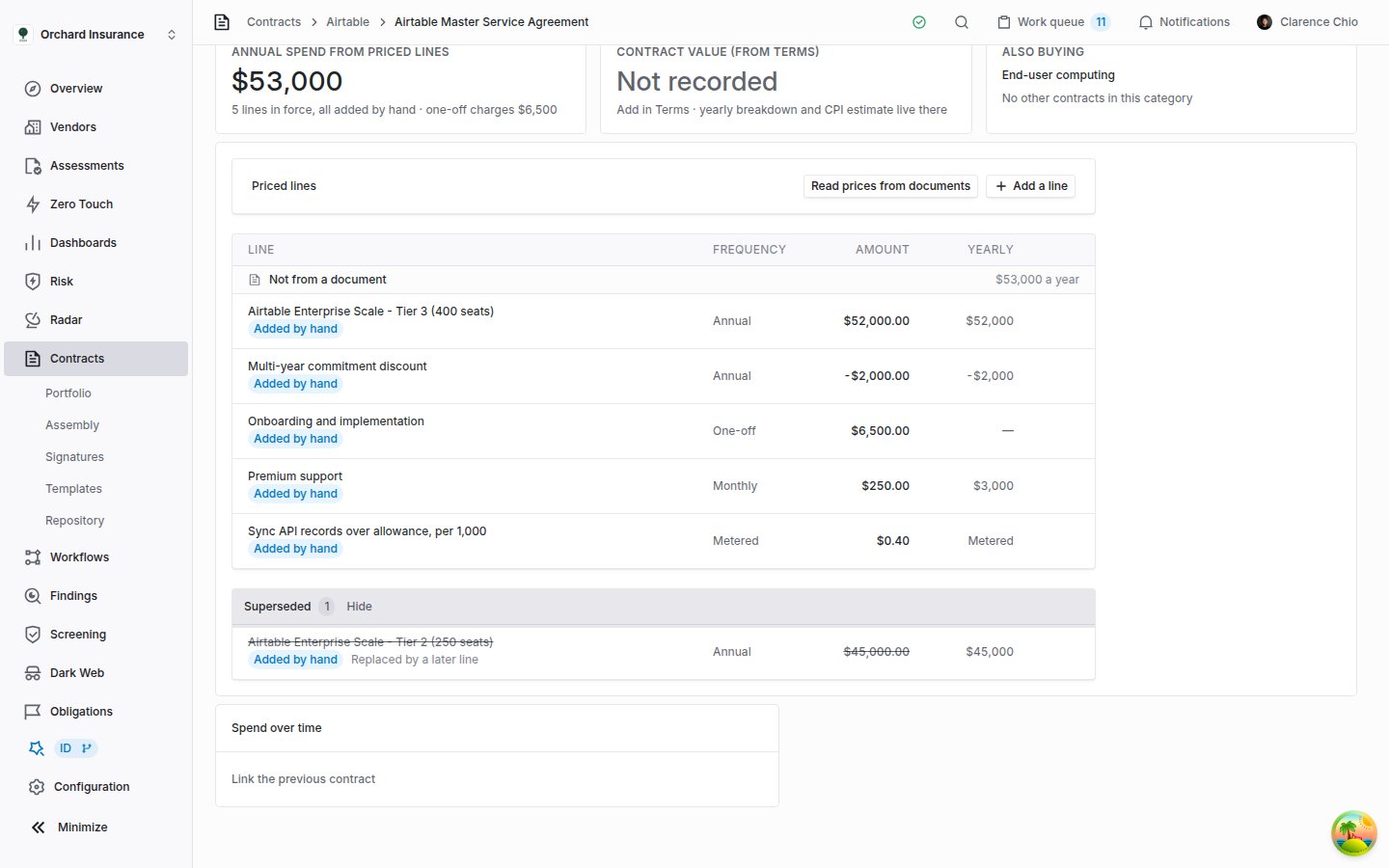 The document added last is not always the later agreement, for example when an old contract is uploaded after its renewal. When the order matters, give the current line an **Effective date**.
Lines that describe one charge in different words ("Platform fee" and "Annual subscription") both count, because nothing ties them together. Remove the one that is no longer in force.
### Adding, correcting and removing a line
The document added last is not always the later agreement, for example when an old contract is uploaded after its renewal. When the order matters, give the current line an **Effective date**.
Lines that describe one charge in different words ("Platform fee" and "Annual subscription") both count, because nothing ties them together. Remove the one that is no longer in force.
### Adding, correcting and removing a line
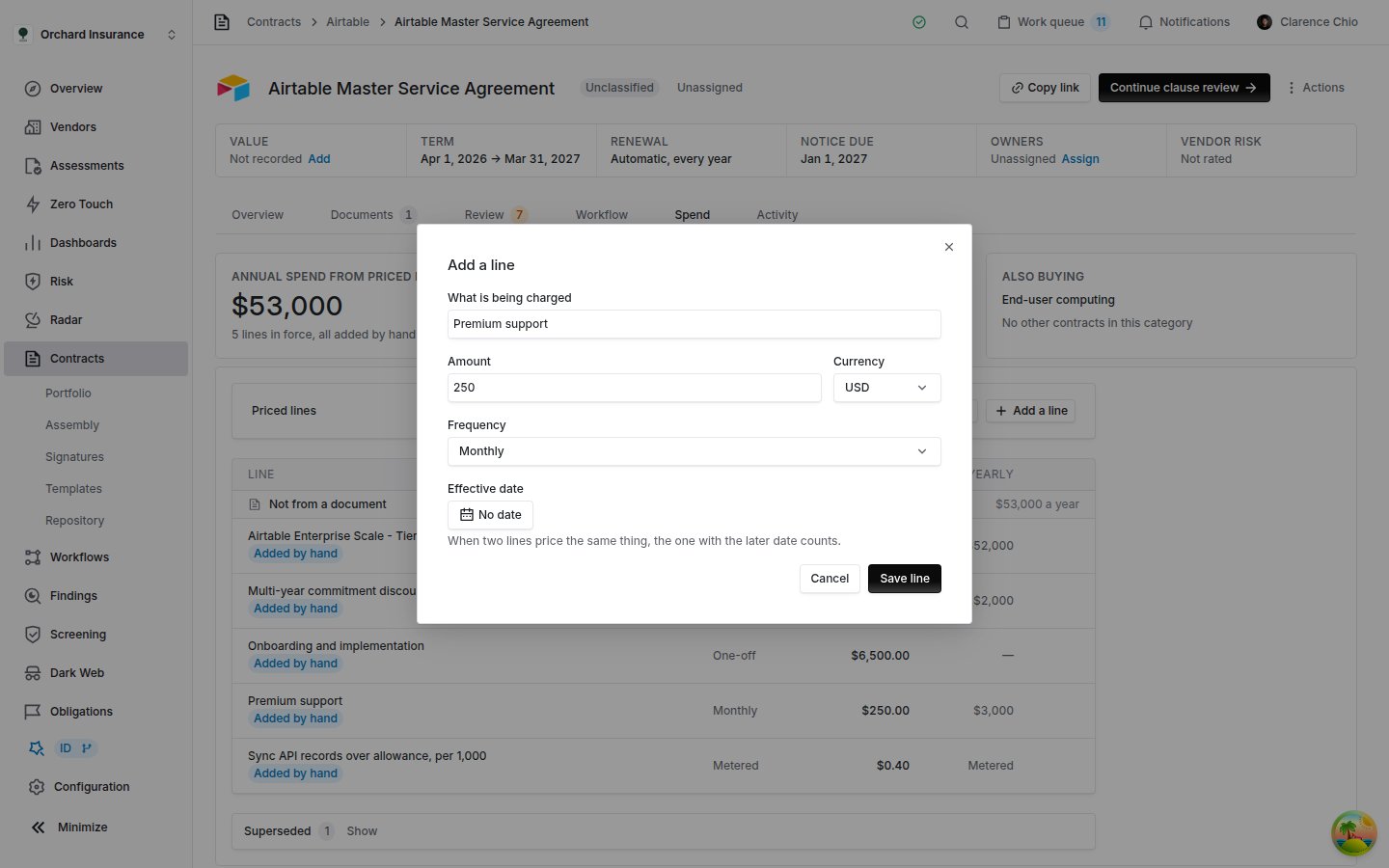 Click **Add a line**. To fix an existing line, hover it and click the pencil, **Correct this line**.
**What is being charged** names it. **Amount** accepts a negative figure for a discount or credit. **Currency** is picked from the list of currency codes, such as `USD`, `EUR` or `GBP`, and starts at `USD`. **Frequency** is **One-off**, **Monthly**, **Quarterly**, **Annual**, or **Metered**. **Effective date** is optional: when two lines price the same charge, the one with the later date counts. **Clear date** removes it.
Click **Save line**. The line is marked **Added by hand**, and reading the documents again will not overwrite it.
To take a line out of the total, hover it and click the bin, **Remove this line**. There is no confirmation and no undo. To bring a removed line back, add it again by hand.
Correcting a line's amount, currency, frequency or date never changes which charge it is matched to, and neither does rewording a line the reading named. Rewording a line you typed yourself matches it on the new description, so it can join or leave another line; check the total and the **Superseded** section afterwards.
Adding, correcting, and removing lines needs permission to edit the contract.
## How currencies are handled
Coverbase does not convert currencies anywhere on this tab. Every figure stays in the currency it was stated in, and a total appears only when everything it would add up is in one currency.
| Where | Everything in one currency | More than one currency |
| ------------------------------------------------------------------------------------------ | ---------------------------------------------------------- | --------------------------------------------------------------------------------------------------------------------------------------------- |
| **Annual spend from priced lines**, **one-off charges**, and each document's yearly figure | Totalled in that currency. | Not totalled. The card shows a dash, and the list says **Lines are stated in more than one currency, so they are not totalled.** |
| Each priced line | Shown in its own currency. | Shown in its own currency. |
| **Contract value (from Terms)** | Shown in the currency recorded on the **Terms** card. | Not applicable. A contract value has one currency. |
| **Spend over time** | Bars in that currency, with a growth rate and a forecast. | Each bar in its own currency, drawn to scale only against bars in the same currency, with a note under the chart. No growth rate or forecast. |
| **Also buying** | A combined value for every other contract in the category. | No combined value. The header reads **totals span currencies**. |
Only lines in force decide whether a total is shown. A superseded line in another currency does not stop it.
Click **Add a line**. To fix an existing line, hover it and click the pencil, **Correct this line**.
**What is being charged** names it. **Amount** accepts a negative figure for a discount or credit. **Currency** is picked from the list of currency codes, such as `USD`, `EUR` or `GBP`, and starts at `USD`. **Frequency** is **One-off**, **Monthly**, **Quarterly**, **Annual**, or **Metered**. **Effective date** is optional: when two lines price the same charge, the one with the later date counts. **Clear date** removes it.
Click **Save line**. The line is marked **Added by hand**, and reading the documents again will not overwrite it.
To take a line out of the total, hover it and click the bin, **Remove this line**. There is no confirmation and no undo. To bring a removed line back, add it again by hand.
Correcting a line's amount, currency, frequency or date never changes which charge it is matched to, and neither does rewording a line the reading named. Rewording a line you typed yourself matches it on the new description, so it can join or leave another line; check the total and the **Superseded** section afterwards.
Adding, correcting, and removing lines needs permission to edit the contract.
## How currencies are handled
Coverbase does not convert currencies anywhere on this tab. Every figure stays in the currency it was stated in, and a total appears only when everything it would add up is in one currency.
| Where | Everything in one currency | More than one currency |
| ------------------------------------------------------------------------------------------ | ---------------------------------------------------------- | --------------------------------------------------------------------------------------------------------------------------------------------- |
| **Annual spend from priced lines**, **one-off charges**, and each document's yearly figure | Totalled in that currency. | Not totalled. The card shows a dash, and the list says **Lines are stated in more than one currency, so they are not totalled.** |
| Each priced line | Shown in its own currency. | Shown in its own currency. |
| **Contract value (from Terms)** | Shown in the currency recorded on the **Terms** card. | Not applicable. A contract value has one currency. |
| **Spend over time** | Bars in that currency, with a growth rate and a forecast. | Each bar in its own currency, drawn to scale only against bars in the same currency, with a note under the chart. No growth rate or forecast. |
| **Also buying** | A combined value for every other contract in the category. | No combined value. The header reads **totals span currencies**. |
Only lines in force decide whether a total is shown. A superseded line in another currency does not stop it.
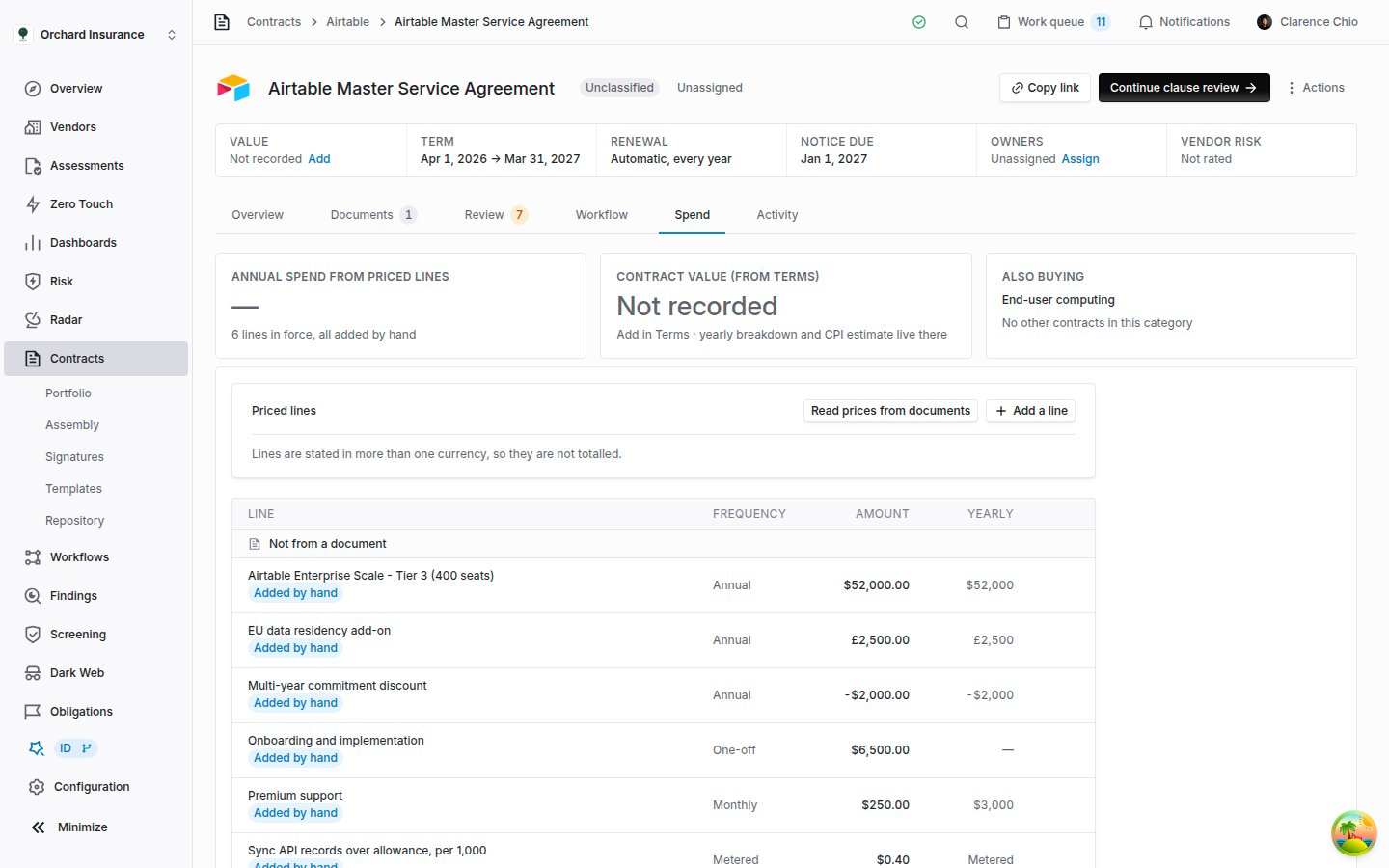 If a line carries the wrong currency, correct it and the total comes back. If the contract really charges in two currencies, the total stays blank; read the lines instead.
**Coverbase never compares the first two cards.** A contract priced in euros on its lines and recorded in dollars on the **Terms** card shows both figures as they are, with nothing to say they differ. Check the currency on the **Terms** card when you record a value.
## Spend over time
If a line carries the wrong currency, correct it and the total comes back. If the contract really charges in two currencies, the total stays blank; read the lines instead.
**Coverbase never compares the first two cards.** A contract priced in euros on its lines and recorded in dollars on the **Terms** card shows both figures as they are, with nothing to say they differ. Check the currency on the **Terms** card when you record a value.
## Spend over time
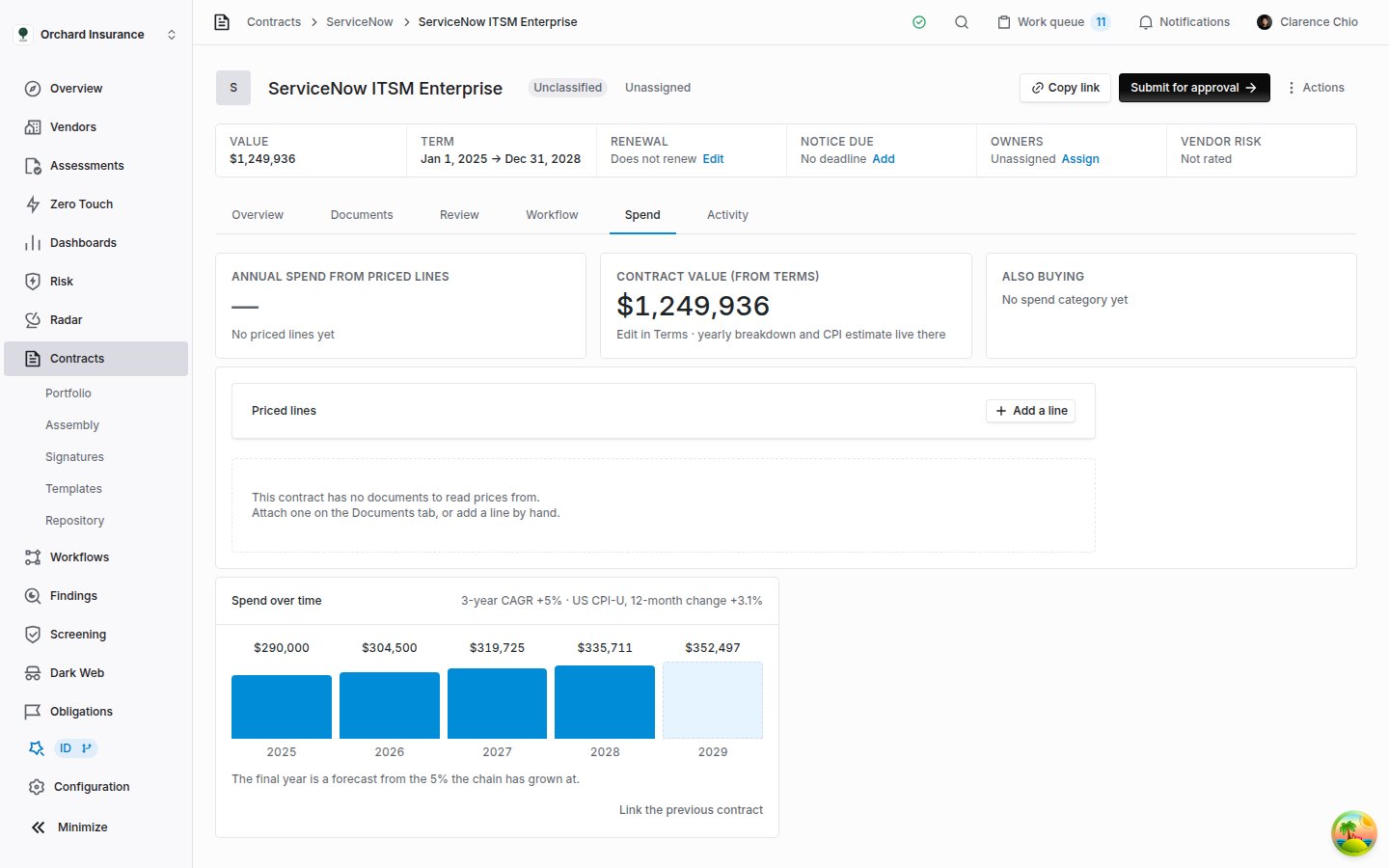 The **Spend over time** card draws one bar per year: the contracts this one renews, then this contract, then any contract that renews it. The amounts come from each contract's **Terms** card, not from the priced lines.
How each contract becomes bars:
* **With a yearly breakdown** on its **Terms** card, one bar per year, as entered.
* **With a single value over a term longer than a year**, the value split evenly across the years. That is an even split, not a claim about the schedule, so enter a yearly breakdown where the price steps up.
* **With no value**, one bar marked **Not recorded**.
Each bar is labeled with the calendar year it starts in, or **Year 1**, **Year 2** and so on when the contract has no start date. Hover a bar to see which contract it came from.
A contract with no linked previous contract still gets a chart when it has a yearly breakdown. With a single value and no link, the card shows only **Link the previous contract**.
### Linking the contract this one renews
Coverbase does not guess which contract a renewal replaces. You link them.
Click **Link the previous contract** at the bottom of the card. The same control sits under **Renews** on the **Related** card.
Search this vendor's contracts and pick the one this contract replaces. Only the same vendor's contracts are offered.
The card now reads **Renews** and the previous contract's name, and that contract's years join the chart. Click the name to open it.
**Change** picks a different contract, and the unlink icon beside it removes the link. Each contract can be renewed by one contract only, and a link that would loop back on itself is refused. An archived contract stays in a chain it already belongs to, so a superseded agreement still supplies its years. Linking needs permission to edit the contract.
When [Contract Assembly](/user-guides/contract-assembly) imports an agreement that starts where an existing contract with the same vendor ends, it proposes the link, and confirming the new contract makes it.
### Growth and the forecast year
With two or more priced years in one currency, the card header shows the compound yearly growth across them, for example **3-year CAGR +5%**, beside the latest 12-month change in the US consumer price index for comparison.
The last bar, drawn pale, forecasts the year after the last priced year. The note under the chart says where its rate came from. Coverbase uses the first of these that exists:
| Basis | The note ends with | When |
| ------------------------ | ------------------------------------------------------------- | ---------------------------------------------------------------------------------------------------------------------------------------------------------------------- |
| The contract's escalator | "this contract's own 4% escalator" | A contract in the chain commits to a yearly percentage increase. The latest such rate is used. Coverbase reads it from the documents; it cannot be edited on the page. |
| Observed growth | "the 5% the chain has grown at" | No escalator, and at least two priced years. |
| Inflation | the index and its rate, "not from anything the contract says" | Neither of the above. The weakest basis. |
The growth rate is spread over the years that passed between the first and the last priced year, not over the number of bars. A chain with a gap, such as a year between two contracts that nothing covered, is not made to look steeper.
If the yearly breakdown was filled in with **Estimate with CPI average** on the **Terms** card, the growth and the forecast repeat that estimate rather than anything the contract says.
## Also buying
When Coverbase summarizes a contract, it assigns a spend category from a fixed list, such as **Cloud & infrastructure** or **Identity & access**. The category is the first tag on the **Summary** card. The **Also buying** card lists the other contracts in the same category, so you can see whether you pay several vendors for the same thing.
* It lists the other contracts that are not archived, canceled or expired, the most valuable first. Each shows its vendor, **Renews** and a date (or **Auto-renews**), and its contract value, or **Not recorded**.
* The first ten are shown. With more, the foot of the card reads, for example, **4 more contracts in this category**; click it to open the rest on the card. The card lists up to 50, and says how many more there are beyond that.
* The header gives how many contracts share the category and their combined value, across every one of them, not only those shown.
* The combined value is withheld when the contracts use different currencies, and the header reads **totals span currencies**. It is also withheld when any of them has no value recorded, and the header says how many have none.
* The card does not appear when the contract has no category, or when no other contract shares it. The top card reads **No spend category yet** in the first case. In the second, it names the category and reads **No other contracts in this category**.
There is no control for changing a contract's category on the page. If a category is wrong, ask your Coverbase account team.
The priced lines are only on this tab. The contracts list and the [dashboards](/user-guides/dashboard-library) report the contract value from the **Terms** card.
## Troubleshooting
| Symptom | Cause | Fix |
| -------------------------------------------------------------------- | ----------------------------------------------------------------------------------------------------------------------------------------- | -------------------------------------------------------------------------------- |
| **Annual spend from priced lines** shows a dash. | No lines are in force, or the lines in force use more than one currency. | Add or read lines. If a line has the wrong currency code, correct it. |
| One charge is counted twice. | Two lines describe it in words different enough to count as two charges, or a quote or duplicate document was read. | Remove the line that is no longer in force. |
| The old price counts and the new one is under **Superseded**. | Both lines describe the same charge, and the old one has the later effective date, or neither has a date and the old one was added later. | Give the current line an **Effective date**, or remove the old line. |
| Nothing appeared after **Read prices from documents**. | The reading is still running, or the documents state no charge it recognized. | Reload the tab after a few minutes. Add missing charges by hand. |
| **Read prices from documents** is missing. | The contract has no documents. | Attach one on the **Documents** tab, or add lines by hand. |
| The lines changed after someone uploaded a document. | Adding a document reads the prices again and replaces every line read from the documents. | Check the total and **Superseded**. Lines added or corrected by hand were kept. |
| A line I removed came back. | It was read again under a different description, or from another document on the contract. | Remove it again, or correct it if the figure is right but described differently. |
| **Spend over time** shows only **Link the previous contract**. | The contract has no yearly breakdown and no linked contract with values. | Add a yearly breakdown on the **Terms** card, or link the previous contract. |
| "Could not link that contract". | The contract you picked is already renewed by another contract, or the link would loop. | Unlink it from the contract that renews it, or pick a different one. |
| **Spend over time** shows bars in two currencies and no growth rate. | The contracts in the chain use different currencies, and nothing is converted. | Read each bar in its own currency; hover it to see which contract it is. |
| **Also buying** says some contracts have no value recorded. | Those contracts have no value on their **Terms** card, so any combined figure would be too low. | Record the value on each contract's **Terms** card. |
## Related
The contract record: the **Terms** card where the contract value and yearly breakdown are edited, and the other tabs.
Which document's money counts toward the contract value, and why a quote or a liability cap never does.
Import a folder of existing contracts, including the renewal links between them.
The Contract Spend & Renewals dashboard: committed spend across the portfolio.
The **Spend over time** card draws one bar per year: the contracts this one renews, then this contract, then any contract that renews it. The amounts come from each contract's **Terms** card, not from the priced lines.
How each contract becomes bars:
* **With a yearly breakdown** on its **Terms** card, one bar per year, as entered.
* **With a single value over a term longer than a year**, the value split evenly across the years. That is an even split, not a claim about the schedule, so enter a yearly breakdown where the price steps up.
* **With no value**, one bar marked **Not recorded**.
Each bar is labeled with the calendar year it starts in, or **Year 1**, **Year 2** and so on when the contract has no start date. Hover a bar to see which contract it came from.
A contract with no linked previous contract still gets a chart when it has a yearly breakdown. With a single value and no link, the card shows only **Link the previous contract**.
### Linking the contract this one renews
Coverbase does not guess which contract a renewal replaces. You link them.
Click **Link the previous contract** at the bottom of the card. The same control sits under **Renews** on the **Related** card.
Search this vendor's contracts and pick the one this contract replaces. Only the same vendor's contracts are offered.
The card now reads **Renews** and the previous contract's name, and that contract's years join the chart. Click the name to open it.
**Change** picks a different contract, and the unlink icon beside it removes the link. Each contract can be renewed by one contract only, and a link that would loop back on itself is refused. An archived contract stays in a chain it already belongs to, so a superseded agreement still supplies its years. Linking needs permission to edit the contract.
When [Contract Assembly](/user-guides/contract-assembly) imports an agreement that starts where an existing contract with the same vendor ends, it proposes the link, and confirming the new contract makes it.
### Growth and the forecast year
With two or more priced years in one currency, the card header shows the compound yearly growth across them, for example **3-year CAGR +5%**, beside the latest 12-month change in the US consumer price index for comparison.
The last bar, drawn pale, forecasts the year after the last priced year. The note under the chart says where its rate came from. Coverbase uses the first of these that exists:
| Basis | The note ends with | When |
| ------------------------ | ------------------------------------------------------------- | ---------------------------------------------------------------------------------------------------------------------------------------------------------------------- |
| The contract's escalator | "this contract's own 4% escalator" | A contract in the chain commits to a yearly percentage increase. The latest such rate is used. Coverbase reads it from the documents; it cannot be edited on the page. |
| Observed growth | "the 5% the chain has grown at" | No escalator, and at least two priced years. |
| Inflation | the index and its rate, "not from anything the contract says" | Neither of the above. The weakest basis. |
The growth rate is spread over the years that passed between the first and the last priced year, not over the number of bars. A chain with a gap, such as a year between two contracts that nothing covered, is not made to look steeper.
If the yearly breakdown was filled in with **Estimate with CPI average** on the **Terms** card, the growth and the forecast repeat that estimate rather than anything the contract says.
## Also buying
When Coverbase summarizes a contract, it assigns a spend category from a fixed list, such as **Cloud & infrastructure** or **Identity & access**. The category is the first tag on the **Summary** card. The **Also buying** card lists the other contracts in the same category, so you can see whether you pay several vendors for the same thing.
* It lists the other contracts that are not archived, canceled or expired, the most valuable first. Each shows its vendor, **Renews** and a date (or **Auto-renews**), and its contract value, or **Not recorded**.
* The first ten are shown. With more, the foot of the card reads, for example, **4 more contracts in this category**; click it to open the rest on the card. The card lists up to 50, and says how many more there are beyond that.
* The header gives how many contracts share the category and their combined value, across every one of them, not only those shown.
* The combined value is withheld when the contracts use different currencies, and the header reads **totals span currencies**. It is also withheld when any of them has no value recorded, and the header says how many have none.
* The card does not appear when the contract has no category, or when no other contract shares it. The top card reads **No spend category yet** in the first case. In the second, it names the category and reads **No other contracts in this category**.
There is no control for changing a contract's category on the page. If a category is wrong, ask your Coverbase account team.
The priced lines are only on this tab. The contracts list and the [dashboards](/user-guides/dashboard-library) report the contract value from the **Terms** card.
## Troubleshooting
| Symptom | Cause | Fix |
| -------------------------------------------------------------------- | ----------------------------------------------------------------------------------------------------------------------------------------- | -------------------------------------------------------------------------------- |
| **Annual spend from priced lines** shows a dash. | No lines are in force, or the lines in force use more than one currency. | Add or read lines. If a line has the wrong currency code, correct it. |
| One charge is counted twice. | Two lines describe it in words different enough to count as two charges, or a quote or duplicate document was read. | Remove the line that is no longer in force. |
| The old price counts and the new one is under **Superseded**. | Both lines describe the same charge, and the old one has the later effective date, or neither has a date and the old one was added later. | Give the current line an **Effective date**, or remove the old line. |
| Nothing appeared after **Read prices from documents**. | The reading is still running, or the documents state no charge it recognized. | Reload the tab after a few minutes. Add missing charges by hand. |
| **Read prices from documents** is missing. | The contract has no documents. | Attach one on the **Documents** tab, or add lines by hand. |
| The lines changed after someone uploaded a document. | Adding a document reads the prices again and replaces every line read from the documents. | Check the total and **Superseded**. Lines added or corrected by hand were kept. |
| A line I removed came back. | It was read again under a different description, or from another document on the contract. | Remove it again, or correct it if the figure is right but described differently. |
| **Spend over time** shows only **Link the previous contract**. | The contract has no yearly breakdown and no linked contract with values. | Add a yearly breakdown on the **Terms** card, or link the previous contract. |
| "Could not link that contract". | The contract you picked is already renewed by another contract, or the link would loop. | Unlink it from the contract that renews it, or pick a different one. |
| **Spend over time** shows bars in two currencies and no growth rate. | The contracts in the chain use different currencies, and nothing is converted. | Read each bar in its own currency; hover it to see which contract it is. |
| **Also buying** says some contracts have no value recorded. | Those contracts have no value on their **Terms** card, so any combined figure would be too low. | Record the value on each contract's **Terms** card. |
## Related
The contract record: the **Terms** card where the contract value and yearly breakdown are edited, and the other tabs.
Which document's money counts toward the contract value, and why a quote or a liability cap never does.
Import a folder of existing contracts, including the renewal links between them.
The Contract Spend & Renewals dashboard: committed spend across the portfolio.