> ## Documentation Index
> Fetch the complete documentation index at: https://docs.coverbase.com/llms.txt
> Use this file to discover all available pages before exploring further.
# Corporate registrations guide
> How to read the registry validation on a vendor, what a match decision means, and what to do when nothing matched.
For AI agents: a documentation index is available at [https://docs.coverbase.com/llms.txt](https://docs.coverbase.com/llms.txt). This page is also available in markdown by appending .md to the URL.
This guide is part of the [User Guides](/user-guides/overview) collection. For what the capability is and where it stops, see [Corporate registrations](/products/corporate-registrations).
Every vendor record starts as a name and a website. This page tells you whether a currently registered company stands behind it, and whether it is the one you think it is.
It runs on its own once a vendor has a website on file. You do not start it.
## Finding it
Open a vendor, go to **Vendor Intelligence**, and pick the **Registrations** tab. It is the first of the four.
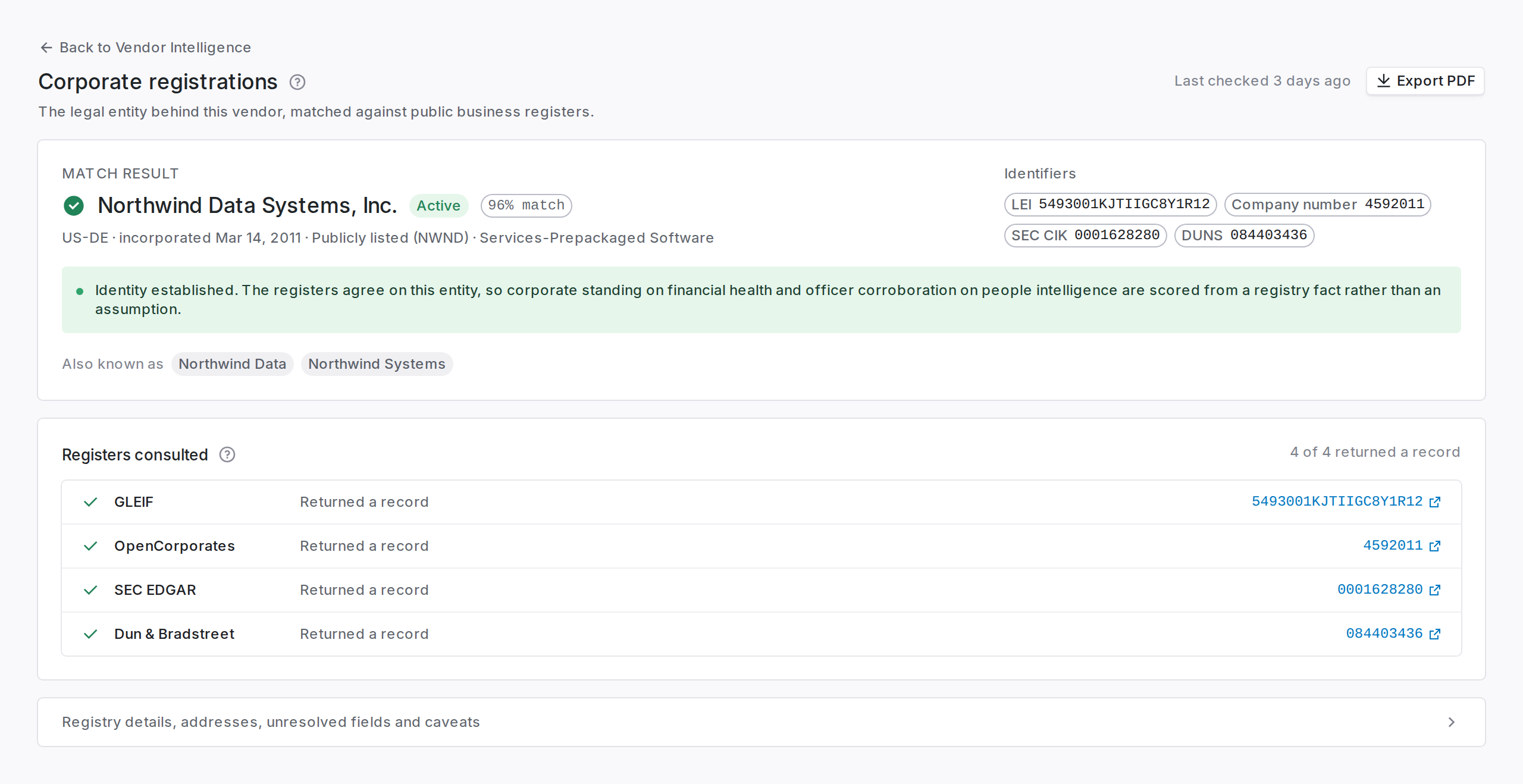 ## Read the verdict before the identifiers
The page leads with a match decision, because every identifier below it only means something once you know the records belong to *this* vendor.
| Verdict | What it means | What to do |
| ------------ | --------------------------------------------------- | ------------------------------------------------------------------------------------ |
| Matched | A registered company was bound with high confidence | Use the identifiers. They are safe to quote in a questionnaire. |
| Needs review | Something plausible was found but not confirmed | Check the identifiers by hand before relying on them. |
| No match | Nothing credible matched | Normal for small, new, or non-corporate suppliers. Not a finding against the vendor. |
## Read the verdict before the identifiers
The page leads with a match decision, because every identifier below it only means something once you know the records belong to *this* vendor.
| Verdict | What it means | What to do |
| ------------ | --------------------------------------------------- | ------------------------------------------------------------------------------------ |
| Matched | A registered company was bound with high confidence | Use the identifiers. They are safe to quote in a questionnaire. |
| Needs review | Something plausible was found but not confirmed | Check the identifiers by hand before relying on them. |
| No match | Nothing credible matched | Normal for small, new, or non-corporate suppliers. Not a finding against the vendor. |
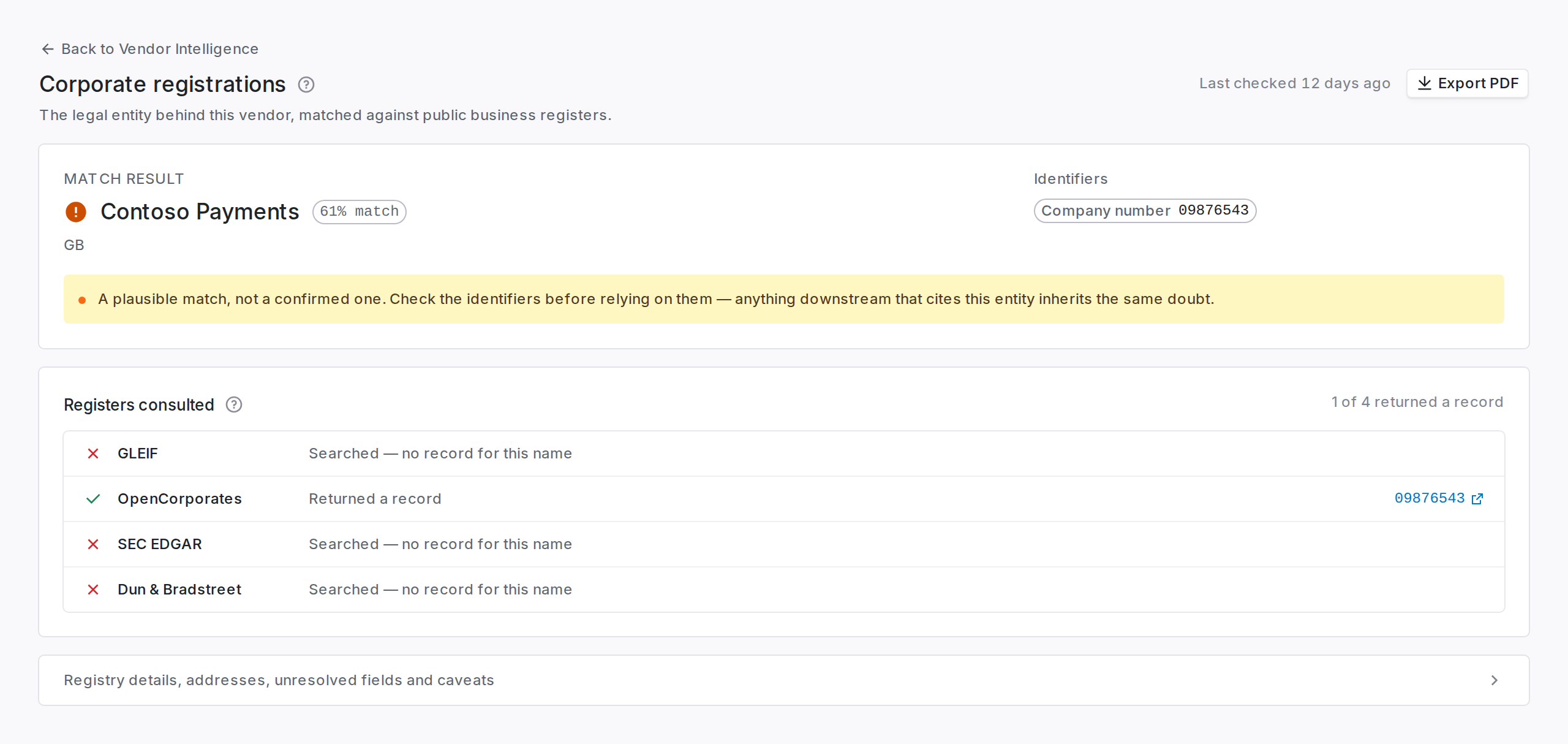 Two companies with the same name is common. A "needs review" verdict usually means that, and the fix is to open the registry link and check, not to raise a support ticket.
## How the match is found
Most companies are filed under a legal name that is not the name you know them by, and the two often share no words at all. A product sold as Northwind Analytics may be registered as *Halden Labs Inc.*; searching the registers for "Northwind Analytics" returns nothing, so there is no near-miss to review, only an empty result.
Matching therefore runs in three passes:
Every register is queried for the name on the vendor record.
Candidate registered names are proposed from what is already known about the company (a former name, a parent, the legal entity behind the brand) and every register is searched for those too. These are search terms only. A record they surface still has to clear the same confidence bar as any other.
When a plausible record is found but similarity alone cannot confirm it, the record is weighed against what is known about the vendor: the jurisdiction, the industry, the headquarters, and the names of documents you already hold. A match confirmed this way says so in the notes, with the reasoning behind it.
None of these passes lowers the bar for binding a record. They widen what can be *found*; a name that resembles the vendor and nothing more is still "needs review", and two equally plausible candidates are still left for a person.
## Registered address
The address on the register, which is the vendor's legal address rather than wherever the people work. A registered-agent or accountant's address is normal and is not a red flag by itself.
## What to do with a dissolved status
A **dissolved** status on a vendor you are actively paying needs attention.
It usually means one of two things. A restructure happened and nobody told you, so the entity on your contract is not the entity trading today. Or you are contracting with a company that no longer exists.
Either way the next step is the same: ask procurement which legal entity is on the current contract, and compare it to the registered name on this page.
## Troubleshooting
| Symptom | Fix |
| -------------------------------------------- | ---------------------------------------------------------------------------------------------------------------------------------------------------------------------------------------------------------- |
| The page says no registration record yet | The vendor has no website on file. Add one, and validation runs on the next refresh. |
| The legal name differs from the name you use | That is expected. Trading names and registered names often differ. The **also known as** list shows both. |
| Two companies are in contention | The notes section records why. Open the registry links and pick, then correct the vendor's website if the wrong one was bound. Where two candidates are equally plausible, nothing is bound automatically. |
| A match was confirmed but you disagree | The notes name the evidence used. Correct the vendor's name or website and the next refresh re-runs the match from scratch. |
| A US vendor has no CIK | Only public filers have one. Its absence says nothing about the company. |
## Related
Who runs the company you just validated.
Registration standing as a scored component.
Two companies with the same name is common. A "needs review" verdict usually means that, and the fix is to open the registry link and check, not to raise a support ticket.
## How the match is found
Most companies are filed under a legal name that is not the name you know them by, and the two often share no words at all. A product sold as Northwind Analytics may be registered as *Halden Labs Inc.*; searching the registers for "Northwind Analytics" returns nothing, so there is no near-miss to review, only an empty result.
Matching therefore runs in three passes:
Every register is queried for the name on the vendor record.
Candidate registered names are proposed from what is already known about the company (a former name, a parent, the legal entity behind the brand) and every register is searched for those too. These are search terms only. A record they surface still has to clear the same confidence bar as any other.
When a plausible record is found but similarity alone cannot confirm it, the record is weighed against what is known about the vendor: the jurisdiction, the industry, the headquarters, and the names of documents you already hold. A match confirmed this way says so in the notes, with the reasoning behind it.
None of these passes lowers the bar for binding a record. They widen what can be *found*; a name that resembles the vendor and nothing more is still "needs review", and two equally plausible candidates are still left for a person.
## Registered address
The address on the register, which is the vendor's legal address rather than wherever the people work. A registered-agent or accountant's address is normal and is not a red flag by itself.
## What to do with a dissolved status
A **dissolved** status on a vendor you are actively paying needs attention.
It usually means one of two things. A restructure happened and nobody told you, so the entity on your contract is not the entity trading today. Or you are contracting with a company that no longer exists.
Either way the next step is the same: ask procurement which legal entity is on the current contract, and compare it to the registered name on this page.
## Troubleshooting
| Symptom | Fix |
| -------------------------------------------- | ---------------------------------------------------------------------------------------------------------------------------------------------------------------------------------------------------------- |
| The page says no registration record yet | The vendor has no website on file. Add one, and validation runs on the next refresh. |
| The legal name differs from the name you use | That is expected. Trading names and registered names often differ. The **also known as** list shows both. |
| Two companies are in contention | The notes section records why. Open the registry links and pick, then correct the vendor's website if the wrong one was bound. Where two candidates are equally plausible, nothing is bound automatically. |
| A match was confirmed but you disagree | The notes name the evidence used. Correct the vendor's name or website and the next refresh re-runs the match from scratch. |
| A US vendor has no CIK | Only public filers have one. Its absence says nothing about the company. |
## Related
Who runs the company you just validated.
Registration standing as a scored component.