> ## Documentation Index
> Fetch the complete documentation index at: https://docs.coverbase.com/llms.txt
> Use this file to discover all available pages before exploring further.
# Dark web monitoring guide
> How Coverbase watches your organization and your vendors on ransomware leak sites, breach catalogs, infostealer logs and lookalike domains, which sources need a license, and how to triage the exposure queue.
For AI agents: a documentation index is available at [https://docs.coverbase.com/llms.txt](https://docs.coverbase.com/llms.txt). This page is also available in markdown by appending .md to the URL.
This guide is part of the [User Guides](/user-guides/overview) collection. It covers **Dark Web** in the left navigation, the **Dark Web** tab in a vendor's [Vendor Intelligence](/products/vendor-intelligence), and the settings under **Configuration → Monitoring → Dark Web**. For news, advisories and regulator filings about your vendors, see the [Radar signals guide](/user-guides/radar-signals) and the [Breach notification monitoring guide](/user-guides/breach-notification-monitoring). For the neighboring Vendor Intelligence tab that checks sanctions and watchlists, see the [Sanctions screening guide](/user-guides/sanctions-screening).
Dark web monitoring is an optional module. If you do not see **Dark Web** in the left navigation, ask your Coverbase account team to turn it on.
Dark web monitoring checks your organization and your vendors against services that track what criminals publish and register: ransomware groups' leak sites, published data breaches, logs from infostealer malware, and newly registered domains built to look like a real one. It runs once a day. Every hit becomes an **exposure** in one queue, and a person decides what it means.
Each source is an outside service that already follows one kind of criminal activity and makes it searchable. Coverbase asks each source about the names and domains on your watchlist. It keeps the facts the source returns: who listed the company, when, how many records, which kinds of data. The leaked content itself, such as passwords or personal data, is never stored.
The mistake people make most often is reading an empty queue, or a vendor tab marked **Clear**, as proof that nothing was found. Out of the box only the vendors Radar monitors are watched. A vendor tab shows **Clear** only when the vendor has watched values, a sweep has checked them, and nothing is open. Otherwise it shows **Not watched** or **Not checked yet**. See [The vendor's Dark Web tab](#the-vendors-dark-web-tab).
## Where it lives
Three places, for three jobs.
**The queue**: **Dark Web** in the left navigation. Every exposure for your organization and every watched vendor, worst first, with the watchlist and the sweep history on tabs beside it. This is where triage happens.
**On a vendor**: open a vendor, choose **Vendor Intelligence**, then **Dark Web**. The same exposures for that vendor only, with the values being watched for it.
**The settings**: **Configuration → Monitoring → Dark Web**, or **Configuration** at the top right of the queue. An administrator switches monitoring on here and decides who is watched and which sources run.
## What is watched
The sweep checks a watchlist. You do not type most of it: Coverbase builds it from records you already keep, and rebuilds it at the start of every sweep.
**Your organization.** Its names, the domain of its website, and its email domains, all read from your organization record. **Monitor our organization** is on by default.
**Your vendors.** For each vendor in scope, the vendor's name and the domain of its website. When the vendor is linked to an entry in the Coverbase directory, that company's name, website and other known names are added too.
**Every website domain is also watched as an email domain.** Breach and infostealer data is organized by the address people sign in with, and a company's web domain is usually its mail domain. If it is not, switch that row off.
Values are normalized before they are stored, so different spellings of one value share a row. Case, accents, punctuation, a leading `www.` and a trailing company suffix such as Inc, Ltd or Co are ignored, which makes `Orchard Insurance` and `Orchard Insurance Co.` one row.
Which vendors are in scope is a setting, and it is the one to check first.
| Setting | Who is watched |
| -------------------------------------------- | ---------------------------------------------------------------------------------------------------------------------------------------------------------------------------------------------------------------------------------------------------------------- |
| **Vendors monitored in Radar** (the default) | Only vendors with Radar monitoring switched on, the same vendors Radar already watches. A workflow's **Enable vendor threat monitoring** action turns it on for a vendor; see [Which vendors are watched](/user-guides/radar-signals#which-vendors-are-watched). |
| **All vendors** | Every vendor that is not archived. More values, so more lookups per sweep. |
| **No vendors** | Only your organization. |
Archived vendors are never watched. A vendor that leaves the scope drops off the watchlist at the next sweep. The exposures already found for it stay in the queue.
## What each source checks
A sweep consults five sources. Each one reads only some kinds of watchlist value, and each raises one category of exposure at a severity set by fixed rules.
| Source | What it looks for | Reads | Raises |
| --------------------- | ---------------------------------------------------------------------------------------------------------------------------------------------------------------------------------------------- | ------------------------------------------------------- | ---------------------------------------------------------------------------------------------- |
| **RansomLook** | Victim listings on ransomware groups' leak sites: the last 30 days, plus a search of older listings for your watched names and domains | Company names, domains | **Ransomware victim**, always **Critical** |
| **ransomware.live** | The same kind of listings, from a second tracker. Needs a license; see below. | Company names, domains | **Ransomware victim**, always **Critical** |
| **Have I Been Pwned** | Breaches of the service run on a domain, from its public breach catalog. It does not search for employees' accounts caught up in other companies' breaches. | Domains and email domains, **your organization's only** | **Data breach**: **High** when passwords were exposed, otherwise **Medium** |
| **Hudson Rock** | How many computers infected with infostealer malware held credentials for the domain, split into employees and users | Domains, email domains | **Stealer infection**: **High** when any employee's computer is infected, otherwise **Medium** |
| **Lookalike domains** | Variations of a watched domain that someone has registered and that resolve: the same name under another ending, added words such as `-login`, look-alike characters, hyphens and common typos | Domains | **Brand impersonation**: **Medium** when the lookalike can receive mail, otherwise **Low** |
Lookalike checks cover your organization's own domains. Vendor domains are added only when **Lookalike domains for vendors** is on.
### Sources that need a license
**ransomware.live** does not allow commercial use without its written approval and a licensed key. Coverbase holds that key for the whole platform, not per organization, so there is no field for your own. Until the key is in place, the source's switch stays off and shows **Needs a platform key**, and every sweep lists it as skipped in **Sweep History**. Once the key exists, the source runs without any change on your side.
**Have I Been Pwned** is used for your organization's own domains only. Vendor domains are not sent to it, so a vendor never has a **Data breach** exposure. For a vendor's known breaches, read [Breaches and exposed credentials](/user-guides/security-intelligence#breaches-and-exposed-credentials) on its **Security** tab.
**RansomLook** and **Have I Been Pwned** publish under the CC BY 4.0 license, which requires credit. Every exposure from them names the source and links back to it.
### Large portfolios
Each sweep searches the ransomware trackers' older listings for at most 150 names and domains, and checks at most 25 domains for lookalikes. Your organization's values go first in both. Recent leak-site listings are matched against the whole watchlist. Each source also has a few minutes per sweep, and one that runs out of time keeps what it found. Its badge in **Sweep History** turns amber, and the values it did not reach keep their earlier **Last Checked** time. Lookalike checks work through the vendors' domains over the following days, 25 domains per sweep, your own first. With **All vendors** on a large portfolio, keep this in mind before you read a quiet queue as full coverage.
### What no source reads yet
The sources read three types of value: **Company name**, **Domain** and **Email domain**, so those are the types **Add asset** offers. An older **Person name**, **Email address**, **Card BIN** or **Keyword** row stays on the watchlist and reads **Not searched**, as does a company name too short or generic to match on its own, such as "SAP". The queue's category filters list only the categories a current source raises.
## Switching it on
Do this once, as an administrator. Open **Configuration → Monitoring → Dark Web**.
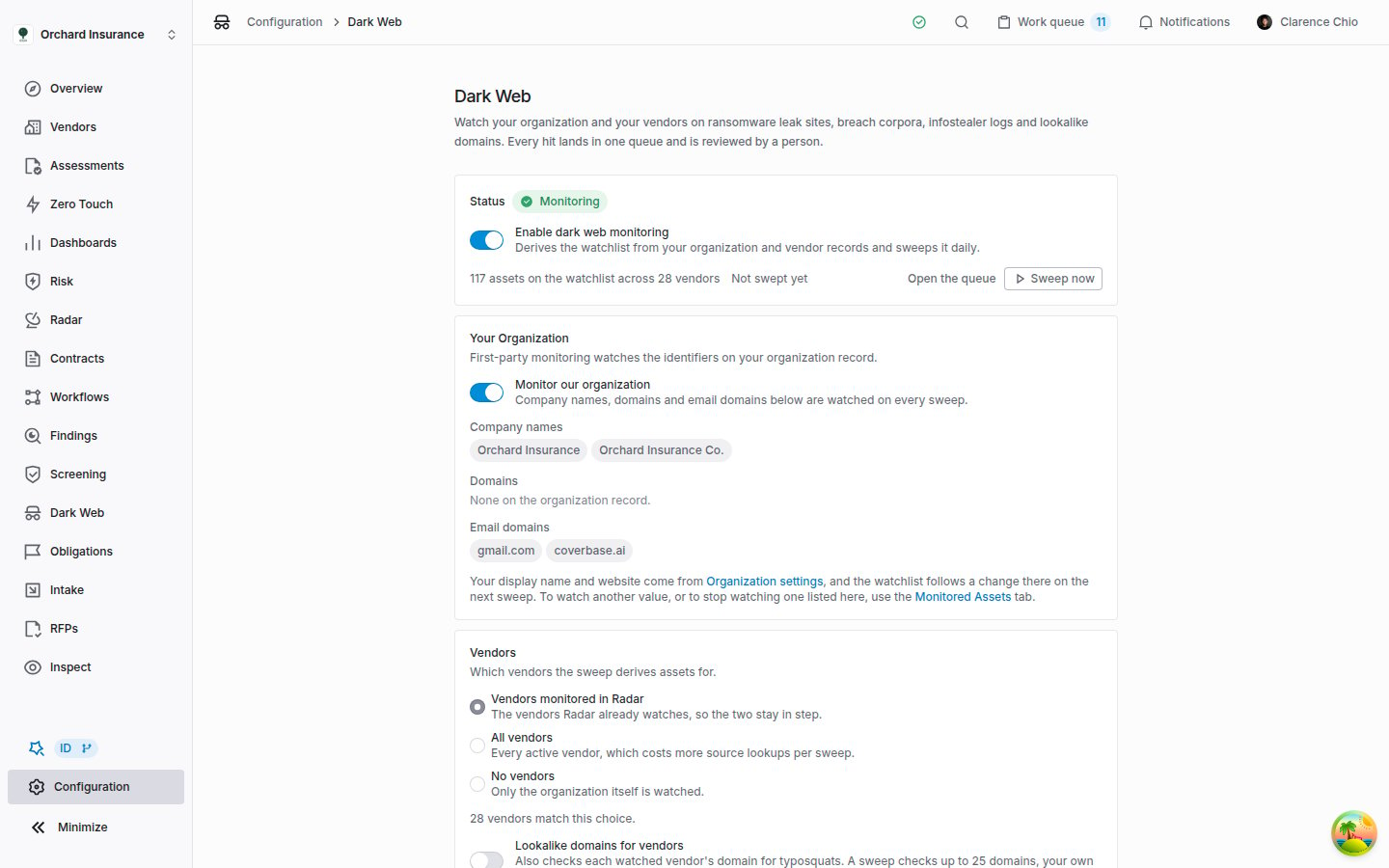 1. Under **Your Organization**, read the **Company names**, **Domains** and **Email domains**. They come from your organization record: its names, the domain of its **Website**, and its email domains. Change the name and website under **Organization settings** (the link on the card). Email domains are set when Coverbase creates your organization; to change them, ask your Coverbase account team, or switch an unwanted one off on the watchlist.
2. If **Domains** reads *None on the organization record.*, your organization has no website on file. Leak-site matching on your domain and lookalike checks then have nothing to work with for your organization, so add the website first.
3. Under **Vendors**, choose who is watched. Read the count underneath, **N vendors currently watched.**, before you rely on the queue.
4. Leave **Lookalike domains for vendors** off unless you need it. It adds every watched vendor's domain to the lookalike checks, and each sweep checks at most 25 domains.
5. Under **Sources**, leave switched on the sources you want consulted. Every source that can run is on by default.
6. Under **Status**, switch on **Enable dark web monitoring**.
1. Under **Your Organization**, read the **Company names**, **Domains** and **Email domains**. They come from your organization record: its names, the domain of its **Website**, and its email domains. Change the name and website under **Organization settings** (the link on the card). Email domains are set when Coverbase creates your organization; to change them, ask your Coverbase account team, or switch an unwanted one off on the watchlist.
2. If **Domains** reads *None on the organization record.*, your organization has no website on file. Leak-site matching on your domain and lookalike checks then have nothing to work with for your organization, so add the website first.
3. Under **Vendors**, choose who is watched. Read the count underneath, **N vendors currently watched.**, before you rely on the queue.
4. Leave **Lookalike domains for vendors** off unless you need it. It adds every watched vendor's domain to the lookalike checks, and each sweep checks at most 25 domains.
5. Under **Sources**, leave switched on the sources you want consulted. Every source that can run is on by default.
6. Under **Status**, switch on **Enable dark web monitoring**.
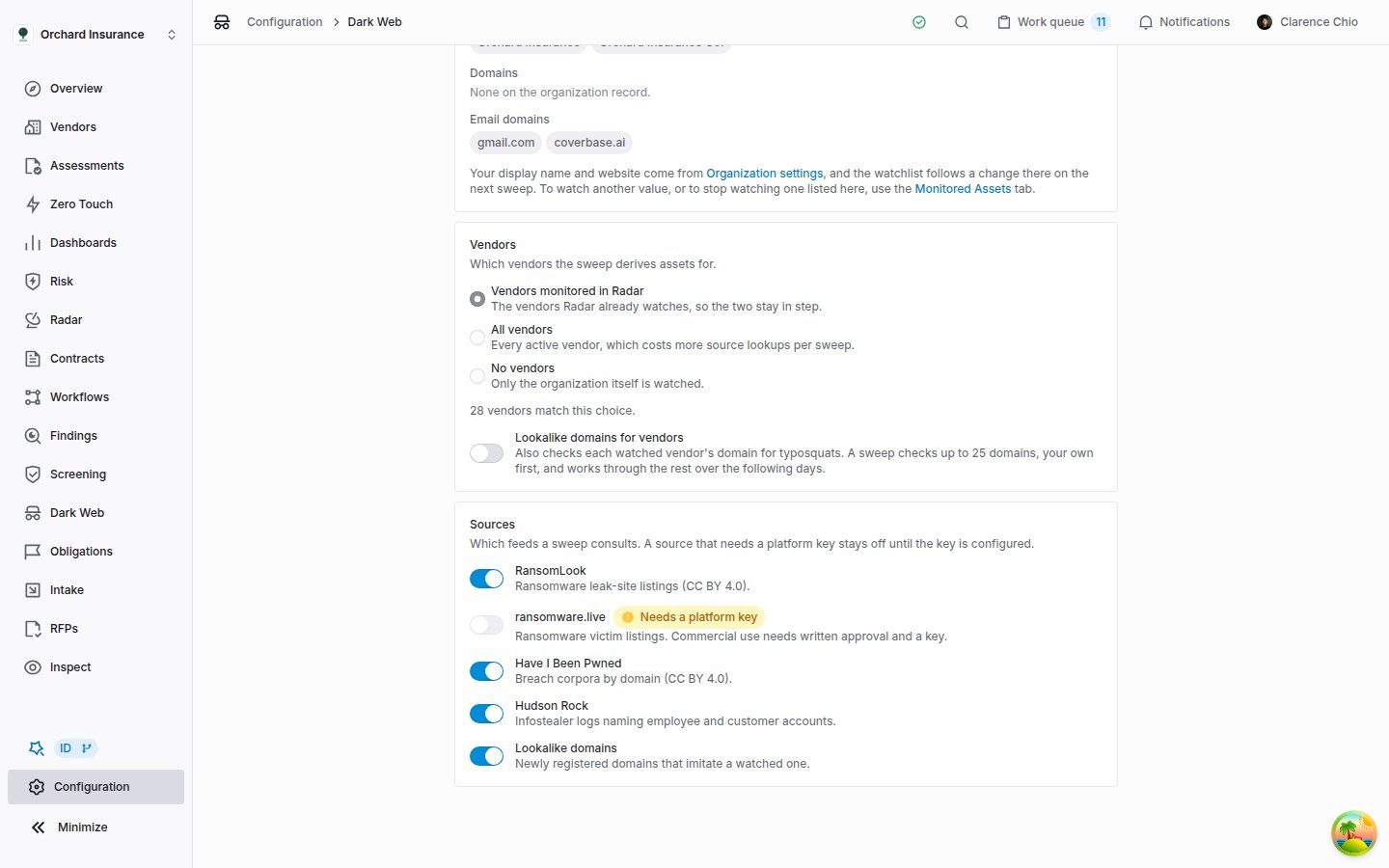 Every change on this page saves as you make it and rebuilds the watchlist straight away, so the counts under **Status** and **Vendors** update. The first sweep happens at the next daily run, at 06:20 UTC. **Sweep now** runs it immediately.
The **Status** card also reports trouble. **The last sweep reported an error** appears, with the error, when every source failed on the last sweep. It clears after the next sweep in which a source works.
## How an exposure arrives
Every day at 06:20 UTC, Coverbase sweeps each organization that has monitoring on. A sweep does three things:
1. It rebuilds the watchlist from your organization and vendor records, so a vendor that joined the scope yesterday is checked today.
2. It asks every switched-on source about the watchlist values that source reads.
3. It records what came back as exposures, stamps each watched value with the time, and adds a row to **Sweep History**.
**Sweep now**, on the queue or on the settings page, runs a sweep immediately. Only one sweep runs at a time for your organization, and a second click reports that one is already running. While a sweep runs, **Last sweep** reads **Running**, and the tables refresh when it finishes.
Three rules keep the queue from filling with repeats and near misses:
* **One exposure per listing.** The same listing found again on a later sweep does not create a new exposure. It moves **Last Seen**, adds to the **seen N times** count, and refreshes the evidence.
* **Your decision sticks.** A new sighting never changes an exposure's status. An exposure you resolved stays resolved even if the source keeps reporting it; its **Last Seen** keeps moving on the **Resolved** list.
* **Names match cautiously.** On a leak-site listing, a domain is the strongest match. A company name matches only as a whole phrase. A name shorter than four characters, or one made only of generic words such as "Global Systems", never matches on its own, so the domain has to appear in the listing.
## The exposure queue
Open **Dark Web** in the left navigation.
Every change on this page saves as you make it and rebuilds the watchlist straight away, so the counts under **Status** and **Vendors** update. The first sweep happens at the next daily run, at 06:20 UTC. **Sweep now** runs it immediately.
The **Status** card also reports trouble. **The last sweep reported an error** appears, with the error, when every source failed on the last sweep. It clears after the next sweep in which a source works.
## How an exposure arrives
Every day at 06:20 UTC, Coverbase sweeps each organization that has monitoring on. A sweep does three things:
1. It rebuilds the watchlist from your organization and vendor records, so a vendor that joined the scope yesterday is checked today.
2. It asks every switched-on source about the watchlist values that source reads.
3. It records what came back as exposures, stamps each watched value with the time, and adds a row to **Sweep History**.
**Sweep now**, on the queue or on the settings page, runs a sweep immediately. Only one sweep runs at a time for your organization, and a second click reports that one is already running. While a sweep runs, **Last sweep** reads **Running**, and the tables refresh when it finishes.
Three rules keep the queue from filling with repeats and near misses:
* **One exposure per listing.** The same listing found again on a later sweep does not create a new exposure. It moves **Last Seen**, adds to the **seen N times** count, and refreshes the evidence.
* **Your decision sticks.** A new sighting never changes an exposure's status. An exposure you resolved stays resolved even if the source keeps reporting it; its **Last Seen** keeps moving on the **Resolved** list.
* **Names match cautiously.** On a leak-site listing, a domain is the strongest match. A company name matches only as a whole phrase. A name shorter than four characters, or one made only of generic words such as "Global Systems", never matches on its own, so the domain has to appear in the listing.
## The exposure queue
Open **Dark Web** in the left navigation.
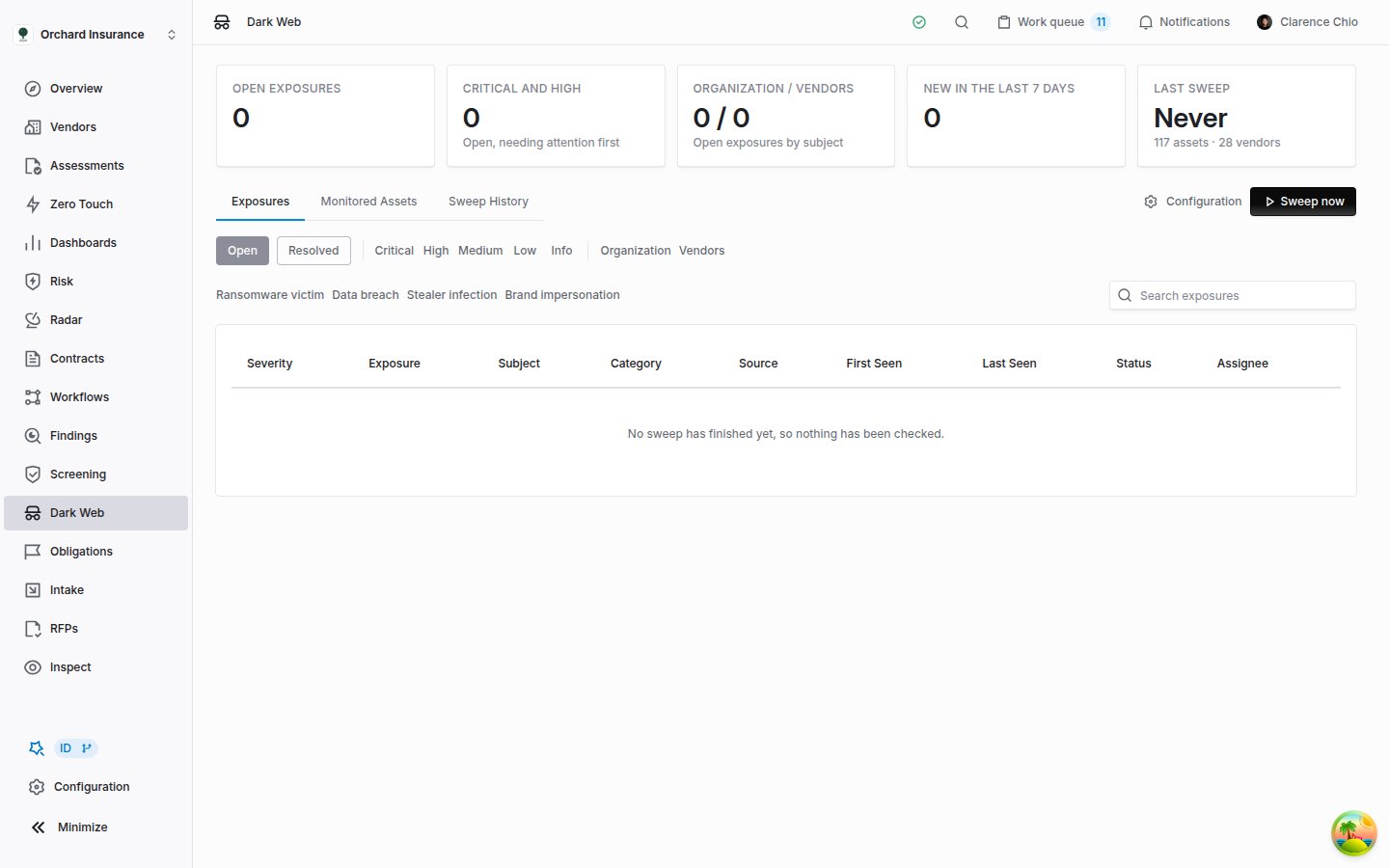 Five counters sit at the top.
| Counter | What it counts |
| -------------------------- | ----------------------------------------------------------------------------------------------------------------------------------------------------------------------------- |
| **Open exposures** | Exposures in **New**, **Acknowledged** or **Investigating** |
| **Critical and high** | Open exposures at **Critical** or **High** |
| **Organization / Vendors** | Open exposures about your organization, then about vendors |
| **New in the last 7 days** | Exposures first found in the past week, whatever their status |
| **Last sweep** | When the last sweep finished, **Running** during one, or **Never**. A sweep in which every source failed does not count. Underneath: how many values and vendors are watched. |
Below them are three tabs, **Exposures**, **Monitored Assets** and **Sweep History**, with **Configuration** and **Sweep now** at the right. You see those two buttons only if your role can change the settings and run sweeps.
The **Exposures** table shows **Severity**, **Exposure** (the title, with the threat actor underneath when the source names one), **Subject** (**Organization** or the vendor), **Category**, **Source**, **First Seen**, **Last Seen**, **Status** and **Assignee**. It is sorted worst severity first, then most recently seen, 50 to a page by default.
### Narrowing the queue
* **Open** and **Resolved** switch between exposures still being worked (**New**, **Acknowledged**, **Investigating**) and closed ones (**Resolved**, **False positive**).
* The severity buttons (**Critical**, **High**, **Medium**, **Low**, **Info**), **Organization** and **Vendors**, and the category buttons below them filter the list. Click a button to apply it and again to clear it. Buttons of the same kind widen the list; buttons of different kinds narrow it.
* **Search exposures** matches the exposure title, the matched term, the threat actor and the vendor's name.
The filters reset when you leave the page. The **Open** or **Resolved** choice and an open exposure are kept in the page address, so you can send a colleague a link to one exposure.
## Reading an exposure
Click a row to open the exposure in a panel on the right. The header names the subject (your organization, or the vendor with a link to its page), the title, the severity, the status, and the category and source.
**What Matched** holds the facts:
| Field | What it tells you |
| ----------------------------- | --------------------------------------------------------------------------------------------------------------------------------------------------------------------------------------------- |
| **Matched Term** | The watched value the source matched, with a confidence: 100% when the source was asked about the domain itself, 95% when a leak-site listing names the domain, 80% when it names the company |
| **Monitored Asset** | The watchlist row that matched, and its type |
| **Threat Actor** | The ransomware group, on a leak-site listing |
| **Data Classes** | The kinds of data exposed in a breach |
| **Records** | The accounts in a breach, or the infected computers for an infostealer exposure |
| **Published** | The date the source gives: the listing, the breach, or the latest infection |
| **First Seen**, **Last Seen** | When Coverbase first and most recently found it, and how many times |
| **Source Link** | The source's own page for it |
Below it, **Summary** is the source's description, with anything that looks like a credential, an email address, a card number or a key masked. **Evidence** lists what else the source returned: counts, malware families, dates and references.
What to check first depends on the category:
| Category | Title reads | Check first |
| ----------------------- | ---------------------------------------------- | ----------------------------------------------------------------------------------------------------------------------------------------------------------------------------------------------------------- |
| **Ransomware victim** | ` listed on the leak site` | Whether the listed victim really is this company. Look at **Matched Term** and its confidence, then the listing through **Source Link**. A match on the company name alone is the likeliest false positive. |
| **Data breach** | ` breach affecting ` | The breach date under **Published**, and whether **Data Classes** include passwords. |
| **Stealer infection** | `Infostealer infections recorded for ` | In **Evidence**, how many employee and user computers were infected, and when the latest infection was. An employee infection means staff credentials for that domain were captured. |
| **Brand impersonation** | `Lookalike domain registered: ` | Whether the **Summary** says it can receive mail. A lookalike that can receive mail can carry phishing or invoice fraud aimed at people who trust the real domain. |
## Triaging an exposure
Decide what each exposure means and record it, so the next person does not check it again.
1. Open the exposure from the queue or from the vendor's tab.
2. In **Triage**, set the **Status**, pick an **Assignee** if someone will follow it up, and write a **Note**: what was checked, and what was decided.
3. Click **Save review**. The panel closes and the queue updates.
From then on the panel shows **Last reviewed by**, with the name and time of the last save.
| Status | Use it when | Listed under |
| ------------------ | --------------------------------------------------------------- | ------------ |
| **New** | Nobody has looked yet. Every exposure arrives here. | **Open** |
| **Acknowledged** | You have seen it and someone owns it. | **Open** |
| **Investigating** | Someone is checking whether it is real and what it touches. | **Open** |
| **Resolved** | It has been dealt with, or checked and found to need no action. | **Resolved** |
| **False positive** | The listing is not about this organization or vendor. | **Resolved** |
Any status can follow any other, which is how you reopen a closed exposure. Nothing moves an exposure between statuses on its own, and there is no delete: an exposure leaves the open list only through its status.
### Escalating to a finding
When an exposure needs work tracked with an owner and a due date, click **Escalate to finding**. Coverbase opens a finding:
* Titled with the exposure's title, with the source type **Dark web exposure**.
* With a description that lists the source, category, severity, matched term, threat actor and reference link, followed by the summary.
* Assigned to the exposure's saved assignee, if it has one.
* On the vendor, for a vendor's exposure. An exposure about your organization gives a finding with no vendor.
The button then reads **Open finding**. An exposure has at most one finding, and on the **Findings** list the finding's **Source** column links back to the exposure. From there it is an ordinary finding; see [Findings and remediation](/user-guides/findings-and-remediation).
Escalating does not change the exposure's status, and it does not save what you changed under **Triage**. Save the assignee first if the finding should go to them, and set the status and click **Save review** afterwards.
## Keeping the watchlist right
Make sure the sweep checks the right values, and nothing that belongs to someone else. Open **Dark Web**, then **Monitored Assets**.
Five counters sit at the top.
| Counter | What it counts |
| -------------------------- | ----------------------------------------------------------------------------------------------------------------------------------------------------------------------------- |
| **Open exposures** | Exposures in **New**, **Acknowledged** or **Investigating** |
| **Critical and high** | Open exposures at **Critical** or **High** |
| **Organization / Vendors** | Open exposures about your organization, then about vendors |
| **New in the last 7 days** | Exposures first found in the past week, whatever their status |
| **Last sweep** | When the last sweep finished, **Running** during one, or **Never**. A sweep in which every source failed does not count. Underneath: how many values and vendors are watched. |
Below them are three tabs, **Exposures**, **Monitored Assets** and **Sweep History**, with **Configuration** and **Sweep now** at the right. You see those two buttons only if your role can change the settings and run sweeps.
The **Exposures** table shows **Severity**, **Exposure** (the title, with the threat actor underneath when the source names one), **Subject** (**Organization** or the vendor), **Category**, **Source**, **First Seen**, **Last Seen**, **Status** and **Assignee**. It is sorted worst severity first, then most recently seen, 50 to a page by default.
### Narrowing the queue
* **Open** and **Resolved** switch between exposures still being worked (**New**, **Acknowledged**, **Investigating**) and closed ones (**Resolved**, **False positive**).
* The severity buttons (**Critical**, **High**, **Medium**, **Low**, **Info**), **Organization** and **Vendors**, and the category buttons below them filter the list. Click a button to apply it and again to clear it. Buttons of the same kind widen the list; buttons of different kinds narrow it.
* **Search exposures** matches the exposure title, the matched term, the threat actor and the vendor's name.
The filters reset when you leave the page. The **Open** or **Resolved** choice and an open exposure are kept in the page address, so you can send a colleague a link to one exposure.
## Reading an exposure
Click a row to open the exposure in a panel on the right. The header names the subject (your organization, or the vendor with a link to its page), the title, the severity, the status, and the category and source.
**What Matched** holds the facts:
| Field | What it tells you |
| ----------------------------- | --------------------------------------------------------------------------------------------------------------------------------------------------------------------------------------------- |
| **Matched Term** | The watched value the source matched, with a confidence: 100% when the source was asked about the domain itself, 95% when a leak-site listing names the domain, 80% when it names the company |
| **Monitored Asset** | The watchlist row that matched, and its type |
| **Threat Actor** | The ransomware group, on a leak-site listing |
| **Data Classes** | The kinds of data exposed in a breach |
| **Records** | The accounts in a breach, or the infected computers for an infostealer exposure |
| **Published** | The date the source gives: the listing, the breach, or the latest infection |
| **First Seen**, **Last Seen** | When Coverbase first and most recently found it, and how many times |
| **Source Link** | The source's own page for it |
Below it, **Summary** is the source's description, with anything that looks like a credential, an email address, a card number or a key masked. **Evidence** lists what else the source returned: counts, malware families, dates and references.
What to check first depends on the category:
| Category | Title reads | Check first |
| ----------------------- | ---------------------------------------------- | ----------------------------------------------------------------------------------------------------------------------------------------------------------------------------------------------------------- |
| **Ransomware victim** | ` listed on the leak site` | Whether the listed victim really is this company. Look at **Matched Term** and its confidence, then the listing through **Source Link**. A match on the company name alone is the likeliest false positive. |
| **Data breach** | ` breach affecting ` | The breach date under **Published**, and whether **Data Classes** include passwords. |
| **Stealer infection** | `Infostealer infections recorded for ` | In **Evidence**, how many employee and user computers were infected, and when the latest infection was. An employee infection means staff credentials for that domain were captured. |
| **Brand impersonation** | `Lookalike domain registered: ` | Whether the **Summary** says it can receive mail. A lookalike that can receive mail can carry phishing or invoice fraud aimed at people who trust the real domain. |
## Triaging an exposure
Decide what each exposure means and record it, so the next person does not check it again.
1. Open the exposure from the queue or from the vendor's tab.
2. In **Triage**, set the **Status**, pick an **Assignee** if someone will follow it up, and write a **Note**: what was checked, and what was decided.
3. Click **Save review**. The panel closes and the queue updates.
From then on the panel shows **Last reviewed by**, with the name and time of the last save.
| Status | Use it when | Listed under |
| ------------------ | --------------------------------------------------------------- | ------------ |
| **New** | Nobody has looked yet. Every exposure arrives here. | **Open** |
| **Acknowledged** | You have seen it and someone owns it. | **Open** |
| **Investigating** | Someone is checking whether it is real and what it touches. | **Open** |
| **Resolved** | It has been dealt with, or checked and found to need no action. | **Resolved** |
| **False positive** | The listing is not about this organization or vendor. | **Resolved** |
Any status can follow any other, which is how you reopen a closed exposure. Nothing moves an exposure between statuses on its own, and there is no delete: an exposure leaves the open list only through its status.
### Escalating to a finding
When an exposure needs work tracked with an owner and a due date, click **Escalate to finding**. Coverbase opens a finding:
* Titled with the exposure's title, with the source type **Dark web exposure**.
* With a description that lists the source, category, severity, matched term, threat actor and reference link, followed by the summary.
* Assigned to the exposure's saved assignee, if it has one.
* On the vendor, for a vendor's exposure. An exposure about your organization gives a finding with no vendor.
The button then reads **Open finding**. An exposure has at most one finding, and on the **Findings** list the finding's **Source** column links back to the exposure. From there it is an ordinary finding; see [Findings and remediation](/user-guides/findings-and-remediation).
Escalating does not change the exposure's status, and it does not save what you changed under **Triage**. Save the assignee first if the finding should go to them, and set the status and click **Save review** afterwards.
## Keeping the watchlist right
Make sure the sweep checks the right values, and nothing that belongs to someone else. Open **Dark Web**, then **Monitored Assets**.
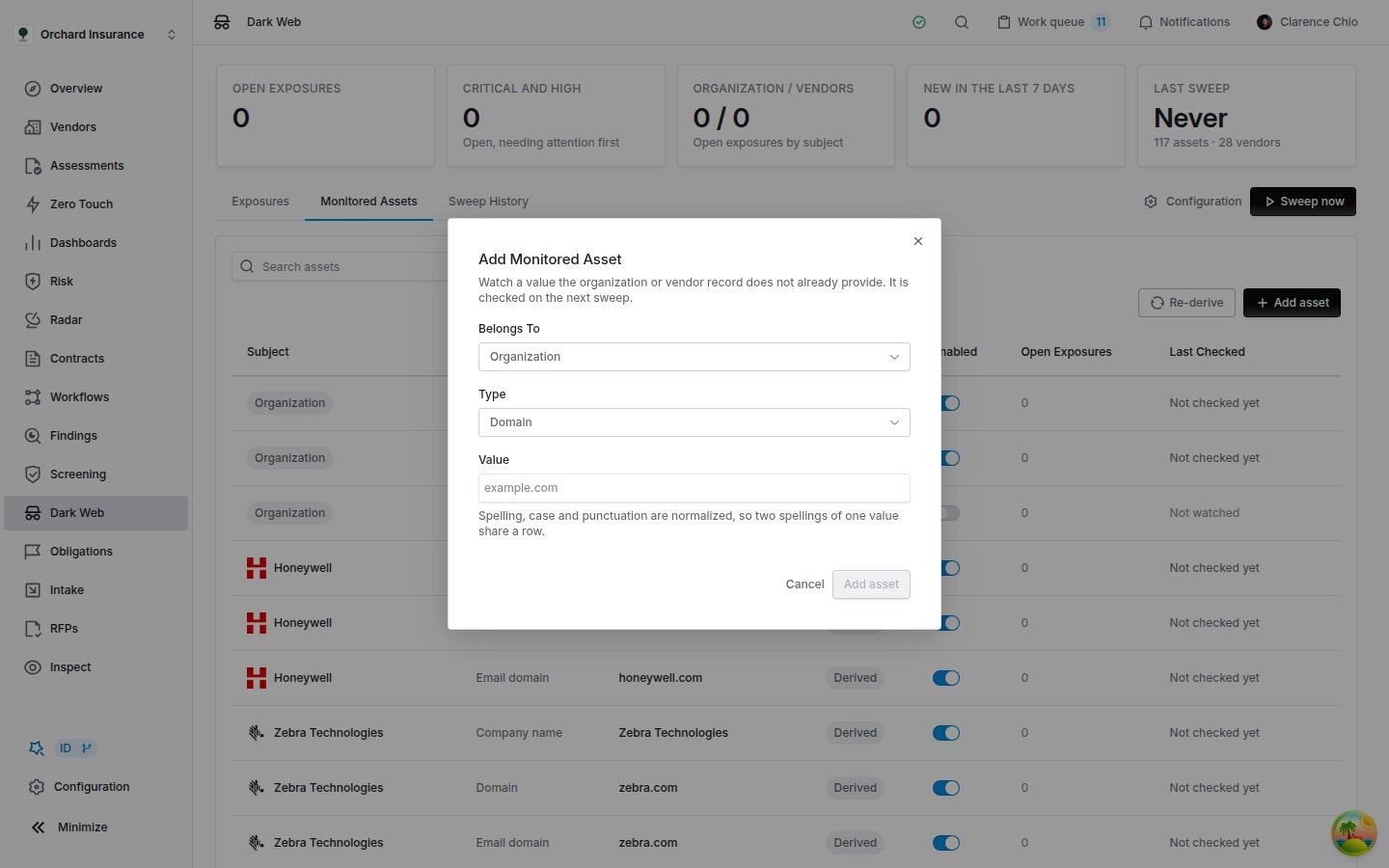
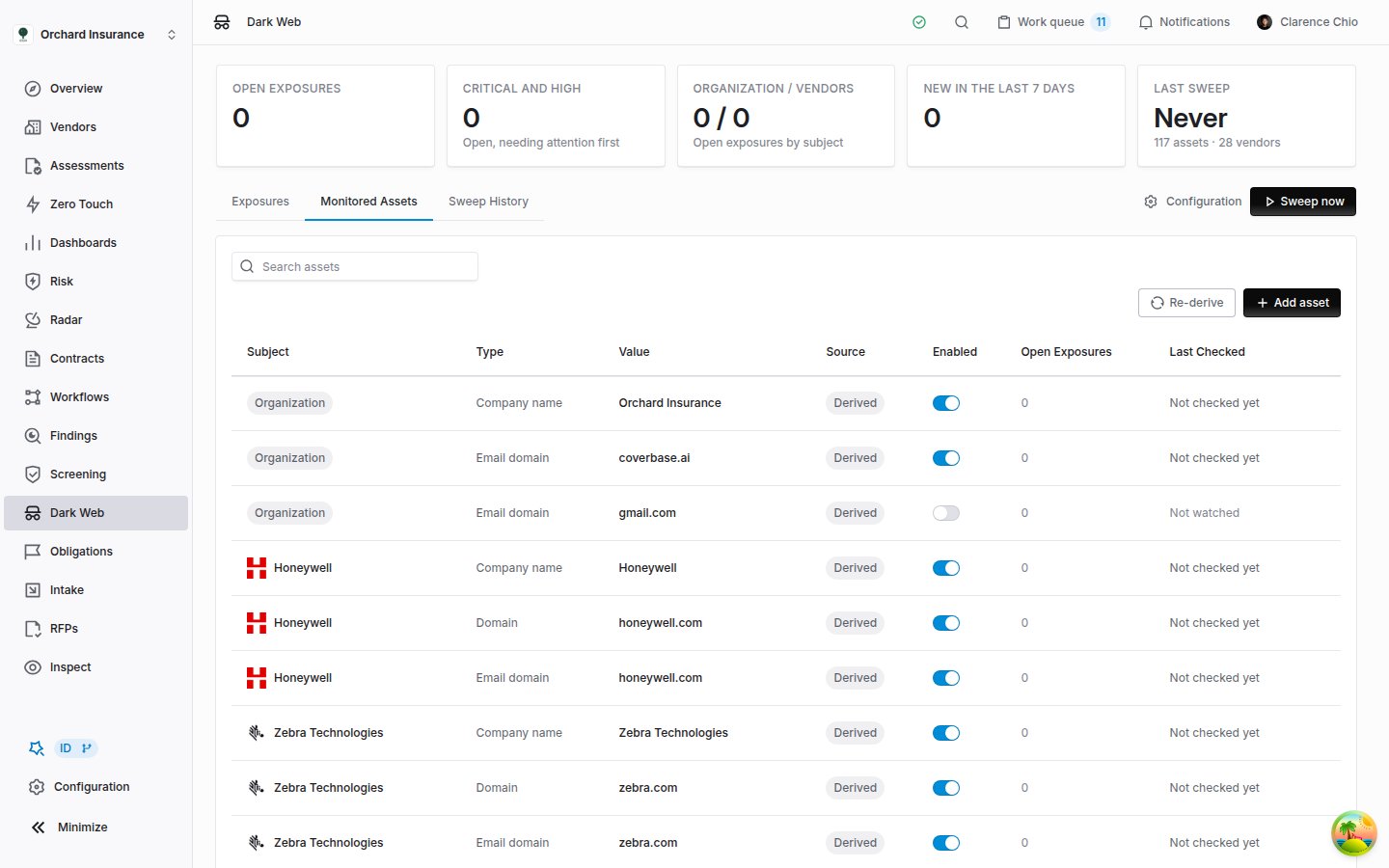 Each row shows its **Subject**, **Type**, **Value**, **Source** (**Derived** from a record, or **Manual** when someone added it), **Enabled**, **Open Exposures** and **Last Checked**. **Search assets** matches values and vendor names.
* **Switch a row off** with its **Enabled** switch to stop checking it. Use it for a value that is not really yours or the vendor's, such as a shared mail provider on the organization record, or a company name that is also an ordinary word. A derived row cannot be removed, because the next rebuild would only add it back. Switched off, it stays off.
* **Derived rows look after themselves.** When a record stops producing a value, because a vendor left the scope or was archived or a website changed, the row leaves the watchlist at the next rebuild. Exposures already found stay in the queue.
* **Re-derive** rebuilds the derived rows now instead of at the next sweep, and reports how many were added, kept and retired. Use it after you change a vendor's website or turn on Radar monitoring for more vendors. Changing a setting on the configuration page rebuilds the watchlist too.
* **Add asset** watches a value no record provides, such as a second brand's domain or the domain a vendor runs its customer portal on. Choose what it **Belongs To** (**Organization**, or **Vendor** and then the vendor), its **Type** and its **Value**. It is checked from the next sweep on.
* **Remove**, the bin icon at the end of a manual row, stops watching that value. Exposures already found for it stay in the queue.
Each row shows its **Subject**, **Type**, **Value**, **Source** (**Derived** from a record, or **Manual** when someone added it), **Enabled**, **Open Exposures** and **Last Checked**. **Search assets** matches values and vendor names.
* **Switch a row off** with its **Enabled** switch to stop checking it. Use it for a value that is not really yours or the vendor's, such as a shared mail provider on the organization record, or a company name that is also an ordinary word. A derived row cannot be removed, because the next rebuild would only add it back. Switched off, it stays off.
* **Derived rows look after themselves.** When a record stops producing a value, because a vendor left the scope or was archived or a website changed, the row leaves the watchlist at the next rebuild. Exposures already found stay in the queue.
* **Re-derive** rebuilds the derived rows now instead of at the next sweep, and reports how many were added, kept and retired. Use it after you change a vendor's website or turn on Radar monitoring for more vendors. Changing a setting on the configuration page rebuilds the watchlist too.
* **Add asset** watches a value no record provides, such as a second brand's domain or the domain a vendor runs its customer portal on. Choose what it **Belongs To** (**Organization**, or **Vendor** and then the vendor), its **Type** and its **Value**. It is checked from the next sweep on.
* **Remove**, the bin icon at the end of a manual row, stops watching that value. Exposures already found for it stay in the queue.
 **Last Checked** is the time of the last sweep in which a source that reads that value finished checking it. A value whose only sources failed, or ran out of time, keeps its earlier time. **Not searched** means no current source can check the value.
## Sweep history
Open **Dark Web**, then **Sweep History**. There is one row per sweep, scheduled or manual, including sweeps that found nothing.
| Column | What it shows |
| ------------------ | --------------------------------------------------------------------------------------------------------------------------------------------------------------------------------------------- |
| **Started** | When the sweep began |
| **Status** | **Running**, **Completed**, **Partial** (at least one source failed and the others ran) or **Failed** (every source that ran failed). Hover a **Partial** or **Failed** status for the error. |
| **Trigger** | **Scheduled**, or **Manual** with the name of whoever clicked **Sweep now** |
| **Assets Checked** | The watchlist values in the sweep |
| **New Exposures** | Exposures found for the first time |
| **Sources** | One badge per source: green when it ran, gray when it was skipped, red when it failed. Hover a badge for how many values it checked and how many candidates it returned, or for its error. |
A source is skipped when it has no key, as ransomware.live does until Coverbase licenses it, or when the watchlist holds nothing it can read. A source switched off in the settings is not listed at all.
A failed source reads as failed, never as clean. The other sources' results still count, and the next sweep tries it again.
## The vendor's Dark Web tab
See one vendor's exposures without the rest of the queue. Open a vendor, choose **Vendor Intelligence**, then **Dark Web**.
**Last Checked** is the time of the last sweep in which a source that reads that value finished checking it. A value whose only sources failed, or ran out of time, keeps its earlier time. **Not searched** means no current source can check the value.
## Sweep history
Open **Dark Web**, then **Sweep History**. There is one row per sweep, scheduled or manual, including sweeps that found nothing.
| Column | What it shows |
| ------------------ | --------------------------------------------------------------------------------------------------------------------------------------------------------------------------------------------- |
| **Started** | When the sweep began |
| **Status** | **Running**, **Completed**, **Partial** (at least one source failed and the others ran) or **Failed** (every source that ran failed). Hover a **Partial** or **Failed** status for the error. |
| **Trigger** | **Scheduled**, or **Manual** with the name of whoever clicked **Sweep now** |
| **Assets Checked** | The watchlist values in the sweep |
| **New Exposures** | Exposures found for the first time |
| **Sources** | One badge per source: green when it ran, gray when it was skipped, red when it failed. Hover a badge for how many values it checked and how many candidates it returned, or for its error. |
A source is skipped when it has no key, as ransomware.live does until Coverbase licenses it, or when the watchlist holds nothing it can read. A source switched off in the settings is not listed at all.
A failed source reads as failed, never as clean. The other sources' results still count, and the next sweep tries it again.
## The vendor's Dark Web tab
See one vendor's exposures without the rest of the queue. Open a vendor, choose **Vendor Intelligence**, then **Dark Web**.
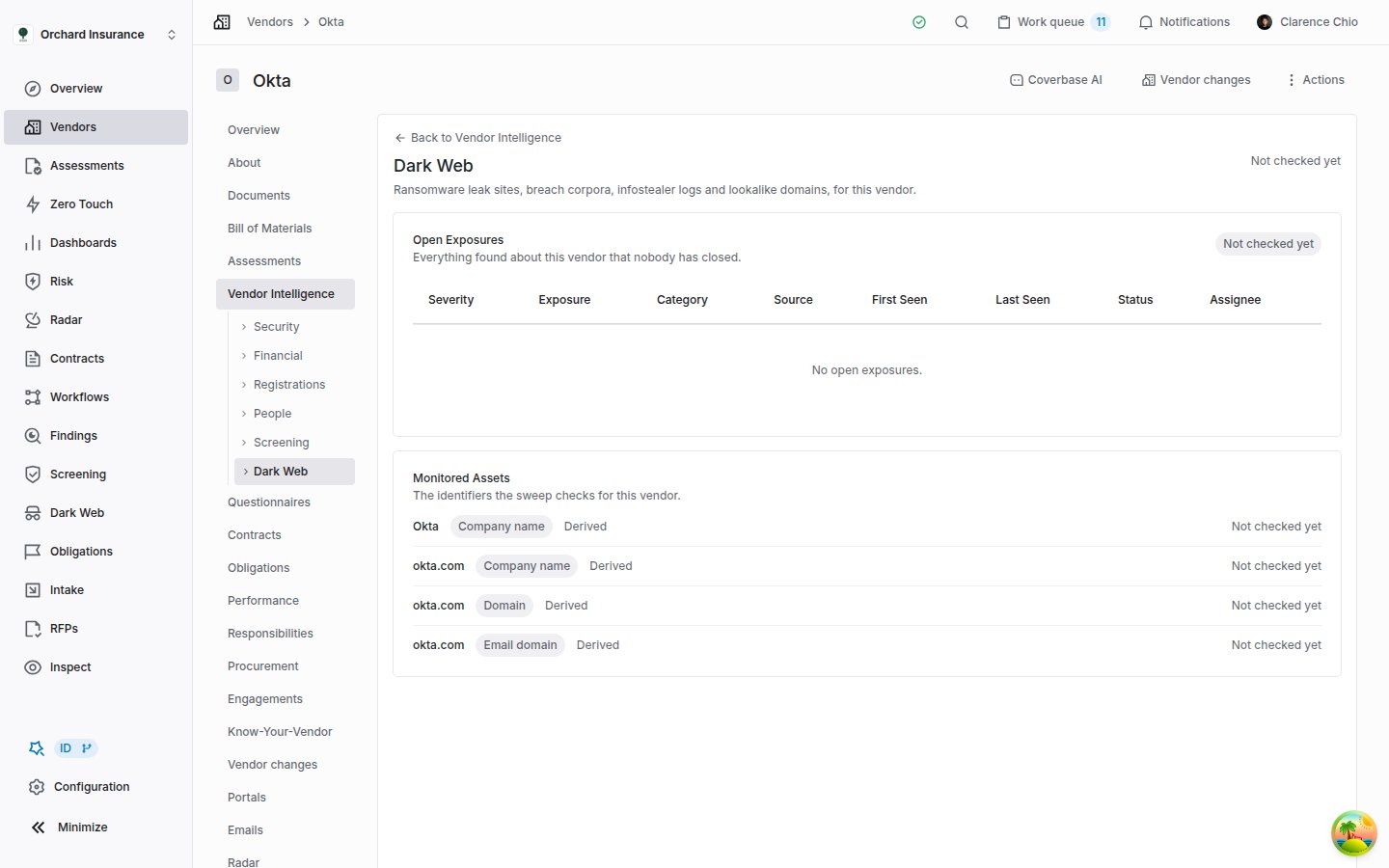 * **Last checked**, at the top right, is the oldest check across the vendor's watched values. It reads **Not checked yet** for a watched vendor before its first sweep, and **Not watched** when nothing a source can search is watched for the vendor.
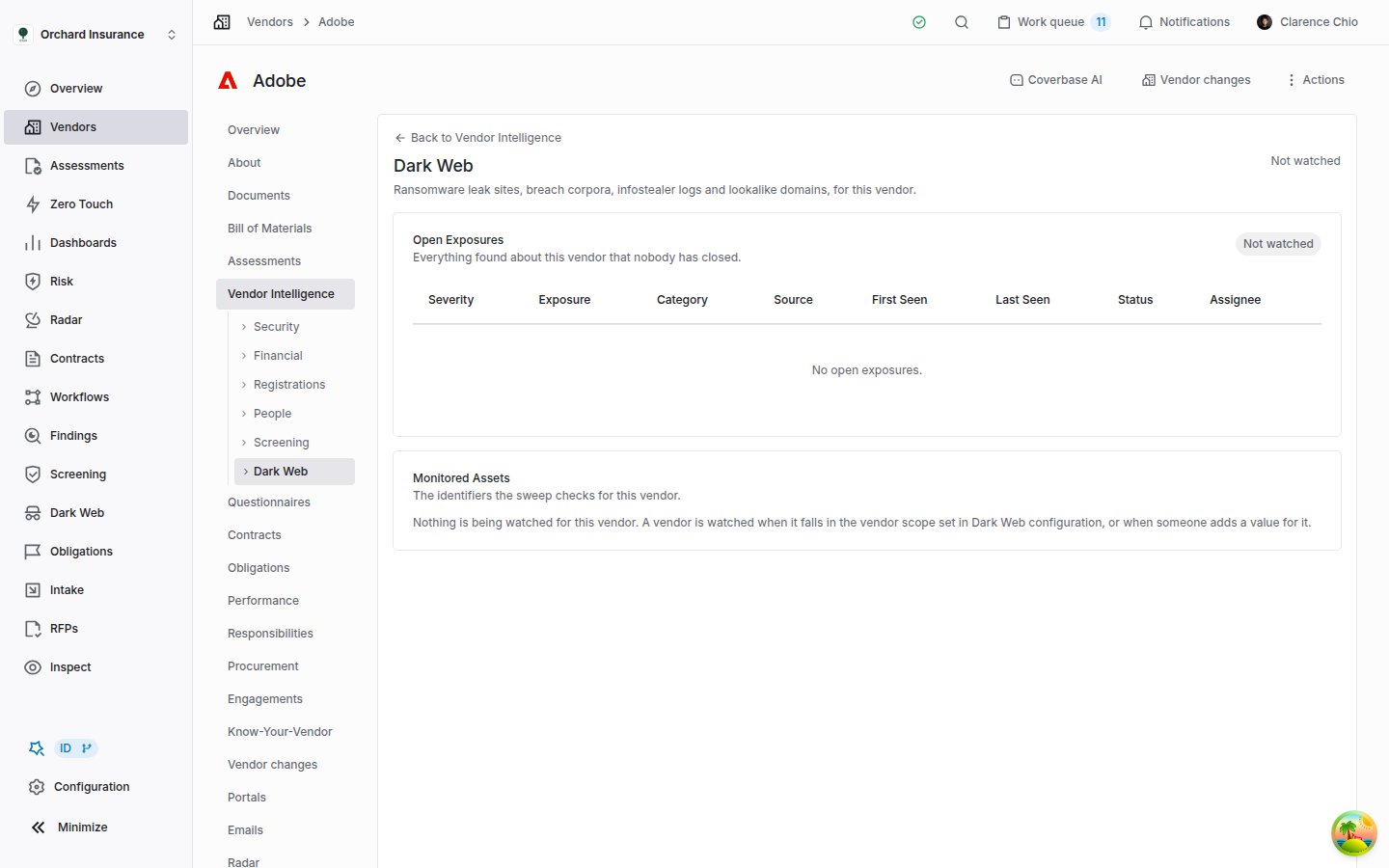
* **Open Exposures** lists everything open for the vendor, with a count per severity. With nothing open it shows **Clear** once a sweep has checked the vendor's watched values, **Not checked yet** before that, and **Not watched** when nothing searchable is watched for the vendor.
* **Monitored Assets** lists the values watched for this vendor, each with its type, **Derived** or **Manual**, **Disabled** when switched off, and when it was last checked. A value with open exposures shows how many are open.
* **Resolved** lists closed exposures, and appears only when there are some.
Click an exposure to open the same panel as on the queue, with the same triage and escalation. The tab lists up to 50 open exposures, 50 resolved ones and 50 watched values; for more, search the vendor's name on the **Dark Web** page. To add or switch off a vendor's values, use **Monitored Assets** on the **Dark Web** page.
**Clear** means a sweep checked the vendor's watched values and nothing is open. It is still only as wide as the sources: before you write "no dark web exposure" into an assessment, check what **Monitored Assets** lists and when **Last checked** ran.
* **Last checked**, at the top right, is the oldest check across the vendor's watched values. It reads **Not checked yet** for a watched vendor before its first sweep, and **Not watched** when nothing a source can search is watched for the vendor.
* **Open Exposures** lists everything open for the vendor, with a count per severity. With nothing open it shows **Clear** once a sweep has checked the vendor's watched values, **Not checked yet** before that, and **Not watched** when nothing searchable is watched for the vendor.
* **Monitored Assets** lists the values watched for this vendor, each with its type, **Derived** or **Manual**, **Disabled** when switched off, and when it was last checked. A value with open exposures shows how many are open.
* **Resolved** lists closed exposures, and appears only when there are some.
Click an exposure to open the same panel as on the queue, with the same triage and escalation. The tab lists up to 50 open exposures, 50 resolved ones and 50 watched values; for more, search the vendor's name on the **Dark Web** page. To add or switch off a vendor's values, use **Monitored Assets** on the **Dark Web** page.
**Clear** means a sweep checked the vendor's watched values and nothing is open. It is still only as wide as the sources: before you write "no dark web exposure" into an assessment, check what **Monitored Assets** lists and when **Last checked** ran.
 If the tab reads **Dark web monitoring is off**, monitoring is switched off for your organization.
The tab is part of the newer vendor page, where **Vendor Intelligence** lists its tabs down the left. If your vendor pages have tabs across the top instead, search the vendor's name on the **Dark Web** page. Reviewers also find the tab under **Vendor Intelligence** when they open a questionnaire submission from the vendor.
| | **Dark Web** page | A vendor's **Dark Web** tab |
| ----------------------------------- | ------------------------------------------ | ----------------------------- |
| Covers | Your organization and every watched vendor | One vendor |
| Exposures about your organization | Yes | No |
| Triage and escalation | Yes | Yes, in the same panel |
| Watchlist | View, add, switch off, **Re-derive** | View only |
| **Sweep History** and **Sweep now** | Yes | No |
| How many exposures | All of them, a page at a time | Up to 50 open and 50 resolved |
## Notifications
Dark web monitoring sends no email and no in-app notification. A new exposure appears in the queue and on the vendor's tab and nowhere else, so someone has to look. The daily sweep runs at 06:20 UTC, so one check a day after that time catches each day's new exposures.
To route new exposures automatically:
* **Workflows.** **Dark Web Exposure** is a trigger record with **Created**, **Updated** and **Deleted** events. See [Building a workflow](/user-guides/building-a-workflow#when-the-trigger).
* **Webhooks.** `DarkWebExposure.Created`, `DarkWebExposure.Updated` and `DarkWebExposure.Deleted` carry `dark_web_exposure_id`. See the [event catalog](/integrations/webhooks#event-catalog).
An exposure you escalate becomes a finding, and from then on it follows the findings workflow, including [its notifications](/user-guides/findings-and-remediation#emails-and-notifications).
## Not the same as Radar or the Security tab
Three parts of Coverbase deal with breaches or the dark web. They do not share a queue, and nothing found by one appears in the others.
| Where | What it is | Worked in |
| ------------------------------------------------------ | -------------------------------------------------------------------------------------------------------------------------------------------------------------------------------------------------------------------------------- | ---------------------------------------------------- |
| **Dark Web** (this guide) | A daily sweep of your watchlist against leak-site trackers, breach and infostealer data, and lookalike domains | The **Dark Web** queue |
| Radar's **Dark Web and Underground Exposure** detector | A [Radar detector](/products/detector-library) that reads Radar's own sources for vendor data, access or credentials advertised on criminal forums | **Radar → Signals** |
| A vendor's **Security** tab | [Breaches and exposed credentials](/user-guides/security-intelligence#breaches-and-exposed-credentials) and [Lookalike domains](/user-guides/security-intelligence#lookalike-domains), as part of the vendor's outside-in rating | The rating itself, from which you can open a finding |
## Who can do what
Dark web monitoring has its own permission, listed as **Dark web exposure** in the role editor. Like other vendor-backed permissions, it needs vendor read alongside it.
| Permission | Allows |
| -------------------------- | ---------------------------------------------------------------------------------------------------------------------------------------------------- |
| `dark_web_exposure:read` | See the **Dark Web** page, a vendor's **Dark Web** tab and each exposure |
| `dark_web_exposure:update` | Triage and escalate exposures; add, switch off and remove watchlist values; **Re-derive**; open and change **Configuration → Monitoring → Dark Web** |
| `dark_web_exposure:run` | **Sweep now** |
| Default role | Access |
| --------------------------------------- | ------------------------------------------------------------------------------------------------------------------------ |
| **Admin** | Everything above |
| **Member**, **Guest** | Read. They see the queue, the vendor tab and each exposure, but no **Triage** section, no **Sweep now** and no settings. |
| **Siloed Member**, **Auxiliary Member** | None. **Dark Web** and the vendor tab do not appear. |
Exposures follow vendor access. A role that can read only some vendors sees those vendors' exposures, plus every exposure about your organization. The counters at the top of the queue still count the whole organization. Custom roles are built in [Permissions and roles](/user-guides/permissions-and-roles).
## Troubleshooting
| Symptom | Cause | Fix |
| ------------------------------------------------------------------------------------- | ------------------------------------------------------------------------------------------------------------------- | ----------------------------------------------------------------------------------------------------------------------------------------------- |
| **Dark Web** is missing from the left navigation | The module is off for your organization, or your role has no dark web permission | Ask your Coverbase account team to turn it on. If colleagues can see it, ask an admin for `dark_web_exposure:read`. |
| The queue is empty and **Last sweep** reads **Never** | No sweep has run since monitoring was switched on | Wait for the 06:20 UTC sweep, or click **Sweep now**. |
| A vendor's tab shows **Not watched** | The vendor is outside the vendor scope | Turn on Radar monitoring for it, choose **All vendors**, or add a value for it with **Add asset**. |
| The settings page reads **0 vendors currently watched.** | The scope is **Vendors monitored in Radar** and no vendor has Radar monitoring on, or no setting has been saved yet | Switch monitoring on, which builds the watchlist. If the count stays at 0, choose **All vendors** or turn on Radar monitoring for your vendors. |
| Your organization's **Domains** reads *None on the organization record.* | Your organization record has no website | Add the website under **Organization settings**. |
| **Sweep now** is grayed out on the settings page | Monitoring is off, or a sweep is running | Switch on **Enable dark web monitoring**, or wait until **Last sweep** stops reading **Running**. |
| **Sweep now** reports that a sweep is already running | One sweep runs at a time per organization | Wait for it to finish. The tables refresh on their own. |
| **Sweep now** is grayed out on the queue, under a *Dark web monitoring is off* notice | Monitoring is off | Switch it on in **Configuration**. |
| **Sweep now** says the sweep was requested | The background worker did not confirm the start | Nothing to do. The sweep starts when the worker picks it up. |
| ransomware.live is off and shows **Needs a platform key** | It needs a commercial license that Coverbase holds for the platform | Nothing to set on your side. Ask your account team if you need it. |
| **The last sweep reported an error** on the settings page | Every source failed on the last sweep | Open **Sweep History** and hover the red badges. The message clears after the next sweep in which a source works. |
| A badge in **Sweep History** is red | That source failed on that sweep | Hover it for the error. The other sources' results count, and the next sweep retries it. |
| A resolved exposure's **Last Seen** keeps moving | The source still reports it, and your decision is kept | If the new sightings matter, set it back to **Investigating**. |
| An exposure is about a different company with the same name | A leak-site listing matched your watched company name, not the domain | Mark it **False positive**. If the name is an ordinary word, switch that **Company name** row off and rely on the domain. |
| **Add asset** confirmed the value, but its row is still switched off | The value was already on the watchlist, and adding it again leaves that row as it was | Switch the existing row on. |
| A watchlist row reads **Not searched** | No current source reads that type of value, or the name is too short or generic to match | Add the vendor's or your own domain instead. See [What no source reads yet](#what-no-source-reads-yet). |
| The **Triage** section and **Save review** are missing | Your role can read exposures but not update them | Ask an admin. Members have read access by default. |
| The counters show more exposures than the table | The counters cover the whole organization; the table shows only the vendors your role can read | Expected. |
## Related
The neighboring Vendor Intelligence tab: sanctions and watchlist matches, re-checked on a schedule.
Which vendors Radar monitors, which is also who dark web monitoring watches by default.
What happens to an exposure once you escalate it to a finding.
A vendor's breaches and lookalike domains as part of its outside-in rating.
If the tab reads **Dark web monitoring is off**, monitoring is switched off for your organization.
The tab is part of the newer vendor page, where **Vendor Intelligence** lists its tabs down the left. If your vendor pages have tabs across the top instead, search the vendor's name on the **Dark Web** page. Reviewers also find the tab under **Vendor Intelligence** when they open a questionnaire submission from the vendor.
| | **Dark Web** page | A vendor's **Dark Web** tab |
| ----------------------------------- | ------------------------------------------ | ----------------------------- |
| Covers | Your organization and every watched vendor | One vendor |
| Exposures about your organization | Yes | No |
| Triage and escalation | Yes | Yes, in the same panel |
| Watchlist | View, add, switch off, **Re-derive** | View only |
| **Sweep History** and **Sweep now** | Yes | No |
| How many exposures | All of them, a page at a time | Up to 50 open and 50 resolved |
## Notifications
Dark web monitoring sends no email and no in-app notification. A new exposure appears in the queue and on the vendor's tab and nowhere else, so someone has to look. The daily sweep runs at 06:20 UTC, so one check a day after that time catches each day's new exposures.
To route new exposures automatically:
* **Workflows.** **Dark Web Exposure** is a trigger record with **Created**, **Updated** and **Deleted** events. See [Building a workflow](/user-guides/building-a-workflow#when-the-trigger).
* **Webhooks.** `DarkWebExposure.Created`, `DarkWebExposure.Updated` and `DarkWebExposure.Deleted` carry `dark_web_exposure_id`. See the [event catalog](/integrations/webhooks#event-catalog).
An exposure you escalate becomes a finding, and from then on it follows the findings workflow, including [its notifications](/user-guides/findings-and-remediation#emails-and-notifications).
## Not the same as Radar or the Security tab
Three parts of Coverbase deal with breaches or the dark web. They do not share a queue, and nothing found by one appears in the others.
| Where | What it is | Worked in |
| ------------------------------------------------------ | -------------------------------------------------------------------------------------------------------------------------------------------------------------------------------------------------------------------------------- | ---------------------------------------------------- |
| **Dark Web** (this guide) | A daily sweep of your watchlist against leak-site trackers, breach and infostealer data, and lookalike domains | The **Dark Web** queue |
| Radar's **Dark Web and Underground Exposure** detector | A [Radar detector](/products/detector-library) that reads Radar's own sources for vendor data, access or credentials advertised on criminal forums | **Radar → Signals** |
| A vendor's **Security** tab | [Breaches and exposed credentials](/user-guides/security-intelligence#breaches-and-exposed-credentials) and [Lookalike domains](/user-guides/security-intelligence#lookalike-domains), as part of the vendor's outside-in rating | The rating itself, from which you can open a finding |
## Who can do what
Dark web monitoring has its own permission, listed as **Dark web exposure** in the role editor. Like other vendor-backed permissions, it needs vendor read alongside it.
| Permission | Allows |
| -------------------------- | ---------------------------------------------------------------------------------------------------------------------------------------------------- |
| `dark_web_exposure:read` | See the **Dark Web** page, a vendor's **Dark Web** tab and each exposure |
| `dark_web_exposure:update` | Triage and escalate exposures; add, switch off and remove watchlist values; **Re-derive**; open and change **Configuration → Monitoring → Dark Web** |
| `dark_web_exposure:run` | **Sweep now** |
| Default role | Access |
| --------------------------------------- | ------------------------------------------------------------------------------------------------------------------------ |
| **Admin** | Everything above |
| **Member**, **Guest** | Read. They see the queue, the vendor tab and each exposure, but no **Triage** section, no **Sweep now** and no settings. |
| **Siloed Member**, **Auxiliary Member** | None. **Dark Web** and the vendor tab do not appear. |
Exposures follow vendor access. A role that can read only some vendors sees those vendors' exposures, plus every exposure about your organization. The counters at the top of the queue still count the whole organization. Custom roles are built in [Permissions and roles](/user-guides/permissions-and-roles).
## Troubleshooting
| Symptom | Cause | Fix |
| ------------------------------------------------------------------------------------- | ------------------------------------------------------------------------------------------------------------------- | ----------------------------------------------------------------------------------------------------------------------------------------------- |
| **Dark Web** is missing from the left navigation | The module is off for your organization, or your role has no dark web permission | Ask your Coverbase account team to turn it on. If colleagues can see it, ask an admin for `dark_web_exposure:read`. |
| The queue is empty and **Last sweep** reads **Never** | No sweep has run since monitoring was switched on | Wait for the 06:20 UTC sweep, or click **Sweep now**. |
| A vendor's tab shows **Not watched** | The vendor is outside the vendor scope | Turn on Radar monitoring for it, choose **All vendors**, or add a value for it with **Add asset**. |
| The settings page reads **0 vendors currently watched.** | The scope is **Vendors monitored in Radar** and no vendor has Radar monitoring on, or no setting has been saved yet | Switch monitoring on, which builds the watchlist. If the count stays at 0, choose **All vendors** or turn on Radar monitoring for your vendors. |
| Your organization's **Domains** reads *None on the organization record.* | Your organization record has no website | Add the website under **Organization settings**. |
| **Sweep now** is grayed out on the settings page | Monitoring is off, or a sweep is running | Switch on **Enable dark web monitoring**, or wait until **Last sweep** stops reading **Running**. |
| **Sweep now** reports that a sweep is already running | One sweep runs at a time per organization | Wait for it to finish. The tables refresh on their own. |
| **Sweep now** is grayed out on the queue, under a *Dark web monitoring is off* notice | Monitoring is off | Switch it on in **Configuration**. |
| **Sweep now** says the sweep was requested | The background worker did not confirm the start | Nothing to do. The sweep starts when the worker picks it up. |
| ransomware.live is off and shows **Needs a platform key** | It needs a commercial license that Coverbase holds for the platform | Nothing to set on your side. Ask your account team if you need it. |
| **The last sweep reported an error** on the settings page | Every source failed on the last sweep | Open **Sweep History** and hover the red badges. The message clears after the next sweep in which a source works. |
| A badge in **Sweep History** is red | That source failed on that sweep | Hover it for the error. The other sources' results count, and the next sweep retries it. |
| A resolved exposure's **Last Seen** keeps moving | The source still reports it, and your decision is kept | If the new sightings matter, set it back to **Investigating**. |
| An exposure is about a different company with the same name | A leak-site listing matched your watched company name, not the domain | Mark it **False positive**. If the name is an ordinary word, switch that **Company name** row off and rely on the domain. |
| **Add asset** confirmed the value, but its row is still switched off | The value was already on the watchlist, and adding it again leaves that row as it was | Switch the existing row on. |
| A watchlist row reads **Not searched** | No current source reads that type of value, or the name is too short or generic to match | Add the vendor's or your own domain instead. See [What no source reads yet](#what-no-source-reads-yet). |
| The **Triage** section and **Save review** are missing | Your role can read exposures but not update them | Ask an admin. Members have read access by default. |
| The counters show more exposures than the table | The counters cover the whole organization; the table shows only the vendors your role can read | Expected. |
## Related
The neighboring Vendor Intelligence tab: sanctions and watchlist matches, re-checked on a schedule.
Which vendors Radar monitors, which is also who dark web monitoring watches by default.
What happens to an exposure once you escalate it to a finding.
A vendor's breaches and lookalike domains as part of its outside-in rating.