> ## Documentation Index
> Fetch the complete documentation index at: https://docs.coverbase.com/llms.txt
> Use this file to discover all available pages before exploring further.
# Asking your documents a question
> Ask a plain-English question in chat and get back the passage from a vendor's documents that answers it: the verbatim quote, its page, a cropped image of the highlighted passage, and a link that opens the document on that page with the passage marked.
For AI agents: a documentation index is available at [https://docs.coverbase.com/llms.txt](https://docs.coverbase.com/llms.txt). This page is also available in markdown by appending .md to the URL.
This guide is part of the [User Guides](/user-guides/overview) collection. It runs through the [Coverbase MCP server](/mcp/overview), so you need a connected assistant. Setup is in [Connecting](/mcp/connecting).
A **document evidence pull** answers a question out of a vendor's stored documents. You ask something like "does the SOC 2 cover encryption of data at rest?" and Coverbase decides which one or two documents are worth reading, reads them, and comes back with the passage that answers you.
The answer comes with its source attached: the sentence as it appears in the document, the page it sits on, an image of that page with the sentence marked, and a link that opens the document there.
This is different from [Document Insights](/user-guides/document-insights). Insights are fields you configure once and Coverbase populates on every matching document. An evidence pull is a one-off question you ask in the moment, about anything, with no configuration.
## What you get back
One or two sentences answering the question, per document read.
The exact span from the document that supports the answer, checked against the document text before it is returned. If no quote could be grounded, the answer says so and you should treat it as unverified.
Where the quote sits in the document. Excel workbooks report a sheet name instead.
A crop of the page with the quote highlighted, rendered during the pull and displayed inline in chat.
Opens the document in Coverbase on the right page with the passage marked. Details in [The highlighted link](#the-highlighted-link).
**High** when the document states it outright, **medium** when it had to be inferred, **low** when the model was unsure.
***
## Running one
### The scripted way
Invoke the `pull_document_evidence` prompt from your client's prompt menu and give it a vendor name and a question. It runs the whole sequence: resolve the vendor, look at what documents exist, start the pull, wait for it, and report each answer with its quote, page, image and link. See [Canned prompts](/mcp/prompts).
### The conversational way
Ask in plain language. All of these start a pull:
> Does Acme's SOC 2 cover encryption of data at rest?
The assistant resolves Acme, sees which documents you hold, and starts a pull scoped to that vendor. If several vendors match the name it asks which one rather than guessing.
> What is the notice period for termination in Acme's MSA?
Naming the kind of document narrows the candidate set before anything is read. You do not have to: the selection step is usually right without it. It helps most when a vendor has dozens of documents and the question points at one type.
> In the Acme penetration test report, were any critical findings left unresolved?
When you name a document, that document is what gets read. No selection step.
> For the Acme Data Warehouse service, does any document say where data is stored?
Restricts the candidate set to documents attached to that service.
> What did Acme's most recent SOC 2 say about change management? Only look at documents uploaded this year.
Upload date filters narrow which documents are candidates.
### It takes a couple of minutes
Starting a pull returns a **run id**, not the answer. The file is fetched, a model reads it, and the passage is located and rendered. A typical pull finishes in one to three minutes, and a long document can take longer.
Your assistant should tell you it is running and then collect the result. If it goes quiet, ask it to check the run.
Do not start a second pull because the first has not come back. Each pull reads documents at full cost. Ask for the result of the run you already have.
***
## A worked example
You ask:
> Does Acme encrypt customer data at rest? Check their SOC 2.
The assistant starts the pull and tells you so:
```
Reading documents to answer: Does Acme encrypt customer data at rest?
Run `cbdevr_01JB2X...` is queued. This takes a couple of minutes.
```
A minute or two later it collects the result:
```markdown theme={null}
# Evidence for: Does Acme encrypt customer data at rest?
Read 1 of 14 readable document(s) in scope, with 6 previously cited
passage(s) available to reuse. Quotes are verbatim from the document.
Selection: The SOC 2 Type 2 report is the only document in scope that
describes encryption controls; the DPA and the MSA cover obligations
rather than implementation.
## Acme Cloud SOC 2 Type II 2025.pdf (SOC 2 Type 2 Auditor Report)
- **Answer:** Yes. Customer data is encrypted at rest with AES-256, with
keys managed in AWS Key Management Service.
- Confidence: high
- **Quoted (page 12):** > All customer data is encrypted at rest using
AES-256 with keys managed in AWS Key Management Service, and encrypted
in transit using TLS 1.2 or higher.
- [Open highlighted in Coverbase](https://your-coverbase-url/vendors/cbvndr_.../documents/cbvdoc_...?page=12&highlight=All+customer+data+is+encrypted...)
- 
```
The `![Evidence snippet]` line renders in chat as a crop of the page with the passage marked:
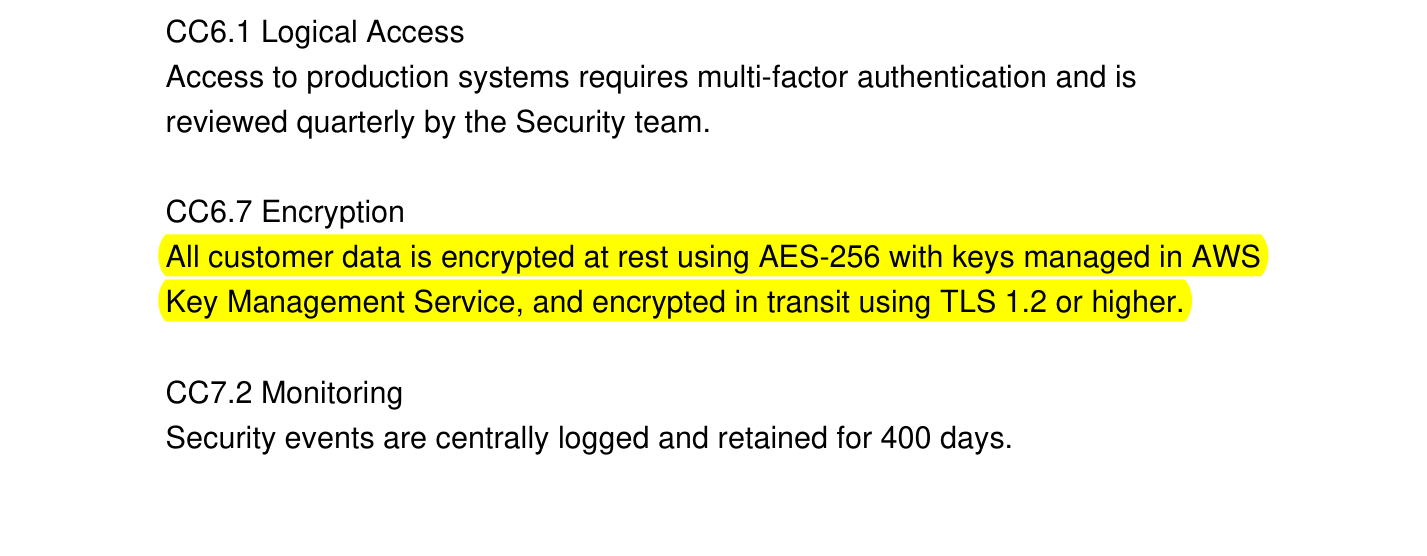 Cite the quote and the link rather than the answer. They are what show where the answer came from.
***
## How Coverbase decides what to read
Reading every document a vendor has for every question would be slow and expensive, so a pull narrows in stages.
Your document type, service, and upload date filters are applied in the database first. Nothing is read yet. At most 100 documents survive as candidates.
Coverbase collects passages that earlier work already quoted from those same documents, along with the images already rendered for them. This is what makes a repeat question cheap.
A model sees the candidate list (names, types, upload dates) and those earlier passages, and picks the one or two documents most likely to hold the answer. It also decides whether an earlier passage already answers the question outright. Its reasoning comes back to you as the **Selection** line.
The chosen documents are read in full. By default at most two, and never more than five.
Each quote is located in the page and cropped with the passage highlighted. If a matching image was already rendered for that passage, it is reused rather than made again.
Read the **Selection** line when an answer is not what you expected. Usually a different document was picked than the one you had in mind, and the line says which and why. Name the document explicitly to override it.
### Asking the same thing twice is cheap
When a passage has already been quoted and rendered, a later pull can answer from it without reading the document again. You will see this in the header:
```
Read 0 of 3 readable document(s) in scope, with 4 previously cited
passage(s) available to reuse.
```
`Read 0` means nothing had to be opened. The finding will say **Source: a passage already cited from this document**, and the snippet image is the one rendered earlier. The answer is grounded in the same verbatim text either way.
Coverbase never reuses a passage whose underlying insight has since been re-extracted, so a stale image cannot ground a new answer.
***
## The highlighted link
Every answer carries a link of this shape:
```
https:///vendors//documents/?page=42&highlight=
```
Opening it loads the document preview, jumps to that page, and marks the passage.
The highlight travels as the quote itself rather than as coordinates on the page. If the document is re-processed and the layout moves, the viewer re-matches the text and still finds it, where a stored box would point at the wrong place. It also keeps the link readable, so you can see what it will highlight before you click.
The link opens Coverbase and respects your permissions. Someone without access to that vendor sees your normal access error, not the document. Sharing the link with a colleague is safe.
The snippet **image** in the chat response is a short-lived link that expires about an hour after the pull. The Coverbase link does not expire. When you paste evidence into a ticket or a report, paste the Coverbase link, and save the image itself if you need it to persist.
***
## What can and cannot be read
Coverbase OCRs documents on ingestion and keeps a searchable rendition alongside the original. A pull reads that rendition, so a scanned PDF that has finished processing is readable and its passages can be highlighted. Quality follows the scan: a clean scan reads like a native PDF, a photographed page at an angle may not.
A workbook is read as a workbook rather than as its PDF rendition, because converting to PDF loses the cell structure. Answers from a workbook cite a **sheet name** instead of a page number, and do not carry a snippet image.
A document that has not finished ingestion has no readable rendition yet, so it is not a candidate. Wait for it to finish and ask again.
A document past the live-analysis size limit reports **Could not read this document** with the reason, rather than silently dropping out of the answer.
If a document was read and does not address the question, the finding says **No answer to this question in this document**. This usually means the clause you expected is not in the vendor's paper.
***
## Reading the answer critically
When the model could not ground its answer in a verbatim span, the response says: **No verbatim quote was grounded in the document, treat the answer as unverified.** Open the document and check it yourself before using the answer.
The header says how many documents were read out of how many were in scope. `Read 2 of 40` means thirty-eight documents were not opened. The answer is what those two say, not a statement about your whole repository.
**Medium** or **low** means the model had to infer. The quote is still verbatim; what is uncertain is whether that quote means what the answer says it means.
"None of the documents read answered the question" is not "the vendor has no such control". Drop the document-type filter, raise the document limit, or ask about a specific document you believe holds the answer.
***
## Limits
| Limit | Value |
| --------------------------------- | ----------------------- |
| Documents read per pull | 2 by default, 5 maximum |
| Candidate documents considered | 100 |
| Concurrent pulls per organization | 3 |
| Typical duration | 1 to 3 minutes |
| Snippet image link lifetime | About 1 hour |
| Coverbase deep link lifetime | Permanent |
A pull that has not reported back within about 25 minutes is reported as stalled. The first pull will not return a result, so start another one.
***
## Permissions and audit
A pull reads only documents you can already see. It runs under your organization and your permissions, exactly like opening the document in the dashboard.
Asking a question does not require write access. The pull records its own question and answer so the result can be collected later, and that record is the only thing it writes. It creates nothing you manage elsewhere: no finding, no note, no document.
Every pull is captured in the MCP audit log with the tool called, the user, the organization, and the timestamp. See [Permissions](/mcp/permissions) and [Security](/mcp/security).
***
## Related
Fields pulled from every document of a type automatically, with the same quote and page citation.
What makes a document usable as evidence in the first place.
`pull_document_evidence` and the nineteen other scripted workflows.
The exact routes behind a pull, for auditing what an assistant did.
Cite the quote and the link rather than the answer. They are what show where the answer came from.
***
## How Coverbase decides what to read
Reading every document a vendor has for every question would be slow and expensive, so a pull narrows in stages.
Your document type, service, and upload date filters are applied in the database first. Nothing is read yet. At most 100 documents survive as candidates.
Coverbase collects passages that earlier work already quoted from those same documents, along with the images already rendered for them. This is what makes a repeat question cheap.
A model sees the candidate list (names, types, upload dates) and those earlier passages, and picks the one or two documents most likely to hold the answer. It also decides whether an earlier passage already answers the question outright. Its reasoning comes back to you as the **Selection** line.
The chosen documents are read in full. By default at most two, and never more than five.
Each quote is located in the page and cropped with the passage highlighted. If a matching image was already rendered for that passage, it is reused rather than made again.
Read the **Selection** line when an answer is not what you expected. Usually a different document was picked than the one you had in mind, and the line says which and why. Name the document explicitly to override it.
### Asking the same thing twice is cheap
When a passage has already been quoted and rendered, a later pull can answer from it without reading the document again. You will see this in the header:
```
Read 0 of 3 readable document(s) in scope, with 4 previously cited
passage(s) available to reuse.
```
`Read 0` means nothing had to be opened. The finding will say **Source: a passage already cited from this document**, and the snippet image is the one rendered earlier. The answer is grounded in the same verbatim text either way.
Coverbase never reuses a passage whose underlying insight has since been re-extracted, so a stale image cannot ground a new answer.
***
## The highlighted link
Every answer carries a link of this shape:
```
https:///vendors//documents/?page=42&highlight=
```
Opening it loads the document preview, jumps to that page, and marks the passage.
The highlight travels as the quote itself rather than as coordinates on the page. If the document is re-processed and the layout moves, the viewer re-matches the text and still finds it, where a stored box would point at the wrong place. It also keeps the link readable, so you can see what it will highlight before you click.
The link opens Coverbase and respects your permissions. Someone without access to that vendor sees your normal access error, not the document. Sharing the link with a colleague is safe.
The snippet **image** in the chat response is a short-lived link that expires about an hour after the pull. The Coverbase link does not expire. When you paste evidence into a ticket or a report, paste the Coverbase link, and save the image itself if you need it to persist.
***
## What can and cannot be read
Coverbase OCRs documents on ingestion and keeps a searchable rendition alongside the original. A pull reads that rendition, so a scanned PDF that has finished processing is readable and its passages can be highlighted. Quality follows the scan: a clean scan reads like a native PDF, a photographed page at an angle may not.
A workbook is read as a workbook rather than as its PDF rendition, because converting to PDF loses the cell structure. Answers from a workbook cite a **sheet name** instead of a page number, and do not carry a snippet image.
A document that has not finished ingestion has no readable rendition yet, so it is not a candidate. Wait for it to finish and ask again.
A document past the live-analysis size limit reports **Could not read this document** with the reason, rather than silently dropping out of the answer.
If a document was read and does not address the question, the finding says **No answer to this question in this document**. This usually means the clause you expected is not in the vendor's paper.
***
## Reading the answer critically
When the model could not ground its answer in a verbatim span, the response says: **No verbatim quote was grounded in the document, treat the answer as unverified.** Open the document and check it yourself before using the answer.
The header says how many documents were read out of how many were in scope. `Read 2 of 40` means thirty-eight documents were not opened. The answer is what those two say, not a statement about your whole repository.
**Medium** or **low** means the model had to infer. The quote is still verbatim; what is uncertain is whether that quote means what the answer says it means.
"None of the documents read answered the question" is not "the vendor has no such control". Drop the document-type filter, raise the document limit, or ask about a specific document you believe holds the answer.
***
## Limits
| Limit | Value |
| --------------------------------- | ----------------------- |
| Documents read per pull | 2 by default, 5 maximum |
| Candidate documents considered | 100 |
| Concurrent pulls per organization | 3 |
| Typical duration | 1 to 3 minutes |
| Snippet image link lifetime | About 1 hour |
| Coverbase deep link lifetime | Permanent |
A pull that has not reported back within about 25 minutes is reported as stalled. The first pull will not return a result, so start another one.
***
## Permissions and audit
A pull reads only documents you can already see. It runs under your organization and your permissions, exactly like opening the document in the dashboard.
Asking a question does not require write access. The pull records its own question and answer so the result can be collected later, and that record is the only thing it writes. It creates nothing you manage elsewhere: no finding, no note, no document.
Every pull is captured in the MCP audit log with the tool called, the user, the organization, and the timestamp. See [Permissions](/mcp/permissions) and [Security](/mcp/security).
***
## Related
Fields pulled from every document of a type automatically, with the same quote and page citation.
What makes a document usable as evidence in the first place.
`pull_document_evidence` and the nineteen other scripted workflows.
The exact routes behind a pull, for auditing what an assistant did.