> ## Documentation Index
> Fetch the complete documentation index at: https://docs.coverbase.com/llms.txt
> Use this file to discover all available pages before exploring further.
# The issue acceptance chain
> Route a decision to accept a finding's risk through the finding owner, a recommending Risk Group, the deciding TPRM Office and an extended approver: set up routing rules, record each step, decide in bulk, and read the effect on residual risk.
For AI agents: a documentation index is available at [https://docs.coverbase.com/llms.txt](https://docs.coverbase.com/llms.txt). This page is also available in markdown by appending .md to the URL.
This guide is part of the [User Guides](/user-guides/overview) collection. It covers **Risk Acceptance Routing** under **Findings Settings** and the **Decision Path** on a finding. It sits beside [Findings and remediation](/user-guides/findings-and-remediation), which covers statuses and vendor commitments, and [Due diligence methods and the portal](/user-guides/due-diligence-methods-and-portal). For what the module is, see [Due diligence](/products/due-diligence#the-acceptance-chain).
Without routing, one person with permission to accept risk can accept a finding's risk on their own. Routing rules put a chain in front of that decision: the finding's owner proposes, a Risk Group recommends, the TPRM Office decides, and an acceptance longer than a set number of days needs one more approver.
Your Coverbase representative turns on the third-party lifecycle features for your organization.
The mistake people make most often is trying to set a routed finding to **Risk accepted** directly. Once a rule routes a finding, every path to risk accepted is refused until the chain has approved the acceptance, and the error says so.
## How the chain works
| Step | Who | Can choose |
| - | - | - |
| **Propose** | The finding's owner (its assignee), or anyone who can update the finding | **Accept risk**, **Remediate** or **Escalate** |
| **Recommend** | The rule's **Recommending Group**, if the rule names one | **Accept risk**, **Remediate** or **Escalate** |
| **Decide** | The rule's **Deciding Group**, or anyone allowed to accept risk if the rule names none | **Accept risk** or **Remediate** |
| **Approve** | The rule's **Approver Beyond That**, only when the acceptance runs longer than the rule's days | **Approve** or **Reject** |
* **Escalate** skips the recommendation and goes straight to the decision.
* The deciding group can decide at any point, before or against the earlier steps. That is recorded as an overrule.
* Accepting risk always needs an end date, no more than 366 days from today.
* A rejected extended acceptance goes back to the decision step.
* Group members and the group's lead can act for the group.
Each step records a rationale. The next person in the chain (the group's lead, or the extended approver) is notified, never the person who acted last.
## Step 1: Write routing rules
Open **Configuration**, choose **Findings Settings**, and find **Risk Acceptance Routing**. With no rules, every finding follows the single-approver path.
Click **Add rule**:
1. **Name** the rule, for example "High severity on critical data".
2. Choose the **Severity or Risk Levels** it matches. Leave it empty to match every finding.
3. Choose the **Recommending Group**, or **No recommendation step**.
4. Choose the **Deciding Group**, or **Any risk acceptance approver**.
5. Optionally set **Days** and the **Approver Beyond That**: an acceptance longer than that many days also needs that person.
6. Click **Save rule**.
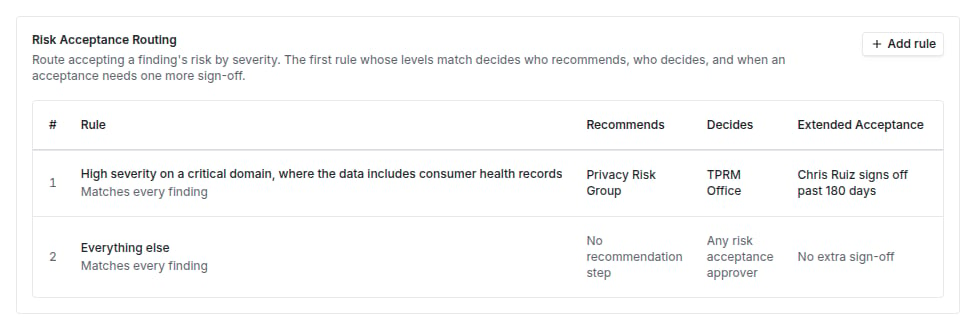 Rules are checked in order and a finding follows the first one that matches. Use **Move up** and **Move down** to order them, most specific first. Deleting a rule sends its findings to the next rule that matches; decisions already recorded stay on their findings.
## Step 2: Read a finding's path
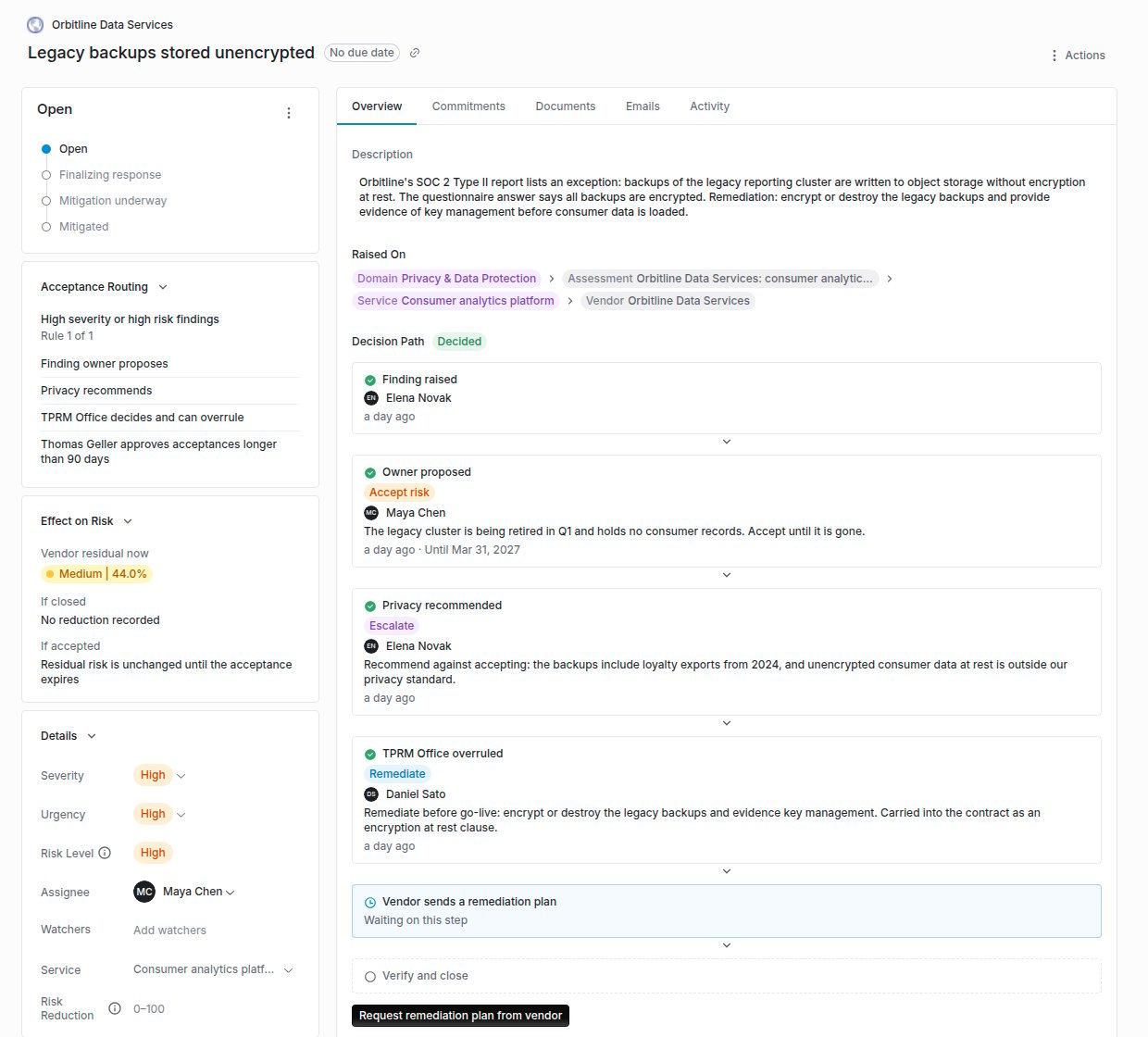
Open the finding. Three cards explain where it stands:
* **Acceptance Routing** names the matching rule (**Rule 2 of 4**) and who proposes, recommends, decides and approves. **No routing rule matches** means the finding follows the single-approver path.
* **Decision Path** shows each step recorded so far, its outcome and rationale, and the next step, such as **Risk group recommends** or **Sign-off on acceptances over 90 days**.
* **Effect on Risk** shows the vendor's residual risk now, **If closed** and **If accepted**, using the finding's recorded residual risk reduction.
Rules are checked in order and a finding follows the first one that matches. Use **Move up** and **Move down** to order them, most specific first. Deleting a rule sends its findings to the next rule that matches; decisions already recorded stay on their findings.
## Step 2: Read a finding's path
Open the finding. Three cards explain where it stands:
* **Acceptance Routing** names the matching rule (**Rule 2 of 4**) and who proposes, recommends, decides and approves. **No routing rule matches** means the finding follows the single-approver path.
* **Decision Path** shows each step recorded so far, its outcome and rationale, and the next step, such as **Risk group recommends** or **Sign-off on acceptances over 90 days**.
* **Effect on Risk** shows the vendor's residual risk now, **If closed** and **If accepted**, using the finding's recorded residual risk reduction.
 ## Step 3: Record a step
Click the button for your step on the **Decision Path**: **Propose**, **Recommend**, **Decide** (or **Decide now** to overrule), or **Review acceptance**. Choose the **Outcome**, write the **Rationale**, and for an acceptance pick **Accept Until**. Then record it.
With [Teams approvals](/integrations/guides/microsoft-teams#register-the-bot) on, the person or group the chain waits on can also approve or decline the step from a Teams card, with their own Coverbase permissions. A card for a step the chain has already moved past is refused.
If the button is missing, the chain is waiting on someone else: **Waiting on another step. You'll be notified when this finding needs you.**
## Step 4: Apply the acceptance
When the chain approves accepting the risk, click **Apply risk acceptance**. This sets the finding to risk accepted through the ordinary finding update, with an exception that ends on the date the chain approved. An exception cannot outlast that date.
When the outcome is **Remediate**, **Request remediation plan from vendor** asks the vendor for a plan through the portal.
## Decide in bulk
On the **Findings** list, select findings and choose **Record decision**. Pick the **Step** (**Propose**, **Recommend** or **Decide**), the outcome and a rationale, which is recorded on each finding. Turn on **Accept the risk right away on findings this decision fully approves** to apply acceptances in the same action.
Findings that are not at that step, or whose step is not yours, are skipped and stay selected. The summary reports each group, for example "12 findings accepted, 3 need a decision", so you can act on the rest next.
## Troubleshooting
| What you see | Cause | Fix |
| - | - | - |
| Setting **Risk accepted** fails with a message that the finding is routed | A rule routes the finding and its chain has not approved accepting the risk. | Work the **Decision Path**, then **Apply risk acceptance**. |
| **Assign this finding so its owner can propose** | The finding has no assignee. | Assign it. |
| **Only the routed Risk Group recommends** | You are not a member or lead of the recommending group. | Ask a member of that group, or add yourself to it. |
| The acceptance is stuck at **Awaiting approval** | It runs past the rule's days and needs the extended approver. | The named approver clicks **Review acceptance**. Or decide again with a shorter **Accept Until**. |
| **Accept Until** rejects the date | The date is in the past or more than 366 days out. | Pick a date within the limit. |
| The exception's end date cannot be changed to a later date | An exception cannot outlast the acceptance the chain approved. | Run the chain again for a longer acceptance. |
| Bulk decision skipped some findings | They were at a different step, or the step was not yours. | They stay selected. Record the step they are at, or ask the right person. |
## Related
Statuses, commitments and verification.
Raising a finding on a question.
User groups and their leads.
Time-bound risk acceptance and remediation.
This documentation is built and hosted on [Mintlify](https://mintlify.com), a developer documentation platform.
## Step 3: Record a step
Click the button for your step on the **Decision Path**: **Propose**, **Recommend**, **Decide** (or **Decide now** to overrule), or **Review acceptance**. Choose the **Outcome**, write the **Rationale**, and for an acceptance pick **Accept Until**. Then record it.
With [Teams approvals](/integrations/guides/microsoft-teams#register-the-bot) on, the person or group the chain waits on can also approve or decline the step from a Teams card, with their own Coverbase permissions. A card for a step the chain has already moved past is refused.
If the button is missing, the chain is waiting on someone else: **Waiting on another step. You'll be notified when this finding needs you.**
## Step 4: Apply the acceptance
When the chain approves accepting the risk, click **Apply risk acceptance**. This sets the finding to risk accepted through the ordinary finding update, with an exception that ends on the date the chain approved. An exception cannot outlast that date.
When the outcome is **Remediate**, **Request remediation plan from vendor** asks the vendor for a plan through the portal.
## Decide in bulk
On the **Findings** list, select findings and choose **Record decision**. Pick the **Step** (**Propose**, **Recommend** or **Decide**), the outcome and a rationale, which is recorded on each finding. Turn on **Accept the risk right away on findings this decision fully approves** to apply acceptances in the same action.
Findings that are not at that step, or whose step is not yours, are skipped and stay selected. The summary reports each group, for example "12 findings accepted, 3 need a decision", so you can act on the rest next.
## Troubleshooting
| What you see | Cause | Fix |
| - | - | - |
| Setting **Risk accepted** fails with a message that the finding is routed | A rule routes the finding and its chain has not approved accepting the risk. | Work the **Decision Path**, then **Apply risk acceptance**. |
| **Assign this finding so its owner can propose** | The finding has no assignee. | Assign it. |
| **Only the routed Risk Group recommends** | You are not a member or lead of the recommending group. | Ask a member of that group, or add yourself to it. |
| The acceptance is stuck at **Awaiting approval** | It runs past the rule's days and needs the extended approver. | The named approver clicks **Review acceptance**. Or decide again with a shorter **Accept Until**. |
| **Accept Until** rejects the date | The date is in the past or more than 366 days out. | Pick a date within the limit. |
| The exception's end date cannot be changed to a later date | An exception cannot outlast the acceptance the chain approved. | Run the chain again for a longer acceptance. |
| Bulk decision skipped some findings | They were at a different step, or the step was not yours. | They stay selected. Record the step they are at, or ask the right person. |
## Related
Statuses, commitments and verification.
Raising a finding on a question.
User groups and their leads.
Time-bound risk acceptance and remediation.
This documentation is built and hosted on [Mintlify](https://mintlify.com), a developer documentation platform.