> ## Documentation Index
> Fetch the complete documentation index at: https://docs.coverbase.com/llms.txt
> Use this file to discover all available pages before exploring further.
# Working Radar signals
> How to read the Radar signal queue, triage a signal into a case, a finding, a reassessment or an acknowledgement, keep sources and detectors tuned, and follow a signal into findings, the risk register, workflows and dashboards.
For AI agents: a documentation index is available at [https://docs.coverbase.com/llms.txt](https://docs.coverbase.com/llms.txt). This page is also available in markdown by appending .md to the URL.
This guide is part of the [User Guides](/user-guides/overview) collection. It covers everything under **Radar** in the left navigation and its settings under **Configuration → Radar**. For what the product is, see [Supplier Radar](/products/supplier-radar). For the one source that has its own setup page, see the [Black Kite monitoring guide](/user-guides/black-kite-monitoring).
Radar is an optional module. If you do not see **Radar** in the left navigation, ask your Coverbase representative to turn it on.
Radar reads external sources (news, advisories, vulnerability databases, sanctions lists, your own feeds) and turns each event that touches one of your vendors into a **signal**. A signal carries a status, a severity, a summary written for your portfolio, and the list of your vendors exposed to it. Your job is to decide which signals become work and to teach the detectors to stay quiet about the rest.
Two settings do the monitoring. A **source** collects. A **detector** decides what is worth an alert. A source with no detector fills up quietly and never tells anyone. A detector with a loose threshold fires on every routine patch note. Most Radar problems are one of those two.
## The vocabulary
| Term | What it is | Where you see it |
| ---------------- | -------------------------------------------------------------------------------------------------------------------------------------------------------------------- | ------------------------------------- |
| **Source** | Your subscription to one feed, API, page or portfolio. Most sources come from the shared library. A source you add by URL is yours alone. | **Configuration → Radar → Sources** |
| **Detector** | A rule for what deserves an alert: plain-language guidance, a severity threshold, category and source filters, and the vendors it applies to. | **Configuration → Radar → Detectors** |
| **Signal** | One event, as it affects your organization. One signal per event, however many detectors fire. | **Radar → Signals** |
| **Alert** | One detector's verdict that an event matters for one of your vendors, with severity, confidence and reasoning. Alerts sit under the signal on its **Detectors** tab. | The signal page |
| **Case** | An investigation you open from a signal, with one thread per vendor and vendor outreach. | **Radar → Cases** |
| **Finding** | A confirmed problem on a vendor, created from a signal. | **Findings**, and the vendor page |
| **Reassessment** | A draft batch of assessments raised from a signal or a trigger, run once you confirm the vendors. | **Radar → Reassessments** |
The chain is: a source pulls an item, Radar folds the item into an event, the event touches one of your vendors and becomes a signal, each enabled detector that targets that vendor reads the event and either alerts or stays quiet, and an alert at or above the detector's severity threshold puts the signal **In alert**. An Informational alert never does.
## Where things live
**Radar** in the left navigation opens the **Portfolio risk** chart and three tabs: **Signals**, **Cases** and **Reassessments**. The **Configurations** button at the right of the tab bar opens **Configuration → Radar**, which has its own three tabs: **Detectors**, **Sources** and **Reassessments** (the reassessment triggers).
Every vendor page also has a **Radar** tab. It lists **Detectors monitoring this vendor** and the vendor's **Recent alerts**, with an **Edit detector** link on each detector.
## The signal queue
Open **Radar → Signals**.
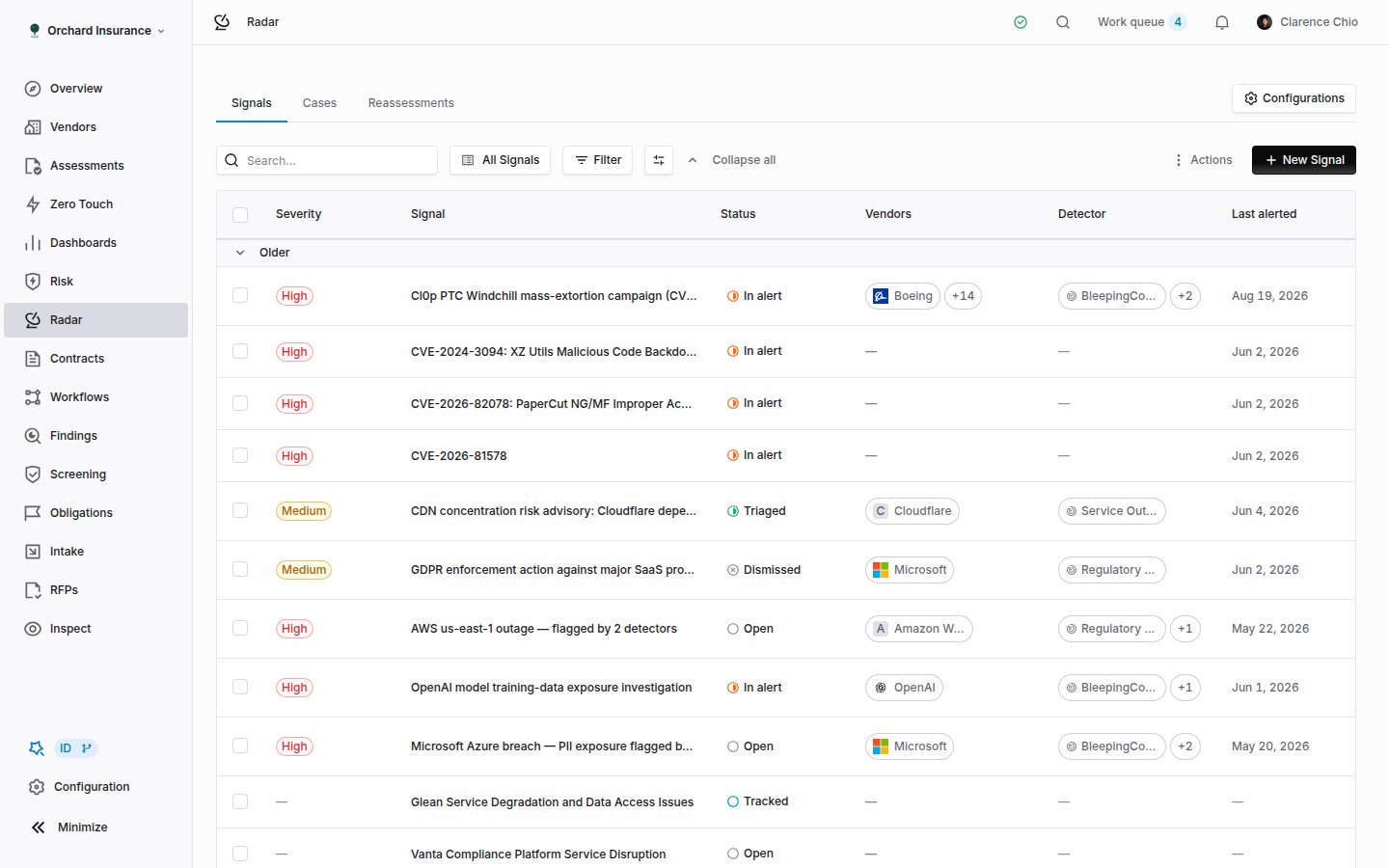 Three built-in views sit in the view selector. **All Signals** is the default and shows everything, newest first. **In Alert** shows only signals with an active alert, most recently alerted first. This is the queue. **Triaged** shows signals someone has already acted on. Add filters, change columns under **Display options**, and save the arrangement as a view of your own.
| Column | What it shows |
| ---------------- | --------------------------------------------------------- |
| **Severity** | The highest severity any detector assigned to this event. |
| **Signal** | The title Radar wrote for your organization. |
| **Status** | Where the signal stands. See the table below. |
| **Vendors** | Your vendors linked to the event. |
| **Detector** | The detectors that fired. |
| **Last alerted** | When the most recent alert attached. |
| **Risk domains** | The domains the firing detectors map to. |
| **First seen** | When Radar first saw the event. |
Rows group by **Today**, **Yesterday**, **This week**, **Last week** and **Older**. **Collapse all** and **Expand all** fold the groups. The actions menu at the right offers **Download as Excel**, which exports the current view with its filters and columns. **New Signal** records an event by hand: title, summary, impact area, affected vendors, and a checkbox to raise an alert at once. Leave the checkbox off and the detectors evaluate it like any other event.
### Signal statuses
| Status | Meaning |
| ------------- | ------------------------------------------------------------------------------------------------------------------------- |
| **Tracked** | A vendor you depend on is linked to the event, but no detector has alerted. Radar shows the exposure and waits. |
| **Open** | No detector is alerting, but someone handled the signal by hand: created it, edited it, or restored it after a dismissal. |
| **In alert** | At least one detector fired at or above its threshold and the alert is still active. |
| **Triaged** | Someone acknowledged the signal, opened a case, created a finding, or started a reassessment. |
| **Dismissed** | Every alert on the signal was dismissed, or the signal was dismissed before any alert existed. |
| **Closed** | A terminal status. Nothing moves a signal here on its own; set it from the status card on the signal page. |
Your organization can add statuses of its own between these under **Statuses**, where the target type is **Radar Signal**.
### Acting on several signals at once
Tick rows and a bar appears with **Start reassessment**, **Acknowledge**, **Dismiss** (or **Restore (un-dismiss)** for dismissed rows), **Should have alerted** and **Clear**. **Should have alerted** is for a Tracked signal a detector missed: pick the detector, and the signal is added to it as a positive example so events like it alert next time.
## Reading a signal
Click a row. The page opens with the title (click it to edit), the severity badge, a **Vulnerability** badge when the event is a CVE, and the **Actions** menu.
Three built-in views sit in the view selector. **All Signals** is the default and shows everything, newest first. **In Alert** shows only signals with an active alert, most recently alerted first. This is the queue. **Triaged** shows signals someone has already acted on. Add filters, change columns under **Display options**, and save the arrangement as a view of your own.
| Column | What it shows |
| ---------------- | --------------------------------------------------------- |
| **Severity** | The highest severity any detector assigned to this event. |
| **Signal** | The title Radar wrote for your organization. |
| **Status** | Where the signal stands. See the table below. |
| **Vendors** | Your vendors linked to the event. |
| **Detector** | The detectors that fired. |
| **Last alerted** | When the most recent alert attached. |
| **Risk domains** | The domains the firing detectors map to. |
| **First seen** | When Radar first saw the event. |
Rows group by **Today**, **Yesterday**, **This week**, **Last week** and **Older**. **Collapse all** and **Expand all** fold the groups. The actions menu at the right offers **Download as Excel**, which exports the current view with its filters and columns. **New Signal** records an event by hand: title, summary, impact area, affected vendors, and a checkbox to raise an alert at once. Leave the checkbox off and the detectors evaluate it like any other event.
### Signal statuses
| Status | Meaning |
| ------------- | ------------------------------------------------------------------------------------------------------------------------- |
| **Tracked** | A vendor you depend on is linked to the event, but no detector has alerted. Radar shows the exposure and waits. |
| **Open** | No detector is alerting, but someone handled the signal by hand: created it, edited it, or restored it after a dismissal. |
| **In alert** | At least one detector fired at or above its threshold and the alert is still active. |
| **Triaged** | Someone acknowledged the signal, opened a case, created a finding, or started a reassessment. |
| **Dismissed** | Every alert on the signal was dismissed, or the signal was dismissed before any alert existed. |
| **Closed** | A terminal status. Nothing moves a signal here on its own; set it from the status card on the signal page. |
Your organization can add statuses of its own between these under **Statuses**, where the target type is **Radar Signal**.
### Acting on several signals at once
Tick rows and a bar appears with **Start reassessment**, **Acknowledge**, **Dismiss** (or **Restore (un-dismiss)** for dismissed rows), **Should have alerted** and **Clear**. **Should have alerted** is for a Tracked signal a detector missed: pick the detector, and the signal is added to it as a positive example so events like it alert next time.
## Reading a signal
Click a row. The page opens with the title (click it to edit), the severity badge, a **Vulnerability** badge when the event is a CVE, and the **Actions** menu.
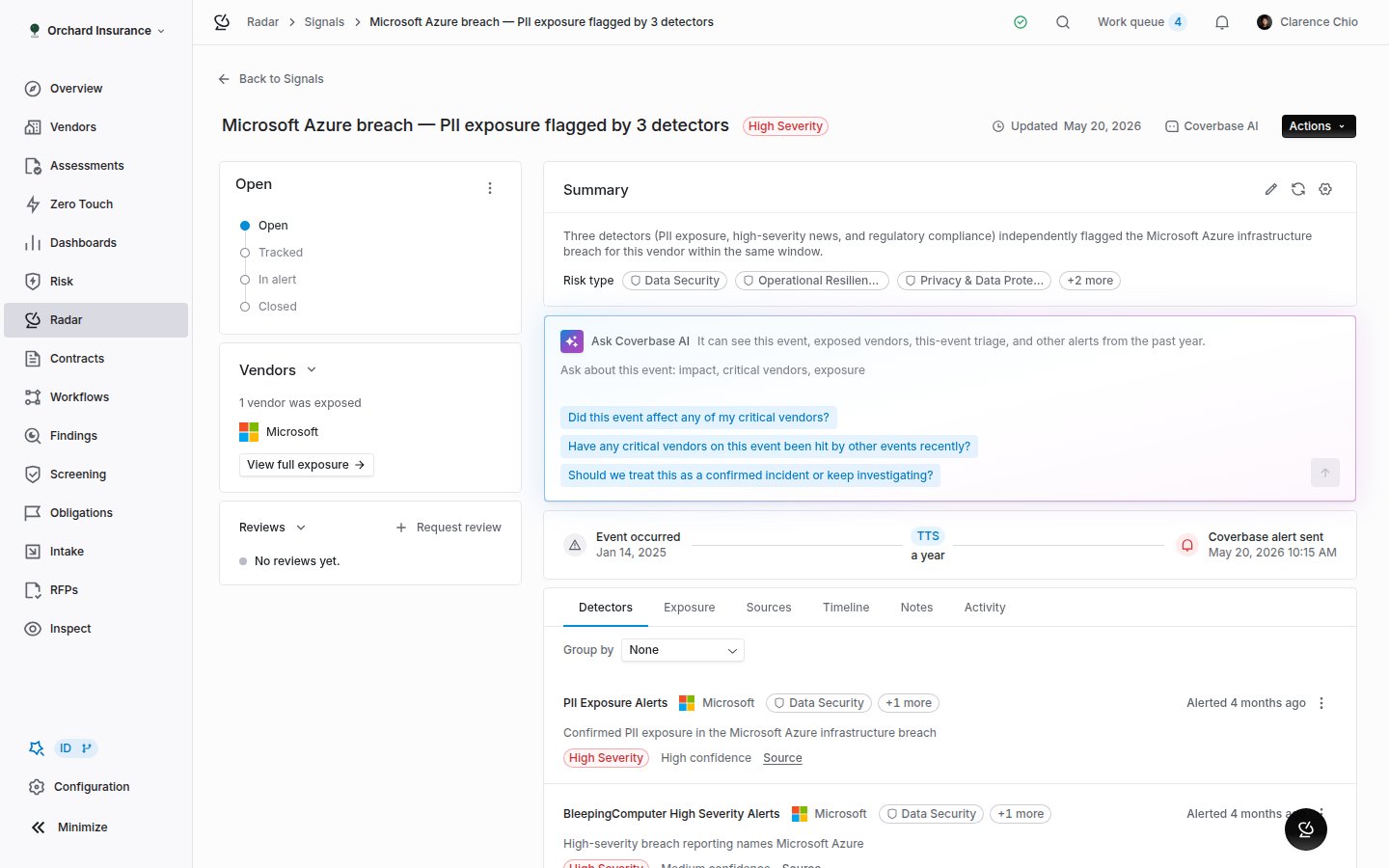 The left column holds:
* The **status card**, named after the current status. Anyone with update permission on alerts can set a different status here.
* **Triage actions**, once any exist: **Marked as acknowledged**, and the cases, findings and reassessments raised from this signal, each linking to its record.
* **Vendors**: how many of your vendors were exposed, with **View full exposure** opening the Exposure tab.
* **Vulnerabilities**, on a CVE event: **Potential impact (CVSS v3.1)**, **Likelihood of exploitation (EPSS)** and **Known exploited (KEV)**. A blank EPSS is common; a blank KEV means no source reported either way.
The main column holds:
* **Summary**, with the **Risk type** chips. Click the pencil to rewrite it by hand. **Regenerate summary** rewrites it from what the detectors currently report and discards any hand edit. **Custom AI instructions** on this card apply to every generated summary in your organization.
* **Ask Coverbase AI**, which can see the event, the exposed vendors, this signal's triage, and other alerts from the past year.
* **Time to signal**: **Event occurred**, **First public disclosure** and **Coverbase alert sent**, with the gaps between them.
Below those, six tabs:
| Tab | What it holds |
| ------------- | --------------------------------------------------------------------------------------------------------------------------------------------------------------------------------------------------------------------------------------------------------------------------------------------------------------------------------------------------------------------------------- |
| **Detectors** | One card per alert: the detector, the vendor, severity, confidence, when it alerted, its reasoning, and the sources it cited. Group by **Detector**, **Severity** or **Vendor**. Each card has its own **New finding**, **Acknowledge** and **Dismiss** actions, and a **Rate this result** pair of thumbs that adds the event to the detector as a positive or negative example. |
| **Exposure** | Every vendor the event touches, with **Tier**, **Inherent risk**, **Residual risk**, **Triage** (what has been done for that vendor) and **Exposure** (**Direct** or **Nth Party**). Switch between **Your vendors** and **All related entities**, and between the **Table** and the **Flow** view. **Add vendor** links a vendor Radar missed. |
| **Sources** | The articles, API records and snapshots behind the event, each with **Published** and **Fetched** times. |
| **Timeline** | Everything in order: sources linked, detections, dismissals, triage. |
| **Notes** | Notes on the signal. |
| **Activity** | The audit trail, including system entries. |
An **Nth Party** exposure means one of your vendors depends on a company the event names. Those relationships come from SOC 2 reports, subprocessor lists and bills of materials, so one event can implicate vendors nobody mentioned.
## Triaging a signal
Open the **Actions** menu on the signal page. What it offers depends on where the signal stands.
| Action | What it does | Status afterwards |
| ------------------------ | ---------------------------------------------------------------------------------------------------------- | ----------------- |
| **Open case** | Starts an investigation with one thread per affected vendor. Shown only while the signal has no open case. | Triaged |
| **Bulk create findings** | One finding per vendor you tick, prefilled from the alert. | Triaged |
| **Start reassessment** | Drafts a reassessment for the exposed vendors, with an optional assessment plan. | Triaged |
| **Acknowledge** | Records that you saw it and no case or finding is needed. | Triaged |
| **Dismiss** | Closes the alerts as not needing action, with an optional reason. | Dismissed |
| **Restore (un-dismiss)** | Brings a dismissed signal back. | In alert |
**Bulk create findings** and **Start reassessment** are disabled when the signal has no exposed vendors. **Acknowledge** disappears once the signal is Triaged or Dismissed.
### Dismissing
The left column holds:
* The **status card**, named after the current status. Anyone with update permission on alerts can set a different status here.
* **Triage actions**, once any exist: **Marked as acknowledged**, and the cases, findings and reassessments raised from this signal, each linking to its record.
* **Vendors**: how many of your vendors were exposed, with **View full exposure** opening the Exposure tab.
* **Vulnerabilities**, on a CVE event: **Potential impact (CVSS v3.1)**, **Likelihood of exploitation (EPSS)** and **Known exploited (KEV)**. A blank EPSS is common; a blank KEV means no source reported either way.
The main column holds:
* **Summary**, with the **Risk type** chips. Click the pencil to rewrite it by hand. **Regenerate summary** rewrites it from what the detectors currently report and discards any hand edit. **Custom AI instructions** on this card apply to every generated summary in your organization.
* **Ask Coverbase AI**, which can see the event, the exposed vendors, this signal's triage, and other alerts from the past year.
* **Time to signal**: **Event occurred**, **First public disclosure** and **Coverbase alert sent**, with the gaps between them.
Below those, six tabs:
| Tab | What it holds |
| ------------- | --------------------------------------------------------------------------------------------------------------------------------------------------------------------------------------------------------------------------------------------------------------------------------------------------------------------------------------------------------------------------------- |
| **Detectors** | One card per alert: the detector, the vendor, severity, confidence, when it alerted, its reasoning, and the sources it cited. Group by **Detector**, **Severity** or **Vendor**. Each card has its own **New finding**, **Acknowledge** and **Dismiss** actions, and a **Rate this result** pair of thumbs that adds the event to the detector as a positive or negative example. |
| **Exposure** | Every vendor the event touches, with **Tier**, **Inherent risk**, **Residual risk**, **Triage** (what has been done for that vendor) and **Exposure** (**Direct** or **Nth Party**). Switch between **Your vendors** and **All related entities**, and between the **Table** and the **Flow** view. **Add vendor** links a vendor Radar missed. |
| **Sources** | The articles, API records and snapshots behind the event, each with **Published** and **Fetched** times. |
| **Timeline** | Everything in order: sources linked, detections, dismissals, triage. |
| **Notes** | Notes on the signal. |
| **Activity** | The audit trail, including system entries. |
An **Nth Party** exposure means one of your vendors depends on a company the event names. Those relationships come from SOC 2 reports, subprocessor lists and bills of materials, so one event can implicate vendors nobody mentioned.
## Triaging a signal
Open the **Actions** menu on the signal page. What it offers depends on where the signal stands.
| Action | What it does | Status afterwards |
| ------------------------ | ---------------------------------------------------------------------------------------------------------- | ----------------- |
| **Open case** | Starts an investigation with one thread per affected vendor. Shown only while the signal has no open case. | Triaged |
| **Bulk create findings** | One finding per vendor you tick, prefilled from the alert. | Triaged |
| **Start reassessment** | Drafts a reassessment for the exposed vendors, with an optional assessment plan. | Triaged |
| **Acknowledge** | Records that you saw it and no case or finding is needed. | Triaged |
| **Dismiss** | Closes the alerts as not needing action, with an optional reason. | Dismissed |
| **Restore (un-dismiss)** | Brings a dismissed signal back. | In alert |
**Bulk create findings** and **Start reassessment** are disabled when the signal has no exposed vendors. **Acknowledge** disappears once the signal is Triaged or Dismissed.
### Dismissing
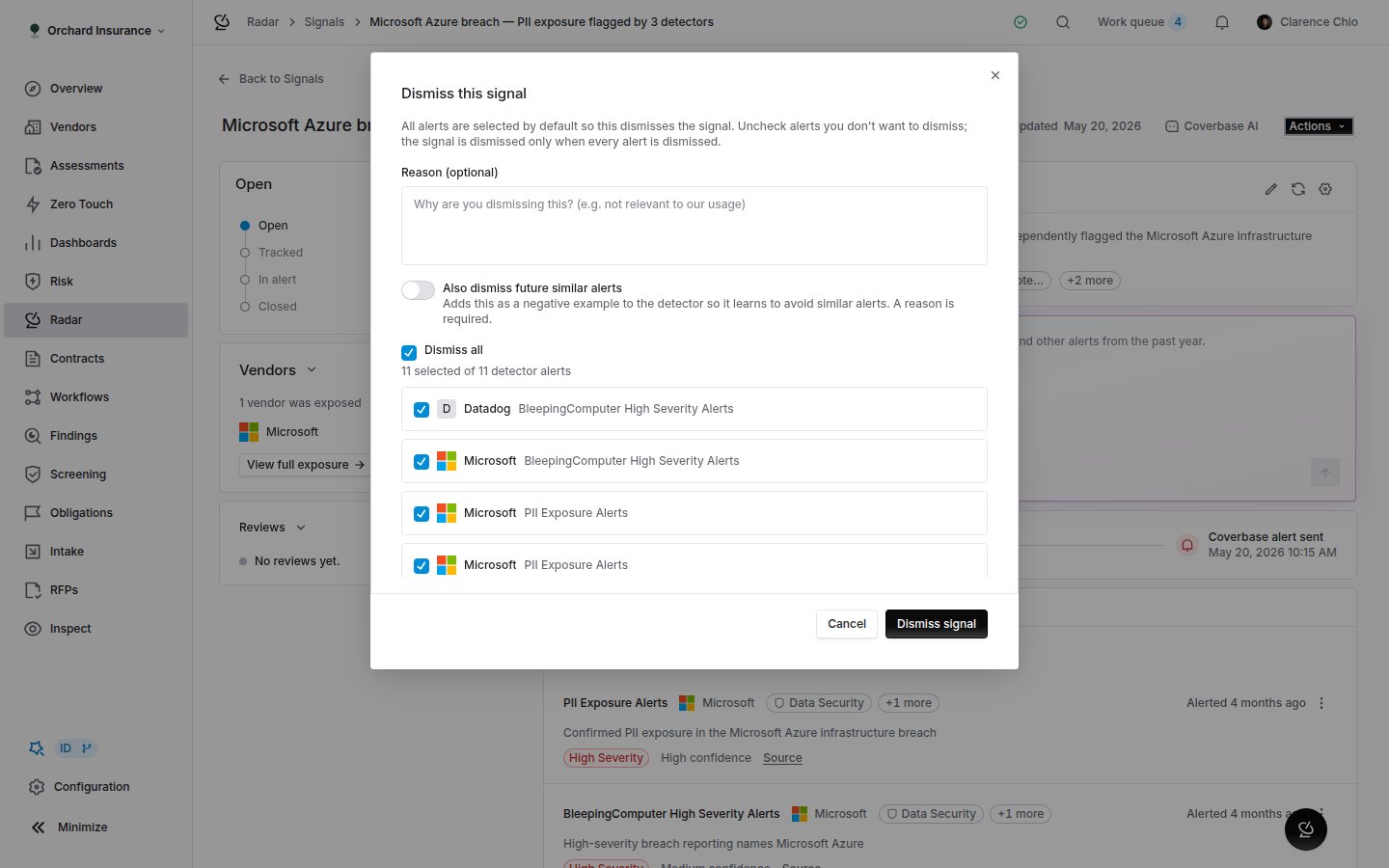 The dialog lists every active alert on the signal, all ticked. Untick the ones you want to keep and only the rest are dismissed; the signal itself is dismissed only when every alert is. Type a **Reason** if you want one on the record. Mention a colleague in it and they get a **Dismissal mentions** notification.
Switch on **Also dismiss future similar alerts** to add the event to the firing detector as a negative example. The reason becomes required, because the detector reads it. This is the main way a detector learns; the other is the detector's own **Test detector** run, below.
### Opening a case
**Create a Case** asks for a **Case title** (prefilled with the signal title), a **Case description**, and the vendors. **Include all affected vendors** is the default. **Create and Continue** takes you to **Send Emails**, where a **Shared Draft Template** with placeholders for the vendor name and your organization name can be applied to every pending vendor, edited per vendor, and sent one at a time or with **Send all remaining**. **Skip and Go to Case** leaves the emails for later.
The case page has **Overview**, **Vendors**, **Notes** and **Activity** tabs, and **Send Emails**, **Add Vendors** and **Import Vendors** buttons. Each vendor thread carries a status, an assignee, a due date and the vendor's replies. **Close Case** asks how it was resolved: **Resolved**, **Won't fix** or **False positive**. Unresolved threads can be resolved with the case or left as they are. **Reopen Case** undoes a close. **Archive Case** is final.
### Starting a reassessment
The reassessment opens as a draft on **Radar → Reassessments** with the exposed vendors preselected. Open it, adjust the vendors and the **Assessment plan**, then **Confirm** and **Run reassessment**, which creates one assessment per vendor from the plan. **Dismiss** closes the draft without running it. Reassessments can also be raised without a person, by the triggers under **Configuration → Radar → Reassessments**: each trigger names a plan, a vendor scope, and either risk-score conditions or an **AI event-type instruction** describing the kind of signal that should trigger it.
### The risk review
When a firing detector has **Residual risk impact** switched on, acknowledging, creating a finding, starting a reassessment, or closing a case as **Resolved** or **Won't fix** raises the affected vendors' residual risk. **Review vendor risk profile updates** opens with the new scores, overall and per domain. Adjust any of them and **Save and continue**, or **Continue** to accept. Dismissing never moves risk, and neither does closing a case as **False positive**. How the size of the move is chosen is on the [Supplier Radar page](/products/supplier-radar#risk-propagation).
## Sources
Open **Configuration → Radar → Sources**.
The dialog lists every active alert on the signal, all ticked. Untick the ones you want to keep and only the rest are dismissed; the signal itself is dismissed only when every alert is. Type a **Reason** if you want one on the record. Mention a colleague in it and they get a **Dismissal mentions** notification.
Switch on **Also dismiss future similar alerts** to add the event to the firing detector as a negative example. The reason becomes required, because the detector reads it. This is the main way a detector learns; the other is the detector's own **Test detector** run, below.
### Opening a case
**Create a Case** asks for a **Case title** (prefilled with the signal title), a **Case description**, and the vendors. **Include all affected vendors** is the default. **Create and Continue** takes you to **Send Emails**, where a **Shared Draft Template** with placeholders for the vendor name and your organization name can be applied to every pending vendor, edited per vendor, and sent one at a time or with **Send all remaining**. **Skip and Go to Case** leaves the emails for later.
The case page has **Overview**, **Vendors**, **Notes** and **Activity** tabs, and **Send Emails**, **Add Vendors** and **Import Vendors** buttons. Each vendor thread carries a status, an assignee, a due date and the vendor's replies. **Close Case** asks how it was resolved: **Resolved**, **Won't fix** or **False positive**. Unresolved threads can be resolved with the case or left as they are. **Reopen Case** undoes a close. **Archive Case** is final.
### Starting a reassessment
The reassessment opens as a draft on **Radar → Reassessments** with the exposed vendors preselected. Open it, adjust the vendors and the **Assessment plan**, then **Confirm** and **Run reassessment**, which creates one assessment per vendor from the plan. **Dismiss** closes the draft without running it. Reassessments can also be raised without a person, by the triggers under **Configuration → Radar → Reassessments**: each trigger names a plan, a vendor scope, and either risk-score conditions or an **AI event-type instruction** describing the kind of signal that should trigger it.
### The risk review
When a firing detector has **Residual risk impact** switched on, acknowledging, creating a finding, starting a reassessment, or closing a case as **Resolved** or **Won't fix** raises the affected vendors' residual risk. **Review vendor risk profile updates** opens with the new scores, overall and per domain. Adjust any of them and **Save and continue**, or **Continue** to accept. Dismissing never moves risk, and neither does closing a case as **False positive**. How the size of the move is chosen is on the [Supplier Radar page](/products/supplier-radar#risk-propagation).
## Sources
Open **Configuration → Radar → Sources**.
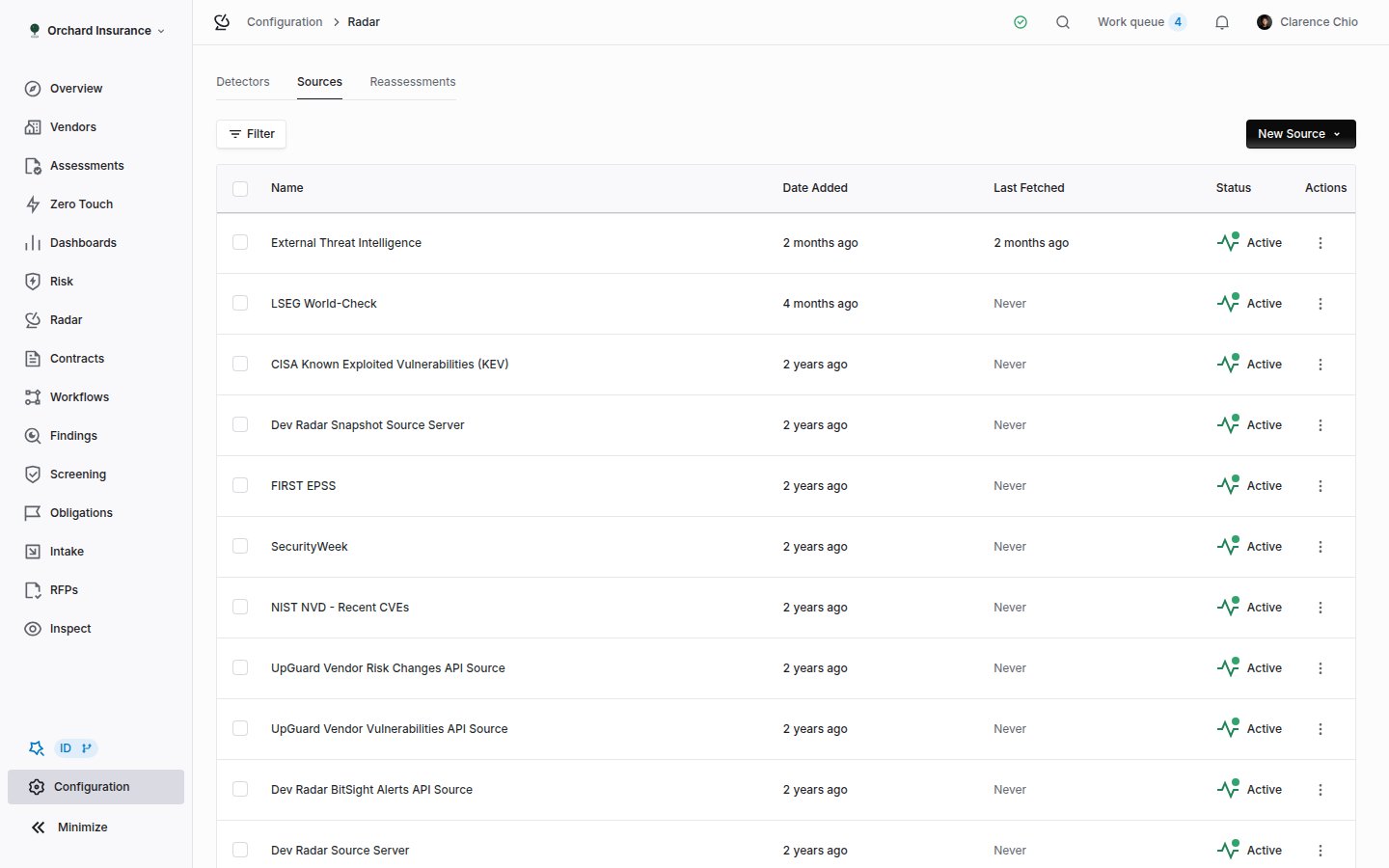 The table shows **Name**, **Status**, **Date Added** and **Last Fetched** (**Never** until the first successful run). The row menu has **Archive**, which stops collection and cannot be undone. Archived sources keep the items they already collected.
**New Source** offers three routes:
* **From Source Library**: pick from the curated catalog, by segment, and **Connect**. The full list is on the [source library page](/products/source-library). Library sources are shared and run on a schedule Coverbase sets; you can rename one but not change how it fetches.
* **Black Kite portfolio**: covered in the [Black Kite monitoring guide](/user-guides/black-kite-monitoring).
* **New Custom Source**: your own **Article Feed** (a news page or RSS feed), **API** (a JSON endpoint with a request configuration and a response mapping), or **Snapshot** (a page or a JSON list watched for changes, with a **Fetch Schedule** of **Hourly**, **Every 4 hours**, **Daily** or **Weekly**).
| Source status | What it means |
| -------------------- | -------------------------------------------------------------------------------------------------------------------- |
| **New** | Not saved yet. |
| **Pending** | Saved, and Radar is still building the extractor that reads the page. RSS feeds skip this and go straight to Active. |
| **Active** | Collecting. |
| **Unsupported** | Radar could not build an extractor for this page. It will not be monitored. |
| **Setup incomplete** | Extractor generation was abandoned. Reopen the source and finish it. |
A custom Article Feed without an RSS feed needs a generated extractor. The source page shows sample extracted items for you to **Accept** or **Reject**, and stays quiet until one is accepted.
### A source's items and runs
Click a source. Besides **Configure**, it has an **Articles** tab (**Snapshot** on a snapshot source) and a **Runs** tab.
The table shows **Name**, **Status**, **Date Added** and **Last Fetched** (**Never** until the first successful run). The row menu has **Archive**, which stops collection and cannot be undone. Archived sources keep the items they already collected.
**New Source** offers three routes:
* **From Source Library**: pick from the curated catalog, by segment, and **Connect**. The full list is on the [source library page](/products/source-library). Library sources are shared and run on a schedule Coverbase sets; you can rename one but not change how it fetches.
* **Black Kite portfolio**: covered in the [Black Kite monitoring guide](/user-guides/black-kite-monitoring).
* **New Custom Source**: your own **Article Feed** (a news page or RSS feed), **API** (a JSON endpoint with a request configuration and a response mapping), or **Snapshot** (a page or a JSON list watched for changes, with a **Fetch Schedule** of **Hourly**, **Every 4 hours**, **Daily** or **Weekly**).
| Source status | What it means |
| -------------------- | -------------------------------------------------------------------------------------------------------------------- |
| **New** | Not saved yet. |
| **Pending** | Saved, and Radar is still building the extractor that reads the page. RSS feeds skip this and go straight to Active. |
| **Active** | Collecting. |
| **Unsupported** | Radar could not build an extractor for this page. It will not be monitored. |
| **Setup incomplete** | Extractor generation was abandoned. Reopen the source and finish it. |
A custom Article Feed without an RSS feed needs a generated extractor. The source page shows sample extracted items for you to **Accept** or **Reject**, and stays quiet until one is accepted.
### A source's items and runs
Click a source. Besides **Configure**, it has an **Articles** tab (**Snapshot** on a snapshot source) and a **Runs** tab.
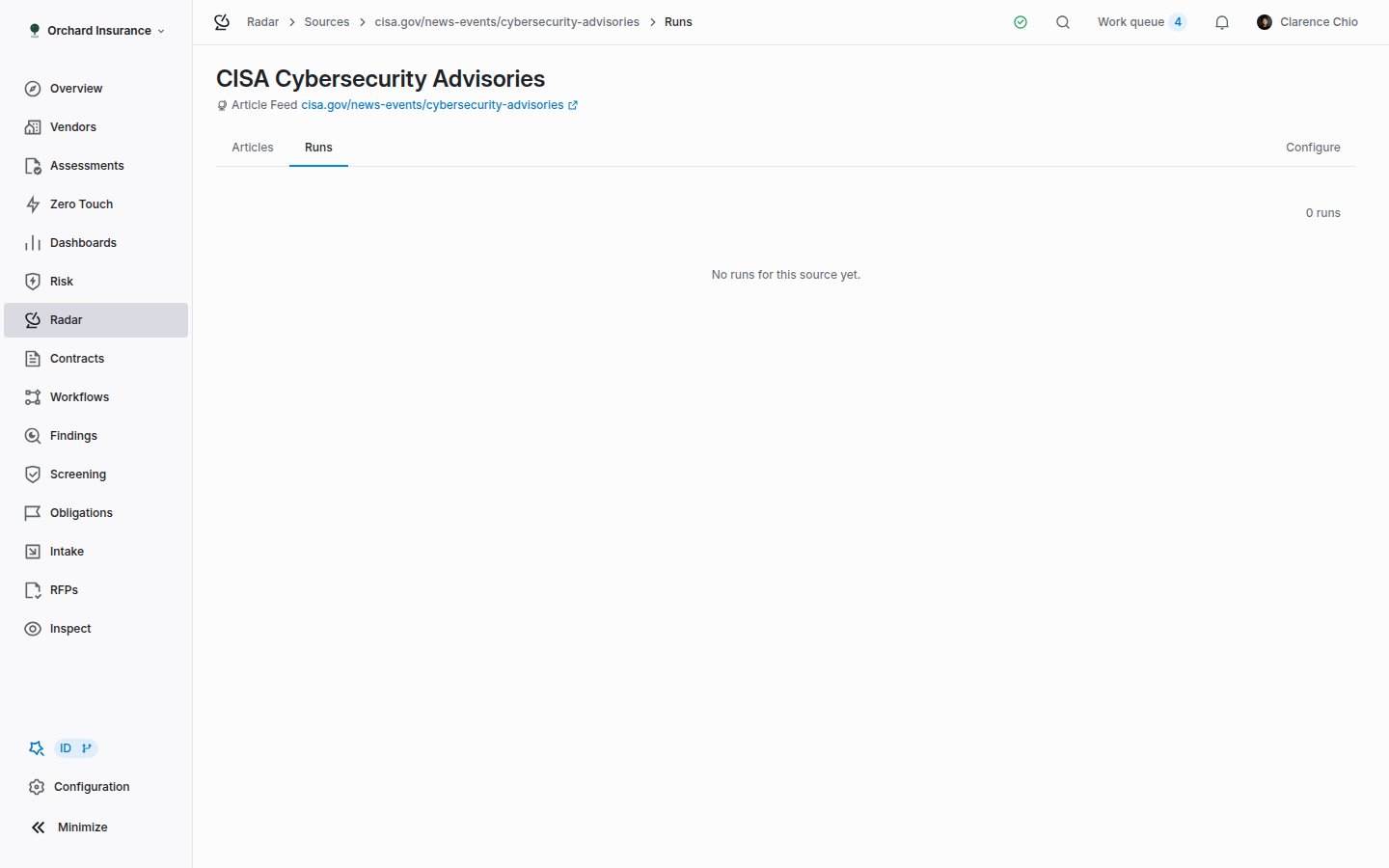 **Articles** lists every item the source collected, with its **Categories** and **Date Ingested**. Click one to read it and see which detectors evaluated it. **Runs** lists each fetch with **Status**, **Date Started**, **Duration**, **Fetched**, **Summarized**, **Entities**, **Detections** and **Errors**. Click a run for its log. A source that runs successfully with zero **Fetched** for days is usually a feed that has stopped publishing, or a page that started blocking automated access.
## Detectors
Open **Configuration → Radar → Detectors**.
**Articles** lists every item the source collected, with its **Categories** and **Date Ingested**. Click one to read it and see which detectors evaluated it. **Runs** lists each fetch with **Status**, **Date Started**, **Duration**, **Fetched**, **Summarized**, **Entities**, **Detections** and **Errors**. Click a run for its log. A source that runs successfully with zero **Fetched** for days is usually a feed that has stopped publishing, or a page that started blocking automated access.
## Detectors
Open **Configuration → Radar → Detectors**.
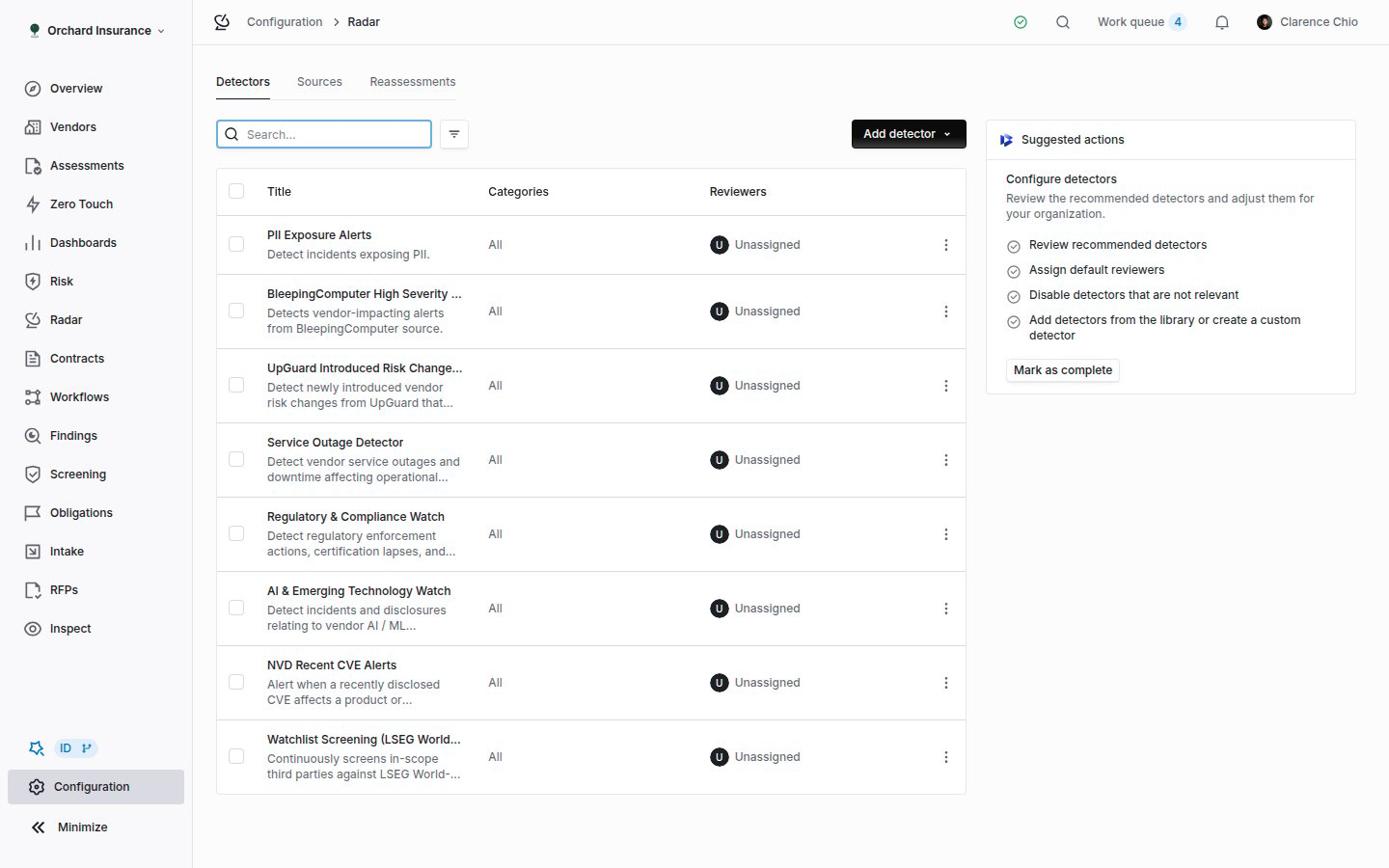 New organizations start with a recommended set already enabled, announced by a banner on the Radar page and a **Suggested actions** checklist here: review the recommended detectors, customize the vendor scope, assign default reviewers, disable what is not relevant, add more. **Mark as complete** hides the checklist.
The table shows **Title**, **Categories** and **Reviewers**. When any detector is disabled, **Enabled** and **Disabled** tabs appear with counts. The row menu has **Enable** or **Disable** and **Archive**. Tick several rows for **Assign reviewer**, **Disable** and **Archive** in bulk. Archiving cannot be undone; disabling can.
### Adding one
**Add detector** offers **From detector library** and **Create custom detector**.
New organizations start with a recommended set already enabled, announced by a banner on the Radar page and a **Suggested actions** checklist here: review the recommended detectors, customize the vendor scope, assign default reviewers, disable what is not relevant, add more. **Mark as complete** hides the checklist.
The table shows **Title**, **Categories** and **Reviewers**. When any detector is disabled, **Enabled** and **Disabled** tabs appear with counts. The row menu has **Enable** or **Disable** and **Archive**. Tick several rows for **Assign reviewer**, **Disable** and **Archive** in bulk. Archiving cannot be undone; disabling can.
### Adding one
**Add detector** offers **From detector library** and **Create custom detector**.
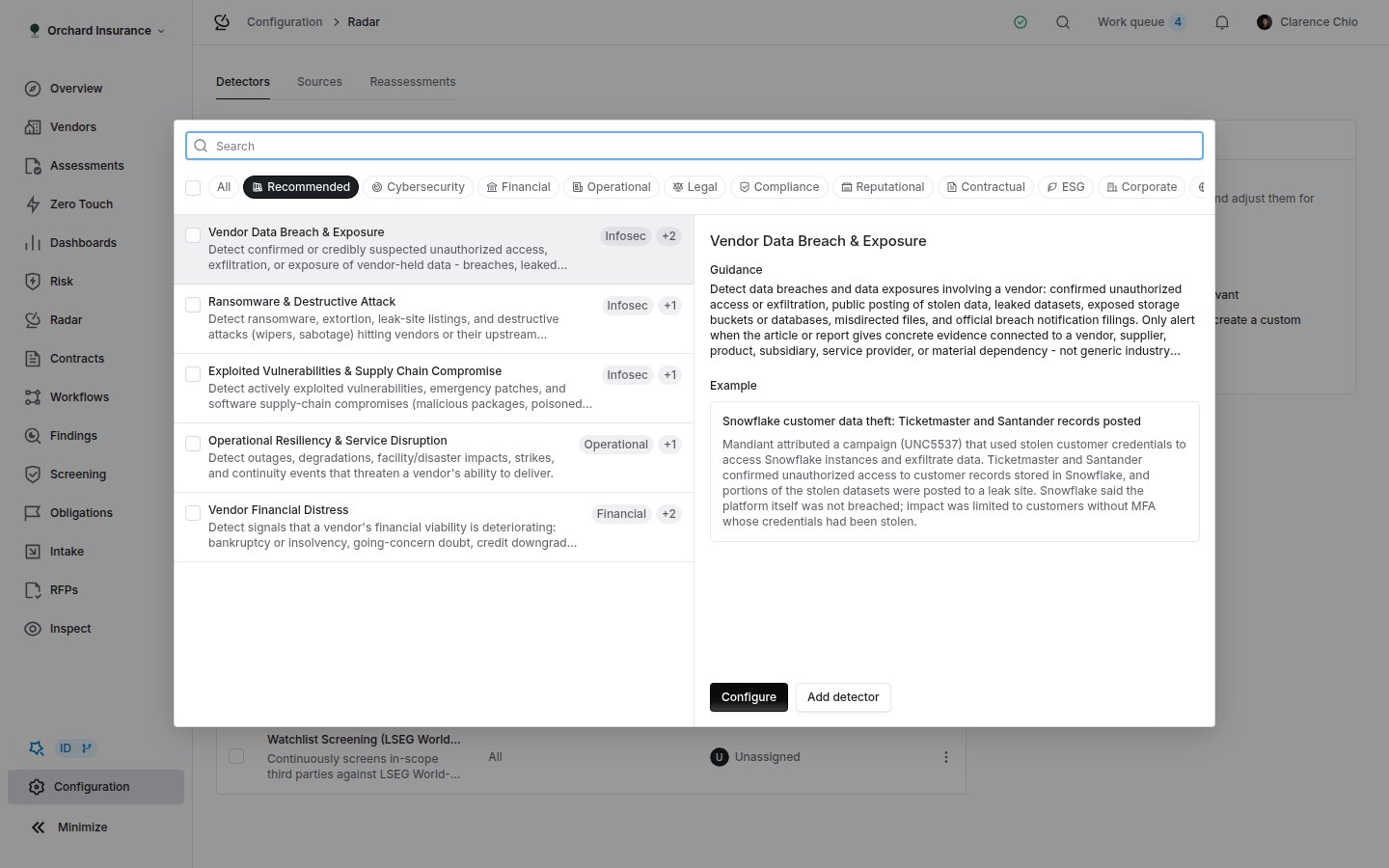 The library groups templates into segments (**Recommended**, **Cybersecurity**, **Financial**, **Operational**, **Legal**, **Compliance**, **Reputational**, **Contractual**, **ESG**, **Corporate**, **Geopolitical & External**, **AI Risk**). **Apply** adds a template with its recommended settings; **Configure** opens it for editing first. Tick several and add them at once. Every template is listed with its default severity on the [detector library page](/products/detector-library). A template becomes an ordinary detector on your organization, so everything below applies to it.
### The detector form
The library groups templates into segments (**Recommended**, **Cybersecurity**, **Financial**, **Operational**, **Legal**, **Compliance**, **Reputational**, **Contractual**, **ESG**, **Corporate**, **Geopolitical & External**, **AI Risk**). **Apply** adds a template with its recommended settings; **Configure** opens it for editing first. Tick several and add them at once. Every template is listed with its default severity on the [detector library page](/products/detector-library). A template becomes an ordinary detector on your organization, so everything below applies to it.
### The detector form
 | Field | What it does |
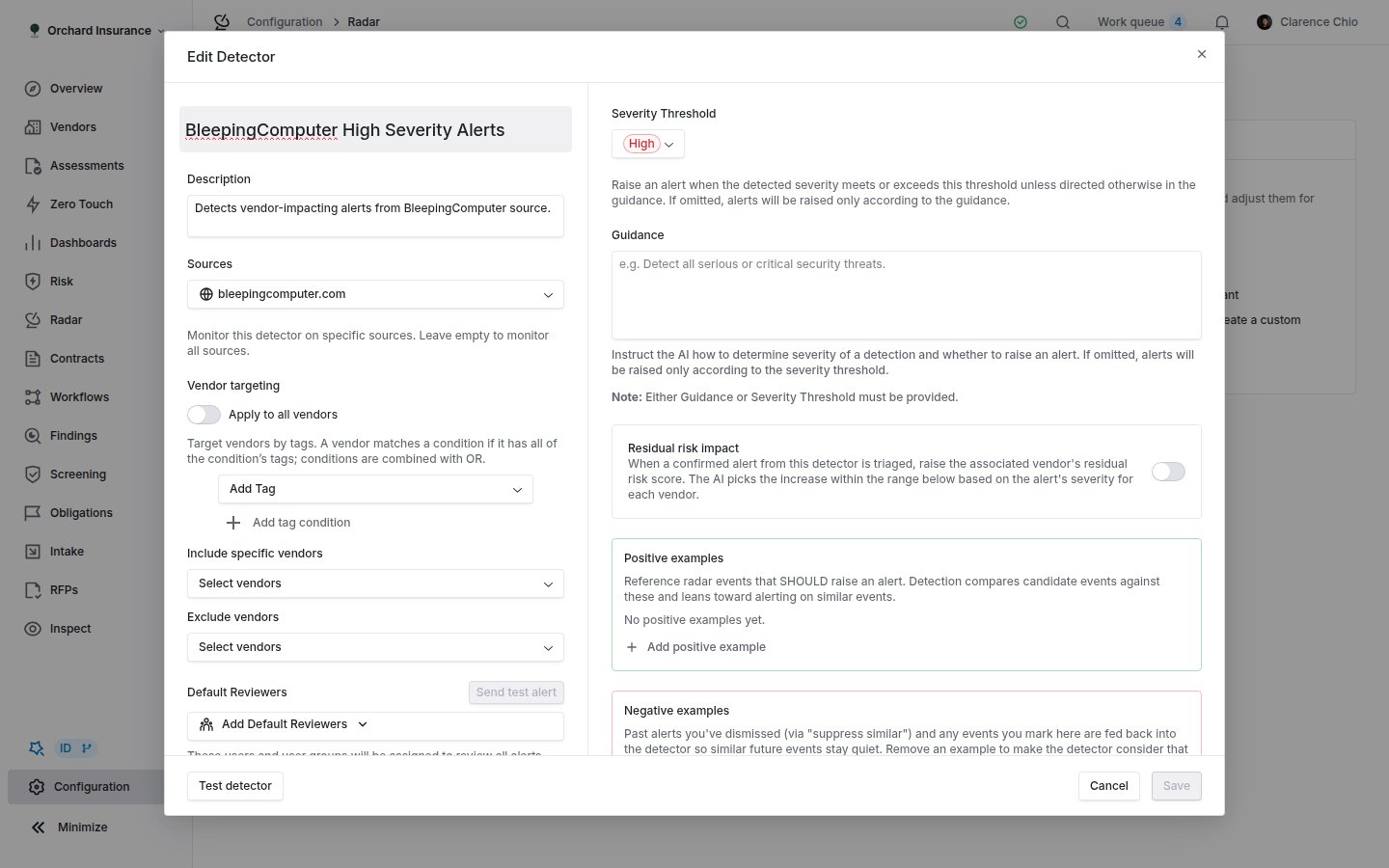
| -------------------------------------------- | ------------------------------------------------------------------------------------------------------------------------------------------------------------------------------------------------------------------------------------------------------------------------- |
| **Name**, **Description** | How the detector appears in lists, on alerts and in notification emails. |
| **Sources** | Restrict the detector to specific sources. Empty means every source. A detector limited to sources sees events you record by hand only if it includes **Manually-created events**. |
| **Vendor targeting** | **Apply to all vendors**, or tag conditions: a vendor matches a condition when it has all of that condition's tags, and conditions are combined with OR. **Include specific vendors** adds named vendors. **Exclude vendors** always wins. |
| **Categories** | Restrict to impact types (Infosec, Financial, Operational, Legal, Compliance, Reputational, Contractual, ESG, Corporate, Geopolitical & External). Empty means all. |
| **Severity Threshold** | **No threshold**, **Informational**, **Low**, **Medium** or **High**. An alert is raised when the detected severity meets or exceeds it. |
| **Guidance** | Plain-language instructions on what to flag and how severe it is. **AI autofill** drafts it from the name and description. Either guidance or a threshold is required. |
| **Residual risk impact** | Off by default. When on, acting on one of this detector's alerts raises the vendor's residual risk by a value between **Min impact** and **Max impact** (0 to 100), on the overall score when **Affect overall residual risk** is on, and on the mapped **Risk domains**. |
| **Positive examples**, **Negative examples** | Events the detector should and should not alert on. Dismissals with **Also dismiss future similar alerts** and thumbs ratings land here. Remove an example to make the detector reconsider. |
| **Default Reviewers** | Users and user groups notified of every alert. **Send test alert** sends one notification to them, once the detector is saved with at least one reviewer. |
| **Detector enabled** | Off keeps the settings but stops evaluation. |
Two other detector kinds share the list. A **Watchlist detector** matches vendors deterministically against connected sanctions and watchlist sources, every 4 hours, and has no guidance, threshold or examples; it needs a watchlist source connected first. A **Black Kite detector** reads your Black Kite portfolio against thresholds, and is covered in its [own guide](/user-guides/black-kite-monitoring#step-4-create-a-detector).
### Testing before you enable
**Test detector** on a saved detector re-runs it against your recent events over the **Last 7 days**, **Last 30 days** or **Last 90 days**. Each result reads **Will alert** or **Will not alert**. Mark results **This should alert** or **This shouldn't alert**, then **Refine with AI** proposes a rewrite of the guidance, which you can edit before **Apply & re-run**. Tick results and **Create alerts** to turn them into real alerts; a result that already has a live alert is skipped.
Start narrow. Keep the threshold at **Medium** or **High**, target the vendors you would act on, and watch two weeks of alerts before loosening anything. Every dismissal with **Also dismiss future similar alerts** makes the detector quieter, so the first weeks are also when it learns fastest.
## Which vendors are watched
A vendor is evaluated by every enabled detector whose **Vendor targeting** includes it. That is the whole rule. The vendor page's **Radar** tab lists the detectors that currently apply, so it is the quickest way to answer "is this vendor covered?". A vendor with no detectors still gets **Tracked** signals when an event touches it, because tracking needs no detector.
Vendors also carry a monitoring flag that the **Enrol new vendors in monitoring** [workflow template](/user-guides/workflow-templates#enrol-new-vendors-in-monitoring) turns on at creation. That flag is what the **vendors monitored by Radar** count on your subscription uses, so it decides what monitoring costs, not what a detector watches.
## Notifications
Radar sends four notifications. Each person can switch them on or off in their notification settings, where the first three sit in the monitoring group.
| Notification | Who gets it | When |
| ------------------------------ | -------------------------------------------------------------------------------------------------------------------- | ---------------------------------------------------------------------------------------------------------------------------------------------------------------------------------------------------------------------------------------------------------------------------------------------------------------------------------------------------------------------------------------------- |
| **Radar detector alert** | The detector's default reviewers | A detector raises an alert. In-app it reads as the severity, the summary and the vendor, with a **View alert** button. The email subject is the severity, "radar alert", the vendor and the summary; the body adds a line about the vendor, when the event was first found, the detector, and **Why this was flagged**. Alerts from one run within a minute of each other arrive as one email. |
| **Reassessment trigger fired** | The people named under **Notify** on the trigger | A reassessment trigger proposes a draft. |
| **Case created** | The default reviewers of the detectors that fired, plus each affected vendor's relationship owners and risk analysts | A case is opened from a signal. |
| **Dismissal mentions** | The person mentioned | Someone mentions them in a dismissal reason. |
A detector with no default reviewers raises alerts that nobody is told about. They still appear in **In Alert**. The full catalog is in the [email notifications guide](/user-guides/email-notifications#monitoring).
## Where signals go next
* **Findings.** A finding created from a signal carries the source type **Radar alert**, opens with the detector name and the alert summary as its title, and links back to the signal from the **Triage actions** card. From there it is an ordinary finding: see [Findings Manager](/products/findings-manager).
* **Vendor risk.** With **Residual risk impact** on, triage moves the vendor's residual score, and the vendor's risk history records the change and the detector behind it.
* **Risk register.** The register's **Signal Sources** settings can attach **Radar signals** and **Radar alerts** at or above a severity threshold to risks, and a risk's **Attach signal** button does it by hand. Turning a source off stops new attachments and leaves existing ones.
* **Workflows.** A workflow can trigger on a Radar signal, condition on its fields, and update it. The **Monitoring signal triage** [template](/user-guides/workflow-templates#monitoring-signal-triage) opens a review and a dated task for every new signal.
* **Dashboards.** The **Portfolio risk** chart on the Radar page plots signals over time by severity, with a **3M**, **6M**, **12M** or **All** range and vendor and tag filters; click a point for the affected vendors. Under **Configuration → Usage Analysis**, **Vendor Radar - signal quality** shows alert volume, triage, and how much led to action, and **Radar per-source signal ratio** shows which sources are productive.
* **API and webhooks.** Events and alerts are readable and dismissable over the [Radar API](/api-reference/radar), and `RadarEvent.*` and `RadarDetectorResult.*` webhooks fire as they change.
## Who can do what
| Role (default) | Signals and alerts | Detectors and sources |
| ----------------- | -------------------------------------------------------------------------------- | ----------------------------------- |
| **Admin** | Everything | Create, edit, test, enable, archive |
| **Member** | Read, triage (acknowledge, dismiss, restore, set status, edit title and summary) | Read only |
| **Siloed member** | Read | Read only |
Radar is org-wide: a siloed member sees every signal, not only their vendors' signals. Creating a case, a finding or a reassessment from a signal also needs the permission for that record. Custom roles can change any of this; see [Permissions and roles](/user-guides/permissions-and-roles).
## Troubleshooting
| What you see | What is happening |
| -------------------------------------------------------------- | --------------------------------------------------------------------------------------------------------------------------------------------------------------------------------------------------- |
| A source runs and **Fetched** climbs, but no signals appear. | No enabled detector targets the vendors in those items, or the detector's threshold is above what it is finding. Check the vendor page's **Radar** tab, then the detector's **Severity Threshold**. |
| A signal is **Tracked** and nothing happens. | That is the design. A related vendor is linked and no detector has alerted. Use **Should have alerted** to teach a detector, or act on it directly from **Actions**. |
| A dismissed signal is not under **Triaged**. | **Triaged** holds signals with a triage action. Open **All Signals** and filter **Status** to **Dismissed**, or **Restore (un-dismiss)** it. |
| Reviewers got no email for an alert. | The detector has no **Default Reviewers**, the reviewer switched **Radar detector alert** off in their settings, or the alert is Informational and did not put the signal in alert. |
| **Acknowledge** is missing from the menu. | The signal is already Triaged or Dismissed. |
| **Bulk create findings** is grayed out. | The signal has no exposed vendors. Add one on the **Exposure** tab first. |
| **Send test alert** is disabled. | Save the detector first, and add at least one default reviewer. |
| A detector alerted on the same event twice. | It fired for two different vendors. Each alert is one detector on one vendor, and both sit under the same signal. |
| A library source cannot be edited. | Library sources are shared. You can rename them; for different settings, create a custom source. |
| The Radar page shows an **Alerts** tab instead of **Signals**. | Your organization is on the older alert view. The queue lists alerts individually rather than one row per event. Ask your Coverbase representative about the signal view. |
## Related
What the product does, the signal lifecycle, and how triage moves residual risk.
Connecting a Black Kite portfolio as a source and alerting on its findings.
Every template with its default severity and what it flags.
Enrolling vendors in monitoring and routing new signals into reviews and tasks.
| Field | What it does |
| -------------------------------------------- | ------------------------------------------------------------------------------------------------------------------------------------------------------------------------------------------------------------------------------------------------------------------------- |
| **Name**, **Description** | How the detector appears in lists, on alerts and in notification emails. |
| **Sources** | Restrict the detector to specific sources. Empty means every source. A detector limited to sources sees events you record by hand only if it includes **Manually-created events**. |
| **Vendor targeting** | **Apply to all vendors**, or tag conditions: a vendor matches a condition when it has all of that condition's tags, and conditions are combined with OR. **Include specific vendors** adds named vendors. **Exclude vendors** always wins. |
| **Categories** | Restrict to impact types (Infosec, Financial, Operational, Legal, Compliance, Reputational, Contractual, ESG, Corporate, Geopolitical & External). Empty means all. |
| **Severity Threshold** | **No threshold**, **Informational**, **Low**, **Medium** or **High**. An alert is raised when the detected severity meets or exceeds it. |
| **Guidance** | Plain-language instructions on what to flag and how severe it is. **AI autofill** drafts it from the name and description. Either guidance or a threshold is required. |
| **Residual risk impact** | Off by default. When on, acting on one of this detector's alerts raises the vendor's residual risk by a value between **Min impact** and **Max impact** (0 to 100), on the overall score when **Affect overall residual risk** is on, and on the mapped **Risk domains**. |
| **Positive examples**, **Negative examples** | Events the detector should and should not alert on. Dismissals with **Also dismiss future similar alerts** and thumbs ratings land here. Remove an example to make the detector reconsider. |
| **Default Reviewers** | Users and user groups notified of every alert. **Send test alert** sends one notification to them, once the detector is saved with at least one reviewer. |
| **Detector enabled** | Off keeps the settings but stops evaluation. |
Two other detector kinds share the list. A **Watchlist detector** matches vendors deterministically against connected sanctions and watchlist sources, every 4 hours, and has no guidance, threshold or examples; it needs a watchlist source connected first. A **Black Kite detector** reads your Black Kite portfolio against thresholds, and is covered in its [own guide](/user-guides/black-kite-monitoring#step-4-create-a-detector).
### Testing before you enable
**Test detector** on a saved detector re-runs it against your recent events over the **Last 7 days**, **Last 30 days** or **Last 90 days**. Each result reads **Will alert** or **Will not alert**. Mark results **This should alert** or **This shouldn't alert**, then **Refine with AI** proposes a rewrite of the guidance, which you can edit before **Apply & re-run**. Tick results and **Create alerts** to turn them into real alerts; a result that already has a live alert is skipped.
Start narrow. Keep the threshold at **Medium** or **High**, target the vendors you would act on, and watch two weeks of alerts before loosening anything. Every dismissal with **Also dismiss future similar alerts** makes the detector quieter, so the first weeks are also when it learns fastest.
## Which vendors are watched
A vendor is evaluated by every enabled detector whose **Vendor targeting** includes it. That is the whole rule. The vendor page's **Radar** tab lists the detectors that currently apply, so it is the quickest way to answer "is this vendor covered?". A vendor with no detectors still gets **Tracked** signals when an event touches it, because tracking needs no detector.
Vendors also carry a monitoring flag that the **Enrol new vendors in monitoring** [workflow template](/user-guides/workflow-templates#enrol-new-vendors-in-monitoring) turns on at creation. That flag is what the **vendors monitored by Radar** count on your subscription uses, so it decides what monitoring costs, not what a detector watches.
## Notifications
Radar sends four notifications. Each person can switch them on or off in their notification settings, where the first three sit in the monitoring group.
| Notification | Who gets it | When |
| ------------------------------ | -------------------------------------------------------------------------------------------------------------------- | ---------------------------------------------------------------------------------------------------------------------------------------------------------------------------------------------------------------------------------------------------------------------------------------------------------------------------------------------------------------------------------------------- |
| **Radar detector alert** | The detector's default reviewers | A detector raises an alert. In-app it reads as the severity, the summary and the vendor, with a **View alert** button. The email subject is the severity, "radar alert", the vendor and the summary; the body adds a line about the vendor, when the event was first found, the detector, and **Why this was flagged**. Alerts from one run within a minute of each other arrive as one email. |
| **Reassessment trigger fired** | The people named under **Notify** on the trigger | A reassessment trigger proposes a draft. |
| **Case created** | The default reviewers of the detectors that fired, plus each affected vendor's relationship owners and risk analysts | A case is opened from a signal. |
| **Dismissal mentions** | The person mentioned | Someone mentions them in a dismissal reason. |
A detector with no default reviewers raises alerts that nobody is told about. They still appear in **In Alert**. The full catalog is in the [email notifications guide](/user-guides/email-notifications#monitoring).
## Where signals go next
* **Findings.** A finding created from a signal carries the source type **Radar alert**, opens with the detector name and the alert summary as its title, and links back to the signal from the **Triage actions** card. From there it is an ordinary finding: see [Findings Manager](/products/findings-manager).
* **Vendor risk.** With **Residual risk impact** on, triage moves the vendor's residual score, and the vendor's risk history records the change and the detector behind it.
* **Risk register.** The register's **Signal Sources** settings can attach **Radar signals** and **Radar alerts** at or above a severity threshold to risks, and a risk's **Attach signal** button does it by hand. Turning a source off stops new attachments and leaves existing ones.
* **Workflows.** A workflow can trigger on a Radar signal, condition on its fields, and update it. The **Monitoring signal triage** [template](/user-guides/workflow-templates#monitoring-signal-triage) opens a review and a dated task for every new signal.
* **Dashboards.** The **Portfolio risk** chart on the Radar page plots signals over time by severity, with a **3M**, **6M**, **12M** or **All** range and vendor and tag filters; click a point for the affected vendors. Under **Configuration → Usage Analysis**, **Vendor Radar - signal quality** shows alert volume, triage, and how much led to action, and **Radar per-source signal ratio** shows which sources are productive.
* **API and webhooks.** Events and alerts are readable and dismissable over the [Radar API](/api-reference/radar), and `RadarEvent.*` and `RadarDetectorResult.*` webhooks fire as they change.
## Who can do what
| Role (default) | Signals and alerts | Detectors and sources |
| ----------------- | -------------------------------------------------------------------------------- | ----------------------------------- |
| **Admin** | Everything | Create, edit, test, enable, archive |
| **Member** | Read, triage (acknowledge, dismiss, restore, set status, edit title and summary) | Read only |
| **Siloed member** | Read | Read only |
Radar is org-wide: a siloed member sees every signal, not only their vendors' signals. Creating a case, a finding or a reassessment from a signal also needs the permission for that record. Custom roles can change any of this; see [Permissions and roles](/user-guides/permissions-and-roles).
## Troubleshooting
| What you see | What is happening |
| -------------------------------------------------------------- | --------------------------------------------------------------------------------------------------------------------------------------------------------------------------------------------------- |
| A source runs and **Fetched** climbs, but no signals appear. | No enabled detector targets the vendors in those items, or the detector's threshold is above what it is finding. Check the vendor page's **Radar** tab, then the detector's **Severity Threshold**. |
| A signal is **Tracked** and nothing happens. | That is the design. A related vendor is linked and no detector has alerted. Use **Should have alerted** to teach a detector, or act on it directly from **Actions**. |
| A dismissed signal is not under **Triaged**. | **Triaged** holds signals with a triage action. Open **All Signals** and filter **Status** to **Dismissed**, or **Restore (un-dismiss)** it. |
| Reviewers got no email for an alert. | The detector has no **Default Reviewers**, the reviewer switched **Radar detector alert** off in their settings, or the alert is Informational and did not put the signal in alert. |
| **Acknowledge** is missing from the menu. | The signal is already Triaged or Dismissed. |
| **Bulk create findings** is grayed out. | The signal has no exposed vendors. Add one on the **Exposure** tab first. |
| **Send test alert** is disabled. | Save the detector first, and add at least one default reviewer. |
| A detector alerted on the same event twice. | It fired for two different vendors. Each alert is one detector on one vendor, and both sit under the same signal. |
| A library source cannot be edited. | Library sources are shared. You can rename them; for different settings, create a custom source. |
| The Radar page shows an **Alerts** tab instead of **Signals**. | Your organization is on the older alert view. The queue lists alerts individually rather than one row per event. Ask your Coverbase representative about the signal view. |
## Related
What the product does, the signal lifecycle, and how triage moves residual risk.
Connecting a Black Kite portfolio as a source and alerting on its findings.
Every template with its default severity and what it flags.
Enrolling vendors in monitoring and routing new signals into reviews and tasks.