> ## Documentation Index
> Fetch the complete documentation index at: https://docs.coverbase.com/llms.txt
> Use this file to discover all available pages before exploring further.
# The Risk module: register, signals and scenarios
> How to keep a risk register in Coverbase: score a risk on the 5x5, let findings, contracts and Radar feed it as signals, decide on what the agent proposes, trace the dependency chain, run a what-if scenario, and produce the board pack.
For AI agents: a documentation index is available at [https://docs.coverbase.com/llms.txt](https://docs.coverbase.com/llms.txt). This page is also available in markdown by appending .md to the URL.
This guide is part of the [User Guides](/user-guides/overview) collection. It covers the **Risk** entry in the left navigation: the register, the chain, scenarios, exposure and the board report. The **Geography** tab has its own guide, [Risk geography map](/user-guides/risk-geography-map). Vendor-level risk scores and how services roll up into them are in the [Admin and setup guide](/user-guides/admin-setup#step-5-configure-risk-and-compliance-scales).
Risk is an optional module. If you do not see **Risk** in the left navigation, ask your Coverbase representative to turn it on.
The register is a list of statements about what could hurt your organization, each scored on a 5x5 of likelihood and impact. It does not hold evidence of its own. A risk points at records in the other modules (an open finding, a contract without a DPA, a Radar alert, a sanctions match) through **signals**, and those signals open and close as the source record changes.
An agent reads the same modules, proposes risks and re-scores, and files stale ones for review. It never closes or deletes a risk on its own. Everything it wants changed waits in an inbox for a person.
The mistake to avoid: leaving the residual score empty. An unscored residual falls back to the inherent score, so a risk you have treated keeps reading **Outside appetite** until you score the residual likelihood and impact.
## Where it lives
Click **Risk** in the left navigation. Six tabs run across the top, in the order a risk officer reads them:
| Tab | What it answers |
| ------------- | ------------------------------------------------------------------------------------------- |
| **Register** | What could hurt us, who owns it, and is it inside appetite |
| **Chain** | What passes through what: business units, services, vendors, fourth parties, regions |
| **Simulate** | What happens if a vendor goes down, a process changes, or we offboard someone |
| **Exposure** | Are we inside appetite per domain, what is the probable loss, and where are we concentrated |
| **Report** | What the board sees this quarter |
| **Geography** | Where suppliers sit on the map (see the [geography guide](/user-guides/risk-geography-map)) |
Two buttons sit to the right of the tabs. **Ask the register** opens a question box that answers from the register, the chain and the signals, and cites the records it used. **Configuration** opens **Configuration → Risk**, covered [below](#configuring-the-module).
## Reading the register
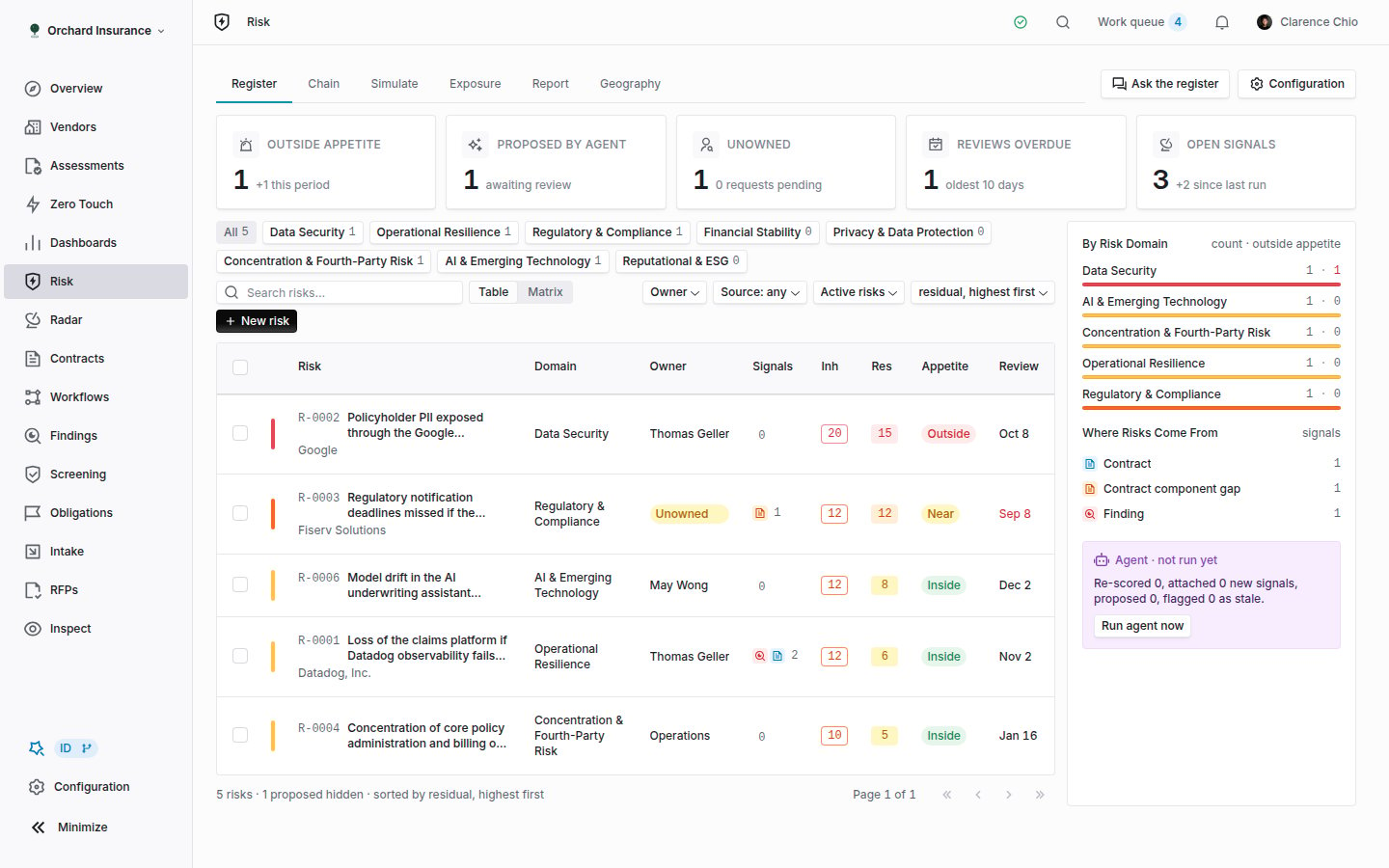 The five tiles at the top are filters. Click **Outside appetite**, **Unowned** or **Reviews overdue** to narrow the table to those risks; click again to clear. **Proposed by agent** opens the [agent inbox](#deciding-on-what-the-agent-proposes). **Open signals** shows the count and the change since the last run.
The line under the filters reads, for example, "12 risks · 3 proposed hidden · sorted by residual, highest first". Proposed risks never appear in the table; they wait in the inbox.
| Column | What it shows |
| ------------ | ------------------------------------------------------------------------------------------------------------------------------------------------------------ |
| **Risk** | The `R-XXXX` label, the statement, and the scope (vendors, services, business units, regions) |
| **Domain** | The risk domain, or none |
| **Owner** | A person or a department. **Unowned** if neither. An accepted risk shows "accepted risk · until date"; a risk with a commitment shows its state and due date |
| **Signals** | Open and closed signal counts, with an icon per source module |
| **Inh** | Inherent score: likelihood x impact before treatment, 1 to 25 |
| **Res** | Residual score after treatment. Equals the inherent score while the residual is unscored |
| **Appetite** | **Outside**, **Near**, **Inside** or **Unscored**, evaluated against the domain's tolerance |
| **Review** | The next review date, flagged **Review overdue** once it passes |
Appetite is read from the domain's **Max Residual** (default 12). A residual above it is **Outside**, a residual within two points of it is **Near**, and anything lower is **Inside**. A risk without a domain uses the default and rolls up as "No domain".
The filter bar narrows by domain, owner, institution, signal source, status scope (**Active risks**, **Closed risks**, **All risks**) and free text, and sorts by residual, inherent, review date or last updated. **Matrix** switches the table to the 5x5 heat map, with inherent and residual dots and the tolerance line drawn on it. Every filter is in the URL, so a filtered view is a link you can send.
The side panel lists **By Risk Domain** (count and how many are outside appetite) and **Where Risks Come From** (signals per source module). Clicking a row filters the table. Underneath, the panel shows when the agent last ran and what it did, with a **Run agent now** button.
### Statuses
| Status | Meaning |
| -------------- | ------------------------------------------------------------------------------------------------------- |
| **Proposed** | Filed by the agent and waiting in the inbox. Not in the table, not in the scores |
| **Open** | Accepted or created, no treatment under way |
| **Mitigating** | A commitment has been requested from the owner |
| **Accepted** | The organization carries the risk as scored. Set by **Accept risk** |
| **Closed** | Treated or no longer relevant. Set from a stale proposal (**Close as treated**) or by a workflow action |
Archiving is separate from closing. **Archive** removes the risk from the register and its scores. Its signals stay on their source records.
## Creating a risk
Click **New risk** in the filter bar. From a vendor, service, contract or finding page, the **Risks** card has **Add risk**, which opens the same form with that record already in scope.
**Statement** is what a board reader sees. The placeholder asks the right question: what could hurt the organization, and how?
Pick a **Risk Domain** (its appetite decides the tolerance), a **Category**, an **Owner** (a person or a department) and, if your org has institutions, an **Institution** or **Group**.
Pick **Likelihood** and **Impact** from your org's five levels; the inherent score updates as you choose. Then pick **Residual Likelihood** and **Residual Impact** for the position after treatment. Leave them at **Unscored** only if you have not treated the risk yet.
Choose a **Treatment** (**No treatment**, **Mitigate**, **Accept**, **Transfer**, **Avoid**), a **Review Date**, and write the **Treatment Plan**: what is being done, by whom, and the residual target. Add the vendors in scope. Click **Create risk**.
When you edit a risk later, the same form adds a **Note** field. Whatever you write there is recorded in the risk's history alongside the change.
## Working a risk record
Click a row to open the record. The URL becomes `/risk/register/`, so it is a link too.
The five tiles at the top are filters. Click **Outside appetite**, **Unowned** or **Reviews overdue** to narrow the table to those risks; click again to clear. **Proposed by agent** opens the [agent inbox](#deciding-on-what-the-agent-proposes). **Open signals** shows the count and the change since the last run.
The line under the filters reads, for example, "12 risks · 3 proposed hidden · sorted by residual, highest first". Proposed risks never appear in the table; they wait in the inbox.
| Column | What it shows |
| ------------ | ------------------------------------------------------------------------------------------------------------------------------------------------------------ |
| **Risk** | The `R-XXXX` label, the statement, and the scope (vendors, services, business units, regions) |
| **Domain** | The risk domain, or none |
| **Owner** | A person or a department. **Unowned** if neither. An accepted risk shows "accepted risk · until date"; a risk with a commitment shows its state and due date |
| **Signals** | Open and closed signal counts, with an icon per source module |
| **Inh** | Inherent score: likelihood x impact before treatment, 1 to 25 |
| **Res** | Residual score after treatment. Equals the inherent score while the residual is unscored |
| **Appetite** | **Outside**, **Near**, **Inside** or **Unscored**, evaluated against the domain's tolerance |
| **Review** | The next review date, flagged **Review overdue** once it passes |
Appetite is read from the domain's **Max Residual** (default 12). A residual above it is **Outside**, a residual within two points of it is **Near**, and anything lower is **Inside**. A risk without a domain uses the default and rolls up as "No domain".
The filter bar narrows by domain, owner, institution, signal source, status scope (**Active risks**, **Closed risks**, **All risks**) and free text, and sorts by residual, inherent, review date or last updated. **Matrix** switches the table to the 5x5 heat map, with inherent and residual dots and the tolerance line drawn on it. Every filter is in the URL, so a filtered view is a link you can send.
The side panel lists **By Risk Domain** (count and how many are outside appetite) and **Where Risks Come From** (signals per source module). Clicking a row filters the table. Underneath, the panel shows when the agent last ran and what it did, with a **Run agent now** button.
### Statuses
| Status | Meaning |
| -------------- | ------------------------------------------------------------------------------------------------------- |
| **Proposed** | Filed by the agent and waiting in the inbox. Not in the table, not in the scores |
| **Open** | Accepted or created, no treatment under way |
| **Mitigating** | A commitment has been requested from the owner |
| **Accepted** | The organization carries the risk as scored. Set by **Accept risk** |
| **Closed** | Treated or no longer relevant. Set from a stale proposal (**Close as treated**) or by a workflow action |
Archiving is separate from closing. **Archive** removes the risk from the register and its scores. Its signals stay on their source records.
## Creating a risk
Click **New risk** in the filter bar. From a vendor, service, contract or finding page, the **Risks** card has **Add risk**, which opens the same form with that record already in scope.
**Statement** is what a board reader sees. The placeholder asks the right question: what could hurt the organization, and how?
Pick a **Risk Domain** (its appetite decides the tolerance), a **Category**, an **Owner** (a person or a department) and, if your org has institutions, an **Institution** or **Group**.
Pick **Likelihood** and **Impact** from your org's five levels; the inherent score updates as you choose. Then pick **Residual Likelihood** and **Residual Impact** for the position after treatment. Leave them at **Unscored** only if you have not treated the risk yet.
Choose a **Treatment** (**No treatment**, **Mitigate**, **Accept**, **Transfer**, **Avoid**), a **Review Date**, and write the **Treatment Plan**: what is being done, by whom, and the residual target. Add the vendors in scope. Click **Create risk**.
When you edit a risk later, the same form adds a **Note** field. Whatever you write there is recorded in the risk's history alongside the change.
## Working a risk record
Click a row to open the record. The URL becomes `/risk/register/`, so it is a link too.
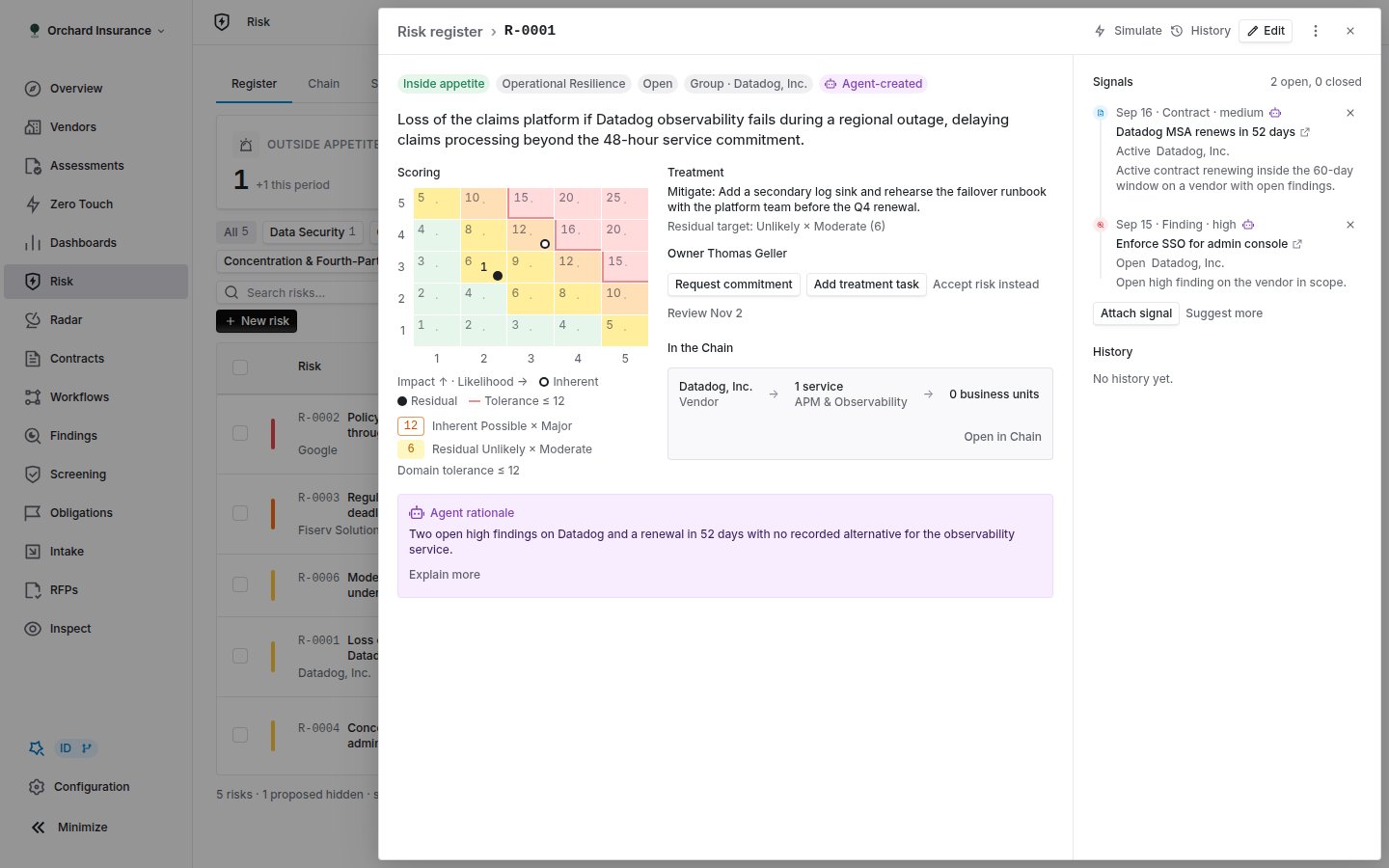 The header carries **Simulate** (opens the Simulate tab with this statement as the question and runs it), **History**, **Edit**, and **Archive**. Below it, the appetite pill, the status pill and where the risk came from: "Agent-created · accepted by name, date" or "Created by name, date".
**Scoring** shows the inherent and residual lines as likelihood x impact and the domain tolerance they are read against. **Treatment** shows the chosen treatment, the plan and the residual target.
**Owner** carries the actions that move a risk:
| Action | What it does |
| ----------------------- | ----------------------------------------------------------------------------------------------------------------------------------------------------------------------------------------------------------------------------------------------------------------------------------------------------------------------- |
| **Request commitment** | Asks the owner to commit to treating the risk by a date. Coverbase creates a finding with the risk as its source and a commitment assigned to the owner, attaches it to the risk as a **Commitment** signal, and moves an **Open** risk to **Mitigating**. If the risk is unowned, the request goes to the domain owner |
| **Add treatment task** | Opens the edit form on the treatment, plan and review date |
| **Accept risk instead** | Asks you to confirm, then sets the treatment to **Accept** and the status to **Accepted**. Accepting records that the organization carries the risk as scored |
| **Set review date** | The risk reappears in the **Reviews overdue** tile when this date passes without a review |
**In the Chain** shows how many business units and customer channels sit behind the risk's vendor, with **Open in Chain**. A risk not tied to a chain node says so.
**Agent rationale** appears on agent-created risks and on any risk the agent re-scored. **Explain more** expands it. If the agent applied a re-score, **Undo** restores the previous levels and journals the reversal.
### Signals on a risk
**Signals** lists every attached record with its source icon, its severity, and its status. A status that changed since attachment reads "from → to". A signal that closed says **Closed**, a dismissed one **Dismissed**, and one whose source was archived **Source removed**. Nothing is ever deleted from this list, so a finding that was open when the risk was raised still shows on the timeline after it resolves.
* **Attach signal** opens evidence the agent found in other modules but did not attach. Attaching keeps a reference, never a copy. **Suggest more** asks the agent to look again.
* The **x** on a signal dismisses it. The source record is untouched.
**History** is the append-only journal: created, proposed, accepted, re-scored, owner changed, status changed, signal attached or closed, merged, edited, scale remapped, closed, reopened. Each row names the person or the agent and shows the scores after the change.
## Signal sources and thresholds
A signal is attached only when its source is enabled under **Configuration → Risk → Signal Sources** and the record clears the threshold set there. Every source is on by default except **Assessments**.
| Source | Becomes a signal when | Closes when |
| -------------------------------------- | ------------------------------------------------------------------------------------------------------------------------------------------ | ------------------------------------------------- |
| **Findings** | An open finding at or above **Min severity** (default High), or any open finding with a missed remediation commitment | The finding is resolved or archived |
| **Commitments** | A commitment misses its due date. This also raises a re-score suggestion (likelihood up one step) | The commitment is met |
| **Contracts** | An active contract renewing within the window (60 days) on a vendor with open findings | The contract stops being active |
| **Contract clauses** | A clause match reviewed as non-conforming or accepted risk | The match leaves an open status |
| **Contract component gaps** | A DPA, SLA, security addendum, SCC, subprocessor list or AI addendum slot is missing or expired on an active contract | The slot is present or not required |
| **Obligations** | Not satisfied past its due date, or pending acknowledgement older than **Days** (14) | Satisfied or archived |
| **Screening** | An unresolved or confirmed sanctions, PEP or adverse media match | Reviewed as not a match |
| **Radar signals** and **Radar alerts** | At or above **Min severity** (High). An alert counts once a reassessment has cited it | Resolved, dismissed or archived |
| **Vendor risk changes** | A vendor score rose within the last 30 days | The change is older than 30 days |
| **Inspect** | An evaluation marked as an issue in the latest run | No longer an issue |
| **Assessments** (off by default) | An SLA breach, or a domain residual above the domain's appetite | Neither holds |
| **Supplier sites** | An active site in a sanctioned country, or in the EU/EEA/UK while a DPA slot on the vendor's contracts is missing or expired | The site is retired or a DPA appears |
| **Chain single points of failure** | A node several services or business units depend on, with no recorded alternative | The node gains an alternative or leaves the chain |
| **Financial health** | The vendor's financial health score fell by **Min score drop** (15) since the previous reading, or a submitted statement failed validation | The latest score is no longer a drop |
Turning a source off stops new attachments. It never removes signals already on a risk. Signal statuses refresh when the source module changes and again in a nightly pass.
## The agent
The agent runs every night, about five minutes after a qualifying change in another module, and whenever someone clicks **Run agent now** (on the register side panel or under **Configuration → Risk → Agent**). One pass refreshes signal statuses, scans the sources, attaches new evidence to the open risk on the same vendor and category (or proposes a new risk), suggests re-scores, and flags stale risks.
Two settings under **Agent** decide how much it does on its own:
* **New risks**: **Propose for review** (default) files each new risk as **Proposed** for a person to accept. **Create directly** opens them as **Open** risks.
* **Re-scoring**: **Suggest** files a re-score suggestion. **Apply and notify** writes the new levels and journals the change; you can still **Undo** on the record.
**Stale after** (default 120 days without a signal change) and free-text **Instructions** (for example, "treat any vendor with access to the core ledger as Tier 1") complete the settings.
The agent never closes, archives or deletes a risk. When every vendor in scope is retired, or every signal has closed, it files a stale proposal with a suggested close. A person applies it or keeps the risk open. A risk you edited or dismissed is never re-proposed by a later scan.
### Deciding on what the agent proposes
Click the **Proposed by agent** tile. The inbox has four tabs.
The header carries **Simulate** (opens the Simulate tab with this statement as the question and runs it), **History**, **Edit**, and **Archive**. Below it, the appetite pill, the status pill and where the risk came from: "Agent-created · accepted by name, date" or "Created by name, date".
**Scoring** shows the inherent and residual lines as likelihood x impact and the domain tolerance they are read against. **Treatment** shows the chosen treatment, the plan and the residual target.
**Owner** carries the actions that move a risk:
| Action | What it does |
| ----------------------- | ----------------------------------------------------------------------------------------------------------------------------------------------------------------------------------------------------------------------------------------------------------------------------------------------------------------------- |
| **Request commitment** | Asks the owner to commit to treating the risk by a date. Coverbase creates a finding with the risk as its source and a commitment assigned to the owner, attaches it to the risk as a **Commitment** signal, and moves an **Open** risk to **Mitigating**. If the risk is unowned, the request goes to the domain owner |
| **Add treatment task** | Opens the edit form on the treatment, plan and review date |
| **Accept risk instead** | Asks you to confirm, then sets the treatment to **Accept** and the status to **Accepted**. Accepting records that the organization carries the risk as scored |
| **Set review date** | The risk reappears in the **Reviews overdue** tile when this date passes without a review |
**In the Chain** shows how many business units and customer channels sit behind the risk's vendor, with **Open in Chain**. A risk not tied to a chain node says so.
**Agent rationale** appears on agent-created risks and on any risk the agent re-scored. **Explain more** expands it. If the agent applied a re-score, **Undo** restores the previous levels and journals the reversal.
### Signals on a risk
**Signals** lists every attached record with its source icon, its severity, and its status. A status that changed since attachment reads "from → to". A signal that closed says **Closed**, a dismissed one **Dismissed**, and one whose source was archived **Source removed**. Nothing is ever deleted from this list, so a finding that was open when the risk was raised still shows on the timeline after it resolves.
* **Attach signal** opens evidence the agent found in other modules but did not attach. Attaching keeps a reference, never a copy. **Suggest more** asks the agent to look again.
* The **x** on a signal dismisses it. The source record is untouched.
**History** is the append-only journal: created, proposed, accepted, re-scored, owner changed, status changed, signal attached or closed, merged, edited, scale remapped, closed, reopened. Each row names the person or the agent and shows the scores after the change.
## Signal sources and thresholds
A signal is attached only when its source is enabled under **Configuration → Risk → Signal Sources** and the record clears the threshold set there. Every source is on by default except **Assessments**.
| Source | Becomes a signal when | Closes when |
| -------------------------------------- | ------------------------------------------------------------------------------------------------------------------------------------------ | ------------------------------------------------- |
| **Findings** | An open finding at or above **Min severity** (default High), or any open finding with a missed remediation commitment | The finding is resolved or archived |
| **Commitments** | A commitment misses its due date. This also raises a re-score suggestion (likelihood up one step) | The commitment is met |
| **Contracts** | An active contract renewing within the window (60 days) on a vendor with open findings | The contract stops being active |
| **Contract clauses** | A clause match reviewed as non-conforming or accepted risk | The match leaves an open status |
| **Contract component gaps** | A DPA, SLA, security addendum, SCC, subprocessor list or AI addendum slot is missing or expired on an active contract | The slot is present or not required |
| **Obligations** | Not satisfied past its due date, or pending acknowledgement older than **Days** (14) | Satisfied or archived |
| **Screening** | An unresolved or confirmed sanctions, PEP or adverse media match | Reviewed as not a match |
| **Radar signals** and **Radar alerts** | At or above **Min severity** (High). An alert counts once a reassessment has cited it | Resolved, dismissed or archived |
| **Vendor risk changes** | A vendor score rose within the last 30 days | The change is older than 30 days |
| **Inspect** | An evaluation marked as an issue in the latest run | No longer an issue |
| **Assessments** (off by default) | An SLA breach, or a domain residual above the domain's appetite | Neither holds |
| **Supplier sites** | An active site in a sanctioned country, or in the EU/EEA/UK while a DPA slot on the vendor's contracts is missing or expired | The site is retired or a DPA appears |
| **Chain single points of failure** | A node several services or business units depend on, with no recorded alternative | The node gains an alternative or leaves the chain |
| **Financial health** | The vendor's financial health score fell by **Min score drop** (15) since the previous reading, or a submitted statement failed validation | The latest score is no longer a drop |
Turning a source off stops new attachments. It never removes signals already on a risk. Signal statuses refresh when the source module changes and again in a nightly pass.
## The agent
The agent runs every night, about five minutes after a qualifying change in another module, and whenever someone clicks **Run agent now** (on the register side panel or under **Configuration → Risk → Agent**). One pass refreshes signal statuses, scans the sources, attaches new evidence to the open risk on the same vendor and category (or proposes a new risk), suggests re-scores, and flags stale risks.
Two settings under **Agent** decide how much it does on its own:
* **New risks**: **Propose for review** (default) files each new risk as **Proposed** for a person to accept. **Create directly** opens them as **Open** risks.
* **Re-scoring**: **Suggest** files a re-score suggestion. **Apply and notify** writes the new levels and journals the change; you can still **Undo** on the record.
**Stale after** (default 120 days without a signal change) and free-text **Instructions** (for example, "treat any vendor with access to the core ledger as Tier 1") complete the settings.
The agent never closes, archives or deletes a risk. When every vendor in scope is retired, or every signal has closed, it files a stale proposal with a suggested close. A person applies it or keeps the risk open. A risk you edited or dismissed is never re-proposed by a later scan.
### Deciding on what the agent proposes
Click the **Proposed by agent** tile. The inbox has four tabs.
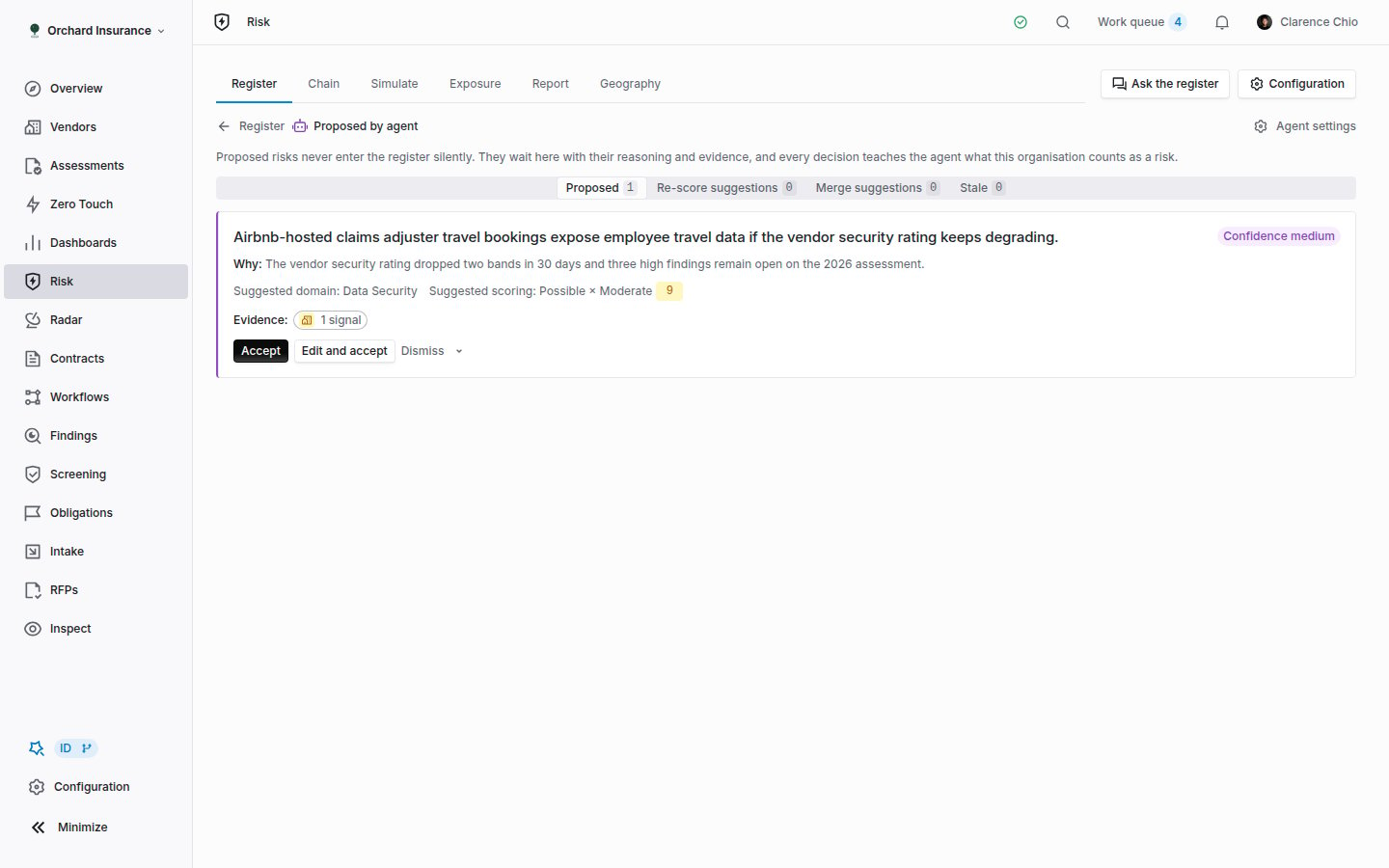 | Tab | Decisions |
| ------------------------ | -------------------------------------------------------------------------------------------------------------------------------------------------------------------------------------------------- |
| **Proposed** | **Accept** opens the risk as scored. **Edit and accept** opens the form first. **Merge into…** folds it into a similar existing risk, moving its signals and scope across. **Dismiss** archives it |
| **Re-score suggestions** | **Apply** writes the suggested levels and journals a re-score. **Keep current** dismisses the suggestion |
| **Merge suggestions** | **Merge** or **Keep separate** |
| **Stale** | **Close as treated** closes the risk. **Set review date** keeps it open with a new date (90 days out unless you pick one). **Keep open** dismisses the flag |
**Dismiss** asks why: **Not a risk for us**, **Duplicate**, **Wrong scoring**, **Already treated** or **Other**. The reason is fed back to the agent and recorded in history.
Each card shows the agent's confidence, its rationale under **Why**, and the signals under **Evidence**. A proposal the agent files with no signals of its own still cites the records it read.
## Chain
| Tab | Decisions |
| ------------------------ | -------------------------------------------------------------------------------------------------------------------------------------------------------------------------------------------------- |
| **Proposed** | **Accept** opens the risk as scored. **Edit and accept** opens the form first. **Merge into…** folds it into a similar existing risk, moving its signals and scope across. **Dismiss** archives it |
| **Re-score suggestions** | **Apply** writes the suggested levels and journals a re-score. **Keep current** dismisses the suggestion |
| **Merge suggestions** | **Merge** or **Keep separate** |
| **Stale** | **Close as treated** closes the risk. **Set review date** keeps it open with a new date (90 days out unless you pick one). **Keep open** dismisses the flag |
**Dismiss** asks why: **Not a risk for us**, **Duplicate**, **Wrong scoring**, **Already treated** or **Other**. The reason is fed back to the agent and recorded in history.
Each card shows the agent's confidence, its rationale under **Why**, and the signals under **Evidence**. A proposal the agent files with no signals of its own still cites the records it read.
## Chain
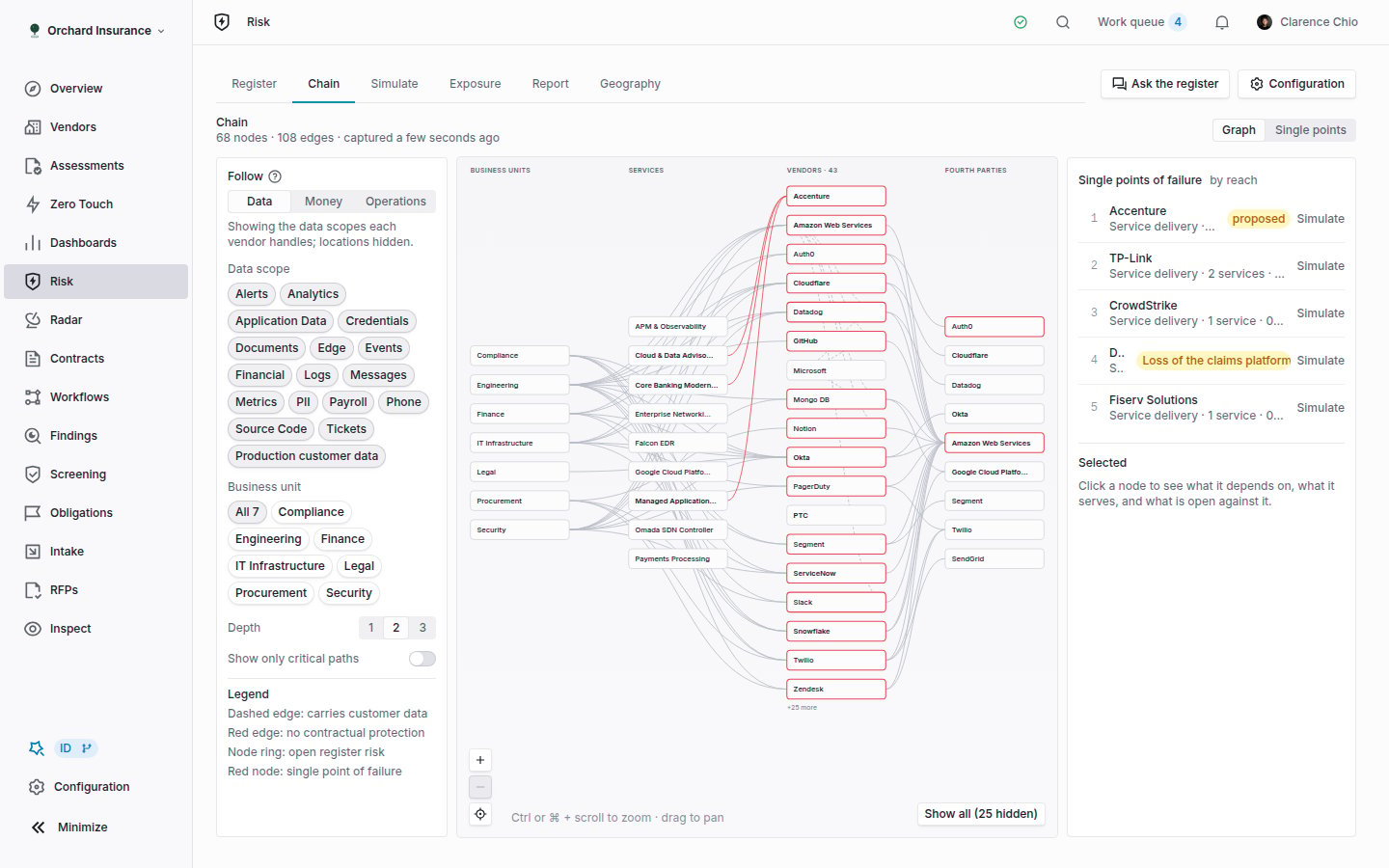 The chain is rebuilt nightly from business unit dependencies, services, active contracts, each vendor's fourth parties (subprocessor lists where there is no entity), supplier sites and vendor risk profiles. The header names the snapshot and its date, so a scenario always says which chain it ran on.
**Follow** picks which chain the graph traces:
| Mode | Shows | Ordered by |
| -------------- | -------------------------------------------------------------------------------------- | ------------------------------------------------------------------ |
| **Data** | Data scopes each vendor handles; locations hidden. A dashed edge carries customer data | Build order |
| **Money** | The same chain without data scopes or locations | Annual contract value, so the largest vendors survive the node cap |
| **Operations** | Regions and sites vendors operate from | The criticality recorded on each business unit dependency |
Narrow with **Data scope**, **Business unit**, **Depth** and **Show only critical paths**. A column with too many nodes collapses the rest behind **+N more**; **Show all** expands it. In the legend, a red edge has no contractual protection, a ring marks a node with an open register risk, and a red node is a single point of failure.
Click a node to see what it depends on, what it serves, its contract (liability cap, SLA, DPA in place or not), and what is open against it (findings, obligations). **Simulate outage** runs an event scenario on it. **Single points** lists every single point of failure by reach, with how many alternatives are on record.
## Simulate
The chain is rebuilt nightly from business unit dependencies, services, active contracts, each vendor's fourth parties (subprocessor lists where there is no entity), supplier sites and vendor risk profiles. The header names the snapshot and its date, so a scenario always says which chain it ran on.
**Follow** picks which chain the graph traces:
| Mode | Shows | Ordered by |
| -------------- | -------------------------------------------------------------------------------------- | ------------------------------------------------------------------ |
| **Data** | Data scopes each vendor handles; locations hidden. A dashed edge carries customer data | Build order |
| **Money** | The same chain without data scopes or locations | Annual contract value, so the largest vendors survive the node cap |
| **Operations** | Regions and sites vendors operate from | The criticality recorded on each business unit dependency |
Narrow with **Data scope**, **Business unit**, **Depth** and **Show only critical paths**. A column with too many nodes collapses the rest behind **+N more**; **Show all** expands it. In the legend, a red edge has no contractual protection, a ring marks a node with an open register risk, and a red node is a single point of failure.
Click a node to see what it depends on, what it serves, its contract (liability cap, SLA, DPA in place or not), and what is open against it (findings, obligations). **Simulate outage** runs an event scenario on it. **Single points** lists every single point of failure by reach, with how many alternatives are on record.
## Simulate
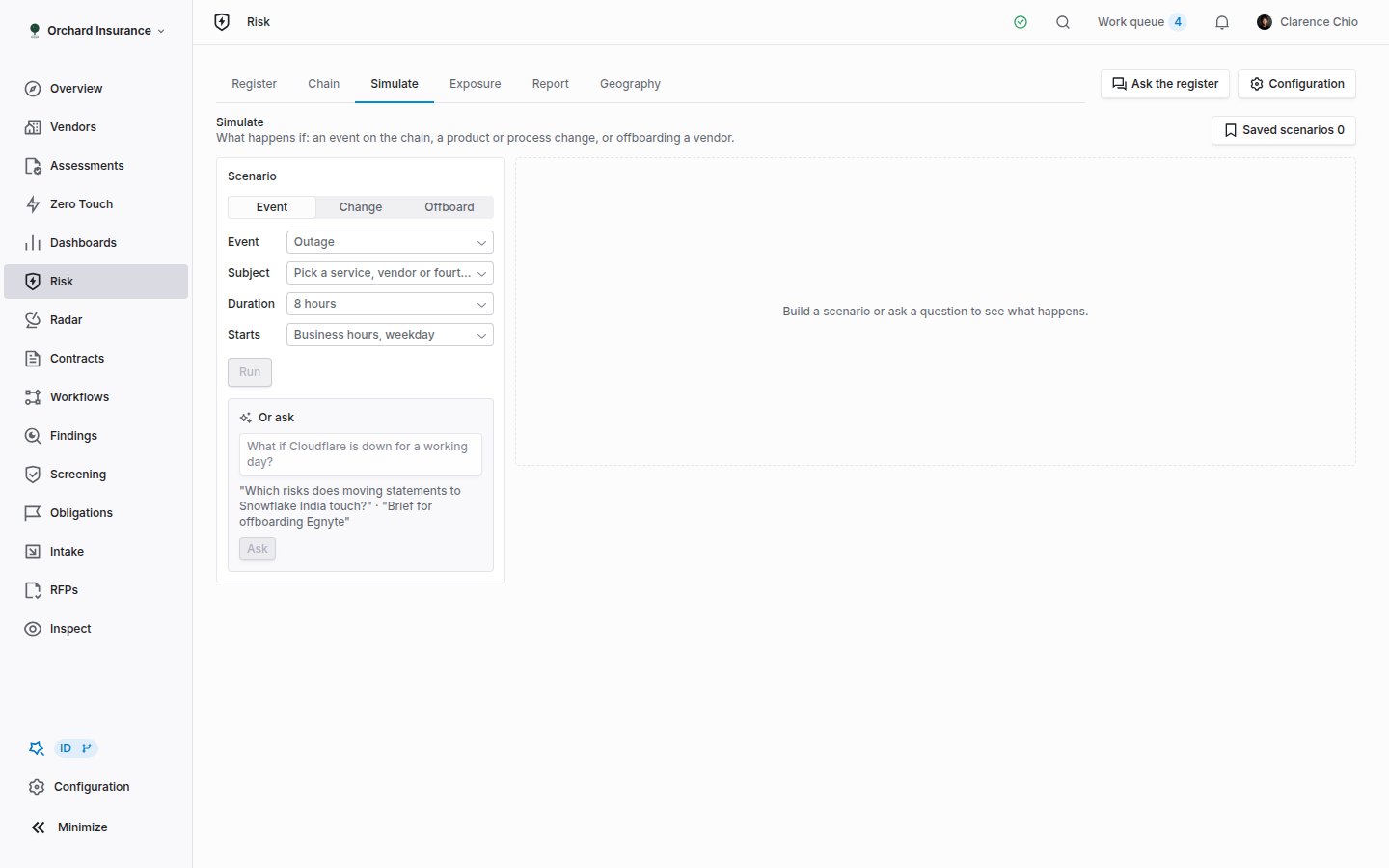 Pick a **Scenario kind**:
* **Event**: an **Outage**, **Breach**, **Insolvency**, **Sanction** or **Market exit** on a **Subject** from the chain, for a **Duration**, starting in **Business hours, weekday**, **Overnight** or **Weekend**.
* **Change**: **Describe the change** in a sentence and name the **Vendors involved** and **Business units involved**. The result lists what it touches: control sets, register risks, obligations and open questions for stakeholders.
* **Offboard**: a **Vendor to offboard**. The result is a brief: termination terms on file, dependencies, open findings and obligations, and alternatives.
Or type the question under **Or ask** ("What if Cloudflare is down for a working day?") and click **Ask**. The form adopts the inputs the model understood, so you can adjust and re-run.
The engine never fills in a number you have not recorded. If an estimate needs an input the org does not hold (a liability cap, a business unit's revenue), the loss reads **Estimate withheld** with the reason, and **Improve it** lists what to record. Confidence is derived from how many inputs are present, never asserted.
A result shows services down, items touched, business units and customer channels, obligations triggered (regulatory and contractual), open findings on the path, the estimated loss, contractual protection per contract, and the **Blast radius** table: each business unit, the services affected, whether the channel is customer-facing, whether a workaround is on file, and the owner.
Under the result: **Save scenario**, **Attach to risk** (the scenario is recorded against that risk and listed as attached to it under **Saved scenarios**), **Create risks from gaps** (each selected draft becomes a proposed risk with the scenario as its first signal) and **Export brief** (a Markdown file). **Saved scenarios** reopens any earlier run with its result.
## Exposure
Pick a **Scenario kind**:
* **Event**: an **Outage**, **Breach**, **Insolvency**, **Sanction** or **Market exit** on a **Subject** from the chain, for a **Duration**, starting in **Business hours, weekday**, **Overnight** or **Weekend**.
* **Change**: **Describe the change** in a sentence and name the **Vendors involved** and **Business units involved**. The result lists what it touches: control sets, register risks, obligations and open questions for stakeholders.
* **Offboard**: a **Vendor to offboard**. The result is a brief: termination terms on file, dependencies, open findings and obligations, and alternatives.
Or type the question under **Or ask** ("What if Cloudflare is down for a working day?") and click **Ask**. The form adopts the inputs the model understood, so you can adjust and re-run.
The engine never fills in a number you have not recorded. If an estimate needs an input the org does not hold (a liability cap, a business unit's revenue), the loss reads **Estimate withheld** with the reason, and **Improve it** lists what to record. Confidence is derived from how many inputs are present, never asserted.
A result shows services down, items touched, business units and customer channels, obligations triggered (regulatory and contractual), open findings on the path, the estimated loss, contractual protection per contract, and the **Blast radius** table: each business unit, the services affected, whether the channel is customer-facing, whether a workaround is on file, and the owner.
Under the result: **Save scenario**, **Attach to risk** (the scenario is recorded against that risk and listed as attached to it under **Saved scenarios**), **Create risks from gaps** (each selected draft becomes a proposed risk with the scenario as its first signal) and **Export brief** (a Markdown file). **Saved scenarios** reopens any earlier run with its result.
## Exposure
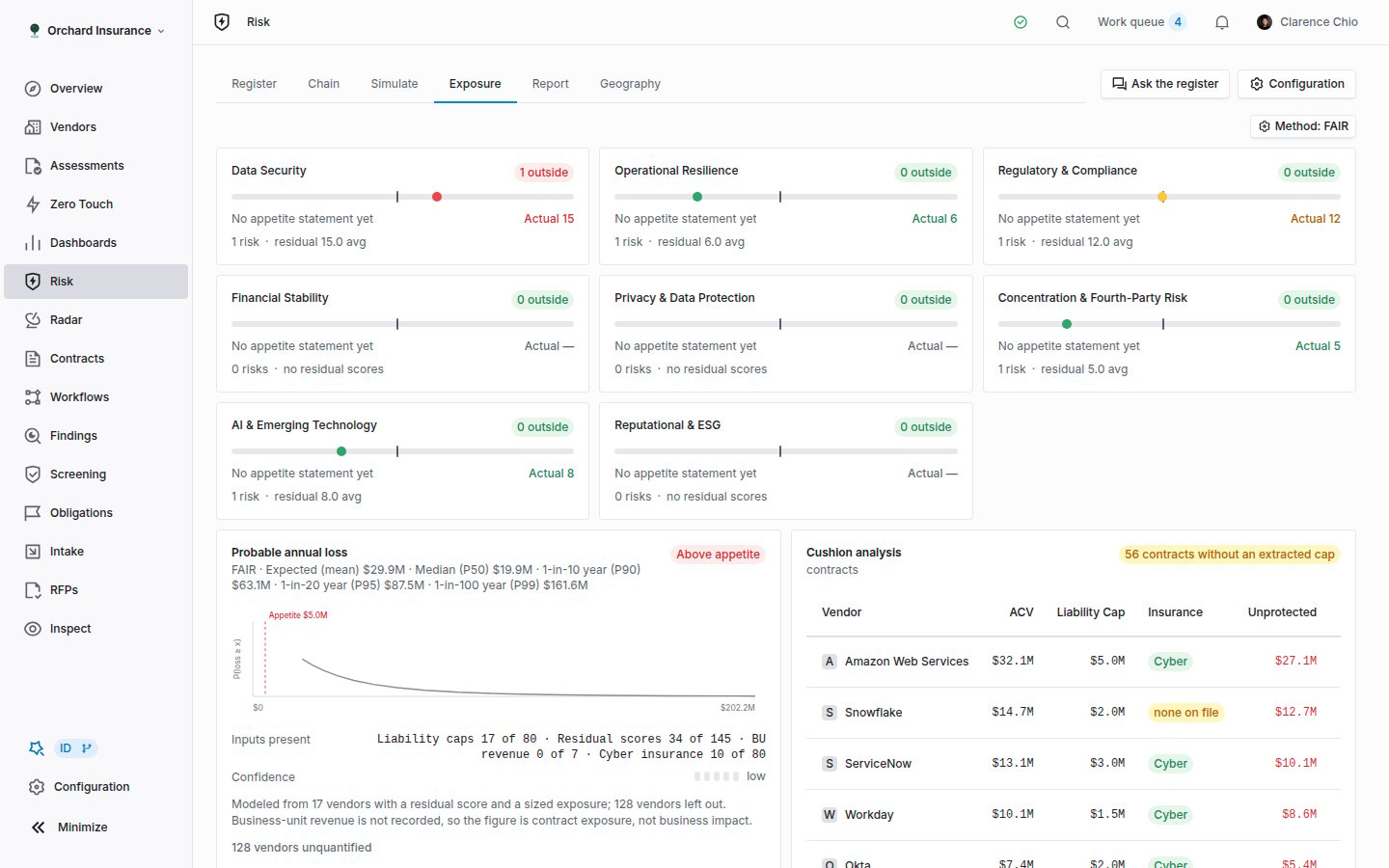 * **Appetite by domain**: one gauge per domain plus "No domain", with the count outside appetite, the appetite statement, the average residual and a 90-day trend (**rising**, **flat**, **falling**). Click **N outside** to open those risks in the register.
* **Probable annual loss**: the loss curve with the appetite line, the **Method** chip (change it under **Configuration → Risk → Quantification**), **Inputs present** per input type, the confidence, and **Vendors without inputs**. Only vendors with a residual score and a sized exposure are modeled; the rest are named, not defaulted.
* **Cushion analysis**: per contract, the ACV, liability cap, insurance (**none on file** or **not extracted**) and the unprotected amount. **Extract from contract** runs clause extraction on rows missing a cap. Unknown stays unknown.
* **Concentration**: shared fourth parties, business units on one vendor, and geography, each linking into the chain.
The line at the bottom names how fresh the assessments, contracts and Radar data are. **Institution** switches between **Group** and one institution.
## Report
* **Appetite by domain**: one gauge per domain plus "No domain", with the count outside appetite, the appetite statement, the average residual and a 90-day trend (**rising**, **flat**, **falling**). Click **N outside** to open those risks in the register.
* **Probable annual loss**: the loss curve with the appetite line, the **Method** chip (change it under **Configuration → Risk → Quantification**), **Inputs present** per input type, the confidence, and **Vendors without inputs**. Only vendors with a residual score and a sized exposure are modeled; the rest are named, not defaulted.
* **Cushion analysis**: per contract, the ACV, liability cap, insurance (**none on file** or **not extracted**) and the unprotected amount. **Extract from contract** runs clause extraction on rows missing a cap. Unknown stays unknown.
* **Concentration**: shared fourth parties, business units on one vendor, and geography, each linking into the chain.
The line at the bottom names how fresh the assessments, contracts and Radar data are. **Institution** switches between **Group** and one institution.
## Report
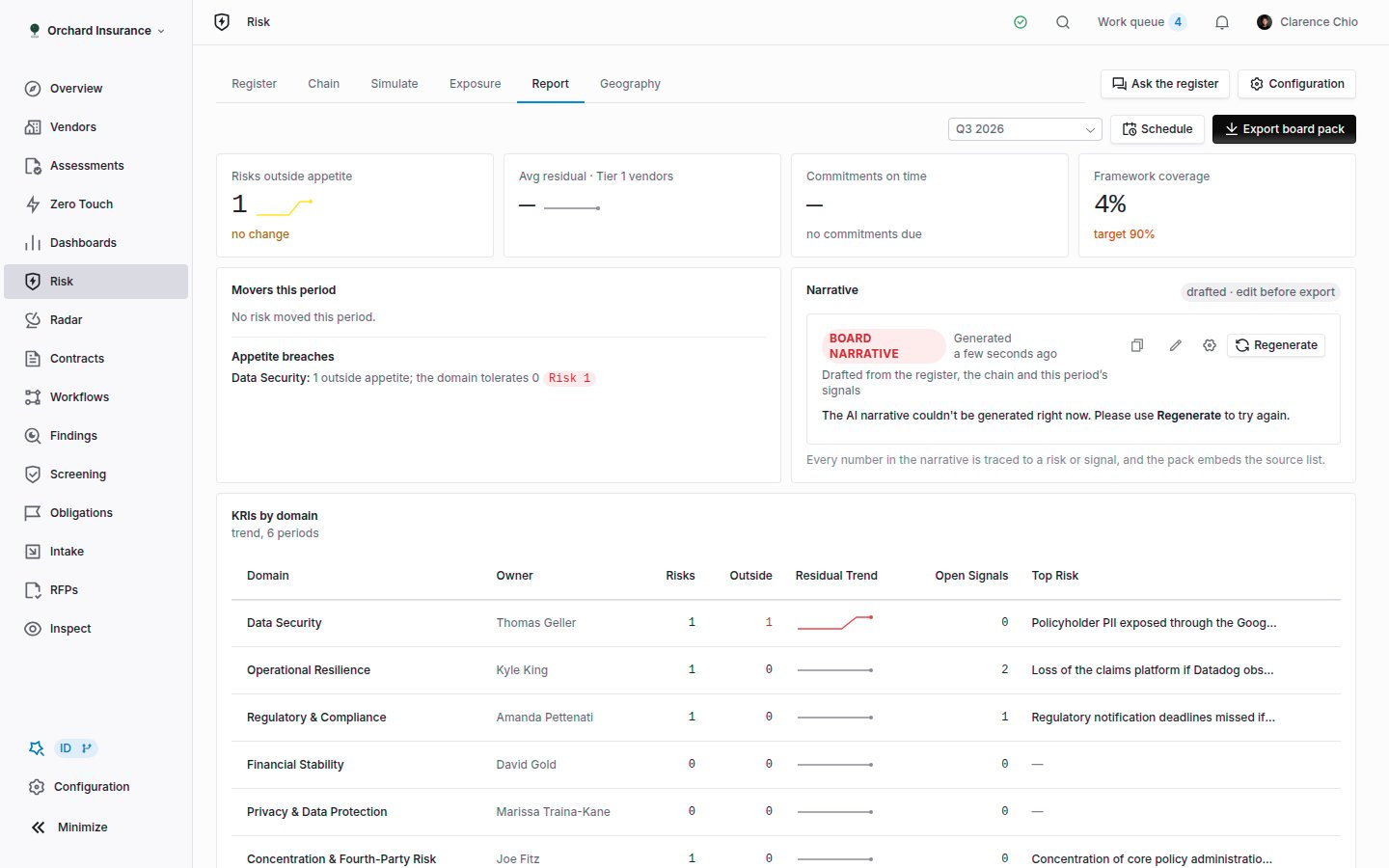 Choose a **Period** (the last six quarters). Four tiles carry a six-quarter sparkline: **Risks outside appetite**, **Avg residual · Tier 1 vendors**, **Commitments on time** and **Framework coverage** (against the frameworks chosen in configuration). **Movers this period** lists re-scored, new and closed risks; **Appetite breaches** lists the domains over their **Max Outside**; **KRIs by domain** gives each domain its owner, risk count, outside count, residual trend, open signals and top risk. All of it is read from the journal, so a re-score that later reversed still shows as a move in its period.
**Narrative** drafts the board text from the register, the chain and the period's signals. It is marked "drafted · edit before export"; click **Edit**, change it, **Save**. Every number in it traces to a risk or signal. **Pinned Chart** shows one chart from an org dashboard (see the [Dashboard library](/user-guides/dashboard-library)); the PDF names it but cannot embed the live view.
**Export board pack** builds the PDF in your browser. **Schedule** emails the report **monthly** or **quarterly** on a chosen day to the recipients you list, for one institution or the whole group. The same schedule is editable under **Configuration → Risk → Board Pack Schedule**.
## Configuring the module
Open **Configuration → Risk**, or click **Configuration** on the Risk page. Each section saves on its own.
| Section | What it holds |
| ----------------------- | ----------------------------------------------------------------------------------------------------------------------------------------------------------------------------------------------------------------------------------------------------------------- |
| **Taxonomy & Domains** | Your risk domains with their owner, control sets, Coverbase category mapping and whether an appetite is set. **Manage domains** opens **Configuration → Risk Domains**, where domains, their reviewers and their control sets are created |
| **Scales & Matrix** | Five levels per axis with a label and criteria, and a preview of the 25-cell matrix |
| **Appetite Statements** | Per domain: a **Statement** in your words, **Max Residual** (the tolerance, default 12) and **Max Outside** (how many risks over it the domain tolerates before it breaches). **Portfolio Thresholds** are the numeric tolerances the quantification model checks |
| **Quantification** | The method behind **Probable annual loss** and its parameters. Switching method resets the parameters to that method's defaults |
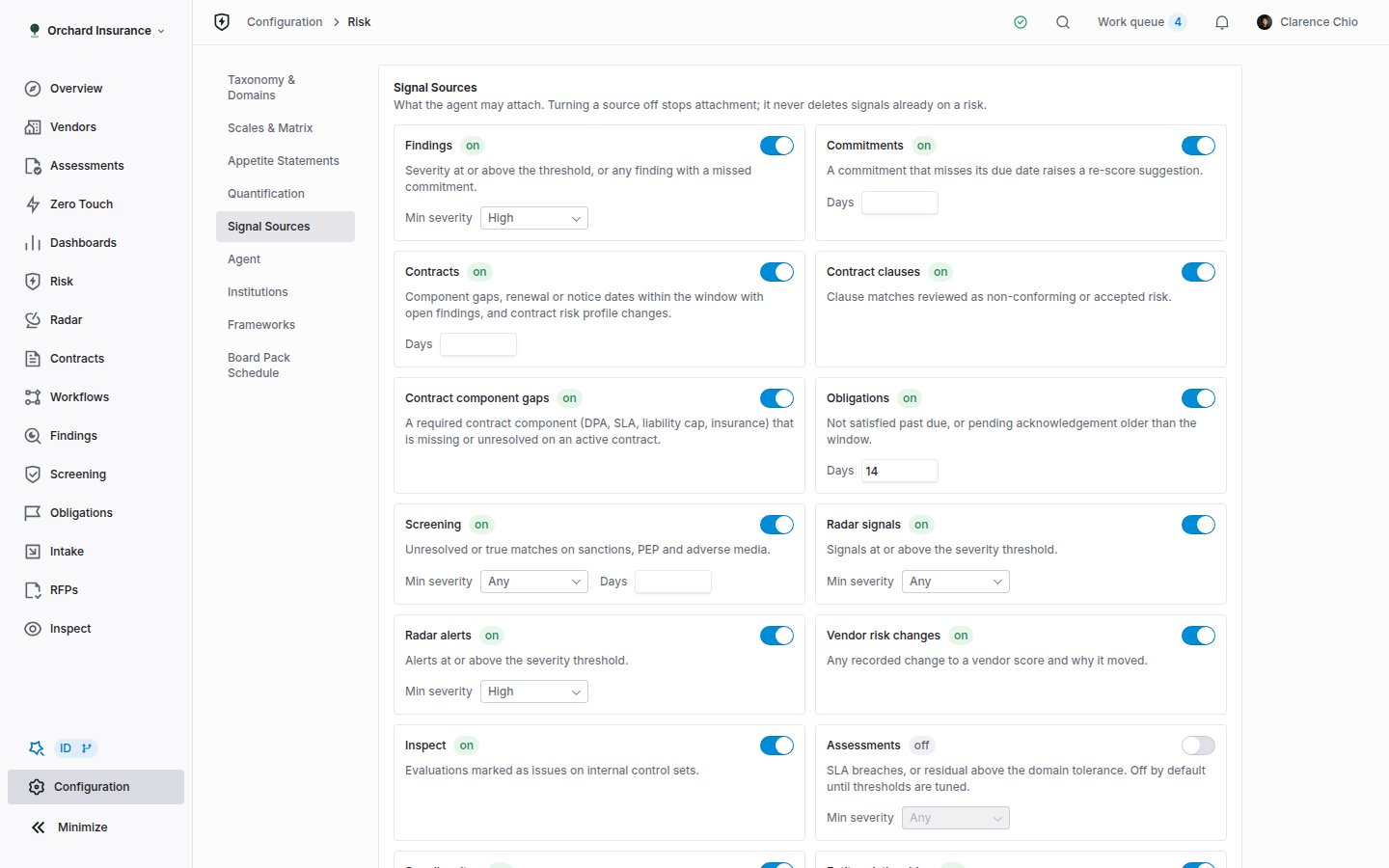
| **Signal Sources** | The on/off switch and threshold per source ([above](#signal-sources-and-thresholds)) |
| **Agent** | **New risks**, **Re-scoring**, **Stale after**, **Instructions** and **Run agent now** |
| **Institutions** | A **Key** and **Label** per institution. A holding company sees **Group**; each institution sees its own rows. A risk is scoped to one institution or shared |
| **Frameworks** | The frameworks the board pack reports coverage against |
| **Board Pack Schedule** | The scheduled send: cadence, day of month, institution, recipients |
Editing a scale re-maps existing risks by level **name**; it never re-scores them. A label you move from level 2 to level 3 takes its risks with it, and a name you remove leaves its risks at their number. Each moved risk gets a **Scale remapped** row in its history.
Choose a **Period** (the last six quarters). Four tiles carry a six-quarter sparkline: **Risks outside appetite**, **Avg residual · Tier 1 vendors**, **Commitments on time** and **Framework coverage** (against the frameworks chosen in configuration). **Movers this period** lists re-scored, new and closed risks; **Appetite breaches** lists the domains over their **Max Outside**; **KRIs by domain** gives each domain its owner, risk count, outside count, residual trend, open signals and top risk. All of it is read from the journal, so a re-score that later reversed still shows as a move in its period.
**Narrative** drafts the board text from the register, the chain and the period's signals. It is marked "drafted · edit before export"; click **Edit**, change it, **Save**. Every number in it traces to a risk or signal. **Pinned Chart** shows one chart from an org dashboard (see the [Dashboard library](/user-guides/dashboard-library)); the PDF names it but cannot embed the live view.
**Export board pack** builds the PDF in your browser. **Schedule** emails the report **monthly** or **quarterly** on a chosen day to the recipients you list, for one institution or the whole group. The same schedule is editable under **Configuration → Risk → Board Pack Schedule**.
## Configuring the module
Open **Configuration → Risk**, or click **Configuration** on the Risk page. Each section saves on its own.
| Section | What it holds |
| ----------------------- | ----------------------------------------------------------------------------------------------------------------------------------------------------------------------------------------------------------------------------------------------------------------- |
| **Taxonomy & Domains** | Your risk domains with their owner, control sets, Coverbase category mapping and whether an appetite is set. **Manage domains** opens **Configuration → Risk Domains**, where domains, their reviewers and their control sets are created |
| **Scales & Matrix** | Five levels per axis with a label and criteria, and a preview of the 25-cell matrix |
| **Appetite Statements** | Per domain: a **Statement** in your words, **Max Residual** (the tolerance, default 12) and **Max Outside** (how many risks over it the domain tolerates before it breaches). **Portfolio Thresholds** are the numeric tolerances the quantification model checks |
| **Quantification** | The method behind **Probable annual loss** and its parameters. Switching method resets the parameters to that method's defaults |
| **Signal Sources** | The on/off switch and threshold per source ([above](#signal-sources-and-thresholds)) |
| **Agent** | **New risks**, **Re-scoring**, **Stale after**, **Instructions** and **Run agent now** |
| **Institutions** | A **Key** and **Label** per institution. A holding company sees **Group**; each institution sees its own rows. A risk is scoped to one institution or shared |
| **Frameworks** | The frameworks the board pack reports coverage against |
| **Board Pack Schedule** | The scheduled send: cadence, day of month, institution, recipients |
Editing a scale re-maps existing risks by level **name**; it never re-scores them. A label you move from level 2 to level 3 takes its risks with it, and a name you remove leaves its risks at their number. Each moved risk gets a **Scale remapped** row in its history.
 The 5x5 here is not the vendor risk scale. Vendor and service scores (0 to 100, with bands and service roll-up) are configured under **Configuration → Scales** and described in the [Admin and setup guide](/user-guides/admin-setup#step-5-configure-risk-and-compliance-scales). A vendor score that rises reaches the register as a **Vendor risk change** signal.
## How the other modules connect
Vendor, service, contract and finding pages each carry a **Risks** card listing the register entries scoped to that record, with their residual score and appetite state, **Add risk**, and **View in register**, which opens the register filtered to that record ("Scoped to this vendor"). Proposed risks show as **Proposed by agent** on the card.
The reverse direction is the signal table above: [findings](/products/findings-manager) and their commitments, [Radar](/products/supplier-radar) signals and alerts, [contract components](/user-guides/contract-components) and clause reviews, obligations, [sanctions screening](/user-guides/sanctions-screening), the [financial health score](/user-guides/financial-health-score), [supplier sites](/user-guides/supplier-information), Inspect evaluations and assessments all reach the register as signals on the risks that cover them. Charts on your dashboards can slice the register by domain, status, appetite, owner and institution. Workflow automations have **Create risk** and **Update risk** actions (see [Workflow templates](/user-guides/workflow-templates)).
A risk that needs a person (a proposal, an overdue review, or an unowned risk outside appetite) also appears once in the work queue, assigned to its owner, or failing that the owning department's lead or a domain reviewer.
## Who can do what
Risk has its own permission resource, **Risk register**, with these grants. Members hold them by default; a missing button means the grant is missing from your role.
| Grant | What it unlocks |
| ------- | ------------------------------------------------------------------------------------------------------------------------------------------------------------------------- |
| Read | Every tab, the record, and viewing the configuration page |
| Create | **New risk**, **Add risk**, **Create risks from gaps**, saving a scenario |
| Update | **Edit**, **Accept risk**, **Request commitment**, **Set review date**, attaching or dismissing a signal, every inbox decision, **Attach to risk**, editing the narrative |
| Archive | **Archive** on a risk, deleting a saved scenario |
| Run | **Run agent now**, running a scenario |
| Export | **Export board pack** |
Saving anything under **Configuration → Risk** needs the organization settings permission, which Admins hold. Roles are managed as described in [Permissions and roles](/user-guides/permissions-and-roles).
## Notifications
Two notification types live under the **Risk** category in your personal notification settings. Both group one agent run's output into a single email.
| Notification | Sent when | Sent to |
| --------------------------------- | -------------------------------------------------------------------- | ----------------------------------------------------------------------------------- |
| **Risk proposal awaiting review** | The agent proposes a new risk, a re-score, a merge or a stale review | The domain's reviewers, the lead of each reviewing department, and the risk's owner |
| **Risk outside appetite** | A risk is re-scored above its domain's tolerance | The risk's owner, the owning department's lead, and the domain's reviewers |
Each email carries a button that opens the risk. Delivery settings are covered in [Email and notifications](/user-guides/email-notifications#who-receives-what).
## Troubleshooting
| What you see | What is happening |
| ------------------------------------------------------------------------ | ---------------------------------------------------------------------------------------------------------------------------------------------------------------------------------------------- |
| A treated risk still reads **Outside appetite**. | Its residual is unscored, so it falls back to the inherent score. Edit the risk and set **Residual Likelihood** and **Residual Impact**. |
| The count line says "3 proposed hidden" but the table shows nothing new. | Proposals never enter the table. Click the **Proposed by agent** tile to decide on them. |
| A finding I expect is not a signal. | Its severity is below **Min severity** for **Findings**, or the source is switched off. Check **Configuration → Risk → Signal Sources**, then **Attach signal** on the risk to add it by hand. |
| A signal closed but is still listed on the risk. | Closed signals stay on the risk as the evidence trail and count under "closed" in the signal counts. |
| **Estimate withheld** on a scenario. | An input the estimate needs is not on record. The **Improve it** line names it (usually a liability cap or ACV on the contract, or a business unit's revenue). |
| The chain shows **Showing 40 of 180 nodes**. | Each column caps at 18 rows. Use **Depth**, **Data scope** or **Business unit** to narrow, or **Show all** on a column. |
| **Run agent now** did nothing visible. | The toast reports what it did: signals attached, proposed, re-scored, flagged stale. Zero across the board means no source cleared its threshold since the last run. |
| I renamed a scale level and the scores changed. | They did not; the risks followed their level **name** to its new number. Check the **Scale remapped** rows in the history. |
| I cannot see **Risk** at all. | The module is not enabled for your organization. Ask your Coverbase representative. |
## Related
The Geography tab: supplier density, country marks and the vendor filters.
Vendor risk scales, service roll-up and the rest of the organization setup.
The DPA, SLA and liability cap slots that feed component-gap signals and the cushion table.
Where to turn the two risk notifications on or off.
The 5x5 here is not the vendor risk scale. Vendor and service scores (0 to 100, with bands and service roll-up) are configured under **Configuration → Scales** and described in the [Admin and setup guide](/user-guides/admin-setup#step-5-configure-risk-and-compliance-scales). A vendor score that rises reaches the register as a **Vendor risk change** signal.
## How the other modules connect
Vendor, service, contract and finding pages each carry a **Risks** card listing the register entries scoped to that record, with their residual score and appetite state, **Add risk**, and **View in register**, which opens the register filtered to that record ("Scoped to this vendor"). Proposed risks show as **Proposed by agent** on the card.
The reverse direction is the signal table above: [findings](/products/findings-manager) and their commitments, [Radar](/products/supplier-radar) signals and alerts, [contract components](/user-guides/contract-components) and clause reviews, obligations, [sanctions screening](/user-guides/sanctions-screening), the [financial health score](/user-guides/financial-health-score), [supplier sites](/user-guides/supplier-information), Inspect evaluations and assessments all reach the register as signals on the risks that cover them. Charts on your dashboards can slice the register by domain, status, appetite, owner and institution. Workflow automations have **Create risk** and **Update risk** actions (see [Workflow templates](/user-guides/workflow-templates)).
A risk that needs a person (a proposal, an overdue review, or an unowned risk outside appetite) also appears once in the work queue, assigned to its owner, or failing that the owning department's lead or a domain reviewer.
## Who can do what
Risk has its own permission resource, **Risk register**, with these grants. Members hold them by default; a missing button means the grant is missing from your role.
| Grant | What it unlocks |
| ------- | ------------------------------------------------------------------------------------------------------------------------------------------------------------------------- |
| Read | Every tab, the record, and viewing the configuration page |
| Create | **New risk**, **Add risk**, **Create risks from gaps**, saving a scenario |
| Update | **Edit**, **Accept risk**, **Request commitment**, **Set review date**, attaching or dismissing a signal, every inbox decision, **Attach to risk**, editing the narrative |
| Archive | **Archive** on a risk, deleting a saved scenario |
| Run | **Run agent now**, running a scenario |
| Export | **Export board pack** |
Saving anything under **Configuration → Risk** needs the organization settings permission, which Admins hold. Roles are managed as described in [Permissions and roles](/user-guides/permissions-and-roles).
## Notifications
Two notification types live under the **Risk** category in your personal notification settings. Both group one agent run's output into a single email.
| Notification | Sent when | Sent to |
| --------------------------------- | -------------------------------------------------------------------- | ----------------------------------------------------------------------------------- |
| **Risk proposal awaiting review** | The agent proposes a new risk, a re-score, a merge or a stale review | The domain's reviewers, the lead of each reviewing department, and the risk's owner |
| **Risk outside appetite** | A risk is re-scored above its domain's tolerance | The risk's owner, the owning department's lead, and the domain's reviewers |
Each email carries a button that opens the risk. Delivery settings are covered in [Email and notifications](/user-guides/email-notifications#who-receives-what).
## Troubleshooting
| What you see | What is happening |
| ------------------------------------------------------------------------ | ---------------------------------------------------------------------------------------------------------------------------------------------------------------------------------------------- |
| A treated risk still reads **Outside appetite**. | Its residual is unscored, so it falls back to the inherent score. Edit the risk and set **Residual Likelihood** and **Residual Impact**. |
| The count line says "3 proposed hidden" but the table shows nothing new. | Proposals never enter the table. Click the **Proposed by agent** tile to decide on them. |
| A finding I expect is not a signal. | Its severity is below **Min severity** for **Findings**, or the source is switched off. Check **Configuration → Risk → Signal Sources**, then **Attach signal** on the risk to add it by hand. |
| A signal closed but is still listed on the risk. | Closed signals stay on the risk as the evidence trail and count under "closed" in the signal counts. |
| **Estimate withheld** on a scenario. | An input the estimate needs is not on record. The **Improve it** line names it (usually a liability cap or ACV on the contract, or a business unit's revenue). |
| The chain shows **Showing 40 of 180 nodes**. | Each column caps at 18 rows. Use **Depth**, **Data scope** or **Business unit** to narrow, or **Show all** on a column. |
| **Run agent now** did nothing visible. | The toast reports what it did: signals attached, proposed, re-scored, flagged stale. Zero across the board means no source cleared its threshold since the last run. |
| I renamed a scale level and the scores changed. | They did not; the risks followed their level **name** to its new number. Check the **Scale remapped** rows in the history. |
| I cannot see **Risk** at all. | The module is not enabled for your organization. Ask your Coverbase representative. |
## Related
The Geography tab: supplier density, country marks and the vendor filters.
Vendor risk scales, service roll-up and the rest of the organization setup.
The DPA, SLA and liability cap slots that feed component-gap signals and the cushion table.
Where to turn the two risk notifications on or off.