> ## Documentation Index
> Fetch the complete documentation index at: https://docs.coverbase.com/llms.txt
> Use this file to discover all available pages before exploring further.
# Security intelligence guide
> How to read a vendor's outside-in security rating, what each factor measures, and what a not-measured factor does and does not tell you.
For AI agents: a documentation index is available at [https://docs.coverbase.com/llms.txt](https://docs.coverbase.com/llms.txt). This page is also available in markdown by appending .md to the URL.
This guide is part of the [User Guides](/user-guides/overview) collection. For what the capability is and where it stops, see [Security intelligence](/products/security-intelligence).
This page rates a vendor's internet-facing security from the outside, by querying their own infrastructure. Nobody at the vendor is contacted, and nothing here depends on their cooperation.
## Finding it
Open a vendor, go to **Vendor Intelligence**, and pick the **Security** tab.
 ## The rating is a floor, not a verdict
Everything measured here is visible from the public internet. That is both its strength and its limit.
A strong rating means the things an attacker can see from outside are in order. It says nothing about what happens inside the vendor's network, how they manage access, or whether they have a working incident process. Those questions need an assessment.
A weak rating is more actionable in the other direction. A monitor-only DMARC policy or an expired certificate is a fact, not an inference, and you can raise it with the vendor immediately.
## Read the factors, then the number
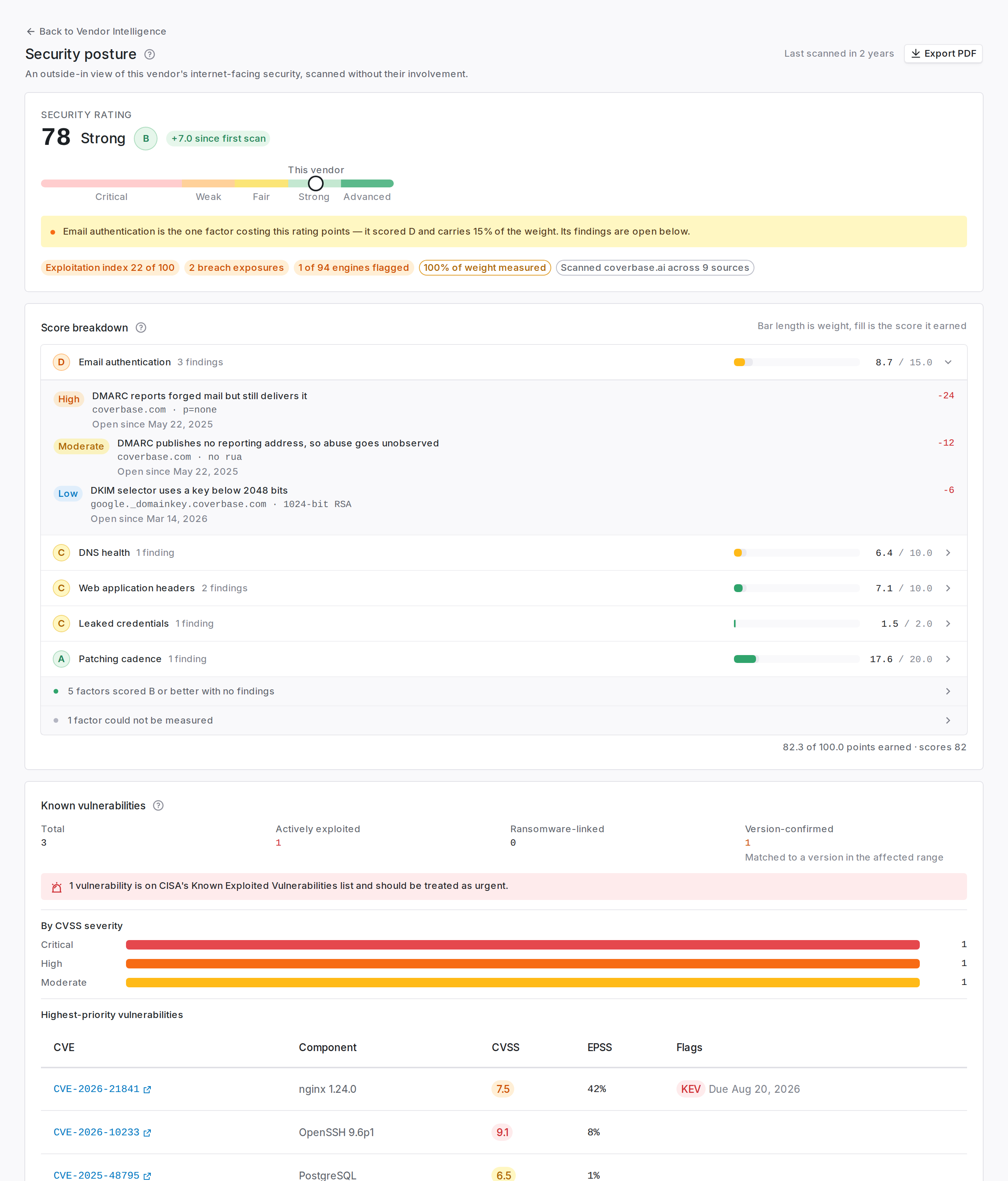
The overall rating is a weighted roll-up. The factor breakdown underneath it is what you act on.
Each factor expands to show the specific observations behind its score, so a low number always resolves to something concrete: a hostname, a header, a certificate, a CVE.
A factor marked **not measured** was excluded from the rating. It is not evidence that the control is in place, and it is not evidence that it is missing. It means we could not observe it.
That distinction matters when you are writing up an assessment. "Not measured" belongs in the questions you ask the vendor, not in the findings you record against them.
## Open a finding to get the fix
Click any finding in a factor to open it.
## The rating is a floor, not a verdict
Everything measured here is visible from the public internet. That is both its strength and its limit.
A strong rating means the things an attacker can see from outside are in order. It says nothing about what happens inside the vendor's network, how they manage access, or whether they have a working incident process. Those questions need an assessment.
A weak rating is more actionable in the other direction. A monitor-only DMARC policy or an expired certificate is a fact, not an inference, and you can raise it with the vendor immediately.
## Read the factors, then the number
The overall rating is a weighted roll-up. The factor breakdown underneath it is what you act on.
Each factor expands to show the specific observations behind its score, so a low number always resolves to something concrete: a hostname, a header, a certificate, a CVE.
A factor marked **not measured** was excluded from the rating. It is not evidence that the control is in place, and it is not evidence that it is missing. It means we could not observe it.
That distinction matters when you are writing up an assessment. "Not measured" belongs in the questions you ask the vendor, not in the findings you record against them.
## Open a finding to get the fix
Click any finding in a factor to open it.
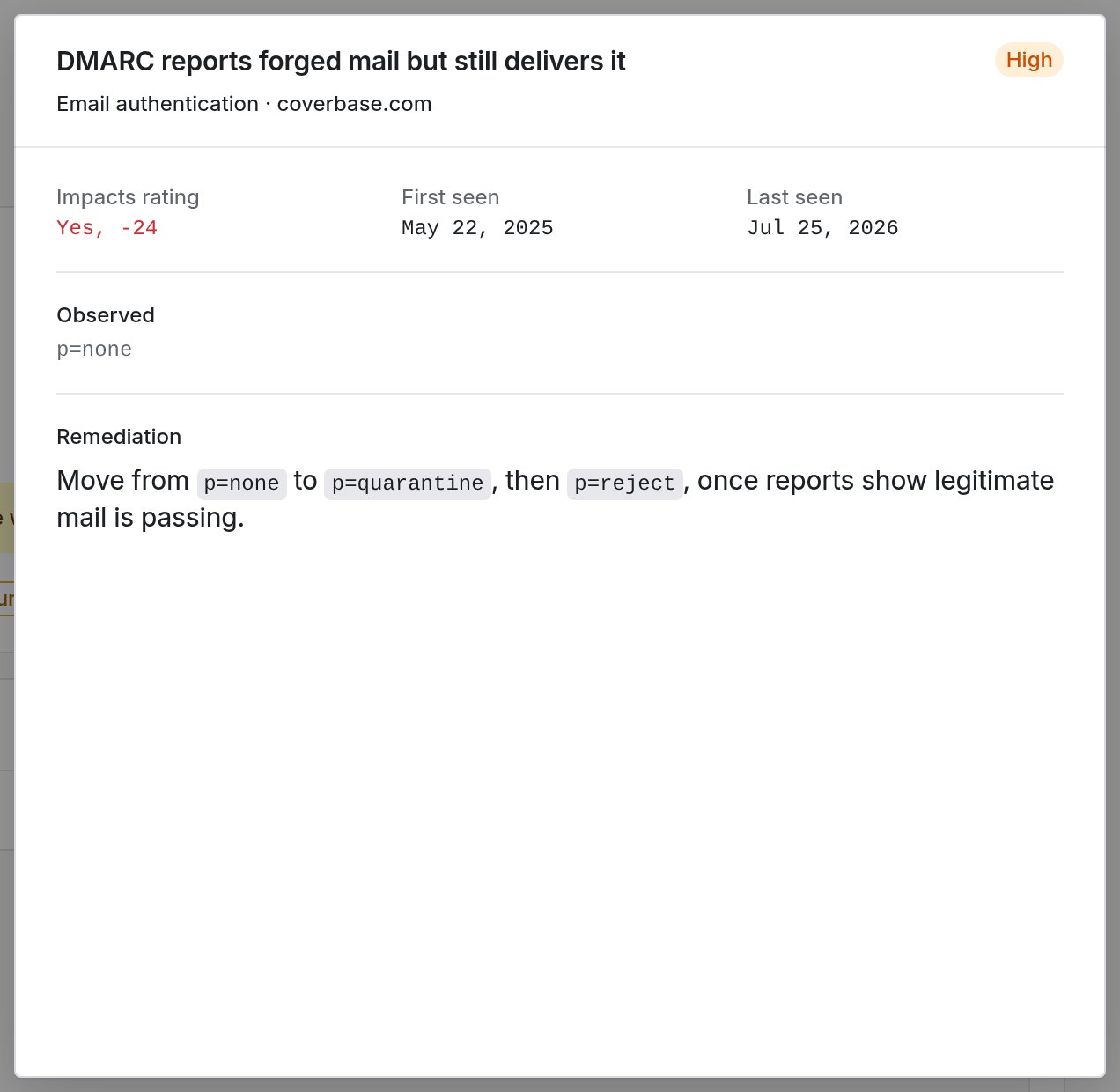 The panel answers the four questions you need before you can raise it with anyone:
* **Impacts rating** tells you whether this finding cost points, and how many. A finding recorded for completeness that moved nothing says **No**.
* **First seen** and **Last seen** tell you how long it has been open. A finding that has survived months has been seen by the vendor's own team too.
* **Observed** is the raw value the scan read, such as `p=none` or `TLSv1.0`.
* **Remediation** is the step that resolves it, written for whoever operates the asset rather than for you.
When you forward a finding to a vendor, "TLS 1.0 is enabled" on its own gives them a problem to research. The remediation step means they can act on it without a round trip.
## Raise findings from what the scan found
**Raise finding** on an open finding creates a tracked finding against the vendor, pre-filled with the asset, the observed value and the scan date, so it stands on its own once it leaves Coverbase.
When a sweep turns up the same problem across a dozen hosts, use **Generate findings** at the top of the page instead.
The panel answers the four questions you need before you can raise it with anyone:
* **Impacts rating** tells you whether this finding cost points, and how many. A finding recorded for completeness that moved nothing says **No**.
* **First seen** and **Last seen** tell you how long it has been open. A finding that has survived months has been seen by the vendor's own team too.
* **Observed** is the raw value the scan read, such as `p=none` or `TLSv1.0`.
* **Remediation** is the step that resolves it, written for whoever operates the asset rather than for you.
When you forward a finding to a vendor, "TLS 1.0 is enabled" on its own gives them a problem to research. The remediation step means they can act on it without a round trip.
## Raise findings from what the scan found
**Raise finding** on an open finding creates a tracked finding against the vendor, pre-filled with the asset, the observed value and the scan date, so it stands on its own once it leaves Coverbase.
When a sweep turns up the same problem across a dozen hosts, use **Generate findings** at the top of the page instead.
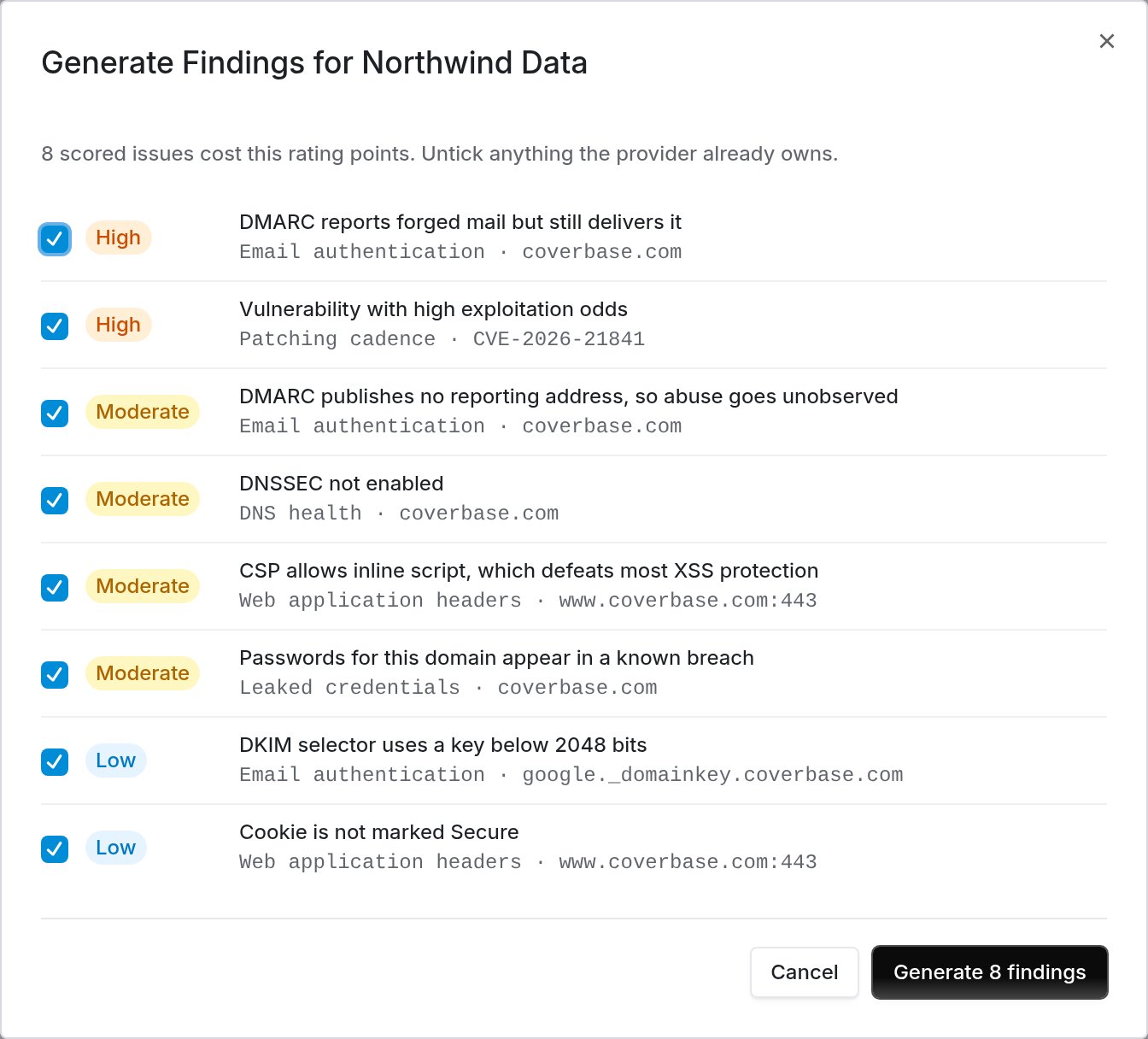 Only issues that cost the rating points are listed, because a zero-penalty observation is not something a provider needs to action. Untick anything the provider already owns before you generate.
## Rating over time
Each point is a restatement of the whole rating. A step change usually means a scan found something new rather than the vendor changing overnight, so read the factors before drawing a trend.
## Attack surface
What is reachable from the internet under the vendor's domains: hosts, exposed services and open ports. A large surface is not automatically a finding; it is context for the rest of the page.
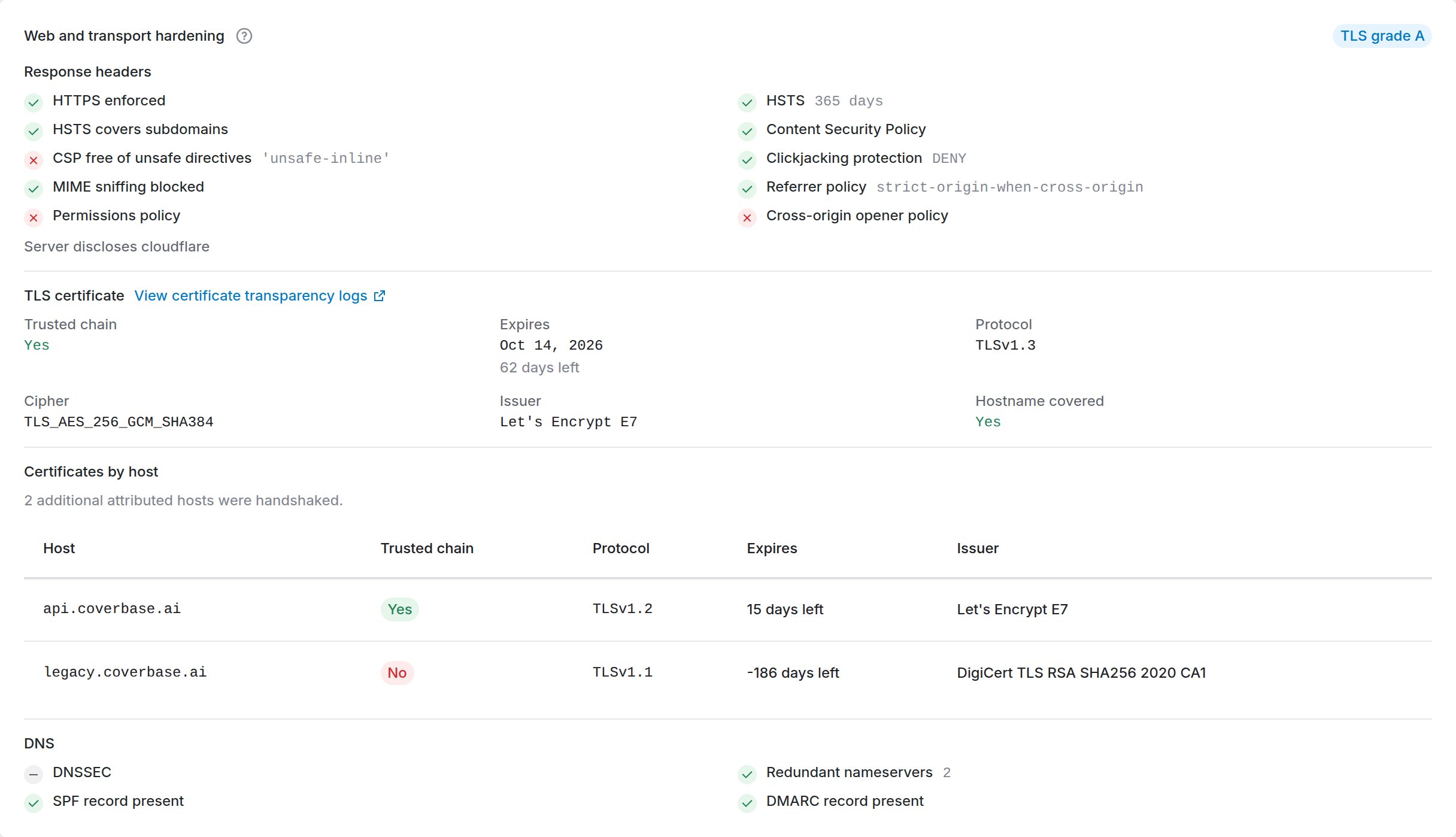
Transport checks run per host rather than only against the vendor's main domain, so a neglected server is not hidden by a well-configured main domain.
Only issues that cost the rating points are listed, because a zero-penalty observation is not something a provider needs to action. Untick anything the provider already owns before you generate.
## Rating over time
Each point is a restatement of the whole rating. A step change usually means a scan found something new rather than the vendor changing overnight, so read the factors before drawing a trend.
## Attack surface
What is reachable from the internet under the vendor's domains: hosts, exposed services and open ports. A large surface is not automatically a finding; it is context for the rest of the page.
Transport checks run per host rather than only against the vendor's main domain, so a neglected server is not hidden by a well-configured main domain.
 ## Attributed estate
The scan works out which domains and addresses belong to the vendor from certificate transparency logs and public scan data, then measures each one. **Attributed Estate** is that list, and it is where you correct what the scan got wrong.
## Attributed estate
The scan works out which domains and addresses belong to the vendor from certificate transparency logs and public scan data, then measures each one. **Attributed Estate** is that list, and it is where you correct what the scan got wrong.
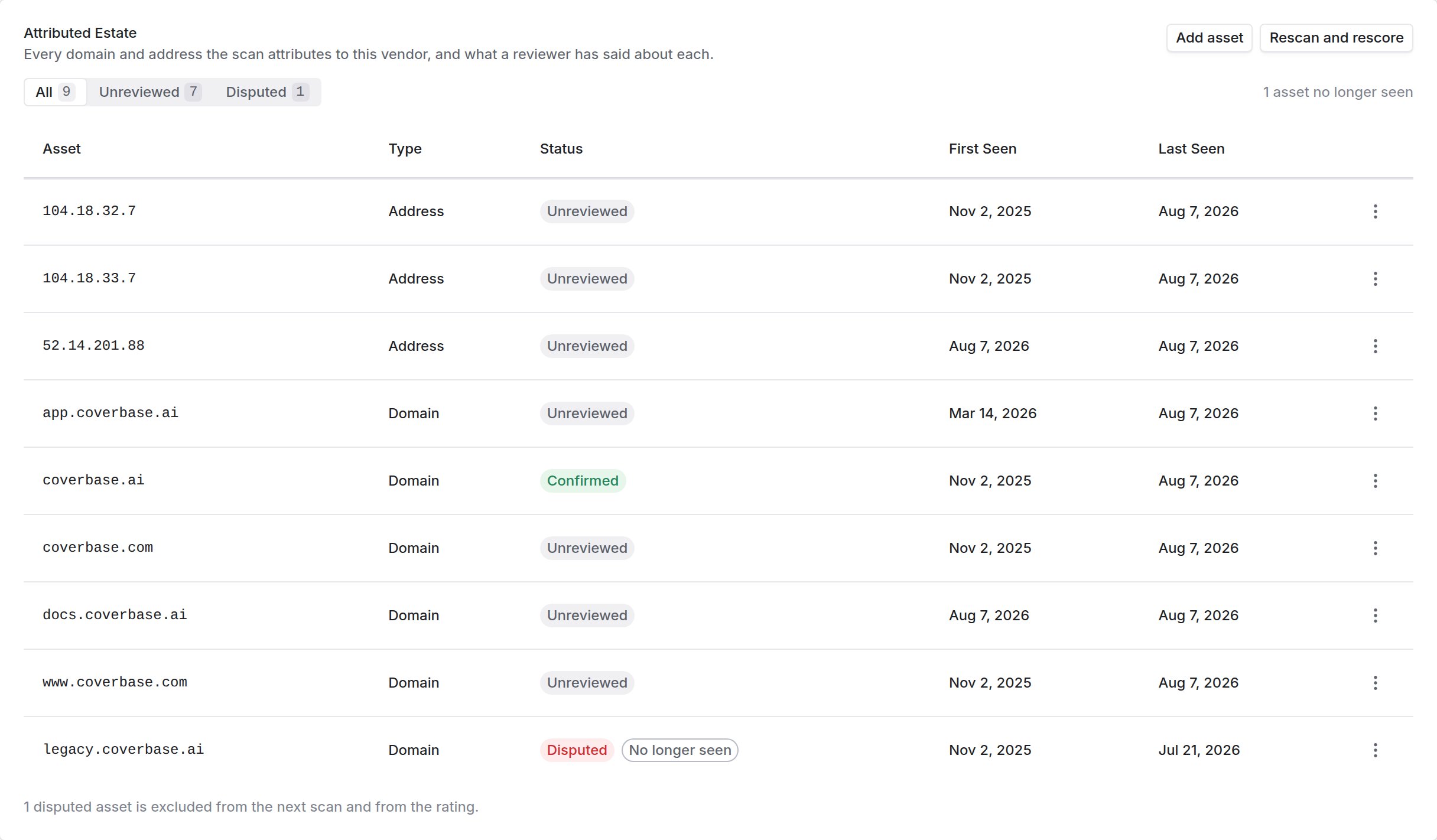 Attribution is worked out from domain names, so two kinds of mistake are normal and both are yours to fix.
### Something is listed that is not theirs
Shared hosting, a reseller, or a product the vendor buys rather than runs. Open the row's actions menu and choose **Dispute**. The next scan skips that asset entirely, and its findings leave the rating.
Choose **Confirm** when you have checked an asset and it is theirs. That records the decision so nobody re-reviews it, and it does not change the rating.
### Something they run is missing
The scan only finds hosts that appear in a public certificate, so an internal host, or one the vendor never published a certificate for, never shows up on its own.
Attribution is worked out from domain names, so two kinds of mistake are normal and both are yours to fix.
### Something is listed that is not theirs
Shared hosting, a reseller, or a product the vendor buys rather than runs. Open the row's actions menu and choose **Dispute**. The next scan skips that asset entirely, and its findings leave the rating.
Choose **Confirm** when you have checked an asset and it is theirs. That records the decision so nobody re-reviews it, and it does not change the rating.
### Something they run is missing
The scan only finds hosts that appear in a public certificate, so an internal host, or one the vendor never published a certificate for, never shows up on its own.
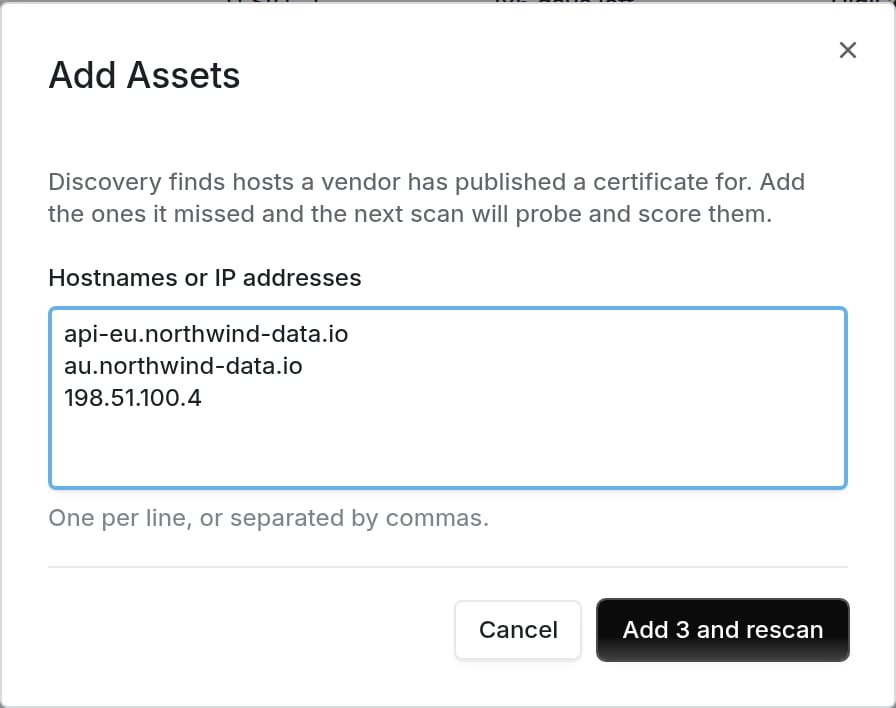 Click **Add asset**, then enter the hostnames or IP addresses, one per line or separated by commas. The next scan probes and scores them like any other asset. Assets you added are marked **Added by hand** and survive a scan that cannot see them, because they are your assertion rather than an observation.
Add the whole list in one go rather than one at a time. Each submission starts a single rescan covering everything in it, so ten hosts added together cost one scan, where ten separate additions cost ten.
If a line is not a hostname or an IP address, the rest are still added. The dialog stays open holding only the lines that failed, so you fix those rather than retyping the list. A mistyped address such as `999.1.1.1` is rejected rather than accepted as a hostname. Accepting it would put an asset in the estate that can never resolve.
Disputing an asset starts a rescan, and so does withdrawing a dispute. A verdict only reaches the rating once the scan has run again, and withdrawing one is what puts the asset back into the score.
Each row carries when the asset was first and last seen. An asset the scan can no longer find is kept and marked **No longer seen** rather than deleted, because an asset leaving the estate is as worth knowing about as one arriving.
## Email authentication
SPF, DKIM and DMARC as published. What matters is the policy, not the presence of a record: a DMARC record set to `none` monitors and enforces nothing, and an SPF record ending in `+all` authorizes the entire internet to send as that domain.
## Web hardening
Transport and browser-facing protections on the vendor's public sites: TLS configuration and the security headers a browser acts on.
## Breaches and exposed credentials
Known breach records and credential exposures associated with the vendor's domains, with dates. Age matters: a decade-old breach and one from last quarter are different conversations.
## Reputation and blocklists
Whether the vendor's domains or hosts appear on public blocklists or threat feeds.
## Security disclosures
Whether the vendor publishes a vulnerability disclosure policy or security contact. Its absence is a maturity signal, not a vulnerability.
## What was scanned
Which checks ran, when, and which did not resolve. A factor that could not be scanned is reported as such rather than scored as a pass.
## Known vulnerabilities
Vulnerabilities are matched against software observed on the vendor's estate, and ordered by how likely they are to be exploited rather than by severity alone.
A vulnerability on CISA's Known Exploited Vulnerabilities list is called out separately. Those are being exploited now. Raise them with the vendor the same week rather than noting them in a report.
## Lookalike domains
The page lists domains built to resemble the vendor's own, and marks which of them resolve and which can receive mail.
A mail-capable lookalike matters most. It can host a page and receive replies, which is what a supplier-invoice fraud attempt against you needs.
## Troubleshooting
| Symptom | Fix |
| -------------------------------------------- | -------------------------------------------------------------------------------------------------------------------------------------------------------- |
| The page says not yet scanned | The vendor has no website on file, or the first scan has not run. Add a website if it is missing. |
| The rating moved and nothing looks different | Open the rating history. Certificates expire and DMARC records change without anyone announcing it. |
| A factor shows no findings but a low score | Expand it. Some factors score on configuration rather than on discrete findings. |
| A vulnerability looks wrong | Version detection is remote and imperfect. Check the flagged component with the vendor before recording it. |
| An asset in the estate is not the vendor's | Dispute it from the row's actions menu. The next scan drops it from the sweep and from the rating. |
| A host you know about is not in the estate | It has no public certificate, so discovery cannot see it. Use **Add asset**, and add every missing host in the same submission so they share one rescan. |
| A dispute has not changed the rating yet | The rescan it started has to finish first. The rating moves on the next completed scan, not on the click. |
| A line was refused when you added assets | It did not read as a hostname or an IP address. The rest were still added, and the dialog keeps the refused lines so you can correct them. |
## Related
The other outside-in score on the same vendor.
Security posture as a scored component.
Click **Add asset**, then enter the hostnames or IP addresses, one per line or separated by commas. The next scan probes and scores them like any other asset. Assets you added are marked **Added by hand** and survive a scan that cannot see them, because they are your assertion rather than an observation.
Add the whole list in one go rather than one at a time. Each submission starts a single rescan covering everything in it, so ten hosts added together cost one scan, where ten separate additions cost ten.
If a line is not a hostname or an IP address, the rest are still added. The dialog stays open holding only the lines that failed, so you fix those rather than retyping the list. A mistyped address such as `999.1.1.1` is rejected rather than accepted as a hostname. Accepting it would put an asset in the estate that can never resolve.
Disputing an asset starts a rescan, and so does withdrawing a dispute. A verdict only reaches the rating once the scan has run again, and withdrawing one is what puts the asset back into the score.
Each row carries when the asset was first and last seen. An asset the scan can no longer find is kept and marked **No longer seen** rather than deleted, because an asset leaving the estate is as worth knowing about as one arriving.
## Email authentication
SPF, DKIM and DMARC as published. What matters is the policy, not the presence of a record: a DMARC record set to `none` monitors and enforces nothing, and an SPF record ending in `+all` authorizes the entire internet to send as that domain.
## Web hardening
Transport and browser-facing protections on the vendor's public sites: TLS configuration and the security headers a browser acts on.
## Breaches and exposed credentials
Known breach records and credential exposures associated with the vendor's domains, with dates. Age matters: a decade-old breach and one from last quarter are different conversations.
## Reputation and blocklists
Whether the vendor's domains or hosts appear on public blocklists or threat feeds.
## Security disclosures
Whether the vendor publishes a vulnerability disclosure policy or security contact. Its absence is a maturity signal, not a vulnerability.
## What was scanned
Which checks ran, when, and which did not resolve. A factor that could not be scanned is reported as such rather than scored as a pass.
## Known vulnerabilities
Vulnerabilities are matched against software observed on the vendor's estate, and ordered by how likely they are to be exploited rather than by severity alone.
A vulnerability on CISA's Known Exploited Vulnerabilities list is called out separately. Those are being exploited now. Raise them with the vendor the same week rather than noting them in a report.
## Lookalike domains
The page lists domains built to resemble the vendor's own, and marks which of them resolve and which can receive mail.
A mail-capable lookalike matters most. It can host a page and receive replies, which is what a supplier-invoice fraud attempt against you needs.
## Troubleshooting
| Symptom | Fix |
| -------------------------------------------- | -------------------------------------------------------------------------------------------------------------------------------------------------------- |
| The page says not yet scanned | The vendor has no website on file, or the first scan has not run. Add a website if it is missing. |
| The rating moved and nothing looks different | Open the rating history. Certificates expire and DMARC records change without anyone announcing it. |
| A factor shows no findings but a low score | Expand it. Some factors score on configuration rather than on discrete findings. |
| A vulnerability looks wrong | Version detection is remote and imperfect. Check the flagged component with the vendor before recording it. |
| An asset in the estate is not the vendor's | Dispute it from the row's actions menu. The next scan drops it from the sweep and from the rating. |
| A host you know about is not in the estate | It has no public certificate, so discovery cannot see it. Use **Add asset**, and add every missing host in the same submission so they share one rescan. |
| A dispute has not changed the rating yet | The rescan it started has to finish first. The rating moves on the next completed scan, not on the click. |
| A line was refused when you added assets | It did not read as a hostname or an IP address. The rest were still added, and the dialog keeps the refused lines so you can correct them. |
## Related
The other outside-in score on the same vendor.
Security posture as a scored component.