> ## Documentation Index
> Fetch the complete documentation index at: https://docs.coverbase.com/llms.txt
> Use this file to discover all available pages before exploring further.
# ServiceNow workflow actions
> Write to your ServiceNow instance from a Coverbase workflow: create and update linked records, create one record per issue or finding, send a custom request, upload documents, and read what each step sent.
For AI agents: a documentation index is available at [https://docs.coverbase.com/llms.txt](https://docs.coverbase.com/llms.txt). This page is also available in markdown by appending .md to the URL.
This guide is part of the [User Guides](/user-guides/overview) collection. It covers the **ServiceNow record** actions in the workflow editor. It sits beside [Building a workflow](/user-guides/building-a-workflow), which covers triggers, conditions, placeholders and the runs page, and [Workflow templates](/user-guides/workflow-templates). For what the ServiceNow integration does as a whole, and how the connection is provisioned, see the [ServiceNow integration guide](/integrations/guides/servicenow).
Workflows is an optional module. If you do not see **Workflows** in the left navigation, ask your Coverbase account team to turn it on.
A workflow can write to your ServiceNow instance as one of its steps. When an assessment finishes, it can open a Vendor Risk Management assessment record, file one risk issue per finding, attach the vendor's evidence, and close the record when everything has landed. Each of those is an automation whose **Then** is one of five actions in the **ServiceNow record** group, and each step records the request it sent and the response ServiceNow gave.
The mistake people make most often is using **Create** where they need **Update**. **Create** writes one record per Coverbase record and table. Every later run of it for the same Coverbase record is **Skipped**, because a record is already linked, so a change you want to push afterwards needs an **Update** step.
## Before you start
**The connection.** The actions write through your organization's ServiceNow connection, which is set on the **ServiceNow GRC** card under **Configuration** → **External Integrations**: the **ServiceNow base URL**, then **Basic authentication** or **OAuth 2.0 (client credentials)**. Click **Save ServiceNow Configuration** first. **Test connection** only checks saved credentials, so it stays unavailable while the form has unsaved changes. The account behind the connection needs write access to every table your steps write to, and to attachments if you upload documents. Provisioning is covered in [Authentication and provisioning](/integrations/guides/servicenow#authentication-and-provisioning). Saving the connection needs the role that manages integrations, by default an Admin.
**Where the actions appear.** While Coverbase knows the connection is not saved, the action picker hides the **ServiceNow record** group. If you cannot read integration settings, the group stays visible, and a step that runs without a connection is **Skipped** with "ServiceNow integration is not configured".
**ServiceNow IDs.** A ServiceNow reference column stores the `sys_id` of the record it points at. Coverbase holds a vendor's, service's or assessment's `sys_id` as its external ID when the record came in from ServiceNow or through the [Import API](/import-api), and the **Insert variable** menu offers it as **External ID (ServiceNow sys\_id)** (`{{vendor:external_id}}`, `{{service:external_id}}`, `{{assessment:external_id}}`). A record without one skips any step that uses the variable. A `sys_id` you keep in a custom field works the same way, through that field's entry in the menu.
Building the automation itself needs the workflow permissions described in [Building a workflow](/user-guides/building-a-workflow#who-can-do-what).
## The five actions
Open an automation, click the action under **Then**, and hover **ServiceNow record**, or type "ServiceNow" into **Search actions...**.
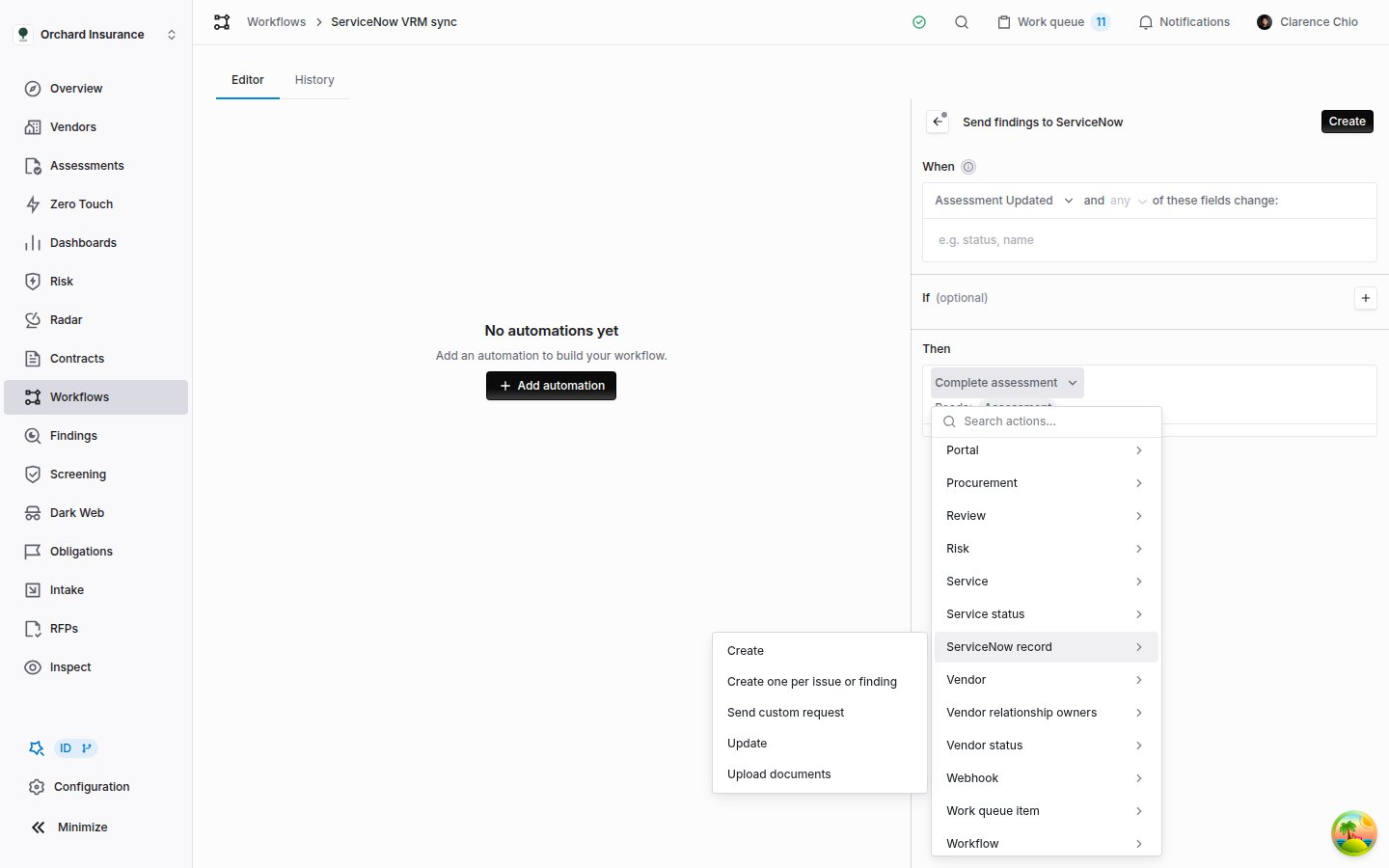 | Action | What it does | What it raises |
| ----------------------------------- | --------------------------------------------------------------------------------------------------- | ------------------------------------------------------------------------------ |
| **Create** | Creates one record in a table and links it to a Coverbase record from the trigger. | **Service Now Record Created** |
| **Update** | Updates the record an earlier **Create** linked to the same Coverbase record. | **Service Now Record Updated** |
| **Create one per issue or finding** | Creates one record for each issue on the triggering assessment, or for each finding attached to it. | **Service Now Record Created** per record, then **Service Now Sync Completed** |
| **Send custom request** | Sends one `POST`, `PATCH` or `PUT` with a JSON body you write, to any API path on your instance. | Nothing |
| **Upload documents** | Uploads Coverbase documents into ServiceNow Document Management. | **Service Now Record Created** per document |
**Create one per issue or finding** is offered only when the trigger can reach an assessment; its form shows **Reads:** **Assessment**. The events in the last column can trigger later automations, and your own systems can receive them as webhooks (`ServiceNowRecord.Created`, `ServiceNowSync.Completed` and so on); see [Webhooks](/user-guides/webhooks).
## Mapping fields
**Create**, **Update** and **Create one per issue or finding** share the same two settings: the table, and the field mappings that become the record.
**ServiceNow table.** Pick a table from the list, or type any table name and choose **Use custom name**. The list suggests the standard third-party risk tables:
| Suggested table | Name in ServiceNow |
| -------------------------------------- | ------------------------------------ |
| Third Party (Vendor) | `core_company` |
| Engagement | `sn_vdr_risk_asmt_vendor_engagement` |
| External Assessment (VRA) | `sn_vdr_risk_asmt_assessment` |
| Third-party Risk Issue | `sn_vdr_risk_asmt_issue` |
| Document (Document Management) | `ds_document` |
| Document version (Document Management) | `ds_document_version` |
**Field mappings.** Each row pairs a **ServiceNow field** with a **Value**. The field picker suggests the standard columns of a suggested table. For any other column, including your instance's own `u_` columns, type the column name and choose **Use custom name**. A value can be fixed text, a variable from the **Insert variable** button beside it, or both, as in `{{vendor:name}} renewal`. **Add mapping** adds a row. Each column can appear once, and a step needs at least one row.
**Translating a value.** A row's **Coverbase value** to **ServiceNow value** pairs are listed under it, and the arrows button adds them to a row that has none. After the value's variables resolve, a value listed on the left is sent as the one on the right, so a finding status label can land as your instance's `state` choice. **Add translation** adds a pair, and a value not listed is sent unchanged. Editing the row's field or value keeps its translations. Clicking the arrows button on a row that has translations removes them.
**Reformatting a date.** The calendar button at the end of a row opens a date format for that value. Type a Python strftime pattern, such as `%m-%d-%Y`, and a value that resolves to a date is sent in that shape: `2027-01-31` becomes `01-31-2027`. An empty date stays empty. The pattern must name at least one date part, such as `%Y` or `%d`. The locale formats `%c`, `%x` and `%X`, and a few rarer codes such as `%f` and `%Z`, are not accepted. If the value is not a date when the step runs, the step is skipped with a message that names the value. Click the calendar button again to remove the format.
**Apply table template** fills in suggested rows when Coverbase has a template for the table and action. If the rows already hold something, it asks **Replace field mappings?** first.
| Action | Table | Rows the template fills |
| ------------------------------------------------- | ------------------------- | ------------------------------------------------------------------------------------------------------------------------------ |
| **Create** | External Assessment (VRA) | `vendor` and `engagement`, from the vendor's and service's `sys_id` |
| **Create** | Third Party (Vendor) | `name` and `website`, from the vendor |
| **Create** | Engagement | `name` from the service, and `vendor` from the vendor's `sys_id` |
| **Create one per issue or finding**, for issues | Third-party Risk Issue | `short_description`, `description`, and the `vendor` and `assessment` `sys_id` |
| **Create one per issue or finding**, for findings | Third-party Risk Issue | `short_description`, `description`, `explanation`, `due_date`, `vendor`, `assessment`, `assigned_to`, `state` and `applies_to` |
**Values are sent as written.** A choice column stores your instance's choice value, and a reference column stores a `sys_id`, so a label or an email address in either lands as text that your forms may not recognize. Check template rows against your instance before you switch the workflow on: the findings template sends the finding's status label to `state` and the assignee's email address to `assigned_to`. When a value needs translating, add translations to its row with the arrows button (see **Translating a value** above).
A variable with nothing behind it skips the whole step rather than sending a blank, exactly as described in [Placeholders in action text](/user-guides/building-a-workflow#placeholders-in-action-text).
## Creating a record
**Create** makes one record and remembers which Coverbase record it belongs to.
| Action | What it does | What it raises |
| ----------------------------------- | --------------------------------------------------------------------------------------------------- | ------------------------------------------------------------------------------ |
| **Create** | Creates one record in a table and links it to a Coverbase record from the trigger. | **Service Now Record Created** |
| **Update** | Updates the record an earlier **Create** linked to the same Coverbase record. | **Service Now Record Updated** |
| **Create one per issue or finding** | Creates one record for each issue on the triggering assessment, or for each finding attached to it. | **Service Now Record Created** per record, then **Service Now Sync Completed** |
| **Send custom request** | Sends one `POST`, `PATCH` or `PUT` with a JSON body you write, to any API path on your instance. | Nothing |
| **Upload documents** | Uploads Coverbase documents into ServiceNow Document Management. | **Service Now Record Created** per document |
**Create one per issue or finding** is offered only when the trigger can reach an assessment; its form shows **Reads:** **Assessment**. The events in the last column can trigger later automations, and your own systems can receive them as webhooks (`ServiceNowRecord.Created`, `ServiceNowSync.Completed` and so on); see [Webhooks](/user-guides/webhooks).
## Mapping fields
**Create**, **Update** and **Create one per issue or finding** share the same two settings: the table, and the field mappings that become the record.
**ServiceNow table.** Pick a table from the list, or type any table name and choose **Use custom name**. The list suggests the standard third-party risk tables:
| Suggested table | Name in ServiceNow |
| -------------------------------------- | ------------------------------------ |
| Third Party (Vendor) | `core_company` |
| Engagement | `sn_vdr_risk_asmt_vendor_engagement` |
| External Assessment (VRA) | `sn_vdr_risk_asmt_assessment` |
| Third-party Risk Issue | `sn_vdr_risk_asmt_issue` |
| Document (Document Management) | `ds_document` |
| Document version (Document Management) | `ds_document_version` |
**Field mappings.** Each row pairs a **ServiceNow field** with a **Value**. The field picker suggests the standard columns of a suggested table. For any other column, including your instance's own `u_` columns, type the column name and choose **Use custom name**. A value can be fixed text, a variable from the **Insert variable** button beside it, or both, as in `{{vendor:name}} renewal`. **Add mapping** adds a row. Each column can appear once, and a step needs at least one row.
**Translating a value.** A row's **Coverbase value** to **ServiceNow value** pairs are listed under it, and the arrows button adds them to a row that has none. After the value's variables resolve, a value listed on the left is sent as the one on the right, so a finding status label can land as your instance's `state` choice. **Add translation** adds a pair, and a value not listed is sent unchanged. Editing the row's field or value keeps its translations. Clicking the arrows button on a row that has translations removes them.
**Reformatting a date.** The calendar button at the end of a row opens a date format for that value. Type a Python strftime pattern, such as `%m-%d-%Y`, and a value that resolves to a date is sent in that shape: `2027-01-31` becomes `01-31-2027`. An empty date stays empty. The pattern must name at least one date part, such as `%Y` or `%d`. The locale formats `%c`, `%x` and `%X`, and a few rarer codes such as `%f` and `%Z`, are not accepted. If the value is not a date when the step runs, the step is skipped with a message that names the value. Click the calendar button again to remove the format.
**Apply table template** fills in suggested rows when Coverbase has a template for the table and action. If the rows already hold something, it asks **Replace field mappings?** first.
| Action | Table | Rows the template fills |
| ------------------------------------------------- | ------------------------- | ------------------------------------------------------------------------------------------------------------------------------ |
| **Create** | External Assessment (VRA) | `vendor` and `engagement`, from the vendor's and service's `sys_id` |
| **Create** | Third Party (Vendor) | `name` and `website`, from the vendor |
| **Create** | Engagement | `name` from the service, and `vendor` from the vendor's `sys_id` |
| **Create one per issue or finding**, for issues | Third-party Risk Issue | `short_description`, `description`, and the `vendor` and `assessment` `sys_id` |
| **Create one per issue or finding**, for findings | Third-party Risk Issue | `short_description`, `description`, `explanation`, `due_date`, `vendor`, `assessment`, `assigned_to`, `state` and `applies_to` |
**Values are sent as written.** A choice column stores your instance's choice value, and a reference column stores a `sys_id`, so a label or an email address in either lands as text that your forms may not recognize. Check template rows against your instance before you switch the workflow on: the findings template sends the finding's status label to `state` and the assignee's email address to `assigned_to`. When a value needs translating, add translations to its row with the arrows button (see **Translating a value** above).
A variable with nothing behind it skips the whole step rather than sending a blank, exactly as described in [Placeholders in action text](/user-guides/building-a-workflow#placeholders-in-action-text).
## Creating a record
**Create** makes one record and remembers which Coverbase record it belongs to.
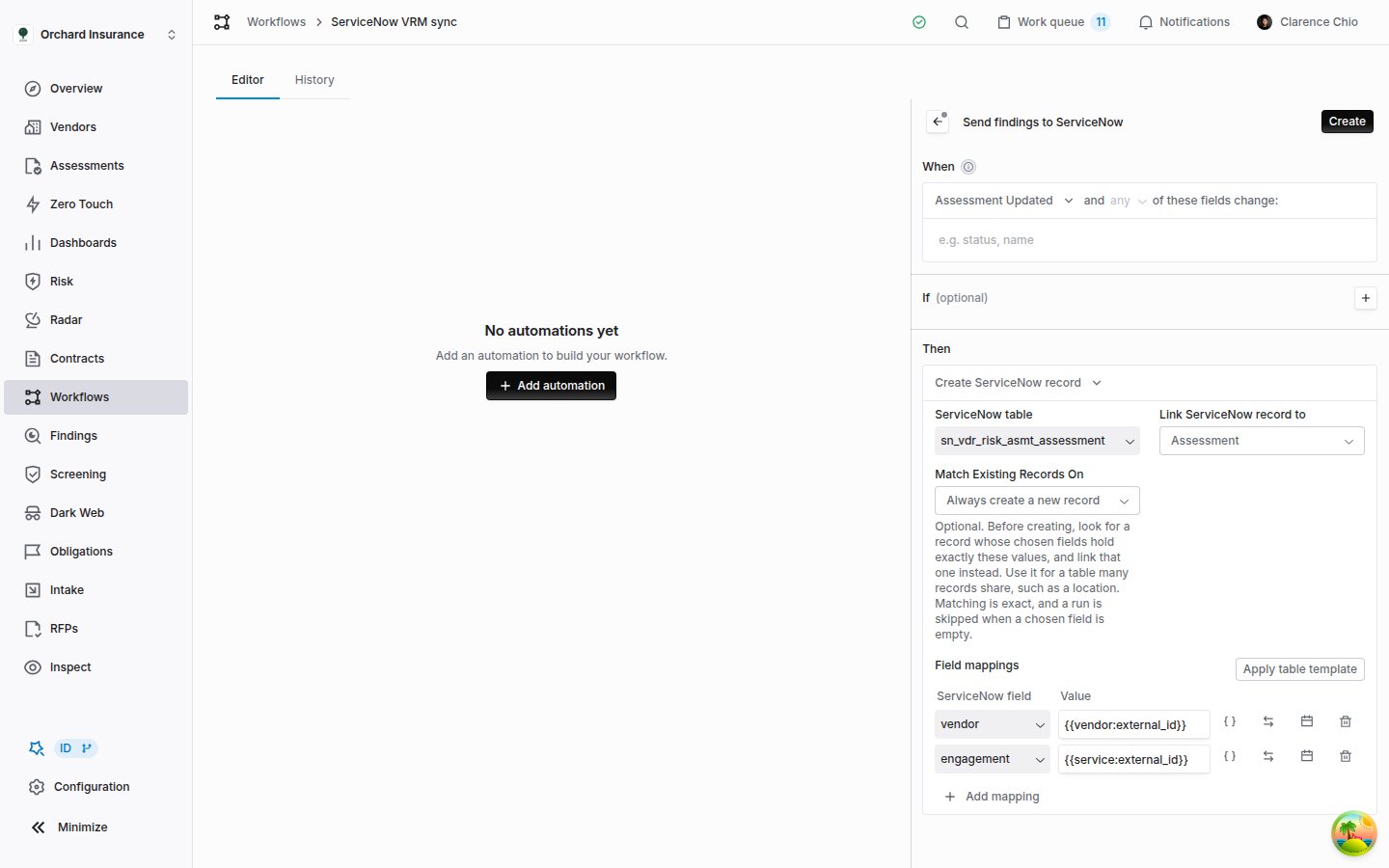 | Field | What it does |
| ----------------------------- | --------------------------------------------------------------------------------------------------------------------------------------------------------------------------------------------------------------------------------------------------------------------------------------------------------------------------------------------------------- |
| **ServiceNow table** | The table the record is created in. |
| **Link ServiceNow record to** | The Coverbase record, taken from the triggering event, that the new record belongs to: **Assessment**, **Vendor**, **Service**, **Finding**, **Contract**, **Procurement**, **Engagement** or **Work queue item**. If the trigger cannot supply one, the step is **Skipped**. |
| **Match Existing Records On** | Optional. Before creating, look for a record whose chosen columns already hold exactly the values this step would send, and link that one instead. It lists the columns you have mapped. Leave it on **Always create a new record** unless many Coverbase records legitimately share one ServiceNow record, such as a location or a business application. |
| **Field mappings** | The record's contents. See [Mapping fields](#mapping-fields). |
A Coverbase record gets at most one linked record per table from **Create**. A second run for the same Coverbase record is **Skipped** with "A ServiceNow record in `
| Field | What it does |
| ----------------------------- | --------------------------------------------------------------------------------------------------------------------------------------------------------------------------------------------------------------------------------------------------------------------------------------------------------------------------------------------------------- |
| **ServiceNow table** | The table the record is created in. |
| **Link ServiceNow record to** | The Coverbase record, taken from the triggering event, that the new record belongs to: **Assessment**, **Vendor**, **Service**, **Finding**, **Contract**, **Procurement**, **Engagement** or **Work queue item**. If the trigger cannot supply one, the step is **Skipped**. |
| **Match Existing Records On** | Optional. Before creating, look for a record whose chosen columns already hold exactly the values this step would send, and link that one instead. It lists the columns you have mapped. Leave it on **Always create a new record** unless many Coverbase records legitimately share one ServiceNow record, such as a location or a business application. |
| **Field mappings** | The record's contents. See [Mapping fields](#mapping-fields). |
A Coverbase record gets at most one linked record per table from **Create**. A second run for the same Coverbase record is **Skipped** with "A ServiceNow record in `` is already linked to this ``". Push later changes with **Update**.
When **Match Existing Records On** is set, the step searches first:
| What the search finds | What the step does |
| ----------------------------------- | ------------------------------------------------------------------------------------------------------- |
| No matching record | Creates the record and links it, as usual. |
| Exactly one | Links that record and leaves its contents unchanged. |
| More than one | **Failed**, listing the matching records. Remove the duplicates in ServiceNow or match on more columns. |
| A chosen column resolved to nothing | **Skipped**, since an empty value cannot identify a record. |
| A value containing `^` | **Failed**. ServiceNow reads `^` as a query separator. |
Matching is exact, so a value of `Acme Inc` does not match a record holding `Acme Inc.`, and the step creates a second record rather than linking one that may not be the same.
A **Create** step on an **Updated** trigger runs on every edit and is **Skipped** every time after the first. Put it on a **Created** trigger, or narrow the **Updated** trigger to the fields that matter, so the runs page stays readable.
## Updating the linked record
**Update** changes the record that a **Create** step, or a match, linked to the same Coverbase record. Set **ServiceNow table** and **Update record linked to** to the same table and record type as that step, and map only the columns you want to change: the step sends those and leaves the rest of the record alone.
If nothing is linked yet, the step is **Skipped** with "No ServiceNow record in `` is linked to this ``". To update a record Coverbase did not create, link it first with a **Create** step that uses **Match Existing Records On**, which links an existing record without changing it, or address it by `sys_id` with **Send custom request**.
A typical pair: **Create** on **Assessment Created** opens the VRA record, and **Update** on **Assessment Updated**, watching the status field, sets the record's `state` as the assessment moves.
## One record per issue or finding
**Create one per issue or finding** turns an assessment's problems into records, such as one Third-party Risk Issue each, in a single step.
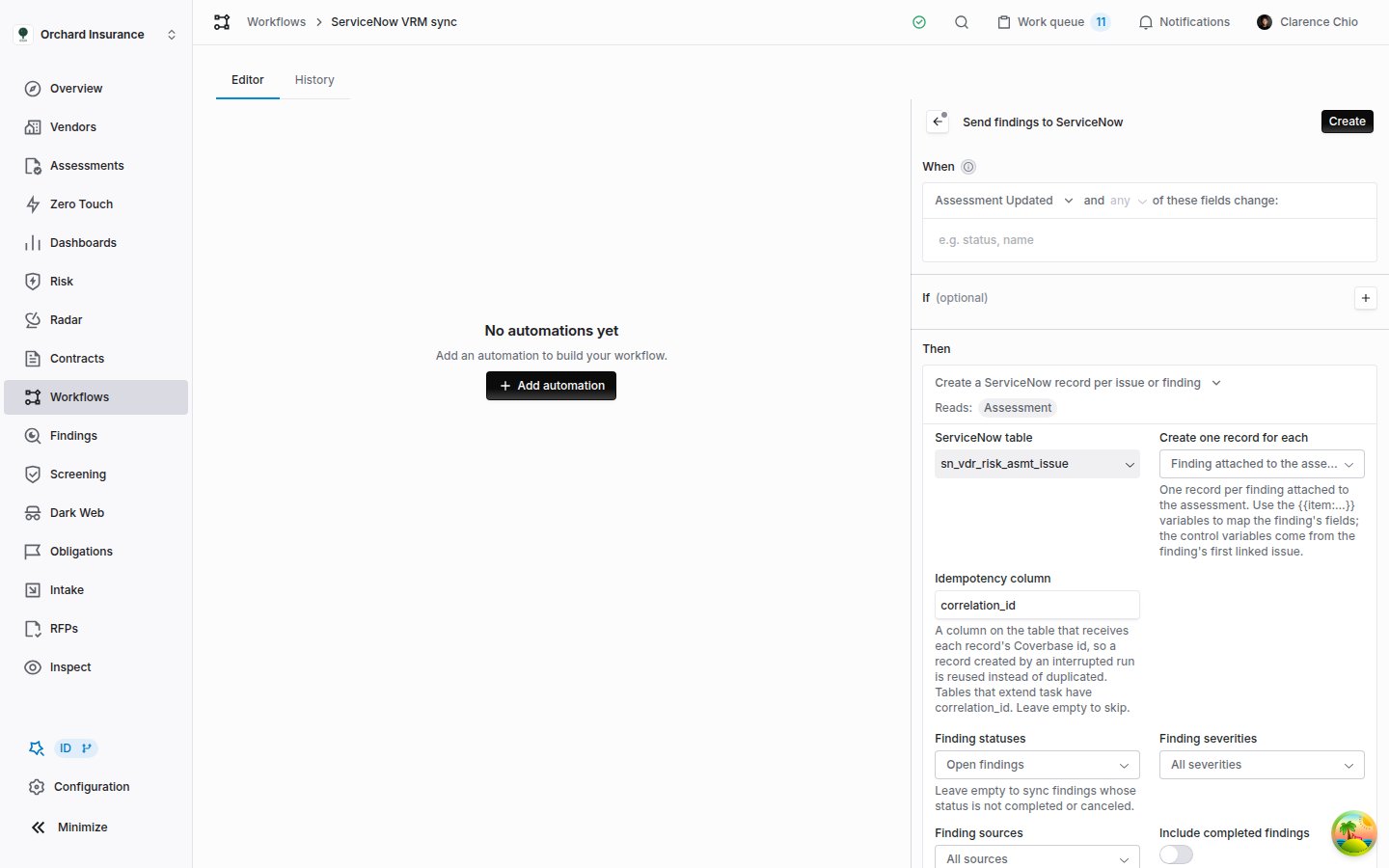 | Field | What it does |
| ------------------------------ | -------------------------------------------------------------------------------------------------------------------------------------------------------------------------------------------------------------------------------------------------------------------------------------------------------------------------------------------------------------------------------------------------------- |
| **ServiceNow table** | The table each record is created in. |
| **Create one record for each** | **Issue on the assessment**: one record per unresolved issue. **Finding attached to the assessment**: one record per finding raised in the assessment or linked to it later. |
| **Idempotency column** | A column that receives each record's Coverbase ID, `correlation_id` by default (tables that extend `task` have it). If a run is interrupted after ServiceNow created a record but before Coverbase recorded it, the next run finds that record by this column instead of creating a second one. It overrides a mapping row for the same column. Leave it empty only if the table has no suitable column. |
| **Field mappings** | What each record holds. The **Insert variable** menu adds the item's own fields. See below. |
For findings, five more settings choose which ones become records:
| Setting | Default | What it does |
| ------------------------------------ | ------------------ | --------------------------------------------------------------------------------------------------------------------------------------------------------------------------------------------------------------- |
| **Finding statuses** | **Open findings** | With nothing chosen, findings whose status is not completed or canceled. Choosing statuses replaces that rule. |
| **Finding severities** | **All severities** | Limits the records to the chosen severity levels. |
| **Finding sources** | **All sources** | Limits the records to findings from the chosen sources, such as **Raised in an assessment**, **Document review** or **Monitoring alert**. |
| **Include completed findings** | Off | Also sends completed and canceled findings. Turning it on reveals **Exclude canceled findings**, which keeps canceled ones (a risk acceptance, for example) out. Both are unavailable once you choose statuses. |
| **Only findings linked to an issue** | Off | Skips ad hoc findings, which have no control reference or control effectiveness to map. |
| Field | What it does |
| ------------------------------ | -------------------------------------------------------------------------------------------------------------------------------------------------------------------------------------------------------------------------------------------------------------------------------------------------------------------------------------------------------------------------------------------------------- |
| **ServiceNow table** | The table each record is created in. |
| **Create one record for each** | **Issue on the assessment**: one record per unresolved issue. **Finding attached to the assessment**: one record per finding raised in the assessment or linked to it later. |
| **Idempotency column** | A column that receives each record's Coverbase ID, `correlation_id` by default (tables that extend `task` have it). If a run is interrupted after ServiceNow created a record but before Coverbase recorded it, the next run finds that record by this column instead of creating a second one. It overrides a mapping row for the same column. Leave it empty only if the table has no suitable column. |
| **Field mappings** | What each record holds. The **Insert variable** menu adds the item's own fields. See below. |
For findings, five more settings choose which ones become records:
| Setting | Default | What it does |
| ------------------------------------ | ------------------ | --------------------------------------------------------------------------------------------------------------------------------------------------------------------------------------------------------------- |
| **Finding statuses** | **Open findings** | With nothing chosen, findings whose status is not completed or canceled. Choosing statuses replaces that rule. |
| **Finding severities** | **All severities** | Limits the records to the chosen severity levels. |
| **Finding sources** | **All sources** | Limits the records to findings from the chosen sources, such as **Raised in an assessment**, **Document review** or **Monitoring alert**. |
| **Include completed findings** | Off | Also sends completed and canceled findings. Turning it on reveals **Exclude canceled findings**, which keeps canceled ones (a risk acceptance, for example) out. Both are unavailable once you choose statuses. |
| **Only findings linked to an issue** | Off | Skips ad hoc findings, which have no control reference or control effectiveness to map. |
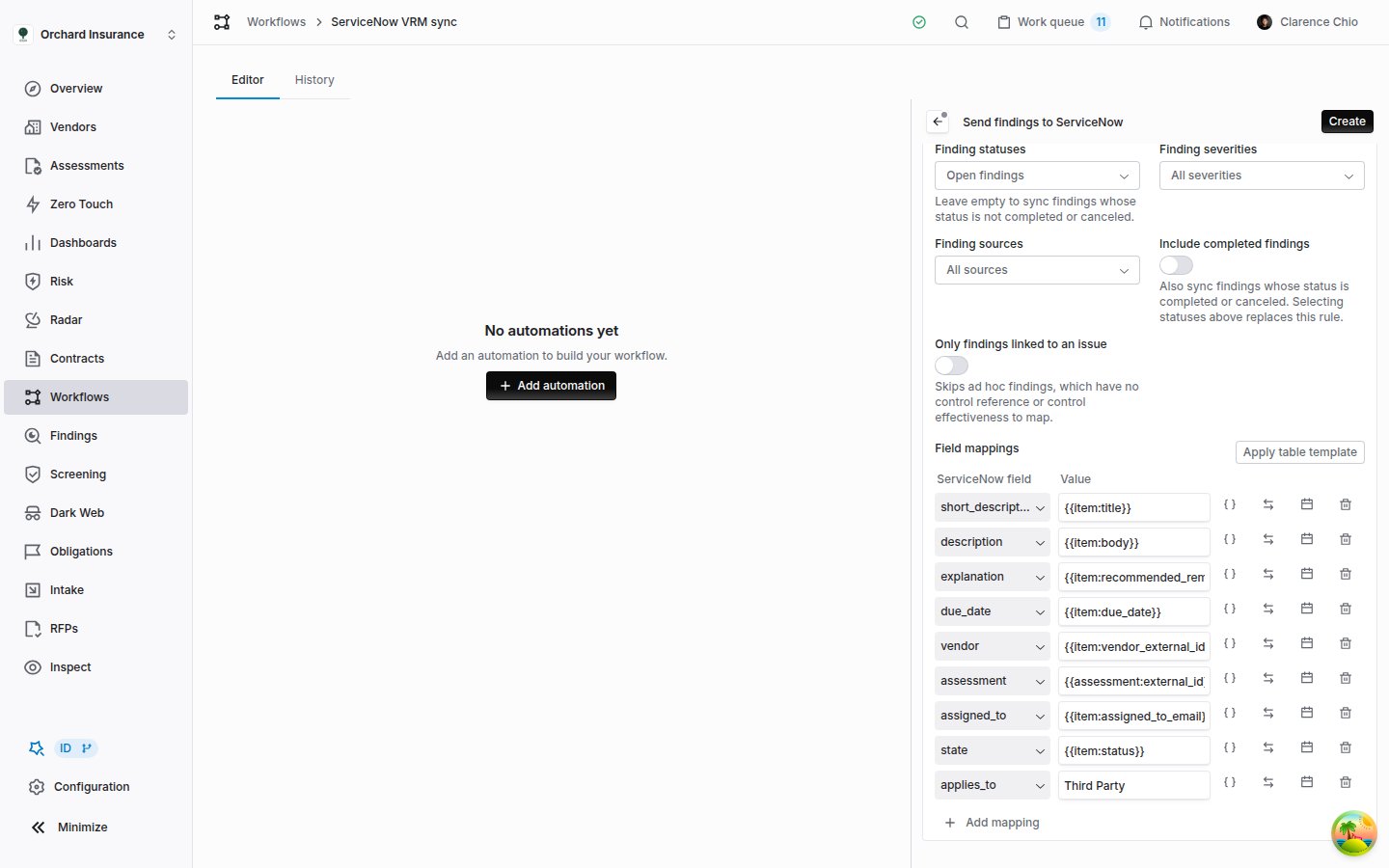 ### Item variables
Inside this action, `{{item:...}}` variables resolve to the issue or finding the record is for. **Insert variable** lists them under **Finding fields**, or under **Issue fields** and **Control fields**, next to the usual workflow variables. Custom fields on findings, issues and controls get groups of their own.
| For a finding | For an issue |
| ---------------------------------------------------------------------------------- | --------------------------------------------------------------------- |
| `{{item:title}}`, `{{item:body}}`, `{{item:recommended_remediation}}` | `{{item:title}}`, `{{item:justification}}` |
| `{{item:status}}`, `{{item:severity}}`, `{{item:risk_level}}`, `{{item:due_date}}` | `{{item:score}}`, `{{item:score_percent}}`, `{{item:issue_category}}` |
| `{{item:assigned_to_email}}`, `{{item:vendor_external_id}}`, `{{item:url}}` | `{{item:control.expectation}}`, `{{item:control.external_idx}}` |
| `{{item:control_reference}}`, `{{item:control_effectiveness}}` | `{{item:public_idx}}`, `{{item:question}}`, `{{item:response}}` |
A finding has no control of its own, so its control variables come from its linked issue with the lowest index, and are blank for an ad hoc finding. Dates arrive as `YYYY-MM-DD`. An item variable with no value on one item sends a blank rather than skipping the step.
### How the step behaves over time
* **Each item gets one record per table.** The first run creates a record for every selected item. A later run creates records only for items that have none, so a finding added to the assessment afterwards goes out on the next run. With nothing new, the step is **Skipped** with "No unsynced findings on the assessment" (or issues).
* **A failure partway through keeps what landed.** If ServiceNow rejects a record, the step is **Failed** with the error and "after creating N of M records". The records already created stay linked, and the next triggering event resumes with the item that failed.
* **Service Now Sync Completed follows.** Once every selected item has its record, Coverbase raises **Service Now Sync Completed** for the assessment. Hang the closing step on it, for example an **Update** of the VRA record linked to the assessment. It can fire again when the step runs again with nothing new to send, so make the closing step safe to repeat.
* **Finding records stay reachable.** Each finding's record is linked to that finding, so an **Update** step with **Update record linked to** set to **Finding**, on a **Finding Updated** trigger, keeps the ServiceNow record current as the finding changes. Records made for issues cannot be targeted by **Update**.
## Sending a custom request
**Send custom request** sends one request, exactly as you write it, to any API path on your instance: a Table API record Coverbase did not create, or a scoped endpoint your ServiceNow team built.
### Item variables
Inside this action, `{{item:...}}` variables resolve to the issue or finding the record is for. **Insert variable** lists them under **Finding fields**, or under **Issue fields** and **Control fields**, next to the usual workflow variables. Custom fields on findings, issues and controls get groups of their own.
| For a finding | For an issue |
| ---------------------------------------------------------------------------------- | --------------------------------------------------------------------- |
| `{{item:title}}`, `{{item:body}}`, `{{item:recommended_remediation}}` | `{{item:title}}`, `{{item:justification}}` |
| `{{item:status}}`, `{{item:severity}}`, `{{item:risk_level}}`, `{{item:due_date}}` | `{{item:score}}`, `{{item:score_percent}}`, `{{item:issue_category}}` |
| `{{item:assigned_to_email}}`, `{{item:vendor_external_id}}`, `{{item:url}}` | `{{item:control.expectation}}`, `{{item:control.external_idx}}` |
| `{{item:control_reference}}`, `{{item:control_effectiveness}}` | `{{item:public_idx}}`, `{{item:question}}`, `{{item:response}}` |
A finding has no control of its own, so its control variables come from its linked issue with the lowest index, and are blank for an ad hoc finding. Dates arrive as `YYYY-MM-DD`. An item variable with no value on one item sends a blank rather than skipping the step.
### How the step behaves over time
* **Each item gets one record per table.** The first run creates a record for every selected item. A later run creates records only for items that have none, so a finding added to the assessment afterwards goes out on the next run. With nothing new, the step is **Skipped** with "No unsynced findings on the assessment" (or issues).
* **A failure partway through keeps what landed.** If ServiceNow rejects a record, the step is **Failed** with the error and "after creating N of M records". The records already created stay linked, and the next triggering event resumes with the item that failed.
* **Service Now Sync Completed follows.** Once every selected item has its record, Coverbase raises **Service Now Sync Completed** for the assessment. Hang the closing step on it, for example an **Update** of the VRA record linked to the assessment. It can fire again when the step runs again with nothing new to send, so make the closing step safe to repeat.
* **Finding records stay reachable.** Each finding's record is linked to that finding, so an **Update** step with **Update record linked to** set to **Finding**, on a **Finding Updated** trigger, keeps the ServiceNow record current as the finding changes. Records made for issues cannot be targeted by **Update**.
## Sending a custom request
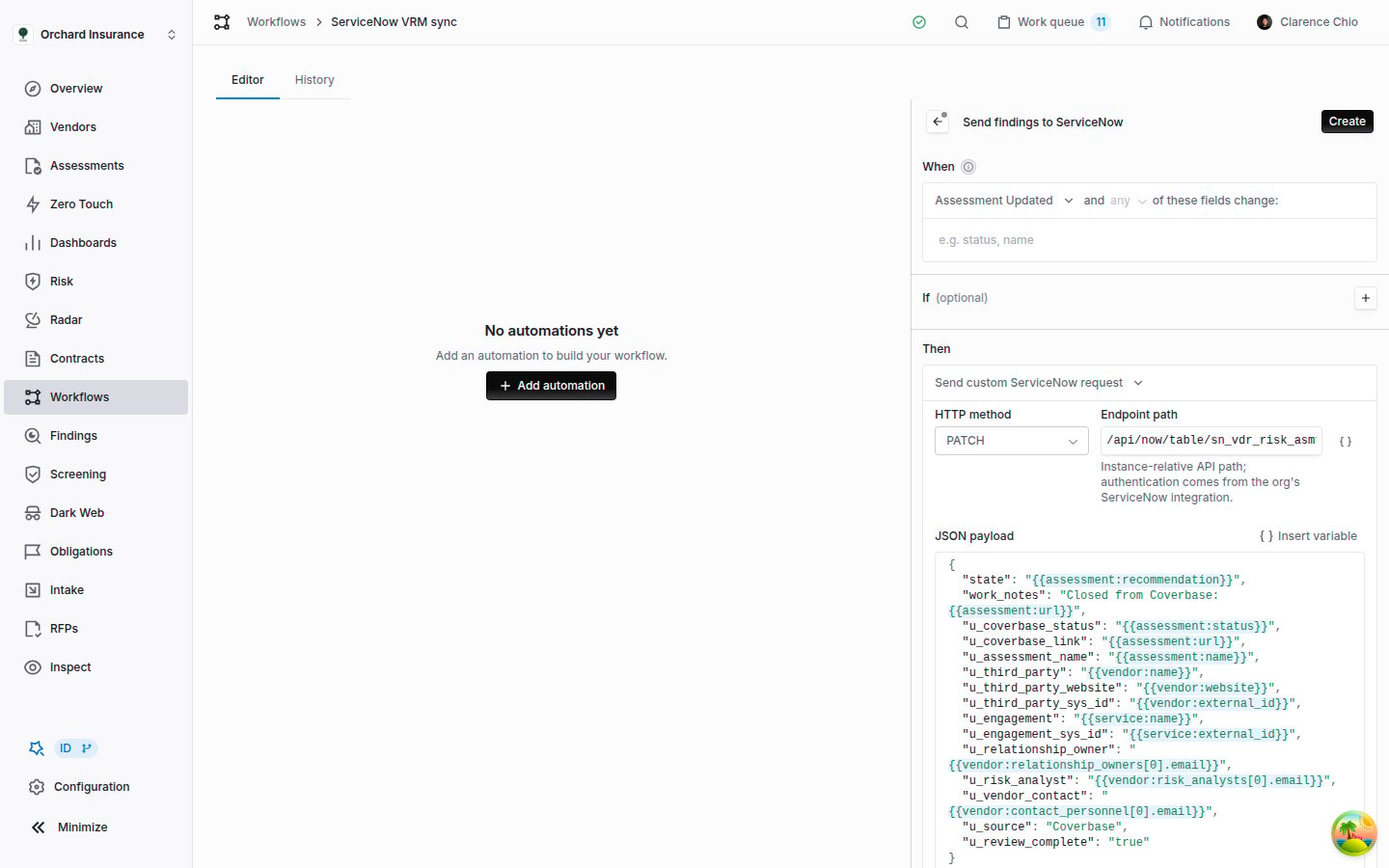
**Send custom request** sends one request, exactly as you write it, to any API path on your instance: a Table API record Coverbase did not create, or a scoped endpoint your ServiceNow team built.
 | Field | What it does |
| ---------------------- | ------------------------------------------------------------------------------------------------------------------------------------------------------------------------------------------------------------------------------------------------------------------------------------------------------------------------------------------ |
| **HTTP method** | `POST`, `PATCH` or `PUT`. |
| **Endpoint path** | The path after your instance's base URL, starting with `/api/`, for example `/api/now/table/sn_vdr_risk_asmt_assessment/{{assessment:external_id}}`. Variables work anywhere in it. It cannot contain `?`, `#`, `%` or empty and relative segments; put query strings in **Query Parameters**. The connection supplies the authentication. |
| **JSON payload** | A JSON object, sent exactly as written. Variables resolve inside string values. **Insert variable** above the editor adds one at the cursor. |
| **Query Parameters** | Optional **Name** and **Value** pairs added to the URL. `sysparm_input_display_value` set to `true`, for example, lets the Table API accept display labels instead of choice codes. |
| **Date Formats** | Optional. Each row names a **Payload field** and a strftime **Format**, such as `%m-%d-%Y`, applied after the variables resolve, so `2027-01-31` is sent as `01-31-2027`. An empty date stays empty. Formats apply before **Value Translations**. |
| **Value Translations** | Optional. Each row names a **Payload field** and rewrites a **Coverbase value** in it to a **ServiceNow value** after the variables resolve, so `Approved` can be sent as `3`. A value with no row is sent unchanged. |
Three payload forms go beyond plain text:
* **Leave a key out when its value is empty.** Add `|omitempty` inside the braces, as in `"u_rto": "{{questionnaire:answer:question_perma_id|omitempty}}"`. When the answer is blank, the key is dropped instead of the whole step being skipped. It works only when the placeholder is the key's entire value, and not in the path or query parameters.
* **Send a list or a number.** For a questionnaire trigger, **Selected answers to a question (list)** and **Selected answers to a question (objects)** arrive as a JSON array, and **Numeric value of an answer** as an unquoted number, when the placeholder is the key's entire value.
* **Translate or reformat a value.** **Value Translations** and **Date Formats** reach only top-level fields that are plain text in the payload. If a row names any other field, the form shows an error and the automation will not save.
The request links nothing in Coverbase and raises no events, so a later **Update** step cannot find what it wrote. The run step shows the path it called, the payload and ServiceNow's response.
## Uploading documents
**Upload documents** copies files from Coverbase into ServiceNow Document Management. Each document becomes a document record (`ds_document`) with a published version (`ds_document_version`) that holds the file.
| Field | What it does |
| ---------------------- | ------------------------------------------------------------------------------------------------------------------------------------------------------------------------------------------------------------------------------------------------------------------------------------------------------------------------------------------ |
| **HTTP method** | `POST`, `PATCH` or `PUT`. |
| **Endpoint path** | The path after your instance's base URL, starting with `/api/`, for example `/api/now/table/sn_vdr_risk_asmt_assessment/{{assessment:external_id}}`. Variables work anywhere in it. It cannot contain `?`, `#`, `%` or empty and relative segments; put query strings in **Query Parameters**. The connection supplies the authentication. |
| **JSON payload** | A JSON object, sent exactly as written. Variables resolve inside string values. **Insert variable** above the editor adds one at the cursor. |
| **Query Parameters** | Optional **Name** and **Value** pairs added to the URL. `sysparm_input_display_value` set to `true`, for example, lets the Table API accept display labels instead of choice codes. |
| **Date Formats** | Optional. Each row names a **Payload field** and a strftime **Format**, such as `%m-%d-%Y`, applied after the variables resolve, so `2027-01-31` is sent as `01-31-2027`. An empty date stays empty. Formats apply before **Value Translations**. |
| **Value Translations** | Optional. Each row names a **Payload field** and rewrites a **Coverbase value** in it to a **ServiceNow value** after the variables resolve, so `Approved` can be sent as `3`. A value with no row is sent unchanged. |
Three payload forms go beyond plain text:
* **Leave a key out when its value is empty.** Add `|omitempty` inside the braces, as in `"u_rto": "{{questionnaire:answer:question_perma_id|omitempty}}"`. When the answer is blank, the key is dropped instead of the whole step being skipped. It works only when the placeholder is the key's entire value, and not in the path or query parameters.
* **Send a list or a number.** For a questionnaire trigger, **Selected answers to a question (list)** and **Selected answers to a question (objects)** arrive as a JSON array, and **Numeric value of an answer** as an unquoted number, when the placeholder is the key's entire value.
* **Translate or reformat a value.** **Value Translations** and **Date Formats** reach only top-level fields that are plain text in the payload. If a row names any other field, the form shows an error and the automation will not save.
The request links nothing in Coverbase and raises no events, so a later **Update** step cannot find what it wrote. The run step shows the path it called, the payload and ServiceNow's response.
## Uploading documents
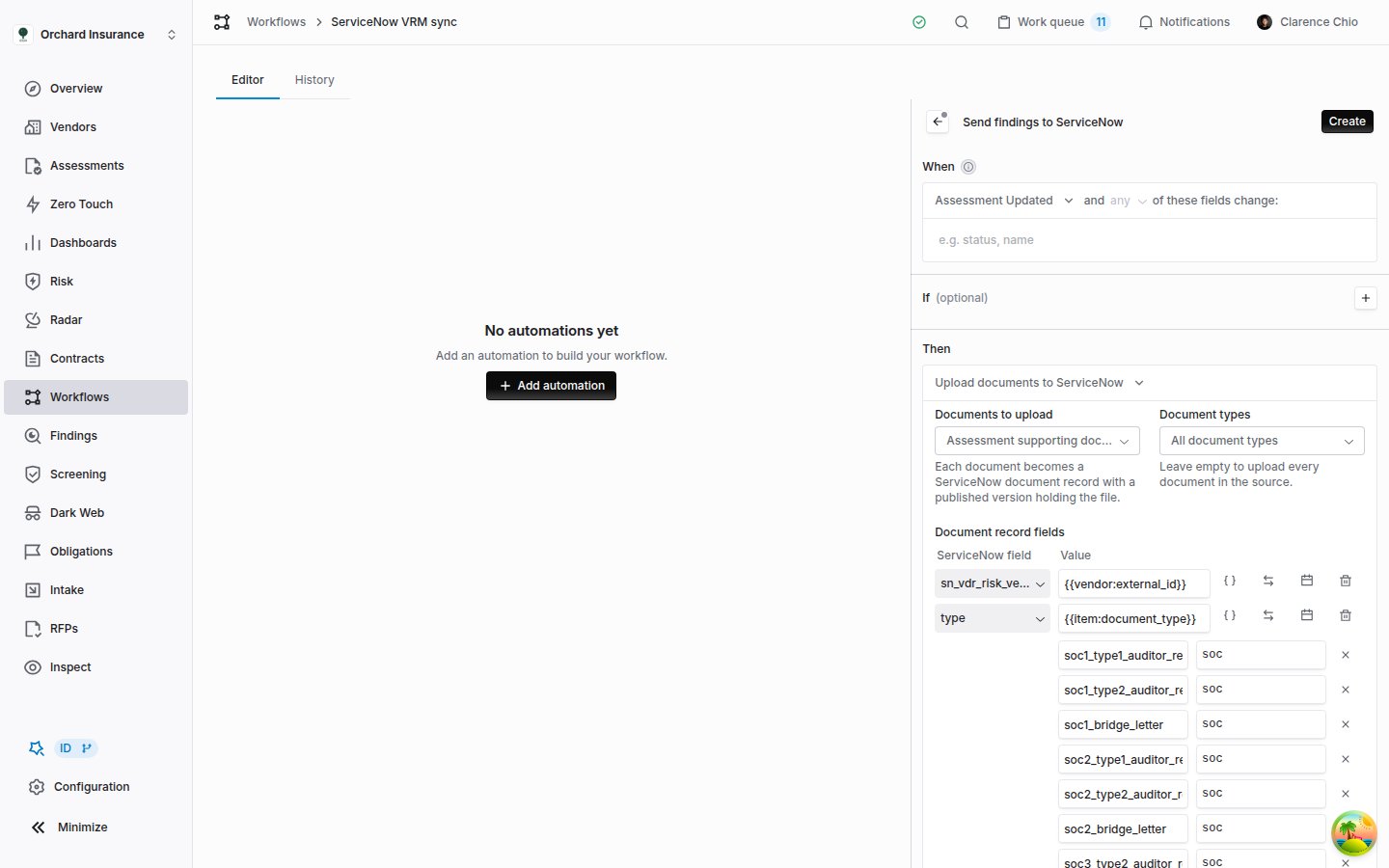
**Upload documents** copies files from Coverbase into ServiceNow Document Management. Each document becomes a document record (`ds_document`) with a published version (`ds_document_version`) that holds the file.
 | Field | What it does |
| --------------------------- | ------------------------------------------------------------------------------------------------------------------------------------------------------------------------------------------------------------------------------------------------------------------------------------------------------------------------------- |
| **Documents to upload** | **Assessment supporting documents**, **The document from the trigger event** (for a vendor document trigger), or **Documents attached to the questionnaire submission**. If the trigger cannot supply them, the step is **Skipped**. |
| **Document types** | Limits the upload to the chosen types. Leave it on **All document types** to send everything in the source. |
| **Document record fields** | Columns on the document record. The defaults link it to the third party (`sn_vdr_risk_vendor` from `{{vendor:external_id}}`), set its `type` from the Coverbase document type, and describe it as the document type for the vendor. The name defaults to the file name and sharing is on; a row for either column overrides it. |
| **Document version fields** | Columns on the version, such as your instance's received and valid-to date columns, from `{{item:uploaded_at}}` and `{{item:expiration_date}}`. |
The **Insert variable** menu adds a **Document** group for these fields: **Name**, **File name**, **Document type**, **Document type label**, **Uploaded on**, **Valid to**, **Uploaded by**, **Uploaded by email**, **Size in bytes** and **Coverbase URL**.
The action manages a few columns itself and refuses a mapping for them: `state`, `default_version` and `external_file_url` on the document record, and `document` on the version. `external_file_url` holds the document's Coverbase link, which the action uses to find its own work again.
**The default type row translates document types.** It sends Coverbase document types as the choice values a third-party risk instance usually uses (a SOC 2 report becomes `soc`, a master services agreement `msa`). Its translations are listed under the row, so change them there to match your instance. The row's arrows button removes them.
Uploads run in the background. The step itself reads "Queued N document upload(s) to ServiceNow", and each file is linked when its upload finishes, which raises **Service Now Record Created**. A document that is already in ServiceNow is not sent again, and a step with nothing new to send is **Skipped** with "Every document is already in ServiceNow". An interrupted upload picks up the document it already created instead of making a second one. Files of 1 GB or more are not uploaded.
## Reading what a step sent
Open the run from the workflow's **History** tab or from **Workflow Runs** (see [Reading the runs page](/user-guides/building-a-workflow#reading-the-runs-page)). On a **Create**, **Update** or per-item step, the **Output** line links each record the step wrote to that record in your instance. Click the step's name to expand it: under the step and component IDs, each call is listed with its method and URL, the **Request payload**, the **Response body**, and the error when there was one.
For **Upload documents**, the uploads finish after the step, and each attempt is added to the step when it does: the file name, size and type, and the new record's `sys_id` or the reason it failed. Reload the run to see them.
## Troubleshooting
| What you see | Cause | Fix |
| ----------------------------------------------------------------------------------- | ----------------------------------------------------------------------------------------------------- | ----------------------------------------------------------------------------------------------------------------------------------------------------------------------------------------- |
| No **ServiceNow record** group in the action picker | The ServiceNow connection is not saved. | Save it on the **ServiceNow GRC** card under **Configuration** → **External Integrations**, or ask whoever manages integrations. |
| No **Create one per issue or finding** in the group | The trigger cannot reach an assessment. | Use an assessment trigger, or one whose record leads to an assessment. |
| **Skipped**: "ServiceNow integration is not configured" | The step ran with no saved connection. | Save the connection, then cause the trigger again. |
| **Skipped**: "A ServiceNow record in ... is already linked to this ..." | **Create** already ran for this Coverbase record and table. | Use **Update** for later changes. Move the **Create** step to a **Created** trigger if it keeps skipping. |
| **Skipped**: "No ServiceNow record in ... is linked to this ..." | **Update** found no record linked to this Coverbase record in that table. | Check that the table and **Update record linked to** match the **Create** step, and that the create has run. |
| **Skipped** with a message about an empty external ID | The vendor, service or assessment has no ServiceNow `sys_id` in Coverbase. | Load the IDs through the ServiceNow push or the [Import API](/import-api), or map the column from a custom field that holds them. |
| **Skipped**: "Could not resolve a ... from the triggering event" | The trigger does not lead to the record the step links to or reads. | Pick a record type the trigger supplies, or change the trigger. |
| **Failed** with a ServiceNow error such as a 403 | The connection's account lacks write access to that table. | Ask your ServiceNow administrator to grant it, then cause the trigger again. |
| **Failed**: "... records in ... already match" | **Match Existing Records On** found more than one record. | Remove the duplicates in ServiceNow, or match on more columns. |
| **Failed** partway, "after creating N of M records" | ServiceNow rejected one record in the batch. | Fix the cause in the error, then cause the trigger again. The step resumes with the item that failed. |
| A choice or reference field is blank or shows raw text in ServiceNow | The mapped value is a label or an email, not a choice value or `sys_id`. | Map a value your instance stores, add translations to the row (see **Translating a value**), or use **Send custom request** with **Value Translations** or `sysparm_input_display_value`. |
| "Enter an instance-relative path beginning with /api/" | The **Endpoint path** is a full URL or does not start with `/api/`. | Enter only the path; the connection supplies the instance. |
| A translation row shows an error and the automation will not save | The **Payload field** is missing from the payload, or is not plain text there. | Name a top-level text field from the **JSON payload**. |
| A date format shows "Use a strftime pattern with at least one date part" | The pattern names no date part, or uses a code Coverbase does not accept, such as `%c`, `%x` or `%X`. | Use a pattern such as `%m-%d-%Y` or `%Y/%m/%d`. |
| **Skipped**: "... is not an ISO date, so the date format ... cannot apply" | The mapped value is not a date, so the format cannot apply. | Remove the format from that row, or map a date variable. |
| The document `type` in ServiceNow is a raw Coverbase type | The default `type` row's translations were removed, or the row was deleted. | Delete the document record rows and click **Apply default mappings**. |
| The step after **Service Now Sync Completed** runs several times for one assessment | The per-item step ran again with nothing new to send, and each run ends with the event. | Narrow the per-item step's trigger, for example to the assessment's status changing, and make the closing step safe to repeat. |
| **Test connection** cannot be clicked | The connection has not been saved, or the form has unsaved changes. | Click **Save ServiceNow Configuration**, then test. |
## Related
Triggers, conditions, placeholders, testing, and reading runs.
What flows between Coverbase and ServiceNow VRM, and how the connection is provisioned.
Ready-made automations you can extend with a ServiceNow step.
Send Coverbase events, including the ServiceNow record events, to your own endpoints.
| Field | What it does |
| --------------------------- | ------------------------------------------------------------------------------------------------------------------------------------------------------------------------------------------------------------------------------------------------------------------------------------------------------------------------------- |
| **Documents to upload** | **Assessment supporting documents**, **The document from the trigger event** (for a vendor document trigger), or **Documents attached to the questionnaire submission**. If the trigger cannot supply them, the step is **Skipped**. |
| **Document types** | Limits the upload to the chosen types. Leave it on **All document types** to send everything in the source. |
| **Document record fields** | Columns on the document record. The defaults link it to the third party (`sn_vdr_risk_vendor` from `{{vendor:external_id}}`), set its `type` from the Coverbase document type, and describe it as the document type for the vendor. The name defaults to the file name and sharing is on; a row for either column overrides it. |
| **Document version fields** | Columns on the version, such as your instance's received and valid-to date columns, from `{{item:uploaded_at}}` and `{{item:expiration_date}}`. |
The **Insert variable** menu adds a **Document** group for these fields: **Name**, **File name**, **Document type**, **Document type label**, **Uploaded on**, **Valid to**, **Uploaded by**, **Uploaded by email**, **Size in bytes** and **Coverbase URL**.
The action manages a few columns itself and refuses a mapping for them: `state`, `default_version` and `external_file_url` on the document record, and `document` on the version. `external_file_url` holds the document's Coverbase link, which the action uses to find its own work again.
**The default type row translates document types.** It sends Coverbase document types as the choice values a third-party risk instance usually uses (a SOC 2 report becomes `soc`, a master services agreement `msa`). Its translations are listed under the row, so change them there to match your instance. The row's arrows button removes them.
Uploads run in the background. The step itself reads "Queued N document upload(s) to ServiceNow", and each file is linked when its upload finishes, which raises **Service Now Record Created**. A document that is already in ServiceNow is not sent again, and a step with nothing new to send is **Skipped** with "Every document is already in ServiceNow". An interrupted upload picks up the document it already created instead of making a second one. Files of 1 GB or more are not uploaded.
## Reading what a step sent
Open the run from the workflow's **History** tab or from **Workflow Runs** (see [Reading the runs page](/user-guides/building-a-workflow#reading-the-runs-page)). On a **Create**, **Update** or per-item step, the **Output** line links each record the step wrote to that record in your instance. Click the step's name to expand it: under the step and component IDs, each call is listed with its method and URL, the **Request payload**, the **Response body**, and the error when there was one.
For **Upload documents**, the uploads finish after the step, and each attempt is added to the step when it does: the file name, size and type, and the new record's `sys_id` or the reason it failed. Reload the run to see them.
## Troubleshooting
| What you see | Cause | Fix |
| ----------------------------------------------------------------------------------- | ----------------------------------------------------------------------------------------------------- | ----------------------------------------------------------------------------------------------------------------------------------------------------------------------------------------- |
| No **ServiceNow record** group in the action picker | The ServiceNow connection is not saved. | Save it on the **ServiceNow GRC** card under **Configuration** → **External Integrations**, or ask whoever manages integrations. |
| No **Create one per issue or finding** in the group | The trigger cannot reach an assessment. | Use an assessment trigger, or one whose record leads to an assessment. |
| **Skipped**: "ServiceNow integration is not configured" | The step ran with no saved connection. | Save the connection, then cause the trigger again. |
| **Skipped**: "A ServiceNow record in ... is already linked to this ..." | **Create** already ran for this Coverbase record and table. | Use **Update** for later changes. Move the **Create** step to a **Created** trigger if it keeps skipping. |
| **Skipped**: "No ServiceNow record in ... is linked to this ..." | **Update** found no record linked to this Coverbase record in that table. | Check that the table and **Update record linked to** match the **Create** step, and that the create has run. |
| **Skipped** with a message about an empty external ID | The vendor, service or assessment has no ServiceNow `sys_id` in Coverbase. | Load the IDs through the ServiceNow push or the [Import API](/import-api), or map the column from a custom field that holds them. |
| **Skipped**: "Could not resolve a ... from the triggering event" | The trigger does not lead to the record the step links to or reads. | Pick a record type the trigger supplies, or change the trigger. |
| **Failed** with a ServiceNow error such as a 403 | The connection's account lacks write access to that table. | Ask your ServiceNow administrator to grant it, then cause the trigger again. |
| **Failed**: "... records in ... already match" | **Match Existing Records On** found more than one record. | Remove the duplicates in ServiceNow, or match on more columns. |
| **Failed** partway, "after creating N of M records" | ServiceNow rejected one record in the batch. | Fix the cause in the error, then cause the trigger again. The step resumes with the item that failed. |
| A choice or reference field is blank or shows raw text in ServiceNow | The mapped value is a label or an email, not a choice value or `sys_id`. | Map a value your instance stores, add translations to the row (see **Translating a value**), or use **Send custom request** with **Value Translations** or `sysparm_input_display_value`. |
| "Enter an instance-relative path beginning with /api/" | The **Endpoint path** is a full URL or does not start with `/api/`. | Enter only the path; the connection supplies the instance. |
| A translation row shows an error and the automation will not save | The **Payload field** is missing from the payload, or is not plain text there. | Name a top-level text field from the **JSON payload**. |
| A date format shows "Use a strftime pattern with at least one date part" | The pattern names no date part, or uses a code Coverbase does not accept, such as `%c`, `%x` or `%X`. | Use a pattern such as `%m-%d-%Y` or `%Y/%m/%d`. |
| **Skipped**: "... is not an ISO date, so the date format ... cannot apply" | The mapped value is not a date, so the format cannot apply. | Remove the format from that row, or map a date variable. |
| The document `type` in ServiceNow is a raw Coverbase type | The default `type` row's translations were removed, or the row was deleted. | Delete the document record rows and click **Apply default mappings**. |
| The step after **Service Now Sync Completed** runs several times for one assessment | The per-item step ran again with nothing new to send, and each run ends with the event. | Narrow the per-item step's trigger, for example to the assessment's status changing, and make the closing step safe to repeat. |
| **Test connection** cannot be clicked | The connection has not been saved, or the form has unsaved changes. | Click **Save ServiceNow Configuration**, then test. |
## Related
Triggers, conditions, placeholders, testing, and reading runs.
What flows between Coverbase and ServiceNow VRM, and how the connection is provisioned.
Ready-made automations you can extend with a ServiceNow step.
Send Coverbase events, including the ServiceNow record events, to your own endpoints.