> ## Documentation Index
> Fetch the complete documentation index at: https://docs.coverbase.com/llms.txt
> Use this file to discover all available pages before exploring further.
# Bulk send
> Send one published signature template to a list of parties in one go. Every row becomes its own envelope, with its own routing and audit trail. The list format, prefilled fields, what each party receives, and tracking a batch.
For AI agents: a documentation index is available at [https://docs.coverbase.com/llms.txt](https://docs.coverbase.com/llms.txt). This page is also available in markdown by appending .md to the URL.
This guide is part of the [User Guides](/user-guides/overview) collection. A bulk send starts from a published template, so read [Signature templates](/user-guides/signature-templates) first. Each row becomes an ordinary envelope, tracked as described in [Sending for signature](/user-guides/signature-envelopes). To write the agreement itself in Coverbase, see [the passage library](/user-guides/signature-passage-library).
Bulk send is part of e-signature. If you do not see **Signatures** and **Templates** under **Contracts** in the left navigation, ask your Coverbase account team to turn it on.
Bulk send takes one published template and a list of parties, and makes one envelope per row. Use it when the paper is the same and only the counterparty changes: a mutual NDA for every new supplier, or revised terms for a whole category of vendors.
Each envelope it makes is an ordinary envelope. It has its own signing order, its own expiry, its own audit trail and its own executed copy, as if you had sent it through the wizard. The batch is the record of how they were made, and the place to see which rows went out.
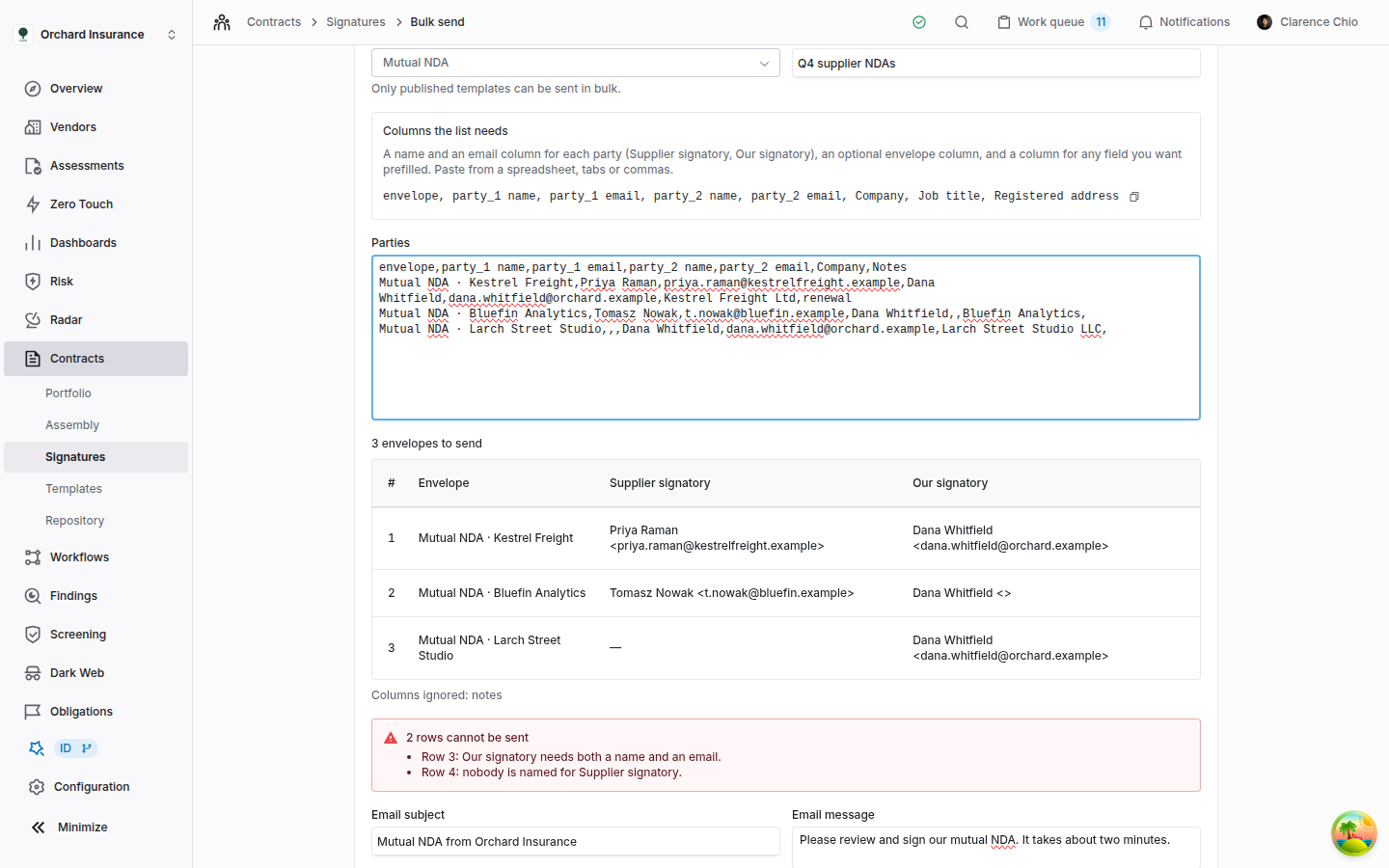
The mistake people make most often is pasting a spreadsheet with its own column headings instead of the header line the page gives them: a heading that matches no party and no labeled field is ignored, and the batch sends without the values in that column.
## Before you start
* **Publish the template.** Only published templates are offered. See [Signature templates](/user-guides/signature-templates#publish-it).
* **Have a name and an email for every party on every row.** A template's parties are all required, and a bulk send cannot drop one. If your own signatory is the same person on every envelope, repeat them on every row.
* **Label the fields you want to prefill.** Only a field with a **Label** in the field inspector, and not set to **Read only**, can take a value from the list.
* **Build the template from Upload or Write.** A template built **From a document** or **From a contract** sits on one vendor's document, and Coverbase files the executed copy of every envelope sent from it among that vendor's documents.
* **Check the expiry and your signing settings.** Every envelope in a batch expires after the template's **Default expiration** when it has one, and otherwise after your organization's **Default Expiry (Days)**. Every envelope follows your organization's **Require email verification** setting. Both organization settings are under **Configuration → E-signature**. The bulk send page has no setting for either.
## Where it lives
| | |
| --------------------------------------- | ------------------------------------------------------------------------------------------ |
| **Contracts → Signatures → Bulk sends** | Every batch your organization has sent, newest first, with **Bulk send** to start another. |
| **Contracts → Templates → Bulk send** | Goes straight to a new bulk send. |
## Send a batch
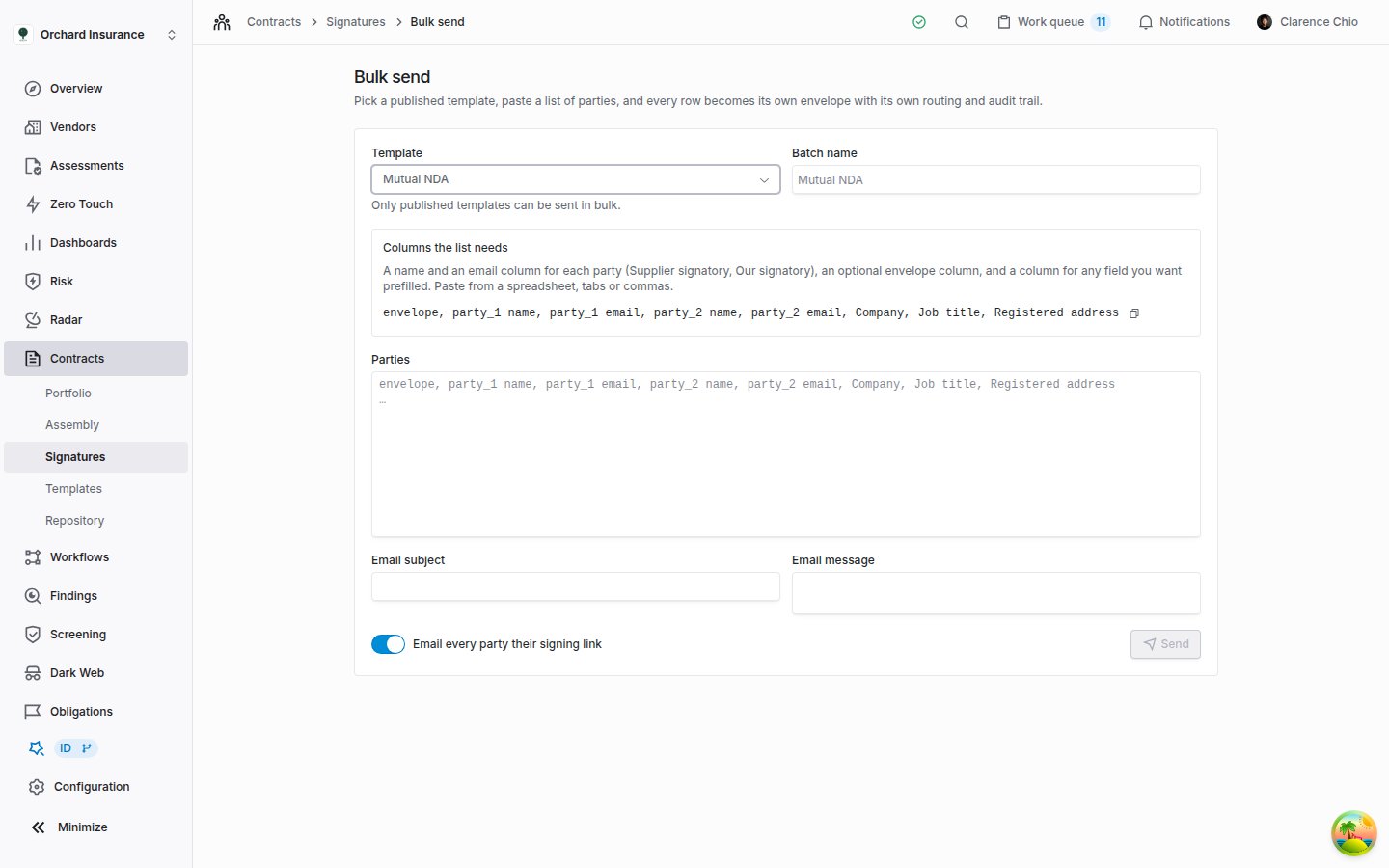
**Template** lists your published templates by name. Publishing a new version of a template retires the version it replaced, so each template is listed once. Once you pick one, **Columns the list needs** shows the header line for that template, with a copy button beside it.
**Batch name** is how the batch appears under **Bulk sends**. Leave it empty and it takes the template's name. Signers never see it: each envelope has its own name.
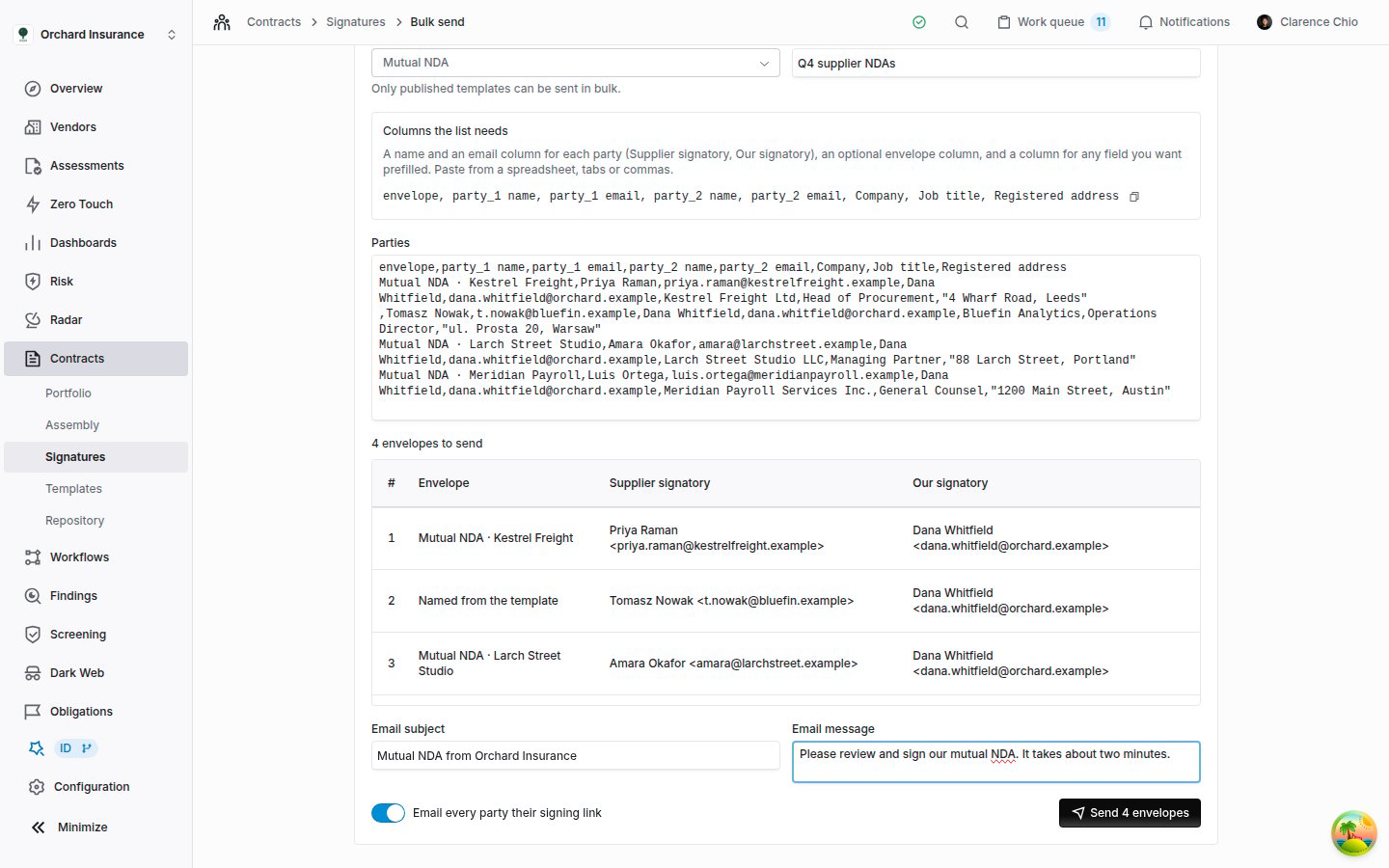
The first line must be the header. Either paste the header line from the page and add one comma-separated line per envelope under it, or put the same headings in the first row of a spreadsheet, one per column, and paste the cells in.
The count above the preview is how many envelopes will be made. Each line shows the envelope's name and who fills each party. Anything that cannot be sent is listed in red, and **Send** stays grayed out until it is fixed.
**Email subject** becomes the subject line of every invitation in the batch. Leave it blank to use your organization's invitation wording. **Email message** is added to every invitation.
Leave **Email every party their signing link** on unless you will hand the links out yourself. **Send** counts your rows (**Send 4 envelopes** for a list of four), queues the batch, and opens its page.
 ## How the list is read
The first line is the header. Every line after it that is not blank becomes one envelope.
| Column | Header | Needed |
| --------------------- | -------------------------------------------------------------- | --------------------------------------------------------------------------------------------------------------------- |
| Envelope name | `envelope` (`envelope name`, `agreement` and `name` also work) | No. An empty cell names the envelope after the template and the first party, for example `Mutual NDA · Tomasz Nowak`. |
| A party's name | ` name` | Yes, for every party on every row |
| A party's email | ` email` | Yes, for every party on every row |
| A party's access code | ` access code` | No. See [access codes](#access-codes). |
| A field's value | The field's **Label** | No. See [prefilling fields](#prefilling-fields). |
`` is either the key the header line uses (`party_1`) or the party's name as the template shows it (`Supplier signatory`). Headings ignore capitals, an underscore counts as a space, and the columns can come in any order, so `Supplier signatory email` and `party_1 email` are the same column.
What catches people out:
* A column headed `Name` on its own is read as the envelope name, not as anyone's name.
* `email` and `e-mail` both work.
* In comma-separated lines, wrap a value that contains a comma in double quotes: `"4 Wharf Road, Leeds"`. Cells pasted from a spreadsheet arrive separated by tabs and need no quotes.
* Two parties on one row cannot share an email address.
* A batch holds up to 500 rows.
* The preview shows the first 50 rows, and the red box the first 10 problems. Every row is sent.
* Problem messages count the header as row 1, so the first envelope is row 2. Blank lines are not counted. The title of the red box counts rows, so a row with two problems counts once.
## How the list is read
The first line is the header. Every line after it that is not blank becomes one envelope.
| Column | Header | Needed |
| --------------------- | -------------------------------------------------------------- | --------------------------------------------------------------------------------------------------------------------- |
| Envelope name | `envelope` (`envelope name`, `agreement` and `name` also work) | No. An empty cell names the envelope after the template and the first party, for example `Mutual NDA · Tomasz Nowak`. |
| A party's name | ` name` | Yes, for every party on every row |
| A party's email | ` email` | Yes, for every party on every row |
| A party's access code | ` access code` | No. See [access codes](#access-codes). |
| A field's value | The field's **Label** | No. See [prefilling fields](#prefilling-fields). |
`` is either the key the header line uses (`party_1`) or the party's name as the template shows it (`Supplier signatory`). Headings ignore capitals, an underscore counts as a space, and the columns can come in any order, so `Supplier signatory email` and `party_1 email` are the same column.
What catches people out:
* A column headed `Name` on its own is read as the envelope name, not as anyone's name.
* `email` and `e-mail` both work.
* In comma-separated lines, wrap a value that contains a comma in double quotes: `"4 Wharf Road, Leeds"`. Cells pasted from a spreadsheet arrive separated by tabs and need no quotes.
* Two parties on one row cannot share an email address.
* A batch holds up to 500 rows.
* The preview shows the first 50 rows, and the red box the first 10 problems. Every row is sent.
* Problem messages count the header as row 1, so the first envelope is row 2. Blank lines are not counted. The title of the red box counts rows, so a row with two problems counts once.
 ### Prefilling fields
A column headed with a field's **Label** fills that field on the row's envelope. The header line on the page lists every field you can prefill, after the party columns.
* Only a field with a **Label** that is not **Read only** can be prefilled.
* The value goes into every field on the envelope with that label, whichever party the field belongs to. Give two parties' fields different labels if they need different values.
* The signer sees the value already filled in and can change it.
* Coverbase does not check the value against the field's options or format, so a **Dropdown** value has to match one of its options exactly.
* To prefill a field that has no label, add one in the template. If the template has been sent from, that means [a new version](/user-guides/signature-templates#versioning-what-freezes-and-when).
### Access codes
Add a ` access code` column to give that party an access code on their envelope, the same as setting **Identity Check** to **Access code** in the wizard. A code has to be 4 to 64 characters. The header line on the page does not include this column, so add it yourself.
Coverbase never shows a code again, on the batch page or anywhere else. Send each one to its party some other way, never in the signing email.
## What each party receives
With **Email every party their signing link** on, which is the default:
* Coverbase works down the list one row at a time, making and sending each envelope.
* Each envelope asks its parties in the template's order. The first is emailed an invitation when the envelope is sent, and the next when the step before them is done, as for any envelope ([routing order](/user-guides/signature-envelopes#step-2-the-recipients)).
* The invitation names you as the sender, names the envelope, and carries your **Email message**. Its subject line is your **Email subject**. Left blank, it is your organization's **Invitation** wording under **Signing Emails** in your signing settings, and without that it reads like *Jordan Lee sent you Mutual NDA · Kestrel Freight*.
* Expiry follows the template, and email verification your organization's settings, as described in [before you start](#before-you-start).
* When the last party signs, every party is emailed the executed copy.
With the switch off, it reads **Mint links only; I will distribute them**. Coverbase makes and sends every envelope but emails nobody. The batch page then has a **Signing Links** column: each sent row lists its parties, with a button that copies that party's own signing link, for you to send them. The envelope's **Portal link** works too: the party enters the email address the envelope was sent to, and Coverbase emails them a one-time code before the document opens.
## Track a batch
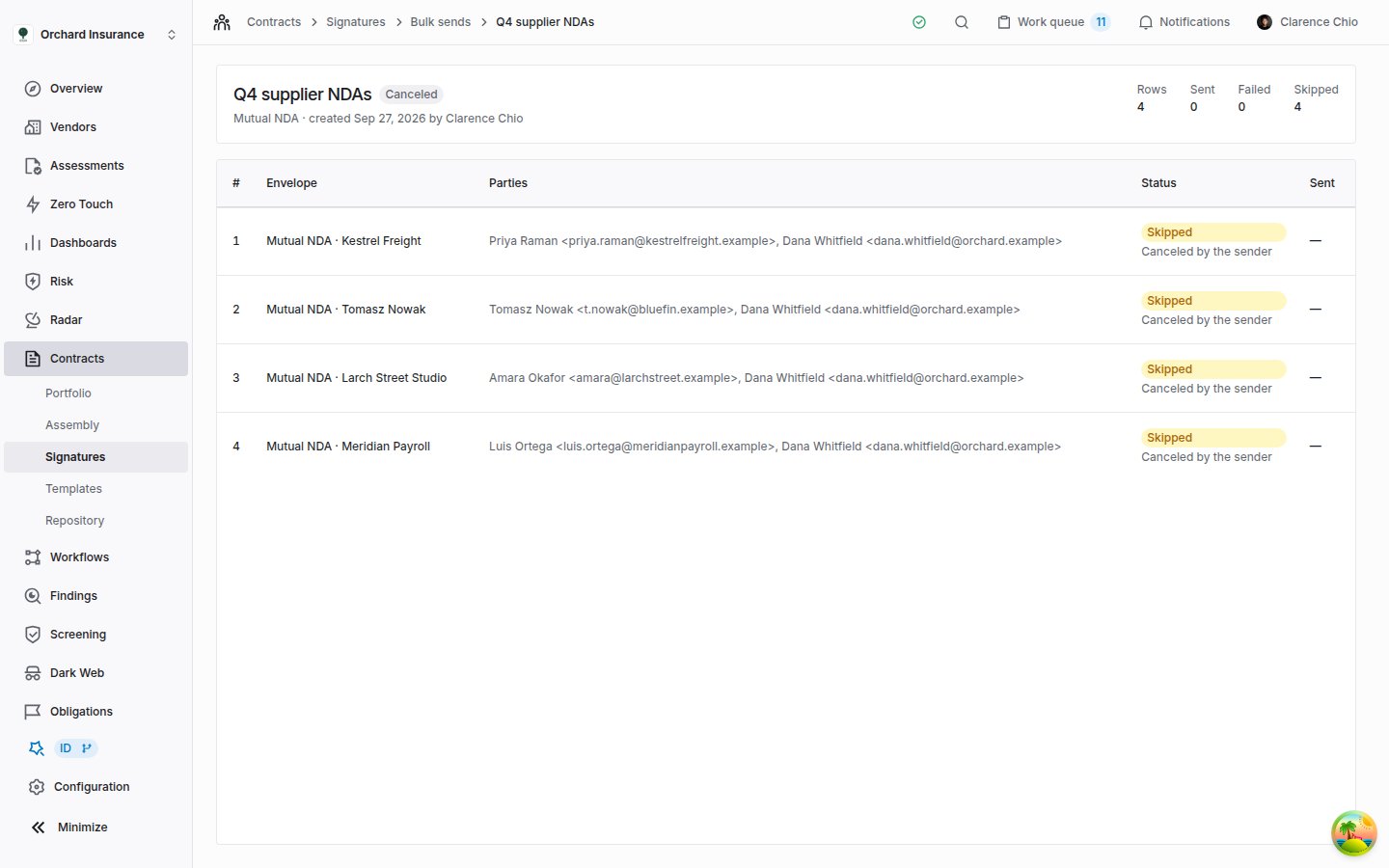
The batch page opens as soon as you send, and refreshes itself until the batch finishes. Across the top: the batch name and status, the template, who started it and when, and four counts: **Rows**, **Sent**, **Failed** and **Skipped**. Below it is one line per row. Once a row's envelope exists, its name links to it and **Sent** shows when it went out. A row that could not be sent shows the reason under its status.
### Prefilling fields
A column headed with a field's **Label** fills that field on the row's envelope. The header line on the page lists every field you can prefill, after the party columns.
* Only a field with a **Label** that is not **Read only** can be prefilled.
* The value goes into every field on the envelope with that label, whichever party the field belongs to. Give two parties' fields different labels if they need different values.
* The signer sees the value already filled in and can change it.
* Coverbase does not check the value against the field's options or format, so a **Dropdown** value has to match one of its options exactly.
* To prefill a field that has no label, add one in the template. If the template has been sent from, that means [a new version](/user-guides/signature-templates#versioning-what-freezes-and-when).
### Access codes
Add a ` access code` column to give that party an access code on their envelope, the same as setting **Identity Check** to **Access code** in the wizard. A code has to be 4 to 64 characters. The header line on the page does not include this column, so add it yourself.
Coverbase never shows a code again, on the batch page or anywhere else. Send each one to its party some other way, never in the signing email.
## What each party receives
With **Email every party their signing link** on, which is the default:
* Coverbase works down the list one row at a time, making and sending each envelope.
* Each envelope asks its parties in the template's order. The first is emailed an invitation when the envelope is sent, and the next when the step before them is done, as for any envelope ([routing order](/user-guides/signature-envelopes#step-2-the-recipients)).
* The invitation names you as the sender, names the envelope, and carries your **Email message**. Its subject line is your **Email subject**. Left blank, it is your organization's **Invitation** wording under **Signing Emails** in your signing settings, and without that it reads like *Jordan Lee sent you Mutual NDA · Kestrel Freight*.
* Expiry follows the template, and email verification your organization's settings, as described in [before you start](#before-you-start).
* When the last party signs, every party is emailed the executed copy.
With the switch off, it reads **Mint links only; I will distribute them**. Coverbase makes and sends every envelope but emails nobody. The batch page then has a **Signing Links** column: each sent row lists its parties, with a button that copies that party's own signing link, for you to send them. The envelope's **Portal link** works too: the party enters the email address the envelope was sent to, and Coverbase emails them a one-time code before the document opens.
## Track a batch
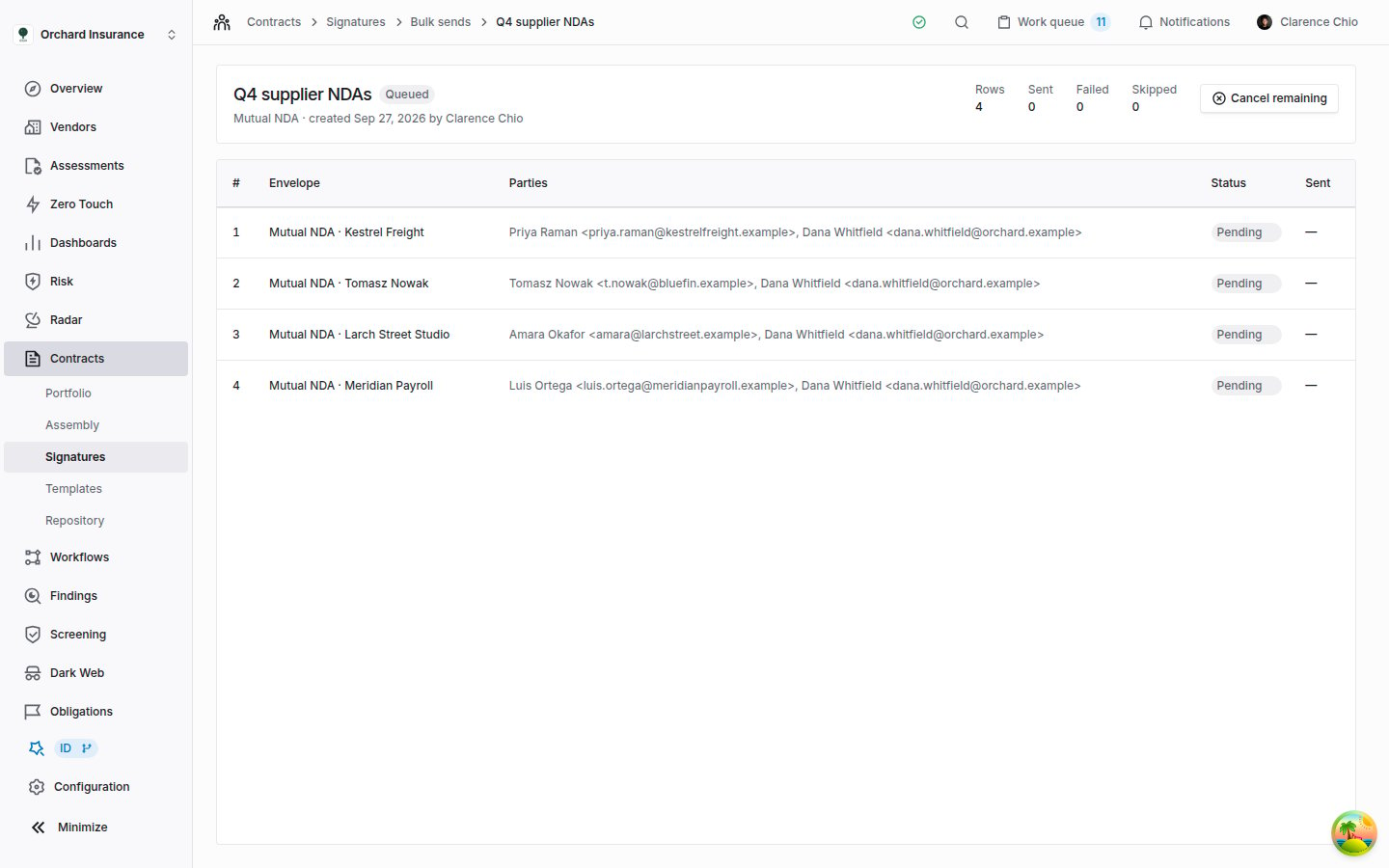
The batch page opens as soon as you send, and refreshes itself until the batch finishes. Across the top: the batch name and status, the template, who started it and when, and four counts: **Rows**, **Sent**, **Failed** and **Skipped**. Below it is one line per row. Once a row's envelope exists, its name links to it and **Sent** shows when it went out. A row that could not be sent shows the reason under its status.
 | Batch status | Meaning |
| --------------------------- | ------------------------------------------------------------------------------------------------------------------ |
| **Queued** | Accepted and waiting. Your organization's batches go out one at a time, so a batch waits while another is sending. |
| **Sending** | Rows are being turned into envelopes, in list order. |
| **Completed** | Every row was sent. |
| **Completed with failures** | Some rows were sent and at least one failed. The reason is on each failed row. |
| **Canceled** | Someone clicked **Cancel remaining**. |
| **Failed** | Every row failed, so nothing was sent. |
| Row status | Meaning |
| ----------- | ----------------------------------------------------------------------------- |
| **Pending** | Not reached yet. |
| **Sent** | The envelope exists and has been sent. |
| **Failed** | This row could not be sent, for the reason shown. The rows after it carry on. |
| **Skipped** | The batch was canceled before this row was reached. |
On **Bulk sends**, **Progress** sums a batch up, for example *3 of 4 sent, 1 not sent*. "Not sent" counts failed and skipped rows together.
Each envelope from a batch is also listed on **Contracts → Signatures** like any other, and the first event on its audit trail says a bulk send created it. To remind, correct or void one, open it and use the actions in [Sending for signature](/user-guides/signature-envelopes#nudging-correcting-cancelling).
Three things to know about the envelopes a batch makes:
* **They are not filed against a vendor or a contract.** An envelope's **Details** read **Not associated with a vendor**. Use **Select a vendor** there if you want it on a vendor's record.
* **The executed copy is kept on the envelope**, where **Download signed copy** fetches it once every party has signed. It also lands among a vendor's documents only when the template was built on that vendor's document (see [before you start](#before-you-start)).
* **The first one sent freezes the template.** The template version is then cited in an audit trail, and changing it takes **Edit as new version**, as after any send.
### Cancel remaining
**Cancel remaining** shows while a batch is **Queued** or **Sending**. It stops every row that has not gone out: those rows become **Skipped** with the reason *Canceled by the sender*, and the batch reads **Canceled**.
Envelopes already sent stay out. To stop one of those, void it from the envelope.
| Batch status | Meaning |
| --------------------------- | ------------------------------------------------------------------------------------------------------------------ |
| **Queued** | Accepted and waiting. Your organization's batches go out one at a time, so a batch waits while another is sending. |
| **Sending** | Rows are being turned into envelopes, in list order. |
| **Completed** | Every row was sent. |
| **Completed with failures** | Some rows were sent and at least one failed. The reason is on each failed row. |
| **Canceled** | Someone clicked **Cancel remaining**. |
| **Failed** | Every row failed, so nothing was sent. |
| Row status | Meaning |
| ----------- | ----------------------------------------------------------------------------- |
| **Pending** | Not reached yet. |
| **Sent** | The envelope exists and has been sent. |
| **Failed** | This row could not be sent, for the reason shown. The rows after it carry on. |
| **Skipped** | The batch was canceled before this row was reached. |
On **Bulk sends**, **Progress** sums a batch up, for example *3 of 4 sent, 1 not sent*. "Not sent" counts failed and skipped rows together.
Each envelope from a batch is also listed on **Contracts → Signatures** like any other, and the first event on its audit trail says a bulk send created it. To remind, correct or void one, open it and use the actions in [Sending for signature](/user-guides/signature-envelopes#nudging-correcting-cancelling).
Three things to know about the envelopes a batch makes:
* **They are not filed against a vendor or a contract.** An envelope's **Details** read **Not associated with a vendor**. Use **Select a vendor** there if you want it on a vendor's record.
* **The executed copy is kept on the envelope**, where **Download signed copy** fetches it once every party has signed. It also lands among a vendor's documents only when the template was built on that vendor's document (see [before you start](#before-you-start)).
* **The first one sent freezes the template.** The template version is then cited in an audit trail, and changing it takes **Edit as new version**, as after any send.
### Cancel remaining
**Cancel remaining** shows while a batch is **Queued** or **Sending**. It stops every row that has not gone out: those rows become **Skipped** with the reason *Canceled by the sender*, and the batch reads **Canceled**.
Envelopes already sent stay out. To stop one of those, void it from the envelope.
 ## Who can do what
| To | You need | Default roles that have it |
| ----------------------------------- | -------------------------------------------------------- | ----------------------------------- |
| See **Bulk sends** and open a batch | Read access to contracts | Admin, Member, Siloed Member, Guest |
| Start a bulk send | The organization-wide **create** permission on contracts | Admin, Member |
| **Cancel remaining** | The organization-wide **update** permission on contracts | Admin, Member |
Custom roles are covered in [Permissions and roles](/user-guides/permissions-and-roles).
## Limits
* Up to 500 rows in a batch. Split a longer list into several batches.
* One batch at a time per organization. Later batches wait as **Queued**.
* If your plan caps envelopes per month, the page says how many your plan still allows under **Columns the list needs**. A longer list shows **More envelopes than the plan allows** and cannot be sent.
* A batch cannot set its own expiry or email verification, add a private note for one party, or file its envelopes against a vendor or a contract.
## Troubleshooting
| Symptom | Cause | Fix |
| ------------------------------------------------------------------------------------------- | ---------------------------------------------------------------------------------------------------------------------------------------------------------------------------- | --------------------------------------------------------------------------------------------------------------------------------------------------------------------------------------------------- |
| The template is not in **Template** | It is still a draft, or it was archived. | Publish it from the template builder. |
| **Template** lists a template twice, each with a version number such as **Mutual NDA · v2** | Two versions were published before publishing a new version retired the old one. | Pick the higher version. Publishing any newer version of the template retires the others. |
| Every row says **nobody is named for** a party | The headings do not name the template's parties, for example plain `Name` and `Email`. | Start again from the header line on the page. |
| **Columns ignored** names a column you need | Its heading matches no party column and no labeled, editable field. | Rename it to the field's **Label**, or to ` email`. To prefill a field with no label, label it in the template. |
| **Send** stays grayed out | No template is picked, the list has no rows under the header, the red box lists a problem, or the list is longer than your plan allows. | Fix what the page points to. |
| **The batch could not be queued.** | More than 500 rows, two parties on one row share an email, a name or envelope name is over 200 characters, or an access code is shorter than 4 or longer than 64 characters. | Fix the list, or split it into smaller batches. |
| A batch stays **Queued** | Another batch from your organization is still sending. | Wait for it to finish. If nothing else is sending, contact support. |
| A row **Failed** with *The plan's monthly allowance of N envelopes is used up.* | Your plan's envelope allowance ran out part way through the batch. | Send the failed rows again as a new batch once your allowance allows it. |
| A party never received an invitation | The email switch was off, the party is in a later step, or the address is wrong. | With the switch off, copy their link from **Signing Links** on the batch page. Otherwise hand them the envelope's **Portal link**. For a wrong address, use **Correct and resend** on the envelope. |
| Every executed copy was filed on one vendor | The template was built **From a document** or **From a contract**, so it sits on that vendor's document. | Build templates for bulk sends from **Upload** or **Write**. |
## Related
Build and publish the template a bulk send starts from, and label the fields you prefill.
Track, remind, correct or void each envelope the batch made.
What every party on the list sees when they open their link.
Envelope statuses, and the signing settings every envelope in a batch follows.
## Who can do what
| To | You need | Default roles that have it |
| ----------------------------------- | -------------------------------------------------------- | ----------------------------------- |
| See **Bulk sends** and open a batch | Read access to contracts | Admin, Member, Siloed Member, Guest |
| Start a bulk send | The organization-wide **create** permission on contracts | Admin, Member |
| **Cancel remaining** | The organization-wide **update** permission on contracts | Admin, Member |
Custom roles are covered in [Permissions and roles](/user-guides/permissions-and-roles).
## Limits
* Up to 500 rows in a batch. Split a longer list into several batches.
* One batch at a time per organization. Later batches wait as **Queued**.
* If your plan caps envelopes per month, the page says how many your plan still allows under **Columns the list needs**. A longer list shows **More envelopes than the plan allows** and cannot be sent.
* A batch cannot set its own expiry or email verification, add a private note for one party, or file its envelopes against a vendor or a contract.
## Troubleshooting
| Symptom | Cause | Fix |
| ------------------------------------------------------------------------------------------- | ---------------------------------------------------------------------------------------------------------------------------------------------------------------------------- | --------------------------------------------------------------------------------------------------------------------------------------------------------------------------------------------------- |
| The template is not in **Template** | It is still a draft, or it was archived. | Publish it from the template builder. |
| **Template** lists a template twice, each with a version number such as **Mutual NDA · v2** | Two versions were published before publishing a new version retired the old one. | Pick the higher version. Publishing any newer version of the template retires the others. |
| Every row says **nobody is named for** a party | The headings do not name the template's parties, for example plain `Name` and `Email`. | Start again from the header line on the page. |
| **Columns ignored** names a column you need | Its heading matches no party column and no labeled, editable field. | Rename it to the field's **Label**, or to ` email`. To prefill a field with no label, label it in the template. |
| **Send** stays grayed out | No template is picked, the list has no rows under the header, the red box lists a problem, or the list is longer than your plan allows. | Fix what the page points to. |
| **The batch could not be queued.** | More than 500 rows, two parties on one row share an email, a name or envelope name is over 200 characters, or an access code is shorter than 4 or longer than 64 characters. | Fix the list, or split it into smaller batches. |
| A batch stays **Queued** | Another batch from your organization is still sending. | Wait for it to finish. If nothing else is sending, contact support. |
| A row **Failed** with *The plan's monthly allowance of N envelopes is used up.* | Your plan's envelope allowance ran out part way through the batch. | Send the failed rows again as a new batch once your allowance allows it. |
| A party never received an invitation | The email switch was off, the party is in a later step, or the address is wrong. | With the switch off, copy their link from **Signing Links** on the batch page. Otherwise hand them the envelope's **Portal link**. For a wrong address, use **Correct and resend** on the envelope. |
| Every executed copy was filed on one vendor | The template was built **From a document** or **From a contract**, so it sits on that vendor's document. | Build templates for bulk sends from **Upload** or **Write**. |
## Related
Build and publish the template a bulk send starts from, and label the fields you prefill.
Track, remind, correct or void each envelope the batch made.
What every party on the list sees when they open their link.
Envelope statuses, and the signing settings every envelope in a batch follows.