

For AI agents: a documentation index is available at https://docs.coverbase.com/llms.txt. This page is also available in markdown by appending .md to the URL.
Open the Documents tab on almost any vendor and you’ll find a section called Coverbase library documents that is already populated. A SOC 2 report, an ISO certificate, a pen test summary. Nobody on your team put them there, and people reasonably want to know two things: where these came from, and whether their own documents are sitting in someone else’s account the same way.
What the library is
The document library is vendor documentation that Coverbase collects and curates itself, so a vendor’s evidence is often waiting for you before you’ve asked anyone for it. It’s keyed to the company rather than to your organization. Coverbase resolves each vendor record to a canonical company, and every customer assessing that same company sees the same library.Collected by us
Our agent requests documentation from the vendor and retrieves what they publish, on our own initiative.
Reviewed before publishing
Nothing reaches the library until a Coverbase reviewer has approved it.
Never sourced from customers
Documents you or your vendors upload to Coverbase are never added to the library.
Where the documents come from
There are two routes, both run by Coverbase and neither triggered by a customer asking for anything.- We ask the vendor. Our agent requests documentation from the company directly, on Coverbase’s own behalf. This is how the library gets hold of material that isn’t published anywhere.
- We retrieve what the vendor publishes. Trust centers (Drata, Vanta, SafeBase, custom portals), certification registries, and official disclosures. Anything ungated is downloaded, and for gated material the agent completes the access request.
This is separate from how an assessment researches the public web while evaluating a control. That path has its own accountability filter and is documented in Evidence quality and source credibility.
What never goes into the library
This isn’t only a policy. It’s how the system is built:- Only Coverbase staff can add a document to the library. The write path is closed to customer organizations completely, so a document can’t land there from your side even by accident.
- Everything in the library was obtained by Coverbase on our own initiative, not in response to any customer’s request or upload.
- Your own vendor documents live in a separate, org-scoped store, under the tenant isolation described in Data protection. They appear on your vendor’s Documents tab in their own section, above the library.
How documents are curated
1
Collected
The agent requests or retrieves the document and files it against the company.
2
Classified and dated
Each document is given a type (SOC 2 Type II, ISO 27001 certificate, pen test report, and so on), a publication date, and an expiry date.
3
Reviewed
A Coverbase reviewer checks the document before it is approved. Until then it isn’t visible to anyone outside Coverbase.
4
Aged out
Expiry follows the document type, not a single global rule: attestations and pen tests age out faster than company policies. Expired documents are hidden by default, with a Show expired toggle when you want to see them anyway.
Where you’ll see it
The card carries a short explanation of its own. Click the question mark next to the heading for the same answer this page gives, without leaving the vendor.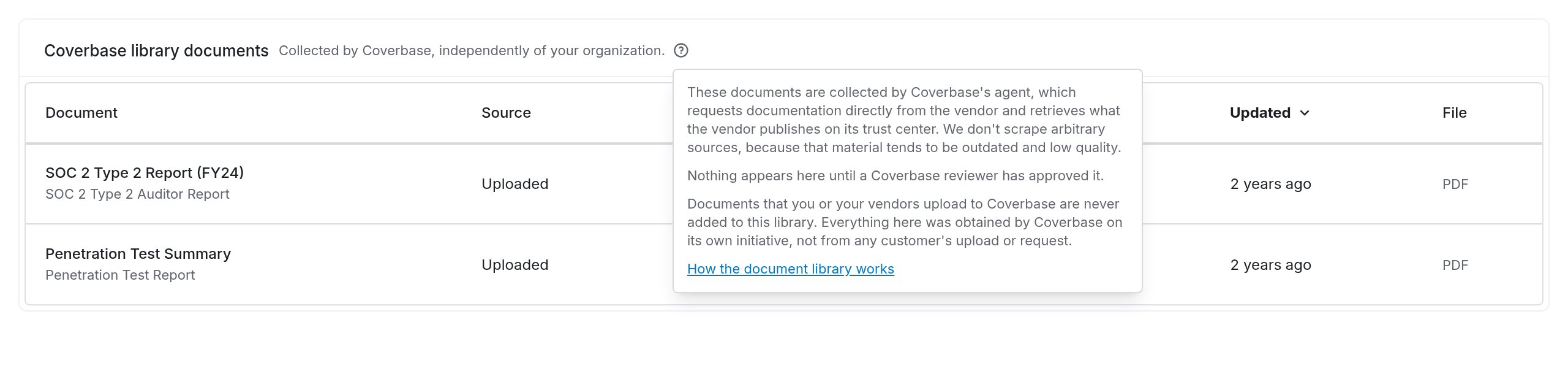
The Coverbase library documents card on a vendor, with the in-app explainer open.
On a vendor
The Documents tab shows Coverbase library documents below your organization’s own documents. Import on a row copies that document into your organization’s own documents; a file you already hold is skipped.
On an assessment
Import from Coverbase Library is one of the five evidence-collection routes, showing the count available before you click. See How to run an assessment.
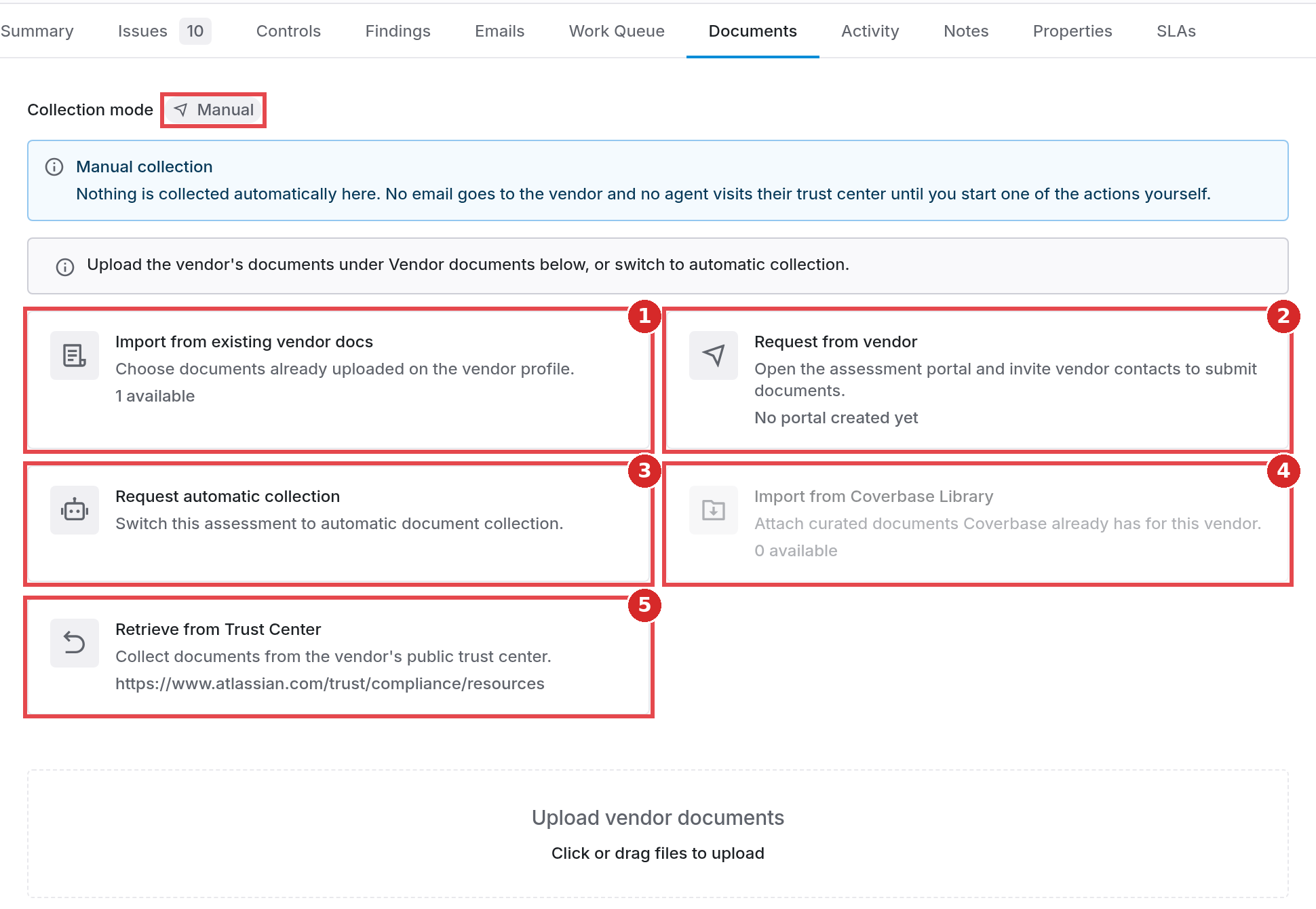
4 Import from Coverbase Library, with the count of documents already held for this vendor. The other cards on this tab collect evidence from your own files, the vendor portal, and the vendor's trust center.
Frequently asked questions
Could a document we uploaded show up in another customer's library?
Could a document we uploaded show up in another customer's library?
No. Customer-uploaded documents are org-scoped and are never promoted into the library. Only Coverbase staff can add library documents, and every one of them was obtained by Coverbase independently.
Why does a vendor we've never contacted already have documents?
Why does a vendor we've never contacted already have documents?
Because the library is built ahead of demand. Coverbase collects documentation for companies across its coverage, so a well-known vendor often has substantial evidence waiting before anyone assesses them. It doesn’t mean someone in your organization requested it.
Is a library document as good as one the vendor sent us directly?
Is a library document as good as one the vendor sent us directly?
For most evidence, yes. It’s the vendor’s own document, retrieved from the vendor or their trust center and reviewed before publishing. Check the publication and expiry dates the way you would for any document, and go to the vendor directly when you need something scoped to your specific engagement.
A library document is wrong, stale, or shouldn't be there. What do we do?
A library document is wrong, stale, or shouldn't be there. What do we do?
Tell us at support@coverbase.ai. Corrections apply at the library level, so a fix reaches everyone assessing that company rather than just your organization.
Related
How to run an assessment
The full walkthrough, including all five evidence-collection routes on the Documents tab.
Evidence quality and source credibility
How web evidence is graded for publisher accountability before it can be cited in an assessment.
Agentic Inspect
The browser-based inspection that reads vendor trust centers and converts attestations into verified evidence.
Data protection
Encryption, tenant isolation, retention, and deletion for the data your organization owns.