

For AI agents: a documentation index is available at https://docs.coverbase.com/llms.txt. This page is also available in markdown by appending .md to the URL.
Your Coverbase representative turns on the third-party lifecycle features, including the Agent Ledger, for your organization.
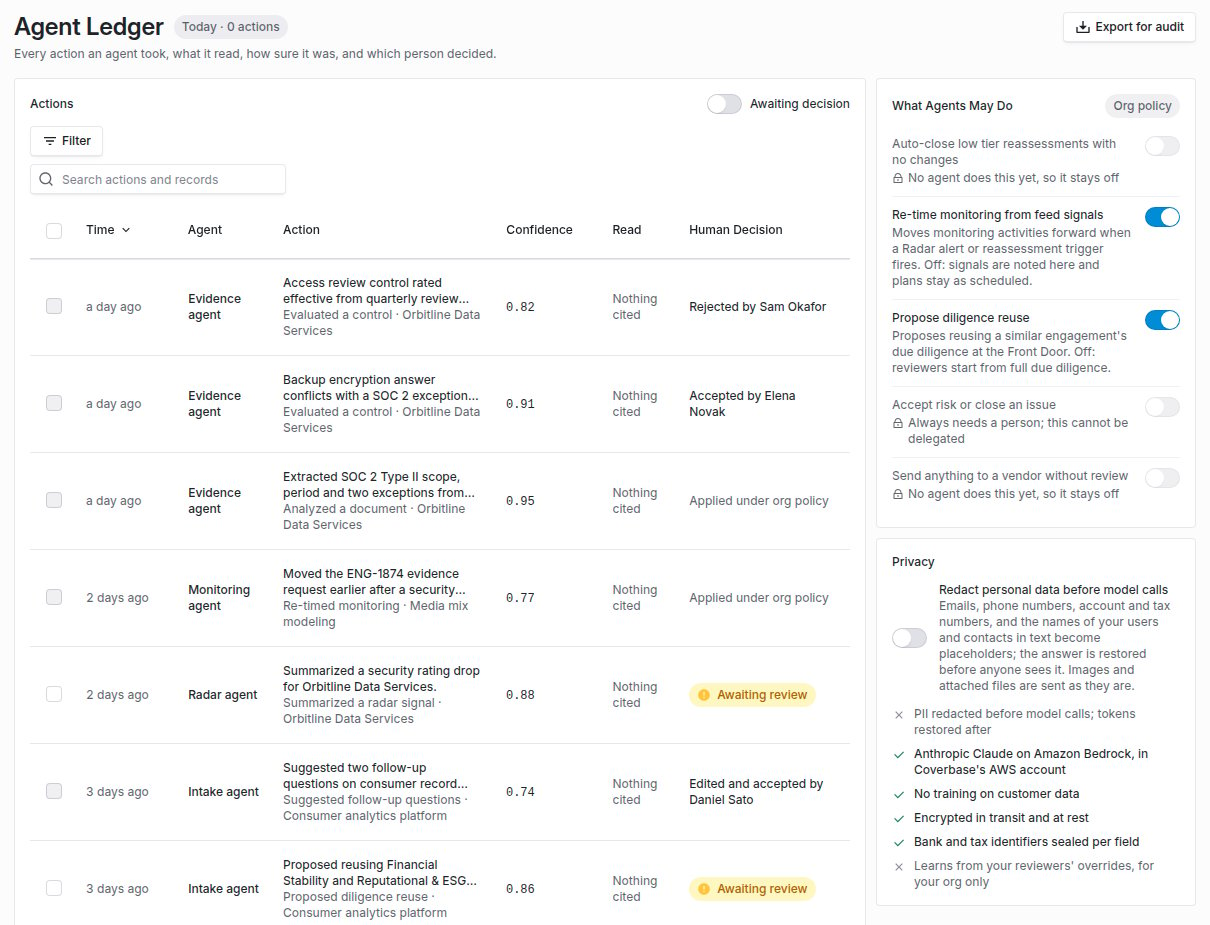
Configuration, then Agent Ledger: agent actions with their confidence and human decision, beside What Agents May Do and Privacy.
What it does
A row for every agent action
Which agent, what it did, to which record, what it read, what it cited, its confidence, the models it called and how many personal details were redacted. A person can accept, edit and accept, or reject an action, one at a time or in bulk.
Agent policies
What agents may do without a person, enforced where the agent acts. Re-timing monitoring from feed signals (off by default) and proposing diligence reuse (on by default) are live. Accepting risk or closing an issue always needs a person and cannot be switched on.
Redaction before model calls
Off by default. When on, email addresses, phone numbers, IBANs, US tax IDs and the names of your users and your vendors’ contacts are replaced with placeholders before a request reaches the model, and put back in the answer before anyone sees it.
Learning from your reviewers
When a reviewer overturns a control evaluation, the correction becomes an example for that control. Nothing reaches an evaluation until you turn learning on, and you can switch any example off.
Audit export
Export for audit writes the actions matching your filters, up to 50,000, to a CSV in the background, with citations, models, the redaction count and the human decision.
What is recorded today
These agents write to the ledger: control evaluation, vendor matching and question planning during intake, follow-up suggestions, the Intake Agent reading a request from a message, questionnaire drafting in the portal, document analysis, the Zero Touch automated review, contract clause review, claim checks, the risk report narrative, and Radar signal summaries.Agent policies
A policy is checked where the agent acts, against the current setting, so a policy switched off a moment ago holds.
Auto-close low tier reassessments with no changes and Send anything to a vendor without review have no agent behind them yet, so they stay off and cannot be switched on. Accept risk or close an issue always needs a person.
Writing a ledger row never fails the action it records. A failed action is recorded as Failed.
How redaction works
Redaction runs in the connection to the model provider, not in individual features, so every model call your organization makes passes through it. If Coverbase cannot read whether redaction is on for your organization, the call fails rather than going out unredacted. Placeholders look like[[PERSON:1a2b3c4d5e6f]]. Each is a keyed hash under a secret held for your organization, so the same person gets the same placeholder across calls and a placeholder cannot be reversed by guessing. Only placeholders the redactor issued are restored.
A model request type that redaction does not cover fails while redaction is on, so a new kind of call cannot bypass it.
How learning works
A daily job collects every evaluation a reviewer moved across the issue boundary in the last 180 days, in either direction, as a learned example for that control. With learning on, a control’s evaluation gets up to five of its enabled examples and your organization’s evaluation guidance, marked as reference data. With learning off, evaluations use the baseline prompt unchanged. Learning applies to your organization only.Where to go next
Agent Ledger guide
Read the ledger, record a decision, set policies, turn on redaction and learning, and export.
AI governance
How Coverbase selects, tests and constrains the models behind these agents.
MCP security
How assistants connected through MCP are logged and constrained.
Data protection
Encryption, field-level sealing and tenant isolation.