

For AI agents: a documentation index is available at https://docs.coverbase.com/llms.txt. This page is also available in markdown by appending .md to the URL.
An engagement is one piece of business with a vendor: the service a Transaction Owner is buying. The engagement record puts everything that happens to that piece of business on one page, so the person who asked for it can see where it is without asking the TPRM Office, and the TPRM Office can see which Risk Groups are still working.
Your Coverbase representative turns on the third-party lifecycle features for your organization.
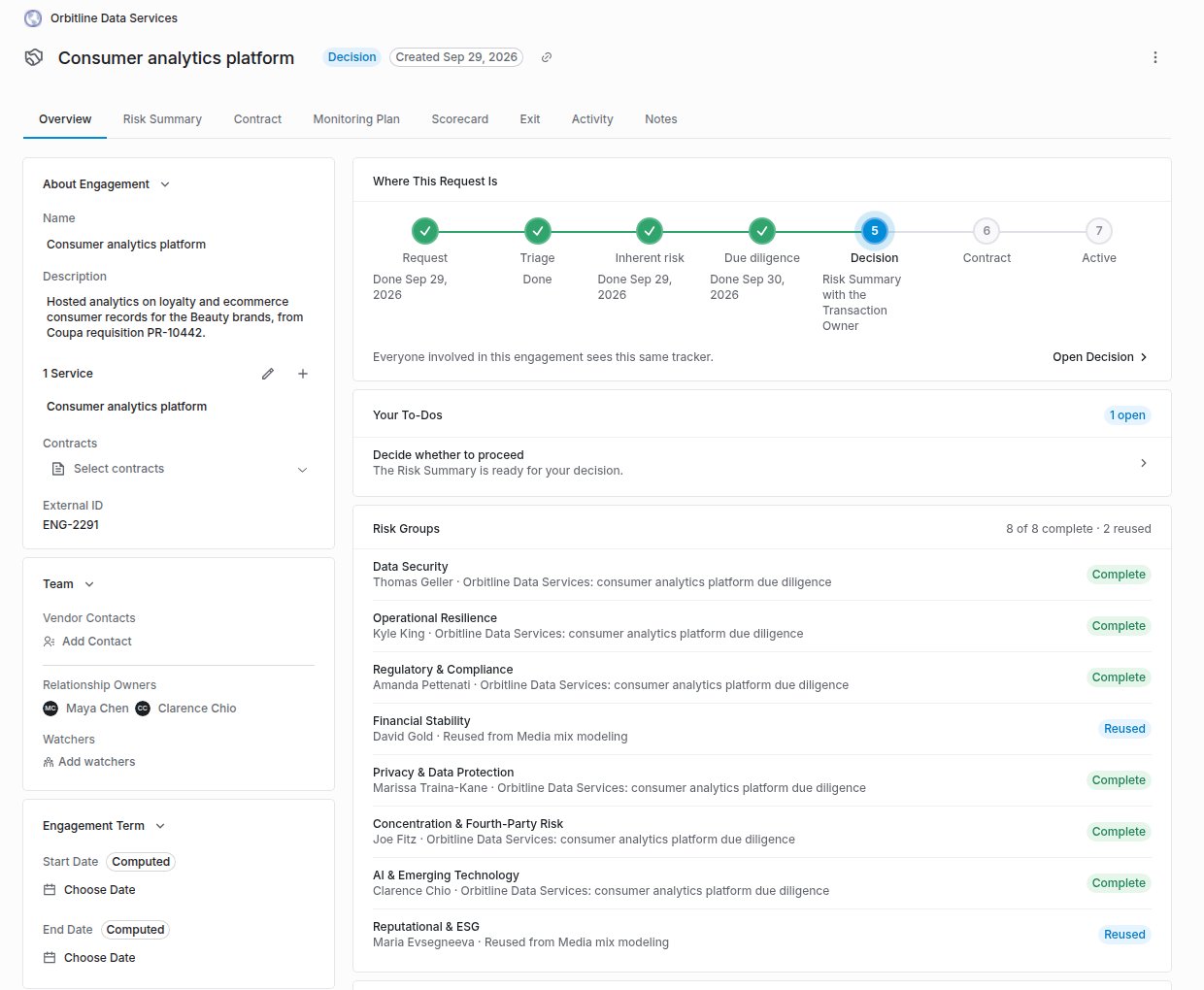
An engagement's Overview tab: the tracker at Decision, the Transaction Owner's to-do, and every Risk Group complete or reused.
What it does
One tracker for everyone
Where This Request Is shows the stage (Request, Triage, Inherent risk, Due diligence, Decision, Contract, Active, Exit) and an expected decision date. Everyone involved in the engagement sees the same tracker.
Risk Groups at a glance
Each risk domain that needs a review shows its status: Complete, Reused, In review, Waiting on vendor or Not started, with the reviewer.
Linked and reused diligence
Assessments are linked to the engagement. A linked assessment performed for something else can be marked as reused, and a Front Door reuse decision links the prior assessment automatically.
Risk Summary
Per domain: inherent risk, control effectiveness and residual risk, read live from the linked assessments. The TPRM Office adds a recommendation and conditions, the Transaction Owner records the decision, and the summary downloads as a PDF.
Notices
The Transaction Owner and the TPRM Office are told when due diligence goes out to the vendor and when it completes. The Transaction Owner receives the Risk Summary automatically when the last Risk Group signs off.
Corporate family
Set a vendor’s parent company to see the family’s rating, contract value and engagements rolled up to the ultimate parent.
When due diligence is complete
A risk domain needs a review on a linked assessment by the same rule the assessment’s own review progress uses. A domain is complete when every performed assessment that needs it has finished its review of it, and reused when a reused assessment has. Due diligence is complete when every domain is one or the other. Archived and canceled assessments drop out. A Front Door reuse decision satisfies exactly the domains it marked for reuse, and nothing it marked for an abbreviated review or new due diligence.The Exit stage
Exit is the eighth stage, after Active. An engagement reaches it when someone files an offboarding request for it that is not canceled or archived.- While the request is requested or in progress, Exit is the current stage and reads Exit under way. Every earlier stage shows as done, and the header badge reads Exiting.
- Once the offboarding completes, Exit shows as done with Exited and the date, and the header badge reads Exited.
- A live engagement with no exit planned keeps Active in focus, reading Live since and the date the contract went live, with Exit upcoming.

The tracker on an engagement whose offboarding is in progress.
The expected decision date
The expected decision date is when the last open domain review’s SLA runs out. A review already running uses its remaining time; one not started uses its full target, counted from when the vendor’s open request is due, or from today. Business days follow the SLA clock. If any open review has no SLA target, no date is shown, and none is shown once a decision is recorded.The decision
Only the Transaction Owner, or someone who can update the vendor, records the decision, and only once due diligence is complete. Proceed to contracting opens the contract handoff for Supply Chain, unless one is already pending or done. Don’t proceed records the decision and stops there. The Transaction Owner is the engagement’s relationship owners (people and groups) plus whoever raised the intake request a linked assessment came from. An engagement with no owners of its own falls back to the vendor’s.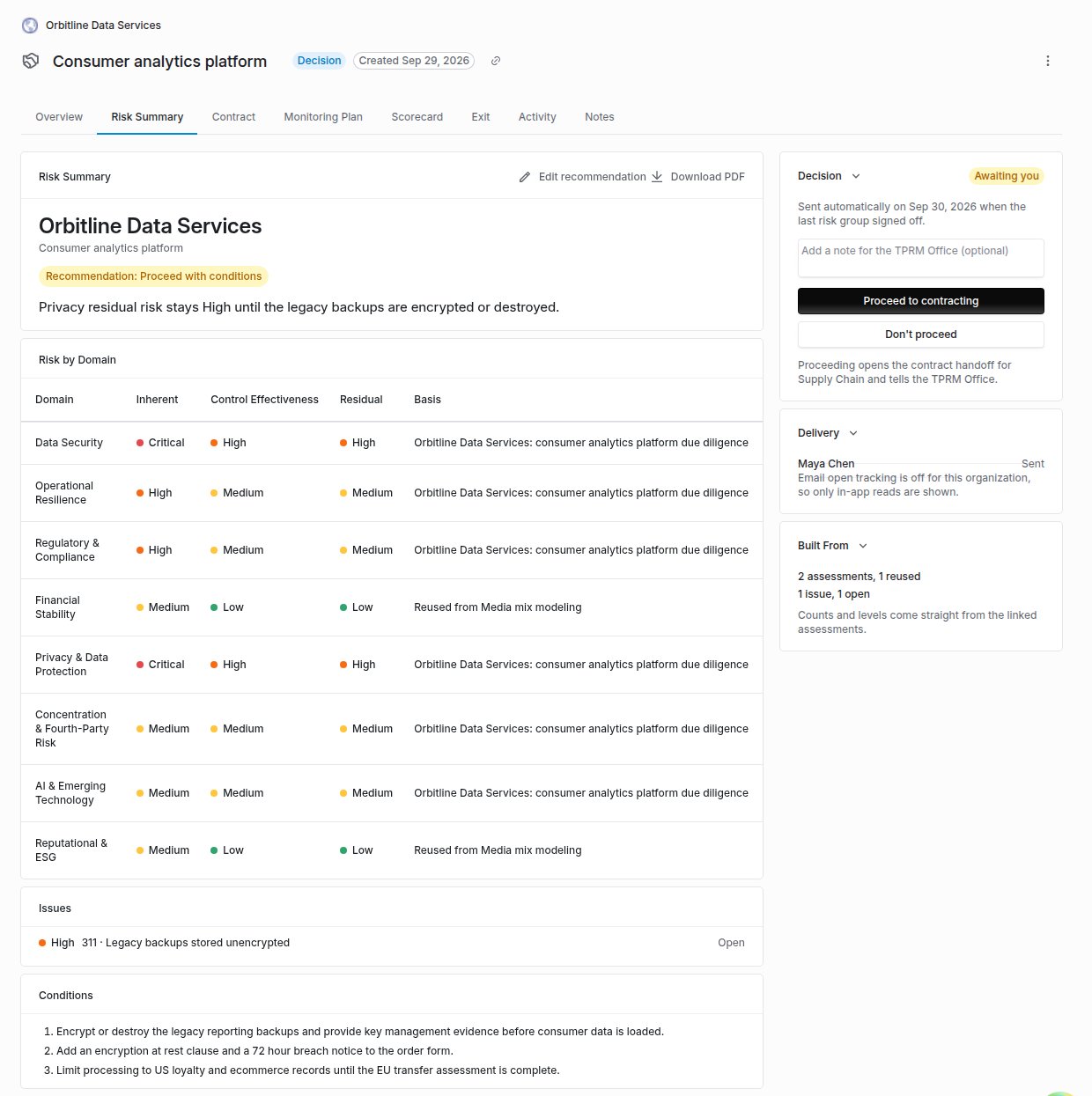
The Risk Summary tab, with the recommendation and conditions, risk by domain, and the Transaction Owner's decision card.
Delivery tracking
The Delivery card on the Risk Summary shows, for each recipient, whether the summary is Sent, In their notifications, Seen or Read in app in Coverbase, and when it was emailed. Email open tracking is off by default. An admin can turn on Risk Summary Open Tracking under Configuration → Communications → Lifecycle Routing and Reminders. With it on, the Risk Summary email, and no other email, carries a tracking pixel, and the card shows Email opened with the date of the first open, or Email not opened yet.- Only the first open is kept. The recipient’s mail client, operating system, IP address and location are discarded and never stored.
- An open is an image load. A mail client that blocks images never reports one, and a security scanner that fetches images can report one before anyone read the email. Treat an open as a signal; Read in app is the stronger fact.
- A summary sent to someone on a digest arrives inside a grouped email, which is never tracked.
- Turning tracking off stops it at once. Opens already recorded keep showing.
Where to go next
Engagement record guide
Link diligence, read the tracker, write the recommendation and record the decision.
Front Door
Where reuse decisions are made.
Monitoring plans
What the engagement owes once it is active.
Offboarding and continuity
The contract handoff, continuity plans and the exit.