

For AI agents: a documentation index is available at https://docs.coverbase.com/llms.txt. This page is also available in markdown by appending .md to the URL.
Your Coverbase representative turns on the third-party lifecycle features, including the Integration Hub, for your organization.
Providers
How a sync works
Each connection syncs on its own interval (every 60 minutes unless you change it, and no more often than every 15 minutes), and on demand with Sync now. A provider that can call a webhook can also nudge a sync when a record changes. A webhook from a contract lifecycle system that names a contract syncs only that contract, including a contract whose record ID is0. Inbound passes run first, in a fixed order, so later passes can find suppliers through links the supplier pass made:
- Suppliers link to a vendor and record its approved supplier list status.
- Requisitions and sourcing events open a draft intake request carrying the value, category and requester, and pass the supplier’s tax ID, D-U-N-S number and LEI to the Front Door.
- Contracts create or update a Coverbase contract and, when executed in the provider, mark it executed through the same path DocuSign uses, so the executed notice and accounting packet fire the same way.
- Budget lines (Coupa) record the amount and committed spend that Spend Controls and the intake budget step read.

A connection's Sync Log tab: each run's trigger, status and record counts, with the error for a failed run.
Matching suppliers
A name alone never links a supplier. A tax ID, D-U-N-S number or LEI match links on one hit, and a domain links only when no stronger identifier points to a different vendor. Every match is among your organization’s own vendors. Anything else goes to the Steward Queue, where someone links it to the right vendor or dismisses it. Once linked, a supplier is never re-matched. The queue filters by system, reason, age and name, and links or dismisses many records at once as a background job that reports, for example, “12 linked, 3 need a decision”. A contract that arrives before its supplier is linked waits, and is filed against the vendor, with its executed copy, as soon as the steward links the supplier.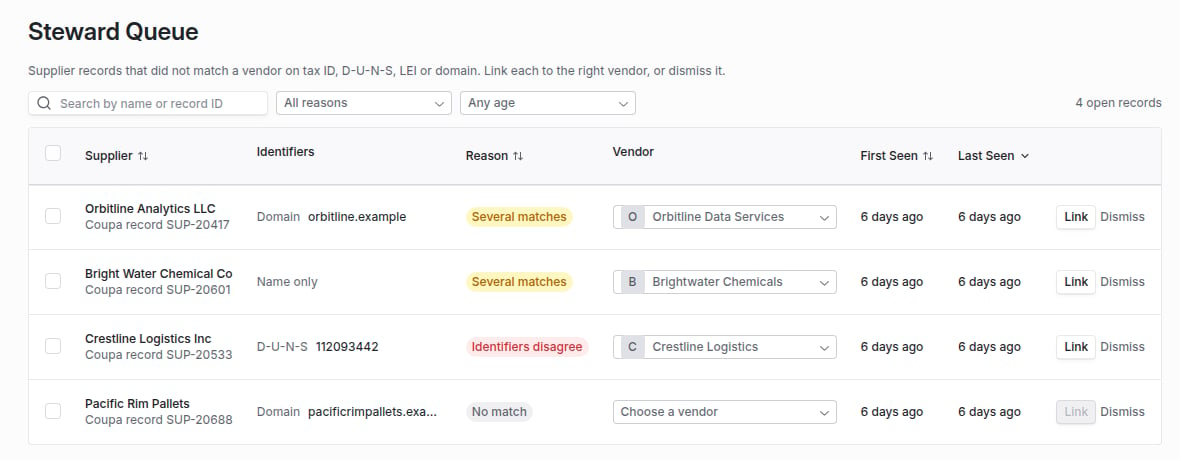
The Steward Queue: supplier records that did not match a vendor, with the reason and a suggested vendor to link.
Approvals in Teams
With a Coverbase bot registered in your Azure tenant, the Microsoft Teams connection posts three requests with Approve and Decline buttons: a Front Door disposition waiting on a sign-off group, a finding’s acceptance chain waiting on a decision, and exit plan evidence waiting on its approver. People decide in Teams as themselves, with their own Coverbase permissions. A Front Door card is posted once for both sign-off groups and is replaced with the outcome whether the sign-off or decline happens on the card or in Coverbase. See Microsoft Teams.The required clause pack
The clause pack written to a contract lifecycle system lists the high and critical severity clauses of your active clause sets, up to 25, by clause ID and name. It is the same list for every contract. Blocking issues are the titles of the vendor’s open findings, up to 20.This list is the same for every contract written to a contract lifecycle system. The clauses a particular engagement requires, from its own risk results and open issues, are its clause pack, shown on the engagement’s Contract tab.
Credentials and webhooks
Credentials go to a secrets manager when you save them and are never returned. The page only says which fields are set. A connection’s webhook signing secret is shown once, when you create or rotate it. Inbound webhooks must be signed (see Integration credentials and signing), and a webhook body is never trusted as data: it only starts a sync that re-reads the record from the provider.Where to go next
Integration Hub guide
Connect a provider, review its field mappings, read the sync log and work the steward queue.
Front Door
Where a synced requisition shows up for the TPRM Office.
Integration directory
Everything Coverbase connects to, and which systems have a connector.
Integration credentials and signing
How credentials, signing secrets and webhooks are protected.