

For AI agents: a documentation index is available at https://docs.coverbase.com/llms.txt. This page is also available in markdown by appending .md to the URL.
Your Coverbase representative turns on the third-party lifecycle features, including data share, for your organization.
What it does
Three destination types
Snowflake (key-pair authentication through the SQL API), BigQuery (a service account key), and Amazon S3 (a role in your account that Coverbase assumes, with no stored secret).
Only what changed
Each sync appends the rows that changed since the last successful one, stamped with when they were written. A failed sync is retried from the same point by the next.
Current views
In Snowflake and BigQuery, each table has a
_current view that keeps the newest version of each row. Point your BI model at the views.A published contract
Eighteen tables, from third parties, engagements and per-domain scores to findings, risk acceptances, contracts, obligations, monitoring and Radar. Columns are added over time but never renamed or removed in place.
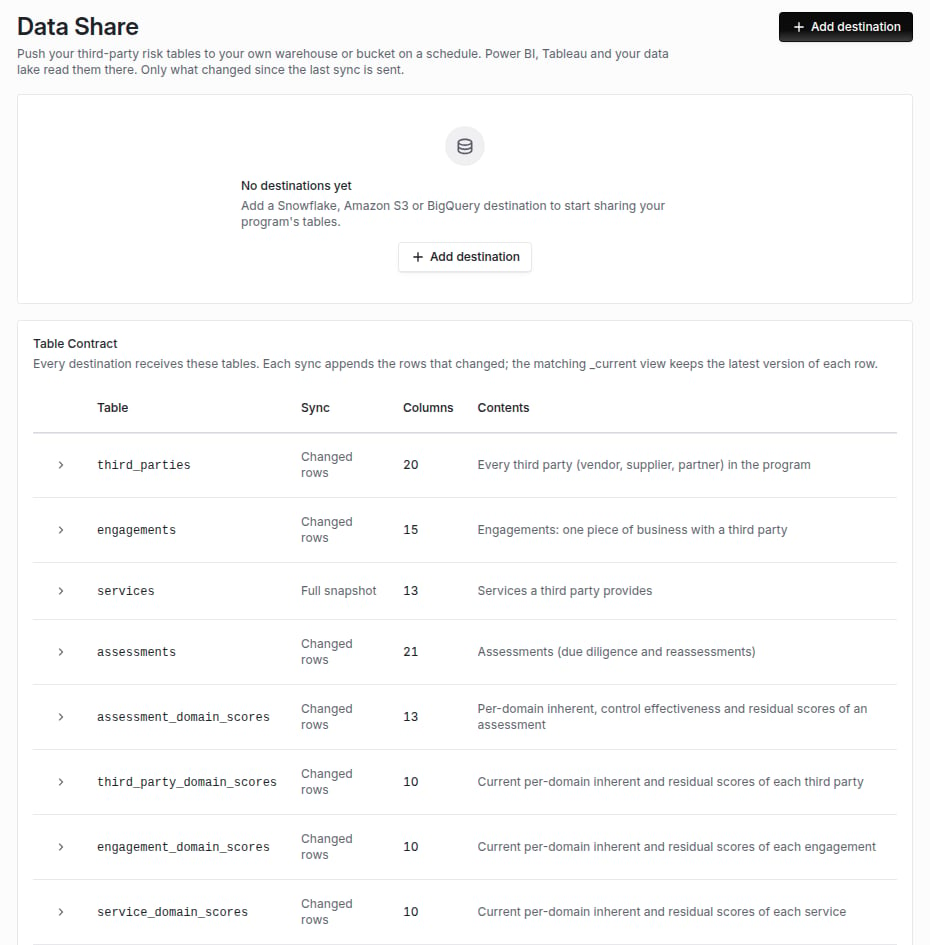
Configuration, then Data Share: the destinations you add, and the table contract every destination receives.
Schedule
Each destination syncs Hourly or Daily, and on demand with Sync now. A Sync now that lands while a scheduled sync of the same destination is running is dropped rather than run twice.What lands where
- Snowflake and BigQuery: one table per contract table, created on the first sync. A column the contract adds later is added to the table. Beside each table, a
<table>_currentview keeps the latest version of each row. - Amazon S3: files in gzip CSV, gzip JSON Lines or snappy Parquet at
<prefix>/<table>/synced_date=YYYY-MM-DD/<run id>-<page>.<ext>, with each table’s contract at<prefix>/_contract/<table>.json. Deduplicate onid, keeping the latest_cb_synced_at, the same way the views do.
is_archived set. A hard delete is not sent, except that the services table is a full snapshot on every run, so a deleted service drops out of its current view.
Credentials
A destination’s credential is write-only. It is stored in a secrets manager the moment you submit it, and the page shows only a non-secret hint: the key’s fingerprint for Snowflake, or the service account email for BigQuery. Archiving a destination deletes its credential. Amazon S3 stores no secret at all. Coverbase assumes your role with an external ID generated for that one destination. See Integration credentials and signing.Where it shows
The Distribution card on Program Overview, under Dashboards, lists each destination with its status and last sync, beside the board pack and your scheduled dashboard emails.Where to go next
Data share guide
Add a destination, test it, read the run log and the table contract.
Snowflake
Key-pair setup and the grants the Snowflake user needs.
Amazon S3
The role, its trust policy and the external ID.
BigQuery
The service account and its roles.