

For AI agents: a documentation index is available at https://docs.coverbase.com/llms.txt. This page is also available in markdown by appending .md to the URL.
Due diligence is the work your Risk Groups do on an assessment: collecting the vendor’s answers and evidence, meeting the vendor where a questionnaire is not enough, and deciding what to do about each finding. These capabilities sit on top of Assessment Copilot and the supplier portal. They change how evidence is gathered and who signs off on risk, not how controls are evaluated.
Your Coverbase representative turns on the third-party lifecycle features for your organization.
What it does
Assessment methods
Each assessment records how evidence is gathered: Questionnaire, Remote review or Onsite. Remote and onsite reviews schedule review sessions with a time, a place or link, internal participants and vendor attendees, who are notified when a session is scheduled, changed or cancelled.
Delegation in the portal
A supplier can hand a section, or individual questions, to a colleague. A question assignment wins over its section’s, which wins over the whole form’s, and the portal shows who answered what.
Answers carried forward
When the same questionnaire goes to a vendor again, their previous answers are copied in. The vendor confirms each one or changes it, and cannot submit until every carried-forward answer is confirmed or updated. Reviewers see which answers changed.
Reviewer edits the vendor approves
When a reviewer edits a vendor’s answer, the vendor sees the before and after in the portal and either approves the edit or suggests different wording.
Service-level questionnaires
Questions can be marked service-level. When a vendor’s company-wide due diligence is current, a new service can be sent only those questions instead of the whole questionnaire.
Findings where they arise
A finding records what it was raised on: a question, a risk domain, a questionnaire, an assessment, a service or the vendor. A reviewer can raise one directly on a question from the vendor’s answer.
The acceptance chain
Accepting a finding’s risk can be routed through a chain of people instead of one approver. Rules under Findings Settings match a finding by its severity or risk level, first match wins, and name:- The finding owner, who proposes to accept the risk, have the vendor remediate, or escalate.
- An optional recommending group, typically the Risk Group for the domain, which recommends.
- A deciding group, typically the TPRM Office, which decides and may decide at any point, overruling what came before. The overrule is recorded as one.
- An optional extended approver, who must also approve an acceptance that runs longer than the rule’s number of days.
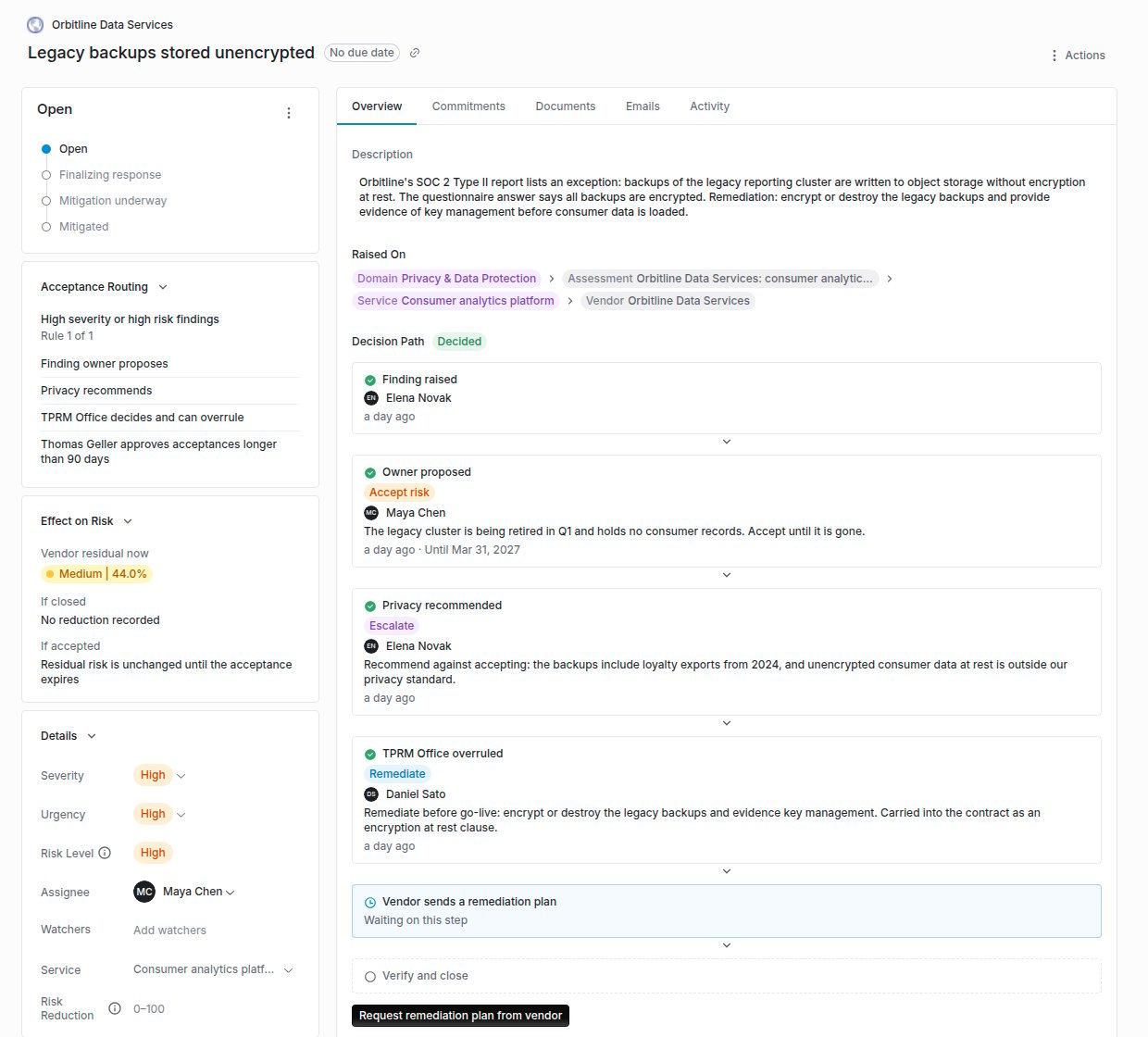
A finding's Acceptance Routing, Effect on Risk and Decision Path, where the TPRM Office overruled a proposal to accept the risk.
When the vendor’s due diligence is current
The abbreviated, service-level send is offered only when the vendor has a completed assessment and its next assessment date has not passed. Otherwise the option is disabled and explains why.What it does not do
- Carried-forward answers are matched by question across questionnaire versions. A question added since the last submission starts empty, and nothing the respondent has already answered on the new request is overwritten.
- An onsite review does not upload evidence for you. Reviewers upload what they collected and record control effectiveness by hand from the assessment.
- The acceptance chain does not change who may raise or close a finding. It governs accepting risk only.
Checking answers against evidence
Claim check tests each answer on a submission against the vendor’s SOC reports, certifications, trust center documents, outside-in scan, licensed ratings and contract terms, marks it Supported, Contradicted, Needs evidence or Not covered with the cited passages, and lets the reviewer raise a finding or ask the vendor to clarify from the result.Where to go next
Due diligence guide
Methods, sessions, delegation, carry-forward, edit approval and service-level sends, step by step.
The issue acceptance chain
Set up routing rules and record proposals, recommendations and decisions.
Engagement record
How completed domain reviews add up to a Risk Summary for the Transaction Owner.
Findings Manager
Statuses, commitments and remediation once a finding exists.