

For AI agents: a documentation index is available at https://docs.coverbase.com/llms.txt. This page is also available in markdown by appending .md to the URL.
Your Coverbase representative turns on the third-party lifecycle features, including monitoring plans, for your organization.
What it does
A plan from your cadence matrix
For each tier of your risk scale, an interval in months and an owner (Transaction Owner or TPRM Office) for each activity: IRQ refresh, performance scorecard, owner attestation, evidence request and contract review. An organization that never saved a matrix gets a default, highest risk tier first.
Reassessments stay in one place
The due diligence reassessment on the plan mirrors your reassessment schedule rather than keeping a second date. Moving it on the plan moves the reassessment schedule, so the reassessment is created on the new date. Continuous monitoring is Radar, always on while Radar is on for the vendor.
Signals re-time the plan
A Radar alert at or above a severity you choose, or a reassessment trigger, pulls the activities you name forward. The move is the monitoring agent acting on its own, so it also needs the Re-time monitoring from feed signals agent policy, off by default. The move is applied at once and recorded with the signal that caused it, and the TPRM Office can keep it or revert it within an undo window.
IRQ refresh with a diff
The Transaction Owner refreshes the inherent risk questionnaire from the last approved answers. The TPRM Office sees every answer that changed, each domain’s score and level before and after, newly in-scope domains and any tier change, then confirms. A new domain or a higher tier raises a reassessment straight away.
Owner attestation
One question on the plan’s cadence: is this still in use? Every answer is logged with the user and time. Start offboarding files a real offboarding request and pauses the plan.
Performance scorecards
A rubric bound to a tier and service category, scored by the respondents you name, with SLA adherence from the vendor’s SLAs. A weighted score below your threshold is flagged.
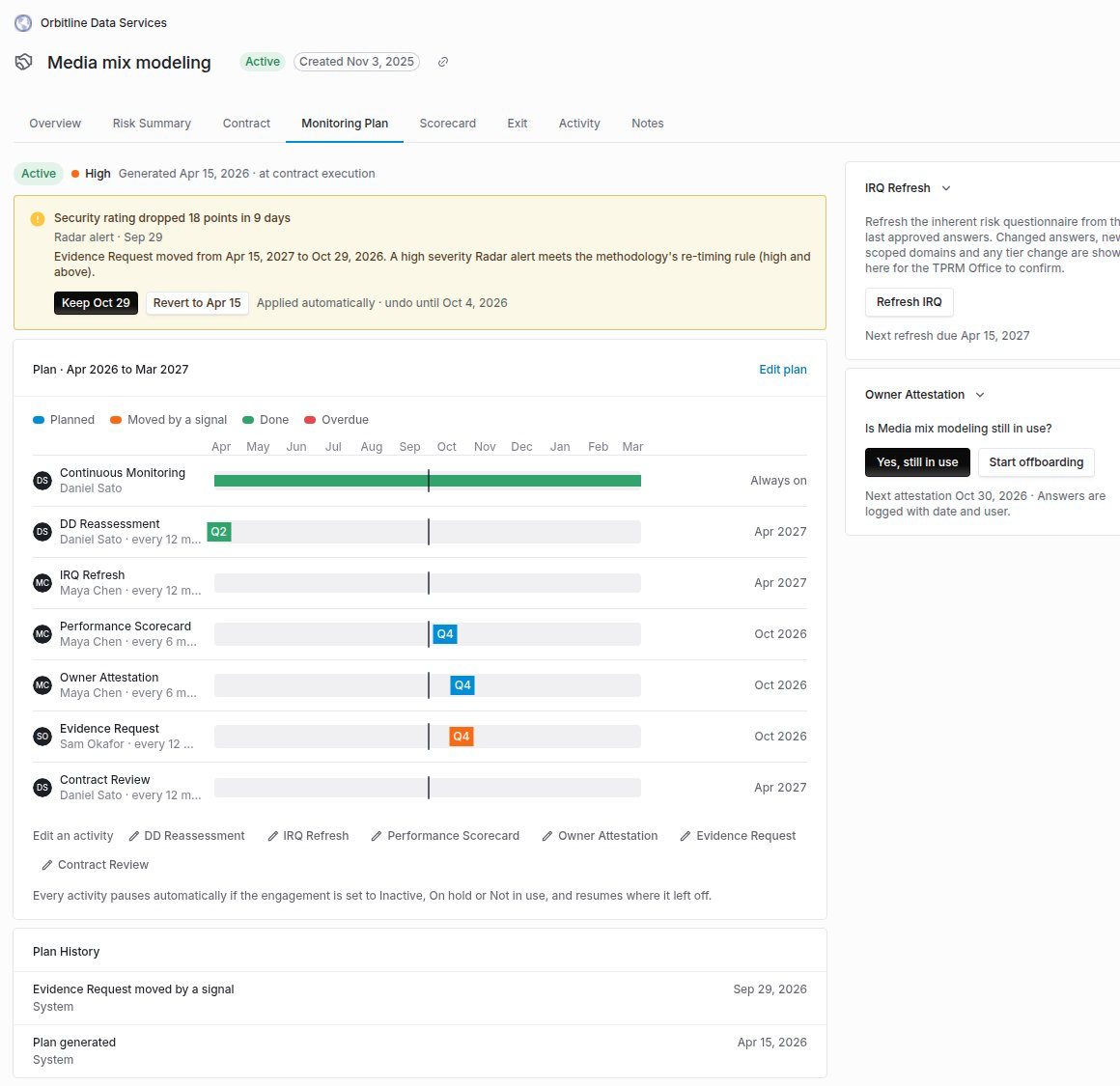
The Monitoring Plan tab on an engagement: a signal move waiting to be kept or reverted, the twelve-month timeline, the IRQ refresh and owner attestation.
When a plan exists
A plan is generated when an engagement goes active, or a service outside any engagement goes active or completes. An executed contract, an approved engagement IRQ or a manual request from the TPRM Office also generates one before that. A daily sweep fills in any live engagement or service that has no plan. A plan is re-planned when the tier moves, an IRQ is approved or a refresh is confirmed. Activities the TPRM Office edited keep their interval, owner and due date. The rest follow the matrix.Pausing
An engagement or service in a canceled status, an expired engagement, or any status you list under Pausing Statuses (such as On hold) pauses its plan. Pausing turns the vendor’s Radar monitoring off only when no other live engagement or active plan needs it, and resuming turns back on only what the pause turned off. While every plan for a vendor is paused, reassessments are neither created nor reminded. On resume, due dates move out by the time spent paused.Notices
Each activity’s owner is told before it is due, by the number of days you set. Past the overdue window, the owner and the TPRM Office are escalated to. Each due date is announced once. The sweep that sends these runs every day at 13:30 UTC.Comparing questionnaire submissions
The IRQ refresh shows a side-by-side diff of the refreshed answers against the last approved IRQ: every answer changed, added, removed or left alone, each answer’s score, and each domain’s score before and after. The same comparison is on the vendor’s Questionnaires tab: Compare any finished submission with the vendor’s earlier submission of the same questionnaire.Contract obligations
When a contract is signed, each obligation in its clause pack that the signed contract carries becomes an activity on the engagement’s plan, on the cadence its clause rule names. It is an ordinary activity. Notices, escalations, completion and pausing apply to it unchanged, and the timeline shows the obligation’s own text.The Monitoring workbench
Monitoring in the left navigation lists every scheduled activity and every plan across your engagements and services, filtered by activity, due window and owner, with what you can see following your vendor access. The TPRM Office can Reschedule selected activities to a date or by a number of days, and Send scorecards now instead of at their notice window. Small selections run at once. Larger ones run in the background with progress. Each activity that cannot move says why, such as a paused plan or a date inside a reassessment’s collection time, and the rest still go through.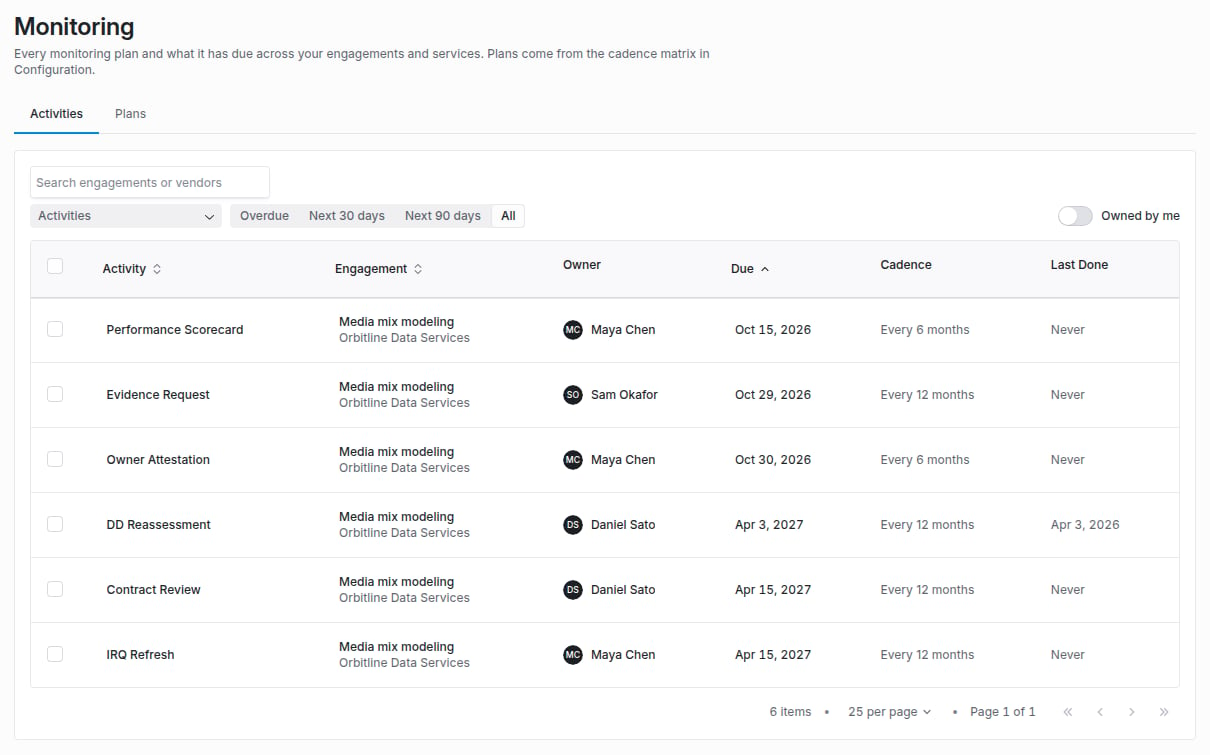
Monitoring in the left navigation: every scheduled activity with its engagement, owner, due date and cadence.
Where to go next
Monitoring plans guide
Set the cadence matrix and rubrics, read a plan, refresh an IRQ and score a scorecard.
Supplier Radar
The signals that re-time a plan.
Offboarding and continuity
What Start offboarding sets in motion.
Engagement record
The engagement page the plan lives on.