

For AI agents: a documentation index is available at https://docs.coverbase.com/llms.txt. This page is also available in markdown by appending .md to the URL.
Front Door is the first review an intake request gets. Before anyone sends a questionnaire or opens an assessment, the TPRM Office answers four questions on one page: is this a new vendor or one you already have, is there an engagement whose due diligence can be reused, does the request need an inherent risk questionnaire (IRQ), and is the vendor blocked. The answers are recorded as a disposition, signed off by two people, and kept in the request’s audit trail.
Your Coverbase representative turns on the third-party lifecycle features for your organization.
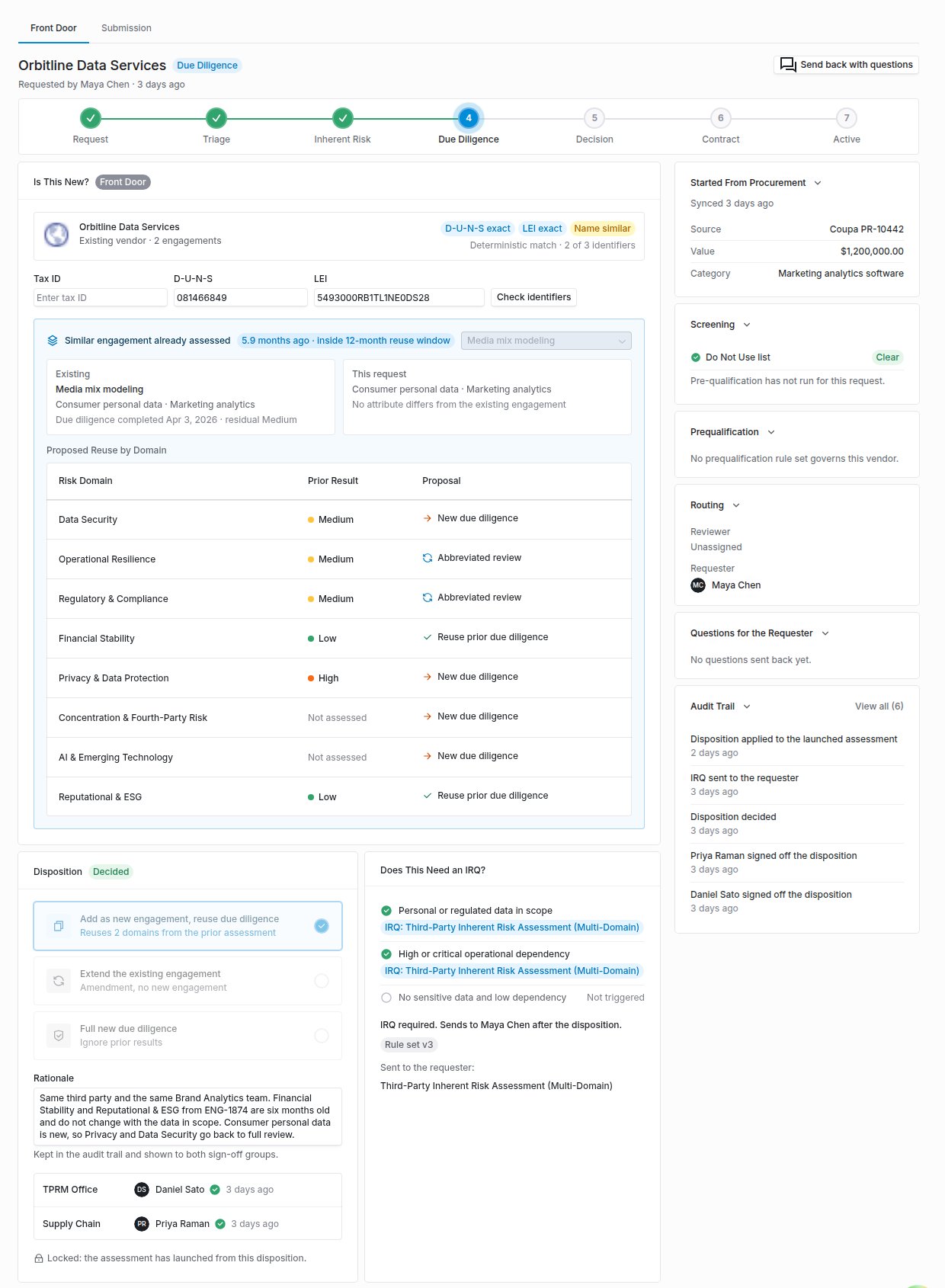
The Front Door tab of an intake request, with the identifier match, proposed reuse by domain, the decided disposition and its two sign-offs.
What it does
Is this new?
Matches the request against your vendors on tax ID, D-U-N-S number and LEI, which count as deterministic, and on domain and name, which count as probabilistic. Tax IDs stay sealed: Coverbase shows only the last four characters.
Engagement reuse
Finds the most similar existing engagement by shared services and tags, says whether its completed due diligence is inside your reuse window (12 months unless you change it), and proposes per risk domain whether to reuse it, run an abbreviated review or start again.
Dual sign-off
A disposition is decided only when one person from the TPRM Office group and a different person from the Supply Chain group have both signed it off. Revising it clears both sign-offs.
Decline with a reason
While a disposition waits for sign-off, a member of a group that has not signed yet can decline it with a required reason. The disposition goes back to the TPRM Office as a draft, any sign-off already given is cleared, and the TPRM Office and the requester are notified.
IRQ scoping rules
Rules read the intake answers and decide whether an IRQ is required and which templates to send. The required IRQs go to the requester once, as soon as the disposition is decided.
Do Not Use
A vendor marked Do Not Use can still be requested, but the requester is warned and approving the request needs an override rationale. Adding a vendor to the list and taking it off both need a reason.
Procurement context
When a request started as a purchase requisition in a connected procurement system, the review shows where it came from, its value and category. With budget lines synced, it shows the request’s draw against the line and any budget exception the requester asked for.
Microsoft Teams approvals
With Teams approvals on, both sign-off groups can sign off or decline from one Teams card. A decision made in Coverbase updates that card, so it cannot record a second decision.
How reuse works
A disposition takes one of three forms:
A reuse decision is applied once, to the next plan-launched assessment for that vendor. Zero Touch assessments do not consume it. After it has been applied, nobody can revise it, and the engagement record shows which domains reused diligence satisfied. If someone scores a reused domain on the new assessment, Coverbase removes the reused label from that domain.
When a sign-off group declines
While a disposition waits for sign-off, a member of a sign-off group that has not signed yet can click Decline, beside Approve triage, and write the reason. A decided disposition cannot be declined. Coverbase then:- returns the disposition to the TPRM Office as a draft and clears any sign-off already given,
- shows on the disposition who declined, for which group, and why, and records the same in the audit trail,
- notifies the TPRM Office and whoever recorded the disposition with the reason, and tells the requester that the TPRM Office is revising the decision.
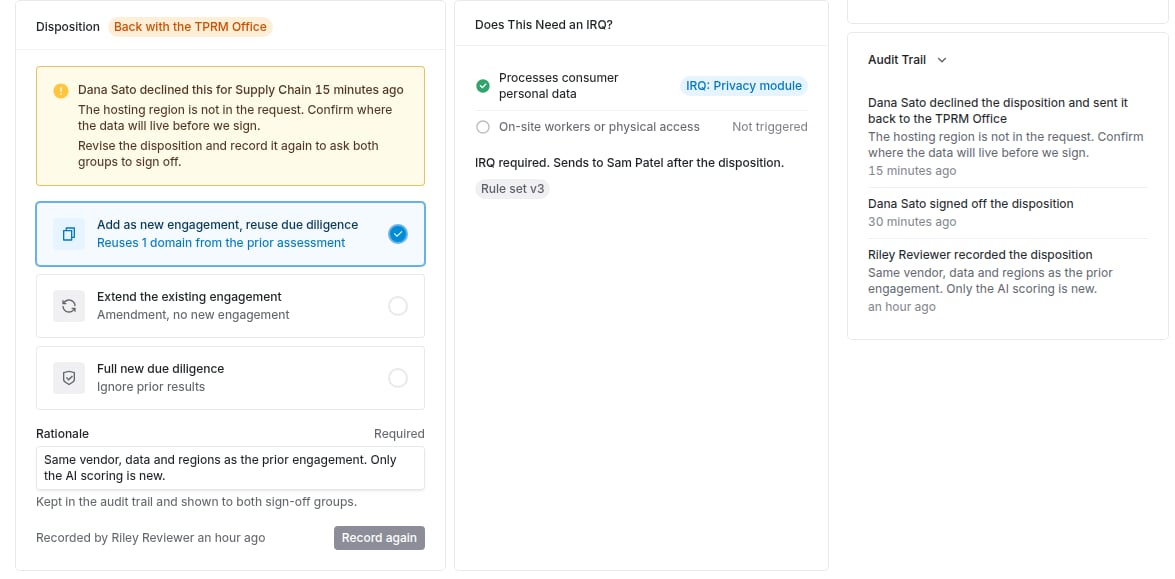
A declined disposition, back with the TPRM Office, showing who declined, for which group, and the reason.
What it does not do
- It does not approve the vendor. Approving the intake is still a separate step, and a vendor created through intake stays in its created status until someone moves it.
- It does not decide on a name match alone. A domain or name match is shown as probabilistic, and only a registry identifier counts as deterministic.
- It does not remove a vendor from the Do Not Use list when an override is recorded. The override applies to that one request.
Where to go next
Front Door guide
Set up the reuse window, sign-off groups and IRQ rules, then triage a request step by step.
Engagement record
Where reused and new diligence come together for the Transaction Owner.
Autonomous Intake
How a request is filed in the first place, from the portal, the API or an AI assistant.
Risk methodology
How the IRQ the Front Door sends is scored and who reviews each domain.