

For AI agents: a documentation index is available at https://docs.coverbase.com/llms.txt. This page is also available in markdown by appending .md to the URL.
Your Coverbase representative turns on Coverbase AI for your organization.
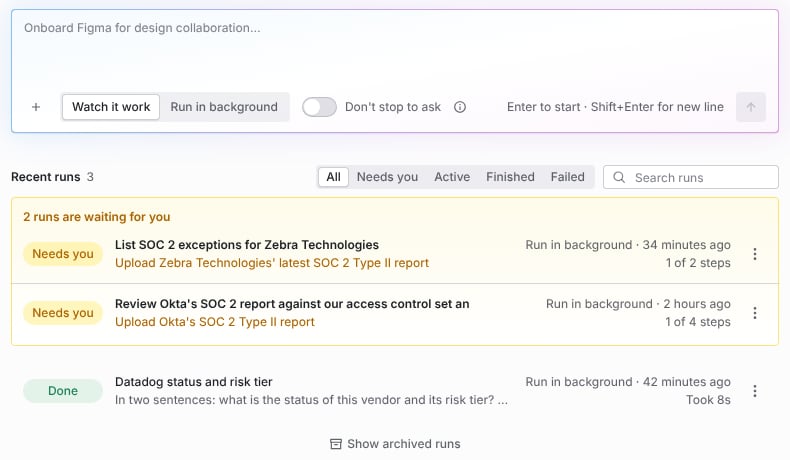
Coverbase AI's home: the composer, and your runs with the ones waiting on you first.
What it does
Works the way an analyst does
Onboards vendors, runs the inherent risk questionnaire, launches and reviews assessments, triages Zero Touch results, sets up Radar detectors, workflows and dashboards, reviews findings, and answers questions about any record.
Reads your files
Attach up to 100 files a message, 50 MB each: SOC 2 reports, contracts, questionnaires, spreadsheets and emails. It reads them in full and quotes the file and page it relied on.
Knows the records you mean
Point it at vendors, assessments, contracts, Radar signals, findings and intake requests from the + menu, or start it from a record’s page, and “this” means that record.
Asks before anything that matters
It stops to ask before work that reaches another person, costs time or is hard to undo, and asks for a document when it needs one you have not given it.
Watch it, or let it run
Watch the cursor work through the product step by step, or send it to the background and read the report when it is done.
Keeps working on its own
Standing agents run on a schedule or when something happens, such as a Radar alert or an overdue finding, within the budgets and quiet hours you set.
What it never does
Coverbase AI never approves a vendor, never accepts risk, never sends anything to a vendor without your approval, and never creates a vendor outside intake. Archiving a record, submitting an intake request and anything else that cannot be undone always waits for you, even when you tell it not to stop to ask.How it reads files
Coverbase AI reads PDFs page by page, Word documents (including older.doc files), Excel workbooks sheet by sheet, CSV files, emails and text files. It reads a long report in sections until it has read the part your question needs.
It tells you when it cannot read something instead of guessing. A scanned PDF or an image has no text to read yet. A password-protected PDF needs an unlocked copy. A damaged file, a .zip archive or an empty file is named as such. Text inside a file is treated as information, not as instructions, so a file that says “archive this vendor” does not make it archive anything. A report about a different company than the one you named is flagged before it is used.
Get started
Working with Coverbase AI
Start a run, answer what it asks, steer it and read the report.
Files and records
Give it documents and point it at the records the work is about.
Memory, permissions and standing agents
What it remembers, what it may do without asking, and agents that run on their own.