

For AI agents: a documentation index is available at https://docs.coverbase.com/llms.txt. This page is also available in markdown by appending .md to the URL.
Marketing compliance is an optional module. If you do not see Marketing in the left navigation, ask your Coverbase account team to turn it on.
What it does
Pre-publication review
The partner or your team submits a URL or pasted copy. Coverbase captures it as an immutable version, runs the program’s rules, and opens a review whose flags quote the exact passage, cite the rule and suggest a fix. A reviewer confirms or dismisses each flag and decides.
Approval codes
An approval hands out a code such as
MKT-2026-0418, valid for 365 days and tied to the version that was captured. The partner keeps it with the asset. Any change needs a new version.Checked against the web
When a submission arrives, Coverbase searches the public web for the same copy and lists where it is already live, how closely each page matches and what differs. A page found this way becomes a live asset and is watched from then on.
Daily sweeps of what is live
Each program names the websites and app listings to watch. A daily sweep crawls them, files what it finds as live assets, and says whether each one matches what was approved, drifted from it, or was never approved.
A shipped rulebook library
FDIC Part 328 Subpart B, Reg DD, Reg Z, Reg E, Visa and Mastercard brand standards, endorsement and email and SMS rules, and UDAAP. Each rule carries a citation, a severity and a pattern check, an AI check or both. Fork a rulebook to edit it, and test a rule against sample text.
Findings, Radar and the exam packet
A confirmed flag can raise a finding on the partner. A confirmed flag on a live asset also raises a Radar alert, so the alert queue and residual risk see it. Reports exports an exam packet per program and period as a zip.
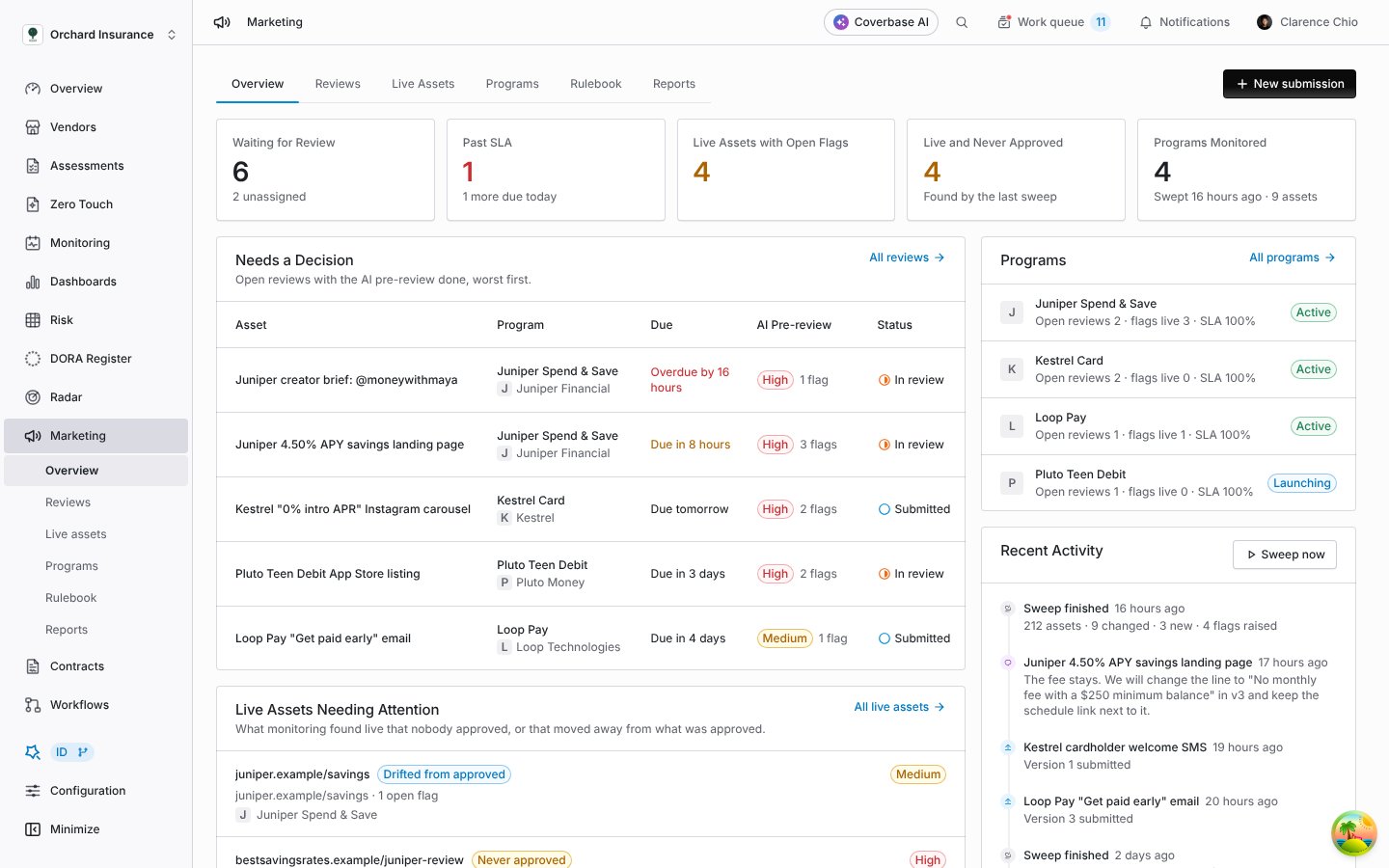
Marketing in the left navigation: what is waiting for a decision, what is live and needs attention, and the programs being monitored.
Key concepts
Six terms, in the order you meet them.
A confirmed flag can become a finding on the partner vendor, with the source Marketing flag. From there it is an ordinary finding; see Findings Manager.
Where to go next
Marketing compliance guide
Set up a program, work a review, read the screenshot view, run sweeps, and export the exam packet.
The marketing rule library
Every shipped rulebook, what each rule checks, pattern and AI checks, forking and versions, and testing a rule.
The partner portal, for partners
What a fintech partner sees: submitting, the quick check, the approval code, messages and live issues. Share it with your partners.
Supplier Radar
Where a confirmed flag on a live asset shows up as an alert on the partner.