

For AI agents: a documentation index is available at https://docs.coverbase.com/llms.txt. This page is also available in markdown by appending .md to the URL.
Your Coverbase representative turns on Payables for your organization.
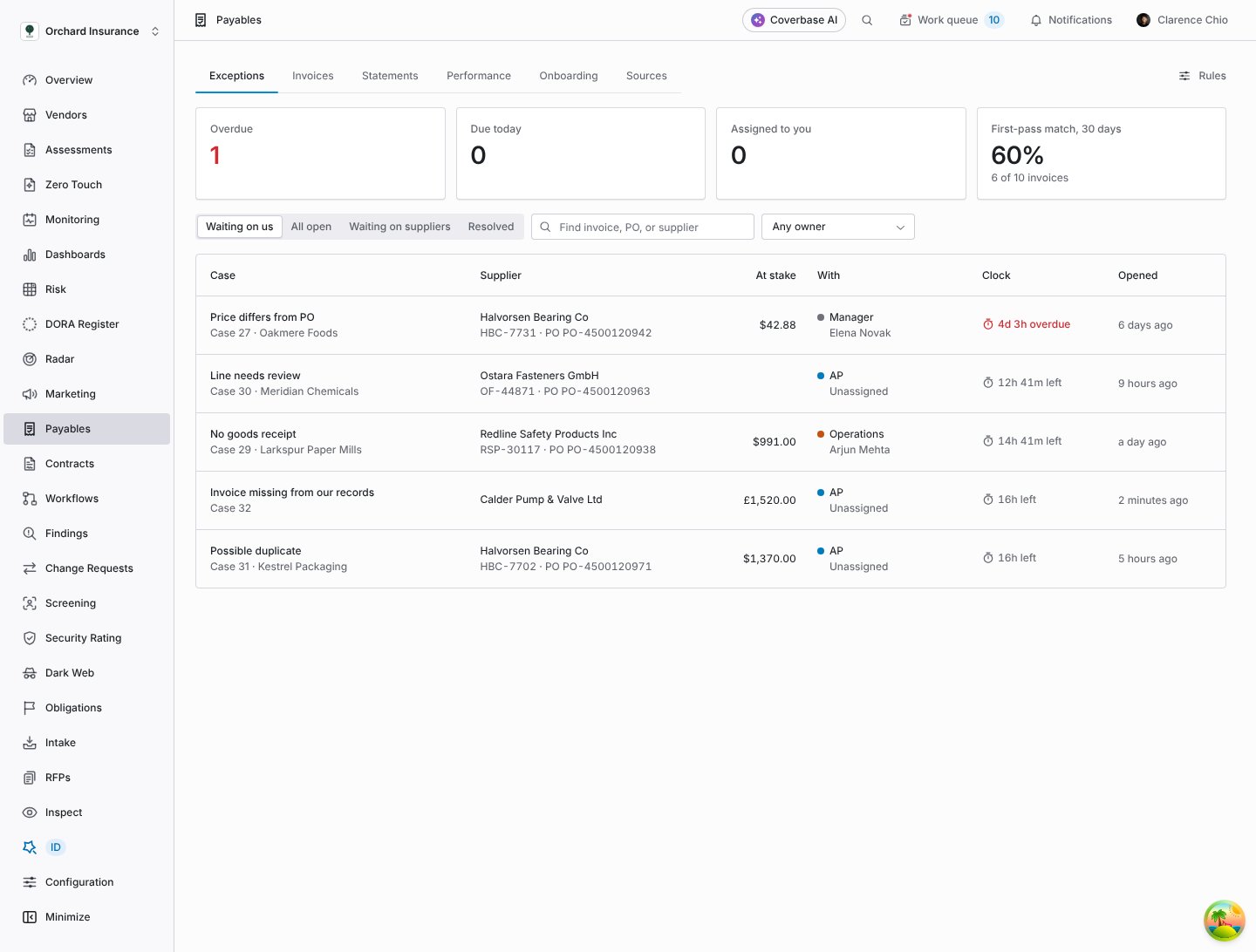
The Exceptions tab: every open case from every intake channel, with what is at stake, who has it and how long they have left.
What it does
One exceptions queue
Invoices booked in your ledger, forwarded by email, sent as EDI or through the intake API, and submitted in the supplier portal all land in one queue. A difference on any of them becomes a case, routed by your rules to AP, procurement, operations, a manager or the supplier.
2-way and 3-way matching
Each invoice line is mapped to a PO line and checked for part number, unit price within your tolerance, quantity against what was ordered and, when you require a receipt, against what was received. Tax, freight, currency and the invoice total are checked too. Only deterministic checks can call an invoice matched.
AI reading of emails and PDFs
Invoices forwarded to your intake address, or uploaded as PDFs, are read by AI into a structured invoice. What it reads is then put through the same checks against the PO and receipt as any other invoice. A field it was unsure of holds the invoice for AP to compare with the PDF, even when every check passes.
Owned cases with clocks
Every case has an owner role, a person within that role when one is set, and a response clock that states whether it counts business or calendar hours. Clocks pause while the supplier owes the next step, send a reminder at 75% by default and escalate when they run out. Time with each owner is measured from the case history, not estimated.
Supplier statements
Each month every supplier gets a statement of the invoices you have recorded from them, per currency and billing entity. They confirm it, flag a line whose amount or status is wrong, or add an invoice you never received. Each difference opens a case for AP.
Performance and scorecards
Your team’s view shows where cases wait, how many clocks were met and how fast suppliers reply. Each supplier has an invoice scorecard of first-pass match, mismatches, duplicates and corrections, with the invoices behind every figure. Suppliers can see theirs and dispute a figure.
Supplier onboarding waves
Upload a client’s supplier list, see every row checked for missing fields and existing suppliers before anyone is invited, then send the invitations. Each supplier is asked only for the requirements your rules attach to their risk tier, country and spend.
Supplier portal
Suppliers see their invoices and why one is on hold, the POs you issued them, their statements and their scorecard. They send corrected invoices, reply on a mismatch, answer a statement and, if you allow it, submit invoices against a PO.
How an invoice moves
- It arrives. From your ledger, the supplier email inbox, EDI, the intake API or the supplier portal. Every delivery is stored once, so a source that sends the same event twice changes nothing the second time.
- It is identified. Coverbase finds the supplier by its supplier ID, then by legal name, ignoring case, punctuation and suffixes such as Inc or GmbH. Two vendors with the same name are never guessed between: the invoice waits for a person.
- It is checked. Against its PO and, for 3-way matching, the goods receipts on that PO. An invoice that names a PO you have not received yet waits, and is checked when the PO arrives. If none arrives within 72 hours by default, a PO not found case opens for AP.
- A difference becomes a case. One case per reason, routed by your rules, with a clock. A case the next check no longer finds (a receipt arrived, a corrected invoice fixed the price) resolves itself.
- A person decides. AP accepts the invoice, asks the supplier for a corrected one, or hands the case to whoever can fix it. Your ledger stays the system that approves and pays.
What the AI does, and what it does not
AI is used in two places, and in neither does it decide anything.- Reading invoices. An invoice forwarded by email or uploaded as a PDF is read into fields and lines. The model is told to copy numbers as printed, to leave a field empty rather than guess, and never to guess a PO number, a quantity or a currency. Text inside the document is treated as data, never as instructions. A statement or a message with no invoice creates no invoice, and neither does an invoice number that is not printed in the message. A missing currency is taken from the PO and flagged for a person, and a missing quantity fails the completeness check. What it reads is then checked against the PO and receipt like an invoice from your ledger, so a misread price or quantity fails a check and opens a case for a person. A field it read with low confidence opens an Invoice reading to check case for AP, even when every check passes. An emailed invoice is not booked: it waits for your ledger to book it, and Coverbase links the two.
- Explaining a mismatch. When an invoice does not match, Coverbase AI can write a short explanation of what differs and suggest which PO line an unplaced invoice line bills. A suggestion is shown as a suggestion. It can move an invoice to Likely a match at most, never to Matched, and a person confirms it.
Limits
- Coverbase never pays, schedules or approves an invoice for payment, and never changes a record in your ledger or procurement system. Finance statuses, payment dates and payments are shown only as your ledger reported them.
- Coverbase does not convert currencies. An invoice in a different currency from its PO always opens a case, and prices in different currencies are never compared.
- Units of measure are converted only when the unit code states its count, such as
BX12orDZ. A pack code with no count, such asCS, is never guessed: the supplier is asked to bill in the PO’s unit. - A statement is a reconciliation aid built from what you had recorded when it was generated. It is not a promise of payment, and an unanswered line is never taken as agreement.
- Clock history starts when Coverbase opened the case. Time spent on an invoice before it reached Coverbase is not reconstructed.
- A figure built on fewer than 5 invoices or replies shows as Too few rather than a number.
Where to go next
How Payables works
The flow from PO to settled invoice, and who does what.
Setting up Payables
Sources, field mappings and the rules every case runs on.
How matching works
Every check, every exception reason and who it goes to.
Working exceptions
The queue, a case and every action on it.
Invoices and statements
The invoice list and drawer, and monthly supplier statements.
Performance and scorecards
Team metrics, supplier scorecards and metric disputes.
Supplier onboarding
Waves, validation and onboarding one supplier.
Invoices in the supplier portal
The guide to share with your suppliers.