

Where it lives
Screening appears in two places, and they are for two different jobs. On a vendor: open a vendor, go to Vendor Intelligence, and pick the Screening tab. This is the view when you already care about one supplier.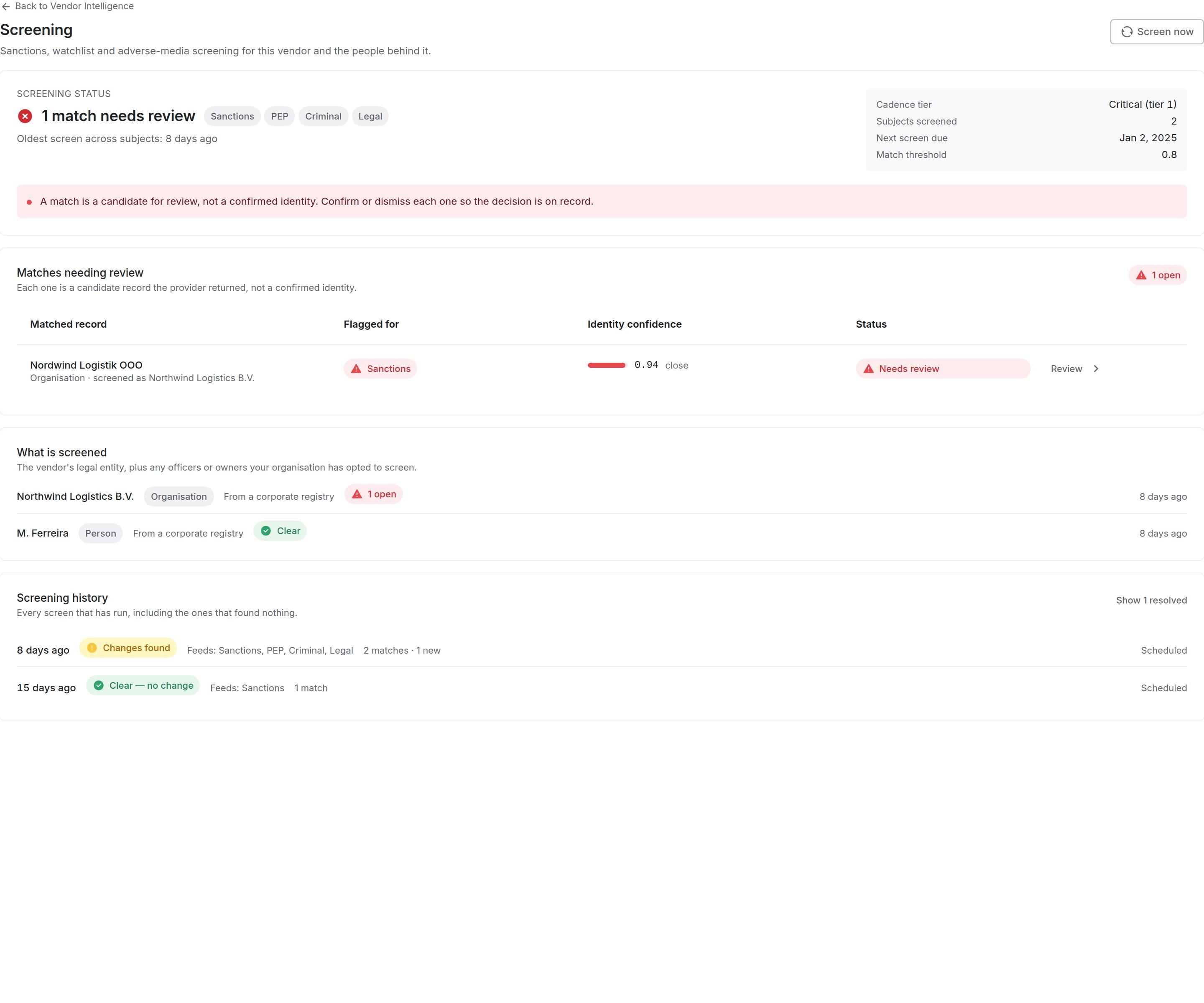
1 Open matches, worst source first. 2 Identity confidence. 3 The run history, including clear screens.
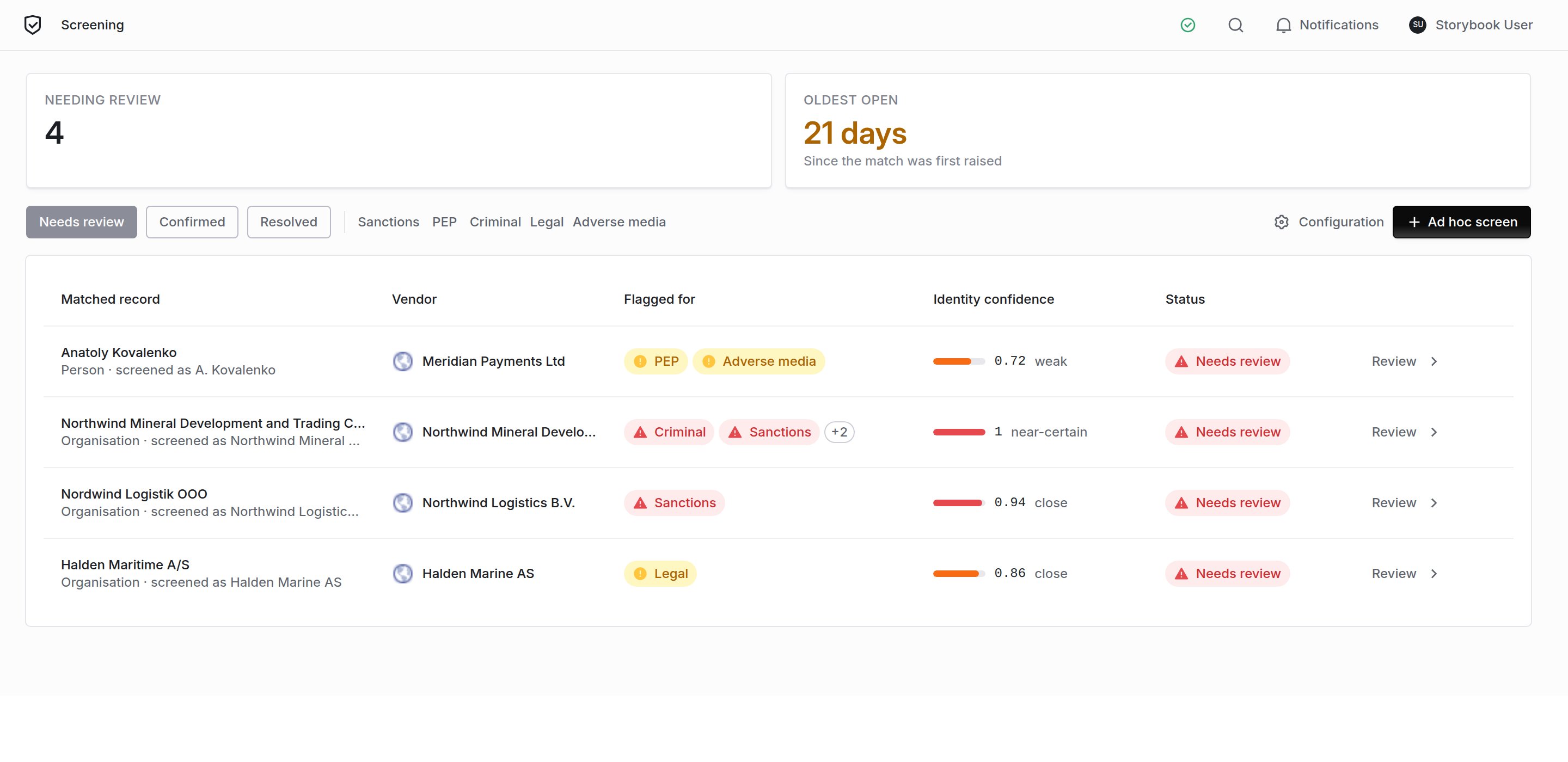
The org-wide queue. Matches from different vendors in one list, oldest first.
Identity confidence is not severity
Every match carries a score. It answers one question: how confident are we that this listed record is this vendor? It does not tell you how serious the listing is. A match at 0.95 against an adverse-media article means we are confident the article is about this subject, not that the article is damning. A confirmed sanctions listing at 0.72 is far more urgent than a high-confidence mention in a news story. Screening runs on thin identity data: a name, usually a country, sometimes a registration number, almost never a date of birth. That is not much to match on, so false positives are expected and are not a defect. A common surname or a generic trading name will produce candidates that are not your vendor. Clearing those is the job, which is why the queue exists.Reading a match
Open any match to get the full record.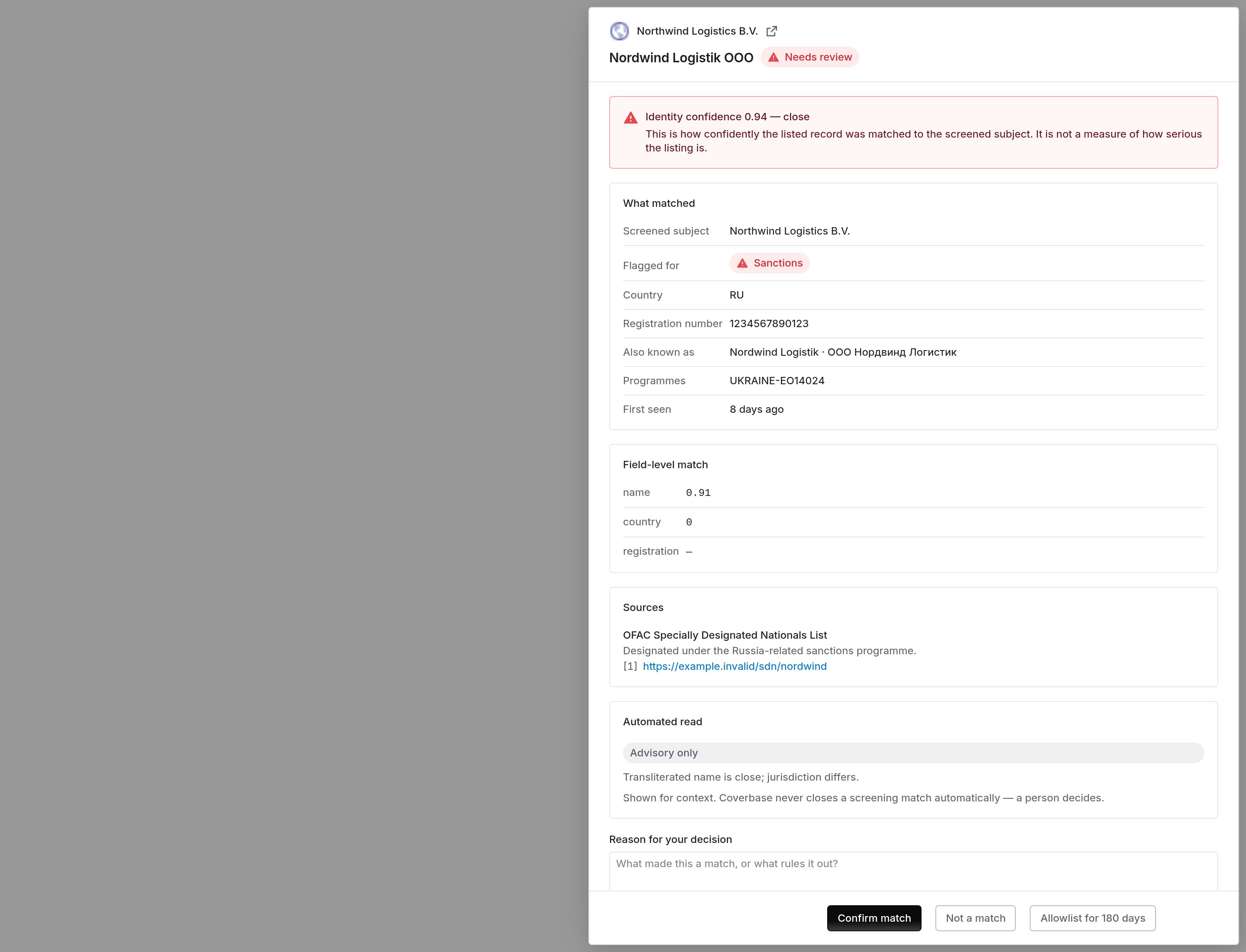
The review drawer: what matched, field by field, with the sources behind it.
- Screened subject vs matched name. The two names side by side. This is usually enough to rule out an obvious mismatch.
- Country and registration number. The strongest discriminators available. A registration number that matches is close to conclusive; a country that does not match is a strong signal it is a different entity.
- Also known as. Transliterations and former names. A vendor that looks unrelated in English can match exactly in its own script.
- Field-level match. Which attributes agreed, and how strongly. A high overall score built only on the name is weaker than a lower score built on name and registration.
- Sources. The listing itself. Follow it before you decide.
Deciding
Three outcomes. The Reason for your decision is optional, but anything you write becomes part of the audit trail, so write it for someone reading it in a year with none of your context.What “clear” looks like
A vendor with nothing to review still shows its run history.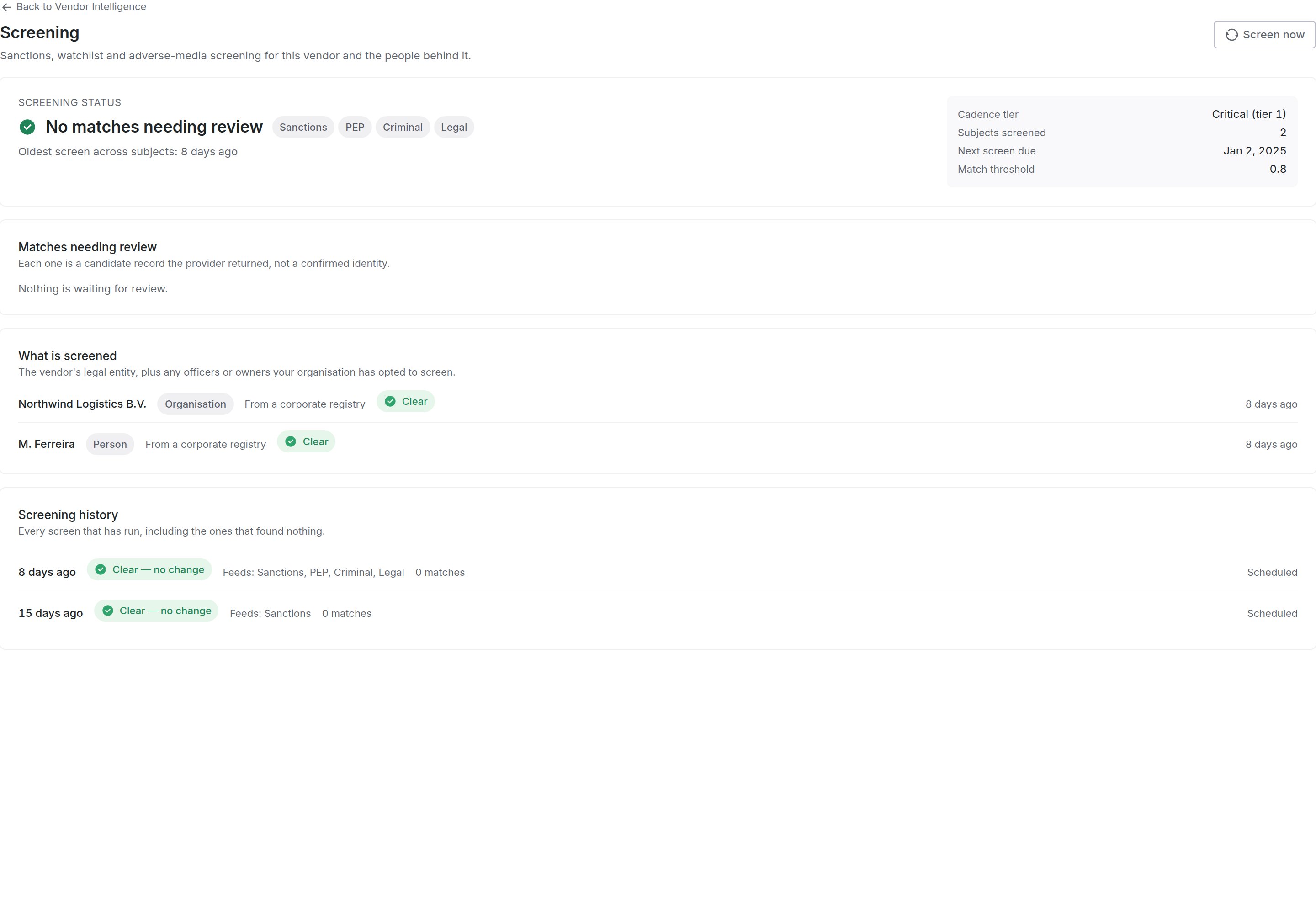
No open matches. The screens still show, with their dates and sources.
Prove a vendor was screened
An auditor usually asks two things: when did you start screening this vendor, and when did you last screen it. A vendor’s Screening tab answers both in First screened and Last screened. A vendor that is enrolled but has not finished a screen yet reads Never screened. To answer for every enrolled vendor at once, click Download evidence on the queue. You get a CSV with one row per enrolled vendor:Screen a vendor now, or someone it missed
Screen now, at the top of a vendor’s Screening tab, screens the vendor straight away instead of waiting for the schedule. It works once a screening provider is connected, even if Screen vendors on a schedule is off. In the dialog you choose:- Who to screen: the organization itself, and any officers or owners already screened for the vendor. A vendor nobody has screened yet screens the organization.
- Screen against: any of the sources switched on for your organization, such as sanctions, PEP or adverse media. A source switched off in the settings is not offered.
- Keep re-screening on a schedule: on by default when your organization screens on a schedule, and off and locked when it does not. Turn it off to screen once without monitoring.
Screening in a Zero Touch assessment
When your organization has a screening provider connected, a Zero Touch assessment screens the vendor itself before it grades. It uses your organization’s sources, and it runs whether or not Screen vendors on a schedule is on. The screen shows in the vendor’s screening history with the trigger Zero Touch assessment, and an open match feeds the report’s Reputation section. The report’s Screening section lists who was screened, the sources, every screen on record, including the clear ones, and the decision and reason recorded on each match. A report run without a provider connected has no Screening section.Screen a name once
Ad hoc screen, on the queue, screens one name a single time without enrolling it for monitoring. Use it for a prospective supplier, a new director, or a name someone asks about.- Pick Organisation or Person and enter the Legal Name or Full Name.
- Add any identifying details you have. Each one rules candidates out; a name on its own returns the most to review.
- Check the Sources. They default to what your policy runs, and a source switched off for your organization cannot be picked.
- Optionally pick a Linked Vendor, so the screen also shows on that vendor’s record. Left empty, it stands on its own and creates no vendor.
- Click Run screen. The page opens the result when the provider answers, and any match lands in the queue marked ad hoc.
Screen a vendor at intake
When someone requests a new vendor, the intake portal’s pre-qualification step checks it for sanctions. An administrator sets how under Configuration → Portal Templates, on the intake template, under Pre-qualifications, below Enable sanctions check. Turning Enable sanctions check off skips the check entirely. Screen Against picks the source:- Coverbase sanctions screening (the default) screens the vendor with your organization’s screening provider once screening is connected. The screen is recorded in the screening history, and a possible match goes to the queue marked ad hoc, like any other match.
- OFAC list only matches the vendor’s name against the US Treasury’s SDN and consolidated lists. Nothing is recorded in the screening history.
- A possible match fails the sanctions check and names the listed party. Review it in the queue. A match you mark Not a match or allowlist no longer fails the check when the requester runs intake again.
- Until screening is enabled and connected with an API key, intake runs its standard OFAC list check, and the step works as it always has. The same happens if every chosen source is switched off, or if a screen can’t complete because the provider is down or rejects the key. A failed screen still shows in the screening history, and a rejected key shows on the Screening settings page.
- If the OFAC lists themselves can’t be read, the check says it needs review. It never reads as clear.
Settings
An administrator configures screening once, under Configuration → Monitoring → Screening, or from Configuration on the queue. It needs theintegration permission, not the screening one.
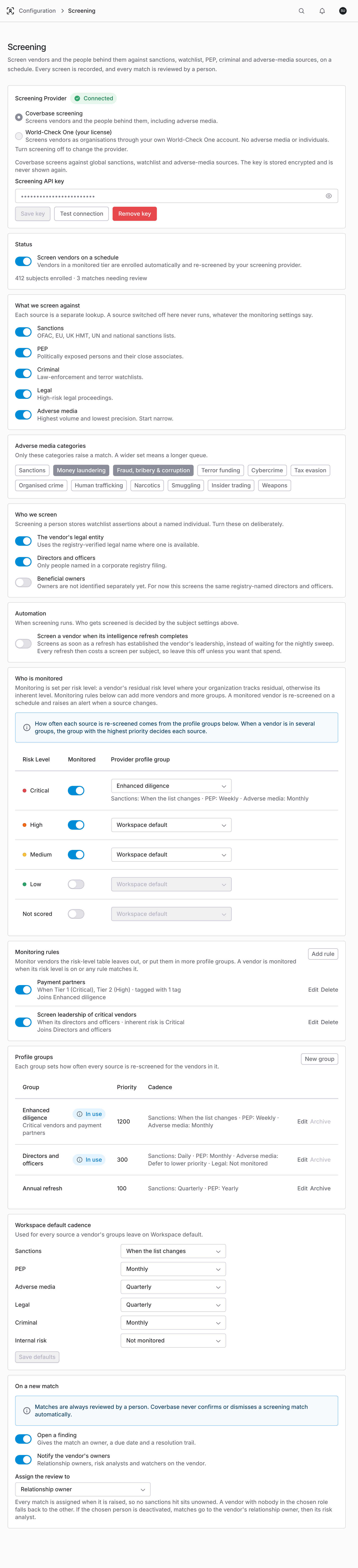
The policy: which sources, who gets screened, which vendors are monitored and how often, and what a new match raises.
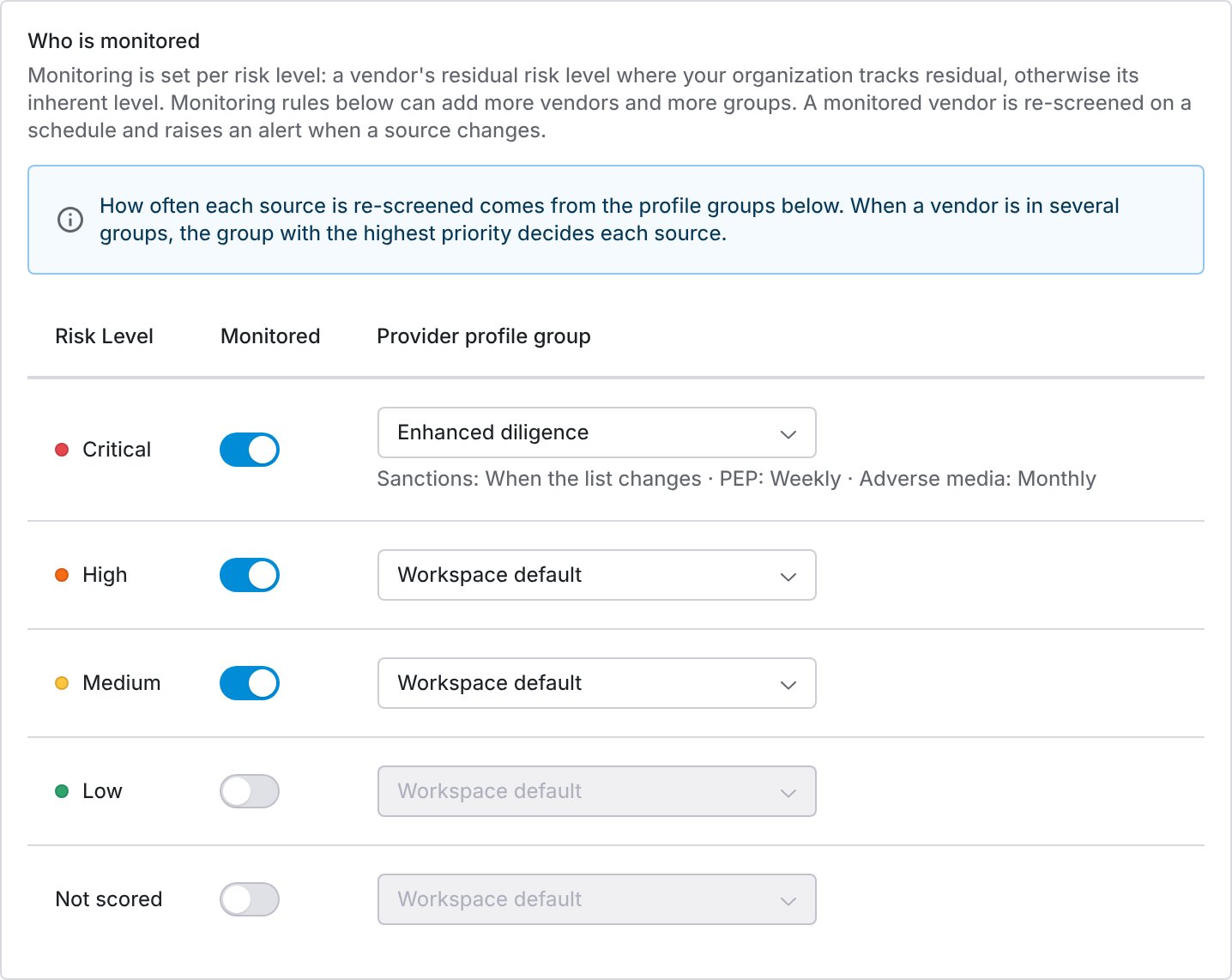
Monitoring per risk level. A level's profile group shows the cadence it sets for each source.
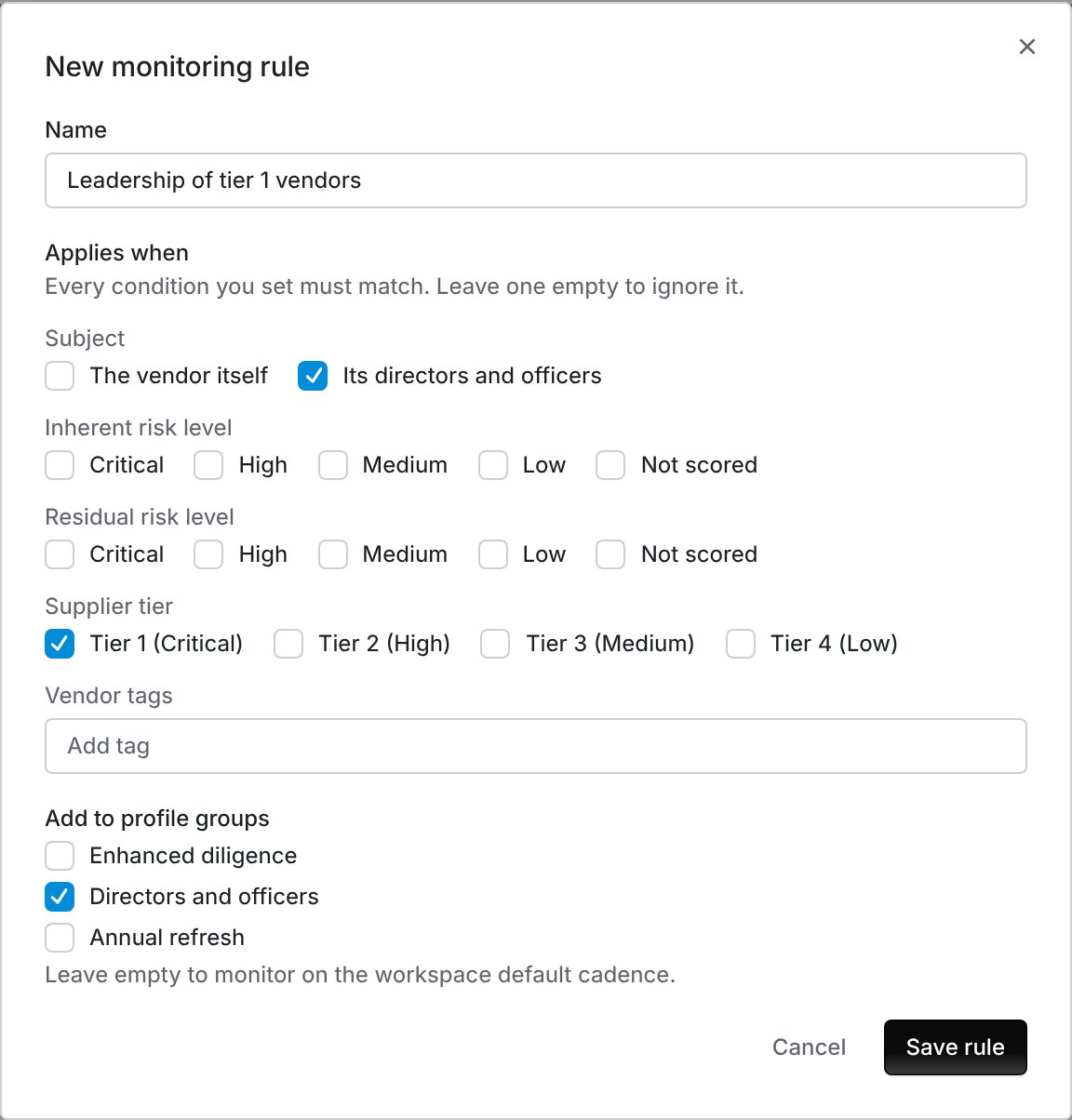
A rule that monitors the directors and officers of Tier 1 vendors in their own profile group.
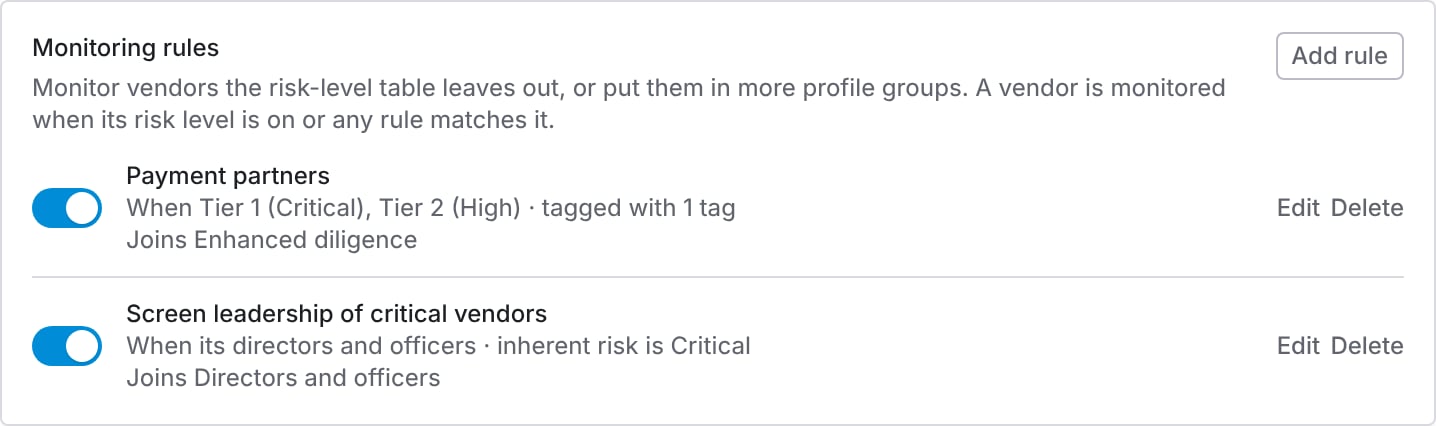
Each rule lists its conditions and the groups its vendors join.
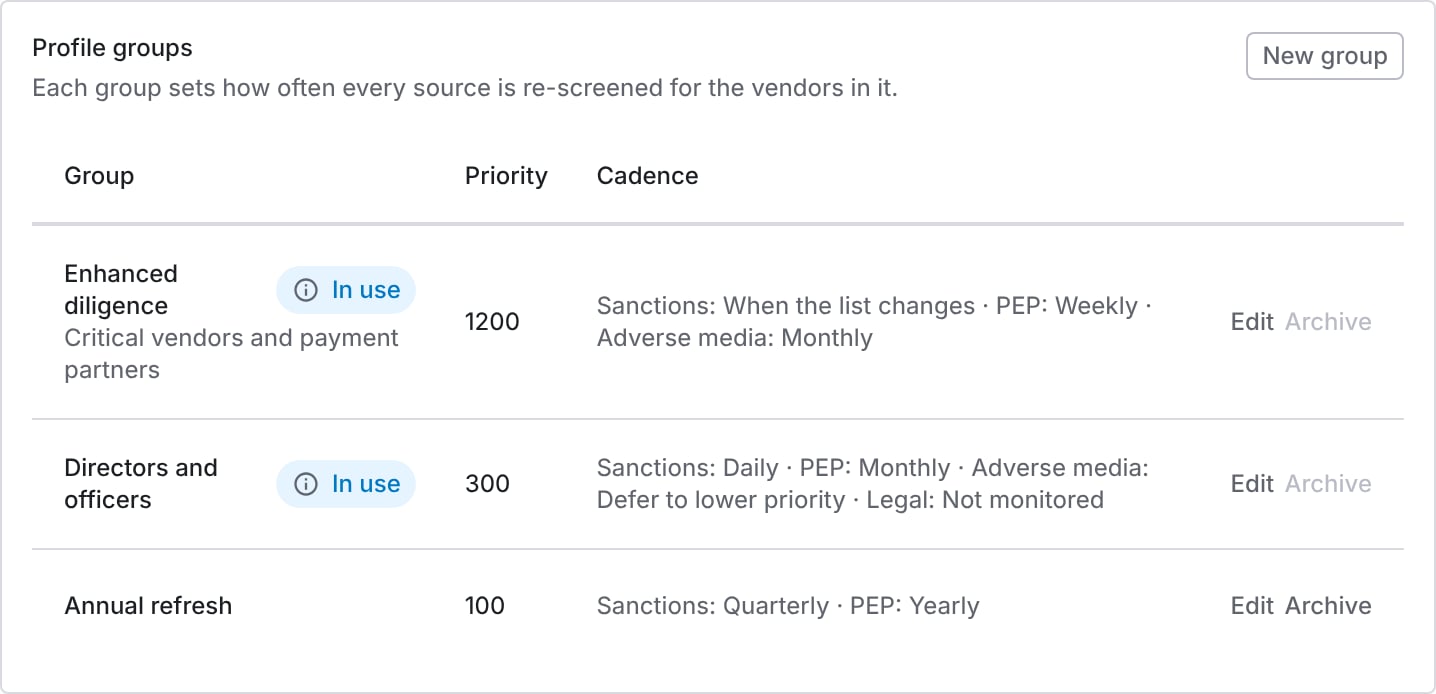
Each group's priority and the cadence it sets per source. A group a risk level or rule uses is marked In use.
- Workspace default uses the workspace default cadence for that source.
- Defer to lower priority passes the source to the vendor’s next group by priority. If no group sets it, that source is not monitored for the vendor.
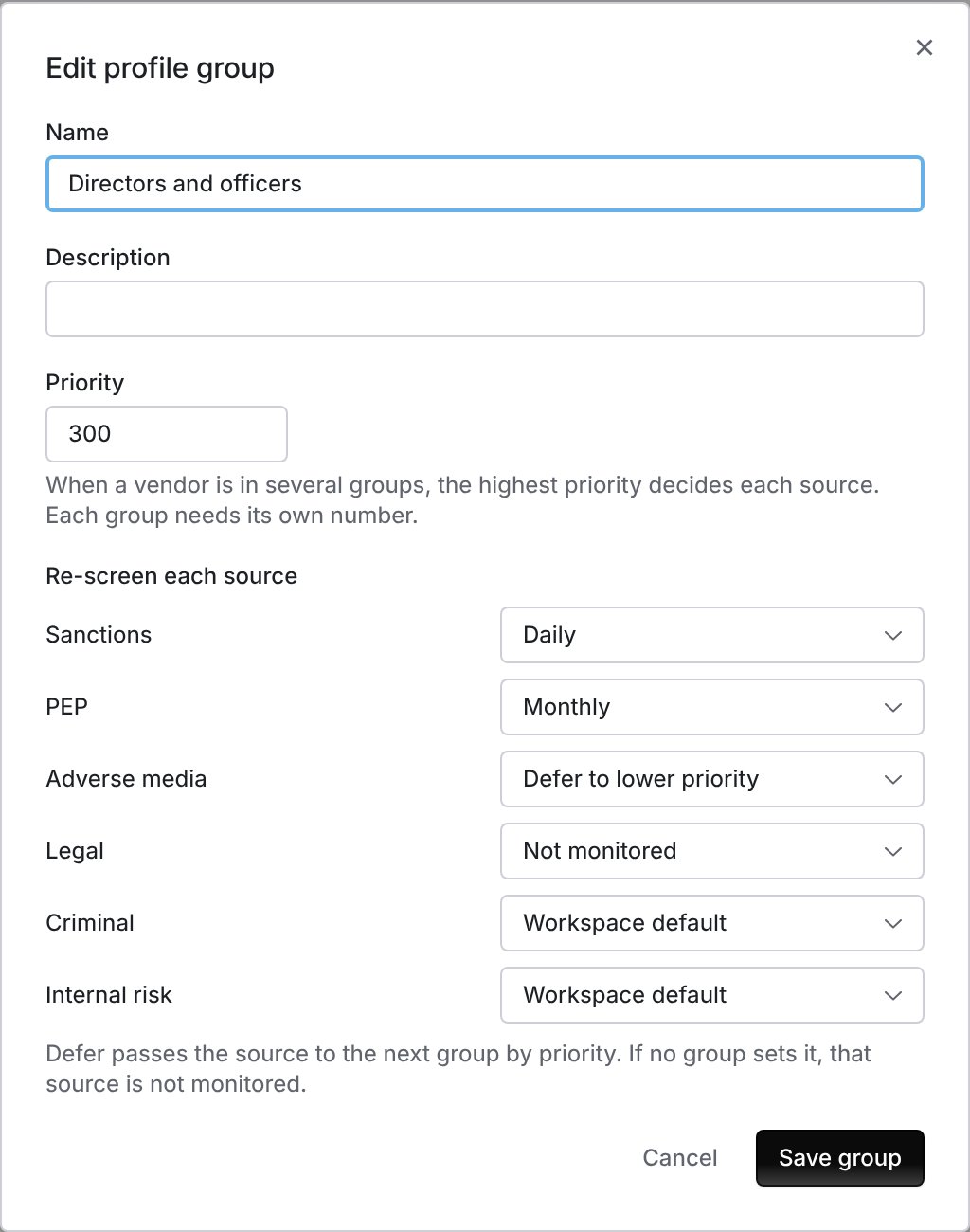
A group's priority and its cadence for each source.
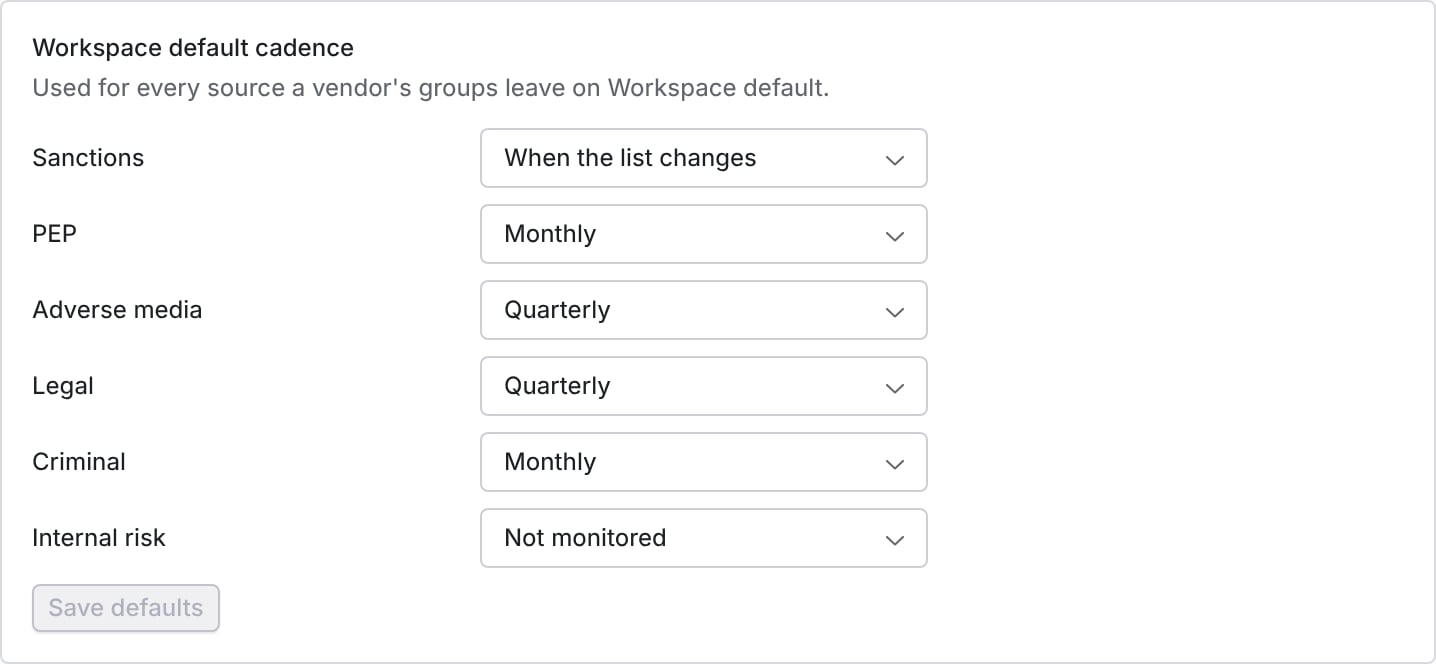
The cadence every source falls back to.
Screen through your World-Check One license
If your organization already licenses LSEG World-Check One, Coverbase can screen your vendors through your own account. Matches still come to the Coverbase queue, you decide them there, and the evidence above covers them the same way. The mistake to avoid is switching providers before you check what World-Check One screens. It screens organizations only, so it leaves out the people behind a vendor and adverse media.Connect your account
- Ask your World-Check One administrator for a service account in the group where Coverbase should create vendor cases.
- In Coverbase, go to External Integrations and open the LSEG World-Check One tile, under Risk Intelligence & Analytics.
- Paste the Service Account UUID and Service Account Secret, then click Save credentials.
- Click Test connection. A working account lists the groups it can use. If it says the account is not in any group, ask your World-Check One administrator to add it to one.
Choose it in your settings
- Under Configuration → Monitoring → Screening, pick World-Check One (your license) under Screening Provider, and confirm the switch.
- Pick a World-Check One Group. Coverbase creates each vendor’s case in this group. Changing the group later does not move cases already created.
- Set Who is monitored by risk level, as for Coverbase screening. Monitoring rules, profile groups and the workspace default cadence are Coverbase screening only.
- Switch on Screen vendors on a schedule.
What changes with World-Check One
Who can do what
Screening has its own permission, separate from the vendor record, so the person who reviews matches need not be the person who administers vendors.Work screening from MCP or the API
You can read the queue, screen vendors and record decisions from an MCP client, and read and screen with an API key. An MCP client reads withquery_vendors(kind="screening"), query_vendors(kind="screening_matches") and query_vendors(kind="screening_match"). It screens with mutate(entity="screening", action=...) (rescreen_vendor, enroll_person, ad_hoc) and records a decision with mutate(entity="screening_match", action="disposition").
The API routes are GET /v1/vendors/{vendor_id}/screening, POST /v1/screening-matches/query, POST /v1/vendors/{vendor_id}/screening/rescreen, POST /v1/vendors/{vendor_id}/screening/people and POST /v1/screening/ad-hoc. See Screening.
Before an MCP client sends a write, it shows you the change and waits for you to confirm it. The MCP tool reference lists every field.
These routes need screening_match permission, which API keys do not hold, so use a key created by a person whose role holds it. Even then, a key cannot decide a match. Clearing a match is a decision for a person.