

For AI agents: a documentation index is available at https://docs.coverbase.com/llms.txt. This page is also available in markdown by appending .md to the URL.
This guide is part of the User Guides collection. It is the entry point for signing. The five guides that follow it go deeper: templates, the passage library, envelopes, bulk send, and the signing experience.
Coverbase also connects to DocuSign if your organization already signs there. The two are alternatives, not layers: DocuSign creates the envelope in your own DocuSign account, while everything on this page happens inside Coverbase. Pick one per agreement rather than both. On a contract record both start from the Signature step of the Workflow tab, once the contract has cleared its approval chain; see Contract intake and approval. A DocuSign envelope is still listed on Contracts → Signatures, with the status DocuSign reports.
The four things
Template
The paper you send repeatedly, with the signing parties and the fields already placed. Built once, used many times.
Envelope
One agreement, out for signature, addressed to named people. Created from a template or from a document on its own.
Portal
What your counterparty opens. No account, no download, a link that works on a phone.
Executed copy
The sealed PDF plus a hash-chained record of everything that happened to it.
The shape of a signing
A template is optional. The parts that are not optional are the envelope, the signing, and the copy you keep.1
Build a template, or skip it
A template holds a source document, the signing parties as roles rather than people, and the fields each role fills. If this is a one-off, start from a document instead and place the fields on the envelope itself.
2
Create an envelope and name the people
The template’s roles become empty seats. You fill in who sits in each one, in what order they are asked, and how long they have.
3
Send it
Coverbase emails the first routing step. Later steps are notified as the envelope advances, so nobody is asked before it is their turn.
4
They sign in the portal
Consent, then adopt a signature, then fill what is theirs. Everything they do is timestamped and recorded against their address.
5
Coverbase seals the result
Once the last party signs, the fields are flattened into the page, the document is sealed, and a signing certificate is generated alongside it.
Where everything lives
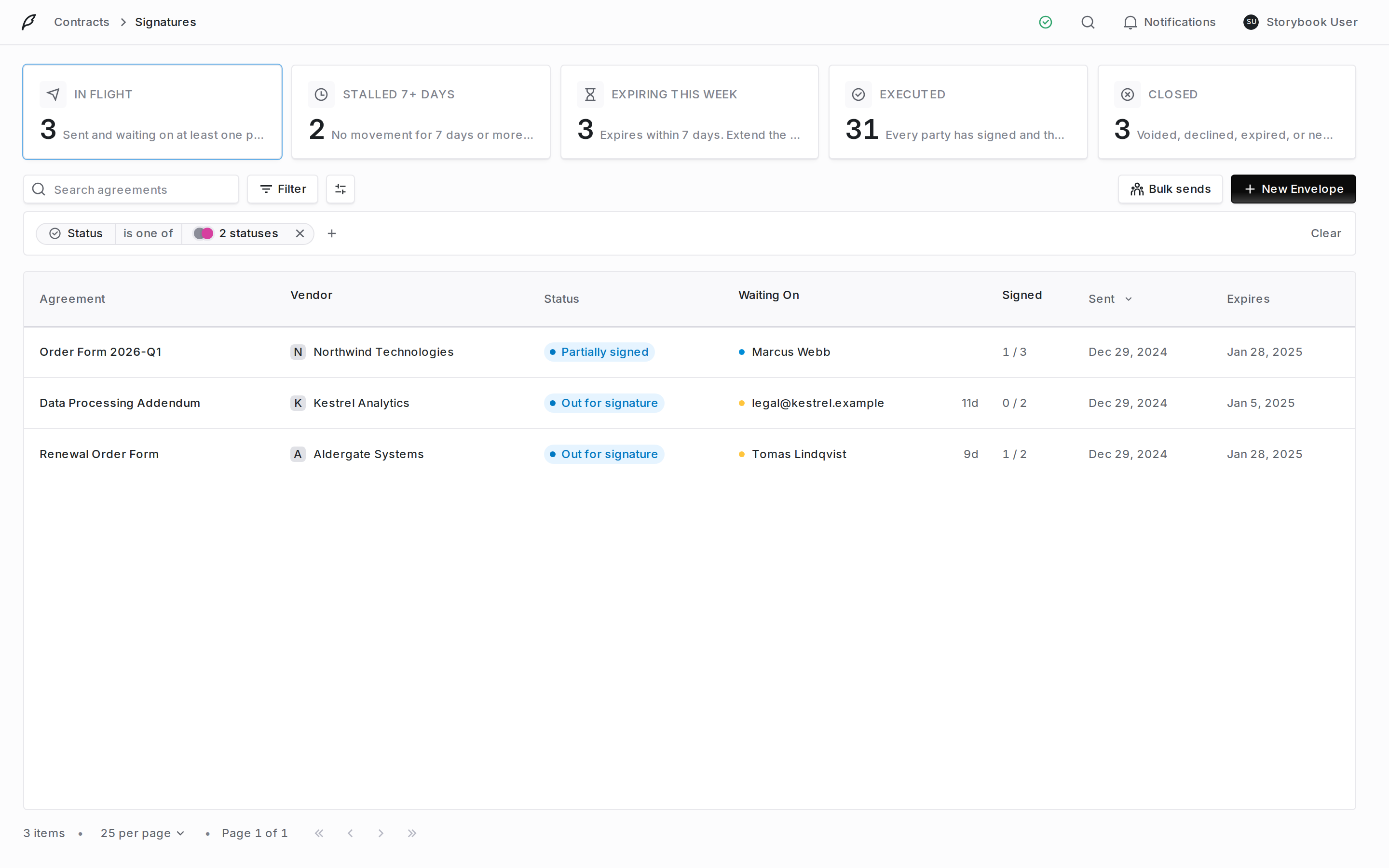
The signatures inbox. The cards across the top are saved filters, not statistics: pick one and the table below it narrows.
An envelope’s statuses
Status is about the envelope as a whole. Each recipient also has their own state, which is what the Waiting On column reads.
Each recipient also carries their own state: not yet notified, notified, opened, consented, signed, completed, declined or delegated, plus address bounced on a DocuSign envelope. That is what the envelope’s Signing Order panel reads out, party by party.
The send wizard saves nothing until you click Send for signature, so opening it and abandoning it leaves no draft behind. Only a sent envelope freezes the template it came from.
Before your first send
Signing settings are organization-wide and only need doing once. They cover the seal, the consent wording, what signers may do, and how the emails and the portal look.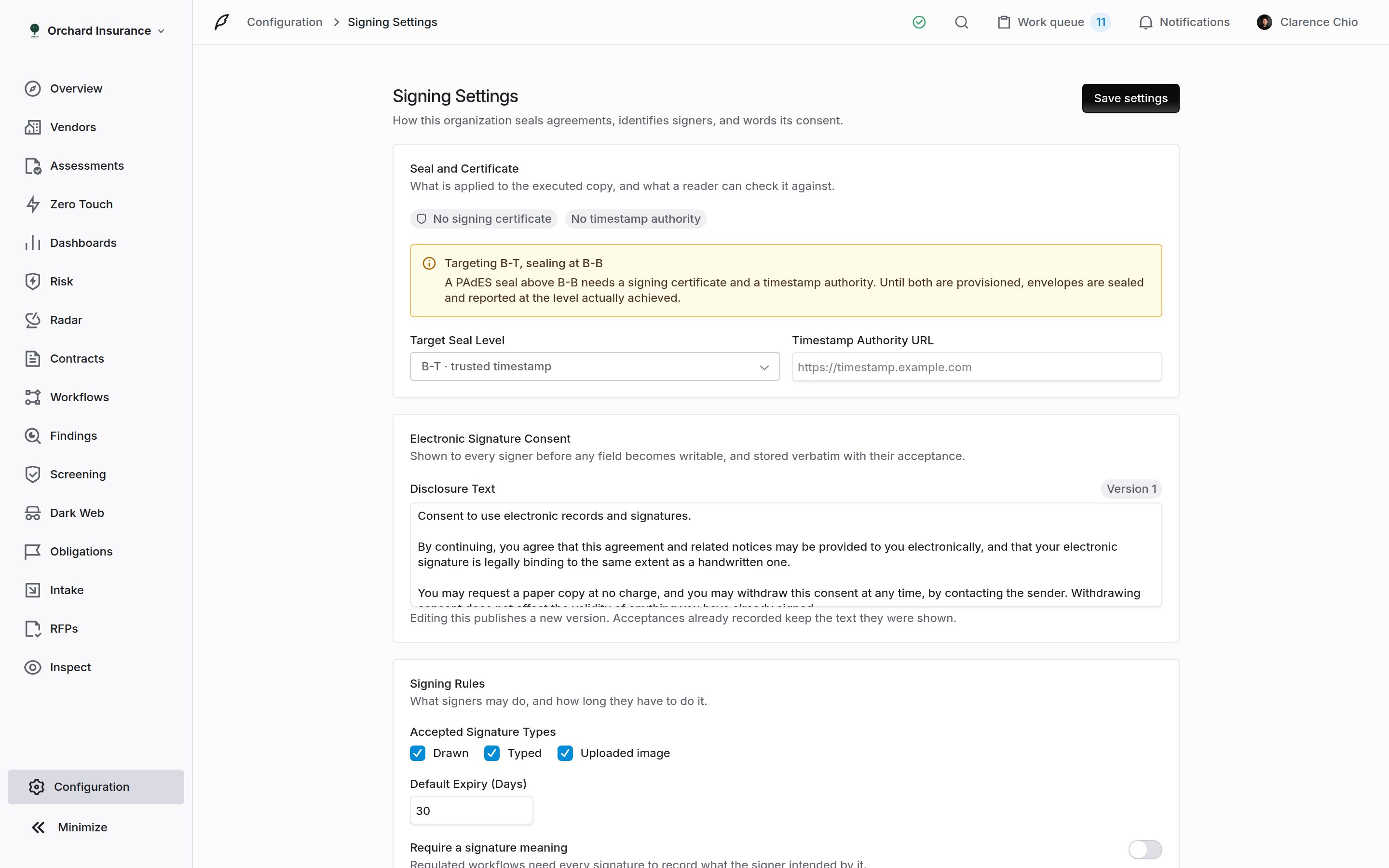
Configuration → E-signature opens Signing Settings. Everything here applies to every envelope your organization sends.
Seal and Certificate
Seal and Certificate
Target Seal Level is the PAdES level Coverbase aims for on the executed copy. Anything above B-B needs a signing certificate and a Timestamp Authority URL; until both are provisioned, envelopes are sealed and reported at the level achieved rather than the one you asked for. The page says which of the two is missing.
Electronic Signature Consent
Electronic Signature Consent
The ESIGN disclosure every signer sees before any field becomes writable. It is stored verbatim with each acceptance, so editing it publishes a new version and acceptances already recorded keep the text they were shown. A later edit cannot appear to change what someone agreed to.
Signing Rules
Signing Rules
Accepted Signature Types decides which ways of signing the signing page offers: Drawn and Typed. Uploaded image is also listed, but the signing page has no upload option today, so ticking it adds nothing for a signer. Default Expiry (Days) is what a new envelope starts at when nothing more specific applies. Require a signature meaning makes every signature record what the signer intended by it, which regulated workflows need and most do not.
Signer Verification
Signer Verification
Turn on Require email verification and a party must prove the address the agreement was sent to before the document is shown. The invitation links to the portal, which checks a one-time code first. Use it when the counterparty’s address is the only thing identifying them. This is the default a new envelope starts at, and the sender can change it for one envelope on the review step. Code lifetime (minutes) sets how long a code stays valid; five wrong guesses spend a code whatever it says.
Signing Emails and Portal Branding
Signing Emails and Portal Branding
Your own wording for the invitation, reminder, completion, declined and verification code mail; leave a field blank to keep the built-in copy. A Subject typed for one envelope, or an Email subject on a bulk send, replaces your invitation subject for that send. Portal Branding sets the Sender Name and a Portal Message shown on the signing page; the logo and accent come from your organization’s branding. Both are covered in the signing experience.
What Coverbase keeps
Every envelope carries three tabs.- Overview: the document, the parties, the fields and their values, and the portal link.
- Audit trail: every event, hash-chained, with IP and user agent. Covered in envelopes.
- Certificate: the signing certificate generated when the envelope completed.
Related
Signature templates
Build the paper you send repeatedly: roles, fields, publishing and versioning.
Sending for signature
Create an envelope, name who signs, send it, and track it to an executed copy.
The signing experience
What your counterparty sees in the portal, and how to brand it.
Contract intake and approval
The DocuSign path from a contract’s Workflow tab.