

Nobody is contacted
It runs without you
It produces one number
When to reach for one
Zero Touch is a filter, not a replacement for a full assessment. It is the right tool when:- A new vendor arrives and you need to know whether to spend a real review on it.
- You have inherited a portfolio and have no idea which vendors are risky.
- A renewal is coming up and you want a cheap re-check since the last review.
- Someone asks “are we exposed to this vendor?” and you need an answer today.
Running one
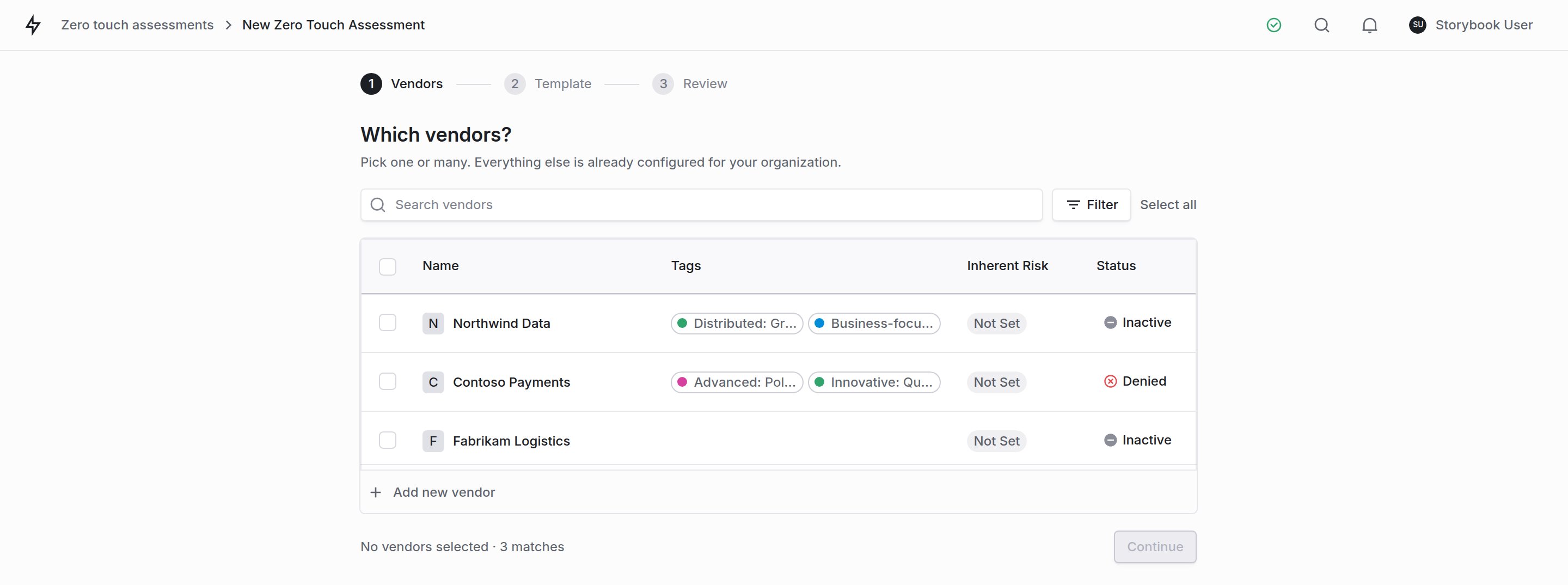
1 Pick one vendor or many. 2 Search and filter the vendor list. 3 Selected vendors carry to the next step.
Pick your vendors
Choose the question set
Confirm
Come back to the runs table
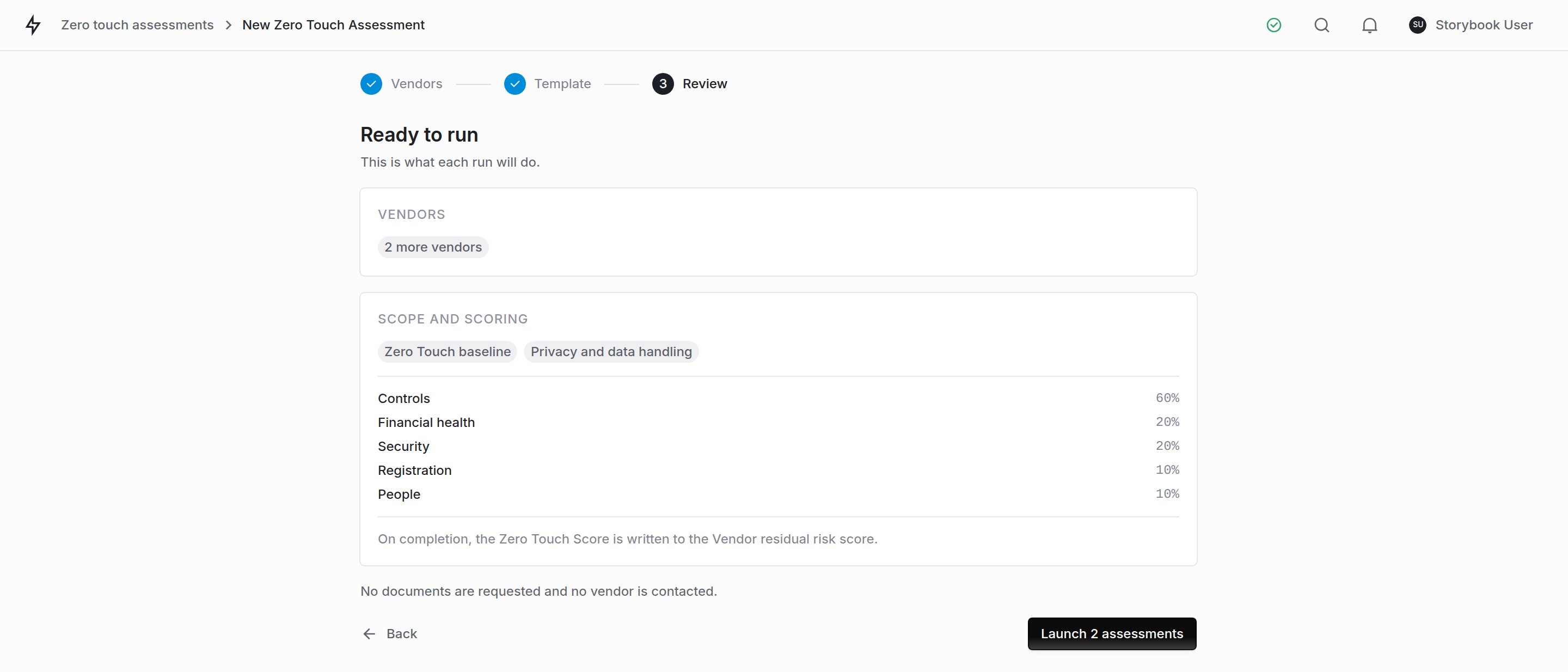
The confirm step. Nothing to configure, because scope and scoring are set once for the organization.
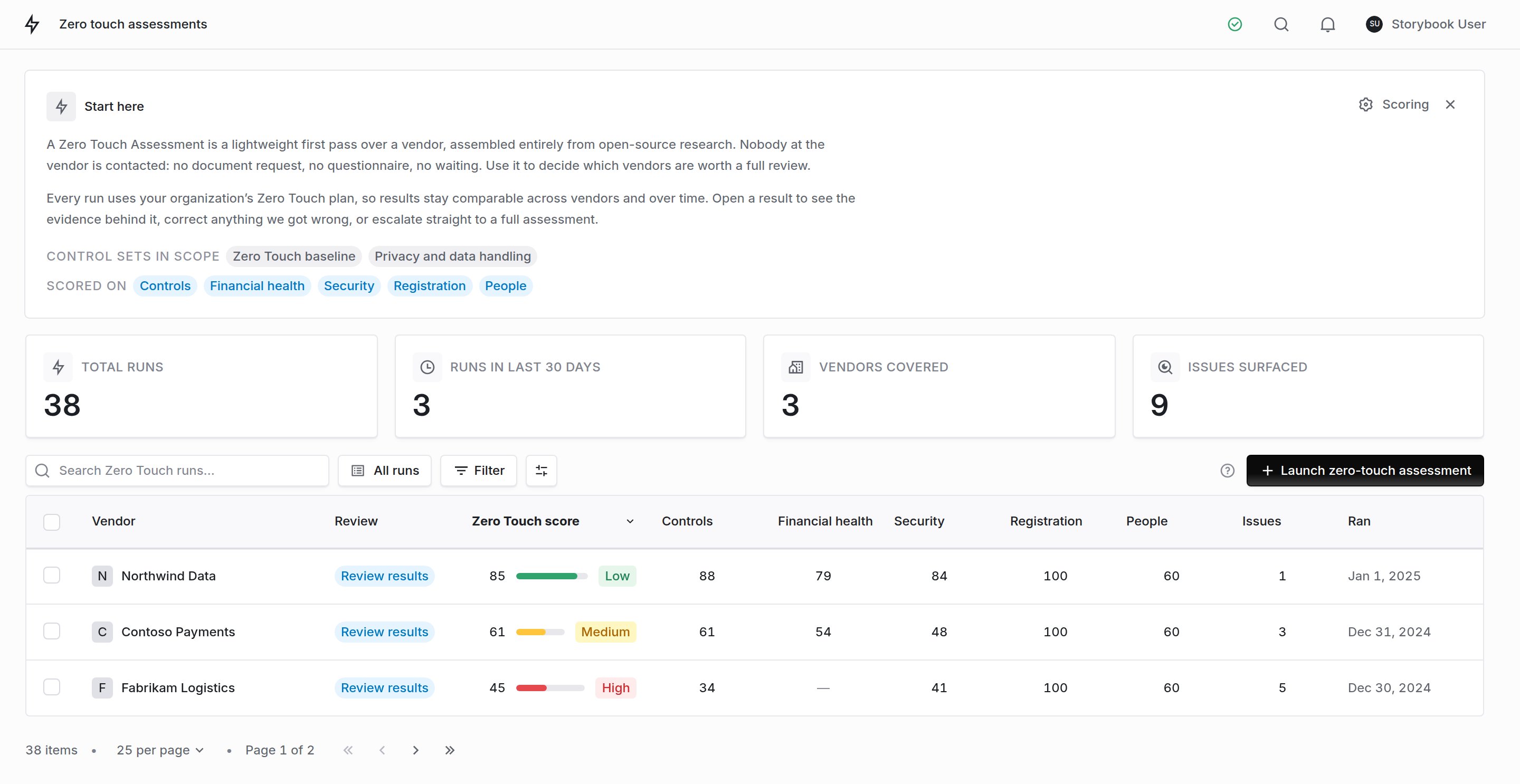
1 Search, saved views and filters. 2 Composite score and band. 3 Per-component scores. 4 Row selection for bulk actions.
- Score columns read down, not across. Every score sits in the same place in every row, so you can scan a column rather than read each row.
- A dash is not a zero. It means the component did not resolve for that vendor, and it was left out of the composite rather than counted against them.
- Not scored means no component resolved. The report lists the reason for each component: public evidence scored no control, the run found no data, your settings turn the component off, or the launcher left it out of the run. To get a score, add evidence (for example, the vendor’s financial statements) and run the assessment again.
Working a batch
Select rows with the checkboxes, then act on the whole selection at once. Click a checkbox to toggle that row. Hold Shift and click another to take everything in between.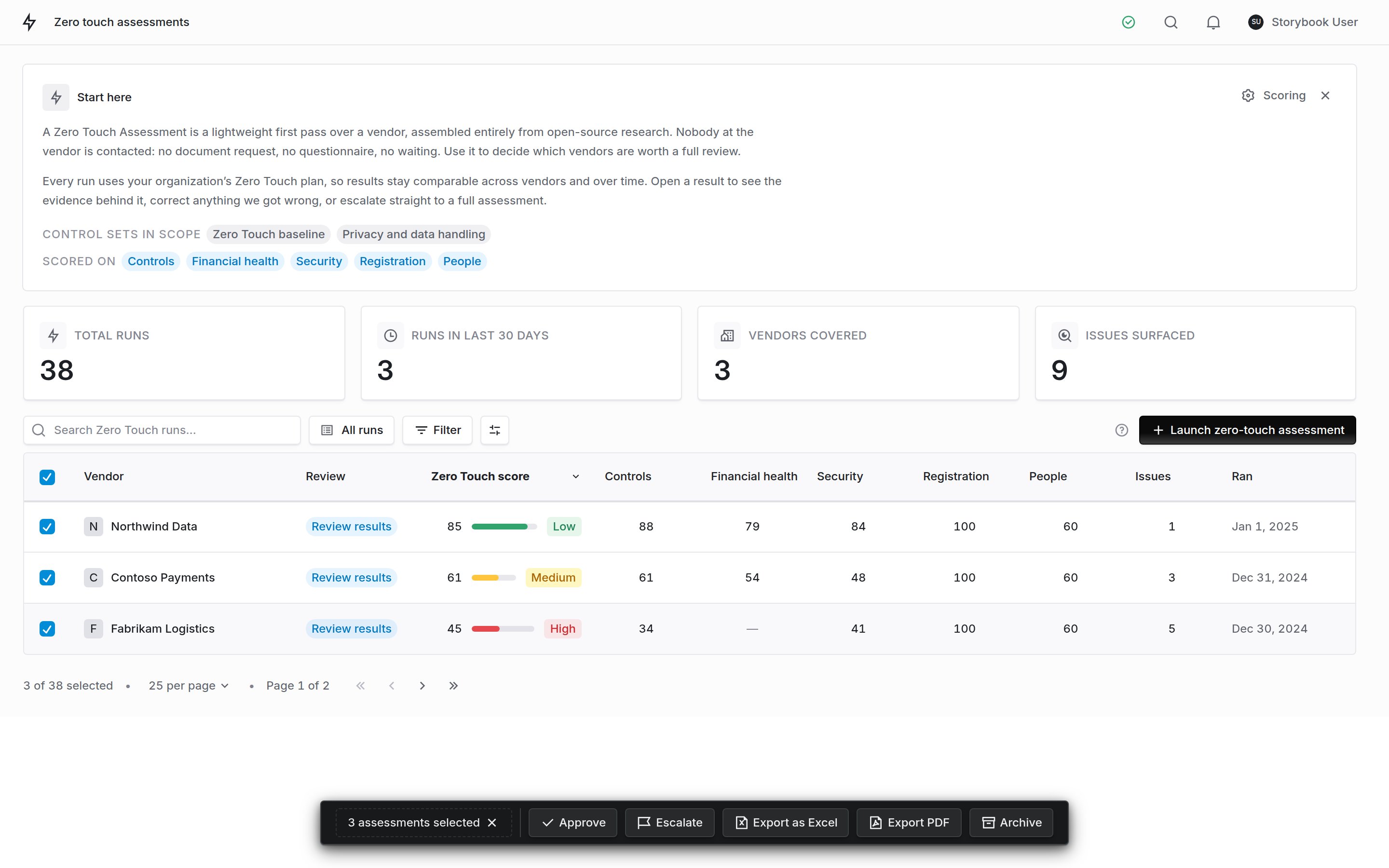
1 Click a checkbox to toggle a row, Shift-click another to take the range. 2 The footer counts your selection against every run, not only this page. 3 Approve, escalate or archive the whole selection at once.
Approve
Escalate
Archive
Reading a result
Open any run to read it as a report. The summary comes first: who the vendor is, the composite and the five components it is made of, the spread of control outcomes, and three short lists of what is in good shape, the key gaps, and the checks still open. The evidence follows, and every control the run evaluated sits in an appendix at the end. Use the rail on the left to jump straight to a section.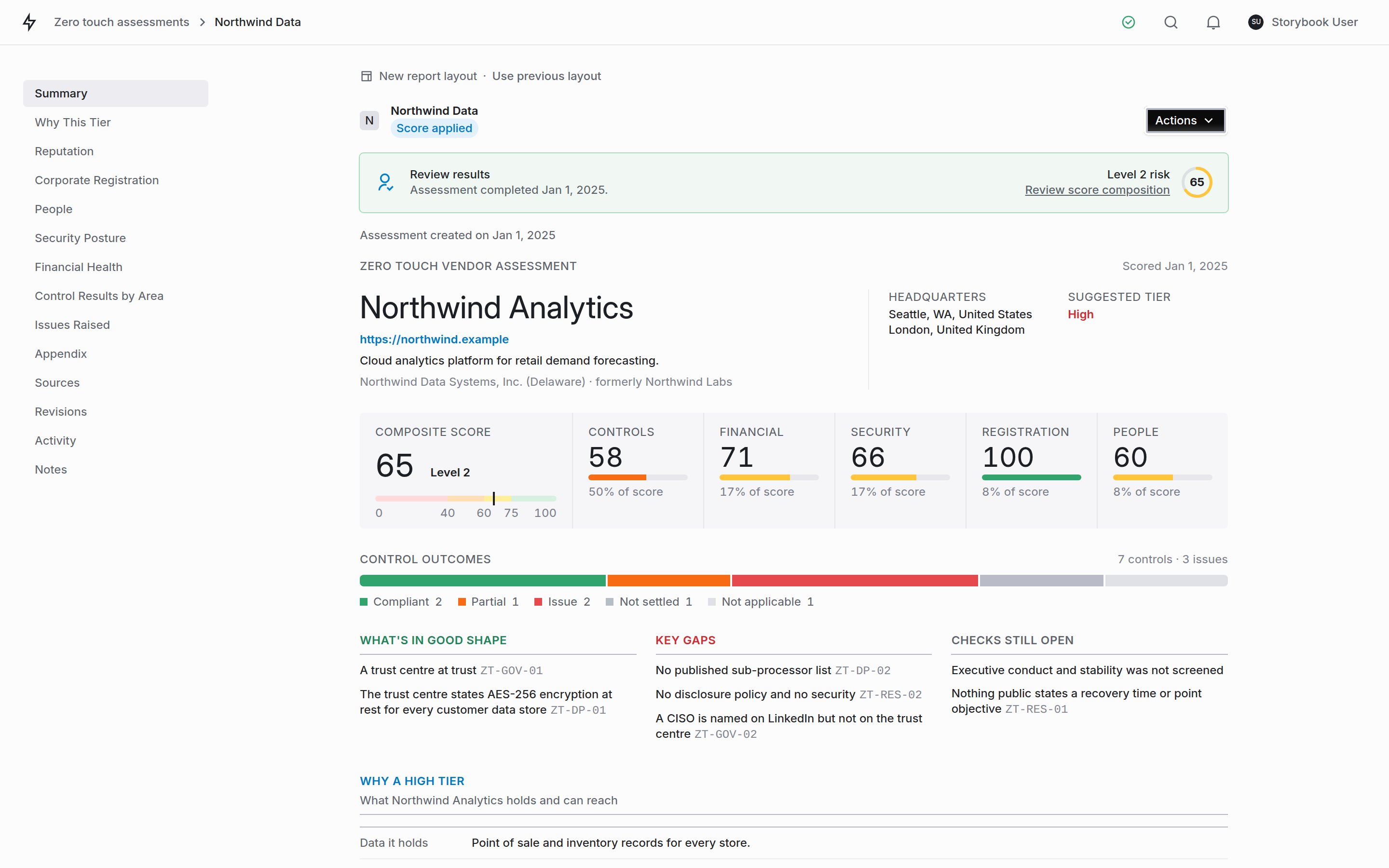
The top of a finished run: the vendor, the composite and its components, the control outcomes, and the summary lists.
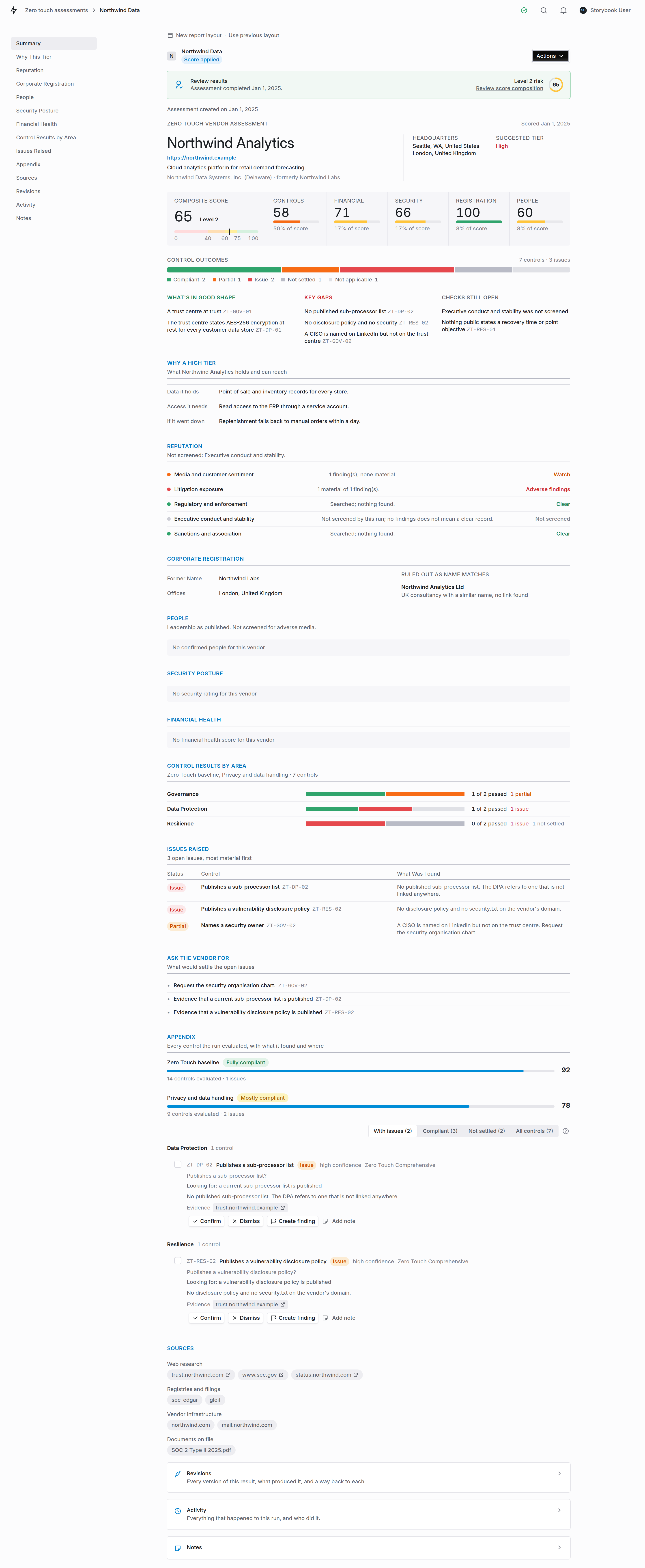
The whole report, from the summary through the appendix and sources to Revisions, Activity and Notes.
Who the vendor is
- Identity confidence: how sure the run is that it profiled the right company. Low when the name is generic or several companies share it.
- Risk tier confidence: how sure it is about the exposure. A run can be certain which company this is and still be unsure how much risk it represents.
The risk tier
What turned up against the vendor's name
The composite, then what it is made of
Check which components resolved
Work the controls
Work the issues
Check the sources
Reading the reputational section
Reputational evidence arrives from three places, and the Reputation section (Reputational Risk in the previous layout) puts all three in one place so you do not have to go looking:- Media and customer sentiment: controversy in the press, breach coverage, what customers say publicly.
- Litigation exposure: suits naming the company or its principals.
- Regulatory and enforcement: regulator decisions, enforcement action, insolvency proceedings.
- Executive conduct and stability: matters attached to a named individual, and leadership churn.
- Sanctions and association: watchlist and financial-crime adjacency.
Not screened is not clear
Each dimension reads one of four ways. The distinction that matters most is the last two, because they look similar and mean opposite things:Material versus carried
A finding is material when it counts against the vendor. A matter the subject was cleared of, or one a reviewer has already dispositioned, is still listed, because it is part of the record of what the run read. It is not counted as material, and it does not deduct from the score. The findings list is ordered material first, then by severity, so the row you need is at the top.Working the controls
Every control the run evaluated is listed in the report’s Appendix, grouped into sections (Security, Privacy, Company and identity, and so on) with its identifier, the question that was put to the research, the answer, and the evidence behind it.The four outcomes
A Zero Touch run reads public evidence and nothing else, so pass/fail is not enough to describe the result. Each control lands in one of four states:Four views over the same list
- With issues: the controls the evidence contradicts. Start here.
- Compliant: compliant and partially compliant together, so you can see what the vendor demonstrably does publish.
- Not settled: the controls nothing public answered.
- All controls: everything, in section order.
Recording your verdict
A control carrying an issue shows its decisions on the row. A control that came back compliant or unsettled folds the same decisions behind Actions.Confirm
Dismiss
Add note
Create findings
What is in a template
Every template card carries a What does this control set assess for? link listing all of its controls by section: the identifier, the question, and what the run treats as a pass. Read it before you commit a portfolio to a template.Revising a result
A run can only read what is public, so it will sometimes miss something you know: the registry match is a different company, a vulnerability belongs to another product with the same name, or the vendor sent you the policy the run could not find. Revise assessment updates the result from text you paste, without rerunning it.Paste what you know
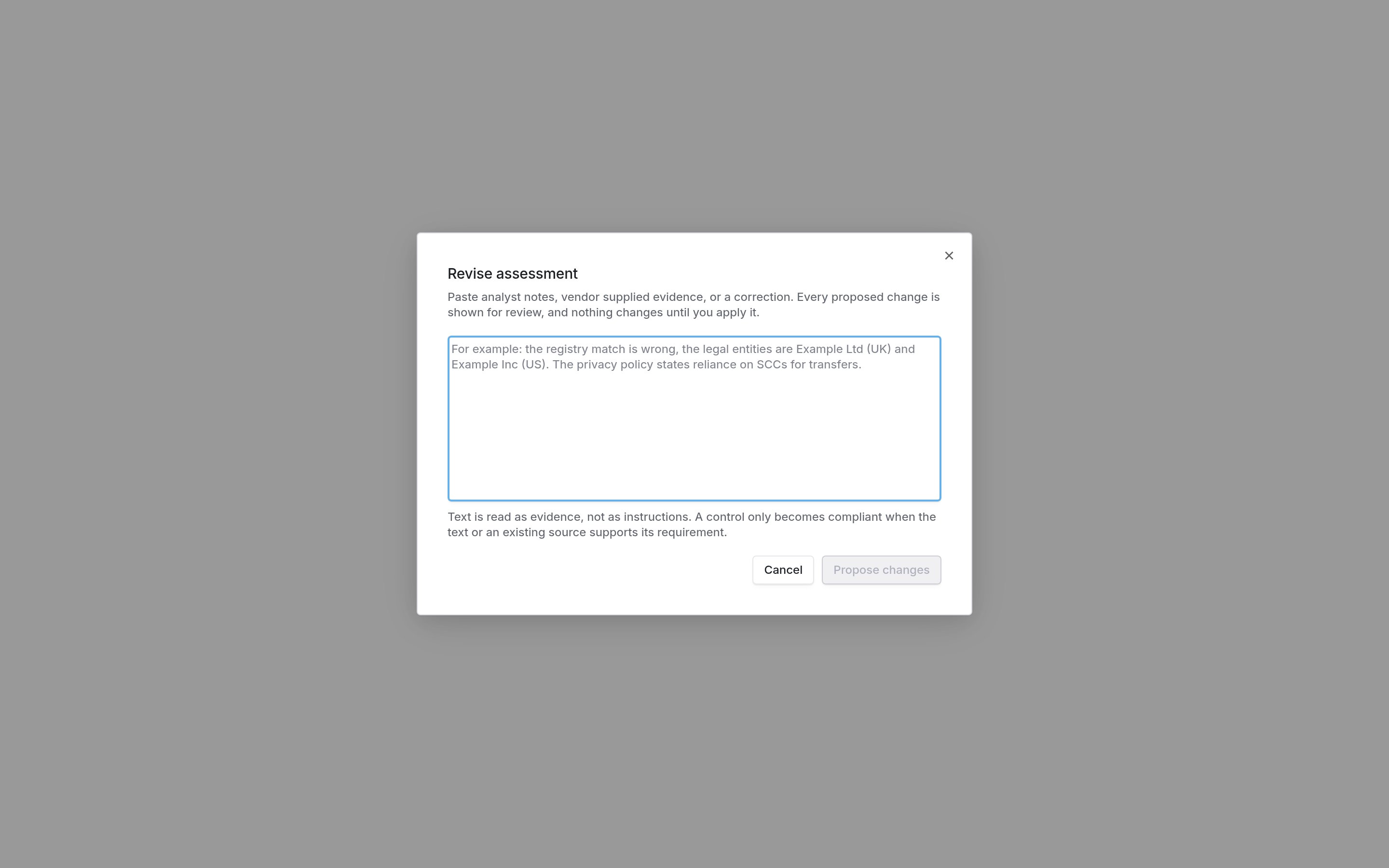
Paste notes, evidence or a correction. Nothing changes until you apply it.
Review each proposed change
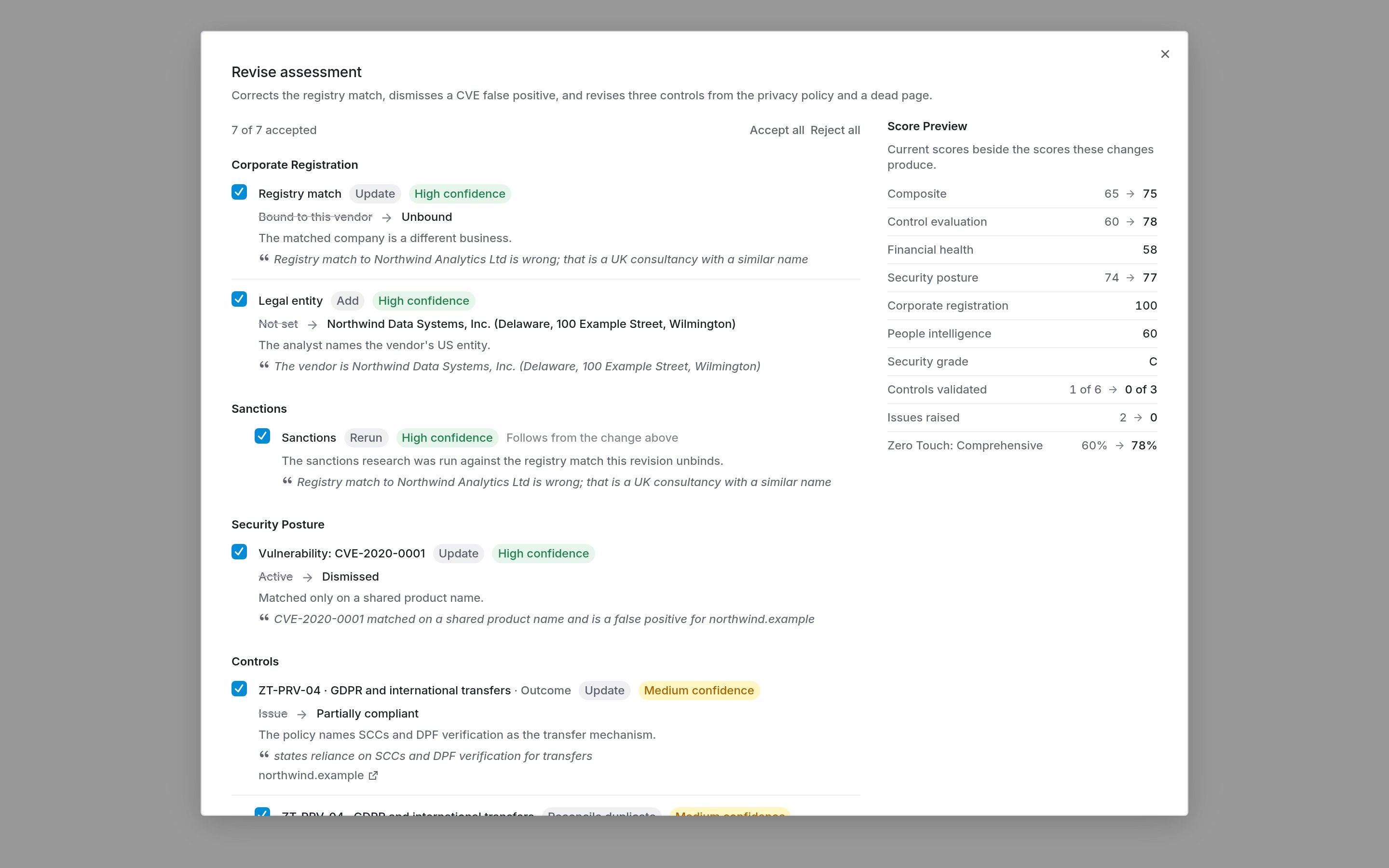
Each change shows what it replaces and the quote it rests on. The preview moves as you accept or reject.
Apply
Going back to an earlier version
Revisions, near the end of the report, lists every version of the result: what produced it (the original run, an analyst revision, a restore or a rescore), its composite, and the changes it applied. Open one to read it, and Restore to make it current again. A restore is itself a new version, so nothing in between is lost.The automated review
When Check each finished run against the vendor’s own pages is on, every finished run is read a second time. The review reads the vendor’s own website: its home page and the pages it links to, its trust and security pages, its policies, and pages found by a web search limited to the vendor’s site. It applies only the corrections a quote from one of those pages, or from a public record already on the run, supports. The corrections are saved as a new version, labeled Automated review under Revisions, with the quotes it relied on. Read it like any other revision, and Restore the previous version if you disagree. A result you revised while the review was running is left alone. The setting is on by default. Turn it off under Scoring on the module page. A run you complete by hand, and a rescore, are not reviewed.Deciding what happens next
A result page is a decision point, and there are three reasonable exits:Accept it
Escalate
Reassess
Reviewing a run
Everything you can do to a run sits behind Actions, at the top right of the result page. You can approve the run, create a full assessment from it, reassess it, revise it from notes or evidence, open the full record, export it, switch layout, or archive it.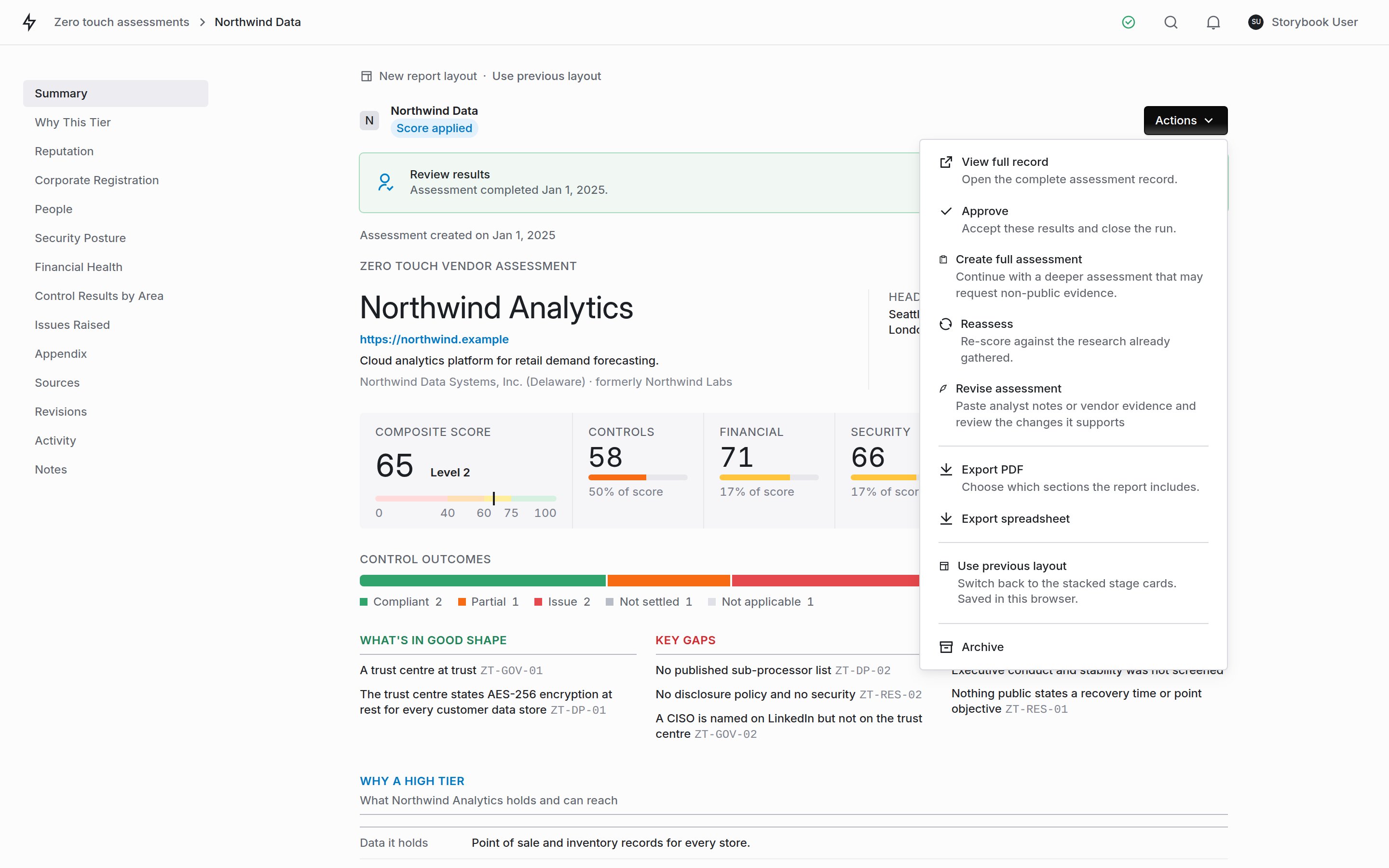
Approve closes the run. Create full assessment carries it onward. Reassess re-runs it, taking your correction first if you give one. Revise assessment updates it from text you paste.
This is the wrong company. The vendor we mean is at northwind.exampleZero Touch researches a vendor from public sources with nobody to ask, so it sometimes binds the wrong website, or a different company with a similar name. Describing that in a sentence is faster than finding the field it maps to. What happens when you submit: the correction is read into a short, fixed set of fields, the website and the company name and nothing else. Those are applied to the vendor record, and the run is re-scored against them. Your exact words, the fields that changed, and the score before and after are all written to the audit trail below.
While a run is working
Results fill in as they land, so a run is readable long before it finishes. Each stage carries its own state, and the banner at the top is the only place a run can be stopped.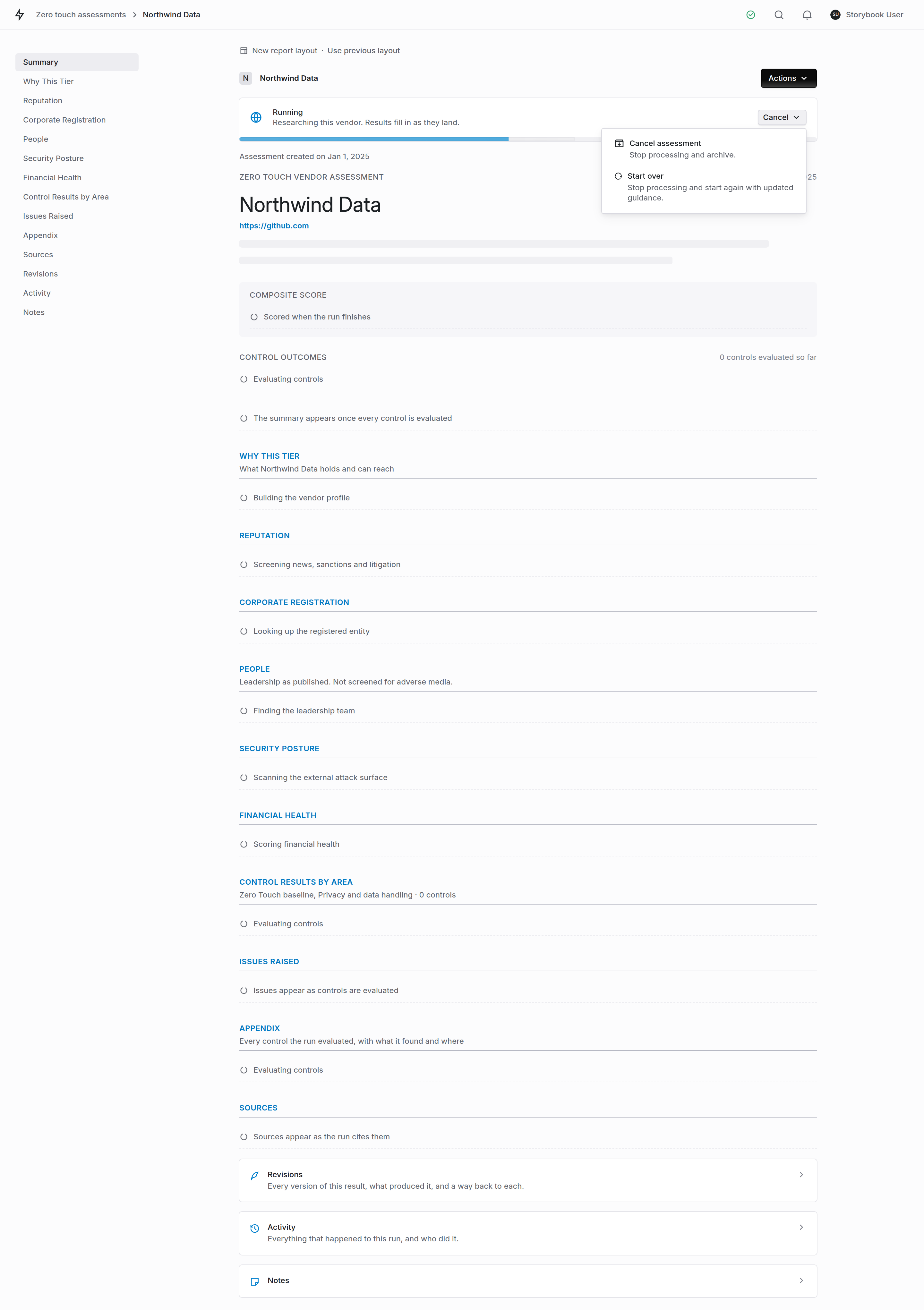
Sections fill in as they land. Cancel stops the run; start over relaunches it, optionally with a correction.
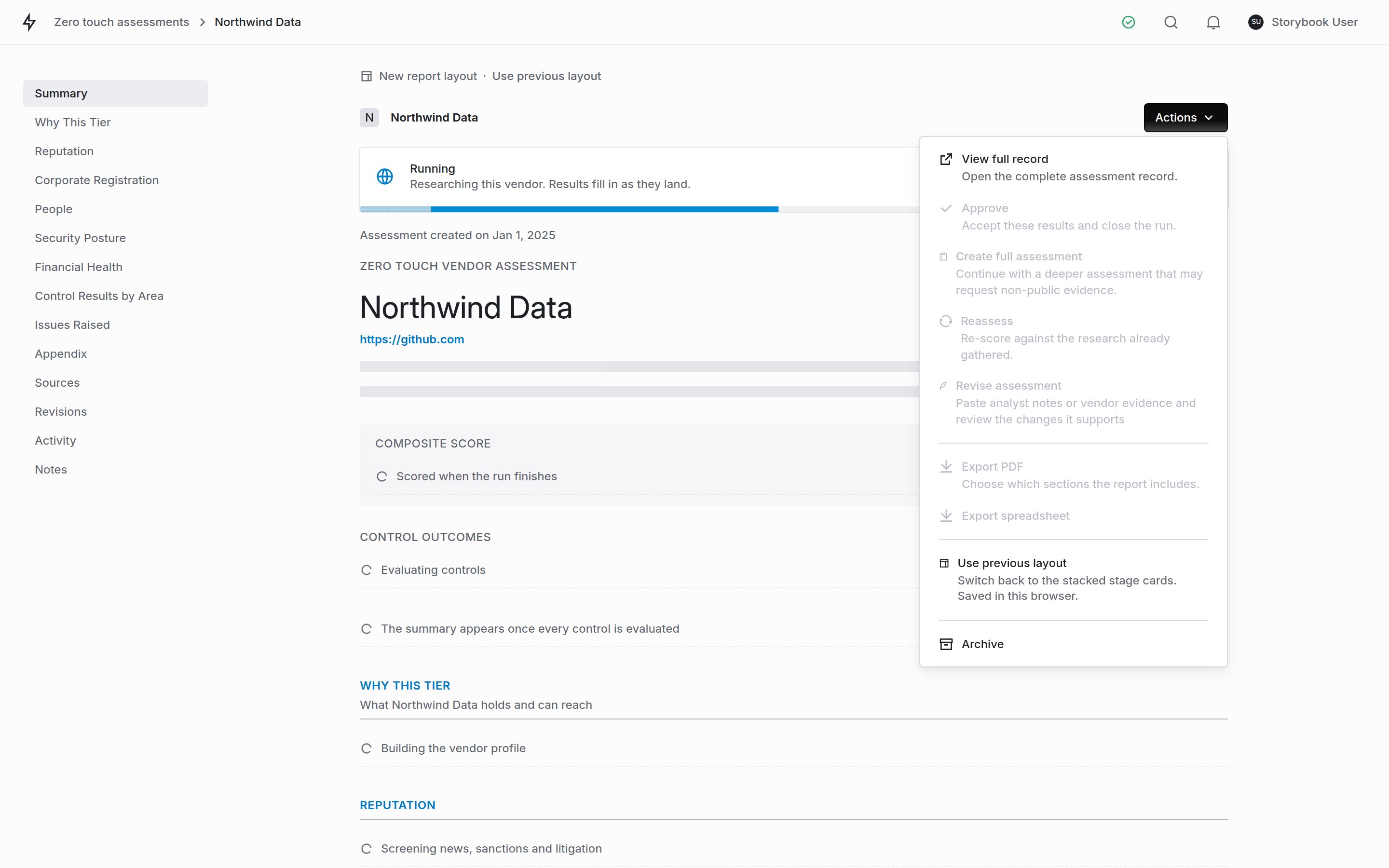
The same menu on a run in flight. What is grayed out is what the run has not produced yet.
Where a run stands
Every run carries a review status, shown on the result page and as a column in the runs table:The audit trail and notes
Below the result, the Activity section is the same activity log that vendors and assessments use, and it lists every action on the run with who took it, what it changed and what the score did: approvals, escalations, archives, corrections, re-scores and control verdicts alike. Notes sits underneath it for context that is not an action. This matters because a Zero Touch Score can be written onto a vendor’s real risk score. If a number moved, the trail is what tells you whether the machine found something or a person corrected it. Escalating does not itself launch a full assessment. It records the judgement. Starting the assessment is a separate step, because it puts work in front of your team and your vendor.Where the score goes
By default the Zero Touch Score stays on the run. Your administrator can point it at a risk score instead, from Scoring on the module page:Tuning what feeds the score
Also under Scoring: which signals count, and how heavily.- Toggle the financial health, security, corporate registration and people components on or off for your organization.
- Set relative weights. They are not percentages. They are renormalised over whichever components resolve for a given vendor, which is why a vendor missing one component still scores out of a full 100.
Corporate registration
Corporate registration
People
People
Choosing a template
Under Scoring, or as a step in the launch wizard, you can switch which set of questions Zero Touch runs evaluate. Seven ship with the product:What each one is for
Zero Touch Comprehensive: 49 questions (the default)
Zero Touch Comprehensive: 49 questions (the default)
Zero Touch Essentials: 12 questions
Zero Touch Essentials: 12 questions
Zero Touch for SaaS and Cloud: 30 questions
Zero Touch for SaaS and Cloud: 30 questions
Zero Touch for Healthcare: 21 questions
Zero Touch for Healthcare: 21 questions
Zero Touch for Financial Services: 29 questions
Zero Touch for Financial Services: 29 questions
Zero Touch for Services and Suppliers: 25 questions
Zero Touch for Services and Suppliers: 25 questions
Zero Touch for Open Source Software: 24 questions
Zero Touch for Open Source Software: 24 questions
Getting the results out
A whole portfolio
A single run
Finding the reputational read quickly
Things worth knowing
Why is my runs table empty right after a bulk launch?
Why is my runs table empty right after a bulk launch?
Do Zero Touch runs show up in my normal assessments list?
Do Zero Touch runs show up in my normal assessments list?
A reputational dimension says Not screened. Is the vendor clean?
A reputational dimension says Not screened. Is the vendor clean?
Why did a control come back unevaluated?
Why did a control come back unevaluated?
Does a re-run use fresh intelligence, or what was gathered last time?
Does a re-run use fresh intelligence, or what was gathered last time?
Why does a control show a code like ZT-SEC-04?
Why does a control show a code like ZT-SEC-04?
Can I re-run a vendor?
Can I re-run a vendor?
The profile describes the wrong company. Can I fix it?
The profile describes the wrong company. Can I fix it?
Does the risk tier change my vendor's risk score?
Does the risk tier change my vendor's risk score?