

What you get back
A direct answer
A verbatim quote
A page number
A snippet image
A highlighted deep link
A confidence
Running one
The scripted way
Invoke thepull_document_evidence prompt from your client’s prompt menu and give it a vendor name and a question. It runs the whole sequence: resolve the vendor, look at what documents exist, start the pull, wait for it, and report each answer with its quote, page, image and link. See Canned prompts.
The conversational way
Ask in plain language. All of these start a pull:A question about one vendor's evidence
A question about one vendor's evidence
Does Acme’s SOC 2 cover encryption of data at rest?The assistant resolves Acme, sees which documents you hold, and starts a pull scoped to that vendor. If several vendors match the name it asks which one rather than guessing.
A question narrowed to a document type
A question narrowed to a document type
What is the notice period for termination in Acme’s MSA?Naming the kind of document narrows the candidate set before anything is read. You do not have to: the selection step is usually right without it. It helps most when a vendor has dozens of documents and the question points at one type.
A question about one specific document
A question about one specific document
In the Acme penetration test report, were any critical findings left unresolved?When you name a document, that document is what gets read. No selection step.
A question scoped to a service
A question scoped to a service
For the Acme Data Warehouse service, does any document say where data is stored?Restricts the candidate set to documents attached to that service.
A question about a period
A question about a period
What did Acme’s most recent SOC 2 say about change management? Only look at documents uploaded this year.The pull itself has no upload-date filter. The assistant uses upload dates when it lists the vendor’s documents, and then points the pull at the document it found, or you can name that document yourself.
It takes a couple of minutes
Starting a pull returns a run id, not the answer. The file is fetched, a model reads it, and the passage is located and rendered. A typical pull finishes in one to three minutes, and a long document can take longer. Your assistant should tell you it is running and then collect the result. If it goes quiet, ask it to check the run.A worked example
You ask:Does Acme encrypt customer data at rest? Check their SOC 2.The assistant starts the pull and tells you so:
![Evidence snippet] line renders in chat as a crop of the page with the passage marked:
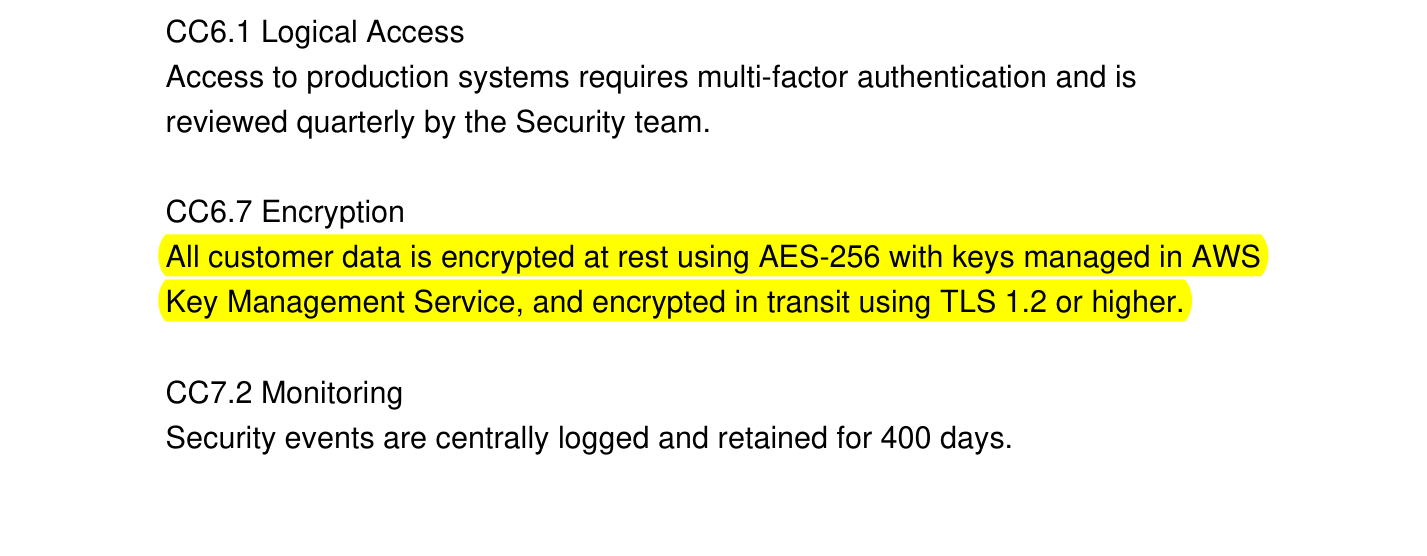
The snippet image returned with the answer: the quoted passage highlighted in place, with the surrounding controls left visible for context.
How Coverbase decides what to read
Reading every document a vendor has for every question would be slow and expensive, so a pull narrows in stages.Filter on metadata
Gather what was already quoted
Let a model pick
Read only those
Locate and render the passage
Asking the same thing twice is cheap
When a passage has already been quoted and rendered, a later pull can answer from it without reading the document again. You will see this in the header:Read 0 means nothing had to be opened. The finding will say Source: a passage already cited from this document, and the snippet image is the one rendered earlier. The answer is grounded in the same verbatim text either way.
Coverbase never reuses a passage whose underlying insight has since been re-extracted, so a stale image cannot ground a new answer.
The highlighted link
Every answer carries a link of this shape:What can and cannot be read
Scanned documents work
Scanned documents work
Excel workbooks read the original file
Excel workbooks read the original file
A document still processing is skipped
A document still processing is skipped
Very large documents may be declined
Very large documents may be declined
A document that answers nothing says so
A document that answers nothing says so
Reading the answer critically
An answer without a quote is unverified
An answer without a quote is unverified
Check what the answer does not cover
Check what the answer does not cover
Read 2 of 40 means thirty-eight documents were not opened. The answer is what those two say, not a statement about your whole repository.Confidence is the model's, not a measurement
Confidence is the model's, not a measurement
Widen the scope before concluding nothing exists
Widen the scope before concluding nothing exists
Limits
Permissions and audit
A pull reads only documents you can already see. It runs under your organization and your permissions, exactly like opening the document in the dashboard. Asking a question does not require write access. The pull records its own question and answer so the result can be collected later, and that record is the only thing it writes. It creates nothing you manage elsewhere: no finding, no note, no document. Every pull is captured in the MCP audit log with the tool called, the user, the organization, and the timestamp. See Permissions and Security.Pull evidence from MCP or the API
You run a pull from an MCP client withquery_vendors(kind="document_evidence") and read the answer with query_vendors(kind="document_evidence_result"). A read-only MCP key works, because a pull changes nothing. The public API has no route for it. To fetch the documents themselves with an API key, use GET /v1/documents and GET /v1/documents/{document_id}/download on the Documents API. See the MCP tool reference.
Related
Document Insights guide
Evidence quality
Canned prompts
pull_document_evidence and the nineteen other scripted workflows.