

For AI agents: a documentation index is available at https://docs.coverbase.com/llms.txt. This page is also available in markdown by appending .md to the URL.
This guide is part of the User Guides collection. Read it when something in your program keeps slipping (a request nobody picks up, a renewal that passes in silence, a finding with no clock on it) and you want to know what is already built before you build an automation from scratch.
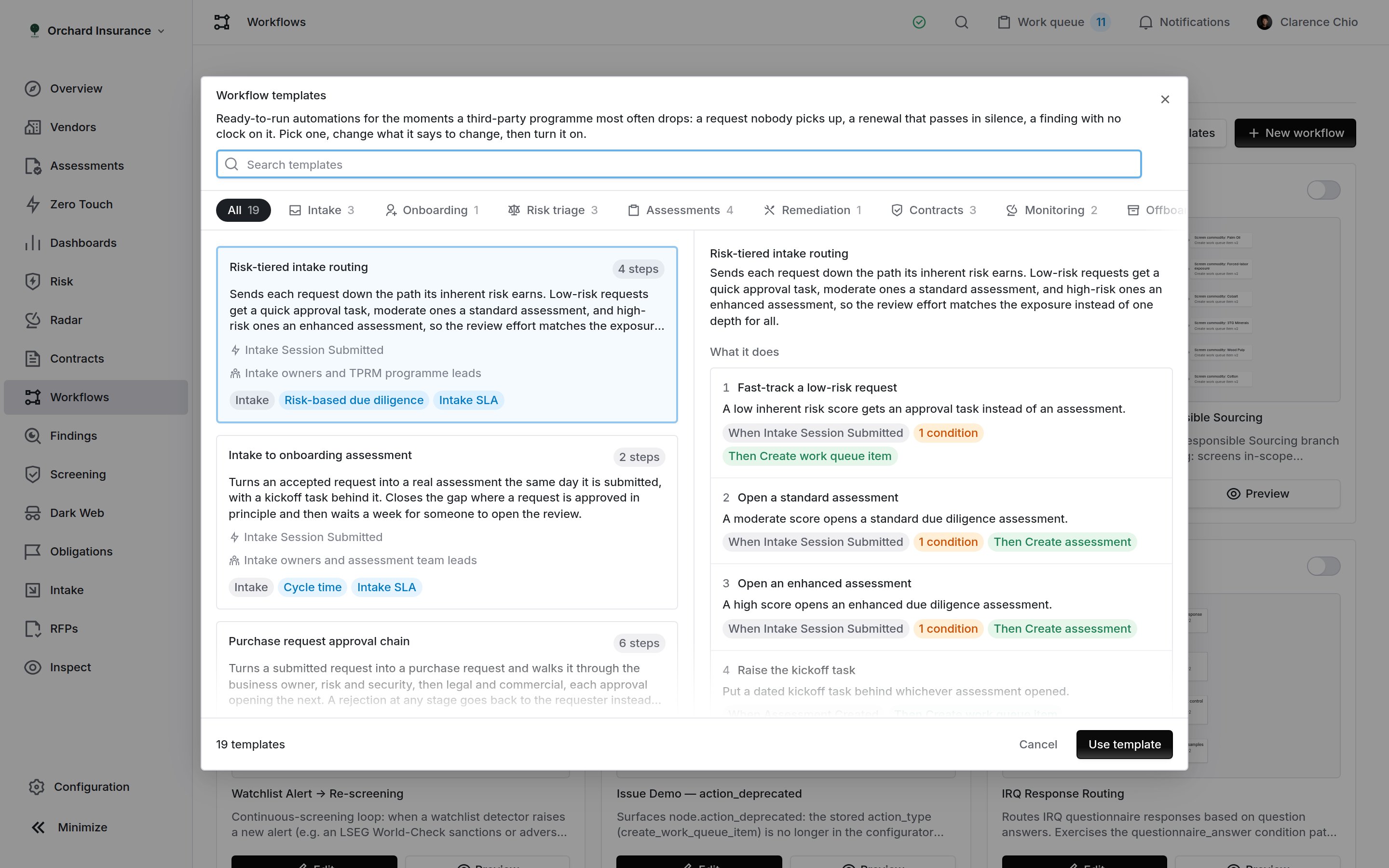
Browse templates. Cards on the left, and the selected template's steps and setup list on the right.
Applying a template makes a copy you own. The workflow, its steps and its conditions become ordinary records in your workspace, editable like any other. Rename them, change the triggers, add gates, delete steps. Nothing syncs back: later changes to the Coverbase template never reach your copy, and your edits never leave your workspace.
The nineteen templates
Shelves follow the third-party lifecycle rather than the records the templates write, so the one you want is usually where the problem happens. Routing is the exception and sits last, because it is not a moment in that lifecycle but a rule applied across all of them.
Every template has at least two steps. A one-step rule is something you can build in a minute; what the library adds is the sequence around it: the kickoff after the assessment, the second check after the first, the sign-off after the last exit task.
Which modules a template needs
The library hides a template your workspace cannot run, so you never adopt an automation whose trigger can never fire. A hidden template takes its shelf with it when it is the last one there: a workspace without Contracts never sees a Contracts tab at all. A module counts as available only when both halves are true. The feature gate says your organization has the module, and your own permissions say you can read its records. An administrator who has the module but a reader who cannot see contracts will not be offered the contract templates, because the workflow would write records that reader cannot open.
Intake is the one module with no gate of its own, so the read permission is the whole test. That matches the left-hand navigation, which shows the Intake item on the same rule. Purchase requests are the reverse: there is no separate read permission for them, so the gate is the whole test.
Two templates need two modules at once. Contract obligation ownership needs Contracts and Obligations, because the obligations it assigns come out of contract paperwork. Purchase request approval chain needs Intake and Purchase requests, because it turns a submitted request into a purchase request.
Eight templates require nothing beyond vendors, services, assessments, findings and tasks, and are visible in every workspace: New vendor onboarding, assessment to decision; Bank detail change verification; Two-level assessment sign-off; Zero-touch assessment launch; Evidence collection handoff; Finding remediation and vendor commitments; Vendor offboarding with sign-off; and Route work to the vendor’s owner.
Two near misses are worth naming, because you might expect them to be gated and they are not.
- Finding templates are not gated on the Findings module. A finding raised inside an assessment is exempt from that gate, so findings exist, and the template works, in a workspace without the standalone Findings area.
- Zero-touch assessment launch has nothing to do with the Zero Touch Assessments module. It starts an ordinary assessment that collects no documents.
How a chain moves
Most templates are chains: one step’s decision opens the next stage, and a rejection sends the work back. Four rules hold every chain together, and each template’s setup list repeats the ones that apply to it.- A review stage advances on Accept and Reject. The next stage opens when a review is set to the built-in Accept status, and the rework or rejection step fires on Reject. A custom decision status you added yourself does neither.
- Stages are told apart by review name. Each step’s gate matches the name of the review the stage before it opened. Rename a review and update the gates on the steps after it.
- A step acts only on what its own workflow opened. The Opened by this workflow condition (under This workflow in the condition picker) ignores a review or task opened by hand, or by another workflow, that happens to carry the same name. Keep it if you rework a step.
- A handoff between people follows the task title. Where the next step waits for a task to be completed, it recognizes the task by its title. A task renamed by hand stops the chain there.
Every template in detail
Each entry below gives the trigger the template listens for, the records it writes and their default clocks, and the short list of things to change before you switch it on.Every title below is written the way the template writes it.
{vendor} stands for the vendor’s own name and {contract} for the contract’s, both filled in when the workflow runs, so a real task reads “Kick off onboarding review for Northwind Analytics”.Risk-tiered intake routing
Shelf: Intake · Needs: Intake · Steps: 4 · For: intake owners and TPRM program leads Sends each request down the path its inherent risk earns, so the review effort matches the exposure instead of one depth for all. What it does. Three steps listen for a request being submitted, each gated on a band of the 0 to 100 inherent risk score. Up to 30, the request gets an approval task instead of an assessment. From 30 to 70 it opens a standard assessment, and above 70 an enhanced one. A fourth step hangs off whichever assessment opened and raises the kickoff task. What lands in the queue. For a low score, a task titled “Approve low-risk request for{vendor}”, filed as an intake request review, due in 2 days. Otherwise an assessment named “Standard due diligence for {vendor}” or “Enhanced due diligence for {vendor}”, plus a task titled “Kick off due diligence for {vendor}”, filed as an assessment review, due in 3 days.
Before you turn it on. Move the 30 and 70 breaks onto your own tier boundaries. Scores carry decimals, so start each band immediately above where the one below ends, or a score between them opens nothing. Point the standard and enhanced steps at your own assessment plans, or each opens an empty assessment. Re-point the approval task, the assessments and the kickoff task. The score is the one the intake’s inherent risk questionnaire produced; an intake without one falls back to the vendor’s current score, and with neither the request matches no band.
Intake to onboarding assessment
Shelf: Intake · Needs: Intake · Steps: 2 · For: intake owners and assessment team leads Turns an accepted request into a real assessment the same day it is submitted, with a kickoff task behind it. It closes the gap where a request is approved in principle and then waits a week for someone to open the review. What it does. Two steps, chained. On submission it opens an assessment named “Onboarding assessment for{vendor}”. Creating that assessment raises its own event, and the second step hangs off that event rather than off the intake submission, so the kickoff task cannot be raised for an assessment that failed to open.
What lands in the queue. The assessment, plus a task titled “Kick off onboarding review for {vendor}”, filed as an assessment review, due in 3 days.
Before you turn it on. Point the assessment step at one of your assessment plans, or it opens an empty ad-hoc assessment that somebody then has to scope by hand. Re-point the assessment’s creator, its assignee and the task. If only some requests should open an assessment, gate the trigger on an inherent-risk threshold, or use the risk-tiered routing template above, which does it for you.
Purchase request approval chain
Shelf: Intake · Needs: Intake and Purchase requests · Steps: 6 · For: procurement, intake owners and approvers Turns a submitted request into a purchase request and walks it through the business owner, then risk and security, then legal and commercial, each approval opening the next. A rejection at any stage goes back to the requester instead of stalling in a queue. What it does. On submission it opens a purchase request titled “Purchase request:{vendor}”, and a review for the business owner. Accepting that review opens the risk and security review; accepting that opens the legal and commercial review.
What lands in the queue. The three reviews in turn, then, once the last is accepted, a task titled “Place the order with {vendor}”, filed as a procurement review, due in 5 days. A rejection at any stage raises “Purchase request for {vendor} was declined”, due in 3 days, asking the owner to tell the requester what would change the answer.
Before you turn it on. Re-point each review at the person or group who signs at that stage. They all land on you until you do, which defeats the chain. The chain rules in How a chain moves apply.
New vendor onboarding, assessment to decision
Shelf: Onboarding · Needs: nothing · Steps: 5 · For: TPRM program owners and assessment leads Any vendor added to the portfolio, by intake, by import, or by hand, gets an assessment, a kickoff task and, once the assessment is complete, a recorded onboarding decision. Vendors that skip intake are the ones that usually go unassessed. What it does. On vendor creation it opens “Onboarding assessment for{vendor}” and, off that assessment, a kickoff task. Separately, when any assessment reaches the Complete stage, it opens a review named “Onboarding decision: {vendor}”. Accepting that review raises the activation task; rejecting it raises the close-out task.
What lands in the queue. A task titled “Kick off onboarding review for {vendor}”, due in 5 days, then the decision review, then either “Activate {vendor}” or “Close out declined vendor {vendor}”, each due in 3 days and filed as an assessment review.
Before you turn it on. Point the assessment step at an assessment plan. Re-point the creator, the assignee, the decision review and both follow-up tasks; the decision usually belongs to the TPRM lead and the follow-up to the relationship owner. The decision opens for every assessment in the workspace that reaches Complete, so gate it on a plan if only onboarding assessments should ask for one. A bulk import of several hundred vendors raises an assessment for each: gate the first step on a risk threshold, or switch the workflow off for the duration of the migration.
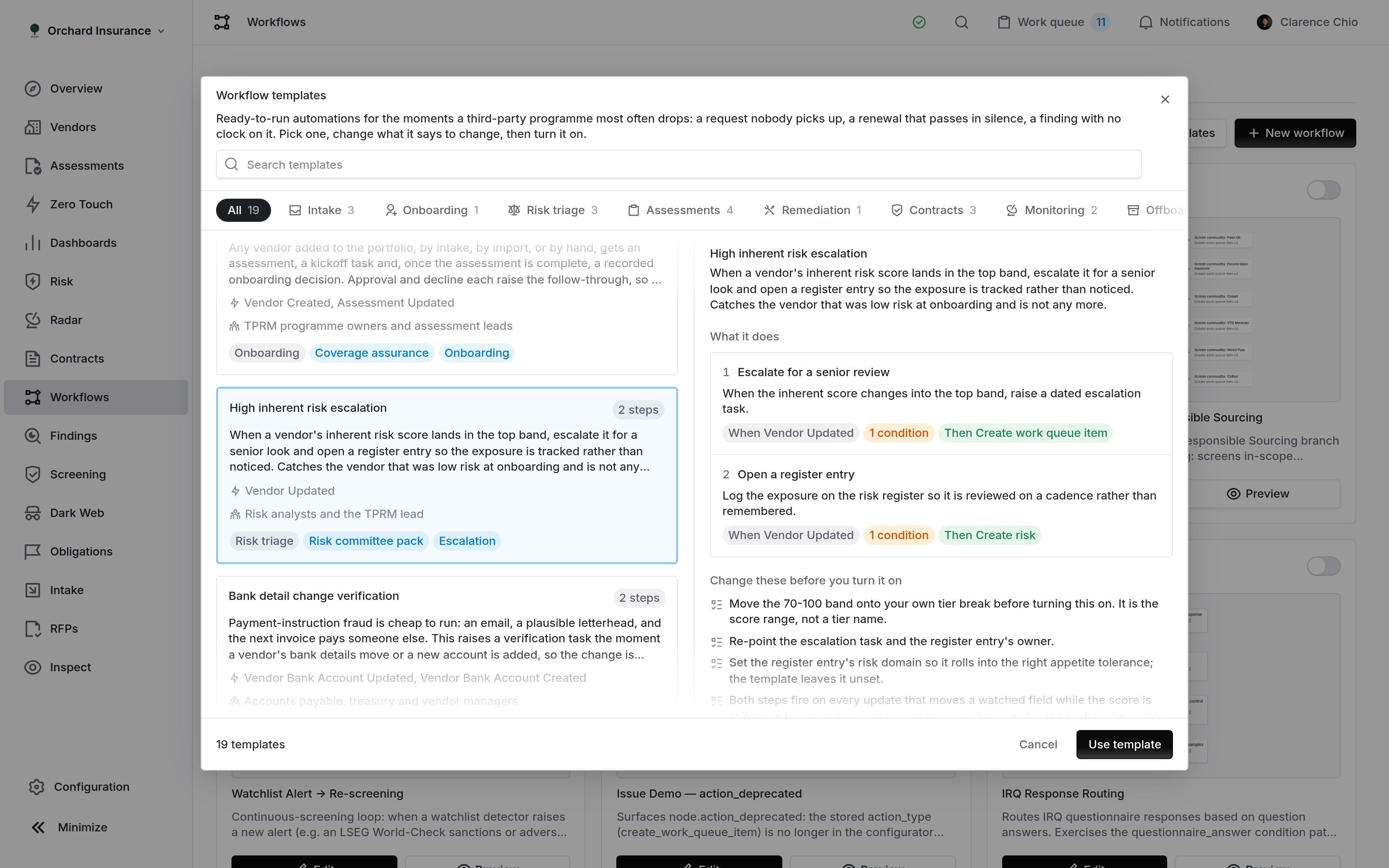
A two-step template. The detail pane spells out each step as when / if / then, and lists what to change before turning it on.
High inherent risk escalation
Shelf: Risk triage · Needs: Risk register · Steps: 2 · For: risk analysts and the TPRM lead Catches the vendor that was low risk at onboarding and is not any more. When the inherent risk score moves into the top band, it escalates for a senior look and opens a register entry so the exposure is tracked rather than noticed. What it does. Two independent steps on the same trigger, both watching the vendor’sraw_irq_score and inherent risk level. When either field changes and the resulting score sits between 70 and 100, one step raises the escalation task and the other opens the register entry. They are independent rather than chained, so removing one leaves the other working.
What lands in the queue. A task titled “High inherent risk: review {vendor}”, filed as an assessment review, due in 5 days, with instructions to confirm the score change is real rather than a half-finished questionnaire, check the assessment scope still matches, and decide whether the relationship needs a senior owner. Alongside it, a risk register entry described as “Elevated inherent risk on {vendor}”, opened at likelihood 3, impact 4, with no risk domain set.
Before you turn it on. The 70 to 100 band is a starting line on the 0 to 100 score, not a standard, so move it to your own tier break. Re-point the task and the register entry’s owner. Set the entry’s risk domain so it rolls into the right appetite tolerance. Treat the 3 and the 4 as a placeholder for a human to correct, not a score.
Worth knowing. Both steps fire on every update that moves a watched field while the score is still in the band, so a vendor whose score walks from 72 to 78 to 81 collects a task and an entry each time. Narrow the gate, or drop the register step, if you want one per escalation.
Bank detail change verification
Shelf: Risk triage · Needs: nothing · Steps: 2 · For: accounts payable, treasury and vendor managers Payment-instruction fraud starts with an email and a plausible letterhead, and the next invoice pays someone else. This puts a verification step between the change and the payment run. What it does. One step listens for a vendor’s bank account being updated, and a second for a new account being added, since a second account is the other half of the same fraud. What lands in the queue. A task titled “Verify changed bank details for{vendor}” or “Verify new bank details for {vendor}”, filed as an assessment review, due in 2 days, whose instructions carry the control itself: call the vendor on a number you already held rather than one from the request, confirm which account future invoices should pay, and record who confirmed it.
Before you turn it on. Re-point the task at whoever is allowed to approve a payment change. The control is worth nothing if it lands on the person who made the change. Two days is short because the window that matters is the one before your next payment run; match it to that run. A vendor’s first account raises a task too, so drop the second step if you verify first accounts during onboarding instead.
Screening match adjudication
Shelf: Risk triage · Needs: Screening · Steps: 2 · For: compliance analysts and the financial crime desk A sanctions or adverse-media hit is only useful if somebody clears it or acts on it. This puts every new match on a desk with a clock, then has a second person check each decision, so no one clears their own match. What it does. When screening raises a match it opens an adjudication task. When that task is completed, a second step raises the second-line check. What lands in the queue. A task titled “Adjudicate a screening match for{vendor}”, due in 3 days, asking the analyst to compare the matched record against what you hold, decide between false positive, true match and needs-more-information, and record the reasoning. Then “Check a screening decision for {vendor}”, due in 2 days. Both are filed as assessment reviews.
Before you turn it on. Re-point the adjudication at the compliance desk that owns screening, which is rarely the TPRM queue, and point the second-line check at a different person. Three days is a starting clock; if you work to a regulatory deadline, set that instead. Every match raises a task, including the false positives, which are most of them, so gate the trigger once you know your own hit rate.
Two-level assessment sign-off
Shelf: Assessments · Needs: nothing · Steps: 5 · For: assessment leads, QA reviewers and second-line risk A maker-checker review for every assessment. Only a second-line approval completes the assessment, and the result is then handed to the business. What it does. When an assessment reaches the Review results stage it opens “First-line review:{vendor}”. Accepting it opens “Second-line review: {vendor}”. A second-line rejection reopens the first line as “First-line review (rework): {vendor}”; a second-line acceptance completes the assessment. Once the assessment is complete, the last step raises the handoff.
What lands in the queue. The reviews in turn, then a task titled “Assessment result for {vendor}”, filed as an assessment review, due in 3 days, whose description links straight to the report.
Before you turn it on. Re-point the first-line and second-line reviews at different people or groups; two reviews by the same person is not a check. Re-point the handoff task at the person who asked for the assessment, usually the vendor’s relationship owner. The chain starts for every assessment that reaches Review results, so gate that step on a plan if only some assessments need two levels. The chain rules in How a chain moves apply.
Zero-touch assessment launch
Shelf: Assessments · Needs: nothing · Steps: 2 · For: assessment team leads Assessments that need nothing from the vendor should not wait in a queue for somebody to press Start. What it does. On assessment creation, it checks the assessment’s document collection mode. If the mode is none, it starts the assessment run immediately. If the assessment collects documents, manually or automatically, the step is rejected and nothing happens, so an assessment is never started behind the person who was about to collect its evidence. When such an assessment reaches Review results, the second step raises a review task. What lands in the queue. A task titled “Review the zero-touch result for{vendor}”, filed as an assessment review, due in 3 days, linking the results.
Before you turn it on. Pair it with an assessment plan whose collection mode is none, or nothing will ever match: assessments default to manual collection, and a default workspace will see this workflow sit idle forever. Re-point the review task at whoever signs off automated results.
Worth knowing. Despite the name, this has no relationship to the Zero Touch Assessments module. It starts an ordinary assessment.
Evidence collection handoff
Shelf: Assessments · Needs: nothing · Steps: 2 · For: assessment analysts and evidence coordinators Automatic evidence collection gives up quietly. This catches the handoff and puts it on a named desk with a date, then hands the assessment back to its analyst once the documents are in. What it does. Listens for the event Coverbase raises when automatic collection hands an assessment back to a human, and opens a collection task. When that task is completed, the second step raises the handback. What lands in the queue. A task titled “Collect evidence for{vendor}”, filed as a document collection handoff so it sorts with the rest of the evidence work, due in 5 days. Then “Resume the assessment for {vendor}”, filed as an assessment review, due in 3 days.
Before you turn it on. Re-point the collection task to whoever chases vendors for documents, and the handback at the analyst who owns the assessment. Match the five-day clock to the evidence SLA you publish.
Reassessment scoping from the monitoring record
Shelf: Assessments · Needs: Monitoring records · Steps: 2 · For: assessment leads and the analysts who plan reassessments When a vendor’s next assessment comes due, the monitoring record already says what happened since the last one. This hands that record to an analyst while there is still time to scope the reassessment on it. What it does. Fires once per record, when the reassessment reminder goes out. A record that is Not clean or Unmonitored raises a scoping task; a Clean one raises a short task to confirm the lighter approach still fits. A record still pending its first verdict raises neither. What lands in the queue. “Scope the reassessment for{vendor}” or “Confirm the reassessment approach for {vendor}”, filed as an assessment review, due in 5 days, linking the record.
Before you turn it on. Re-point both tasks at whoever scopes reassessments, usually the vendor’s risk analyst. If the reminder leaves too little time to scope, move it earlier in your reassessment settings.
Finding remediation and vendor commitments
Shelf: Remediation · Needs: nothing · Steps: 2 · For: findings owners and vendor relationship owners A finding with no owner and no date tends to stay open until the next audit asks about it, and a vendor’s promise to fix it is where tracking usually stops. What it does. Two independent steps. One opens a dated remediation task for every new finding, whatever raised it. The other raises a chase task when a vendor commitment is recorded. What lands in the queue. A task titled “Remediate finding on{vendor}”, due in 30 days, and a task titled “Check the commitment from {vendor}”, due in 14 days, both filed as assessment reviews.
Before you turn it on. Re-point both tasks: findings usually belong to the vendor’s risk analyst, and chasing a commitment to whoever holds the relationship. Thirty days is one clock for every finding; if your policy varies by severity, duplicate the first step and gate each copy with a filter. Fourteen days on the commitment is a check-in, not the commitment’s own deadline.
Contract review, approval handoff and execution
Shelf: Contracts · Needs: Contracts · Steps: 5 · For: legal, security, procurement and contract owners Every new contract is read by legal, then by security and privacy, before anyone is asked to approve it. Signature then raises the handover, so the obligations get owners while the negotiation is still fresh. What it does. A new contract opens “Legal review:{contract}”. Accepting it opens “Security and privacy review: {contract}”, and accepting that raises the approval handoff. A rejection at either review raises the rework task. Separately, when the contract reaches Executed, the last step raises the handover.
What lands in the queue. The two reviews in turn, then “Submit {contract} for approval”, due in 3 days, or on a rejection “Renegotiate {contract}”, due in 7 days. On execution, “Hand over {contract}”, due in 5 days. All three tasks are filed as contract reviews and link the contract.
Before you turn it on. Re-point both reviews and the tasks. Value-based sign-off belongs to the contract approval policies in your settings, not to this workflow; the approval task only says the reviews are done. Imports create contracts too, so switch the workflow off during a bulk import, or gate the first step on value or type. The chain rules in How a chain moves apply.
Contract renewal runway and expiry
Shelf: Contracts · Needs: Contracts · Steps: 2 · For: procurement and vendor managers Auto-renewal deadlines pass in silence and cost a year of spend. Whenever a renewal, expiry or notice date is set or changed, this raises a decision task with a month of runway on it, and if a term still runs out, a follow-up the day it expires. What it does. One step watches four fields on a contract:renewal_date, expiration_date, notice_due_to_vendor_date and auto_renew. When any of them moves, it raises the decision task. The other fires when Coverbase’s daily lifecycle job marks a contract expired, which is the day after its term ends.
What lands in the queue. A task titled “Renewal decision: {contract}”, due in 30 days, and on expiry “{contract} has expired”, due in 7 days, whose description warns that the service it covers is running uncontracted. Both are filed as contract reviews and link the contract.
Before you turn it on. Understand what triggers it: the first step fires when a date moves, not when one approaches. It is the workflow for “somebody told us the renewal is in March”, not the countdown to March itself; pair it with contract date reminders for the countdown. Re-point both tasks to the contract’s owner, and trim the watched date list to the ones your contracts carry. The expiry step fires on every expiry, including ones already replaced, so gate it if your renewals supersede rather than extend. A bulk import that brings contracts in already expired does not raise a task for each, because only the daily job marking a term expired fires it.
The dates themselves are available as
{contract:renewal_date} and {contract:notice_due_date} if you want them in the body, and the template leaves them out on purpose. A contract with that date still empty would stop the task being raised at all.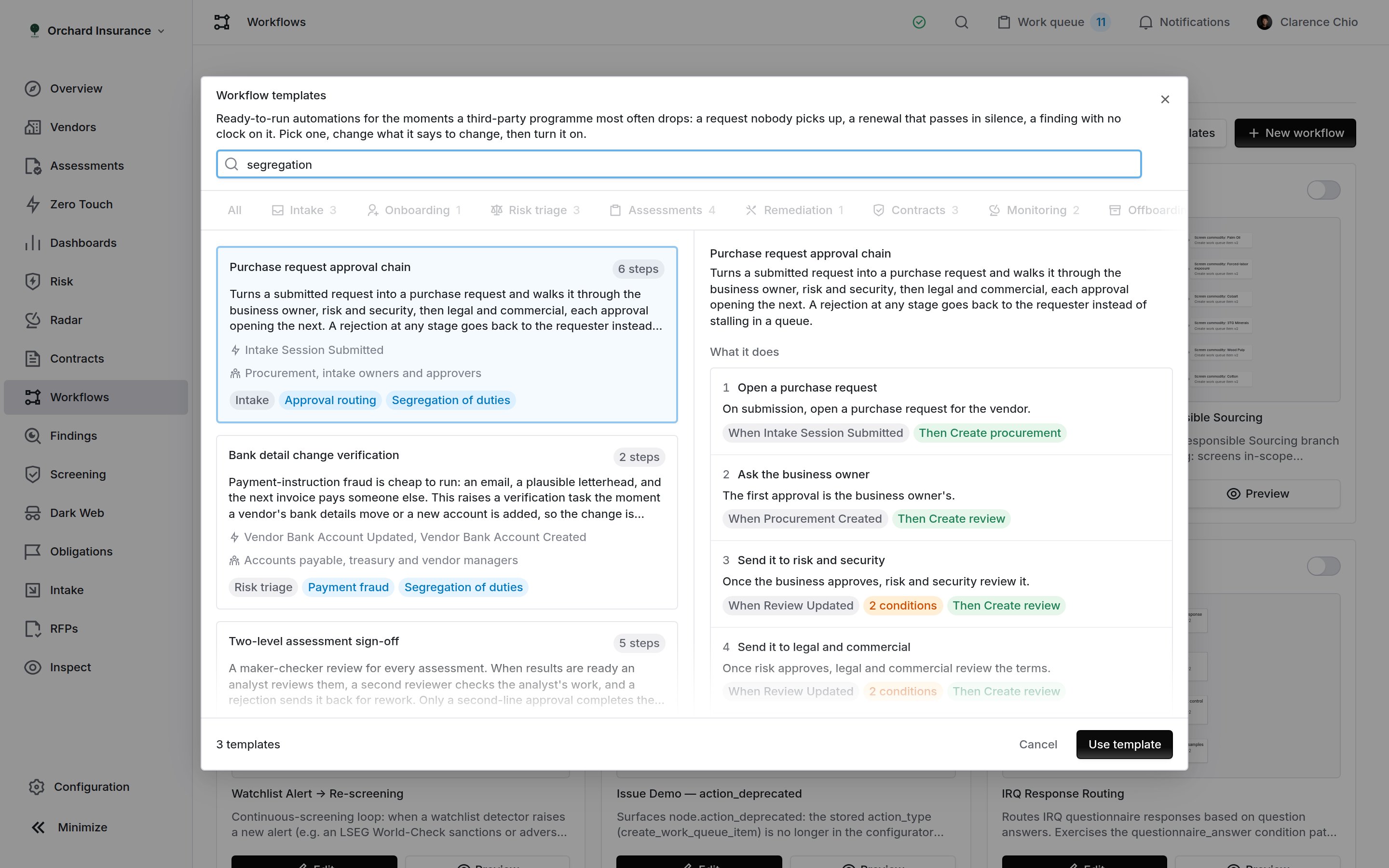
Search spans the whole library, not only the shelf you are on, and matches the job labels as well as the names.
Contract obligation ownership
Shelf: Contracts · Needs: Contracts and Obligations · Steps: 2 · For: contract owners, compliance and control owners An obligation extracted from a contract and left unassigned is a commitment the org has made and nobody has read. This puts an owner and a date behind each one as it is raised, then has that owner tie it to the control that satisfies it. What it does. Fires when an obligation is raised against a vendor’s document, which is usually when contract analysis finishes. When that task is completed, the second step raises the evidence task. What lands in the queue. A task titled “Assign a contract obligation for{vendor}”, due in 14 days, then “Evidence a contract obligation for {vendor}”, due in 30 days, both filed as contract reviews.
Before you turn it on. Contract analysis raises obligations in batches, so a freshly analyzed contract can produce a dozen tasks at once. Run it on one contract before turning it on across the workspace. Re-point the first task at whoever triages obligations, and reassign the second to the control owner the triage named.
An obligation typed in by hand with no source document has no vendor behind it, so no task is raised for it. The alternative would be a task filed against the wrong vendor.
Monitoring signal triage
Shelf: Monitoring · Needs: Radar monitoring · Steps: 2 · For: monitoring analysts and the TPRM lead A monitoring program is only worth the alerts somebody reads. This turns each new signal into an adjudication record and a dated task, so the queue is worked rather than watched. What it does. Two independent steps on signal creation. One opens a review named “Signal review:{signal}”, bound to the signal itself so the adjudication has a record from the start. The other raises the task that gives it a clock.
What lands in the queue. The review, plus a task titled “Triage monitoring signal for {vendor}”, filed as an assessment review, due in 3 days, carrying the signal’s name and severity in its description.
Before you turn it on. Re-point both steps to whoever works the alert queue. Set the review’s status so signals start in your adjudication pipeline. Every signal raising a task is a lot of tasks, so gate the trigger on severity once you know your own volume.
Monitoring record turned not clean
Shelf: Monitoring · Needs: Monitoring records · Steps: 2 · For: monitoring analysts and relationship owners A vendor that was clean at its last assessment has something on its record now. This puts the record in front of an analyst the day the verdict turns, and then has the business owner hear about it from you. What it does. When a record’s verdict turns Not clean, it raises a review task. When that task is completed, the second step raises the briefing task. What lands in the queue. “Review the monitoring record for{vendor}”, then “Brief the business on {vendor}”, each filed as an assessment review and due in 3 days.
Before you turn it on. Re-point the review task at whoever works the monitoring queue, and the briefing at the vendor’s relationship owner. If it fires too often, tighten what counts toward the verdict in the monitoring records policy rather than here.
Vendor offboarding with sign-off
Shelf: Offboarding · Needs: nothing · Steps: 4 · For: TPRM program owners, security operations and legal Archiving a vendor record is not offboarding it. This splits the exit into the three jobs different teams own, and raises a final sign-off only once every open task on the vendor is closed. What it does. When a vendor record is archived, three steps raise the exit tasks in parallel. A fourth waits for the last open task on that vendor to be completed, then raises the sign-off. What lands in the queue. “Offboarding: revoke access for{vendor}” (due in 7 days), “Offboarding: confirm data return or destruction by {vendor}” (30 days) and “Offboarding: terminate contracts with {vendor}” (14 days), then “Sign off the exit of {vendor}” (5 days), all filed as assessment reviews.
Before you turn it on. Re-point each exit task at the team that owns it: access to security operations, data to privacy, contracts to legal. The sign-off waits for every open task on the vendor, not only these three, so close or move anything unrelated. The exit tasks are recognized by their Offboarding: title prefix; keep it if you reword them, and keep it out of the sign-off’s title.
Route work to the vendor’s owner
Shelf: Routing · Needs: nothing · Steps: 2 · For: TPRM program owners running a shared queue Work that lands on a central desk gets triaged twice: once to work out whose vendor it is, and once to do the thing. This template removes the first pass. What it does. When any task is raised, it re-points the assignee onto the relationship owner recorded against that task’s vendor, so the queue arrives sorted. When a vendor is created with no relationship owner, a second step raises a task asking for one. What lands in the queue. No new record for the routing itself; it changes who an existing task belongs to. For an ownerless new vendor, a task titled “Name an owner for{vendor}”, due in 5 days.
Before you turn it on. Understand its reach: this moves the assignee on every task the workspace raises, not only the ones a workflow raised. Gate the trigger on task type if you only want it for some of them. Fill in the owners of the vendors you already hold before turning it on. Vendors created by a process that names the owner afterwards, such as a bulk import, raise the ownership task anyway; close those by hand or turn the second step off during the import.
Who it routes to. The vendor’s first relationship owner, which can be a person or a group, so this is how a template routes to a team without naming one. Swap the step to risk analysts if that is who owns your queue.
A vendor with no relationship owner is left alone. The task keeps the assignee it already had rather than being unassigned.
Applying one
Selecting a card shows what the template does, step by step, as when something happens / if these conditions hold / then this is written. Underneath it is the list of things to change once it lands. Use template copies it into your workspace and opens it in the editor, switched off.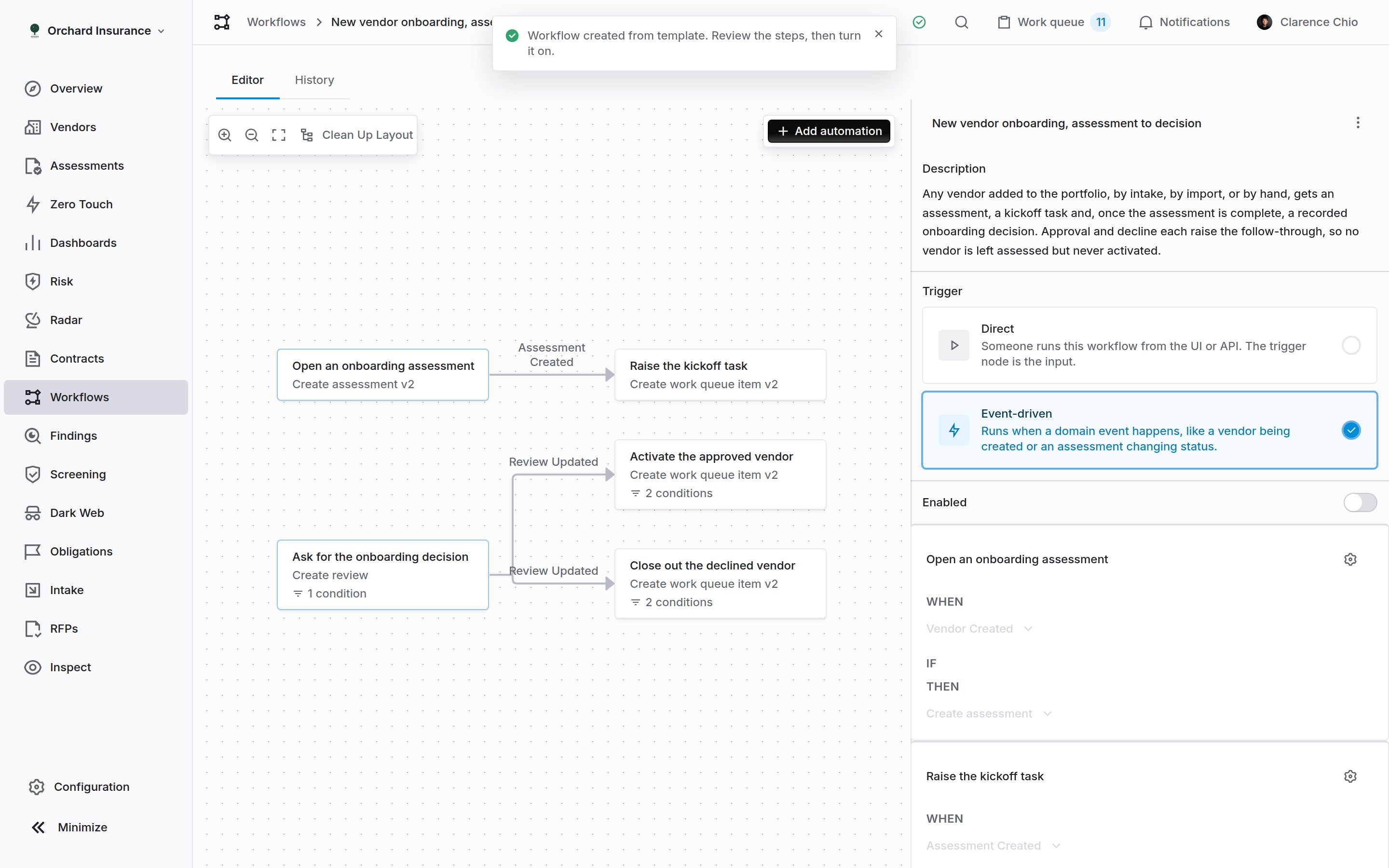
The applied workflow, open in the editor. Every step is drawn, a child hangs off the event its parent emits, and Enabled is off until you turn it on.
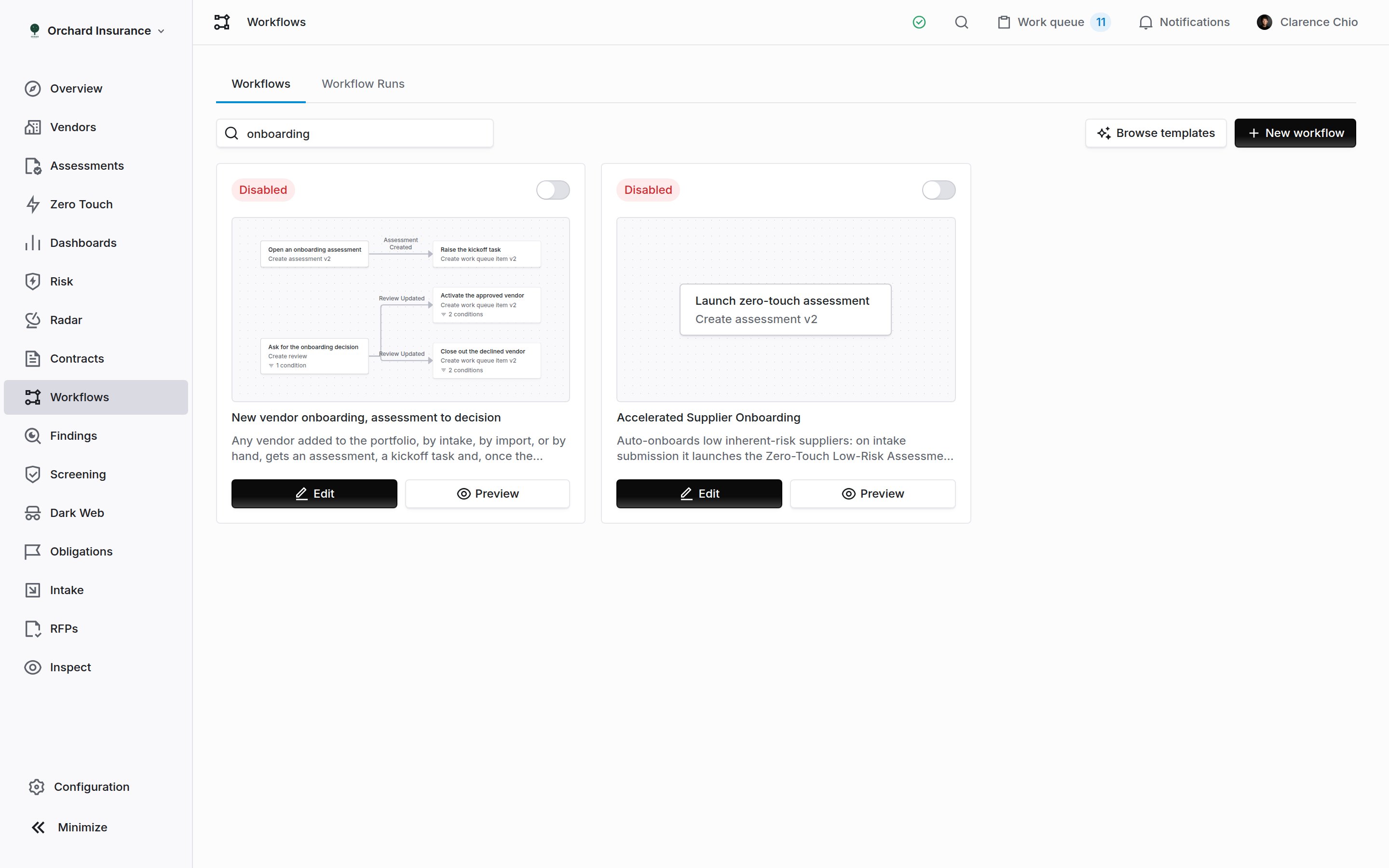
An applied template in the workflows list, found by searching its name, with its shape previewed on the card.
The two things every template leaves for you
Who the work goes to
A task with nobody on it does nothing, and a template cannot know your people, so every task, review, assessment and register entry a template creates is assigned to whoever applied it. This means the workflow runs as soon as you switch it on, rather than skipping. It is also the first thing to change on almost every template. Open the step, change the assignee to the person, department or role that should own the work, and save.What is org-specific
Templates never reference anything that belongs to one workspace (a status, a tag, an assessment plan, a questionnaire, an email template) because a template holding one would apply everywhere and run nowhere. That is why an assessment step opens an ad-hoc assessment until you point it at a plan, and why a review starts at its default status until you set one. Both are listed under Change these before you turn it on, in the order to work through them.Making one your own
A template is a starting point. Once it is in your workspace:- Narrow the trigger. Most templates ship wide: every vendor, every finding, every signal. Adding a condition (an inherent-risk threshold, a tag, a filter on the record) is usually the difference between a useful queue and a noisy one.
- Split a step in two. A thirty-day remediation clock for every finding becomes two steps with different clocks once you gate each one on severity.
- Add a step. Templates stop at what is portable; yours can send an email from one of your templates, post to a webhook, or open a ServiceNow record.
- Rename everything. Step names, workflow name, the copy inside the tasks. All of it is yours, and the task instructions especially are written to be edited.
- Apply the same template twice. Two copies with different gates, one for critical vendors and one for the rest, is a normal way to use the library.
Apply templates from MCP or the API
You can browse the templates and copy one from an MCP client or with an API key. An MCP client reads withquery_platform(kind="workflow_library") and copies a template with mutate(entity="workflow", action="apply_template"). The API routes are GET /v1/workflow-templates and POST /v1/workflow-templates/{template_slug}/apply. See Workflow definitions.
Before an MCP client sends a write, it shows you the change and waits for you to confirm it. The MCP tool reference lists every field.
A copy starts switched off. Make the changes the template leaves for you before you turn it on.
Where to go next
Assignment and delegation
Who owns what, and the departments and roles a workflow step can route to instead of a person.
Reviews and approvals
The review records the contract and monitoring templates open, and the pipelines they move through.
Contract dates and reminders
The countdown to a renewal, as opposed to the decision task the renewal template raises when a date moves.
Zero touch assessments
The assessments that need nothing from the vendor, which the zero-touch template starts automatically.