

The short version
You ask
The supplier answers
Coverbase checks it
A reviewer decides (for bank changes)
Your finance system hears about it
approved and rejected events, so filter on the action before you apply anything.Where this lives
Three places, depending on who you are.On the vendor
In a questionnaire
In configuration
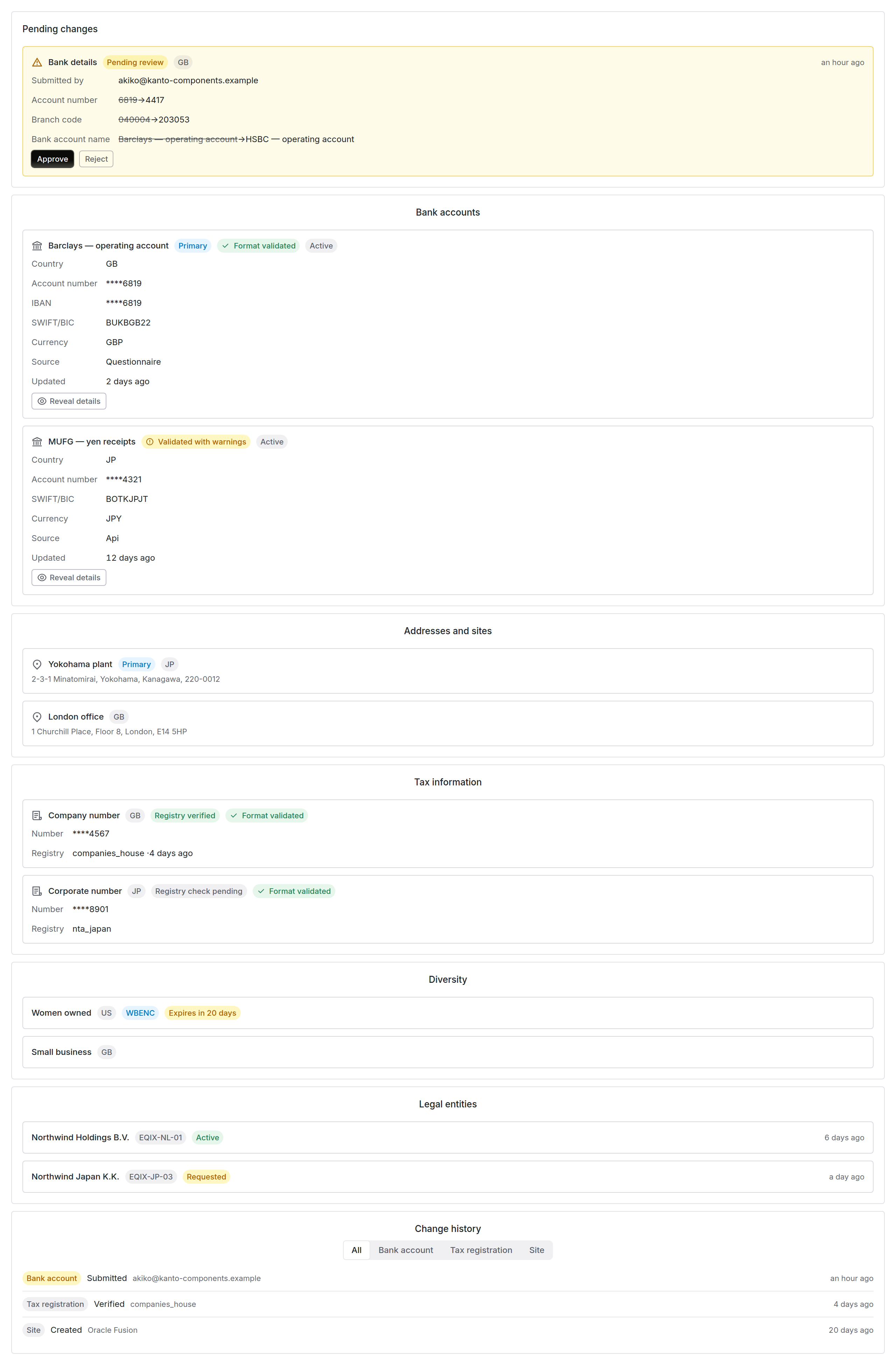
Records on file, on a vendor's Vendor Onboarding Information tab. Bank accounts are masked to the last four digits until someone with the reveal permission asks to see one.
Asking a supplier: the four question types
Supplier information is collected through the questionnaire engine rather than through a separate flow. That means assignment, reminders, progress tracking, autofill and review all work as they already do, and a supplier who has filled in one Coverbase questionnaire knows how to fill in this one. When you author a questionnaire on the Know-Your-Vendor tab of Configuration → Questionnaires, four extra response types appear alongside the usual text and select types: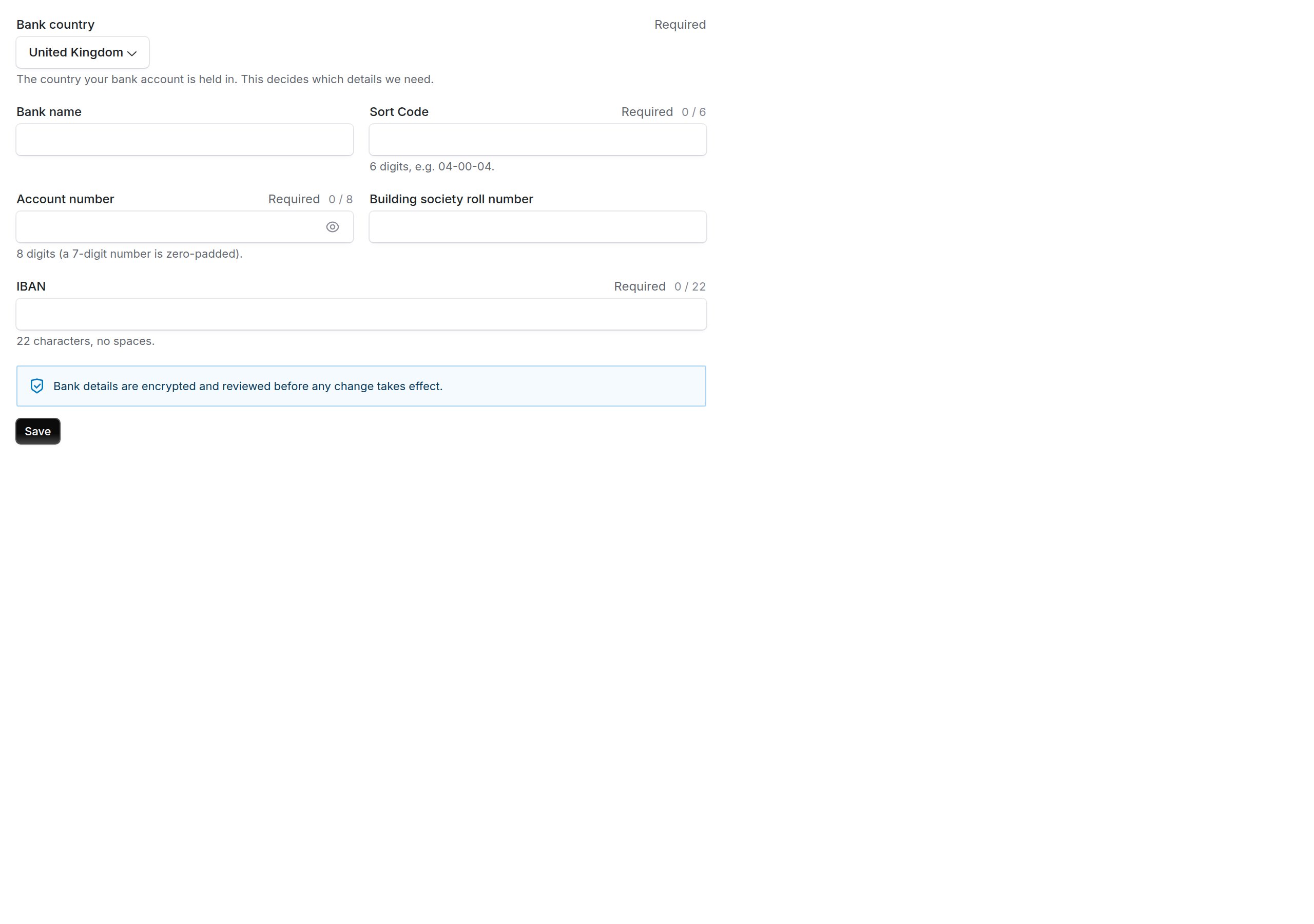
A bank details question as the supplier sees it. Changing the country changes the fields below it.
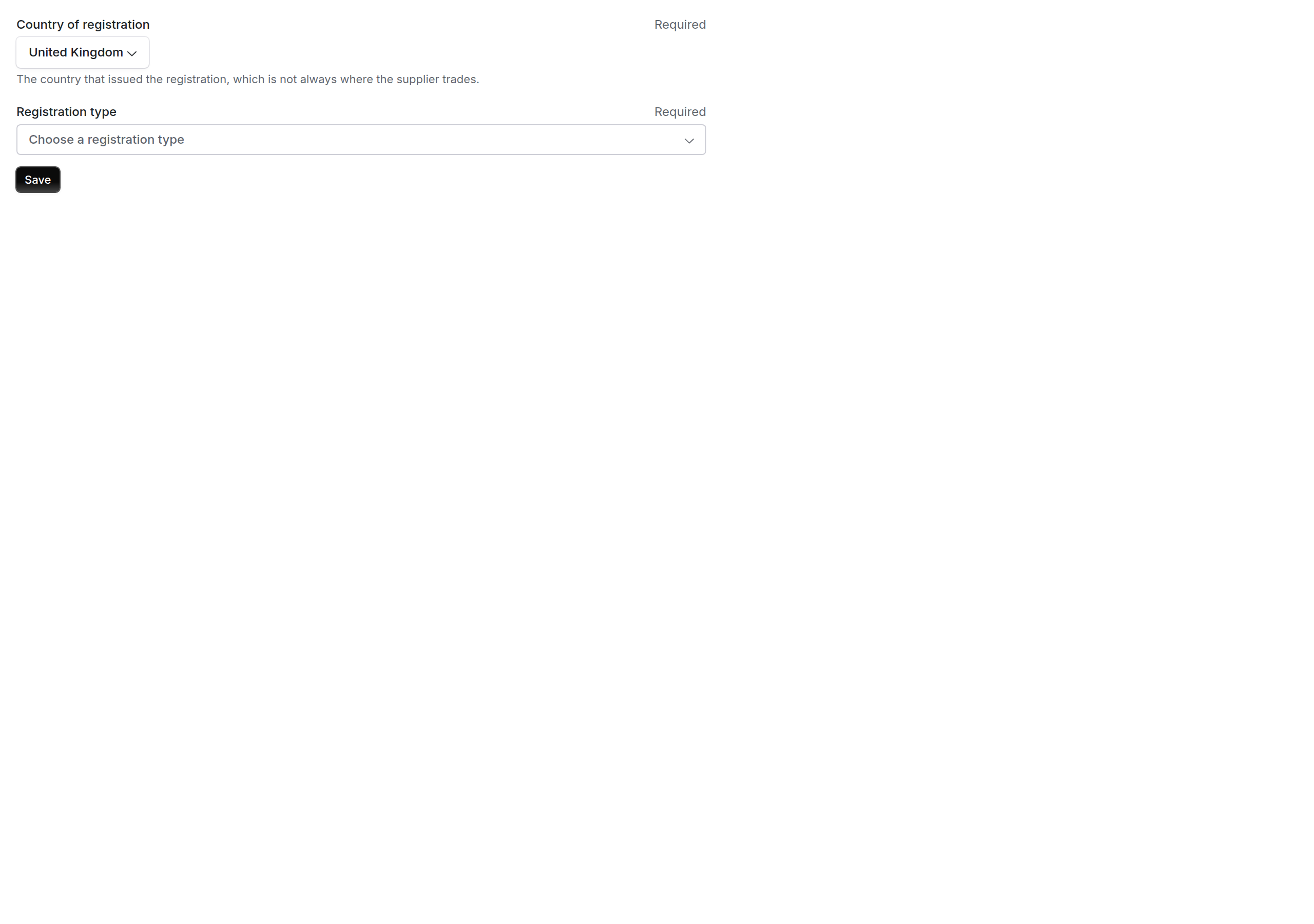
The other three types are the same form with a different field set. A country with more than one tax identifier asks which one is being given.
What the answer stores
This matters if you export questionnaire responses. The answer to one of these questions is a reference, not a payload. When the supplier submits, the real values go into their own table, encrypted. What lands in the questionnaire response is a row id plus a masked summary: the last four digits, the country, and the validation outcome. Every reader of questionnaire responses, including the CSV export, the follow up spreadsheet round trip and autofill, therefore sees the summary and never the identifier. A reviewer reading the response sees each saved bank account and tax registration labelled field by field: country, the last four digits of the account number and IBAN, and the validation outcome. A reviewer with Supplier banking: read can click Show full details to see the whole account, including one still waiting for approval. Each reveal is recorded. The supplier sees bank identifiers in full while typing them, so they can check what they entered. Once saved, only the last four digits are shown.Offering a live bank connection
A bank details question has one setting: Offer a live bank connection. It is off by default. Turn it on and the supplier gets the option to link their bank directly instead of typing account details. Leave it off and they only see the country form, and none of the connection logic runs. It is a per question choice rather than an organization wide one, because the ask is heavier than typing and you may want it on your main onboarding questionnaire but not on a quick refresh.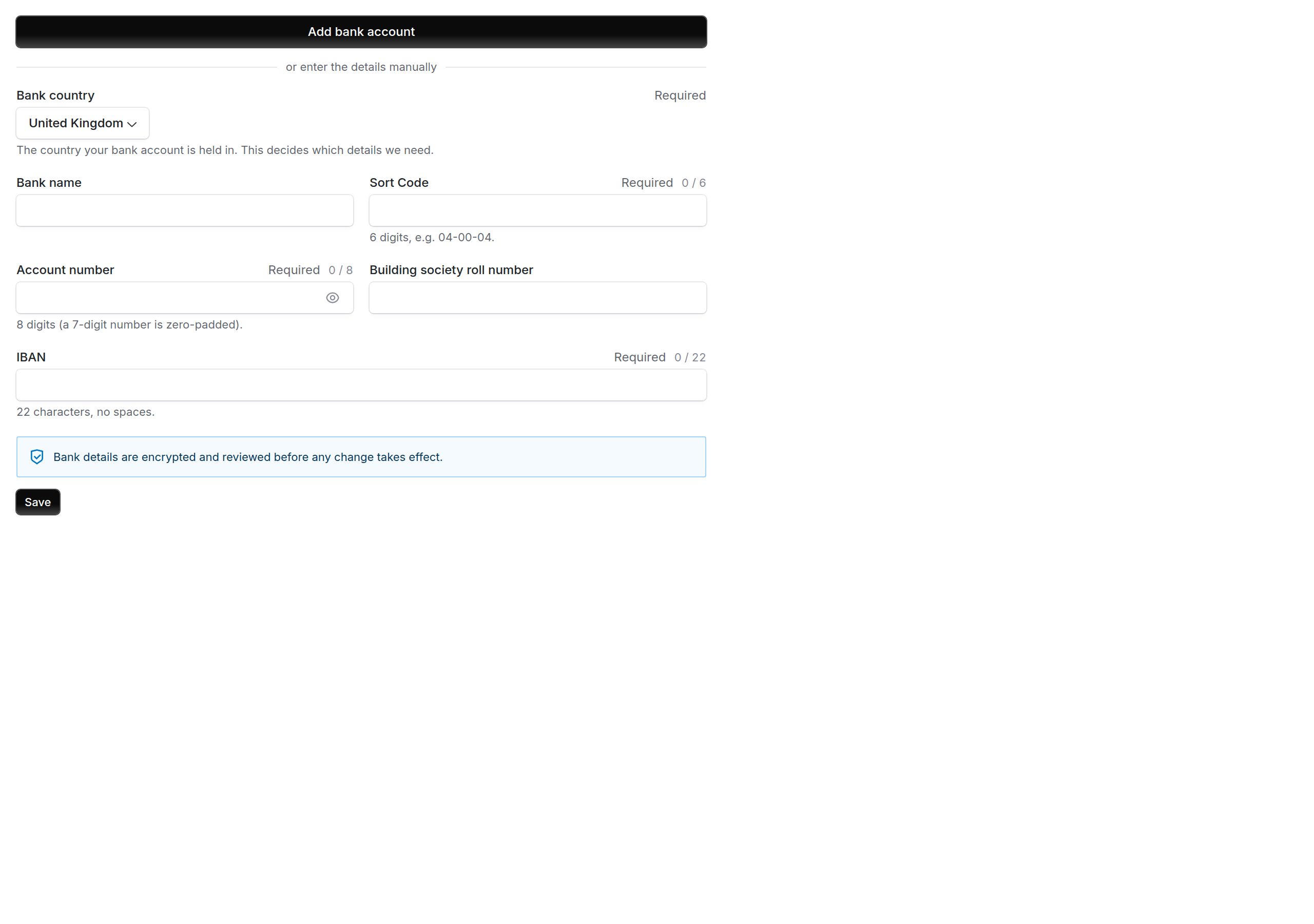
With the setting on, the supplier is offered the connection first and can still type the details instead.
Picking a known bank
Some countries ask for details the supplier has no way to look up. A Colombian form wants the bank’s own taxpayer ID, which appears on a bank statement but not on anything a supplier keeps to hand. Where Coverbase holds a bank list for the country, the supplier picks their bank from a searchable list instead of typing its name, and the fields the list knows are filled in for them. Picking a Colombian bank fills in its code and its taxpayer ID. A bank the list has never seen is typed as free text. Nothing is filled in, because there is nothing to fill it in from, and the supplier is asked for a recent bank statement showing the account belongs to them. Colombia is the only country that asks for that statement today.Currency and check digits
Every bank account records the currency it is held in. The form opens on the bank country’s own currency, euros for a French account or pesos for a Mexican one, and the supplier changes it for an account held in another currency. A separate check digit is asked for only in Brazil and France, where a payment needs it. Other countries do not show the box. Mexico and Peru still send one to your finance system, read from the CLABE or the CCI.Mexico and Colombia
Both countries’ payments teams named the details a payment needs, and the form requires them:What a supplier is not asked for
Three values reach your finance system without a supplier ever seeing them, because a supplier has no way to know the right answer and a wrong guess is worse than no answer.What happens when a supplier submits
Normalizing first
Before anything is judged, values are cleaned up in the way that country expects. Spaces come out of an IBAN. A United Kingdom sort code shorter than six digits is padded with leading zeros rather than rejected, because people do type five digit sort codes and the leading zero is implied.Then errors and warnings, which are not the same thing
An error blocks
A warning informs
Which countries ask for an IBAN
The IBAN box appears only for countries that issue IBANs, and it stops accepting characters at that country’s IBAN length. Spaces do not count, so an IBAN pasted in groups of four is cut at the right place. An IBAN is required in every EU member state and in Oman. Countries that do not issue IBANs, such as the United States, Canada, Australia, India, Japan, Singapore and Colombia, do not show the box.The intermediary bank
Every country offers an optional Intermediary bank section, folded away below the account. A supplier fills it in only when payments to their account are routed through a correspondent bank. It takes the fields your finance system keeps for an intermediary account: country code, city, account number, bank name, branch number and IBAN, plus a SWIFT/BIC. Once any of them is filled, the country code and account number are required.Checksums
A checksum is a self checking digit built into an identifier: an IBAN, a US routing number, a Spanish NIF, a Mexican CLABE. It catches the most common human errors, a mistyped digit and a transposed pair, before the details ever reach your finance system. Coverbase implements the published algorithm for each identifier that has one, and only those. Where an identifier’s check digit rule is not publicly documented, the format is checked and the checksum is not invented. The per country pages say exactly which checks apply. See Supplier countries.Registry confirmation, afterwards
Where a public register exists, a tax or company registration is looked up in the background after it is saved. Companies House and HMRC for the United Kingdom, the VIES service for European VAT numbers, and so on. This is never part of validation. It runs afterwards, it annotates the record with what the register said, and a reviewer can retry it. A register being slow or down has no effect on a supplier’s ability to submit their details, which is why it sits outside the validation path.Rules that read more than one field
Most rules judge a field on its own. These read a second value, so they can only run on submission rather than as the supplier types.Question settings
Each of these question types has settings in the questionnaire builder, under the response type:Answers that build on earlier ones
The form reuses what the supplier already entered, so they type an address once:- Countries follow the main address. Once the primary address is saved, every later address and the bank details open on its country. The supplier can pick another country, and from then on the form leaves their choice alone.
- Same as main address. A remit-to address question offers a Same as main address box. Ticking it copies the main address and keeps the two in step until the supplier saves. A list beside it copies any other address from the form, which the supplier can then edit.
- The bank is paid against the remit-to address. A bank details question shows a Remit-to address list, set to the remit-to answer. Your finance system receives the link with the account.
Addresses hold more than an address
An address carries the details your finance system needs to pay against it, not only the lines and the postal code.- Your finance system’s structure. Line 1 is the building number (up to 16 characters) and line 2 the street name (up to 70). The city (up to 35) is required, the postal code (up to 16) is required everywhere except countries with no postal codes, and the state or province is required in the United States and Canada. The form shows a running character count and says which field is missing before the supplier saves. An address that is only a country is still accepted where the question allows any location.
- Purpose. An address is a Primary or a Remittance address. An address is a registration address by carrying a tax registration rather than by being marked as one, so a single address can be both where the supplier is registered and where remittance advice goes.
- Email lists. Two lists per address: where purchase orders go, and where remittance advice goes. A primary address question asks for the purchase order list only, and a remit-to address question for the remittance list only. A malformed address is refused. A missing one is a warning, on the primary address and on any remittance address, and is never asked for in China.
- PO language. The language your finance system sends purchase orders in, chosen under the purchase order emails on the primary address. It is optional unless the question makes it required.
- Tax registrations. A tax registration can attach to one address rather than to the supplier as a whole, which is how a supplier registered in more than one region records each registration against the site it belongs to.
- Inactive addresses. An address the supplier no longer uses can be kept on file as inactive rather than deleted, the way your finance system keeps a superseded address. It shows an Inactive label on the Vendor Onboarding Information tab. The primary address cannot be made inactive until another address takes its place.
Registrations a supplier is exempt from
A supplier who is exempt from a registration has no number to give. Ticking the box that says the supplier is exempt from that registration replaces the identifier with a Reason for exemption, which is required. The two are alternatives: a submission carrying both is refused. An exempt supplier is also asked for a Supporting document, such as the legal provision or the certificate their tax authority issued. Whether it is suggested or required is the question’s Exemption Document setting.Diversity classifications
A diversity record takes the same shape as a business classification in Oracle Fusion:Asking an existing supplier to update their details
Use an update request when a supplier you already hold needs to change something specific: a new bank account, an account in a new currency, a moved address, a new PO email address, or their contacts. It works the same for a supplier you onboarded in Coverbase and one whose details were loaded from your finance system.- Open the vendor and go to the Vendor Onboarding Information tab.
- In Update Requests, click Request update.
- Enter the supplier contact who should receive it.
- Tick each section the supplier should update. For each one, choose what you need and write a note:
- Bank accounts: Change an account, Add an account (for example a new currency), or Confirm details.
- Addresses: Moved location, Add an address, or Confirm details.
- PO email address, Contacts, Tax registrations and Diversity.
- Legal entities: pick up to five of your own entities to add. These are requested in your name when you send. If Legal entity assignments need approval is on, approve them on the Legal entities card.
- Click Send request.
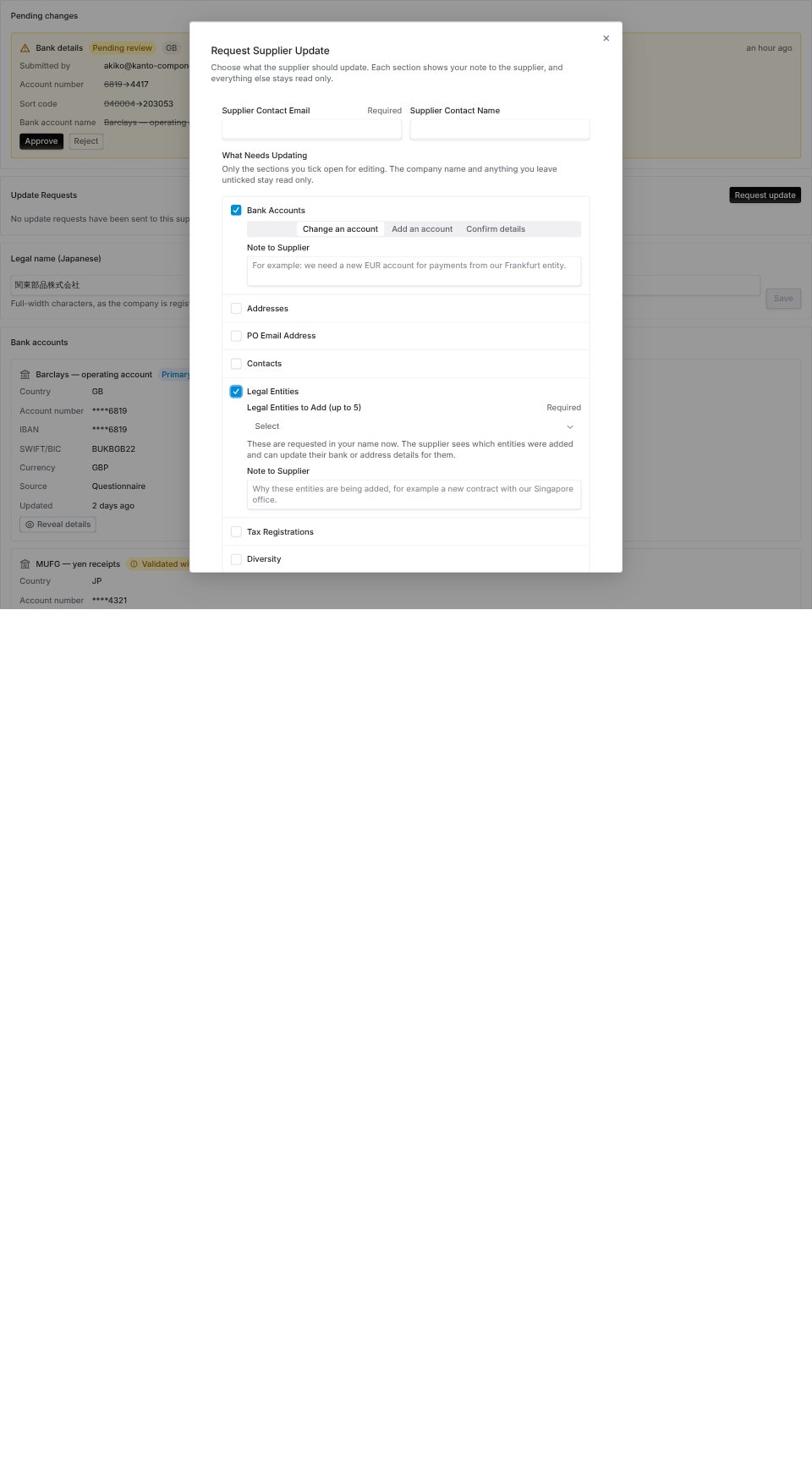
Each section you tick gets its own choice and its own note. Sections you leave unticked stay read only for the supplier.
- Change an account or address. They pick which one they are replacing, then enter the new details. A bank change waits in the review queue against the account it replaces, and your finance system keeps paying the old account until you approve it. When a supplier replaces an address because they moved, rather than to fix a typo, they tick This is a new address. The new address is saved alongside the old one, which is kept on file as inactive. The new address keeps the old one’s purpose and email lists.
- Add a new record.
- Confirm details with This is still correct, when nothing has changed.
- Contacts. They mark people to remove and add new ones. Nothing changes on the vendor until you click Apply to contacts.
Review: the part that stops fraud
Invoice redirection fraud, where an attacker persuades someone to change a supplier’s bank details, is one of the most common and most expensive attacks in accounts payable. The review queue exists for it. By default, a bank change never touches the live account. It goes into a queue and waits. The supplier sees that their submission is recorded and awaiting review. The account your finance system knows about is unchanged, and no webhook fires. When a reviewer approves, the change lands and the webhook goes out. When a reviewer rejects, nothing is restored, because nothing had been replaced. The queue is the Vendor changes page. Open it from the Vendor changes button at the top of the vendor page, which shows a count when something is waiting. The same page also lists subprocessor suggestions waiting for a decision.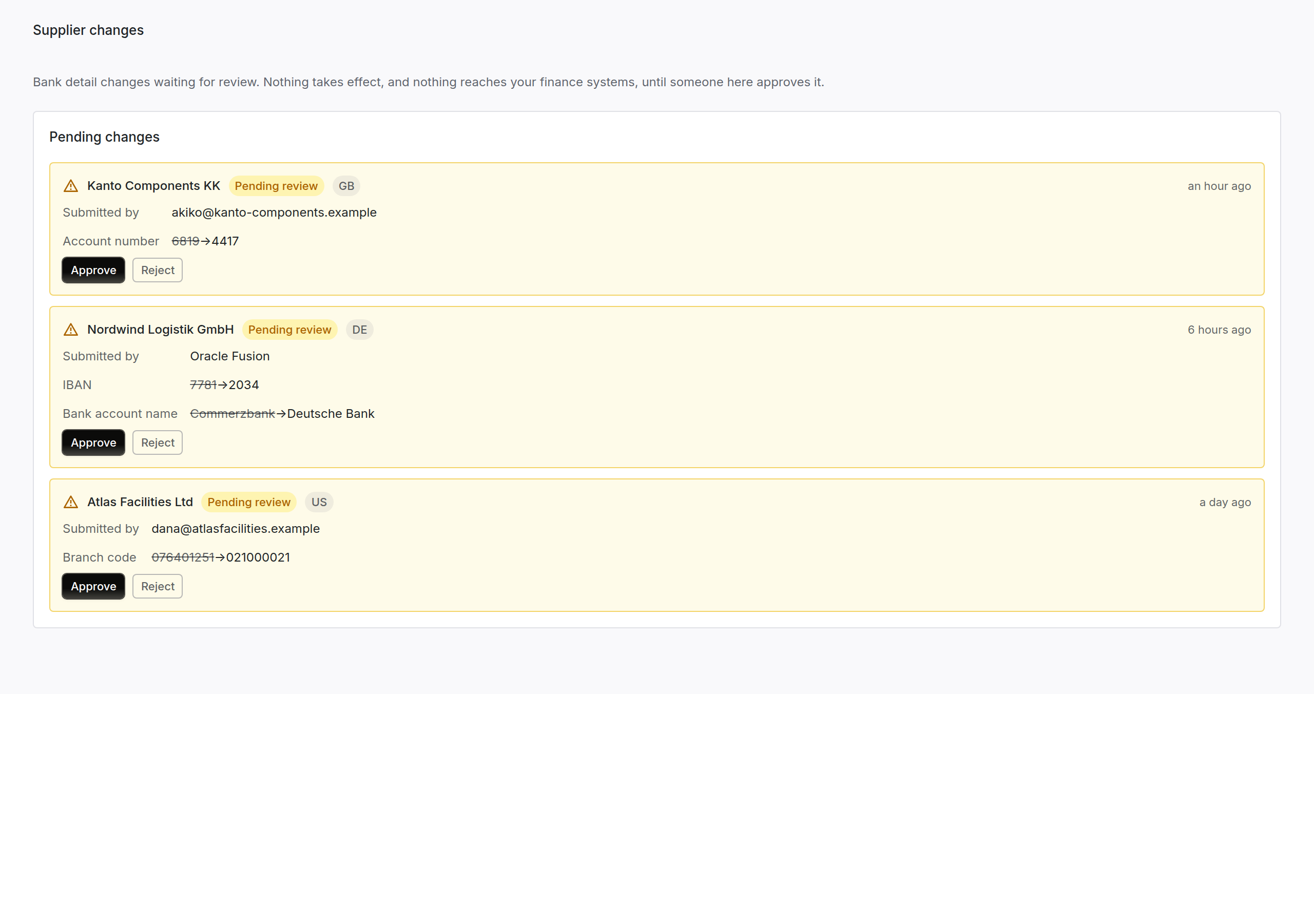
The bank changes on the Vendor changes page. Each pending change shows what is being changed, who submitted it, and through which surface.
- Submitting and approving are different permissions. Someone who can enter a change cannot necessarily approve it. That includes your own staff entering details on a supplier’s behalf from the vendor tab.
- Approving the form approves its bank changes. When a reviewer with Supplier banking: approve approves or rejects a questionnaire, the bank changes the supplier entered in it are approved or rejected with it. A reviewer without that permission leaves them in the queue, and a change that would take the supplier past your bank account limit stays there too.
- The change history is append only. Every supplier visible change writes an event, and nothing updates or deletes one. That history is the same source the API delta feed and the webhook payloads read from, so what a reviewer sees and what your finance system received cannot drift apart.
Who can see and do what
Two permission resources, each split three ways, so a reviewer does not have to also be an editor.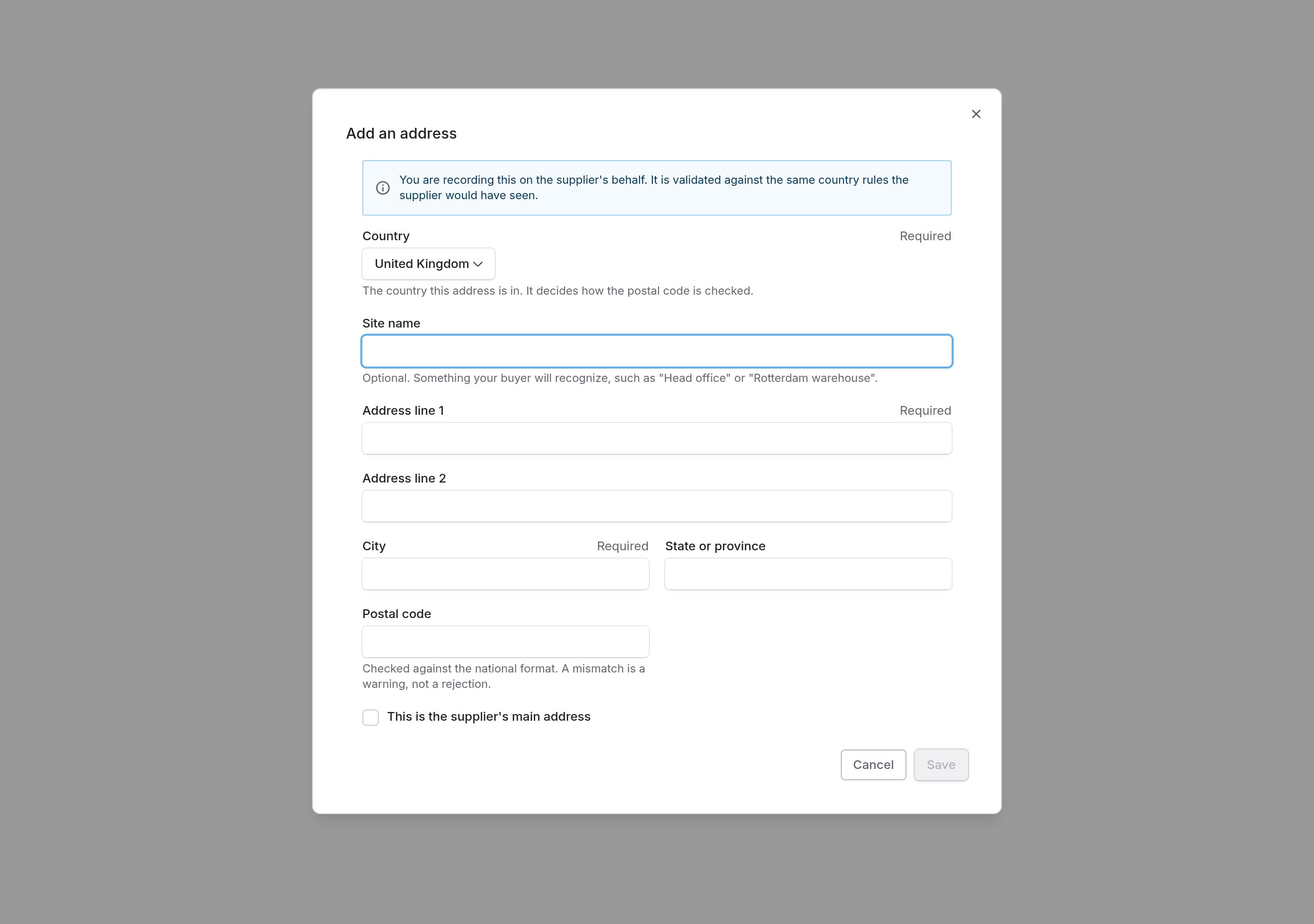
Staff entry on the vendor tab. The same country rules the supplier would have seen, and entering a change here still does not approve it.
Configuring it for your organization
The Know Your Vendor section of Configuration → Know Your Vendor Settings holds the policy. Everything on it is per organization.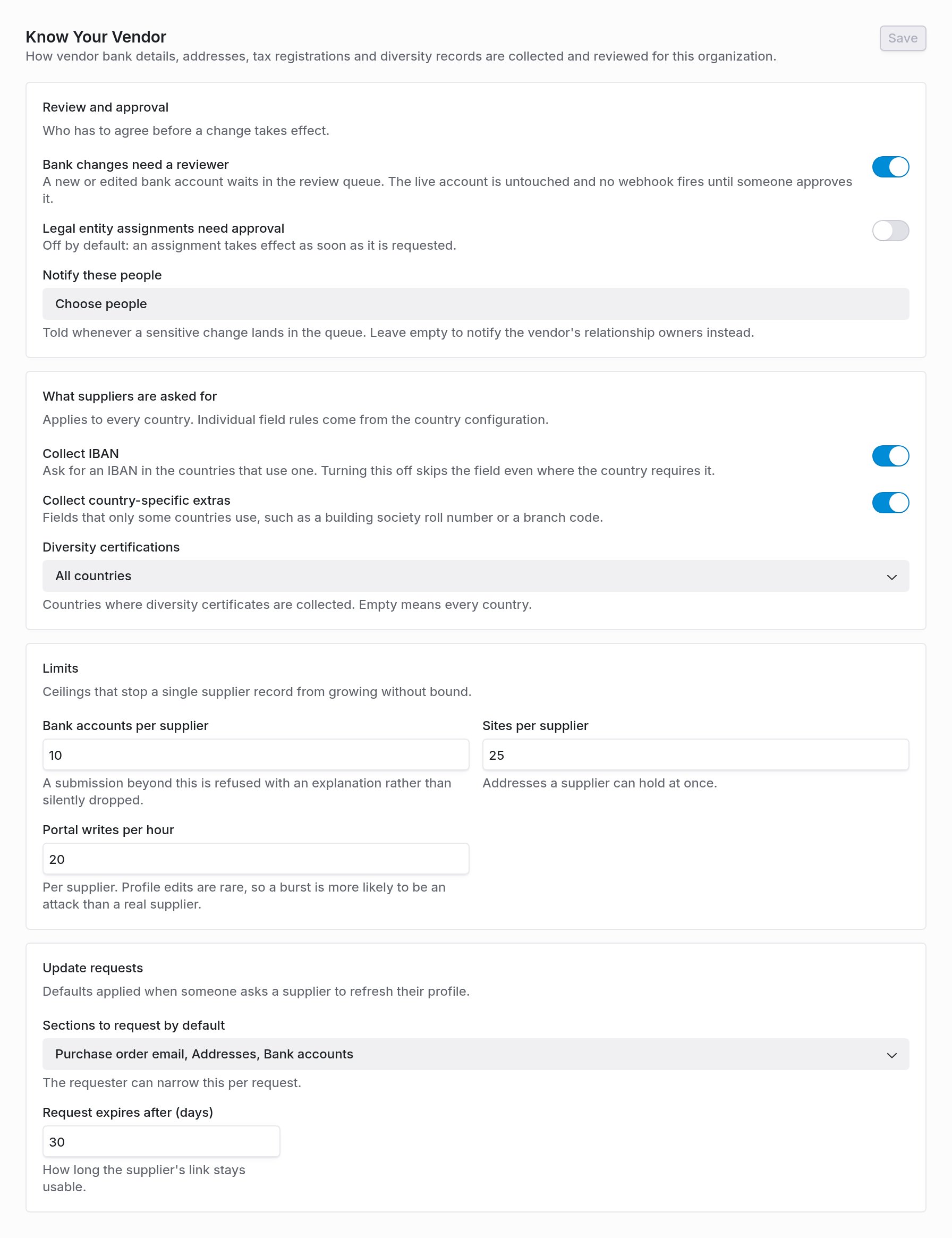
Know Your Vendor settings. Bank review is on by default.
Review and approval
Review and approval
Bank ownership check
Bank ownership check
What suppliers are asked for
What suppliers are asked for
Limits
Limits
Update requests
Update requests
Legal entities
Configuration → Legal entities is the list of your own contracting entities that suppliers get assigned to. The entity code is what your finance system matches on, so it has to be exactly what that system expects. Entities can be imported from CSV, which upserts on the entity code and reports the outcome per row. Deactivating an entity blocks new assignments and leaves existing ones alone. One assignment request covers up to five entities. A request that quotes a purchase requisition raised more than thirty days ago needs a justification before it is accepted; a request quoting no requisition cannot be stale and is not asked for one.Country rules
The 109 countries ship with rules already configured, and those are documented per country in Supplier countries. Coverbase can override any country’s rules for your organization’s suppliers, which is how a late correction from your finance team becomes a configuration change rather than a release. Ask your Coverbase contact.Getting it into your finance system
Two ways, and most integrations use both.Webhooks
The changes feed
When something goes wrong
Work supplier records from MCP or the API
You can read and update supplier records from an MCP client or with an API key. An MCP client reads withquery_vendors(kind="supplier_profile"), query_vendors(kind="supplier_changes") and query_platform(kind="bank_change_reviews"). It writes with mutate(entity="supplier_profile", action="update"), mutate(entity="site", action=...), mutate(entity="diversity_record", action="create") and mutate(entity="bank_account", action="retire").
The API routes are the bank account, site, tax registration, diversity, contact, update request and legal entity routes under /v1/vendors/{vendor_id}, and GET /v1/vendors/changes. See the Supplier Profile API.
Before an MCP client sends a write, it shows you the change and waits for you to confirm it. The MCP tool reference lists every field.
An API key can request a bank change but cannot approve one, apply a supplier’s contact changes or change Know Your Supplier settings. Full bank and tax identifiers need the banking:read key scope.