

coverbase-governor Python package. For what the governor decides and why, see the Governor product page. For the TypeScript package, see the TypeScript SDK guide.Before you start
- In Inspect › Governor › Targets, add the systems the agent may reach. Each one is a target, for example
prod-dbfor a Postgres database orbilling-apifor an HTTP API. - In Policies, make sure a baseline lets the agent reach those targets. An agent can see and act on only the targets a baseline lets it reach.
- In Agents, select Register agent, name it after your agent and select Register. The Connect an agent panel shows the key once. Copy it.
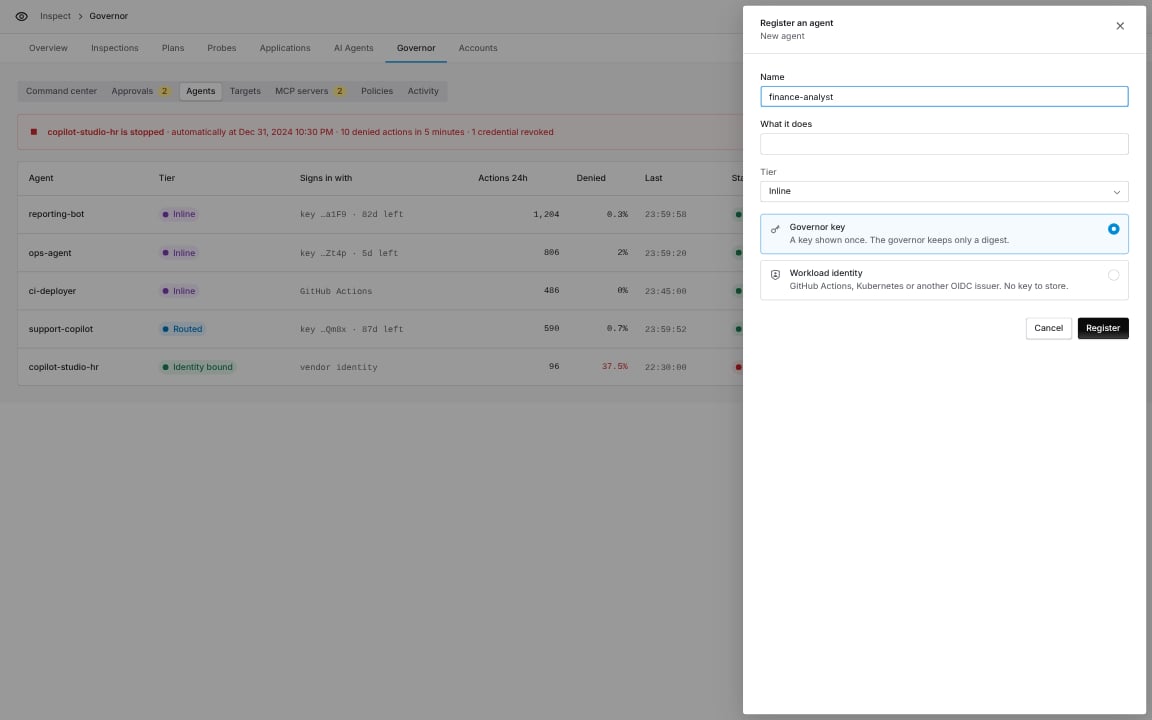
Register agent: name the agent, choose how it signs in, and save.
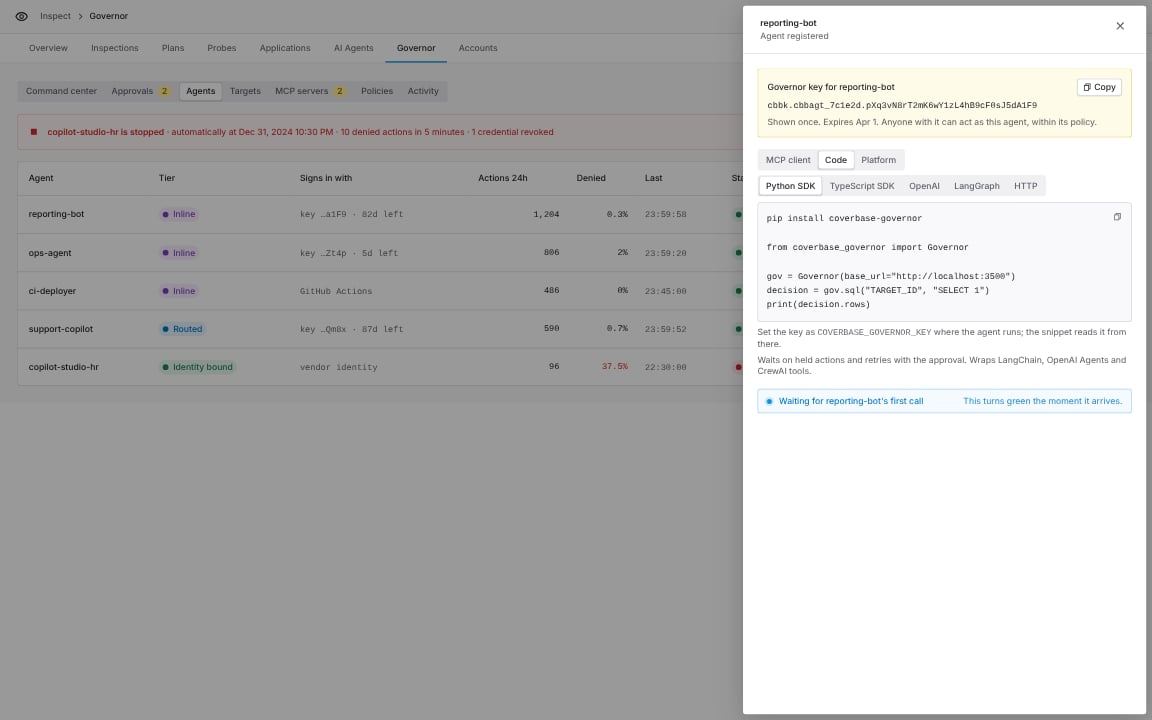
Connect an agent, Code group, Python SDK: the install command and a first query for this agent.
Install
httpx. Install an extra for each framework you use:
Configure
Set the key where the agent runs. The SDK reads it from the environment, so it never lands in your source.COVERBASE_GOVERNOR_URL defaults to https://api.coverbase.app. A key created before the governor was renamed also works as COVERBASE_BROKER_KEY.
You can also pass everything to the client:
Your first governed query
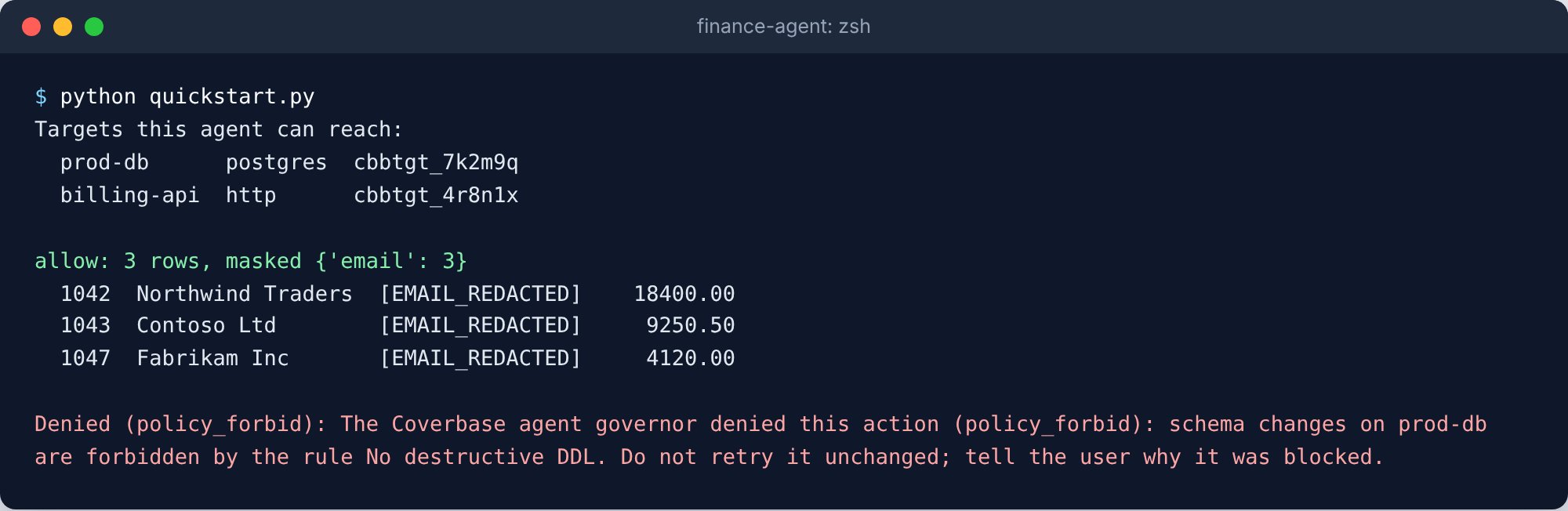
The agent lists its targets, reads invoices with emails masked, and is refused a DROP.
The script behind this screenshot
The script behind this screenshot
cbbtgt_...). The SDK looks names up once through whoami and caches them. An exact name wins; a name that differs only in letter case resolves only when one target matches.
sql, http, aws and code cover the four request kinds:
Decision with verdict, note, risk_score, intents, result, masked and audit_seq. decision.rows holds SQL rows as dictionaries.
Held actions
A policy can hold an action until a person approves it in Inspect › Governor › Approvals. The SDK handles the wait:- It calls
on_holdwith the held decision, so you can tell your user. - It checks the approval until a person decides.
- When the person approves, it sends the identical request again with the approval and returns the result.

The update is held, the agent waits, and it runs once a person approves.
The script behind this screenshot
The script behind this screenshot
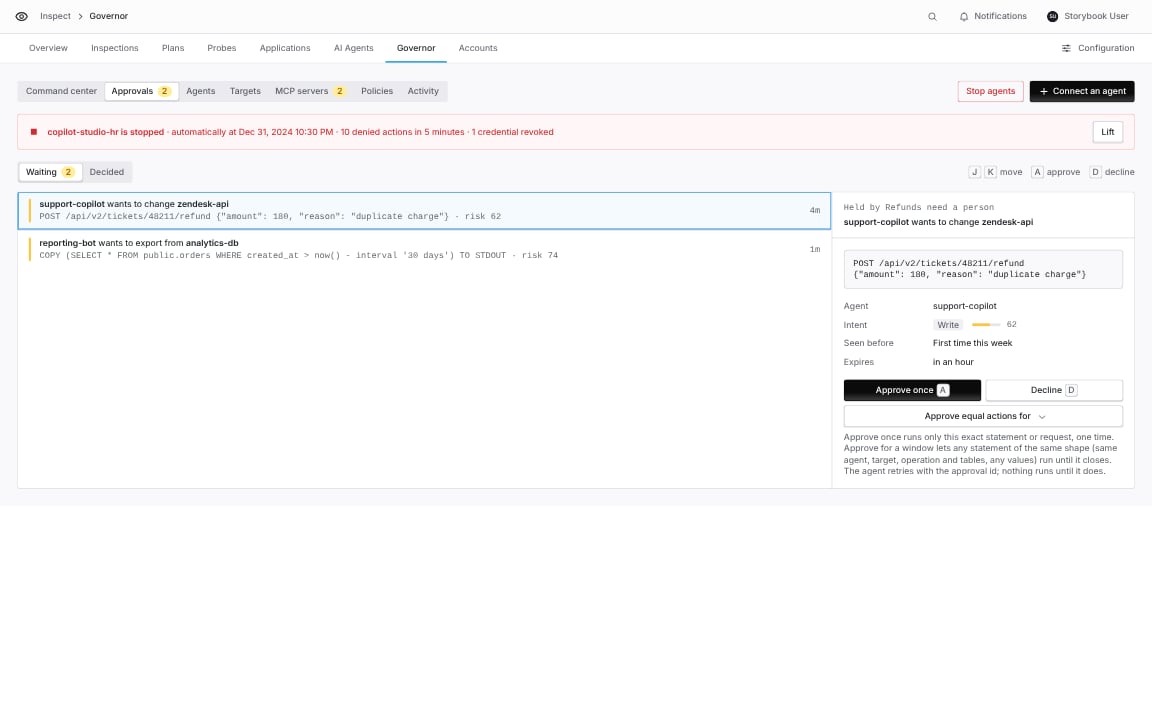
Inspect › Governor › Approvals: the person sees the exact statement. Approve once runs only that statement.
wait=False. The SDK raises ApprovalPending with the approval id. Pass the id back later to resume:
Errors
Every error’s message is written so a model can pass it to its user.Govern your agent’s tools
Every target as a tool
governor_tools builds one tool for each target the agent can reach, with the same names and arguments as the governor’s MCP tools, plus governor_identity_token. A governed tool never raises for a policy outcome. It returns the status (allowed, held, denied or failed) and a message, so the model sees why and can tell the user.
- LangGraph
- OpenAI Agents SDK
- CrewAI
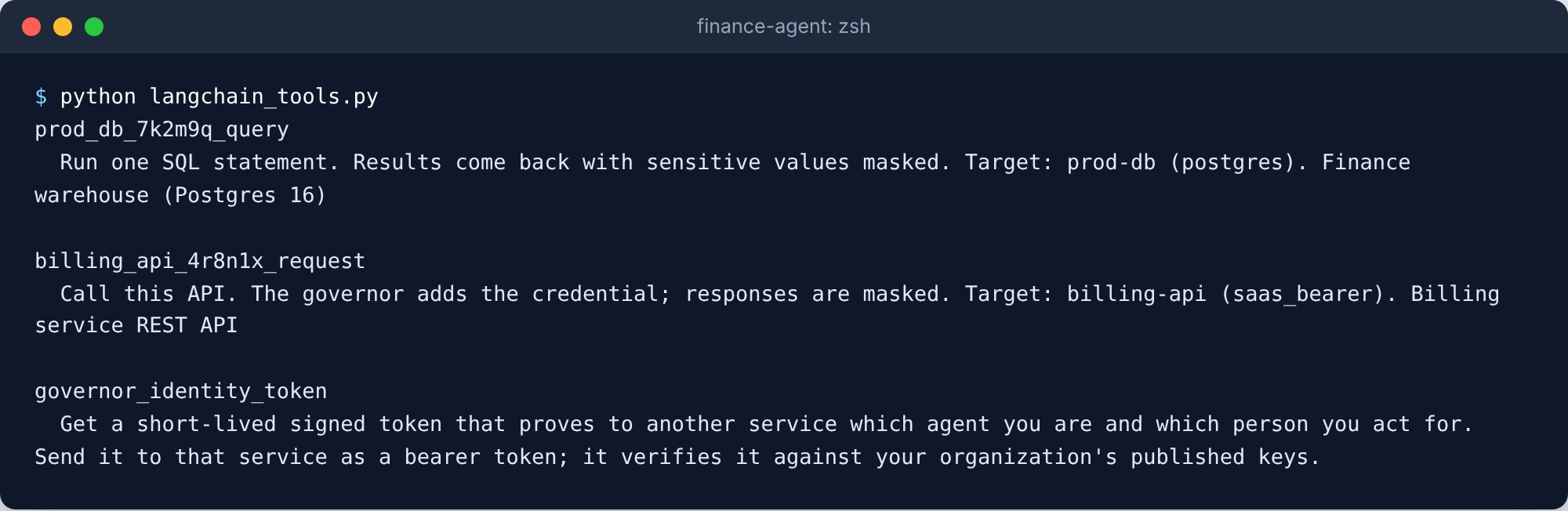
governor_tools: one tool per target this agent can reach, plus the identity token tool.
The script behind this screenshot
The script behind this screenshot

The same tools for the OpenAI Agents SDK.
The script behind this screenshot
The script behind this screenshot
Wrap a tool you already have
governed_tool wraps a function that builds an action. It keeps the function’s name, docstring and signature, so each framework reads the tool’s schema from it.
to_openai_agents and to_crewai do the same for the other frameworks.
By default a held tool waits for the person. With on_hold="return", it returns {"status": "waiting_for_approval", "approval_id": ...} at once, and the model can tell the user. When the model calls the tool again with the same arguments, the SDK sends the request it built the first time, with the approval, so the approved call runs.
Drop-in clients
To route existing code through the governor, change the line that opens the connection.Postgres

The Postgres drop-in: a DB-API cursor whose statements go through the governor.
The script behind this screenshot
The script behind this screenshot
rollback() is not supported. Use dialect="mysql" for a MySQL target.
HTTP with httpx or requests

The httpx transport: the refund is held, approved, and the response comes back as a normal httpx response.
The script behind this screenshot
The script behind this screenshot
Authorization and Cookie headers are dropped. AsyncGovernedTransport does the same for httpx.AsyncClient.
Act on behalf of a person
When a person delegates a task to the agent, pass the delegation. Rules that need a delegation then apply, the agent can reach only the targets that person delegated, and the person is recorded on every decision.Identity tokens for your own services
An agent can get a short-lived signed token that names it, and the person it acts for, for a service that checks your organization’s published keys. See Agents as an identity provider.
An identity token for one audience, valid for five minutes.
The script behind this screenshot
The script behind this screenshot
Sign in with a workload identity
An agent running in GitHub Actions, Kubernetes or another OIDC issuer can sign in with its workload token instead of a key. Set up the agent’s federation rule in Inspect › Governor › Agents, then pass a function that returns a fresh token and the agent’s id:Async
AsyncGovernor has the same methods as coroutines:
Check the results in Coverbase
Every call appears in Inspect › Governor › Activity with its verdict, the rule that matched, the risk and the masked fields. Open a decision to see each step of the decision path.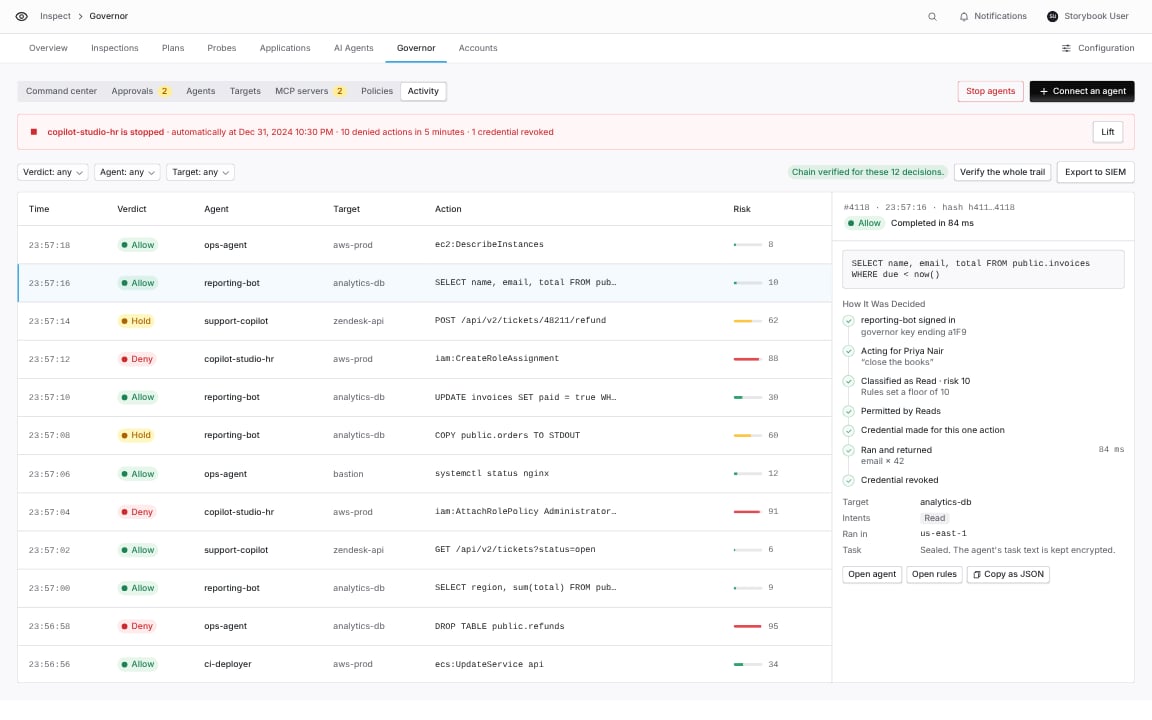
Inspect › Governor › Activity: each decision the SDK caused, with the steps the governor took.