

For AI agents: a documentation index is available at https://docs.coverbase.com/llms.txt. This page is also available in markdown by appending .md to the URL.
This guide is part of the User Guides collection. It covers the Rulebook tab under Marketing. For submitting, reviewing and sweeping, see the Marketing compliance guide. For the rules a partner sees before submitting, see The partner portal, for partners.
Marketing compliance is an optional module. If you do not see Marketing in the left navigation, ask your Coverbase account team to turn it on.
The Rulebook tab
Open Marketing, then Rulebook. Rulebooks are grouped, each with its rule count and the product types it applies to. A library rulebook reads Library · vN; your fork reads Yours · vN. The views All and Enabled switch between every rule and the rules switched on. The search box matches rule names and citations. Each rule row shows Rule, Citation, Checked By (Pattern, AI or Pattern + AI), Severity and On/Off. Click a row to open the rule.What ships
Eight rulebooks. Severity is the rule’s default; a flag carries it.FDIC Part 328 Subpart B
How a non-bank may describe deposit insurance, and the bank it must name when it does. Applies to every product type.Reg DD deposit advertising
What an advertisement for a deposit account must say when it states a rate, a bonus or that the account is free. Applies to deposit programs.Reg Z credit advertising
Trigger terms, required disclosures and approval claims for credit cards, loans and buy-now-pay-later.Reg E prepaid and payments
Fee disclosure timing, account naming and speed claims for prepaid cards and payment products.Visa brand standards
The issuing statement and mark treatment Visa requires of a co-branded card. Applies to debit card, credit card and prepaid programs whose network is Visa.Mastercard brand standards
The issuing statement and card-face requirements Mastercard sets for a co-branded card. Applies to debit card, credit card and prepaid programs whose network is Mastercard.Endorsements, email and SMS
FTC endorsement disclosures, CAN-SPAM and TCPA elements. Applies to every product type.UDAAP general
Unfair, deceptive or abusive claims that any channel can carry. Applies to every product type.Pattern checks and AI checks
Each rule is checked one of three ways, shown under Checked By.
A pattern is one of three kinds:
- A required phrase must appear: one of the listed phrases has to be in the text.
- A forbidden phrase must not appear: none of the listed phrases may be in the text.
- A trigger phrase needs its companion nearby: wherever a trigger phrase appears, a companion phrase has to appear within a set number of words. The rule drawer reads within N words of the companions.
{bank_name}, {partner_name}, {program_name} or {network_name}, and the program’s Approved Language fills them in when the rule runs. That is why the same library rule checks each program for its own issuing statement.
A pattern flag carries High confidence. An AI flag carries the model’s confidence, and Low confidence, quote not located when the quote the model returned is not in the text; the flag is kept so the reviewer sees the claim, and nothing is highlighted.
Forking and versions
Library rulebooks carry no organization and are the same in every workspace. They are read-only: opening a library rule shows Library rules are read-only. Fork the rulebook to edit a copy. To change a rule:- Open the rulebook and click Fork for editing. Coverbase copies every rule into a rulebook of your own, keeps a record of which library rulebook it came from, and opens the copy. The copy reads Yours · v1. If the rulebook was already forked, the button opens your existing copy.
- Assign the fork to your programs with Edit program, under Rulebooks. A program that still lists the library rulebook keeps running the library’s rules.
- Edit rules in the copy. Each rule’s drawer has What the rule checks (the AI instruction), Deterministic check (the pattern, which runs first), Severity, Applies to Products, Channels, Remediation text the partner sees and Sample language the partner can lift as-is. Click Save as vN.
Testing a rule
Open a rule and scroll to Test Against Text. Paste marketing copy, pick under Program whose approved language to use the program whose bank text and approved claims should fill the rule’s placeholders (or No program), and click Run check.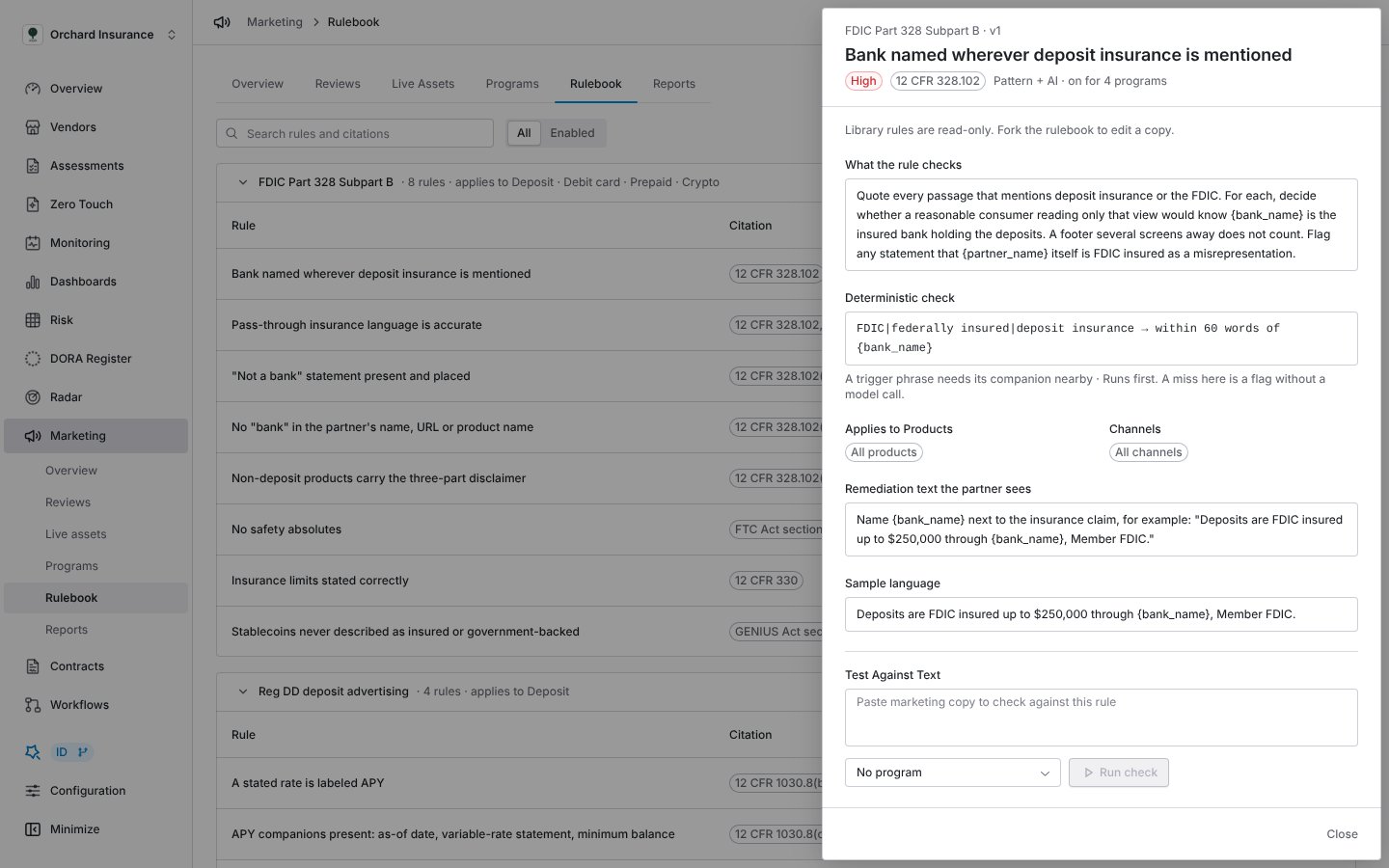
A rule's drawer with the test run: the pattern ran, the AI ran, and one hit quotes the passage.
Troubleshooting
Related
Marketing compliance guide
Programs, reviews, the screenshot view, sweeps, notifications and the exam packet.
The partner portal, for partners
The rules and sample language a partner sees before submitting, and the quick check.
Detector library
Radar’s detector library, which the rulebook library is modeled on.
Permissions and roles
Who can fork and edit a rulebook.