

For AI agents: a documentation index is available at https://docs.coverbase.com/llms.txt. This page is also available in markdown by appending .md to the URL.
This guide is part of the User Guides collection. It covers signatures that people in your organization put on TPRM records. It sits beside The engagement record, whose Risk Summary decision is the usual record signed, and Audit trails, the organization-wide record of changes. To collect signatures from people outside your organization on a contract, see E-signature overview instead.
Before you start
Electronic signatures are off by default, and there is no settings screen for them yet. An admin turns them on withPUT /v1/record_signature/settings, or asks your Coverbase representative. The settings are:
Reading the settings needs organization settings read permission; changing them needs update permission.
Sign a Risk Summary decision
1
Decide
On the engagement’s Risk Summary tab, under Decision, choose Proceed to contracting or Don’t proceed. With signatures on, Sign decision to proceed (or Sign decision not to proceed) opens instead of recording the decision at once.
2
Choose the meaning
The dialog shows the record you are signing and, under Meaning of signature, the meanings it can carry with their statements. For a Risk Summary these are Approval (“I approve this risk summary and the decision to proceed.”) and Responsibility (“I accept responsibility for the residual risk of this engagement.”). Signing as shows your printed name and email address.
3
Confirm your password
Click Continue to sign. If you have not confirmed your identity within the window, Coverbase asks for your password (or the factor your organization requires). The signature and the decision are then recorded together.
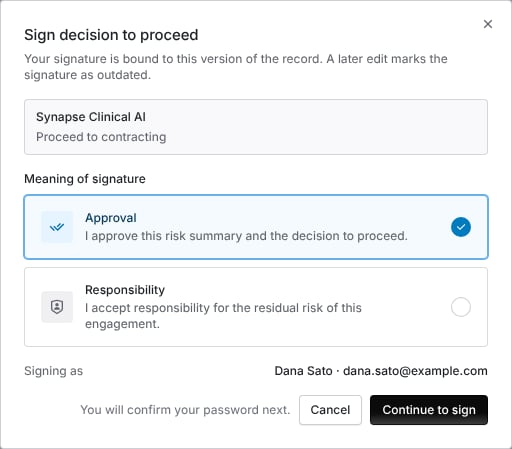
Signing a decision to proceed. The signer picks the meaning, then confirms their password.
Sign an assessment acknowledgement
When a relationship owner acknowledges an assessment’s results on its Summary tab, Sign acknowledgement opens with the meaning Acknowledgement: “I have read this assessment report and acknowledge its findings and residual risk.” It continues the same way. Only a relationship owner who acknowledged the results can sign the acknowledgement, and only a completed assessment’s report can be signed. An assessment report can also be signed with Review, Approval or Authorship by its assignee or a reviewer, and an intake disposition or a finding acceptance decision by the people who decided it. These are signed throughPOST /v1/record_signature.
Read a signature
Under the decision, Electronic signature shows each signature on the record:- the signer’s printed name, the meaning and its statement, and the time;
- Re-authenticated, with the last eight characters of the signature ID;
- the record’s state: Record unchanged, Record changed since signing when a material field of the record changed after signing, or Signature failed verification when the stored signature no longer checks out;
- N earlier signatures when the record was signed more than once.
Troubleshooting
Related
The engagement record
The Risk Summary and its decision.
Audit trails
The hash-chained activity log and who initiated each change.
Front Door triage
Intake dispositions and their two sign-offs.
Records retention and legal hold
How long signed records are kept.