

For AI agents: a documentation index is available at https://docs.coverbase.com/llms.txt. This page is also available in markdown by appending .md to the URL.
This guide is part of the User Guides collection. It covers Configuration → Reference Data. It sits beside Risk methodology, which sets how risk is scored, and Zero Touch assessments, whose country risk check reads your high-risk countries.
Before you start
Viewing reference data needs organization settings read permission. Creating lists and versions needs organization settings update permission. Coverbase reads one list by its key today:high_risk_countries. A Zero Touch assessment’s country risk check treats a country on the version in force on the run date as high risk, and cites the list and version. Any other key is your organization’s own list.
Read a list
Open Configuration and choose Reference Data. The table lists each list’s Name, Key, Current Version (with the date it took effect, or None in force) and Items. Click a list to open it.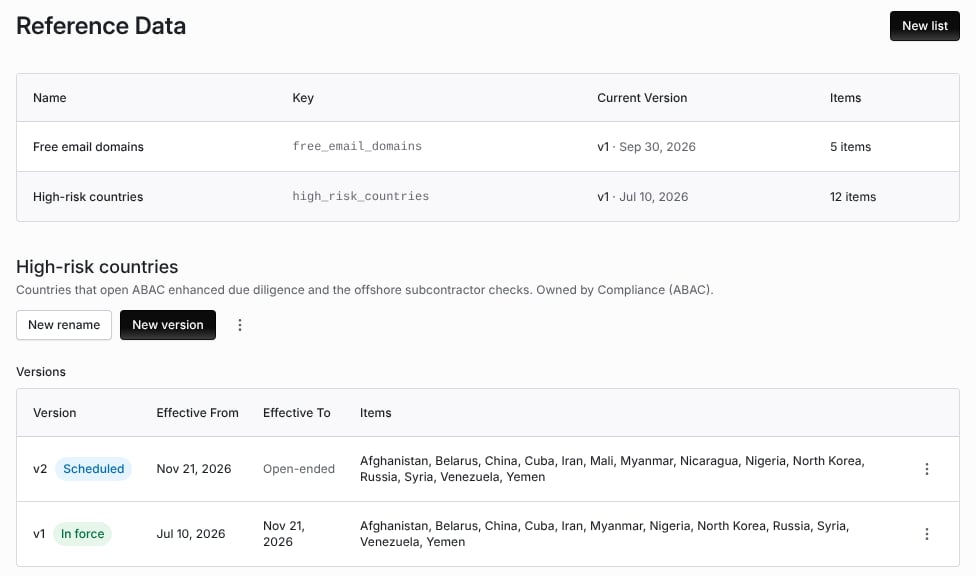
High-risk countries with a version in force and a scheduled version that adds two countries.
Create a list
Click New list. Give the Key (lowercase letters, digits and underscores, for examplehigh_risk_countries), the Name and an optional Description, and click Create.
Publish a new version
1
Start the version
Open the list and click New version. The items start from the version in force today.
2
Set the dates
Set Effective From and, optionally, Effective To. Dates apply as whole UTC days. A version must end after it starts.
3
Edit the items
For high-risk countries, add or remove Countries. Each is stored as its ISO 3166-1 two-letter code. For other lists, each item has a Code and a Label; Add item adds one and every code must be unique. Add Notes on why the version changed.
4
Save
Click Save. A version with a future start date reads Scheduled until that day.
Rename a label
Label Renames lets a record created under an old label display under today’s label. Click New rename and give the Old Label, the New Label and the Effective From date. Archive rename removes one.Archive a list
Archive list, from the list’s menu, stops it applying everywhere it is used. Its versions are kept.Troubleshooting
Related
Zero Touch assessments
The country risk check that reads your high-risk countries.
Risk methodology
Domain weights, roll-up and simulating a rule change.
Promoting configuration from a sandbox
Moving configuration between organizations.
Records retention and legal hold
How long records are kept.