

For AI agents: a documentation index is available at https://docs.coverbase.com/llms.txt. This page is also available in markdown by appending .md to the URL.
This guide is part of the User Guides collection. It covers Configuration → Records Retention. It sits beside Audit trails, whose purge follows the audit log rule set here, and Offboarding and continuity, which starts the clock for offboarded vendor records.
Before you start
Viewing the page needs organization settings read permission. Changing the schedule, placing or releasing a hold, and deciding the queue need organization settings update permission.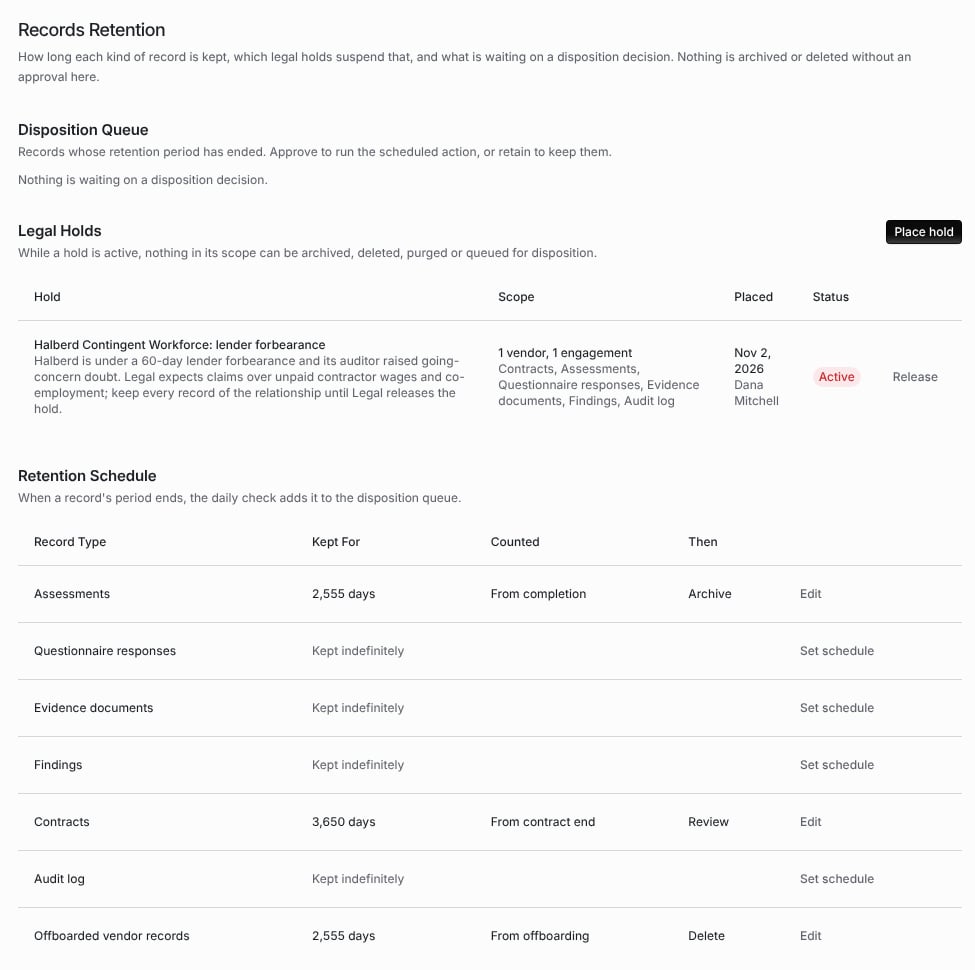
Configuration → Records Retention, with an active legal hold and a schedule for four record types.
Step 1: Set the retention schedule
Retention Schedule lists each Record Type: Assessments, Questionnaire responses, Evidence documents, Findings, Contracts, Audit log and Offboarded vendor records. A type with no rule reads Kept indefinitely. To set a rule, click Set schedule (or Edit) on the row and fill in:
Click Save. Keep indefinitely removes the rule.
Records past their period are queued for a decision, not removed. An approved Archive or Delete archives the record: it leaves every list, and Coverbase support can still restore it.
The Audit log rule works differently. Audit log entries are not queued. A rule for them keeps entries for at least that many days, longer than Coverbase’s own purge would. See Audit trails.
Step 2: Place a legal hold
While a hold is active, nothing in its scope can be archived, deleted, purged or queued for disposition.1
Open the dialog
Under Legal Holds, click Place hold.
2
Name it and say why
Enter the Name and the Reason.
3
Choose the scope
Add Vendors to hold every record that belongs to them. Leave vendors empty to hold the whole organization. Under Record Types, tick the types to hold, or leave all unchecked to hold every type.
4
Place it
Click Place hold. The hold shows Active with its scope, when it was placed and by whom.
- Deleting or archiving an assessment, contract, finding or vendor document it covers is refused with This record is on legal hold and cannot be archived or deleted.
- The daily check does not queue a record it covers.
- An item already in the queue is not changed when someone approves it. It is counted as on legal hold instead.
- An organization-wide hold on the Audit log stops the audit log purge.
Step 3: Decide the disposition queue
Once a day, Coverbase adds every record whose retention period has ended to the Disposition Queue, with the Record and the date it was Due. The heading says how many records are due. Select records and choose:- Approve N records runs each record’s scheduled action. A record a hold now covers is not changed, and the page says how many were on legal hold.
- Retain keeps the selected records, and records the decision.
Troubleshooting
Related
Audit trails
The audit log, its hash chain and its retention.
Offboarding and continuity
Offboarding, which starts the clock for offboarded vendor records.
Electronic signatures on records
Signed decisions on TPRM records.
Permissions and roles
The organization settings permissions this page needs.